
Key Takeaways
- Upwork clone scripts enable fast marketplace launches without building complex systems from scratch.
- Core workflows include job posting, bidding, contracts, and secure payments.
- Modern scripts use smart matching and automation to improve connections.
- Customization allows niche marketplaces for specific industries or regions.
- Speed to market is a major advantage, with launches in days instead of months.
- An Upwork clone is a scalable foundation for building a freelance ecosystem.
Stats That Matter
- Real-time job matching systems improve engagement and activity.
- Advanced proposal systems support attachments, templates, and Q&A.
- Contracts support hourly and fixed-price models with escrow and milestones.
- Collaboration tools like chat, video, and shared workspaces boost retention.
- Modern features include job alerts, time tracking, multilingual support, and mobile apps.
- Ready-made solutions can launch in as little as 6 days, enabling faster go-to-market.
Real Insights
- Success depends on fast and relevant matching, not just listings.
- Built-in collaboration tools increase retention and reduce external dependencies.
- Trust features like escrow and reviews are essential for credibility.
- Niche marketplaces can outperform global platforms in targeted segments.
- Faster launch improves competitive advantage in crowded markets.
- The best platforms combine automation, trust, and monetization into a scalable system.
There was a time when “working from home” meant checking emails in pajamas. In 2026, it means collaborating with teams across five time zones, managing contracts through digital platforms, and delivering high-end services without ever meeting a client in person. Remote work is no longer a perk—it’s a lifestyle. And Upwork Clone Script are fueling this decentralized workforce revolution
But as remote work becomes more specialized, global platforms can’t serve every niche. That’s where the opportunity lies. Launching your own freelance platform like Upwork lets you tap into untapped markets, offer personalized features, and even position yourself as the go-to remote work marketplace in your region or industry. And you don’t need a million-dollar team to do it—modern Upwork clone script come fully loaded and ready to roll
Smart founders are already cashing in. Whether you’re aiming to launch a remote-only gig network for software developers in Eastern Europe or a premium consultant platform for U.S. law firms, there’s a clone script that’ll fit like a glove
What Is an Upwork Clone Script?
An Upwork clone script is ready-made software that helps you launch a freelance marketplace similar to Upwork. It connects clients who need skilled professionals with freelancers who can deliver services across categories such as software development, design, writing, marketing, consulting, finance, legal support, and virtual assistance.
For example, a client may need a mobile app developer, UI/UX designer, content writer, SEO expert, video editor, or business consultant. Instead of searching manually across different platforms, the client can post a project, define the budget, receive proposals, compare freelancer profiles, start a contract, manage milestones, pay securely, and leave a review after completion.
For freelancers, the platform provides a space to create a professional profile, showcase skills, upload portfolios, set hourly or fixed-price rates, submit proposals, communicate with clients, manage projects, track work, and receive payments.
For the business owner, the script includes an admin dashboard to manage clients, freelancers, job listings, proposals, contracts, payments, commissions, reviews, disputes, and overall marketplace performance.
In simple terms, an Upwork clone script gives founders a ready-made foundation to launch a freelance marketplace faster instead of building client apps, freelancer apps, proposal systems, contract workflows, payment infrastructure, and admin controls from zero.
Miracuves helps founders launch a white-label Upwork Clone App with source code, PHP/Laravel backend, Flutter apps, admin control, and faster deployment for freelance marketplace businesses.
Why Launch an Upwork Clone in 2026?
The freelance economy is continuing to expand as businesses increasingly rely on remote professionals, specialized contractors, and project-based talent. Companies are no longer limited to hiring within their local geography. Instead, they can access skilled professionals from around the world through digital freelance marketplaces.
This shift has created significant opportunities for entrepreneurs looking to build niche hiring platforms, regional talent networks, and industry-specific freelance communities.
An Upwork clone script provides a practical way to enter this market without spending months or years developing marketplace infrastructure from scratch. Instead of building job posting systems, bidding workflows, contracts, messaging tools, payment handling, reviews, and admin controls from the ground up, founders can start with a proven marketplace foundation and focus on growth.
Several market trends make 2026 an attractive time to launch a freelance platform:
Growth of Remote and Hybrid Work
Remote work is no longer a temporary trend. Businesses across industries now hire freelancers, consultants, agencies, and remote specialists for projects ranging from software development and design to marketing, legal services, accounting, and customer support.
This growing demand creates opportunities for new marketplaces that connect businesses with specialized talent.
Rise of Niche Freelance Communities
Many businesses prefer industry-specific marketplaces over large general platforms. A focused marketplace often delivers better matching, higher-quality leads, and stronger community engagement.
Examples include:
- Healthcare professionals
- Legal consultants
- Software developers
- Financial experts
- Content creators
- Marketing specialists
- Engineering consultants
Instead of competing directly with large global platforms, founders can dominate smaller but highly valuable market segments.
Global Talent Access
Cross-border hiring has become easier than ever. Companies increasingly work with freelancers across different countries and time zones, creating demand for platforms that support international payments, remote collaboration, and global talent discovery.
This trend allows freelance marketplaces to scale beyond local markets and serve a worldwide audience.
AI-Powered Hiring and Matching
Modern freelance marketplaces are moving beyond simple job boards. Smart matching systems, automated recommendations, profile scoring, and AI-assisted search help clients find qualified freelancers faster while improving project success rates.
Founders launching in 2026 have access to technologies that can significantly improve marketplace efficiency and user experience.
Faster Validation with Clone Solutions
One of the biggest advantages of an Upwork clone is speed. Instead of spending months building standard marketplace features, founders can launch faster, acquire users sooner, collect feedback, and validate their business model before making larger investments.
Early validation helps reduce risk while creating opportunities to refine the platform based on real user behavior rather than assumptions.
The Opportunity for Founders
The goal is not necessarily to build the next Upwork. Many of the most successful marketplaces focus on a specific niche, region, profession, or hiring model.
By combining a proven freelance marketplace framework with a focused market strategy, founders can create platforms that solve specialized hiring challenges while building sustainable revenue streams through commissions, subscriptions, premium listings, and marketplace services.
For entrepreneurs looking to enter the growing freelance economy, 2026 presents a strong opportunity to launch, validate, and scale a marketplace using an Upwork clone script as the foundation.
What Should You Look for in an Upwork Clone?
1. Real-Time Job Matching
Upwork’s biggest strength is dynamic job-to-talent matching. Your clone script should support smart recommendations, live job feeds, and skill-tag-based notifications. The faster freelancers see relevant gigs, the more active your ecosystem becomes
2. Robust Proposal System
A powerful Upwork clone doesn’t just let freelancers bid—it lets them stand out. Features like customized cover letters, file attachments, Q&A during bidding, and proposal templates help both freelancers and clients make better choices. This isn’t Craigslist—you need polish
3. Contract & Payment Handling
Your script must support hourly contracts with time tracking, fixed-price gigs with milestones, and escrow payments to build trust. Bonus if you offer in-app invoicing, tax documentation, and payment splits. Freelancers want to get paid fast and transparently
4. Review & Dispute Resolution
Disputes are inevitable, but how you manage them sets your platform apart. Include dual reviews, automated refund triggers for inactive contracts, and a dispute center with admin override powers. Nobody wants to chase payments in DMs
5. Project Management & Collaboration Tools
Many Upwork clones now include Kanban-style task boards, shared folders, chat with read receipts, video calling modules, and file versioning. If clients can manage projects without switching to another tool, your retention soars
6: Freelancer Onboarding & Profile Verification
The success of a freelance marketplace depends heavily on the quality of talent inside the platform. That is why strong onboarding and verification systems are becoming standard in modern Upwork clone scripts.
Why Businesses Choose an Upwork Clone Instead of Building From Scratch
Building a freelance marketplace from scratch sounds attractive at first, but the reality is far more complex. Founders must develop user onboarding systems, freelancer profiles, job posting workflows, proposal management, milestone tracking, payment processing, dispute resolution mechanisms, messaging infrastructure, review systems, admin controls, and security frameworks before the platform is ready for launch.
The challenge is not simply building these features. The challenge is connecting them into a reliable ecosystem that works smoothly for clients and freelancers alike.
An Upwork clone script reduces this complexity by providing a pre-built foundation based on a proven marketplace model. Instead of spending months developing core marketplace functionality, businesses can focus on branding, niche positioning, customer acquisition, and platform growth.
For many startups, speed to market becomes a competitive advantage. Launching earlier allows founders to validate demand, attract initial users, collect feedback, and improve the platform based on real-world behavior rather than assumptions.
This is one reason freelance marketplaces targeting specific industries such as software development, design, consulting, legal services, healthcare, or home services increasingly choose clone-based development approaches instead of starting from zero.
How an Upwork Clone Script Works
An Upwork clone script is more than a freelance job board. It is a complete marketplace ecosystem that connects clients looking for skilled professionals with freelancers seeking project opportunities. The platform manages everything from job posting and proposal submission to contracts, payments, communication, and dispute resolution within a centralized system.
A typical Upwork-like marketplace operates through three core participants: clients, freelancers, and administrators. Each group interacts with the platform differently, but together they create a scalable freelance economy.
Client Flow
The client journey usually begins when a business or individual creates an account and posts a project requirement. Clients can define project scope, required skills, budget, deadlines, and hiring preferences.
A strong Upwork clone should allow clients to:
- Post fixed-price or hourly projects
- Review freelancer profiles and portfolios
- Receive and compare proposals
- Conduct interviews through chat or video calls
- Create contracts and milestones
- Track project progress
- Release payments securely
- Leave ratings and reviews
This workflow helps clients hire qualified professionals while maintaining transparency throughout the project lifecycle.
Freelancer Flow
Freelancers are the supply side of the marketplace. After registration, they create professional profiles showcasing skills, experience, certifications, portfolios, hourly rates, and service categories.
A freelancer should be able to:
- Build and customize a professional profile
- Browse available projects
- Submit proposals and cover letters
- Communicate with clients
- Manage contracts and milestones
- Track billable hours
- Receive payments securely
- Build reputation through ratings and reviews
The easier it is for freelancers to find relevant projects and manage their work, the more active and valuable the marketplace becomes.
Admin Flow
The admin dashboard acts as the operational control center of the platform. It allows marketplace owners to monitor activity, manage users, enforce policies, and oversee financial operations.
Key admin capabilities typically include:
- Client and freelancer management
- Profile verification and moderation
- Job and proposal monitoring
- Commission and fee management
- Payment and payout tracking
- Dispute resolution handling
- Analytics and reporting
- Platform configuration and settings
A powerful admin panel is essential because it allows founders to scale operations without relying on developers for day-to-day marketplace management.
How the Marketplace Generates Value
The platform creates value by simplifying hiring and project execution. Clients gain access to a global talent pool, freelancers gain access to new opportunities, and the marketplace owner earns revenue through commissions, subscriptions, featured listings, premium memberships, or transaction fees.
When these workflows operate smoothly together, an Upwork clone becomes more than a freelance platform. It becomes a scalable digital marketplace capable of supporting thousands of projects, users, and transactions simultaneously.
Read More : How to Develop an Upwork App Alternative
2026-Ready Features You Shouldn’t Miss

- Live Job Alerts: Push notifications based on saved searches or matched skills
- Integrated Calendars: For setting interview schedules, call bookings, and deadlines
- Built-in Time Tracker: Ideal for hourly contracts, especially if your audience includes agencies
- Multilingual Support: Remote work is global—your platform should be too
- Mobile Apps: 70%+ of users interact with freelance platforms via smartphone
- Compliance Tools: KYC, NDA templates, contractor agreements, country-based tax rules
- Talent Verification: Optional test modules, portfolio showcases, skill endorsements
Read More : Upwork Features Every Startup Should Know About
Essential Integrations Every Upwork Clone Should Support
Modern freelance marketplaces rarely operate as standalone systems. To deliver a smooth hiring and collaboration experience, an Upwork clone should support integrations that simplify communication, payments, scheduling, and productivity.
Some of the most important integrations include:
- Stripe and PayPal for global payments
- Zoom or Google Meet for interviews and client meetings
- Slack integration for team communication
- Google Calendar for interview scheduling
- Cloud storage integrations for file sharing
- Email automation systems for notifications and onboarding
- Analytics tools for user tracking and growth monitoring
These integrations reduce operational friction and make the platform feel more professional for both freelancers and clients. As remote hiring becomes more competitive, seamless workflows can significantly improve retention and user satisfaction.
Upwork Clone vs Building a Freelance Marketplace From Scratch
One of the first decisions founders face is whether to build a freelance marketplace from scratch or launch using an Upwork clone script.
A custom-built platform offers maximum flexibility but typically requires significant investment in design, development, testing, payment infrastructure, messaging systems, contract management, admin controls, and long-term maintenance. Development timelines can often extend for several months before the platform is ready for real users.
An Upwork clone script takes a different approach. Core marketplace workflows such as job posting, bidding, freelancer profiles, contracts, payments, reviews, and administration are already developed. This allows businesses to focus on customization, branding, user acquisition, and growth rather than rebuilding standard marketplace functionality.
| Factor | Upwork Clone Script | Custom Development |
|---|---|---|
| Launch Timeline | Days to Weeks | Several Months |
| Initial Investment | Lower | Higher |
| Core Features | Pre-Built | Built From Scratch |
| Time to Revenue | Faster | Slower |
| Technical Risk | Lower | Higher |
| Customization | High | Unlimited |
For most startups, the biggest advantage is speed. Launching earlier allows founders to validate demand, attract users, refine their marketplace model, and generate revenue while competitors are still building. Businesses with highly specialized requirements may eventually choose custom development, but many successful freelance marketplaces begin with a clone-based foundation and expand over time.
Global Cost Factors & Pricing Breakdown
PHP/Laravel is often the most practical choice for launching an Upwork clone quickly and affordably. Node.js/Python fits better when real-time workflows and heavier marketplace activity become more important, while Go microservices are better suited for enterprise-scale freelance platforms with higher concurrency and more complex infrastructure needs.
Miracuves Upwork-Like App Solution Cost and Tech Stack
Miracuves Pricing for a Upwork Like Freelance Marketplace developed in PHP/Laravel with Flutter Apps for $2,799 USD (One-Time Price) in just 6 days
Get a fully developed, deployment-ready platform modeled after Upwork. Built on a reliable PHP/Laravel backend with Flutter mobile apps, this complete solution helps you launch and scale a freelance marketplace quickly and efficiently.
- Core Workflows: Job posting, freelancer bidding, talent matching, contract management, messaging, and secure payments.
- Built-in Operations: Commission setup, proposal handling, milestone-based payments, and transaction management.
- Management Hub: Centralized admin panel to manage clients, freelancers, job listings, contracts, earnings, and platform activity.
- Launch-Ready: Fully prepared for your branding, configuration, and immediate go-to-market execution.
Why is it so affordable?
Most modern freelance platforms are built using complex architectures like Node.js or microservices. While powerful, these approaches require large engineering teams, longer timelines, and significantly higher development costs.
We took a smarter and more practical approach:
- You Aren’t Paying for Ground-Up Development: Our freelance marketplace engine is already developed, tested, and ready to deploy. You skip months of development time and avoid the high costs of building from scratch.
- The Power of PHP / Laravel: Built on one of the most trusted and widely used frameworks globally, this solution keeps upfront costs low while ensuring long-term flexibility. With a large developer ecosystem, it becomes easier and more cost-effective to maintain, scale, and customize your platform.
- Built for Practical Growth: You get a strong, market-ready freelance platform with essential features like bidding systems, escrow payments, and talent discovery—without the complexity and expense of enterprise-level builds.
You get a scalable, production-ready platform without paying inflated development costs.
Note: This cost is for the solution, re-branding, deployment, and source code only.
ROI of Launching an Upwork Clone Faster
Many founders focus only on development cost, but speed-to-market often delivers a much larger return on investment. A freelance marketplace that launches six months earlier gains six additional months to acquire users, test monetization models, improve platform workflows, and establish search visibility.
Early launch also allows businesses to collect real user feedback before investing heavily in custom development. Instead of spending months building features based on assumptions, founders can validate demand using real marketplace activity and refine the platform based on actual user behavior.
For many startups, the biggest advantage of an Upwork clone script is not simply saving development costs. It is gaining a head start in customer acquisition, revenue generation, and market positioning while competitors are still building their platforms.
Who Should Consider Building an Upwork Clone?
1. Regional Job Platforms: Launch a remote gig platform for freelancers in your city, state, or country. You can localize pricing, payments, language, and job categories to serve local demand better than global players
2. Industry-Specific Networks: Think of a “Upwork for Healthcare Writers” or “Remote Platform for Fintech Engineers.” Focused communities tend to grow faster because everyone speaks the same language—professionally and culturally
3. Enterprise Portals: Big companies are hiring freelancers too. Offer an Upwork-like tool tailored for corporations to manage their freelance workforce. Think internal marketplaces, approval hierarchies, and centralized billing
4. Creator-Driven Portals: YouTubers, podcasters, course creators—they all need talent. Build an Upwork clone to connect creators with editors, thumbnail designers, and VAs. Niche sells
Common Mistakes Startups Make When Launching an Upwork Clone
Many founders assume building a freelance marketplace is only a technical challenge. In reality, most platforms fail because of marketplace balance, poor positioning, or weak user retention strategies.
One of the biggest mistakes is launching too broad. Competing directly with global freelance giants from day one makes growth difficult and expensive. Niche-focused marketplaces usually gain traction faster because they solve a more specific hiring problem.
Other common mistakes include:
- Allowing low-quality freelancer profiles without moderation
- Ignoring dispute resolution workflows
- Having weak onboarding experiences
- Launching without mobile optimization
- Failing to attract both freelancers and clients simultaneously
- Charging aggressive commissions too early
- Not investing in trust-building features
Another overlooked issue is platform liquidity. Freelancers leave if there are no jobs, while clients leave if they cannot quickly find qualified talent. Early-stage marketplaces must carefully balance both sides of the ecosystem.
The most successful Upwork clone businesses typically begin with a focused niche, a smaller regional audience, or an industry-specific hiring problem before expanding into larger markets.
What Makes 2026 Upwork Clone Script Stand Out?
This year’s best clones are embracing three major shifts:
Decentralized Payment Options: Crypto wallets and stablecoin payouts are now in demand, especially for international freelancers
AI-Powered Search: Script that learn from user behavior to optimize job matching and freelancer discovery
Community-First Features: Public forums, mentorship hubs, feedback circles—gig work can be lonely, and community boosts retention
The best Script in 2026 aren’t just copies—they’re upgrades. They take Upwork’s playbook and remix it for modern, mobile-first, loyalty-driven users who want more than just transactions
SEO and Growth Strategies for Scaling an Upwork Clone
Building a freelance marketplace is only the first step. The bigger challenge is attracting both freelancers and clients consistently over time.
Many successful Upwork-like platforms grow through niche-focused SEO strategies, content marketing, referral programs, and community-driven engagement. Search visibility becomes especially important because job pages, freelancer profiles, and skill-based landing pages can generate long-term organic traffic.
Some effective growth strategies include:
- Creating SEO-friendly freelancer profile pages
- Publishing niche hiring guides and industry blogs
- Launching referral and invite programs
- Building regional or industry-specific landing pages
- Using email campaigns to reactivate inactive users
- Offering verified freelancer badges for trust-building
Freelance marketplaces that invest in organic growth early often reduce their long-term advertising costs while building stronger user loyalty.
As competition increases, platforms that combine strong technology with smart acquisition strategies usually scale much faster than feature-heavy platforms with weak marketing foundations.
Why Niche Freelance Platforms Are Growing Faster Than General Marketplaces
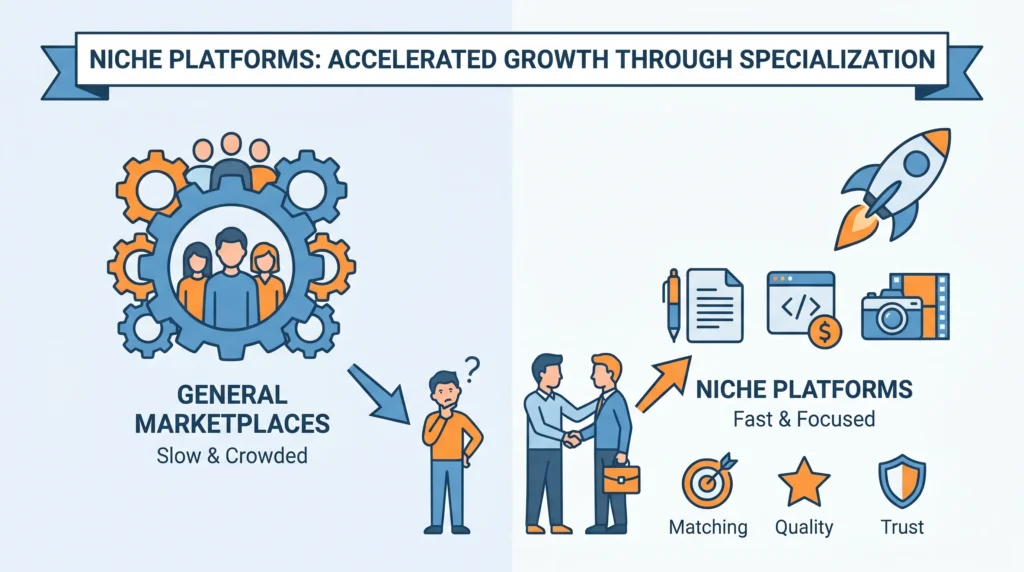
One of the biggest shifts in the freelance economy is the rise of niche marketplaces. Instead of trying to compete directly with massive platforms that serve every industry, many startups are building focused freelance ecosystems for specific professions, regions, or business categories.
This approach is working because specialized platforms solve more targeted problems. Clients often prefer hiring from marketplaces where freelancers already understand their industry, terminology, workflows, and expectations. At the same time, freelancers benefit from better-quality leads and less competition compared to overcrowded global platforms.
For example, a marketplace focused only on healthcare writers, fintech developers, legal consultants, or video editors can create a much more personalized experience than a broad freelance platform trying to serve everyone at once.
Niche freelance platforms also gain advantages in:
- Faster community building
- Better freelancer-to-client matching
- Stronger user retention
- Easier SEO targeting
- Lower customer acquisition costs
- Higher trust within specialized industries
From a business perspective, niche marketplaces are often easier to position and market because the audience is more clearly defined. Instead of spending heavily to compete against global giants, founders can dominate smaller but highly valuable market segments.
This is why many modern Upwork clone businesses are no longer trying to become “the next Upwork.” Instead, they are becoming the best freelance platform for a specific industry, region, or professional community.
Revenue Models Used by Successful Freelance Marketplaces
Before launching a freelance platform, it is important to understand how Upwork-style marketplaces actually generate revenue. The most successful platforms rarely rely on a single monetization method.
Instead, they combine multiple revenue streams that grow alongside platform activity.
Some of the most common monetization models include:
| Revenue Stream | How It Works |
|---|---|
| Commission Fees | Percentage charged on completed freelancer payments |
| Featured Listings | Clients pay to boost job visibility |
| Freelancer Memberships | Premium plans with extra bids or profile visibility |
| Hiring Subscriptions | Businesses pay monthly for advanced hiring tools |
| Escrow Processing Fees | Small fee added during secure payment handling |
| Advertising Placements | Sponsored freelancer or agency visibility |
| Skill Certifications | Paid verification tests or badges |
The right monetization structure depends on your target audience. Enterprise-focused platforms may prioritize subscription revenue, while creator-focused marketplaces often generate more from transaction fees and premium visibility tools.
A balanced revenue model helps maintain platform growth without making the experience feel overly commercial for freelancers or clients.
How Upwork Clone Platforms Handle Secure Payments
Payment trust is one of the biggest factors that determines whether freelancers and clients continue using a marketplace. A strong Upwork clone script should include secure payment infrastructure that protects both parties throughout the project lifecycle.
Most modern freelance platforms support:
- Escrow-based milestone payments
- Automated freelancer payouts
- Multi-currency transactions
- Tax invoice generation
- Refund and dispute handling
- Wallet systems and transaction history
- Split payments for agencies or teams
Escrow systems are especially important because they reduce payment disputes and increase trust between users who may never meet in person. Clients feel safer knowing payments are protected until work is completed, while freelancers gain confidence that approved work will be paid on time.
International freelance platforms should also support multiple payment gateways and regional payout methods to improve global accessibility.
Trust, Verification, and Marketplace Safety Features Every Upwork Clone Must Include
Trust is one of the most important factors in any freelance marketplace. Unlike traditional employment, clients and freelancers often work together without ever meeting in person. This creates challenges around payments, project delivery, identity verification, and dispute management.
A successful Upwork clone script must include systems that help both parties feel secure throughout the hiring process. Without strong trust and safety mechanisms, marketplaces often struggle with low retention, payment disputes, fake profiles, and poor user experiences.
Freelancer Verification
Profile verification helps improve marketplace credibility and reduces the risk of fake accounts. Modern Upwork clone platforms often support:
- Identity verification
- Email and phone verification
- Skill certifications
- Portfolio validation
- Social profile linking
- Agency verification
Verified freelancers typically receive more client trust and higher project acceptance rates.
Secure Escrow and Payment Protection
Payment security is critical for both clients and freelancers. Escrow systems ensure funds are reserved before work begins and only released when agreed milestones are completed.
Important payment protection features include:
- Escrow-based milestone payments
- Automated payout processing
- Multi-currency support
- Payment history tracking
- Refund management
- Invoice generation
These systems help reduce payment-related conflicts while increasing confidence on both sides of the marketplace.
Ratings and Review Systems
Reviews help maintain marketplace quality by providing transparency about previous project experiences.
A strong review system should support:
- Client-to-freelancer reviews
- Freelancer-to-client reviews
- Public ratings
- Project completion feedback
- Performance scoring
This allows users to make informed hiring decisions while rewarding high-quality service providers.
Dispute Resolution Workflows
Even well-managed projects can encounter disagreements regarding scope, quality, deadlines, or payments. A dedicated dispute management system helps resolve issues fairly and efficiently.
Common dispute management features include:
- Evidence submission
- Contract and milestone review
- Admin mediation tools
- Refund workflows
- Escrow intervention controls
Effective dispute handling protects marketplace reputation and improves long-term user trust.
Fraud Prevention and Account Security
Freelance marketplaces often attract fraudulent activities such as fake profiles, spam proposals, payment scams, and account abuse. Strong security controls help reduce these risks.
Essential security features include:
- Two-factor authentication
- Suspicious activity monitoring
- Login alerts
- Device tracking
- Anti-spam systems
- Automated fraud detection
These protections help maintain a safer environment for both clients and freelancers.
Why Trust Features Matter
Many founders focus heavily on job posting, bidding systems, and payment features while overlooking trust infrastructure. In reality, trust is often what determines whether users stay on a platform long term.
Clients are more likely to hire when they feel protected. Freelancers are more likely to accept projects when payments are secure. A marketplace that combines verification, escrow protection, dispute resolution, reviews, and security controls creates a stronger ecosystem where both sides can transact with confidence.
As freelance marketplaces continue growing in 2026, trust and safety features are no longer optional additions. They are foundational systems that directly impact user retention, platform reputation, and long-term business growth.
How to Choose the Right Upwork Clone Script for Your Business
Not every Upwork clone script is built for the same type of business. Some are designed for quick startup launches, while others focus on enterprise scalability, advanced automation, or niche freelance communities. Choosing the right solution depends less on “having the most features” and more on matching the platform to your actual business goals.
If you are launching a regional freelance marketplace or validating a startup idea, a PHP/Laravel-based solution is often the most practical option. It reduces development costs, speeds up deployment, and gives you enough flexibility to customize workflows as your platform grows.
For platforms expecting large-scale real-time activity—such as live collaboration, heavy messaging, or thousands of simultaneous users—Node.js or microservices-based architectures may make more sense long term. These systems are more scalable, but they also require larger budgets and more technical management.
You should also evaluate the script based on your target audience. A marketplace for creative freelancers may prioritize portfolio showcases and messaging tools, while a platform for agencies or enterprise hiring may require approval workflows, team accounts, compliance systems, and advanced reporting.
Before choosing any Upwork clone script, ask:
- Is the source code included?
- Can the platform scale later?
- Are mobile apps part of the package?
- How customizable are the workflows and branding?
- Does it support secure payments and escrow?
- Can it handle both hourly and fixed-price projects?
- Is technical support or deployment assistance included?
The best Upwork clone is not necessarily the most expensive or complex one. It is the one that aligns with your launch goals, audience, growth strategy, and operational budget from day one.
Best Upwork Clone Scripts Compared in 2026
Choosing the best Upwork clone script is not simply about finding a platform that looks similar to Upwork. The real goal is finding software that helps you launch, manage, and scale a successful freelance marketplace with minimal operational friction.
Modern Upwork clone solutions vary significantly in terms of source code ownership, customization flexibility, mobile app support, freelancer management tools, payment infrastructure, and marketplace scalability. Some platforms are designed for startups looking to validate an idea quickly, while others focus on enterprise-level marketplaces that require advanced workflows and higher user volumes.
When evaluating different Upwork clone scripts, founders should focus on several key factors:
- Source code ownership and customization rights
- Freelancer and client management workflows
- Escrow and payment handling capabilities
- Mobile app availability
- White-label branding options
- Marketplace monetization features
- Admin dashboard controls
- Scalability for future growth
- Deployment and technical support
The table below highlights some of the most common options available in the market.
| Provider | Best For | Key Strength | Pricing Visibility | Potential Limitation |
|---|---|---|---|---|
| Miracuves Upwork Clone | Founders seeking rapid launch and ownership | Source code, white-label branding, PHP/Laravel backend, Flutter apps, 6-day deployment | Public pricing available | Scope may vary based on custom requirements |
| YoGigs | Freelance marketplace businesses | Mature bidding workflows and marketplace features | Quote-based | Additional customization may be required |
| Appscrip Freelancer Clone | Marketplace startups and growing platforms | Extensive marketplace modules and integrations | Demo-based | Limited pricing transparency |
| Appkodes Freelancer Clone | Businesses needing flexibility | Customizable marketplace architecture | Quote-based | Timeline depends on customization scope |
| Custom Development Agencies | Enterprise-grade marketplaces | Fully tailored workflows and infrastructure | Project pricing | Highest cost and longest development timeline |
While every solution offers a different feature mix, founders should avoid comparing clone scripts purely based on feature count. Most modern platforms already provide freelancer profiles, job posting systems, proposal management, messaging, reviews, and payment handling.
The real difference comes from how efficiently these features work together. A strong Upwork clone script should help freelancers discover opportunities quickly, allow clients to hire with confidence, automate marketplace operations, and provide administrators with complete visibility into platform activity.
For startups entering the freelance economy, launch speed often becomes a competitive advantage. A ready-made Upwork clone allows businesses to focus on user acquisition, niche positioning, and revenue generation rather than spending months rebuilding standard marketplace functionality from scratch.
The best Upwork clone script is ultimately the one that aligns with your business goals, budget, growth plans, and target audience rather than the one with the longest list of features.
Why Miracuves Is a Strong Upwork Clone Choice
Choosing the right Upwork clone script is not only about features. It is about finding a solution that helps you launch faster, control your platform, and scale without rebuilding core marketplace infrastructure later.
Many freelance marketplace projects fail because founders spend too much time and budget developing standard functionality that already exists. Job posting, proposal management, contracts, payments, messaging, reviews, and admin controls are essential features, but building them from scratch can significantly delay market entry.
Miracuves helps founders avoid this challenge by providing a ready-made Upwork-style marketplace foundation that can be customized for different industries, regions, and business models.
Key advantages include:
- Full source code ownership
- White-label branding and customization
- PHP/Laravel backend architecture
- Flutter-based mobile applications
- Freelancer and client management workflows
- Proposal and bidding systems
- Escrow and payment management
- Admin dashboard and reporting tools
- Multi-role marketplace operations
- Deployment and launch assistance
Unlike many marketplace solutions that focus only on front-end design, Miracuves provides operational workflows required to manage a real freelance platform. This includes project management, proposal handling, user administration, commission management, contract workflows, reviews, and marketplace analytics.
Another advantage is launch speed. Instead of spending months building marketplace infrastructure, founders can focus on acquiring freelancers, attracting clients, refining their niche, and validating demand.
The platform is also suitable for different marketplace models, including:
- General freelance marketplaces
- Industry-specific talent networks
- Regional hiring platforms
- Agency marketplaces
- Creator service platforms
- Consulting and professional services networks
For founders, this flexibility reduces risk because the platform can evolve as business requirements change over time.
The goal is not simply to replicate Upwork. The goal is to use a proven marketplace framework, customize it around your target audience, and launch a scalable freelance ecosystem with significantly less development effort.
For businesses seeking source-code ownership, white-label control, faster deployment, and marketplace-ready workflows, Miracuves provides a practical starting point for building and growing an Upwork-style freelance platform.
Read More : Upwork App Marketing Strategy: Winning the Freelance Marketplace Race
Final Thoughts
Remote work has created a once-in-a-generation opportunity for digital entrepreneurs. If you’re thinking about launching a platform that connects talent with opportunity, there’s no better time—or tool—than a top-tier Upwork clone script. And no, you don’t have to reinvent the wheel. Just customize it to roll in your direction
At Miracuves, we help innovators launch high-performance app clones that are fast, scalable, and monetization-ready. Ready to turn your idea into reality? Let’s build together
FAQs
What’s the main difference between a Fiverr and Upwork clone?
Fiverr is task-based with fixed packages; Upwork is contract-based with proposals and long-term gigs. Upwork clones focus more on job applications, interviews, and hourly work
Do Upwork clone Script support time tracking?
Yes, many modern Script come with built-in time trackers, screenshots, activity logs, and productivity reports. It’s essential for hourly contracts
Can I build an Upwork clone without coding skills?
Definitely. Many Script are no-code or low-code, and you can customize branding, categories, and fees without writing a single line of code
What features should a modern Upwork clone include?
A strong Upwork clone should include freelancer profiles, proposal management, escrow payments, messaging, milestone tracking, reviews, dispute resolution, admin controls, and mobile applications
Is an Upwork clone better than building a freelance marketplace from scratch?
For most startups, an Upwork clone provides a faster and more cost-effective route to market because core marketplace workflows are already developed and tested.
What should I look for before choosing an Upwork clone script?
Key factors include source code ownership, customization flexibility, mobile app availability, payment infrastructure, scalability, admin controls, deployment support, and long-term maintenance options.
Can an Upwork clone support both hourly and fixed-price projects?
Yes. Modern Upwork clone scripts typically support hourly contracts with time tracking as well as fixed-price projects with milestone-based payments.
How do Upwork clone platforms handle secure payments?
Most platforms use escrow-based payment systems, milestone releases, payout management, transaction tracking, and dispute resolution workflows to protect both clients and freelancers.
Related Articles
Miracuves is an independent software development company. We are not affiliated with, connected to, sponsored by, or endorsed by any company or product named in this article.
Terms such as “X Clone” are used descriptively. It is how the software industry refers to building a platform with functionality comparable to a known service, and how clients search for it.
The entire design and codebase of our products is built by our own team. Our products contain no code, design, graphics, or content originating from any third-party website or applications.
All third-party names and marks referenced in this article are the property of their respective owners, referenced solely to identify the services discussed.