
Key Takeaways
- An online ticketing ecosystem connects event discovery, venue information, seat availability, booking, payments, digital tickets, entry validation, refunds, and organizer operations in one coordinated flow.
- Customers move from browsing events to selecting seats, completing payment, receiving a ticket, and validating access, while inventory and transaction status remain synchronized.
- The ecosystem depends on accurate seat inventory, temporary seat holds, payment confirmation, ticket issuance, QR or barcode validation, notifications, and real-time event updates.
Booking & Payment Flow Signals
- Event discovery can combine search, categories, location, dates, venues, pricing, recommendations, filters, and organizer information to help users find relevant experiences.
- Seat booking should coordinate live inventory, seat maps, temporary reservations, pricing tiers, booking limits, promo codes, taxes, convenience fees, and timeout rules to prevent double booking.
- Payment services should manage authorization, success and failure states, retries, refunds, transaction references, booking confirmation, and digital ticket generation after successful payment.
Entry & Operations Insights
- Entry systems can use QR codes, barcodes, scanner apps, ticket-status checks, duplicate-scan prevention, access rules, and real-time validation to confirm legitimate admission.
- Organizers should monitor bookings, seat occupancy, payment failures, refunds, cancellations, scan activity, no-shows, revenue, customer support issues, and event-level performance.
- Miracuves develops customizable ticketing platforms with event discovery, seat booking, payment integration, digital tickets, QR validation, organizer dashboards, analytics, notifications, and admin controls.
An online ticketing ecosystem is not just a digital page where users buy tickets. It is a connected operating system where event discovery, seat selection, payment confirmation, ticket generation, venue entry, refunds, and organizer reporting all work together.
For users, the experience looks simple. They search for an event, choose a date, select seats or passes, pay online, and receive a digital ticket. For the business owner, however, every step depends on strong backend coordination. The platform must know which events are live, which seats are available, which payments are successful, which tickets are valid, and which organizers need settlement.
This is why founders planning an entertainment booking, cinema ticketing, live event, sports, theatre, or activity booking platform need to understand the ecosystem behind the interface. A clean app design can attract users, but the real product value comes from accurate inventory, secure checkout, controlled admin workflows, and reliable entry validation.
What Is an Online Ticketing Ecosystem?
An online ticketing ecosystem is the complete digital infrastructure that allows users to discover events, reserve inventory, make payments, receive tickets, and enter venues using verified booking records.
It usually connects five core participants:
| Participant | What They Need | Why It Matters |
|---|---|---|
| Users | Event discovery, seat selection, payments, tickets, refunds | Creates a smooth booking experience |
| Event organizers | Event setup, ticket rules, sales tracking, payout visibility | Helps manage supply and revenue |
| Venue teams | Seat maps, showtimes, check-in tools, scan validation | Keeps entry and capacity under control |
| Platform admins | User control, listings, commissions, refunds, reports | Enables business operations |
| Payment partners | Secure transaction processing and confirmation | Connects money movement to booking status |
A strong ticketing platform does not treat these workflows separately. It connects them so that every ticket has a clear status from search to entry.
Why This Topic Matters for Founders
Many founders first think about ticketing as a user-facing app. They imagine screens for events, banners, seats, offers, payments, and tickets. That is important, but it is only the visible layer.
The real challenge is operational. The platform must prevent double booking, manage high-demand events, release unpaid seats, validate QR codes, process refunds, calculate organizer payouts, and give admins control when something goes wrong.
For example, if two users try to book the same seat during a popular concert sale, the system needs a clear rule. It cannot simply show the same seat as available to everyone. The seat must be temporarily locked for one user, released if payment fails, and marked as booked only after successful confirmation.
That small workflow decides whether the platform feels reliable or broken.
How Event Discovery Works in a Ticketing Platform
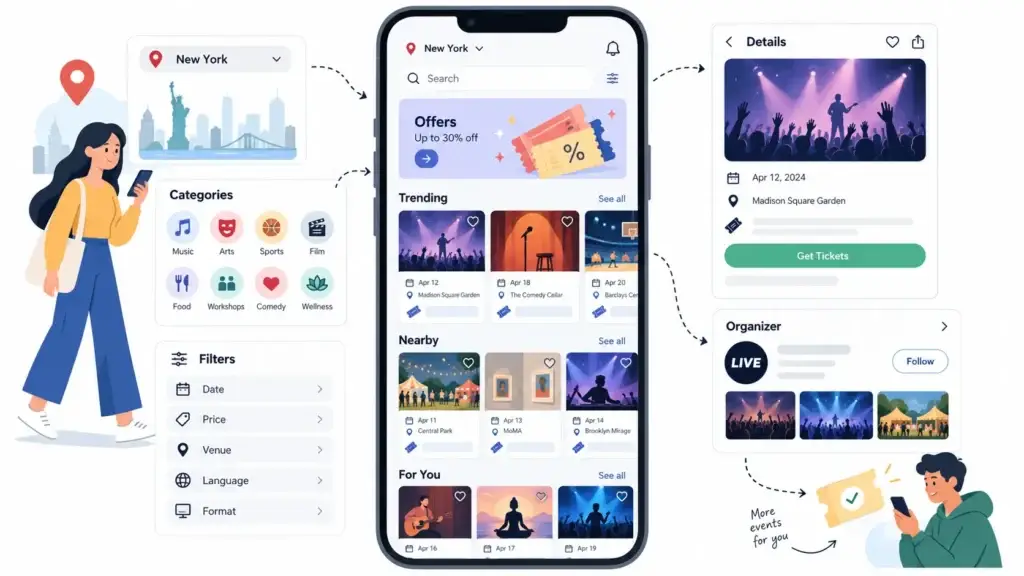
Event discovery is the first layer of the ticketing ecosystem. It helps users find what they want to attend based on location, category, date, price, popularity, language, venue, rating, or interest.
A well-designed discovery layer usually includes:
- City or location selection
- Event categories
- Search bar
- Filters for date, price, venue, language, and format
- Trending events
- Personalized recommendations
- Event detail pages
- Organizer profiles
- Offers and promotional banners
For founders, discovery is not only a browsing feature. It affects conversion. If users cannot quickly find relevant events, they leave before reaching the booking flow.
A strong event discovery system should answer three questions quickly: what is happening, where it is happening, and why the user should book now.
How Event Pages Turn Discovery Into Booking Intent
Once a user clicks an event, the event detail page must convert interest into action. This page usually includes event images, title, description, date, time, venue, ticket price, seating type, age limits, cancellation rules, organizer information, and available showtimes.
For movies or seated events, the page may show multiple time slots and venues. For concerts or festivals, it may show pass categories such as general entry, VIP, early bird, backstage access, or group passes.
This is where the platform begins moving from content discovery into transaction logic. The event page must connect with inventory records so users only see bookable dates, valid ticket categories, and active prices.
If the event page is disconnected from backend inventory, users may see outdated pricing, unavailable seats, or cancelled shows. That creates support pressure and damages trust.
How Seat Booking and Ticket Inventory Work Together
Seat booking is one of the most sensitive parts of an online ticketing ecosystem. It connects front-end seat maps with backend inventory states.
A simple event listing can show total ticket availability. But seated venues need deeper control. Each seat must have a current state, such as available, temporarily held, booked, blocked, or unavailable.
| Seat State | Meaning | Business Impact |
|---|---|---|
| Available | User can select the seat | Keeps inventory open for sale |
| Temporarily held | Seat is locked during checkout | Prevents double booking |
| Booked | Payment confirmed and ticket issued | Final confirmed sale |
| Blocked | Admin or venue has manually restricted it | Useful for reserved, damaged, or special-use seats |
| Unavailable | Seat cannot be sold for that show | Prevents invalid booking |
For founders planning deeper control over available, held, booked, blocked, and released seats, understanding seat inventory management for event platforms is important before scaling into high-demand events, multiple venues, or time-sensitive ticket sales.
This workflow matters because ticketing demand often arrives in short bursts. A normal ecommerce cart can tolerate slower purchase decisions, but event seats are limited and time-sensitive. Once an event date passes, unsold inventory cannot be recovered.
Why Temporary Seat Holds Are Important
Temporary holds protect the booking journey. When a user selects seats and moves to checkout, the platform should lock those seats for a short period. This prevents another user from buying the same seats while payment is being attempted.
A proper hold system needs:
- Hold ownership linked to a user or session
- Hold expiry timer
- Automatic release after timeout
- Payment status check before final booking
- Admin visibility into stuck holds
- Audit logs for unusual inventory changes
Without temporary holds, the platform risks duplicate bookings. Without expiry, abandoned carts can silently block inventory and reduce revenue.
For founders, this is not just a technical detail. It affects customer support, venue confidence, and organizer trust.
How Online Payments Connect to Ticket Confirmation
Payments are not separate from booking. They are part of the booking state machine.
A user should not receive a confirmed ticket only because they clicked the pay button. The platform should wait for verified payment confirmation. Once the payment gateway confirms the transaction, the booking record can move from pending to confirmed.
A practical payment workflow looks like this:
- User selects ticket or seat.
- Platform creates a temporary booking record.
- Selected inventory is held.
- User completes checkout.
- Payment gateway sends confirmation.
- Platform verifies the payment response.
- Ticket is generated.
- Inventory status changes to booked.
- User receives confirmation by app, email, SMS, or WhatsApp.
- Organizer and admin dashboards update revenue records.
This flow reduces errors because money movement, inventory, and ticket issuance are connected.
What Happens When Payment Fails?
Payment failure handling is just as important as payment success handling. If a transaction fails, the platform must decide what happens to the selected ticket or seat.
A good ticketing workflow should:
- Keep the booking in pending state while payment is being verified
- Avoid issuing a ticket before confirmation
- Release the held inventory after timeout or failed payment
- Notify the user clearly
- Allow retry where appropriate
- Log the failed attempt for admin review
- Avoid duplicate charges through proper payment tracking
This protects both the user and the platform operator. The user gets clarity, while the business avoids fake bookings, settlement confusion, and manual support work.
How Digital Tickets Are Generated
After successful payment confirmation, the platform generates a digital ticket. This ticket should connect to the event, user, seat or pass category, payment record, booking ID, and entry validation status.
A digital ticket usually includes:
- Booking ID
- Event name
- Venue name
- Date and time
- Seat number or pass type
- User name or customer reference
- QR code or barcode
- Payment status
- Entry status
- Cancellation or refund rules
The ticket is not just a receipt. It is a controlled access record. That means it must stay connected to the backend until the user enters the venue.
Why QR Ticket Validation Matters at Entry
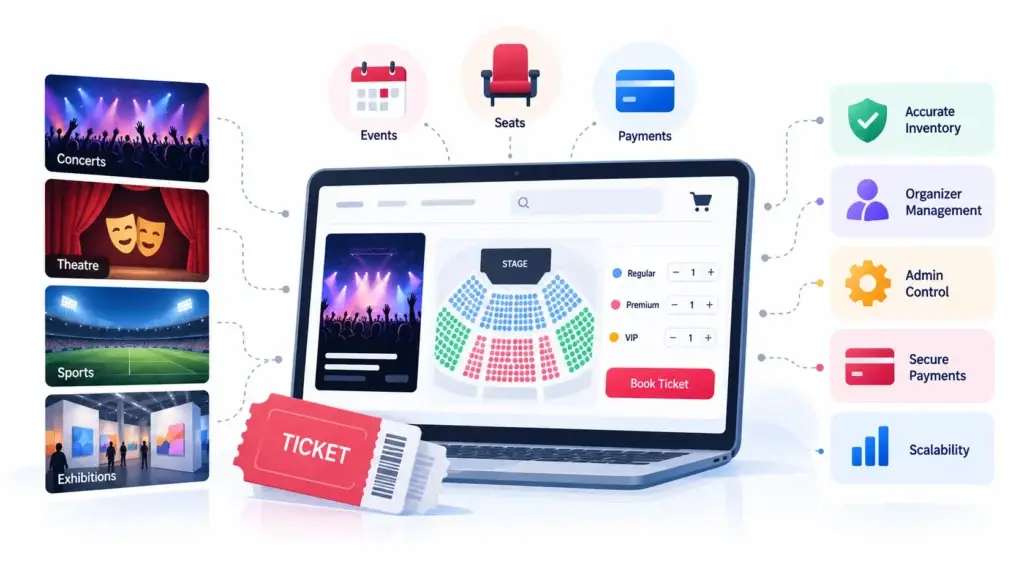
Entry is where the digital booking becomes a real-world transaction. The venue team must confirm whether the person standing at the gate has a valid, paid, unused ticket for the correct event and time.
QR validation helps venue staff scan the ticket and check its status instantly. A good validation system should confirm:
- Is the ticket real?
- Has payment been confirmed?
- Is this the correct event?
- Is this the correct date and showtime?
- Has the ticket already been used?
- Is the ticket cancelled or refunded?
- Is the scanner operated by authorized staff?
Once a ticket is scanned successfully, its status should change to used. If the same QR code is scanned again, the system should show that it has already been used.
This protects venues from duplicate entry, fake screenshots, and manual confusion during peak entry windows.
How Organizer and Venue Dashboards Fit Into the Ecosystem
Users see the booking side, but organizers and venue teams need their own dashboards.
An organizer dashboard may include event creation, ticket categories, pricing, sales reports, attendee lists, revenue summaries, cancellation rules, and promotional tools.
A venue dashboard may include seat maps, hall layouts, showtime scheduling, blocked seats, staff access, gate scanning, and occupancy reporting.
These dashboards matter because the platform is not only selling tickets. It is coordinating different business participants. If organizers cannot update event details or view bookings, the admin team becomes a bottleneck. If venues cannot validate entry, the customer experience suffers at the final step.
What the Admin Panel Controls
The admin panel is the command center of the ticketing business. It gives the platform operator control over listings, users, organizers, payments, commissions, refunds, promotions, reports, and support issues.
A strong admin panel should allow the operator to manage:
- Users and customer accounts
- Event organizers and venue partners
- Event approvals and listing quality
- Categories and cities
- Ticket pricing rules
- Seat maps and availability
- Booking records
- Payment status
- Refund requests
- Commission settings
- Coupons and offers
- QR validation logs
- Staff permissions
- Revenue reports
- Dispute and support workflows
For a closer look at user apps, organizer dashboards, venue workflows, booking controls, payment modules, QR validation, and admin features, review the ticketing platform feature modules page.
For founders, admin control is what turns the platform from a booking app into a manageable business. Without it, every operational change becomes a developer task.
How Refunds and Cancellations Should Work
Refunds and cancellations need clear rules because every event has different policies. Some tickets may be non-refundable. Some may allow cancellation until a certain date. Some may support partial refunds, wallet credits, or organizer approval.
A reliable refund workflow should connect:
- User request
- Event cancellation rules
- Payment record
- Ticket status
- Inventory release rules
- Organizer approval, if required
- Admin review
- Refund confirmation
- Settlement adjustment
If refunds are not connected to payment and inventory records, the platform can create financial errors. A refunded ticket should not remain valid at the entry gate. A cancelled seat may need to return to available inventory depending on timing and event rules.
How Revenue Flows Through an Online Ticketing Platform
A ticketing ecosystem can support several monetization models. The right model depends on the business type, target market, event categories, organizer agreements, and customer expectations.
| Revenue Stream | How It Works | Founder Consideration |
|---|---|---|
| Convenience fee | User pays a service fee during checkout | Easy to understand but must feel fair |
| Organizer commission | Platform takes a percentage from ticket sales | Works well for marketplace-style ticketing |
| Featured listings | Organizers pay for higher visibility | Useful when discovery traffic grows |
| Banner promotions | Sponsored event placements or brand ads | Needs traffic volume and careful placement |
| Subscription tools | Organizers pay for advanced dashboard access | Better for repeat event organizers |
| Add-ons | Food, parking, merchandise, upgrades, insurance | Increases order value |
| Cancellation charges | Platform keeps a small fee on eligible cancellations | Must be clearly explained to users |
Founders who want to compare convenience fees, organizer commissions, featured listings, ads, subscriptions, and add-on revenue in more depth can explore the ticketing platform revenue model before finalising how the business will earn from users, venues, and event organizers.
The platform should not force monetization too early at the cost of trust. Founders should first ensure the booking journey works clearly. Once users and organizers trust the platform, monetization can expand through visibility, tools, and add-ons.
Why Security and Access Control Are Important
Ticketing platforms handle user data, payments, organizer records, venue access, and financial settlements. That makes security a product foundation, not a decorative feature.
Important security layers include encrypted data transfer, secure payment gateway integration, role-based access control, audit logs, admin permissions, QR scan logs, abuse reporting, and fraud monitoring.
For example, not every staff member should access payout reports. A gate scanner may only need ticket validation access. An organizer may only see events they own. The platform admin should control permissions based on role and responsibility.
This reduces operational risk and protects trust across the ecosystem.
The Complete Online Ticketing Flow From Discovery to Entry
Here is how the full journey connects:
| Stage | User Action | Backend Workflow | Business Value |
|---|---|---|---|
| Discovery | User browses events | Platform filters live events by city, date, category, and availability | Helps users find relevant experiences |
| Event detail | User reviews event information | System displays active pricing, schedules, rules, and inventory | Builds booking confidence |
| Seat or ticket selection | User chooses seats or passes | Inventory is checked and temporarily held | Prevents double booking |
| Checkout | User applies offer and pays | Booking remains pending while payment is verified | Reduces false confirmations |
| Confirmation | User receives digital ticket | Ticket is generated after verified payment | Creates a valid access record |
| Entry | Staff scans QR code | Platform checks validity and marks ticket as used | Controls venue access |
| Reporting | Organizer reviews sales | Dashboard updates revenue, attendance, and settlement data | Supports business operations |
A more detailed breakdown of the full ticket booking journey can help founders understand how event discovery, seat holds, checkout, payment confirmation, ticket generation, and check-in should connect inside one platform.
This connected journey is what separates a basic event listing website from a true ticketing platform.
Founder Decision Signals Before Building a Ticketing Platform
Inventory Pressure
If your events have limited seats, high demand, or multiple venues, real-time inventory control should be planned early.
Payment Risk
If payment confirmation is not linked to ticket generation, the platform may issue invalid tickets or create settlement errors.
Entry Control
If venues need QR scanning, offline coordination, or staff access, entry validation must be part of the core product flow.
Admin Dependency
If every event update, refund, or blocked seat requires developer help, the platform will become difficult to operate at scale.
Common Mistakes Founders Should Avoid
Treating Ticketing Like a Simple Listing Website
A listing website can show events. A ticketing platform must manage bookings, payment states, inventory, refunds, and entry. If the product is planned only as a catalogue, the business may struggle once real users start booking.
Confirming Tickets Before Payment Verification
A ticket should be issued only after payment is confirmed. Otherwise, the platform risks fake confirmations, unpaid bookings, and disputes with organizers.
Ignoring Seat Hold Expiry
If selected seats stay locked after abandoned checkout, the platform loses sellable inventory. Every temporary hold should have a clear expiry and release rule.
Giving Venue Staff Too Much Admin Access
Entry staff usually need scan validation, not full admin control. Role-based access helps reduce mistakes and protects sensitive platform data.
Launching Too Many Categories at Once
Movies, concerts, sports, theatre, workshops, and festivals may all look attractive, but each category has different rules. A focused launch often helps founders validate demand faster before expanding into more categories.
How Miracuves Helps Founders Build a Connected Ticketing Ecosystem
Miracuves helps founders build ticketing platforms where discovery, inventory, seat booking, payments, QR ticketing, admin control, organizer dashboards, and venue workflows work together.
Instead of building every booking module from zero, founders can start with a ready-made platform foundation and customize it for their target city, category, brand, pricing model, and partner network. This is especially useful when the business goal is faster market validation with a controlled product base.
For founders evaluating a launch-ready event booking product, Miracuves offers a 6-day solution delivery option with white-label branding, source-code ownership, admin dashboard control, and deployment support. You can explore the related ready-made ticketing platform to understand how Miracuves structures the product side for faster launch.
When Should You Choose a Ready-Made Ticketing Foundation?
A ready-made ticketing foundation makes sense when the business model follows known booking patterns and the founder wants to launch faster. This may include cinema ticketing, concert booking, theatre events, sports passes, workshops, comedy shows, festivals, or local experiences.
It is especially useful when you need:
- Faster launch
- Branded user app and web experience
- Admin dashboard
- Organizer and venue workflows
- Seat inventory management
- Payment gateway integration
- QR ticket validation
- Source-code ownership
- Customization support
Founders who are still comparing build routes can also review the ready-made vs custom ticket booking platform guide to understand when a launch-ready foundation makes sense and when a custom build may be more suitable.
Custom development may still be suitable when the business needs highly unique workflows, unusual venue operations, deep enterprise integrations, or a completely new ticketing model. The right path depends on scope, launch timeline, budget, and operational complexity, so founders should also review the ticket booking platform development cost before deciding between a ready-made foundation and a fully custom build.
If you need implementation guidance, product customisation, deployment support, and technical planning, working with an event ticketing app development partner can help connect business requirements with the right platform architecture.
Final Thoughts: Ticketing Works When Every Step Is Connected
An online ticketing ecosystem succeeds when discovery, seat booking, payment, ticket generation, entry validation, refunds, and reporting work as one connected system.
For users, the platform should feel fast and simple. For organizers, it should provide visibility and control. For venues, it should make entry smooth. For founders, it should create a reliable business foundation that can support monetization, growth, and partner operations.
The strongest ticketing platforms are not only built around attractive event pages. They are built around trust. Seats should be accurate. Payments should be verified. Tickets should be valid. Entry should be controlled. Admins should have visibility. Organizers should know what they earned.
Miracuves helps founders move toward that connected platform model with ready-made, white-label ticketing solutions designed for faster deployment, source-code ownership, and practical business control.
After the platform foundation is ready, growth depends on organizer acquisition, local event partnerships, user retention, promotions, and repeat bookings. Founders planning the next stage can explore ticket booking platform launch strategies to understand how marketing supports platform adoption after launch.
FAQs
What is an online ticketing ecosystem?
An online ticketing ecosystem is a connected platform that manages event discovery, ticket or seat selection, payments, digital ticket generation, venue entry, refunds, organizer dashboards, and admin control.
How does seat booking work in an online ticketing platform?
Seat booking works by showing real-time availability, temporarily holding selected seats during checkout, confirming payment, and then marking the seats as booked after successful payment verification.
Why are temporary seat holds important?
Temporary seat holds prevent two users from booking the same seat at the same time. If the user does not complete payment within the allowed time, the platform should release the seat back into available inventory.
How do payments connect with ticket confirmation?
The platform creates a pending booking during checkout. Once the payment gateway confirms the transaction, the system generates the ticket, updates inventory, and sends confirmation to the user.
What is QR ticket validation?
QR ticket validation allows venue staff to scan a digital ticket and check whether it is valid, paid, unused, and linked to the correct event, date, time, and entry rule.
What should an admin panel include in a ticketing platform?
A ticketing admin panel should include controls for users, organizers, venues, events, seat maps, bookings, payments, refunds, commissions, offers, QR validation logs, staff permissions, and reports.
How does an online ticketing platform make money?
It can make money through convenience fees, organizer commissions, featured listings, advertising, premium organizer tools, add-ons, and eligible cancellation charges.
Can Miracuves help launch an online ticketing platform faster?
Yes. Miracuves helps founders launch white-label ticketing platforms with source-code ownership, admin control, booking workflows, payment integration, and QR ticket validation. For ready-made solutions, Miracuves can support 6-day delivery depending on final scope and customization requirements.
Miracuves is an independent software development company. We are not affiliated with, connected to, sponsored by, or endorsed by any company or product named in this article.
Terms such as “X Clone” are used descriptively. It is how the software industry refers to building a platform with functionality comparable to a known service, and how clients search for it.
The entire design and codebase of our products is built by our own team. Our products contain no code, design, graphics, or content originating from any third-party website or applications.
All third-party names and marks referenced in this article are the property of their respective owners, referenced solely to identify the services discussed.