
















Key Takeaways
- Ticket Booking Journey should connect discovery, seat selection, temporary holds, checkout, payment confirmation, ticket generation, QR validation, and settlement as one controlled workflow.
- Seats should be held before payment so other users cannot book the same inventory during checkout.
- Bookings should become confirmed only after the backend verifies payment and seat-hold ownership.
- Tickets and QR codes should be generated once and linked to the live booking record.
- Venue check-in should validate each ticket once and record repeat scan attempts for staff review.
Journey Signals
- Seat inventory should be revalidated at selection time because front-end availability can become stale.
- Seat holds need clear ownership, start time, expiry time, pricing tier, and booking-attempt records.
- Payment callbacks should be idempotent so retries do not create duplicate bookings or tickets.
- QR validation should check payment, event, showtime, cancellation, refund, and previous check-in status.
- Post-event settlement should connect bookings, refunds, fees, commissions, payouts, and reporting from the same transaction history.
Real Insights
- The booking journey is not just a checkout flow; it is a sequence of inventory, payment, ticketing, entry, and reporting states.
- Weak hold logic can create double bookings, while poorly designed expiry rules can block sellable inventory.
- Payment success alone is not enough unless the platform also confirms the correct booking attempt and seat ownership.
- A static QR image is not secure enough unless the scanner checks the live ticket status before allowing entry.
- The strongest path is: discover event → select seat → validate inventory → create hold → complete checkout → verify payment → issue ticket → validate QR → record check-in → settle the event.
A customer sees the booking journey as a few simple steps: choose an event, select seats, pay, receive a ticket, and enter the venue.
For Event Ticketing Platforms, the journey is much more complex.
Every step depends on a controlled sequence of inventory, payment, ticketing, validation, and reporting states. A seat must be held before payment, confirmed only after verified payment, converted into a valid ticket, scanned once at the venue, and recorded correctly for settlement and reporting.
If this Ticket Booking Journey is not designed properly, the platform can face double booking, failed payments, duplicate tickets, invalid QR scans, refund disputes, and venue partner complaints.
This guide explains how a modern ticketing platform manages the full journey from seat hold to check-in, and what founders should plan before launching a cinema, concert, sports, theatre, or live-event booking platform.
Why the Booking Journey Matters in Event Ticketing Platforms
A ticketing product is not just an event listing website. It is a real-time booking engine where inventory is limited, customer decisions happen quickly, and many users may compete for the same seats at the same time.
In ecommerce, a product may have hundreds of identical units. In ticketing, Seat H14 for a Friday 8 PM show is a unique asset. Once it is sold, it cannot be sold again. If two customers believe they booked the same seat, the platform loses trust immediately.
This is why Event Ticketing Platforms need a carefully managed booking journey.
The platform must answer several questions at every step:
- Is this event live for booking?
- Is this showtime still open?
- Is the seat still available?
- Has another user temporarily held it?
- Has payment been verified?
- Has the ticket been issued?
- Has the ticket already been scanned?
- Should the venue allow entry?
- Should the partner receive settlement for this booking?
The better the journey is designed, the fewer manual interventions the platform needs. Customers get a smoother booking experience, venue teams get clearer records, and founders get more reliable revenue reporting.
The Complete Journey From Seat Hold to Check-In
A modern ticketing platform usually follows a structured journey:
Booking Journey Stages in Event Ticketing Platforms
| Journey Stage | What Happens | Why It Matters |
|---|---|---|
| Discovery | The user browses events, movies, shows, venues, dates, and categories. | Strong discovery improves event visibility and helps users reach bookable inventory faster. |
| Seat Selection | The user chooses seats or ticket types from a live inventory view. | The platform must show accurate availability to reduce booking frustration. |
| Seat Hold | Selected seats are temporarily locked for the user during checkout. | This prevents another user from booking the same seats while payment is pending. |
| Checkout | The user reviews price, fees, taxes, discounts, and payment options. | Clear checkout reduces abandonment and prevents pricing disputes. |
| Payment Confirmation | The payment gateway confirms whether the transaction succeeded. | The platform should confirm the booking only after verified payment status. |
| Ticket Generation | The system creates a ticket ID, QR code, receipt, and booking history record. | This connects payment, seat ownership, and entry validation. |
| Check-In | Venue staff scan the ticket and validate entry. | The ticket should move from valid to checked-in only once. |
| Settlement | The platform calculates commission, partner payout, fees, refunds, and reports. | Accurate settlement keeps venue and organizer relationships healthy. |
Stage 1: Discovery and Event Selection
The booking journey begins before a user sees the seat map.
Discovery is where users browse what is available in their city, category, date range, venue, or preferred experience type. This may include movies, concerts, theatre, comedy, sports, workshops, activities, festivals, or private venue events.
For founders, discovery affects conversion directly. If users cannot find relevant events quickly, they may never reach checkout.
A strong discovery layer should include:
- city-based event browsing
- category filters
- date and time filters
- venue pages
- event detail pages
- pricing visibility
- showtime selection
- search suggestions
- event recommendations
- availability indicators
This stage also matters for supply partners. Organizers and venues want their events to be discoverable, not buried inside a generic listing page. If discovery is weak, marketing spend becomes less efficient because users arrive but do not find the right event.
For a broader understanding of the product structure, founders can read this online ticket booking platform guide before finalizing their booking flow.
Stage 2: Seat Selection and Inventory Validation
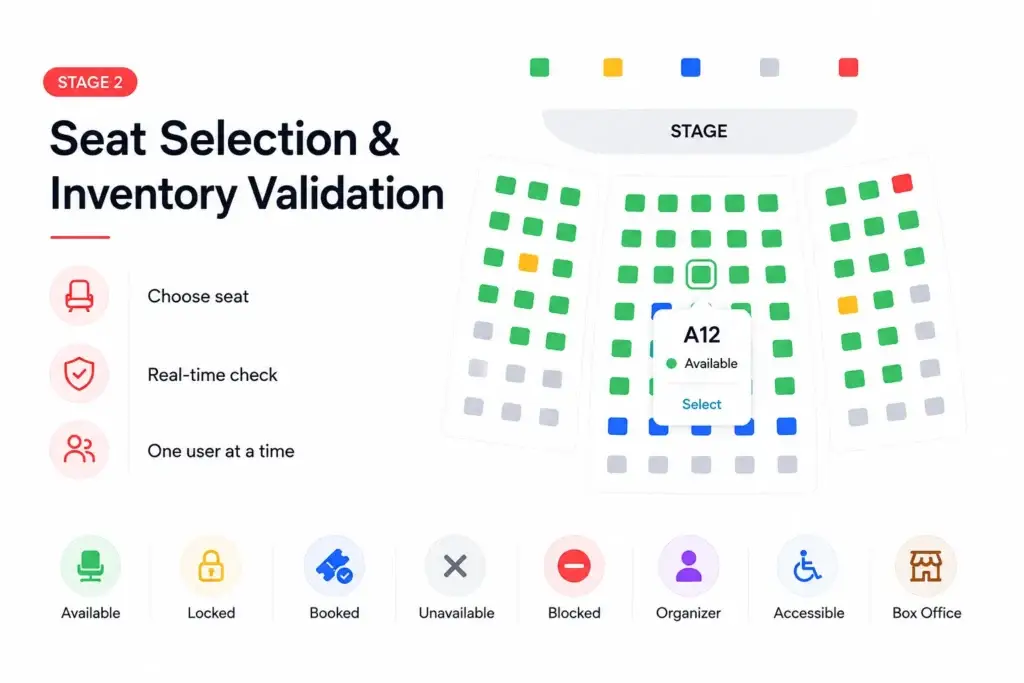
Seat selection is where the platform moves from browsing into real-time inventory.
At this point, the customer chooses a seat, ticket class, section, row, table, zone, or general admission quantity. For assigned seating, the system must know the exact status of every seat for that specific event and showtime.
Seat selection should also connect with a clear seat inventory management system in Event Ticketing Platforms, so available, locked, booked, and unavailable seats are handled correctly during high-demand booking periods.
The seat map may show seats as:
- available
- locked
- booked
- unavailable
- blocked by admin
- reserved for organizer use
- accessible seating
- offline box-office allocation
The important rule is simple: the frontend seat map should not be the final authority. It may show what was true a few seconds ago, but the backend must verify the seat again when the user selects it.
This is especially important during high-demand events. Two users may open the same seat map, see the same available seat, and tap it at nearly the same moment. The platform must allow only one user to hold it.
This is why the seat selection stage should connect with the wider ticketing platform feature breakdown, including real-time seat maps, booking flow, payment handling, ticket validation, and admin controls.
Stage 3: Seat Hold and the Temporary Reservation Window
A seat hold is a temporary reservation created when a user selects seats and proceeds toward checkout.
This is the bridge between “I want these seats” and “I have paid for these seats.”
Without a hold, another user could select the same seat while the first user is entering payment details. With a hold, the platform gives one user a limited window to complete checkout while hiding or disabling those seats for others.
A practical seat hold should include:
- event ID
- showtime ID
- seat ID
- user ID or session ID
- booking attempt ID
- lock start time
- lock expiry time
- selected pricing tier
- current hold status
- audit log entry
The hold should expire automatically if payment is not completed within the allowed time. This prevents abandoned carts from blocking inventory.
The hold timer should also be visible to the user. A countdown creates urgency, sets expectations, and reduces confusion when the seat is released after inactivity.
For founders, this is one of the highest-risk parts of the booking system. If the hold logic is weak, double booking can happen. If the hold window is too long, sellable inventory stays blocked. If the hold window is too short, genuine customers may lose seats during payment.
Stage 4: Checkout, Pricing, Discounts, and Fees
Checkout is where the platform turns selected inventory into a payable order.
The customer should clearly see the ticket price, convenience fee, taxes, discounts, coupon value, wallet credits, and final payable amount before they confirm payment.
This matters because hidden charges at the last step can increase abandonment. It also matters for support because pricing disputes are easier to resolve when the platform keeps a clear order record.
Checkout in Event Ticketing Platforms should support:
- base ticket price
- seat category pricing
- premium seat pricing
- time-based pricing
- coupons and offers
- loyalty credits
- taxes and convenience fees
- group booking totals
- refund policy visibility
- terms and conditions
- payment method selection
Seat inventory and pricing should remain connected. If a user changes seats, adds more tickets, removes a coupon, or applies credits, the platform should recalculate the order without losing the hold state.
This is also where the event ticketing business model becomes important, because commissions, convenience fees, premium seating, refunds, and partner settlements all depend on clean booking records.
Stage 5: Payment Confirmation and Booking Finalization
A booking should not become confirmed just because a user clicked the payment button.
The platform should wait for verified payment confirmation from the payment gateway. This usually happens through a secure callback or webhook. The backend then checks whether the payment belongs to the correct booking attempt, whether the amount matches, whether the hold is still valid, and whether the seats are still assigned to that user or session.
A reliable payment confirmation flow should check:
- payment status
- transaction ID
- booking attempt ID
- amount paid
- currency
- gateway signature
- order expiry
- seat hold ownership
- duplicate callback attempts
- refund or cancellation status
Duplicate payment callbacks can happen. Network delays can happen. Users can refresh pages, retry payments, or open the same order on multiple devices. The platform should use idempotency so repeated callbacks do not create duplicate tickets.
Once payment is verified, the platform can safely move the booking from pending to confirmed and the seats from locked to booked.
Founders should also review event ticketing app cost factors because payment gateway integration, webhook handling, refunds, seat locking, and reporting can affect the final scope of development.
Stage 6: Ticket Generation and Customer Confirmation
After payment confirmation, the platform generates the ticket.
This is where the booking becomes visible to the customer as a usable entry credential. The ticket may include a QR code, ticket ID, event name, venue, seat number, showtime, booking reference, refund status, and entry rules.
A good ticket generation flow should:
- create a unique ticket ID
- generate a QR code or scannable token
- attach seat and event details
- save the ticket in booking history
- send email, SMS, WhatsApp, or push confirmation
- make the ticket downloadable
- update admin and venue dashboards
- record the ticket generation time
The platform should generate tickets only once per confirmed booking. If a user reloads the confirmation page, the system should show the existing ticket rather than creating a new one.
This protects against duplicate tickets, support confusion, and gate-entry disputes.
Stage 7: Pre-Event Reminders and Booking Management
The journey does not stop after ticket generation.
Between booking and check-in, the platform should help the user remember and manage the event. This is especially important for concerts, plays, workshops, festivals, and sports events where bookings may happen days or weeks in advance.
Useful pre-event workflows include:
- booking confirmation reminders
- venue directions
- parking or entry instructions
- event policy reminders
- cancellation rules
- refund status updates
- showtime change alerts
- organizer messages
- ticket sharing rules
- customer support access
For platform operators, these workflows reduce no-shows, confusion, and last-minute support tickets. For organizers, they improve event-day attendance and customer satisfaction.
Marketing and retention also connect here. After users complete their first booking, the platform can use category follows, event reminders, personalized alerts, loyalty credits, and referral campaigns to bring them back. Founders can connect this with ticketing platform marketing strategies after the booking engine is stable.
Stage 8: Venue Check-In and QR Validation
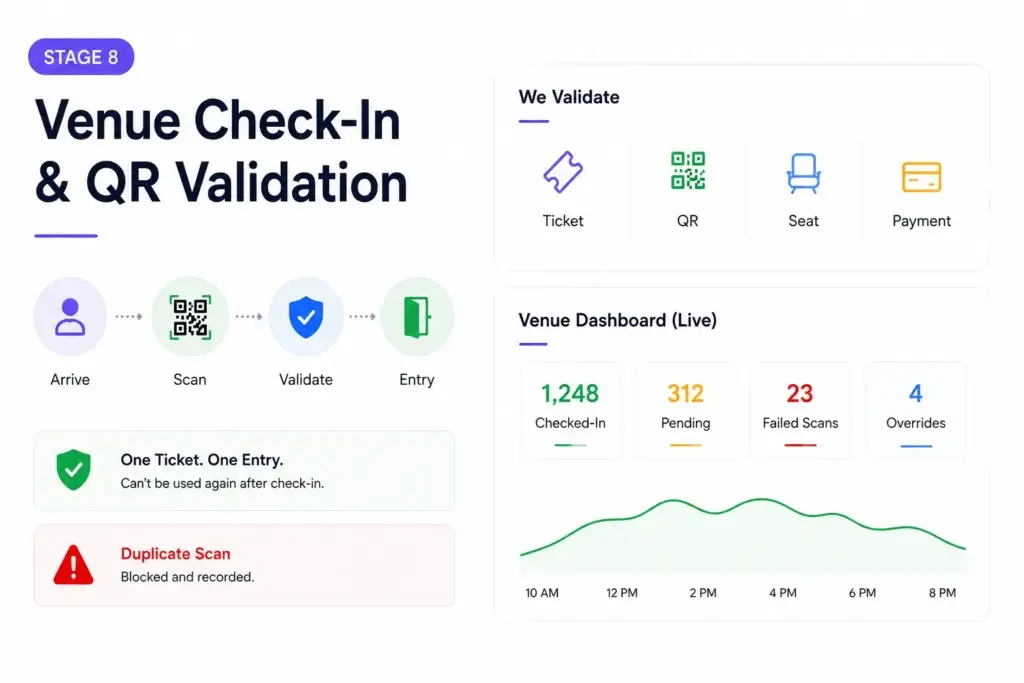
Check-in is where the digital booking meets the physical venue.
The customer arrives, shows the ticket, and venue staff scan the QR code or ticket reference. The platform must verify whether the ticket is valid, unused, for the correct event, for the correct date, and eligible for entry.
A proper check-in system should validate:
- ticket ID
- QR token
- event ID
- showtime
- seat number
- payment status
- cancellation status
- refund status
- already checked-in status
- scanner staff permissions
- venue access rights
The most important rule is that a ticket should transition from valid to checked-in only once. If the same QR code is scanned again, the platform should not allow a second entry. It should record the repeat scan attempt and show staff the correct warning.
This protects the venue from ticket sharing abuse and gives the support team a clear audit trail if a customer disputes entry.
Venue dashboards should also show real-time entry counts, pending arrivals, checked-in tickets, failed scans, and manual override actions.
Stage 9: Post-Event Settlement and Reporting
After the event, the platform must close the commercial loop.
Settlement connects confirmed bookings with commissions, convenience fees, refunds, venue payouts, organizer reports, taxes, and platform revenue. If the booking journey was not recorded properly, settlement becomes manual and error-prone.
Post-event reporting should include:
- tickets sold
- seats checked in
- no-shows
- gross ticket value
- platform fees
- partner commission
- refunds and cancellations
- failed payments
- payout status
- event-level revenue
- organizer performance
- customer repeat behavior
This is where founders see whether the business model is healthy. A ticketing platform may show high booking volume but still have weak margins if refunds, payment failures, discounts, support costs, or partner disputes are not tracked correctly.
A strong booking journey gives the operator confidence from first seat hold to final settlement.
Booking Journey State Map
State Map From Seat Hold to Check-In
| State | Trigger | Next Possible State | Risk to Control |
|---|---|---|---|
| Seat Available | Event is active and seat is open for booking | Seat Held | Stale seat map or competing users selecting the same seat |
| Seat Held | User selects the seat and starts checkout | Booked or Released | Hold expiry, abandoned checkout, or duplicate selection attempts |
| Payment Pending | User starts payment | Confirmed, Failed, or Expired | Delayed gateway response or duplicate payment callbacks |
| Booking Confirmed | Verified payment confirmation is received | Ticket Issued | Incorrect confirmation without matching payment |
| Ticket Issued | QR code and booking record are generated | Checked In or Cancelled | Duplicate ticket generation or unclear refund state |
| Checked In | Venue staff scan and validate the ticket | Closed | Repeat scans, fake QR codes, or manual entry misuse |
| Settlement Ready | Event is completed and booking records are finalized | Paid Out or Reconciled | Wrong commission, refund mismatch, or partner dispute |
Admin Controls Needed Across the Booking Journey
The admin panel is what turns the booking journey into an operating system.
Without strong admin controls, every exception becomes a developer ticket. A venue wants to block a row. A customer says payment succeeded but the ticket is missing. A QR scan fails at the gate. An organizer wants a sales report. A refund needs review.
The admin dashboard should help operators manage:
- event listings
- venue layouts
- seat maps
- showtimes
- seat holds
- locked inventory
- pricing rules
- coupons and offers
- payment status
- failed bookings
- ticket generation
- refunds and cancellations
- QR validation
- staff access
- settlement reports
- audit logs
A strong platform should also show why something happened. It is not enough to show that a ticket failed. The admin should know whether payment failed, the hold expired, the ticket was refunded, the QR was already scanned, or the staff member lacked permission.
If you are comparing technical teams, choose an event ticketing development partner that understands booking state logic, payment confirmation, venue dashboards, check-in tools, and admin-led operational control.
Founder Decision Signals
Trust
If users can pay but do not receive valid tickets instantly, trust drops. Payment confirmation and ticket generation must be tightly connected.
Operations
If venue teams cannot scan tickets, handle repeat scans, and view real-time entry counts, event-day operations become fragile.
Scalability
If you expect high-demand shows, seat holds, lock expiry, payment callbacks, and live seat map updates must work under traffic spikes.
Revenue
If booking, refund, and check-in records are incomplete, commission calculation and partner settlement become harder to trust.
Common Mistakes Founders Should Avoid
Confirming bookings before payment verification
A booking should become confirmed only after the platform verifies the payment response. Otherwise, the system may issue tickets without valid payment.
Creating seat holds without expiry
If abandoned holds do not expire automatically, valuable inventory remains blocked and customers see fewer available seats than they should.
Treating QR codes as static images
A QR ticket should be connected to a live booking record. The scanner must check payment, event, timing, cancellation, and previous scan status.
Leaving venue teams without real-time tools
Event-day staff need a mobile-friendly scanner, door list, failed scan reasons, manual review controls, and live check-in counts.
How Miracuves Helps Founders Build Ticketing Platforms With Reliable Booking Journeys
Miracuves helps founders build ticketing platforms where discovery, seat selection, temporary holds, checkout, payment confirmation, ticket generation, QR validation, admin control, and settlement work as one connected system.
For founders planning to launch a cinema, event, theatre, sports, concert, or multi-category booking business, a ready-made event booking platform can provide the product foundation for faster validation without building every booking module from zero.
You can also explore Miracuves’ event ticketing app solution or browse broader listings marketplace solutions if your business includes venues, rentals, travel, jobs, events, or other listing-led booking models.
The goal is not to copy another ticketing brand. The stronger decision is to build a reliable booking journey that protects inventory, confirms payment correctly, supports venue operations, and gives founders control over revenue and growth.
For businesses that need custom workflows, Miracuves also offers custom mobile app development services for mobile-first booking, marketplace, and customer experience products.
Final Thoughts: The Booking Journey Is the Real Product
Event Ticketing Platforms succeed when every step of the booking journey is controlled.
A user should be able to discover an event, select seats, hold them temporarily, pay securely, receive a valid ticket, enter the venue smoothly, and see the booking reflected accurately in their history. The venue should be able to scan tickets, manage entry, view reports, and receive settlement without manual confusion.
From seat hold to check-in, every state matters.
The platform that manages this journey clearly earns customer trust, venue trust, and founder confidence. The platform that treats it as a simple form and payment button risks overselling, support pressure, and operational failure during the moments that matter most.
FAQs
What is the booking journey in Event Ticketing Platforms?
The booking journey is the complete flow from event discovery and seat selection to temporary hold, checkout, payment confirmation, ticket generation, venue check-in, and settlement reporting.
Why do ticketing platforms hold seats before payment?
Seat holds prevent double booking while a user completes checkout. The platform temporarily locks selected seats so another user cannot book them during the payment window.
When should a ticketing platform confirm a booking?
A booking should be confirmed only after payment is verified and the platform checks that the seat hold still belongs to the same user or session.
Why is QR validation important for event check-in?
QR validation connects the digital ticket to a live booking record. It helps venue staff confirm whether the ticket is valid, unused, paid, and linked to the correct event and showtime.
What happens if a customer does not complete payment during the hold window?
If payment is not completed before the hold expires, the platform should release the seats back to available inventory so other customers can book them.
How do Event Ticketing Platforms prevent duplicate ticket use?
They prevent duplicate use by changing ticket status after the first successful scan. Any repeat scan should be recorded as an attempt and shown clearly to venue staff.
What admin tools are needed for the booking journey?
Admins need controls for events, venues, seat maps, holds, bookings, payments, refunds, QR validation, failed scans, staff permissions, settlement reports, and audit logs.
Can Miracuves help build a ticketing platform with a complete booking journey?
Yes. Miracuves helps founders build white-label ticketing platforms with seat inventory, booking workflows, payment handling, ticket generation, QR validation, admin control, source-code ownership, and faster launch support.
Miracuves is an independent software development company. We are not affiliated with, connected to, sponsored by, or endorsed by any company or product named in this article.
Terms such as “X Clone” are used descriptively. It is how the software industry refers to building a platform with functionality comparable to a known service, and how clients search for it.
The entire design and codebase of our products is built by our own team. Our products contain no code, design, graphics, or content originating from any third-party website or applications.
All third-party names and marks referenced in this article are the property of their respective owners, referenced solely to identify the services discussed.