
















Key Takeaways
- Seat Inventory Management should control available, locked, booked, and unavailable seats through clear real-time state transitions.
- Temporary seat locks prevent multiple users from booking the same seat during checkout.
- Seats should become booked only after the backend verifies successful payment and confirms the active lock.
- Expired or abandoned seat holds should automatically return to available inventory.
- The backend must remain the final authority even when the front-end seat map updates in real time.
Inventory Signals
- Available seats should be revalidated when selected instead of trusting an older seat-map view.
- Locked seats should track ownership, booking attempts, start time, expiry time, and payment references.
- Unavailable seats should include reason codes so venue teams understand why inventory is blocked.
- Payment failures and expired checkout sessions need clear rules for releasing seats back into inventory.
- Admins should be able to block, release, inspect, override, and audit seat states without developer intervention.
Real Insights
- A seat is not simple inventory; it is tied to a specific event, showtime, venue position, category, price, and booking state.
- Weak locking creates double-booking risk, while overly long locks can unnecessarily reduce sellable inventory.
- Real-time seat-map visuals are useful, but backend validation protects against stale or delayed availability updates.
- Payment confirmation, seat state, ticket generation, QR validation, refunds, and cancellations should operate as one connected workflow.
- The strongest journey is: available → user selects → backend validates → seat locks → payment verifies → seat books → ticket issues → QR validates at entry.
Seat selection looks simple to the customer. They open an event, view the seat map, pick a seat, complete payment, and receive a ticket.
But for Event Ticketing Platforms, seat inventory is one of the most sensitive parts of the entire booking engine.
The platform must know which seats can be selected, which seats are temporarily held, which seats are already sold, and which seats should never be sold for that show. If this logic is weak, the result is double booking, angry customers, refund pressure, gate-entry disputes, and venue partner complaints.
This guide explains how Seat Inventory Management states work in modern ticketing platforms, why the available → locked → booked journey matters, and what founders should plan before launching a cinema, concert, theatre, sports, or live-event booking platform.
Why Seat Inventory States Matter in Event Ticketing Platforms
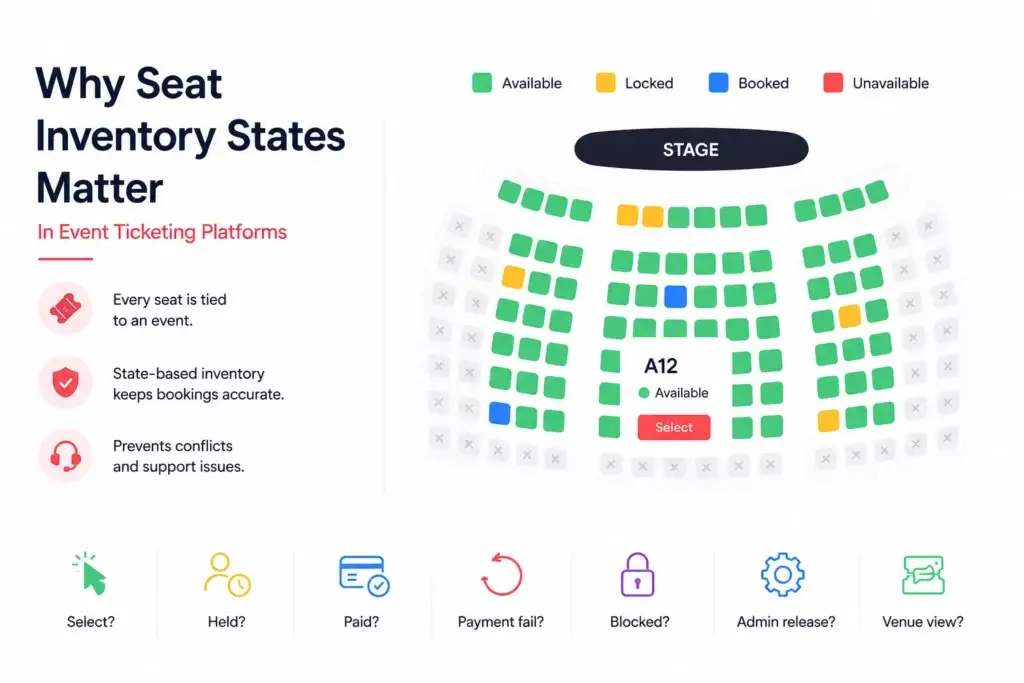
In normal ecommerce, inventory usually means product quantity. If ten items are available and one customer buys two, the system reduces stock to eight. Ticketing is harder.
If you are still mapping the wider product structure, this online ticket booking platform guide explains how event discovery, seat selection, payments, ticket confirmation, and admin workflows connect inside a booking product.
A seat is not just a quantity. It is a specific position inside a venue, linked to a specific event, date, showtime, section, row, price category, and entry rule. Seat A12 for a Friday evening show is different from Seat A12 for Saturday afternoon. Even the same seat can have different pricing, availability, restrictions, or visibility depending on the event.
That is why Event Ticketing Platforms need a state-based inventory system. Every seat must always have one clear status, and every status must tell the platform what can happen next.
A strong seat state system helps the platform answer:
- Can the user select this seat right now?
- Is another user already holding it?
- Has payment been completed?
- Did payment fail and should the seat return to sale?
- Is the seat blocked for operational reasons?
- Can the admin release it manually?
- What should the venue team see at entry?
Without these answers, the front-end seat map becomes unreliable. Users may see seats that are not truly available, payments may confirm against expired holds, and support teams may struggle to explain what happened.
The Four Core Seat Inventory States
Most seat-based ticketing systems can be understood through four core states: available, locked, booked, and unavailable.
These seat states should connect with the wider ticketing platform feature breakdown, including seat maps, booking flows, payment handling, QR validation, and admin controls.
Seat Inventory States in Ticketing Platforms
| Seat State | What It Means | Can the User Book It? | Founder Risk if Mismanaged |
|---|---|---|---|
| Available | The seat is open for selection and has not been held or sold. | Yes | Users may see inaccurate availability if real-time updates are delayed. |
| Locked | The seat is temporarily held for a user while they complete checkout. | No, except by the lock owner | Weak locking can cause double booking or abandoned seats staying blocked. |
| Booked | The seat has been paid for and confirmed as a valid ticket. | No | Incorrect confirmation can create free tickets, refund disputes, or entry problems. |
| Unavailable | The seat is blocked from sale for operational, venue, sponsor, safety, or admin reasons. | No | Incorrect blocking reduces sellable inventory or creates customer confusion. |
Available Seats: The Starting Point of the Booking Journey
An available seat is a seat that the system currently allows a user to select.
This sounds simple, but in a real ticketing platform, availability depends on several conditions. The event must be active. The showtime must be open for sale. The seat must belong to the correct venue layout. The seat category must be enabled. The seat must not be locked by another user, booked by a previous customer, or blocked by the organiser.
The front end should show available seats clearly, usually with a selectable color or visual state. But the front end should never be treated as the source of truth. The backend must verify the seat again when the user clicks it.
This matters because seat maps can become stale. A user may load the seat map at 6:00 PM, but another user may select the same seat at 6:01 PM. If the platform only trusts what was shown when the page loaded, it can accept an invalid selection.
For founders, this is the first important lesson: availability must be checked at the moment of action, not only when the seat map loads.
Locked Seats: The Temporary Hold That Prevents Double Booking
A locked seat is temporarily reserved for one user while that user moves through checkout.
This is one of the most important states in Event Ticketing Platforms because two users may click the same seat almost at the same time. The system must decide who gets the temporary hold and who receives a message that the seat is no longer available.
A proper lock should include:
- seat ID
- event ID
- showtime ID
- user ID or session ID
- lock start time
- lock expiry time
- booking attempt ID
- payment reference where applicable
- current lock owner
- audit trail
The lock should also have a clear expiry window. If a customer selects seats but does not complete payment, the platform should automatically release those seats after the hold time ends. This prevents abandoned carts from silently reducing sellable inventory.
The customer experience should also be clear. A countdown timer can show how long the seat will remain reserved. If time expires, the platform should release the lock and ask the user to select again.
For high-demand events, the locked state is where the platform earns trust. If locking is too weak, seats can be sold twice. If locking is too strict, seats may remain blocked unnecessarily. The right balance protects both conversion and inventory accuracy.
Booked Seats: When a Hold Becomes a Confirmed Ticket
A booked seat is a seat that has moved from temporary hold to confirmed sale.
This should happen only after payment confirmation is verified by the platform. A user clicking “pay” should not be enough. The payment gateway, wallet, or checkout provider must return a valid confirmation, and the backend should verify that callback before marking the seat as booked.
A reliable booked-state flow should confirm:
- the seat is still locked by the same user or session
- the lock has not expired
- payment confirmation is valid
- the paid amount matches the booking amount
- taxes, fees, discounts, and coupons reconcile correctly
- the ticket ID or QR code is generated once
- the booking record is saved permanently
- venue entry validation can read the booking state
Once the seat becomes booked, it should no longer be available to other users. It should also be visible in customer booking history, admin reports, venue dashboards, and QR validation workflows.
This state is commercially important because revenue recognition, partner settlement, refund handling, and entry validation all depend on it. If the booked state is wrong, every downstream workflow becomes unreliable.
Unavailable Seats: Seats That Should Not Enter the Sales Flow
Unavailable seats are blocked from public booking.
This state is not the same as booked. A booked seat has been sold to a customer. An unavailable seat may never have been sold, but the platform still prevents users from selecting it.
Seats may be unavailable because of:
- broken seats
- wheelchair-accessible allocation rules
- sponsor or promoter holds
- venue staff holds
- blocked rows for camera, lighting, or production equipment
- social distancing or safety requirements
- private guest allocations
- offline box-office reservations
- compliance or operational restrictions
Unavailable states should be manageable from the admin or venue dashboard. The operator should be able to mark seats unavailable, add a reason, set expiry where relevant, and release them when they can return to public sale.
The business risk is simple: if too many seats are marked unavailable without tracking, the platform loses revenue. If blocked seats are accidentally released, the venue may face operational issues at the door.
How the Seat State Journey Works From Selection to Entry
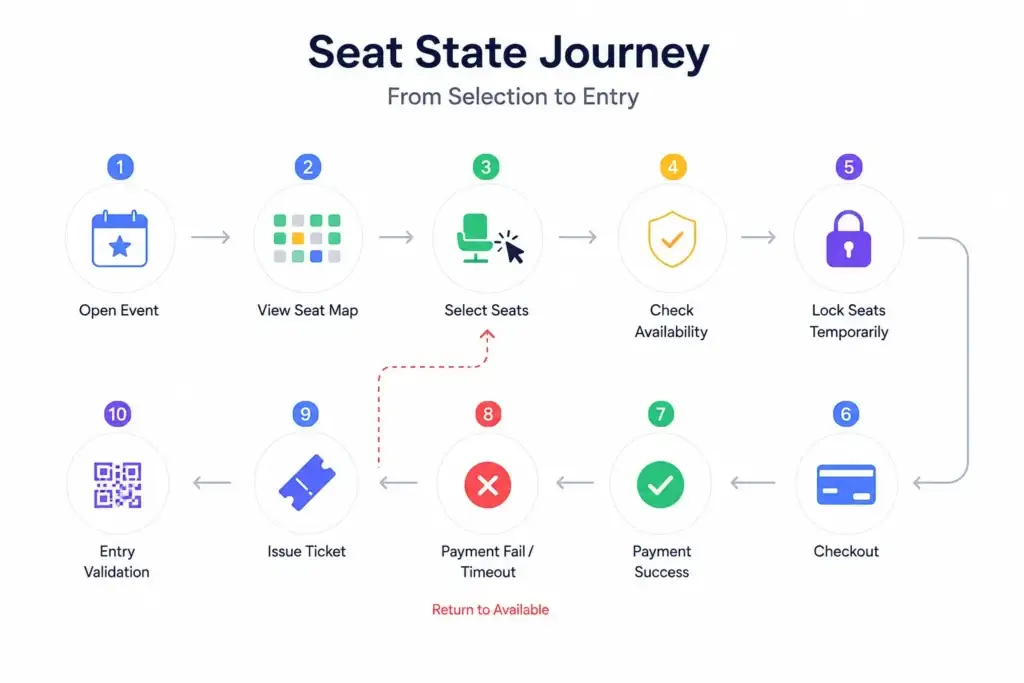
The cleanest seat journey usually follows this logic:
- The customer opens the event and views the seat map.
- The platform displays seats as available, locked, booked, or unavailable.
- The customer selects available seats.
- The backend checks whether those seats are still available.
- The system creates a temporary lock for that user.
- The user proceeds to checkout.
- If payment succeeds, the seats become booked.
- If payment fails or the timer expires, the seats return to available.
- The ticket is issued only after confirmation.
- At the venue, QR validation confirms whether the booking is valid.
This journey sounds linear, but real users create messy situations. They refresh the page. They open the same event in two tabs. They lose connectivity. They abandon checkout. Payment confirmation arrives late. A gateway callback retries. A support agent modifies an order. An organiser blocks a row after sales open.
That is why seat inventory should be designed as a state machine, not as a simple “available true or false” field.
Why Real-Time Seat Maps Need Backend Authority
Real-time seat maps are important because users need to see availability changes quickly. If another user locks a seat, that seat should grey out or become unavailable on nearby screens.
However, real-time visuals are not enough.
The backend must remain the authority because front-end updates can lag, fail, or arrive out of order. The seat map may show a seat as available, but the backend should still reject the selection if the seat was locked milliseconds earlier.
A strong platform combines:
- backend state validation
- WebSocket or live-update events
- versioned seat inventory rows
- lock expiry jobs
- retry-safe payment confirmation
- admin override controls
- audit logs for every important state change
For founders, this means the real product is not just the visible seat map. The real product is the inventory logic behind it.
Where Payments Fit Into Seat Inventory States
Payments and seat states must work together carefully.
The platform should not mark a seat as booked simply because a user reached checkout. It should also not release a seat too early while payment is still being processed. This is why the locked state acts as a bridge between selection and booking.
Seat inventory also affects the event ticketing business model, because commissions, convenience fees, refunds, cancellations, and venue settlements all depend on accurate booking status.
A good payment-seat flow looks like this:
- User selects seat.
- Seat becomes locked for a limited time.
- User starts payment.
- Payment gateway sends confirmation.
- Backend verifies the confirmation.
- Seat becomes booked.
- Ticket and QR code are generated.
- Receipt and booking history are updated.
If payment fails, the seat should either remain locked briefly for a retry or return to available after the hold expires. The exact rule depends on the platform’s checkout strategy.
This is also where refund and cancellation rules matter. A cancelled booking should not always return to available automatically. Some venues may keep cancelled seats blocked for manual review, while others may release them instantly. The platform should allow the operator to configure that policy.
Founder Decision Signals
Speed
If you are launching with seated venues, do not leave seat locking for later. It is part of the first reliable booking version.
Trust
If users can pay for seats that are not actually available, your support and refund workload will grow faster than your revenue.
Scalability
If you expect popular shows, plan for concurrent seat selection, lock expiry, live updates, and checkout retries from day one.
Operations
If venue teams cannot block, release, audit, and validate seats from the dashboard, every event becomes harder to manage.
Admin Controls Required for Seat State Management
The admin panel decides whether the platform can operate without constant developer support.
A strong admin dashboard should allow operators to:
- upload or configure venue seat layouts
- set seat categories and pricing
- block and unblock seats
- view locked seats in real time
- release expired holds
- inspect failed booking attempts
- override seat availability with reason logs
- monitor high-demand events
- track booking conversion by section
- manage refunds and cancellations
- view entry validation status
- export reports for venue partners
Founders should also review event ticketing app cost factors, because real-time seat maps, lock expiry, payment callbacks, admin overrides, and reporting modules can change the final development scope.
The admin layer should also show why a seat is unavailable. “Unavailable” alone is not enough. The operator needs context: blocked by admin, held for sponsor, under maintenance, wheelchair allocation, offline booking, or system lock.
This is the difference between a simple booking website and an operational ticketing platform.
Common Mistakes Founders Should Avoid
Treating seat inventory as a simple availability flag
A true ticketing system needs multiple states, lock ownership, expiry, payment confirmation, audit logs, and admin control. A yes/no field is not enough for real event traffic.
Marking seats booked before payment verification
A seat should move to booked only after verified payment confirmation. Otherwise, the platform risks free tickets, fake confirmations, and settlement errors.
Forgetting abandoned checkout recovery
If locked seats do not expire automatically, abandoned carts silently reduce inventory and revenue. Hold windows should be visible to users and enforceable by the backend.
Giving admins no reason codes for blocked seats
Unavailable seats should carry a reason. Without reason logs, venue teams cannot tell whether a seat is broken, reserved, blocked for production, or held manually.
How Miracuves Helps Founders Build Seat-Ready Ticketing Platforms
Miracuves helps founders build ticketing platforms with the operational foundation required for real bookings, venue workflows, customer checkout, admin control, and source-code ownership.
For businesses that need custom workflows, Miracuves also offers custom mobile app development services for booking products, marketplace platforms, and mobile-first customer experiences.
For founders planning a cinema, concert, theatre, sports, or multi-event booking business, a ready-made event ticketing app solution can provide the platform base for real-time seat maps, booking flows, payment handling, QR ticket validation, and admin-led inventory management.
If you are comparing technical teams, choose an event ticketing development partner that understands seat locking, venue dashboards, payment confirmation, ticket validation, and admin-led inventory control.
The goal is not to copy another ticketing brand. The stronger decision is to use a proven booking pattern, customize it for your venue network, and build the seat inventory logic correctly from the beginning
You can also explore Miracuves’ event ticketing app solution or browse broader listings marketplace solutions if your business includes events, rentals, travel, jobs, or other listing-based models.
Related reading: How Ticketing Platforms Handle Cards, UPI, Wallets, and Payment Gateway Failures and What Is the Best Go-to-Market Strategy for a New Ticketing and Event Discovery Platform.
Final Thoughts: Seat States Are the Trust Layer of Ticketing
Event Ticketing Platforms are judged during pressure moments.
When a popular show opens, hundreds or thousands of users may compete for the same sections. The platform must show accurate seats, lock selections fairly, confirm bookings only after verified payment, release abandoned holds, and keep venue teams informed.
Available, locked, booked, and unavailable are not just technical labels. They are business controls. They decide whether customers trust the platform, whether venues trust the operator, and whether the founder can scale beyond the first few events.
FAQs
What are seat inventory states in Event Ticketing Platforms?
Seat inventory states describe whether a seat is available for selection, temporarily locked during checkout, booked after payment, or unavailable due to operational rules. These states help prevent double booking and support reliable event operations.
What does a locked seat mean in a ticketing platform?
A locked seat is temporarily held for a specific user or session while checkout is in progress. Other users should not be able to book it unless the lock expires or the system releases it.
Why do ticketing platforms need lock expiry?
Lock expiry prevents abandoned carts from blocking inventory forever. If a user selects seats but does not complete payment within the hold window, the platform can release those seats back to available inventory.
When should a seat become booked?
A seat should become booked only after payment is verified and the backend confirms that the user still owns the valid seat lock. This prevents invalid confirmations and reduces booking disputes.
What is the difference between booked and unavailable seats?
A booked seat has been sold to a customer. An unavailable seat is blocked from sale for operational reasons, such as broken seating, sponsor holds, offline reservations, production setup, or admin restrictions.
How do Event Ticketing Platforms prevent double booking?
They prevent double booking with backend validation, temporary locks, versioned inventory updates, lock ownership, expiry rules, and real-time seat map updates. The backend must remain the final authority.
Why is admin control important for seat inventory?
Admin control allows operators and venue teams to block seats, release holds, review booking attempts, manage refunds, inspect audit logs, and validate entry. Without this layer, operations depend too heavily on developers.
Can Miracuves help build a ticketing platform with seat inventory logic?
Yes. Miracuves helps founders build white-label event ticketing platforms with seat inventory workflows, booking logic, payment handling, QR validation, admin control, source-code ownership, and faster launch support.
Miracuves is an independent software development company. We are not affiliated with, connected to, sponsored by, or endorsed by any company or product named in this article.
Terms such as “X Clone” are used descriptively. It is how the software industry refers to building a platform with functionality comparable to a known service, and how clients search for it.
The entire design and codebase of our products is built by our own team. Our products contain no code, design, graphics, or content originating from any third-party website or applications.
All third-party names and marks referenced in this article are the property of their respective owners, referenced solely to identify the services discussed.