White Label Courier App - Same-Day Delivery Platform You Own
Miracuves' ready-made, white-label courier app gives your delivery firm a platform of its own: a customer site and app, a driver app on Android and iOS, a zone-based admin panel and unencrypted source, all rebranded within six working days.
Senders see the fee and tip before booking and pick whether sender or receiver pays; merchants keep wallets, upload addresses in bulk and print labels by the batch, and dispatch assigns each job to a driver. Gateway, SMS, map and developer accounts stay in your name. Your own driver approval step or a different settlement cycle is scoped separately and quoted in writing, typically 2-8 weeks of work.
Launch in 6 Days with
- Source Code
- Customer App
- Driver App
- Admin Panel
- Merchant Wallets
- Android + iOS
StackFlutter · PHP · Bootstrap · MySQL · Firebase · SMS Gateway
Live feed
- 24 addresses imported in one bulk batchBulk
- Merchant job given to a vanDispatch
- Priority flag set on a parcelPriority
- On its way, 11 min from the dropTracking
- Order closed with signature and photoProof
- Parcel booked from a wallet balanceWallet
- Merchant invoice set to paidInvoices
- Labels printed for the whole batchLabels
- 24 addresses imported in one bulk batchBulk
- Merchant job given to a vanDispatch
- Priority flag set on a parcelPriority
- On its way, 11 min from the dropTracking
- Order closed with signature and photoProof
- Parcel booked from a wallet balanceWallet
- Merchant invoice set to paidInvoices
- Labels printed for the whole batchLabels

- 1Queue for Every Vehiclebikes, cars, vans and trucks booked on the same screens
- 3Handover Recordsa verification code, an electronic signature and a photograph
- 0%Revenue Share With Miracuvesno royalty on any delivery or merchant invoice
- 4Optional Add-Onssmart routing, AR navigation, lockers and load sensors, each priced apart
- 6Days to Launchand if the delay is ours, we keep going free
- $2,499Paid Once, Not Rentedsource code yours, no per-seat fee, no monthly rental
Live in six working days, or we keep working free until you launch. Every build carries 60 days guidance, 6 months bug fixes and 12 months updates.Verify every figure
Grow One District at a Time
Start with a single district and the drivers you can support, then open more zones on the same deployment; extra capacity is a hosting and settings decision.
What Drivers Hand In
Driver sign-up collects ID proof, vehicle registration and insurance details before the first job, and commission can follow vehicle type or distance.
The Gateway Keeps Card Data
Card details pass straight to the payment provider you pick; the platform stores each order with its payment status, plus any cash on delivery and the matching merchant invoice entries.
01Test drive it
Working Demo
White Label Delivery App Demo - Sender, Driver, Web & Operator Views
Run the Miracuves courier platform yourself before you spend anything. The sender logs in with one phone number and the driver with a second, the web demo runs in a browser window, and admin access is given out on a guided call. Book a job, then follow it through the driver and operator views. On that call we also demonstrate merchant accounts, wallets and invoices.

Sender App for Courier Booking
The sender's side of the phone: choose the load type, enter the pickup and drop addresses, check the distance and fee, tip the delivery man, name the payer and send the request.
- 1Pick Android or iOS in the app portal
- 2Sign in with the sender login listed here
- 3Open Home, Request, Orders and Tracking
+91 9876543210 | User_321
Courier Driver App
The driver's side of the phone: incoming jobs to accept or decline, in-app turn-by-turn help, chat with the customer, plus a captured signature and photo to close the job at the door.
- 1Pick Android or iOS in the app portal
- 2Sign in with the driver login listed here
- 3Open Requests, Navigation, Chat and Handover
+91 9876543211 | Driver_321
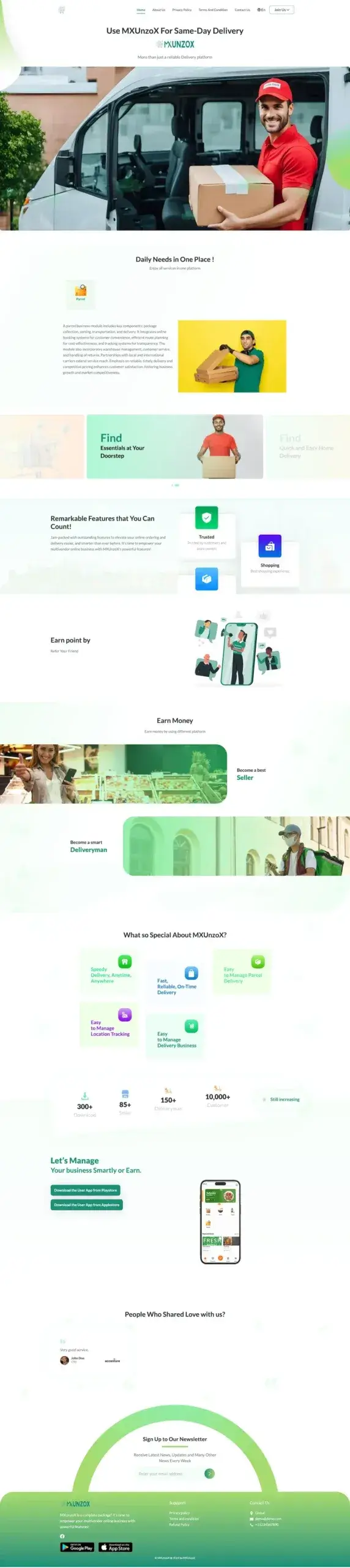
Customer Website & Delivery Staff Panel
Customers book from a desktop site, while delivery staff get a browser panel built for bigger screens.
- 1Load the demo address in another window
- 2Pick either the customer or the delivery login
- 3Open Booking, Orders and Parcel details
mxunzox.mimeld.com
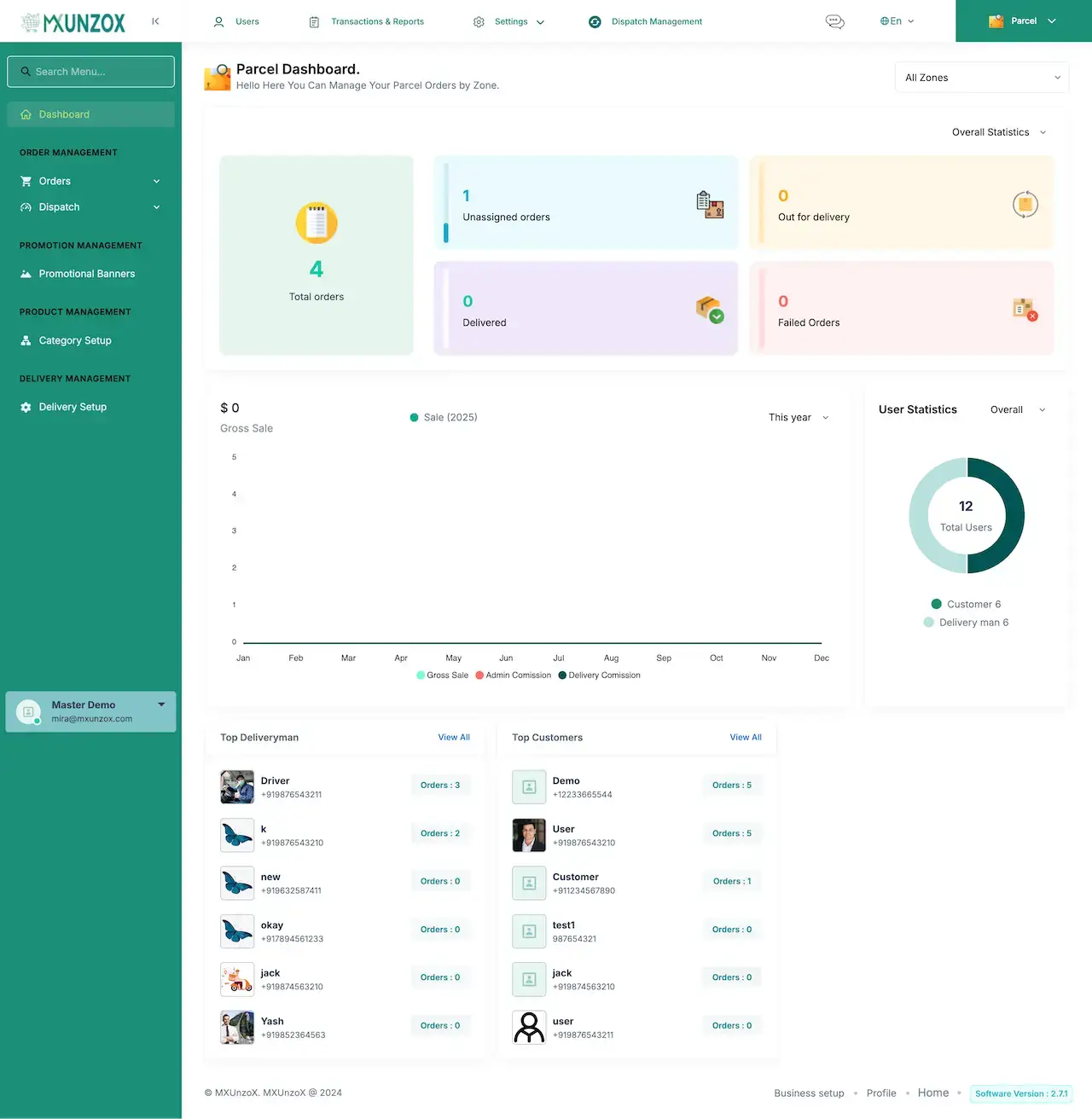
Operator Admin Console
Behind the admin login: orders and dispatch, delivery setup, a zone-filtered parcel dashboard, plus categories, banners, user lists and transaction reports.
- 1Visit the admin login page
- 2Ask us for the admin login details
- 3Open Dashboard, Orders, Dispatch and Reports
shared on a guided call
Walk Through It With Us
Guided Walkthrough: Courier Booking Flow, Fleet Dispatch, Signed Handover & Merchant Billing
Fastest route to seeing how the pieces fit together is a call with us. We walk one load through the demo, from booking to signed handover, and then tailor each screen to your fleet, zones, pricing rules and launch date.
Book a live walkthrough.Screen by Screen
Courier App Screens - Sender Booking, Account & Wallet, Admin Dashboard & Public Website
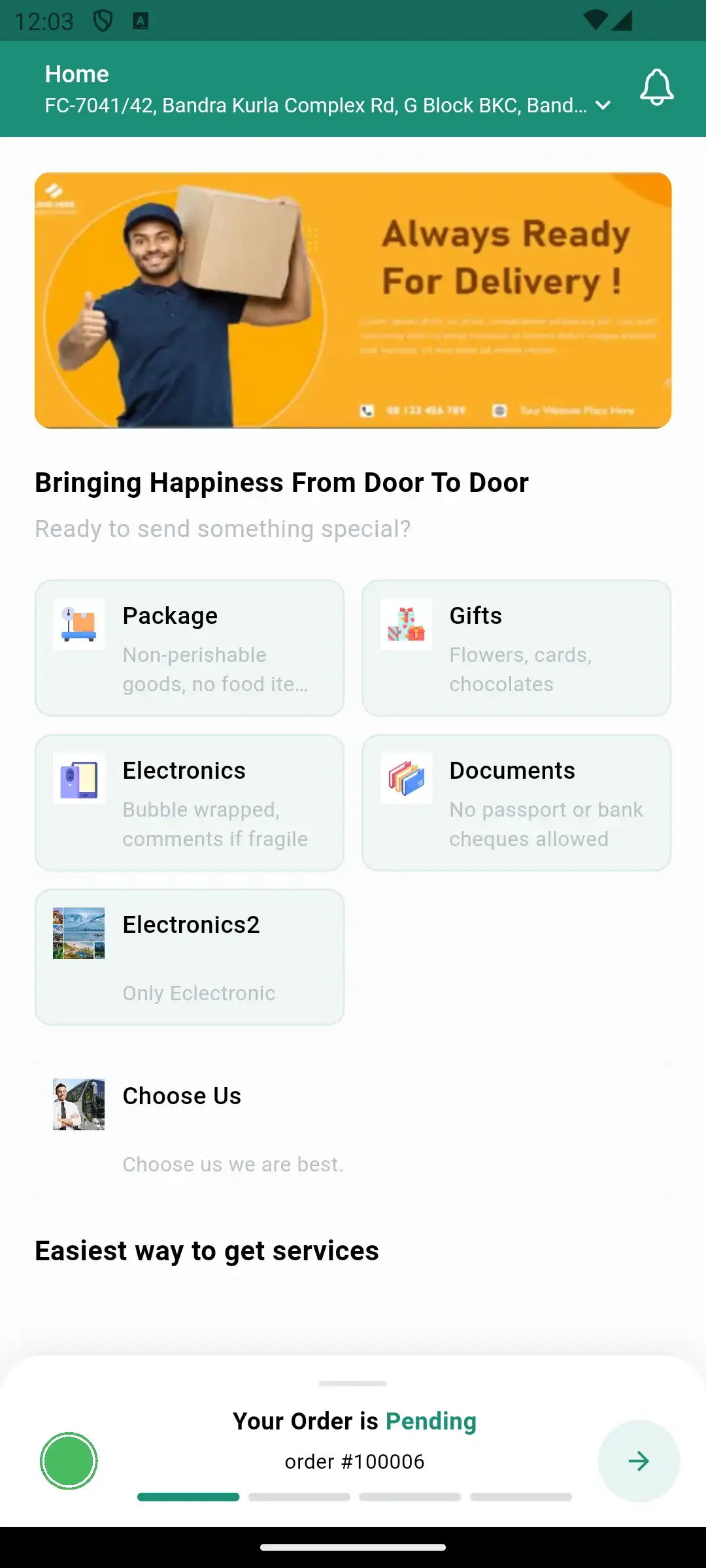
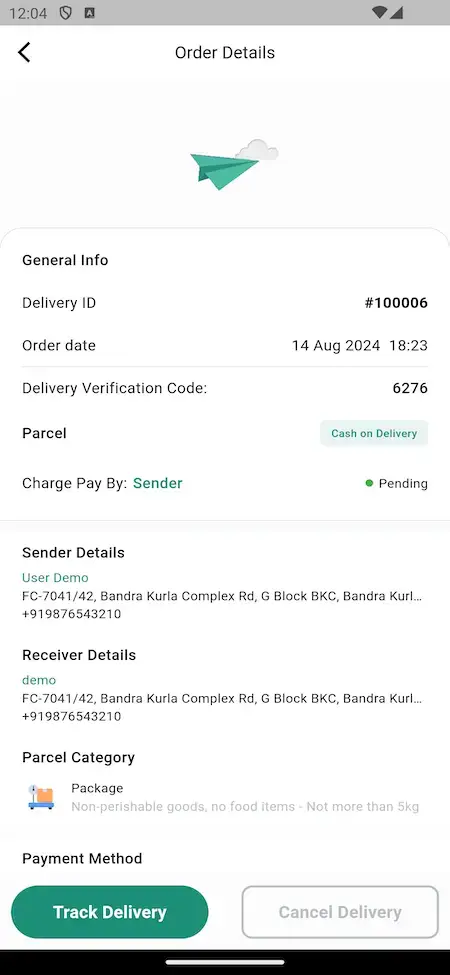
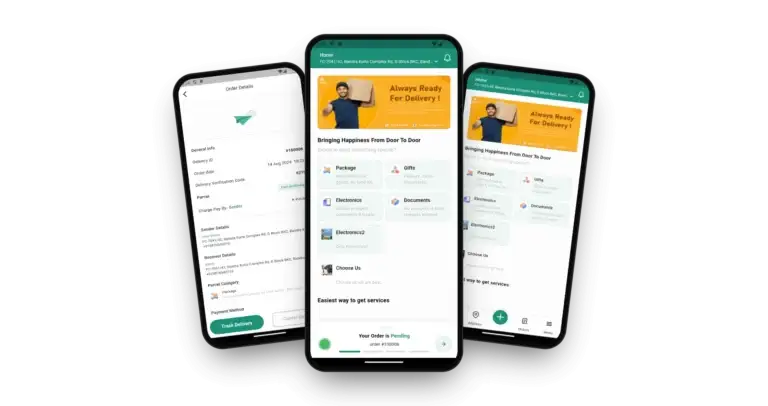
Miracuves took these screenshots along a single delivery, from the request to the doorstep, across the sender app, the wallet menu, the parcel dashboard and the public site.
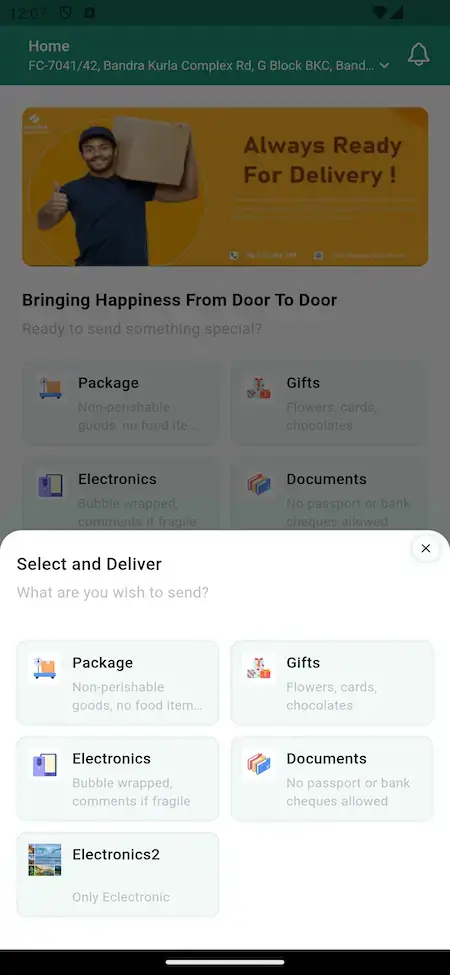
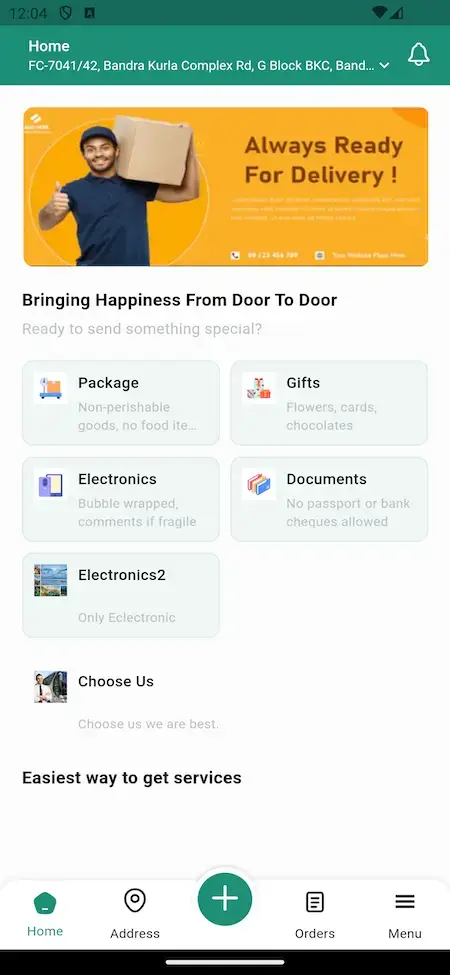


Follow one load through the product: the home screen, the category sheet, a request form with the fee and tip, the pending order, then the live tracker, and last the order page holding the verification code.
02Proof
Client Voices
Client Reviews - Courier and Fleet Operators, in Their Own Words
What clients say about building on Miracuves bases. Four of the eight describe courier, delivery or fleet platforms; the other four come from different industries and stand exactly as their authors wrote them.
“The team was running it on a dispatcher and a Google Sheet, and we needed a real platform quickly, because we were about to onboard a major retail client. Miracuves’s Delivery Genie base gave us the rider app, the dispatch console, and live tracking. We launched in 6 weeks and cleared 4x the previous order volume in the first month.”
“Floaters is a hyperlocal on-demand delivery service in Baltimore — same-day parcels, small-business drops, and a courier network. The team was running it on a dispatcher and a Google Sheet, and we needed a real platform — fast, because we were about to onboard a major retail client. Miracuves's Delivery Genie base gave us the rider app, the dispatch console, and live tracking. We added a multi-tenant layer for our B2B clients, our branded customer tracking page, and a custom COD/settlement module. We launched in 6 weeks. The retail client came on board, and we cleared 4x the previous order volume in the first month.”
“We were juggling spreadsheets, a third-party GPS provider, and a phone. We needed a single operations console. Miracuves’s MXLogistics base covered the trip lifecycle, the driver app, and the customer tracking page. We’ve cut operations admin time by about 40%.”
“Speedyven is a hyperlocal courier network — packages, food, and same-day essentials across a few metros. The dispatch and rider app were the parts where we needed to move fastest, because riders have low tolerance for clunky tools. Miracuves's Delivery Genie base gave us the rider app, the dispatch console, and live tracking. We added our custom surge-pricing engine, our multi-merchant order router, and a custom rider-incentives module. We launched in 7 weeks. Rider activation is high and the platform's been stable through weekend peaks.”
“Turo is the obvious reference, but the Caribbean specifics, from different insurance norms to different payment rails, meant we needed a real partner, not just a clone. Miracuves’s MXCar base covered the listing, the trip flow, and the host payouts. We launched in 6 working days and are live in three islands.”
“We were running it on phone calls and a paper calendar, and we were losing bookings to bigger OTAs. Miracuves’s GetmyBoat Clone base gave us the calendar, the booking flow, and the payment engine. Online bookings are up roughly 70% in the first six months, and the ops team finally has a live view of the fleet.”
“Every HMS I tried was built for general physicians, with no lesion mapping, no before/after tracking, and no procedure-based billing. Their MXHealth base gave us the patient app, doctor app, EMR and video consult out of the box. Front-desk time on scheduling and follow-ups is down ~70%, and we went fully digital in 9 months, where a fully custom job would have been 18.”
“Building a compliant telehealth stack from scratch in three markets would have been a year-plus effort. Miracuves’s MXHealth base covered the patient and doctor apps, video consult, e-prescription and the pharmacy integrations. We launched in our first market in 9 weeks and rolled out to two more in the following six months.”
What You Can Check
Case Study - What Is on the Public Record and What You Can Verify Yourself
No client fleet is publicly named as running this logistics base, so there is no case to summarize. What we can offer is a demo and a release log, and the points below show how to use each.
There is no named client running this logistics base for us to show, and we will not stage one. A working demo and a dated release log are what we can put in front of you.

- Place a booking in the sender app with the demo login
- Look at the same order from the admin side during a guided call
- Sign in to the driver app and see the job from the other end
- Read the release log entry by entry, date by date
- Name a client who has not agreed to be named
- Pass off a quote or number from a different product as this one
- Present an add-on as if the base package included it
- Apply your logo, icons and colors to the apps and the web platform
- Configure your city's zones, fares and parcel categories
- Install on your hosting and pass over the whole source
- Base build time: 6 working days
A named client will be featured here once one agrees to be named and a case study has been published.Miracuves · How we treat case studies
03Under the hood
In Brief
What a White Label Courier App Gives Businesses, Fleets and Senders
A white label courier app is a finished parcel service you run under your own brand, and Miracuves builds it with booking, dispatch, tracking, handover proof and billing already inside. Customers and merchants request a pickup and a drop-off, drivers on bikes, cars, vans or trucks accept the job, and the operator runs zones and fares from one admin panel.

Built for the Whole Job, Not the Form
The hard part comes after the order is placed. That is where dispatch, a delivery code, proof of delivery and merchant billing live, with zone-level reports on top.
Source You Can Change
All code comes unencrypted, which lets your developers adjust pricing, flows and screens as the business changes.
Add-Ons Are Priced Apart
Four add-ons - smart routing, AR navigation, lockers and load sensors - are sold separately, each at its own price, and none is counted in the base package.
Web, Android & iOS
What Is Courier Management Software Here?
Accepting a booking is the easy part of a logistics product. The harder work sits behind it: pairing a vehicle with the load, assigning the right driver, proving who received the goods, and billing merchants who send parcels daily. All of that groundwork is built and working already.

- 01Pickup and drop booking that includes the vehicle choice
- 02Fee, tip and payer visible before the sender confirms
- 03Tracking on a live map, a verification code and proof of delivery
- 04Driver app covering jobs, chat and navigation
- 05Merchant wallets and invoices, plus an admin panel with reports
The package brings a website and a Flutter app for customers, a Flutter driver app and an admin panel, plus the full source code.
What Is Included
White Label Courier App Features - Vehicle Classes, Driver Dispatch, Proof of Delivery, Merchant Billing & Admin Tools
Miracuves lists only what you can open in the phone apps, the console or the dated release log, and optional extras are labeled as add-ons further down.
Vehicle Types & Booking
Bikes, cars, vans and trucks are covered. The sender picks the vehicle that suits the load size and trip length, and the choice follows the delivery details in the booking flow.
- Choose a bike, car, van or truck for each job
- Choose the vehicle once the delivery details are in
- The product FAQ also mentions motorcycles and bicycles
- Commission can be set by vehicle type, distance or offer
- Those pricing rules live under Delivery Setup in the admin panel
Pickup & Drop-off Booking
A booking is two addresses plus a description of the load. One request screen gathers both parties, quotes the delivery fee and shows the distance before the sender commits.
- Sender and receiver details on one form
- Category cards: Package, Gifts, Electronics and Documents
- Distance and fee are visible before confirmation
- A free-text box for extra driver instructions
- The request screen offers a Save for later choice
- A Confirm Parcel Request button places the order
Dispatch & Driver Control
Dispatch has its own area in the console. Admins register and check drivers, assign jobs and watch each open order until it is closed out.
- Dispatch Management has its own entry in the top menu
- New drivers are onboarded and verified in the panel
- Open orders are watched, and problems handled, in real time
- Admins can watch a delivery man being assigned live
- Fare Management holds fees, discounts and the pricing structure
- Branch records sit next to the delivery men
- Dispatch moves orders from unassigned to assigned
Merchant Accounts & Bulk Uploads
Businesses that ship every day get personal accounts with a dashboard, a wallet and bulk address loading, instead of typing in each job.
- Every merchant works from a personal dashboard
- Google Maps addresses can be imported in bulk
- A bulk modal takes parcels in batches
- Wallets are switched on merchant by merchant
- The merchant payment account includes a bank list
- A parcel logs page records every job
Wallets, Billing & Payments
Wallets and invoices let merchants be billed per batch. Senders still see the fee first and pick who pays, and a gateway takes card payments.
- Wallets for merchants and for the admin
- Parcels can be booked against a wallet balance
- Each merchant gets an invoice
- Picking an invoice in merchant payments marks it paid
- Invoice totals feed the Excel export
- The mobile app shows payment requests and statements
- Razorpay appears in the release log as a new gateway
- Cash on Delivery shows on orders, alongside a Charge Pay By option
Handover Code & Delivery Proof
Every order carries a verification code, and drivers can then attach an electronic signature and a photograph, which leaves the order with a record.
- Each order shows a Delivery Verification Code
- A one-time code confirms the handover
- Drivers record an electronic signature at the door
- A photo is uploaded with the proof
- The customer is notified once the job is done
- The proof remains attached to the order
Live Parcel Tracking & Order History
Each order gets a five-stage tracker over a map, and past jobs stay in the Orders tab so customers can reopen them.
- Stages run from Order Placed to Delivered
- The stages are drawn over a map
- A short notice appears until a driver is assigned
- Pending orders show a progress bar on the home screen
- Order details carry a Track Delivery button
- The mobile app groups parcels by status
Priority Parcels & Labels
Urgent parcels can be flagged, and the driver sees them marked, while labels can be printed in volume for the packing table.
- A priority system flags urgent jobs
- Priority parcels stand out on the delivery man map
- Admin and merchant panels can print many labels at once
- The label print size is a design setting
- The release log notes shorter tracking ids
Driver's App
The driver side covers sign-up papers, incoming requests, navigation, chat and a route-ordered list of assigned parcels.
- Sign-up collects ID proof, vehicle registration and insurance details
- Documents are uploaded for checking
- Drivers accept or reject each request from the phone
- GPS and in-app navigation guide each trip
- Drivers message the customer from within the app
- Assigned parcels show up as a route-wise list
- Location can be turned on from the handset
Zone-Level Dashboard
The admin opens on a dashboard of the day, which a zone filter can narrow, showing total, unassigned, in-transit, delivered and failed parcels.
- Parcel counters: total, unassigned, on the road, delivered, failed
- A picker for All Zones or one zone
- A Gross Sale chart that splits admin commission from delivery commission
- Statistics on customers and delivery men
- Top delivery man and top customer rankings
- The zone filter covers the entire dashboard
Alerts, Ratings & Support
Customers get alerts at each stage, rate the delivery both ways and open support tickets that each carry their own status.
- Alerts when an order is confirmed, assigned to a driver and completed
- Customer and driver rate each other and add feedback
- Support tickets move through Pending, Processing, Resolved and Closed
- The release log lists SMS over Twilio or Nexmo
- A damaged or lost parcel can be reported through support
Theme, Languages & Promo Banners
The same console that runs operations also controls the look, with language choices, a theme palette, a ready front-end template and promotional banners.
- English plus French, Spanish and Chinese
- Prices can show country symbols
- Front-end theme colors are changed from the admin panel
- A ready-made front-end website template
- Promotional Banners sit under Promotion Management
- Category Setup decides which parcel kinds are offered
- A language switcher sits in the page header
Good to know before you buy: We hand the platform over finished and rebranded. From your side we need store developer accounts, hosting and a domain, a payment gateway account with KYC done, your business details, logo and other brand assets, and your own keys for SMS and Google Maps. Store review at Apple and Google runs on their timetable and sits outside our 6-day build time.
Run It Day by Day
Courier Management Admin Panel - Orders, Dispatch, Fare Rules & Merchant Billing
Your dispatchers work from a single Miracuves console that shows jobs waiting for a driver, parcels in transit, finished drops, failures and each merchant's balance.


What the Admin Panel Contains
- 01
Parcel Overview
Parcel counts by status - total, unassigned, in transit, delivered, failed - appear next to a gross sales chart for the year and user numbers; a single zone filter changes the whole screen.
- 02
Orders & Dispatch
Order Management lists every order. Jobs get allocated and followed through to completion under Dispatch Management, which sits in the top menu.
- 03
Delivery Setup & Pricing
This is where fees, discounts and the pricing structure are edited, along with commission rules tied to vehicle type or distance.
- 04
Load Categories
The admin defines the kinds of goods senders can choose from; the demo offers Package, Gifts, Electronics and Documents.
- 05
Users, Drivers & Merchants
The panel tallies registered customers and delivery men, ranks the top of each group, handles driver onboarding and verification, and stores merchant accounts along with their wallets.
- 06
Promotions
Promotion Management holds the banners and marketing tools used to win back earlier customers.
- 07
Transactions & Reporting
From the top menu you reach transactions and reports, which hold merchant invoices, whether each is paid, and payment requests.
- 08
Settings, Language & Support
Covers general settings, business setup, a language switcher, public-site theme colors and support tickets that use four statuses.
Money Flow
The finance view of the console, from a paid delivery fee through to a settled merchant invoice.
- The top menu holds transactions and reports
- Invoice status shown beside wallet balances
- A sales chart splits admin from delivery commission
- Excel export includes invoice totals
Settings & Utilities
The controls working behind the public site and everyday operations.
- Menus for business setup and profiles
- General Settings includes cron job notes
- A header switch for the language
- Footer shows the software version
Need the console to go further? Additional reports, a different settlement cycle, extra languages, or your own approval step for onboarding drivers are each scoped separately. Send us your dispatch team's needs and you will get a written quote in reply.
04Package & price
Everything Delivered
Inside the Package: Apps, Admin Panel, Source Code & Deployment for Your White Label Courier App
Miracuves delivers a running courier service instead of components: the customer site, two phone apps, the operator panel, the database design and the whole source. No part is encrypted, which means you can run it as is or modify it freely.
$ git clone your-courier-app Complete Source Code
Your developers get the web platform and each mobile app as unencrypted source, so they can shape the product around how you operate.
- Web platform source with no encryption
- Android and iOS app source, written in Flutter
- Edit it, extend it and redeploy it freely
- Handed over into a repository you own
Database Schema
The schema you receive documents every table behind parcels, merchants, branches, drivers, invoices and wallets, which is enough to recreate the database from an empty server.
- The schema is packaged with the source
- MySQL named as the data tier
- Parcel, merchant, branch and delivery man tables
- Invoice, wallet and payment request tables
SMS & Alerts
Order status alerts, in-app messaging between customer and driver, and SMS gateway integration for codes and messages.
- Order alerts at confirmation, assignment and completion
- In-app chat links customer and driver
- SMS via Twilio and Nexmo
- Each order is issued a verification code

Customer Site & Web Panels
A responsive site for booking in a browser, a front-end template with colors you can change, and web panels covering both customers and delivery staff.
- Browser-based booking and order tracking
- Theme colors you control on a front-end template
- Delivery staff get a web panel
- Four languages - English, French, Spanish and Chinese
Sender & Driver Apps
A sender app and a driver app, both built in Flutter, covering messaging, navigation, booking, tracking and proof of delivery.
- Sender app: requests, orders and tracking
- Driver app: requests, navigation and chat
- Proof of delivery by signature and photo
- Publishing happens via your own developer accounts


Operator Panel
Covers the parcel dashboard and orders, then dispatch and delivery setup, with promotions, users, transactions and reports alongside.
- Dashboard with a zone filter
- Handling of orders, dispatch and delivery fees
- Promotional banners and parcel categories
- Settings, reports, payments and people
Access & Verification Controls
Customer, driver and admin each sign in separately, and the product ships with handover checks and driver document uploads.
- Every role sees its own screens
- Handover is confirmed by a verification code
- Drivers upload documents for review
- Your payment gateway holds the card data
Launch & Support
Our team brands and deploys the platform, passes you a handover notes pack and opens three support periods at once, all counted from launch day.
- Logo, icons and colors applied for your brand
- Set-up on your own hosting
- Your team receives the deployment settings and notes
- Guidance for 60 days, fixes for 6 months, updates for 12 months
Want to see it first? Log into the demo as either a sender or a driver, or ask for a guided tour where we follow one load from booking to signed handover, then match each screen to your city and your fare plan.
Upfront Pricing
How Much Does a White Label Courier App Cost in 2026?
A fixed $2,499 covers the launch-ready white label courier platform, so your courier app development cost is known on day one. Add-ons, extra integrations or bespoke flows outside the base package are scoped separately and quoted in writing.
Professional
Ready-to-Launch PackageChosen by: Courier startups, small fleet owners, retailers that want a delivery arm of their own
What arrives is the demo, as is, under your logo, icons and colors, sitting on servers you manage.
Start NowEnterprise
Custom Builds for Larger ScopeChosen by: Multi-city logistics groups, freight firms, platforms that need their own dispatch rules
Need flows the base package leaves out? We build to your brief, and nothing starts until the scope and the price are agreed on paper.
Ask for a QuoteWhite Label Courier App Development Cost in 2026
Miracuves prices the courier platform at $2,499, paid once. That covers your branding on the customer site, both Flutter apps and the admin panel, deployment to your servers, the MySQL schema and the unencrypted source, ready in six working days with no per-driver fee as your fleet grows.
What moves your total sits outside the software invoice
- Hosting and a domain for the site and panels
- Apple and Google developer accounts
- Gateway, SMS and map accounts in your name
- Gateway fees on every card payment
Smart routing, AR navigation, lockers or load sensors are quoted separately in writing, and extra flows typically take 2-8 weeks.
Compare Your Options
Ready-Made White Label Courier App vs Custom Development vs SaaS
You can reach a branded courier service three ways, compared here: owning the Miracuves package, paying an agency to code from zero, or renting a dispatch tool by the month.
| Criteria | MiracuvesReady-Made White Label Courier App | Custom Development | SaaS |
|---|---|---|---|
| Launch time | Taking bookings in 6 working days | A written quote, then 2-8 weeks of build | Sign-up is quick, tailoring is slow |
| Upfront cost | $2,499 paid once | Priced after scoping, in writing | A monthly plan instead of a purchase |
| Source code ownership | Unencrypted code and schema, all yours | Whatever the contract grants | Stays with the provider |
| Customization | Fares, flows and screens, edited freely | Anything, at custom-build prices | Inside the tool settings only |
| Ongoing fees | No per-delivery or per-driver charges | Hosting plus a maintenance deal | Billing continues each month |
| Branding & app-store listing | Your brand in both app stores | Your brand, after delivery | Provider branding can show through |
| Best for | Courier startups and small fleets | Dispatch rules no base supports | A short delivery pilot |
Same product, other editions: Lalamove Clone · Dunzo Clone · Uber Delivery Clone · Browse all Parcel Delivery solutions
Ownership
What White Label Means for a Courier Delivery App
Across the market, a white label courier app can mean almost anything, and for Miracuves it means software you rebrand and keep. Here it means software you rebrand and own, delivered with its full source, not a service you rent.
Before go-live we strip out the demo branding and put your logo, icons and palette on the site and the two apps. The apps publish through Apple and Google store accounts held in your name, the site lives on your own domain and hosting, and the admin panel lets you retune front-end theme colors whenever you like.
Ownership covers the PHP and Bootstrap web platform and admin panel running on MySQL, both Flutter apps for Android and iOS, the database schema, and the setup, signing, cron and architecture notes. Payment is a single one-off amount: Miracuves charges no royalty, no seat fee and no per-transaction fee, and nobody can reprice the code later.
White label here does not mean renting space on a vendor's servers where access can be cut. Payment gateway, SMS, Firebase, Google Maps and Apple and Google developer accounts stay in your name, with keys you supply. Courier licensing, driver vetting and local rules run through your own operating entity, while the platform ships with three separate logins and a gateway that keeps card details.
Where It Fits
Courier App Use Cases - Zone Rollouts, Van Loads, Merchant Bulk Dispatch & Signed Drops
Van operators, merchant networks and bike pools lean on different parts of the single courier product Miracuves delivers. A van business starts with vehicle choice and fares, a merchant network with wallets and invoices, and a courier pool with driver requests and navigation. Configuration decides which of these gets the emphasis.
Swipe · 6
Set up a merchant account with a wallet of its own, let the shop import an entire batch of addresses, print the labels, dispatch everything, and bill at the close of the cycle.

Offer bigger vehicles for bulky goods: customers choose a van or a truck, and fares follow the vehicle and distance rules you define.

Run a pool of two-wheeler drivers on short, urgent jobs. Each one takes a request on the phone, follows in-app navigation and can message the sender.

Pair the delivery code with the electronic signature and the photo to create a record for goods that someone will query afterward.

Bill repeat customers through wallets and merchant invoices, then set each invoice to paid once the money comes in.

Begin in a single district. The dashboard zone filter shows which parcels still need a driver, and you add the next district after that.

White Label Courier App Business Model: Three Ways to Run It
One codebase serves three kinds of operator, each leaning on a different part of booking, dispatch and billing.
City courier startup
A founder opens one district with bikes and vans, takes bookings from senders directly and expands zone by zone as drivers join.
Merchant delivery arm
A retailer or online brand runs its own riders, imports addresses in bulk, prints labels by the batch and keeps a signed record per order.
Logistics add-on
A marketplace team adds parcel booking and proof of delivery to its product without coding dispatch from nothing.
Parcels, drivers, wallets and invoices sit in your own database, whichever route you pick.
A single platform, six ways to operate it. All six rely on one customer site, one set of apps and one admin panel. What changes is configuration: the zones you open, the vehicles you permit, the way fares and commission are set, and the look of the brand. Either way there is one codebase to maintain.
Talk to Our TeamIndustries
Sectors a Parcel Delivery App Serves
Any business that moves goods from one point to another can run this platform. Last-mile services take bookings all day, while small-freight operators work with vans and trucks. Online retailers and store chains build a delivery arm of their own, and sellers of furniture and appliances need a signed drop. Neighborhood grocers promise same-day runs; subscription brands send the same route every week. Franchise groups assign each branch a zone, and platform builders bolt logistics onto a larger product.
from one platformMXUnzoX
- 01LmLast-Mile Delivery
- 02DsDocument Delivery
- 03SfSmall-Load Freight
- 04EcE-Commerce Delivery
- 05RcChain Retail
- 06FaFurniture & Home Appliances
- 07PbPlatform Developers
- 08KgKirana & Grocers
- 09SdSubscription Deliveries
- 10SlSMB Logistics Firms
- 11FnFranchise Groups
- 12PsPrint & Stationery Shops
Whatever goods you move, your brand appears on the booking flow, the tracker, the handover record and the admin panel, starting with the first screen.
06Behind the screens
End to End
How the White Label Courier App Works - Sign Up, Pick, Book, Pay, Track & Sign Off
For a customer on a Miracuves courier build, a few taps book the job while a set sequence of request, assignment, live tracking and handover runs underneath. Trace it below from the opening screen to a signed drop-off, then see the architecture.
Courier Booking Journey - Home Screen to a Signed Delivery
Swipe · 6
- 1Sign Up to Book a Courier
New customers register, log in using an email or a phone number and land on a home screen listing the kinds of load they can send.
- Sign-up with personal details
- Login by email or phone number
- Home screen lists the parcel categories
- 2Pick the Parcel Category
A pop-up sheet asks what is being sent and shows the parcel categories, so each job begins with the correct kind of load.
- Package, Gifts, Electronics and Documents as categories
- A line of guidance beneath each
- Set up by the admin
- 3Add Sender, Receiver & Vehicle
On the request form the customer enters sender and receiver, reads the distance, fee and tip, and names the payer. In the product flow the vehicle choice comes straight after this step.
- Sender and receiver details
- Distance, fee and tip figures
- Payer set under Charge Pay By
- 4Pay for the Delivery & Confirm
Once the order has been reviewed, the customer picks a payment method and confirms. The order stays marked pending until a driver accepts.
- A summary of the order to check
- Choice of payment method
- Pending status shown with a progress bar
- 5Track the Parcel on a Map
A tracker takes the order from placement and confirmation through to delivery under way, drawn over a map of the local area.
- A five-stage progress bar
- A local map sits behind it
- A notice appears until a driver is assigned
- 6Handover, Code Check & Rating
Arriving at the door, the driver requests the verification code, the order then switches to delivered, and the customer may leave a rating.
- Delivery Verification Code stored on the order
- Alert once the delivery is complete
- Rating and feedback are optional
What Lies Beneath
Courier Platform Architecture & Dispatch Logic
- 01Stage 01
Role-Based Logins
Customers, drivers and admins sign in separately and see different screens, so a driver never ends up in the operator console.
- 02Stage 02
Order Status Flow
Order Placed and Order Confirmed come first, then Preparing Item, then Delivery on the way, and finally Delivered: five labels in all on the tracker.
- 03Stage 03
Dispatch & Allocation
Until dispatch hands it to a delivery man, a new order is listed as unassigned, and that driver's map flags any priority parcel.
- 04Stage 04
Fare & Commission Rules
Fees, discounts and commission structures are kept in the admin settings, away from the booking screens where the outcome is displayed.
- 05Stage 05
Payments & Wallets
Each order stores its payment, plus any cash on delivery and the matching merchant wallet and invoice entries, so balances and statements can be checked later.
- 06Stage 06
Proof Records
To close a job the driver checks the code, captures a signature and takes a photograph, and all three remain on the order as evidence.
The Tech Stack
Courier App Tech Stack - PHP, MySQL, Flutter & Gateways
Miracuves chose a courier stack with a steady web layer, a database that records each order identically and phone apps that feel native. Here is that stack, quoted from the product pages.
Web & Admin Tier
- Three surfaces: customer site, delivery staff web panel and admin panel
- Bootstrap provides the responsive pages
- Front-end template with theme colors you can adjust
- The admin footer displays version 2.7.1
Database Tier
- Stores parcels, merchants, branches and drivers
- Schema and source are delivered together
- It can rebuild an empty database
Phone Apps
- Complete Flutter builds using current dependencies
- A customer app and a separate driver app
- Home, Address, Orders and Menu tabs
- Publishing runs via your own developer accounts
Payment Tier
- Razorpay was added as a gateway per the release log
- Cash on Delivery works with either party paying
- Merchants and the admin hold separate wallets
- Opening and verifying the gateway account is up to you
Linked Services
- Google Maps supplies address lookup, routing and live map views
- SMS messages go through Twilio and Nexmo
- Firebase is among the integrations
- Translation and payment gateway APIs round out the list
Code Delivery
- Source arrives together with its history
- Written steps cover signing the mobile projects
- Documentation covers cron jobs and deployment setup
- Your engineers receive the architecture notes
PHP with Bootstrap on MySQL powers the web and admin side, while Flutter powers the apps. Google Maps, Twilio, Firebase, the payment gateways and the translation service run on accounts and keys you open yourself and hand over at deployment. All of them are mainstream tools with a wide pool of engineers to hire from.
Space to Scale
Scaling a Courier Business - Zones, Unassigned Queues, Merchant Batches & Space to Grow
Distinct customer, driver and admin surfaces sit on one shared core, so more districts, drivers and parcels mean added capacity and settings rather than a rewrite.
Zone by Zone. Filter the dashboard to one zone to run and measure a single district before opening the next.
A Queue Dispatch Can See. Orders that no driver has accepted show up as unassigned, which tells dispatchers what to chase first.
Merchants Ship in Batches. Bulk address import, shared label printing and per-merchant invoices keep the heaviest shippers from slowing everyone else down.
Records That Reconcile. A job's order, wallet, invoice and commission entries are all stored, so dashboard totals can be matched to statements.
Grow Zone by Zone
Districts run as separate zones, and an All Zones view covers the whole operation, so you can open and monitor them one by one.
Open Job Queue
Orders that no delivery man has taken wait on the dashboard until one does, and priority parcels are highlighted on his map.
- Running count of unassigned orders
- Parcels can be flagged priority
- Route-ordered list of assigned parcels
- Live view as an assignment happens
Distinct Surfaces
Customers, drivers and admins work in separate screens with separate permissions, so changing one role leaves the other two untouched.
- A separate login per role
- Separate screens for each role
- API behind the mobile apps
- Web panels alongside the apps
Bulk Merchant Jobs
Shops with many parcels are easier to manage using Google Maps address import, label printing in volume and one invoice per merchant.
- Bulk parcel loading
- Bulk label printing in admin and merchant panels
- Invoicing merchant by merchant
- Wallet balance can pay for parcel creation
Settlements on Record
Statements, payment requests, wallet balances and the status of each invoice are logged against every merchant and order.
- Wallets for merchants and for the admin
- Payment requests and statements
- Each invoice marked paid or unpaid
- Cash on delivery logged per order
Handover Documentation
The platform ships with source code, schema, setup notes and the cron job details, which means a different team could operate it with no help from us.
Room for Local Needs. Every logistics market ends up wanting something of its own: a custom pricing rule, another vehicle class, a different way to settle accounts. Code you can read end to end, on a common stack, means a new screen, pricing rule or integration is routine development work, whether your engineers or ours do it.
Close to launch? Start with one district and as many drivers as you can support well, then grow on the same deployment. When volume rises, more capacity is a hosting and settings decision, while features beyond the base build are scoped and priced on their own.
07Trust and security
Open for Review
White Label Courier App Security - Separate Logins, Delivery Codes, Gateway Payments & Launch Checklist
Courier software holds phone numbers, delivery addresses, names and payment references for every customer, and drivers move other people's parcels into the hands of strangers. Three questions matter most: which role can see which data, how a handover gets evidenced and what is finished before launch. Here is what the product does today and what stays with you.
- 01 · RolesSeparated Roles
Customers, drivers and admins sign in separately and see different screens, each with only the data its role needs, so no one wanders into the operator console.
- Disputes & Claims: A support ticket passes through Pending and Processing before it ends as Resolved or Closed. Whether to compensate for lost or damaged goods is your policy call; the software records the case and provides no insurance.
- 02 · HandoverCodes & Proof of Delivery
A delivery verification code is attached to every order. Drivers can also add an electronic signature and a photo to the order inside the app, so a disputed handover can be checked against the order record.
- Proof Retention: The signature and photo from a handover are stored with the order. Your privacy policy should state how long they are kept and who may open them.
- 03 · DriversDriver Paperwork
At registration, drivers supply their ID proof, vehicle registration and insurance details, after which each one is reviewed and approved by admins in the panel.
- Driver Verification: The platform stores the documents drivers upload. Who gets accepted, and how often papers are rechecked, falls under your onboarding policy.
- 04 · KeysHandling of Keys
Map, SMS and payment gateway keys belong in your own server configuration, not in the repository we hand over. We go through this together at deployment.
- Pre-Launch Tasks: Ahead of go-live we schedule key rotation, a pen test and a restore drill with you, plus a review of the payment and SMS setup you chose.
- 05 · CardsCard Details Stay at the Gateway
Card details pass directly to whichever payment provider you pick. The platform stores just an order and a payment status, never a card number.
- Gateway Readiness: Your gateway account, opened in your name with KYC completed, switches live payments on. Your SMS and maps keys work the same way.
- Commission Settings: Pricing and commission live in the admin settings, so what a driver earns on any job stays under your control and can be revised.
- 06 · BackupsScheduled Backups
Deployment includes a backup schedule, and we run a trial restore before launch, because an untested backup proves nothing.
The safeguards listed above ship working, and a trial restore, rotated secrets and a penetration test are added to the go-live plan we review together.
Review Security Before LaunchReadiness for Operators
Courier App Readiness for Operators - What the Software Covers and What Stays on Your Side
Moving goods means carrying other people's property along public roads in vehicles that people you recruit drive. Miracuves provides the tools for booking, dispatch, handover, billing and payments. Who may drive, which goods are allowed, which insurance applies and what local law requires are all matters for you as operator.
Ready here means software whose working state the demo or the admin panel shows you directly. Licenses and approvals are obtained by your own operating entity. This page gives no legal advice.
Included in the Software
Parcel-category booking with a fee and a choice of vehicle; a five-stage order tracker; a verification code plus proof of delivery; driver documents and job requests drivers can accept or decline; merchant wallets and invoices; support ticket statuses; and an admin panel covering dispatch and reports.
Stays With the Operator
Terms of service, the privacy policy, the choice of drivers and how they are vetted, the goods you accept, payouts for loss or damage, and any refund or cancellation terms beyond configured defaults.
Drivers & Vehicles
Local law and your own policy decide if a driver is licensed, if a vehicle is roadworthy and insured, and if drivers count as contractors or employees. Papers for ID, registration and insurance are gathered by the app, which passes no judgment on them.
Your Markets
Rules on banned goods, courier licensing, cash handling, tax and personal data vary by country and frequently by city as well. Before the first booking in any market, let qualified local advisers review it.
08Expand the platform
- Booking, vehicle choice & fares
- Dispatch, live tracking & proof
- Driver app & merchant invoices
- Reports & admin panel
How modules get added
- 1Pick a module
Pick from routing, AR guidance, load sensors or lockers, now or after launch.
- 2Quote first
Every module gets its scope and price set down in writing before anyone starts building it.
- 3Shipped as code
A finished module merges into the codebase you already own.
Go Beyond
Courier App Add-Ons - Smart Routing, AR Guidance, Load Sensors & Lockers
The core package is fully working and can be shown in the demo today. Each of the four optional modules below is scoped on its own for fleets that want sharper routes or more care with fragile loads, and priced individually once your market is clear.
Drag to scroll · hover to pause
- 01Navigation
Smart Route Planning
An AI-assisted routing layer that factors in traffic, weather and job priority when choosing each trip's path. This adds to the GPS and in-app navigation that the driver app already includes.
Route · Engine - 02Navigation
AR Turn-by-Turn Navigation
An AR overlay showing turn-by-turn directions on the driver's camera feed, which makes the final approach to a loading bay or gate easier.
AR · Navigation
- 03Load care
Smart Parcel Monitoring
IoT sensors report temperature, humidity and handling for a load, and live alerts reach both the customer and the driver when goods must not be shaken or warmed.
Package · Sensors - 04Load care
Automated Parcel Lockers
Recipients can collect a parcel from locker stations at chosen sites whenever it suits them, so there is less waiting and no hand-to-hand exchange.
Lockers · Pickup
More Delivery Platforms
Delivery Platforms Beyond Parcels - Four Sister Solutions
This courier platform moves loads for businesses and individuals. If your plan also covers meals, groceries or medicines, each of these four platforms takes those jobs on in its own way.

01A food platform covering venue listings, menus and ordering, with a rider app for every meal leaving a kitchen.
Explore Solution
02A quick-commerce build where everyday catalog goods are picked, packed and delivered in minutes.
Explore Solution

03A grocery marketplace built around store catalogs, personal shoppers and orders you can schedule.
Explore Solution
04A pharmacy build for ordering and delivering medicines, under its own rules about what can be sold.
Explore Solution09Revenue streams
Where Revenue Comes From
White Label Courier App Revenue Models - Job Fees, Distance-Based Fares, Priority Surcharges & Merchant Invoicing
A courier platform earns on every trip, and each revenue stream has a setting of its own in the admin panel, which lets you change one without touching the others.
Two streams usually carry the most weight: the price of a job by vehicle and distance, and merchants who ship in volume.
- 01
Fee by Vehicle Class
Every booking gets a fee, shown to the sender before confirmation. Since commission can vary by vehicle type, bike drops and van runs can carry different prices.
- 02
Distance-Based Fares
Through Delivery Setup, fares rise with distance. A long haul therefore pays more than a short hop, and no separate price list is needed.
- 03
Surcharges for Priority Parcels
Priority parcels show up marked on the driver map, which gives you a natural point to charge extra when speed matters.
- 04
Merchant Billing
Shops that ship daily hold a wallet and receive an invoice per merchant, so you can bill on a cycle instead of collecting after every job.
- 05
Operator Commission
The dashboard divides gross sale into an admin portion and a delivery portion, so the operator's cut and the driver's cut appear as separate numbers.
- 06
Promotional Banners
Promotion Management controls banner placement, so a slot can be offered to a local business.
| Revenue line | How the fee is charged | RateUsual take rate | What limits it |
|---|---|---|---|
| Job Fee by Vehicle Class | A single flat sum per booking, displayed to the sender before confirmation, while commission by vehicle class is held in the admin panel. | Uber Direct pricing starts at $6.99 per delivery and varies with distance, speed and region. | The going rate of courier APIs where you operate. Uber says its fee carries 0% commission, so rivals charging a flat fee are easy to find. |
| Distance Charges | An opening amount, then a rate on every kilometer or mile driven. | Uber Direct in Australia charges A$10 plus A$1.10 for each km, while DoorDash charges $9.75 for the first 5 miles and $0.75 per mile after that. | How far a customer is willing to pay. DoorDash stops mileage fees at 15 miles and bills 60% of the first fee if a delivery comes back to its pickup, and Uber adds a wait-time fee after a courier has waited 10 minutes. |
| Priority Parcel Surcharges | An extra charge on parcels flagged as priority, along with any further surcharge written into your fare rules. | UPS reported $282 million more fuel surcharge revenue in 2025, and FedEx links its surcharge to a weekly fuel price. | How much extra customers accept. The filings publish no flat surcharge percentage, so whatever rate you apply is a figure you pick and test. |
| Merchant Billing | Each business receives an invoice covering the parcels it dispatched, and wallet balances and invoice status are monitored. | Revenue per parcel was $13.21 at UPS US Domestic in 2025, about $4.77 at USPS and GBP 3.13 across the UK market. | Whatever a business already pays its carrier. Ofcom puts the UK real-term average at GBP 3.13 for 2024-25, 7.3% lower, whereas revenue per piece in UPS US Domestic climbed 7.1%, so the spread is wide. |
| Operator Commission | The operator keeps a share of every fee, and the gateway deducts card processing from what it settles. | No dated courier commission page was found. Stripe charges 2.9% + 30c on US cards and 1.5% + 20p on UK cards. | How much drivers will put up with before they quit, and the country of your gateway. Store commissions apply to digital goods rather than a courier booking, which makes card fees the figure to model. |
How to read this. Prices for a single job or a single mile are published by DoorDash Drive and Uber Direct, with the Australian rates taken from Uber's regional page. Revenue per parcel and the fuel surcharge come from the Ofcom postal monitoring report, USPS fiscal 2025 results, the FedEx annual report and the UPS annual report; the per-piece USPS number is our own division of two reported totals. Card rates come from Stripe UK pricing and Stripe US pricing, while Apple's program page explains why store commissions cover only digital goods. Each figure is another company's number and is offered purely as a modeling input; it is not a quote, nor a prediction of your platform's earnings.
White Label Courier App Revenue Model, Stage by Stage
Each earning line in this courier platform has its own control in the admin panel, so fare rules grow by stage with your fleet.
Launch
One district and a few drivers live on a fee for every job, shaped by vehicle class and distance, with commission set per vehicle type.
Traction
Shops that dispatch daily open merchant accounts with wallets, and priority parcels carry a surcharge on top of the base fare.
Scale
Several zones run together, invoices close out per merchant each cycle, and banner slots add a further stream beside job fees.
Card and wallet fees stay with your gateway, and every delivery charge you bill is yours in full.
Market Benchmarks
Courier & Parcel Market Benchmarks - Independent 2025-2026 Figures
The revenue models above are ours. The figures below are not. They come from Ofcom, the UPS and FedEx annual reports on Form 10-K and the US Postal Service fiscal 2025 results, reproduced as published. Together they show how large parcel volumes are and what carriers earn per package in the UK and US, so you can test your own delivery pricing against numbers you can check.
4.2bn Parcels Delivered in the UK in 2024-25
Ofcom reports that total measured parcel volumes rose 7.1 percent to 4.2 billion items in 2024-25, and that measured parcel revenues were GBP 13.2 billion, down 0.8 percent in real terms. Real-term average revenue per parcel fell 7.3 percent, from GBP 3.38 to GBP 3.13, so volume grew while the price paid per parcel did not keep pace.
$88.7bn UPS Revenue on 20.8m Packages a Day
UPS reports total revenue of $88.7 billion in 2025 and an average of 20.8 million packages per day, 5.2 billion over the year, in its annual report on Form 10-K. In its US Domestic segment, average revenue per piece rose 7.1 percent to $13.21 while average daily package volume fell 8.6 percent to 17.5 million.
$94.7bn FedEx Revenue in Fiscal 2026
FedEx reports consolidated revenue of $94,720 million for the fiscal year ended 31 May 2026, up 8 percent from $87,926 million in fiscal 2025, in its annual report on Form 10-K. It attributes higher operating income mainly to improved base yields for its package services, and notes its indexed fuel surcharge on Express US Domestic shipments.
$32.6bn Shipping and Packages Revenue at USPS
The US Postal Service reports Shipping and Packages revenue of $32,580 million on 6,837 million pieces in fiscal 2025. Revenue rose $315 million, or 1.0 percent, while volume fell 415 million pieces, or 5.7 percent. Dividing the two reported figures gives about $4.77 of revenue per piece, with USPS Ground Advantage cited as the growth driver.
Ofcom, Post monitoring report: Postal services in the financial year 2024-25, 3 December 2025 - ofcom.org.uk
United Parcel Service, Inc., Annual Report on Form 10-K for the year ended 31 December 2025, filed 17 February 2026 - sec.gov
FedEx Corporation, Annual Report on Form 10-K for the fiscal year ended 31 May 2026, filed 20 July 2026 - sec.gov
United States Postal Service, U.S. Postal Service Reports Fiscal Year 2025 Results, 14 November 2025 - about.usps.com
All figures are the publishers’ own, reproduced as published from a regulator report, annual filings and a results release. The USPS revenue-per-piece figure of about $4.77 is our arithmetic on two reported figures. Carriers define volume and revenue differently and are as each publisher states them. They describe the organizations named, not any platform Miracuves builds, and nothing here is a revenue projection for your business.
Market Moment
Why Launch a White Label Courier App in 2026?
Shops want reliable pickups and a tidy record, and Miracuves replaces hours of phone dispatch with a branded app you control. With a branded app you hold the booking record, the proof of handover and the customer contacts that a call center never collects.
01Phone Dispatch Breaks Down After a Few Drivers
When jobs arrive by phone and are chased by message, every extra driver multiplies the admin work. A single screen of unassigned orders removes much of it.
02Companies Expect Online Booking
A shop that sends parcels daily would rather import its addresses and receive one invoice than phone in every job. A merchant account is how you win and keep that customer.
03Signature and Photo Settle Disputes
With a signature and a photo taken at the door, a disputed delivery can be checked against the order record, not by anyone's recollection.
04More Vehicle Choice Wins Bigger Jobs
With bikes, cars, vans and trucks all bookable in one app, the same platform handles a morning document run and a bulkier load that afternoon.
05Cash and Wallets on One Ledger
Every order logs cash collected on delivery, wallet payments and merchant invoices separately, which is easier to reconcile than notes kept by each driver.
06A Ready Base Beats Writing One
Most of a courier business comes down to booking, dispatch, driver tools, an admin console and a proof-of-delivery step. A branded copy of all of it starts running on your servers 6 working days after kickoff.
The Platform in Numbers
Vehicle Classes
Handover Checks
Tracker Stages
Days to Go Live
Plenty of projects get stuck on the plain core of logistics: choosing a driver, evidencing the handover and settling up afterward. Here that core already works.
Business Value
Courier Business Market Appeal, Earning Potential & Prospects
A Miracuves courier platform earns once shops entrust it with parcels and drivers can count on it for steady work. Each point below is there to make that choice easier for both sides and to keep the relationships going.
- 01
Revenue on Every Trip
The operator takes a commission on the fee each job earns, which ties revenue to the volume carried instead of the size of an office.
- 02
Many Levers, One Console
Promotional banners, merchant billing, priority handling and pricing rules each have their own control in one admin panel, so using one never forces a redesign of the others.
- 03
Customers and Drivers Are Yours
Accounts, drivers, order history and merchant balances sit in a database that belongs to you, so the value grows with you instead of with an aggregator.
- 04
Freedom to Switch
Holding the full source and schema, you are free to switch host, team or strategy later with no one to ask.
- Fee by Vehicle Class
- Distance-Based Fares
- Surcharges for Priority Parcels
- Merchant Billing
- Operator Commission
- Promotional Banners
What protects a courier platform is its driver supply and customer trust far more than any feature list.
- 01Drivers familiar with your zones are slow to replicate
- 02Merchants holding signed handovers have a reason to stay
- 03Your history starts on launch day, inside a database you own
- 04Quick dispatch and fair pay keep drivers around
Each of the three cases below changes a single input, how many drivers are active, and points to whichever lever carries the most weight at that fleet size. Use them as a starting point for planning; none of them promises what a courier service will earn.
At this size the fee on each job drives early revenue.
One district, a handful of drivers and local jobs, where each parcel's fee has to cover running costs. This illustrates scale and is not a forecast.
Job fees together with merchant invoices.
A whole city divided into zones and invoicing shops that dispatch every day, where priority surcharges begin to count next to the base fee. This illustrates scale and is not a forecast.
Many cities, invoicing and banners all running.
In this picture, several cities run on one network: merchant invoices, surcharges and banner slots build on top of the per-job fee, and the dashboard singles out the zones short of drivers next. It illustrates scale and is not a forecast.
10Choose Miracuves
Why Pick Us
How Miracuves Compares With Other White Label Courier App Developers
You can get a courier platform from a generic delivery script, an independent developer or a development agency. A ready-made base, coming from a team that has already shipped one, is another route.
Reasons Founders Pick Miracuves
- 01
Drivers Get Their Own App
A dedicated driver app handles requests, navigation and chat, while the admin side onboards and verifies drivers. Plenty of generic delivery scripts stop at the customer screen.
- 02
Built-In Proof of Delivery
Each order carries a verification code, and drivers capture an electronic signature and a photo in the app, so a disputed parcel can be checked against a record.
- 03
Merchant Invoicing Included
The base includes invoices, labels, bulk import, wallets and merchant accounts, which business customers tend to ask about first.
- 04
Full Source Code, Owned by You
You receive the entire codebase unencrypted, with schema and setup notes, which leaves no one able to change its price or terms afterward.
- 05
Dated Release History
The release log runs from the first release in January 2023 to July 2024, so each change can be read in sequence.
- 06
Scope Stated Clearly, Line by Line
Three separate lists cover what the base includes, what the add-ons bring and what you supply, and yours holds a payment gateway account, hosting and Apple and Google developer accounts.
How to Choose a White Label Courier App Development Company
Pick a provider whose demo books a job, dispatches it and closes it with a signed handover before you commit.
What to look for Miracuves
- A driver app included Job requests, navigation, chat and handover capture for drivers
- Proof at the door Verification code, electronic signature and photo on each order
- Business billing Merchant wallets, bulk address import, labels and invoices
- Code you own Unencrypted source with schema, cron and signing notes
- Support after launch Guidance through month two, patches through month six, releases through month twelve
Walk away from any vendor who
- Charges per driver or per delivery
- Stops at a customer booking screen
- Withholds the source code
- Publishes the apps from its own store account
This Platform vs. Generic Scripts and Agency Builds
| Criteria | MiracuvesMiracuves Courier App | Ready-Made Script | Bespoke Agency Build |
|---|---|---|---|
| Launch Time | Ready in six working days | Unclear, or up to you | Priced by project, often several months |
| Code Ownership | Complete, unencrypted | Frequently partial or locked | Usually yes |
| Logistics Depth | Vehicle classes, tracker, verification code, proof of delivery, merchant billing | A booking form and almost nothing more | Only as deep as the budget goes |
| Driver Tools | A driver app for jobs, maps and chat | Seldom included | Built on request |
| Payments & Wallets | Razorpay, wallets, cash on delivery | Varies with the script | Added case by case |
| Admin & Reports | Zone dashboard with dispatch and reporting | Minimal or missing | Built to order for an extra fee |
| Security & Compliance | Role-separated logins and card data left at the gateway | Bare minimum | Differs between vendors |
| Price, Speed and Quality | Fixed price, quick delivery, a tested base | Cheap, but risky | Expensive, and slow to deliver |
| Support & Updates | Platform guidance for 60 days, patches for 6 months, releases for 12 | Rarely offered | Per the contract |
No route to a courier platform gets through its first busy month unscathed. The rows above show where each option strains.
Talk to Our TeamChangelog
White Label Courier App Release Log - Dates & Updates
Dated entries for the web platform and both apps, listed from newest to oldest. The wording is tidied, and each entry concerns this courier product.
| Release date | Count | Details |
|---|---|---|
| 3 July 2024 | 17 updates | Web platform Fixed wallet faults in the parcel store Fixed an error on the parcel index page Fixed 500 errors triggered by switching language Fixed a white screen on the parcel logs page Fixed the bank name field that was absent from the merchant account A stray $ sign no longer appears on the merchant dashboard or merchant view Fixed errors returned by the Twilio SMS API Fixed a registration bug Smoothed out how the invoice system runs The invoice total is now part of the Excel export Tracking ids for parcels are shorter Invoices can be generated for each merchant Merchant payments let you pick an invoice, which marks it as paid Added cron job setup details to General Settings Label print size now has a design option Parcels can now be created from wallet funds Mobile apps Fixed status changes on parcels that were failing in the delivery apps |
| 28 Oct 2023 | 16 updates | Web platform Fixed a problem during installation Fixed the bulk parcel modal Fixed the bank list in the merchant payment account Fixed switching between languages The Parcel, Branch and Deliveryman screens now show Google Maps The Google Maps key is now configurable New parcel priority system Priority parcels are now marked on the delivery man map Admins can now follow an assigned delivery man live New admin wallet system New merchant wallet system Wallets can be switched on for one merchant at a time Google Maps addresses can now be imported in bulk Mobile apps New customer-side proof of delivery, using an electronic signature plus a photo upload New route-ordered view of the parcels a delivery man has been assigned A delivery man can now switch location on from the phone |
| 20 Jun 2023 | 16 updates | Web platform Added French, Spanish and Chinese Added country symbols Added batch label printing to the admin and merchant panels Added support ticket statuses: Pending, Processing, Resolved, Closed Added a front-end template Added front-end theme color options, set in the admin panel Added the API integration that serves the mobile app Mobile apps New: balance details New: clearable parcels New: parcel details New: the merchant account list New: the invoice list and invoice details New: the parcel status list plus parcels grouped by status New: parcel analytics New: payment requests, with a list of those raised New: statements |
| 16 Apr 2023 | 7 updates | Fixed A problem with alerts A fault in the index file A push notification issue Added An add-on system Razorpay payment gateway Nexmo SMS gateway Twilio SMS gateway |
| 21 Feb 2023 | 1 update | Fixed Various bug fixes |
| 1 Jan 2023 | 1 update | Release Initial release |
Let's start building
Let's turn your courier business plan into a working dispatch platform.
Set up a free consultation and you leave with plain answers and a firm timeline. We are not after a rushed sale; we want a client who trusts us.
- A first reply within 2 hours
- A free consultation call
- No long-term commitment
- All source code is yours
11Learn more
From the Blog
Courier Delivery App: Latest Reading & Guides
Fresh reading on how same-day delivery software is assembled, why founders pick a ready-made base rather than commission custom development, and what it costs.


About the platform6 questions
01What is a white label courier app?
A white label courier app is a ready-made courier platform operated under your brand rather than ours. Customers and merchants request a pickup and a drop-off, and drivers on bikes, cars, vans or trucks complete the job. From the admin panel the operator sets up zones and fares and runs dispatch. It ships with customer-facing web and mobile apps, a driver app and an operator admin panel, all under your brand.
02Is this the same platform as the Lalamove Clone?
Yes, it is the same platform. The pages for the Lalamove Clone, the Uber Delivery Clone and the Dunzo Clone each present this software as a model of one well-known app, whereas this page covers the platform underneath. Under either description, the software is delivered white-label under your brand. Do not use any third-party name or logo in your branding, and check courier licensing, prohibited goods and driver rules with a local adviser for each market you serve. Miracuves cannot give legal advice.
03Do I get the full source code?
Yes, every line of source code reaches you unencrypted. Branding happens before deployment, when your logo, icons and colors take over throughout the site and both apps. With that source, your team or ours can later rework fares, flows, screens and features, and anything past the base build is scoped and priced in writing up front.
04Does the courier delivery app run on Android and iOS?
Yes, on both platforms. Flutter underlies the customer app and the driver app on Android and iOS. The site loads in any browser and the console for admins is web-based. Publishing goes through developer accounts you hold with Apple and Google, whose review time sits outside our 6-day build.
05How much does a white label courier app cost?
The platform costs $2,499, one fixed price. It covers a customer website and mobile app, the driver app, plus the admin panel and the unencrypted source code, plus rebranding, deployment and help getting the apps published. Four optional add-ons are quoted separately: routing, AR guidance, load sensors and lockers. Support overlaps in three periods: platform guidance through day 60, priority bug fixes through month 6 and updates through month 12.
06What is the difference between a white label courier app and a custom build?
With a white label courier app you start from finished software you rebrand and own; a custom build is written from an empty repository for one client. You can open the demo today, the source belongs to you, the price is set up front and launch takes 6 working days. Ready-made platforms are what Miracuves has shipped since 2010: 9,000+ projects completed for 6,000+ clients. Our team answers inside 2 hours on Mon to Sat, from 10:00 until 19:00 IST.
Ordering, vehicles & proof7 questions
07How does courier booking work for a customer?
Booking is a short guided flow. A customer registers, signs in and states what is being sent on the home screen, then enters sender and receiver details, reviews the distance and fee, chooses who pays, selects a vehicle and confirms. The order waits as pending until a driver accepts it, and a tracker follows it from there.
08Which vehicle classes can customers choose from?
Customers can choose bikes, cars, vans or trucks; the product FAQ also mentions motorcycles and bicycles. Vehicle choice comes after the delivery details, and rates can be tied to vehicle class, distance or a promotion in the admin panel.
09Does the app offer live parcel tracking?
Yes. A five-stage tracker drawn on a map moves from Order Placed to Delivered, and it says clearly when no driver has been assigned yet. Once a driver takes the job it can be followed, with alerts at confirmation, assignment and completion.
10Which payments are supported?
Cards (credit and debit), digital wallets and cash on delivery are listed, and the sender picks who pays, the sender or the receiver. The demo includes a cash-on-delivery order, and Razorpay appears in the release log as a gateway that was added. Which gateways you can use depends on the accounts you link.
11Can orders be scheduled in advance?
Requests go out immediately by design, and the request screen already includes a Save for later choice. Pickups in fixed time slots can be added too: raise it before launch and we write the scope down first.
12What happens if a parcel is damaged or lost?
The customer can open a support ticket, and the ticket moves through Pending, Processing, Resolved or Closed. Whether to pay out for goods that arrive damaged or go missing is your call; the software records the case but gives no insurance on the parcel.
13How does proof of delivery work in the app?
Every order gets a verification code, which confirms the goods reach the right person and closes the job with a doorstep check. The release log also notes that proof of delivery can include an electronic signature and a photo, stored together with the order.
Drivers and merchants6 questions
14How do drivers join the platform?
A driver registers in the delivery app and submits ID proof, vehicle registration and insurance details, then an admin checks and approves the application inside the panel before the driver takes a first job. Your own onboarding policy decides how strict the vetting is.
15Can drivers choose which jobs to accept?
Yes. A driver can accept or reject each incoming request. Jobs a driver accepts are listed in route order, and the app adds navigation, plus chat with the customer.
16How do drivers get paid?
Driver earnings follow the fare and commission settings that the operator configures in the admin panel. The apps show balance details, payment requests and statements, while how often drivers are paid out, and into which account, is up to the operator.
17Can customers and drivers rate one another?
Yes. Ratings and feedback run in both directions between customer and driver, which gives the operator a service-quality record to act on.
18Can businesses send parcels in bulk with a merchant account?
Yes. According to the release log, merchants get a dashboard of their own and wallets, can create parcels from a wallet balance, import Google Maps addresses in bulk and print labels in bulk. The public demo logins do not include merchant accounts; they are shown on a guided call.
19How do wallets and invoices work for merchants?
Both merchants and the admin hold wallets, and invoices are generated merchant by merchant. Picking an invoice in merchant payments marks it paid. The mobile app additionally lists payment requests and statements, and invoice totals are included in the Excel export.
Admin, launch & ownership11 questions
20What does the admin panel offer?
The admin panel of this courier management software opens on a dashboard that counts parcels as total, unassigned, on the road, delivered or failed, next to a gross sale chart. Other sections cover order intake and dispatch, delivery fees, parcel categories, banners, promotions, lists of users and of delivery men, transaction reports, general settings, language options and support tickets.
21Can a single admin panel manage multiple cities or regions?
Yes, through zones. The parcel dashboard has a zone filter to narrow the view, while All Zones shows the entire operation. Pricing and commission are set up in the admin panel; should each city need its own prices, raise it with us before the rollout is planned.
22Who sets driver commission rates?
You do, in the admin panel. Rates may depend on vehicle type, on delivery distance or on a promotion, and the dashboard sales chart reports the admin commission and the delivery commission separately.
23Can dispatchers watch driver dispatch happen live?
Yes. Dashboard counters track unassigned orders as well as parcels already on the road, and Dispatch Management lets you follow each job. Admins can also see an assignment to a delivery man unfold live. The delivery man map flags priority parcels.
24Can I connect other payment gateways or analytics tools to the platform?
Many integrations are already in place. The product already connects to Firebase, Google Maps, Twilio, a translation API and payment gateway APIs, and the release log also lists Razorpay, Nexmo and Twilio SMS. Any other gateway, analytics or support tool needs integration work that we scope and price on its own, built on your own accounts and keys.
25How long does it take to launch a white label courier app?
Rebranding and deployment on your hosting take us 6 working days, and Apple and Google review time is added after that. From your side we need hosting, a domain, developer accounts for both stores, brand assets, a KYC-complete payment gateway account, Firebase, SMS and Google Maps keys opened in your name and any policies your operation calls for.
26Which security steps are planned before launch?
The launch plan already lists key rotation, a penetration test, a restore drill and a review of how your payment and SMS settings are configured. Out of the box the three logins are separate, your payment gateway keeps card details to itself and every proof of delivery is kept on record. Driver vetting rules and data retention are your call.
27Where does a white label courier app earn its first revenue?
The fee on each job comes first, because nothing else has to exist before it: a single paid delivery is all it takes. Merchant billing follows, once shops that send parcels daily have signed up and it makes sense to run a billing cycle. Priority surcharges and promotional banners arrive later, once volume gives them something to build on. Selling the white-label setup on to other operators, or licensing out regions, is yours to arrange commercially.
28Can competitors easily copy a white label courier app?
Mostly through people rather than features: driver supply and customer trust. A bench of reliable drivers familiar with your zones, plus merchants who have a signed-handover history, is slow for a rival to copy. The platform begins that record on launch day, with every order carrying a code and proof, and keeps it all in your own database. Fast dispatch and fair driver earnings are the second moat, because drivers stay where work is steady.
29What is the business model of a white label courier app?
Income comes from several independent settings in the admin panel. Each booking carries a fee by vehicle class, fares rise with distance through Delivery Setup, and priority parcels give you a point to charge extra for speed. Merchants who ship daily hold wallets and are invoiced per cycle, the dashboard splits each sale into admin and delivery portions, and banner slots can be sold to local businesses.
30What is the step-by-step process to launch my white label courier app?
Try the customer app, driver app, website and operator console in the demo first. Then hand over brand assets, hosting, a domain, developer accounts for both stores, a gateway account with KYC done and your Firebase, SMS and Google Maps keys. We rebrand and deploy everything on your servers, and the courier service is ready to take bookings 6 working days in; app-store review follows its own calendar.
Go Deeper on Courier Delivery Software
Courier sector notes, practical build help and explainers from our blog.
Logistics app development
View the service→GuideDeveloper build guide
A logistics app walked through stage by stage: architecture, data model, dispatch logic and deployment.
Open the guide→Business model
The structure of an on-demand logistics business and the sources of its revenue.
Open the guide→GuideWhite-Label Lalamove App Security: Risks, Compliance & Safety in 2026
Read the guide→Disclaimer
Miracuves is an independent software development company. We are not affiliated with, connected to, sponsored by, or endorsed by Lalamove.
Read our full Legal Notice & Disclaimer →“White label courier app” describes a category of product, not any one company. Brand names appear elsewhere on this site only to describe the kind of platform being built and the terms buyers search for.
The entire design and codebase is built by our own team. The product contains no code, design, graphics, or content originating from the Lalamove website or applications.
Lalamove and all other third-party names and marks are the property of their respective owners, referenced here solely to describe the category of software offered.