Store Aggregator App · Production Ready

OneCart Clone App - White-Label Multi-Store Grocery Marketplace

Miracuves' OneCart clone, a ready-made and white-label build, lets several stores share one app: shopper, store and courier apps for Android and iOS, a storefront with admin, store and courier panels, and complete source you own, on your hosting in six working days.

Shoppers search items and stores from one box and hop between store pages without signing in again. Checkout offers Home Delivery or Take Away with an optional courier tip. Each order comes from a single store, and four add-on modules are priced apart from the base. Want one checkout spanning several stores? That is custom work, costed in writing before anything starts and usually built in 2-8 weeks.

Launch in 6 Days with

  • Source Code
  • Shopper App
  • Store App
  • Courier App
  • Storefront
  • Courier Panel

StackFlutter · PHP · Bootstrap · MySQL · Google Maps · Firebase

MXGroc console · MarketplaceIllustrative
Orders today212
Stores open12
Awaiting approval4

Orders, stores and wallet activity

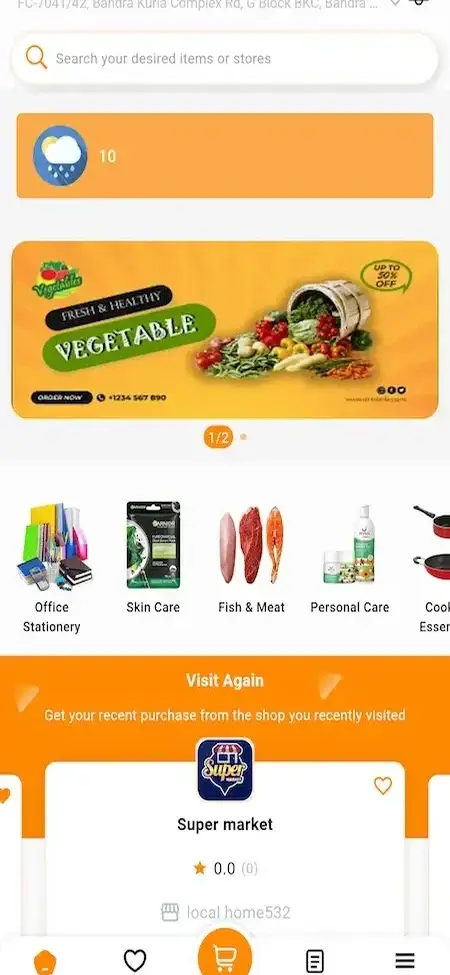
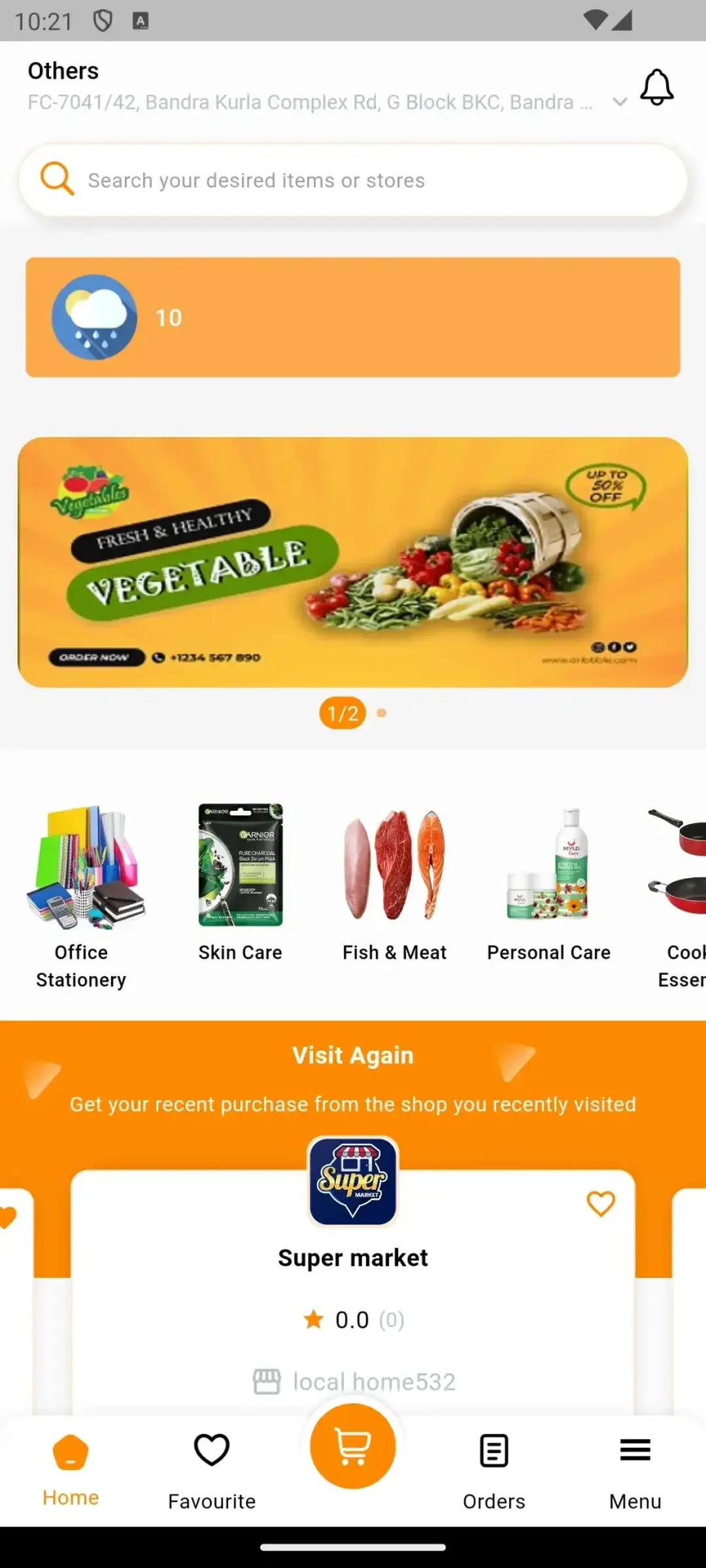
OneCart Clone customer app home screen: address bar, one search field for items and stores, a vegetable promotion banner, category tiles and a Visit Again row.
Each store runs its own paneland you see them all in one
  • 8Order Status Tilesunassigned, accepted, packaging, out for delivery, delivered, canceled, payment failed and refunded
  • 5Details on Every Store Pagecover image, logo, minimum order, rating and delivery time
  • 0%Revenue Share With Miracuvesno per-store fee and no slice of any order, delivered or taken away
  • 3Shopper Rewardsa wallet with a top-up bonus, loyalty points, Refer & Earn
  • 6Days to Launchand if the delay is ours, we keep going free
  • $2,499Paid Once, Not Rentedsource code yours, no per-seat fee, no monthly rental

Live in six working days, or we keep working free until you launch. Every build carries 60 days guidance, 6 months bug fixes and 12 months updates.Verify every figure

Any Shelf, Not Only Groceries

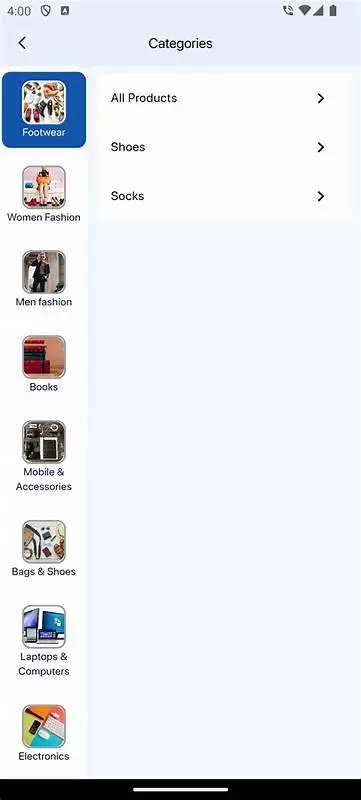
The category tree is not limited to food: the demo lists footwear, books, electronics, laptops and fashion beside fresh items, each with its own units.

A Live Order Bar on Home

While an order is open, a bar above the tabs shows its status and number, right on the home screen.

Gateways You Attach

Cards and local wallets go through the gateways on your own merchant account, the wallet balance can pay for an order, and cash on delivery shows only while the admin leaves it on.

Planning one app that brings several stores together?Talk to Product Expert

Chosen by 6,000+ clients across the globe

Miracuves is listed by Expertise.com as a managed IT service provider.Miracuves is an official member of the Forbes Business Council.Miracuves is a verified agency on DesignRush, listed among top design agencies in India.Miracuves is reviewed on Trustpilot as a software development company.Miracuves is listed by The Manifest among top managed software development companies.Miracuves is listed by DesignRush as a top software development company.Miracuves is recognized by GoodFirms as a top software development company.Miracuves is ranked among the top 1000 companies globally by Clutch.Miracuves is a top managed service provider in the United States on Clutch.

01See it live

Hands-On

Try the OneCart Clone in Three Roles: Shopper, Store Owner and Courier

Miracuves' OneCart clone demo gives every role its own login. The shopper app lists stores and items side by side, the store app and the delivery partner app belong to the two people who prepare and carry an order, and the web demo adds the public storefront plus sign-in pages for the panels. Begin as a shopper, then view the same order from the other chairs.
OneCart Clone customer app home screen with search, a promotion banner, category tiles, a Visit Again store card and an order-confirmed bar above the tab bar.OneCart Clone customer app list of Best Stores Nearby with logo, distance, starting price and rating, followed by Most Popular Items and Best Reviewed Items.
Shopper app

The OneCart Clone in a Shopper's Hand

Type in an address, search items and stores in one box, open Best Stores Nearby, enter a store and carry on to checkout, where home delivery or take away is picked.

  1. 1Get the shopper app onto a phone
  2. 2Sign in with the demo login shown here
  3. 3Visit Home, a store, Checkout and the account hub
Customer login:+91 9876543210 | User_321
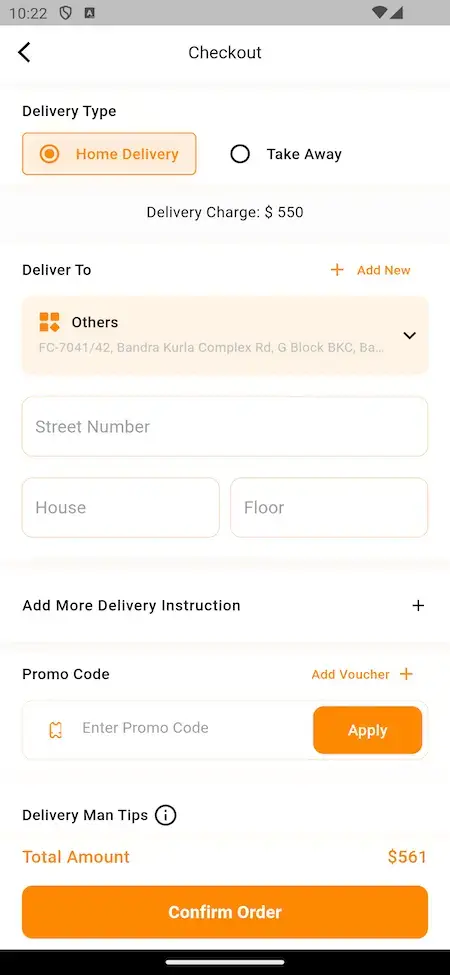
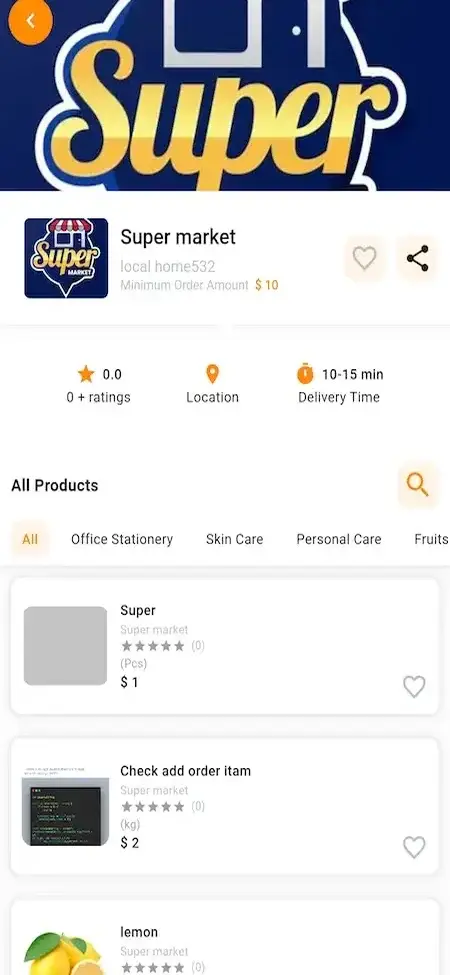
OneCart Clone store page in the customer app: store cover and logo, minimum order amount, rating, delivery time, category chips and an All Products list with prices.OneCart Clone checkout screen: Home Delivery or Take Away, delivery charge, delivery address, delivery instructions, promo code, delivery man tips and a Confirm Order button.
Store + courier

The Apps Behind the Counter and on the Road

A store owner deals with orders and products in the store app, while a delivery man collects and completes drops in the delivery app. Whatever either does is reflected in the shopper screens you just saw.

  1. 1Choose either the store or the delivery app
  2. 2Use the login listed beside it
  3. 3Follow one order from that side
Store and courier access:Store: grocery@demo.com | Store_321
Delivery man: +91 9876543211 | Driver_321
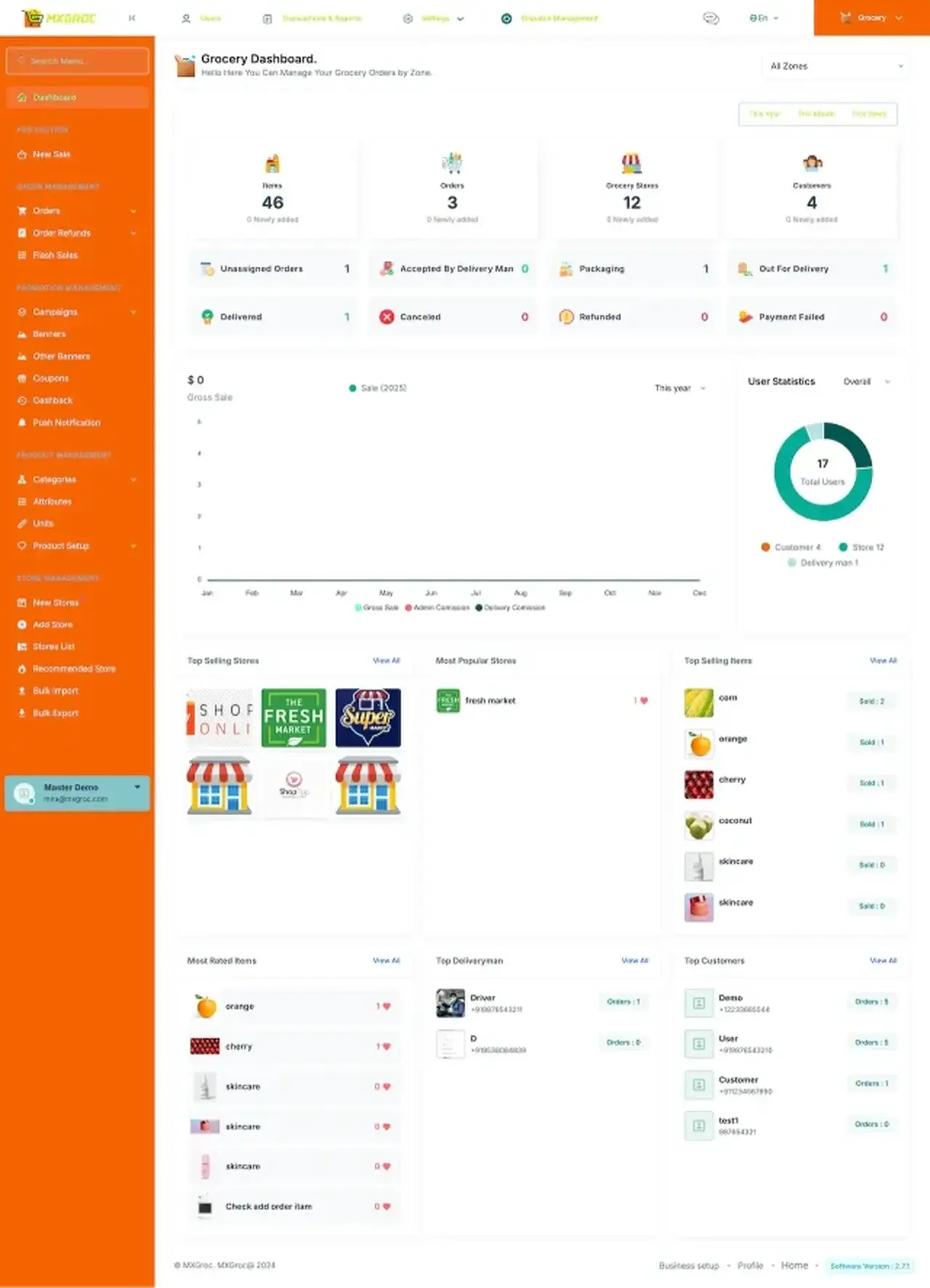
OneCart Clone admin dashboard: item, order, store and customer counts, order status tiles, a sales chart, user statistics and ranked stores, items, delivery men and customers.
Browser demo

The Storefront and Two Panel Sign-In Pages

The public storefront is the browser side of the shopper experience, and the demo keeps separate sign-in pages for the admin panel and the store panel. Their access details are shared once you book a call.

  1. 1Visit the demo website in another window
  2. 2Scroll through the public storefront
  3. 3Ask for panel access while booking
Panel access:shared on a guided call
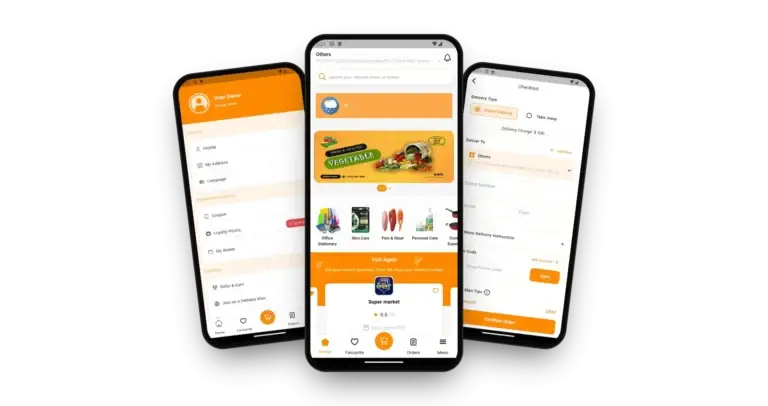
OneCart Clone on three phones: the shopper home with promo banner, categories and visited shop, the shopper menu with coupons, loyalty points and earnings and the checkout with delivery type, promo code and total

See It With Us

OneCart Clone Walkthrough: One Shopper, Several Stores, One Admin Console

A marketplace is easiest to judge while it runs. Over roughly thirty minutes we open the shopper app and visit a couple of stores, switch to the panel one of those stores uses, and end on the admin dashboard, relating every screen to the business you intend to run: which store types come first, how many you start with and where the first zone sits.

Arrange a Live Demo

The Screens

Screens From a Multi-Store App Like OneCart: Eight Shopper Views Plus the Operator Dashboard

Genuine screens from the demo app, in the order a shopper meets them: stores first, then one store, an item, checkout and the account area. The final tab shows the dashboard an operator opens to see every store at once.
OneCart Clone customer app home screen with search, a promotion banner, category tiles, a Visit Again store card and an order-confirmed bar above the tab bar.
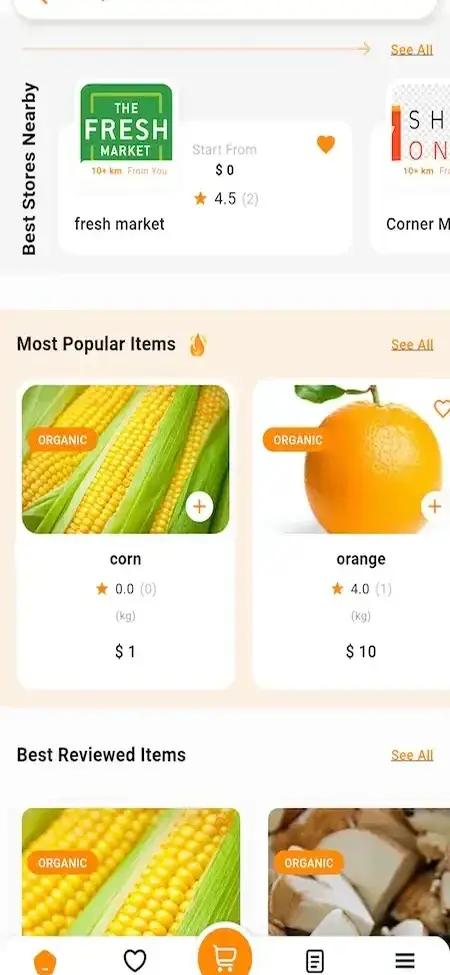
OneCart Clone customer app list of Best Stores Nearby with logo, distance, starting price and rating, followed by Most Popular Items and Best Reviewed Items.
OneCart Clone store page in the customer app: store cover and logo, minimum order amount, rating, delivery time, category chips and an All Products list with prices.
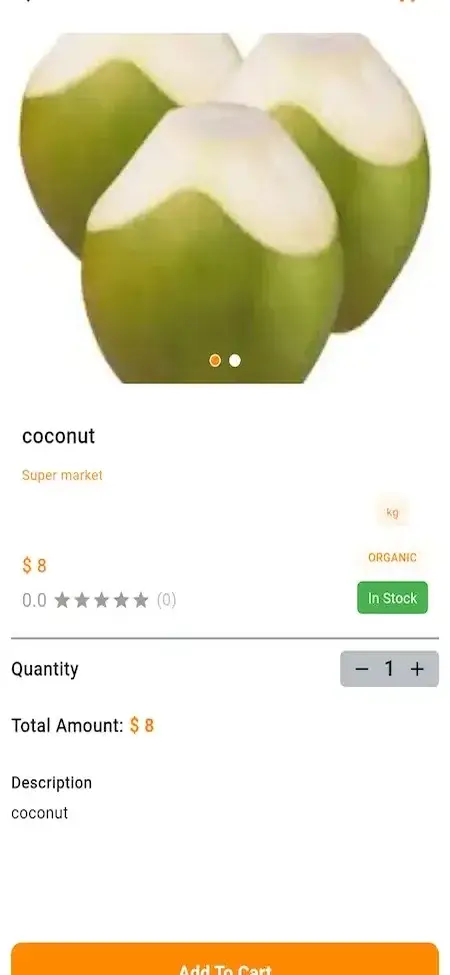
OneCart Clone item screen: product photos, store name, price, unit, organic tag, in-stock label, quantity stepper, total amount and an Add To Cart button.
OneCart Clone checkout screen: Home Delivery or Take Away, delivery charge, delivery address, delivery instructions, promo code, delivery man tips and a Confirm Order button.
OneCart Clone categories screen: a column of category icons such as Footwear, Women Fashion, Books and Electronics beside the product groups of the chosen category.
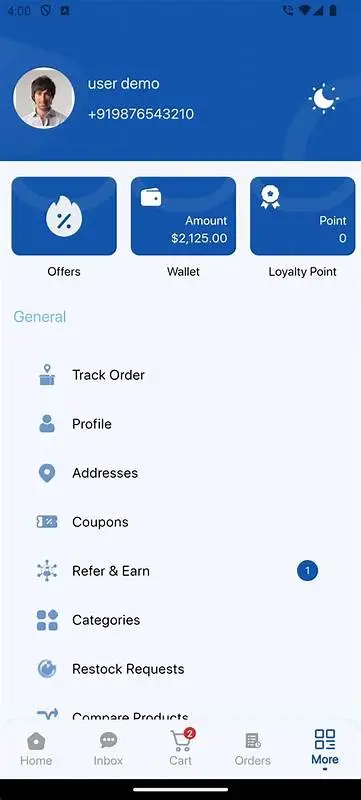
OneCart Clone account hub: offers, wallet and loyalty point tiles above a list with Track Order, Addresses, Coupons, Refer and Earn, Categories and Restock Requests.
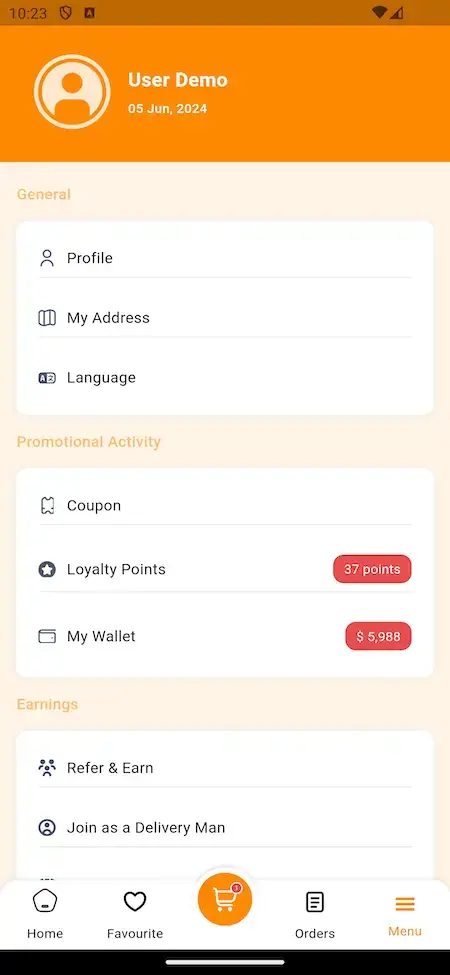
OneCart Clone menu screen: profile, address and language entries, then coupon, loyalty points and wallet balance, then refer and earn and join as a delivery man.
8 screens · scroll →
OneCart Clone admin dashboard: item, order, store and customer counts, order status tiles, a sales chart, user statistics and ranked stores, items, delivery men and customers.
1 screen

Eight shopper screens run from the first search to the account menu, and the operator dashboard totals what each store has sold.

Explore Our Solutions

02Proof

In Their Words

OneCart Clone Client Reviews: What Operators Said About Starting on a Miracuves Base

Three of these four delivery operators went live inside a month; Speedyven launched in seven weeks. Talokitoko, Click2Deliver and Makaalu all say the base was already built, and Speedyven says the same of its rider app and dispatch.

CCharles EveillardManaging Partner, Izi Technologies
“Talokitoko is grocery and food delivery for the African diaspora market in Europe. The rider app, dispatch and the merchant console were already built, so we spent the engagement on our own local payment mix, the vendor onboarding flow and the regions we actually operate in. The platform was live inside a month, which was months faster than our internal estimate.”
CClick2Deliver TeamFounding team, Click2Deliver
“Two order types, one courier fleet. The base handled multi-vertical ordering, so the work was our merchant mix and the grocery-specific substitution and weight rules. Live inside a month.”
MMustafa H.CTO, Speedyven Networks
“Speedyven is a hyperlocal courier network — packages, food, and same-day essentials across a few metros. The dispatch and rider app were the parts where we needed to move fastest, because riders have low tolerance for clunky tools. Miracuves's Delivery Genie base gave us the rider app, the dispatch console, and live tracking. We added our custom surge-pricing engine, our multi-merchant order router, and a custom rider-incentives module. We launched in 7 weeks. Rider activation is high and the platform's been stable through weekend peaks.”
MMakaalu TeamFounding team, Makaalu
“We needed three apps that agree with each other: customer, driver and store. The shared state model was already built, which is the part people underestimate. Live inside a month with all three in the stores.”
Read More Client TestimonialsOperators and founders, unedited

Check It Yourself

OneCart Clone Case Study: The Evidence We Have and How You Can Test It

What proof exists for this product today, set out directly, and how you can check it before spending a cent.

Case Study
This exact product has no named client launch on record

No client has published a case study for this build, so we show none and have made none up. Below you will find ways to check the product yourself, and a plain note on what we refuse to count as proof.

Not publishedNamed client
Demo + callWay to verify
Multi-storeBusiness model
3Role apps
4Web surfaces
6Working days, base build
OneCart Clone admin dashboard: item, order, store and customer counts, order status tiles, a sales chart, user statistics and ranked stores, items, delivery men and customers.
Challenges
  • Independent stores must read as one app from the shopper side
  • Each store wants its own prices, stock and minimum order, kept apart from the rest
  • The operator needs one overview of orders, stores and commission
Goal
  • Enter two demo stores and compare how each presents itself
  • Judge store sign-up and approval against your own onboarding plan
  • Look through the source for whatever a demo cannot display
Solution by Miracuves
  • Test accounts for all three apps
  • A storefront plus sign-in pages for two web panels
  • A walk through the dashboard with our team
  • Release notes from 14.0 up to 15.0
  • A price in writing first, then six days of work

An invented client, a borrowed logo or an unverifiable number will never stand in for proof here. Once a real launch of this product is published, it receives its own case study in this spot.Miracuves · How we treat proof

Look at real portfolio workDelivery projects, groceries among them, completed on sister Miracuves bases.

03The product

The Product

What a OneCart-Like App Puts in Your Hands: a Multi-Store Grocery Marketplace

Built ready-made by Miracuves, this OneCart clone is a multi-vendor marketplace that puts several stores in one app. A shopper enters an address, searches items and stores in one box and walks into the store that fits. Stores run their own catalogs, delivery men carry the orders, and an admin panel handles approvals, orders and commission.

OneCart Clone on three phones: the shopper home with promo banner, categories and visited shop, the shopper menu with coupons, loyalty points and earnings and the checkout with delivery type, promo code and total

Many Stores, One Front Door

Different kinds of store share one list, and a shopper hops between them without leaving the app or logging in again.

Source You Can Open

You get the entire codebase unencrypted. Your developers may rework any screen or flow later, and no per-seat licence fee applies.

Add-Ons Stay Add-Ons

Four extras are priced separately: a virtual assistant, a community wishlist, recipe import and smart shopping lists. Not one of them is part of the base.

Under the Surface

What Does a OneCart Clone Script Contain?

In an aggregator the difficult part sits in the middle: many sellers whose prices, units and stock differ, all presented to the shopper as one catalog. The shopper journey and the delivery flow that surround that middle are finished too.

OneCart Clone admin dashboard: item, order, store and customer counts, order status tiles, a sales chart, user statistics and ranked stores, items, delivery men and customers.
  1. 01A marketplace whose stores each have a page and a catalog
  2. 02One search box for items and stores on the first screen
  3. 03A checkout that offers home delivery or take away
  4. 04Apps for shoppers, for stores and for delivery men
  5. 05An admin dashboard covering orders, stores and money

The package contains three phone apps (shopper, store, delivery man), four browser surfaces (a storefront plus a panel for admin, stores and couriers) and the complete Flutter and web source.

The Feature List

OneCart Clone Features: Search, Store Pages, Checkout, Store Roster, Delivery, Deals, Dashboard & Settings

Everything listed here ships in the Miracuves OneCart clone app and can be opened in the demo, spotted on the dashboard or read in a release note. Anything that needs its own module is gathered under the add-ons lower down.

Feature 01 / 11

One Search Across Stores

Opening the app shows an address bar with one search box that covers items and stores alike. Banners, category tiles and a Visit Again row follow, and a slim bar tracks any order that is still open.

  • The top bar carries the saved delivery address and a bell for alerts
  • One search field is labeled for items or stores
  • Promotion banners rotate above the row of category tiles
  • Demo tiles include Office Stationery, Skin Care, Fish & Meat and Personal Care
  • Visit Again brings back the stores a shopper used recently
  • A bar above the tabs reports the status and number of the open order
  • The tab bar offers Home, Favourite, the cart, Orders and Menu
  • Best Stores Nearby gives every store a logo, a distance, a starting price and a rating
  • Most Popular and Best Reviewed Items carry an organic tag, a unit and an add button
Feature 02 / 11

Store Pages With Their Own Terms

Each store gets a page: cover image, logo, minimum order amount, rating and delivery time, followed by a searchable product list under category chips.

  • The page begins with the cover image and the logo
  • A minimum order amount is printed under the store name
  • Rating, location and a delivery time such as 10-15 min sit in one row
  • Favourite and share buttons accompany the name
  • An All Products list has a search icon and category chips
  • Every product row shows rating, unit and price
  • Admin and sellers can each set a minimum order value (v14.0)
  • Stores maintain their catalogs in the store panel or the store app
  • Open the store from Best Stores Nearby, Visit Again or the search box
Feature 03 / 11

Items, Units & Category Trees

An item screen shows photos, price, unit, stock state and a quantity stepper. Behind the scenes the admin keeps shared lists of categories, attributes and units, and the tree is not limited to groceries.

  • Several photos may be attached to one item and swiped through
  • Price, unit (kg or pcs) and an organic tag appear together
  • An In Stock label, a quantity stepper and a running total sit under the photos
  • Description text and an Add To Cart button close the screen
  • The demo tree holds Footwear, Women Fashion, Men fashion, Books, Mobile & Accessories, Bags & Shoes, Laptops & Computers and Electronics
  • Categories, Attributes, Units and Product Setup are menus under Product Management
  • Store Management offers Bulk Import and Bulk Export for stores
Feature 04 / 11

Checkout: Delivery or Take Away

Checkout presents Home Delivery and Take Away as two choices, prints the delivery charge, collects an address, a promo code and an optional courier tip, and finishes on one Confirm Order button.

  • Delivery Type switches between Home Delivery and Take Away
  • The delivery charge is displayed before the total
  • Deliver To lists saved addresses, with Add New and fields for street, house and floor
  • An extra field takes delivery instructions
  • The promo code field comes with Add Voucher and Apply
  • Delivery Man Tips is one line of the total
  • Selected cart lines can be bought alone while the others stay in the cart (v14.6)
  • Buy Now checks out separately and leaves the cart untouched (v14.6)
  • Guests can check out, with a tick box that creates an account (v14.0, v14.6)
  • A minimum order value and a free-delivery threshold can be configured (v14.0)
  • An earlier order can be repeated from the order history (v14.0)
Feature 05 / 11

Store Roster & Approval

Stores apply and wait for the admin to approve them before running a panel of their own, and the admin may also add one manually. The dashboard counts the stores and shows which ones sell most.

  • Store Management groups New Stores, Add Store and Stores List
  • New Stores is where applications wait for a decision
  • Recommended Store flags the stores the admin wants to push
  • Bulk Import and Bulk Export help when the roster grows long
  • The admin's own shop can head the vendor list (v14.5)
  • Block, unblock, approve and deny actions e-mail the person concerned (v14.5)
  • The seller registration form was made more informative (v14.6)
  • The dashboard counts stores and ranks Top Selling Stores and Most Popular Stores
  • Every store has a panel and an app of its own
Feature 06 / 11

Orders, Dispatch & Delivery

An order moves across a tracking map of five stages and across eight status tiles on the dashboard. Delivery men sign up in the app and wait for approval before taking drops, and the release notes mention image and OTP verification.

  • Tracking runs through five stages: it starts at Order Placed, passes Preparing Item and Delivery on the Way, and ends at Delivered
  • The home screen carries a live order bar
  • Status tiles tally unassigned, packaging, out-for-delivery, delivered, canceled, payment-failed and refunded orders
  • Dispatch Management is reached from the admin top bar
  • Couriers can sign up through Join as a Delivery Man in the account menu
  • Delivery men are vetted and approved before any order reaches them
  • Top Deliveryman ranks couriers by orders handled
  • A handover check with an image and an OTP is named in the v14.0 notes
Feature 07 / 11

Deals, Banners & Clearance

Campaigns, banners, coupons and promotions, cashback, push messages and flash sales each have an admin menu. From v15.0 a clearance section can display discounted stock on store pages and on the home screen.

  • Clearance discounts show on store detail pages and on the home screen (v15.0)
  • The product page gained a call-to-action area (v15.0)
  • A Campaigns menu under Promotion Management
  • Banners and Other Banners are separate menus, with Coupons and Cashback beside them
  • Push Notification has a menu, and a tapped message can open a set page (v14.8)
  • A Flash Sales menu exists, and a single deal can hold many products (v14.7)
Feature 08 / 11

Wallet, Points & Referral

The account area gathers a wallet, loyalty points, coupons and Refer & Earn, so a shopper has several reasons to come back to the same marketplace.

  • Offers, Wallet and Loyalty Point tiles head the account hub
  • Shoppers fund the wallet from web and app (v14.0)
  • Top-ups can earn a bonus (v14.0)
  • Refer & Earn pays once the invited friend's first order has been delivered (v14.0)
  • Coupons are listed in the account menu
  • My Address, Language and Profile share that list
Feature 09 / 11

Reviews, Chat & Restock

Shoppers rate items and stores, sellers can reply, and chat reaches the admin team. A restock request lets a shopper ask for a missing item and learn when it returns.

  • Ratings and review counts show on stores and items
  • Sellers may answer a review (v14.7)
  • The Inbox tab on the account hub opens chat, and shoppers can write to the admin (v14.4)
  • Admin-side and seller-side chat received improvements (v14.5)
  • Restock Requests is an entry on the account hub
  • The admin and the store can each handle a restock request, and the shopper receives a notice (v14.9)
  • Low stock raises a pop-up in the admin and vendor panels (v14.6)
Feature 10 / 11

Dashboard & Zones

The grocery dashboard opens with an All Zones selector and counters for items, orders, stores and customers, followed by a sales chart, user statistics and ranked lists.

  • A zone selector sits beside This Year, This Month and This Week filters
  • Counters show Items, Orders, Grocery Stores and Customers
  • A gross sales chart draws admin commission and delivery commission
  • User Statistics divide shoppers, stores and delivery men
  • Ranked lists cover top stores, top items, most-rated items, delivery men and customers
  • Transactions & Reports have menus of their own
Feature 11 / 11

Settings, Sign-In & Tools

Business setup, sign-in methods, payments, languages and tags live in the settings, and a counter-style New Sale screen is there for walk-in customers.

  • The admin chooses manual, OTP and social sign-in (v14.8)
  • Cash on delivery can be switched off (v15.0)
  • Amazon S3 can serve as file storage (v14.7)
  • New Sale is a point-of-sale screen for admins, store panels and the store app (v14.9)
  • Google and social pixels connect alongside Tag Manager and Analytics (v15.0)
  • Maintenance mode can be pointed at a single module (v14.8)

Your share of the work: Apple and Google developer accounts that are verified, hosting plus a domain, your logo and legal pages, third-party keys where needed and a gateway account with its KYC done. We handle rebranding and deployment, and the app stores review on their own timetable, which sits outside our 6 days of building.

Chat With Our Team

Income Lines

How a OneCart Clone Makes Money: Store Commission, Pickup Fees, Delivery Charges, Promoted Stores & Wallet Top-Ups

A multi-store app like OneCart can earn from several directions, and Miracuves gives each its own setting, so adjusting one leaves the others as they were.

Early on, commission and delivery charges tend to carry the business, and featured stores, campaign slots and wallet balances join in once traffic steadies. Every rate is set by you, zone by zone, and Miracuves takes no cut of what the stores sell.

  1. 01

    Commission Per Order

    One store commission percentage is set by you. Every store order is charged at that rate, the store receives the remainder, and your income rises with order volume across all stores.

  2. 02

    Pickup Orders

    A shopper can choose Take Away at checkout. The trip to the door disappears while the order still passes through your platform, and published marketplace plans price pickup lower, which is a helpful yardstick for your own rate.

  3. 03

    Delivery Charges & Free-Delivery Value

    The delivery charge, the minimum order value and the total above which delivery costs nothing are all settings, so small baskets pay for their own trip and large baskets travel free.

  4. 04

    Promoted Stores & Banners

    The Recommended Store option and the banner menus open up home-screen space that stores wanting extra visibility may be willing to buy.

  5. 05

    Campaign & Flash-Deal Slots

    Campaigns, flash sales, coupons and cashback are tools in the admin. Whether a store pays to take part is for you to decide, and no public rate exists for it.

  6. 06

    Wallet Top-Ups

    Shoppers can load a wallet, with a bonus if you add one, and that money stays on your platform until they spend it.

Public numbers behind five income lines of a multi-store marketplace, sourced from merchant pricing pages, an annual report and a card processor's price list.
Income lineHow it is chargedTake rateTypical take rateWhat limits it
Commission Per OrderThe operator retains a share of every store order before paying the store.Published marketplace plans start at 15% (DoorDash Basic) and top out at 30% (the highest Uber Eats and DoorDash plans) for a delivery order, and Instacart's filed transaction revenue equals about 7.2% of order value.Whatever the store could net on competing marketplaces. Both pricing pages note that rates can vary by market.
Pickup OrdersA fee on an order the shopper collects at the store rather than receiving at the door.Uber Eats lists a 7% pickup fee (10% where in-store prices are not validated), and DoorDash lists 6% on all of its plans.Because pickup spares the platform a delivery, stores will measure your rate against these published ones.
Delivery Charges & Free-Delivery ValueA per-order charge that falls to zero once the basket reaches a chosen value.No dollar figure is given for the fee itself. Members of Instacart's paid plan are charged no delivery fee on orders of $10 or more at a retailer.The basket size where skipping the charge still pays for the trip. For people outside the paid plan, Instacart ties the fee to the retailer, the delivery window and the basket total.
Promoted Stores & BannersA paid slot on the home screen or in a campaign, added to the store's commission.Advertising and other revenue at Instacart equals about 2.9% of order value and total revenue about 10.1% (our sums on its 10-K).The attention a slot really wins for the store. Instacart puts its advertising investment rate at 2.9%, effectively level with the year before, so this income follows volume.
Wallet Top-UpsThe card processor takes a fee on each top-up, and you either pass it on or absorb it.The published US price for a card payment at Stripe is 2.9% plus 30 cents.Gateway, country and card mix. The top-up bonus is a cost you pick yourself, so no public rate covers it.

Reading the table. Commission and pickup percentages are taken from the merchant pricing pages of Uber Eats and DoorDash, while the free-delivery rule appears on an Instacart help page. The shares of order value (7.2%, 2.9% and 10.1%) are our own sums on numbers printed in the Instacart annual report on Form 10-K, and the Stripe card rate is stated on one of its support pages. Take every figure as one input to your model. None is an offer or a forecast of income, and your own rates are chosen in the admin panel.

Revenue Model

OneCart Clone Revenue Model, Stage by Stage

Miracuves gives the OneCart clone six income lines, from per-order commission and Take Away fees to campaign slots, and each waits in the admin until your store roster can carry it.

Launch

In one district, commission on every store order and the delivery charge cover hosting and support, while a minimum order keeps small baskets worth the trip.

Traction

As the city splits into zones, Take Away orders reach shoppers who live near a store, and promoted stores begin paying for home-screen space.

Scale

Across a region, you can sell stores flash-deal and campaign places or the Recommended Store spot, while top-up wallet balances stay on your platform, on top of commission in every zone.

Commission, delivery charge and minimum order are set per zone in the admin, and Miracuves keeps 0% of every store order.

Looking for a revenue plan tailored to your marketplace?Design My Revenue Model

The Back Office

White-Label OneCart App Admin Panel: Stores, Orders, Dispatch, Promotions and Reports in a Single Console

The admin of a Miracuves OneCart clone lands on a grocery dashboard that answers the day's first questions: how many stores are listed, which orders nobody has taken, what has sold and who has applied.

OneCart Clone admin dashboard: item, order, store and customer counts, order status tiles, a sales chart, user statistics and ranked stores, items, delivery men and customers.

Menus Inside the Admin Panel

  • 01

    Zone-Aware Dashboard

    With the All Zones selector set to one zone, the grocery dashboard shows just that area. Counters cover items, orders, stores and customers, and the gross sales chart separates admin commission from delivery commission.

  • 02

    Order Status Tiles

    A row of eight tiles files orders by state, from unassigned and accepted through packaging and out for delivery to delivered, canceled, payment failed and refunded.

  • 03

    Store Management

    Applications wait under New Stores, Add Store creates one manually, Stores List displays the roster, Recommended Store lifts a few, and Bulk Import and Export handle large batches.

  • 04

    Catalog Setup

    Product Management gathers Categories, Attributes, Units and Product Setup, and the top-selling and most-rated item lists reveal what really moves.

  • 05

    Dispatch & People

    Dispatch Management opens from the top bar, the Top Deliveryman and Top Customers lists rank activity, and user statistics divide shoppers, stores and delivery men.

  • 06

    Promotion Management

    One sidebar heading holds Campaigns, Banners, Other Banners, Coupons, Cashback and Push Notification, and Flash Sales has its place next to Orders.

  • 07

    Money Menus

    Order Refunds, Transactions & Reports and the commission lines on the sales chart tell you what came in, what went back and what stayed with you.

  • 08

    Counter Sale & Settings

    New Sale works as a point-of-sale screen, Business setup keeps the global settings, and a language selector lives in the top bar.

Where the Money Goes

Finance menus show how the money of an order moves, from what the shopper pays to what the store is owed.

  • Wallet balance can settle an order
  • Refunds have a menu, and v15.0 restyled their details page
  • Transactions & Reports each have a menu
  • Admin commission and delivery commission are charted separately

Settings & Switches

What stands behind the public site and the day-to-day running.

  • Business setup keeps the global settings
  • Cash on delivery can be disabled
  • A language selector is in the top bar
  • Maintenance mode can be pointed at one module

Console missing a piece? An added report, a different payout cycle, more languages or a tailored approval step is priced as a separate job. Describe the need and a written estimate follows.

Ask About Console Changes

04Package and price

What You Receive

What Comes in the Package: Source Code, Three Apps, Four Web Surfaces and Deployment

What Miracuves delivers already works as a marketplace, so you are never handed loose components: three apps, a storefront, panels for admin, stores and delivery staff, plus the entire codebase, which is yours without conditions. The ongoing bills belong to your providers alone: gateway charges on card orders, messaging for sign-in codes and order updates, map usage for addresses and tracking, server and domain costs, and Apple and Google developer accounts for three apps.

01

The Complete Source

Web and mobile code come readable and unencrypted, so your developers can adjust whatever the next phase of the business needs.

  • Unencrypted web platform code
  • Flutter projects covering Android and iOS
  • Yours to modify, extend and redeploy
  • Project codes arrive together with the source
02

A Public Storefront

A responsive site that introduces the marketplace and invites visitors to register as a shopper, a seller or a delivery man.

  • A landing page with a hero banner and feature sections
  • Calls to join as a seller or as a delivery man
  • Pages for About Us, Privacy Policy, Terms and Contact Us
  • A language selector and a Join Us link up top
03

Alerts & Messaging

Push, SMS and email notices, along with an inbox linking shoppers, sellers and the admin team.

  • Tapping a push notice can open a page you pick
  • A text-message gateway handles SMS
  • Each email follows a template you can edit
  • Chat works across the website, the apps and both staff panels
OneCart Clone admin dashboard: item, order, store and customer counts, order status tiles, a sales chart, user statistics and ranked stores, items, delivery men and customers.
04

A Panel for Every Role

Admin, store and delivery panels open in any browser: the operator gets a console, every store a workspace and each courier a screen of their own.

  • Admin: dashboard, orders, stores and reports
  • Store: catalog, orders and offers
  • Delivery: the drops given to each courier
  • Every role has its own sign-in
05

Three Role Apps

Flutter produces the shopper, store and delivery apps for Android and iOS, with one portal linking to every install.

  • Shopper app: home, stores, items, checkout and menu
  • Store app: one shop's orders and stock
  • Delivery app: drops and earnings
  • Store listings go under your own developer accounts
OneCart Clone customer app home screen with search, a promotion banner, category tiles, a Visit Again store card and an order-confirmed bar above the tab bar.
06

Wallet & Gateways

Payment gateway APIs, a wallet with an optional top-up bonus and a cash-on-delivery switch in the admin.

  • Payment gateways attached to your merchant account
  • Wallet top-ups that can earn a bonus
  • Cash on delivery can be disabled
  • Every refund has a details page
07

Roles & Checks

Separate logins and sign-in methods, sign-off for stores and couriers, user blocking and the handover check mentioned in the release notes.

  • One login each for shopper, store, delivery man and admin
  • Sign-in by password, OTP or social account, as you set it up
  • Applicants are accepted or refused, with an e-mail
  • Image-and-OTP handover check (v14.0 notes)
08

Brand & Aftercare

The look you choose on every screen, deployment carried out by us and three support periods that overlap.

  • Your logo, icons and colors on each screen
  • Deployment onto hosting you own
  • Code and project files passed to you
  • 60 days of guidance, 6 months of priority bug fixes and 12 months of updates

Prefer to test first? Log in to the demo in each role, or ask us to follow a single order from shelf to door and set it against your plan.

Chat With Our Team

Fixed Price

What Will a Ready-Made OneCart Clone Set You Back?

At a flat $2,499, the white-label OneCart Clone has no hidden tiers. Extras, new integrations and changed flows are scoped first and quoted in writing.

Most Popular

Professional

Ready-Made Launch Package
$2,499one payment
Go live in 6 days

Ideal for: Neighborhood aggregators, regional marketplaces that bring several shops online, and delivery firms that would like a store list

You receive the demo you tried, carrying your logo, icons and colors and running on hosting that you own.

Start Your Launch

Enterprise

Bespoke Work for Larger Plans
Customquote
Schedule depends on scope

Ideal for: Teams whose plan calls for one checkout across several stores, pin-code service areas, catalog sync with outside systems, delivery slots, subscriptions or a shopper role

Anything the base does not contain is built from your brief once we have agreed on scope and price.

Ask for a Quote
Development Cost

OneCart Clone Development Cost in 2026

One $2,499 payment buys the OneCart clone outright from Miracuves, with no per-store fee and no monthly rental, and six working days later the store roster, approval queue, zone dashboard, wallet and three Flutter apps run on hosting you own, source included.

$2,499 Paid once
6 working days Running on your hosting
0% Cut of store sales

Ongoing bills from your own providers

  • Gateway charges on card orders
  • Per-message fees for OTP logins and alerts
  • Map usage for addresses and tracking
  • Server and domain costs
  • App store accounts that list all three apps

Combining several stores' items in one cart, drawing delivery areas by pin code, linking a store's own stock system or booking delivery slots is quoted in writing first, with custom work usually landing in 2-8 weeks.

Compare Your Options

Ready-Made OneCart Clone vs Custom Development vs SaaS

Bringing several stores into one app can start from Miracuves' ready-made base, a custom build or a SaaS plan. This is how the three routes line up for a store aggregator.

CriteriaMiracuvesReady-Made OneCart CloneCustom DevelopmentSaaS
Launch timeSeveral stores in one app within 6 working days2-8 weeks, dated in the written scopeFast start on a fixed store template
Upfront costFlat $2,499, no hidden tiersSet by a written quoteModest entry price, then monthly billing
Source code ownershipWhole codebase handed over unencryptedNegotiated in the development contractRetained by the platform provider
CustomizationRework any store, checkout or dispatch screenShaped entirely around your briefOnly toggles and themes on offer
Ongoing feesNo revenue cut; only your providers bill youPaid support after handoverSubscription plus possible per-order charges
Branding & app-store listingAggregator apps listed under your own nameYour branding, published when builtThe listing may carry the provider's brand
Best forNeighborhood aggregators uniting local stores quicklyMerged carts or store-system sync from day oneSingle shops testing online ordering

In Practice

How Operators Use an App Like OneCart: Neighborhood Aggregators, Mixed-Goods Catalogs, Take-Away Pickups & Zone-by-Zone Launches

Each operator leans on another corner of the same OneCart clone, built once by Miracuves. A neighborhood aggregator starts at store approval, a mixed-goods marketplace starts at its category tree, and a campaign-led business starts at banners and coupons. Setup differs; the code does not.

AggregatorStoresLocal Stores Under One App

Gather the grocers, butchers and household shops of a district in one app, each with a page, a catalog and a minimum order, and let shoppers search the lot from one box.

01
OneCart Clone customer app list of Best Stores Nearby with logo, distance, starting price and rating, followed by Most Popular Items and Best Reviewed Items.
PickupDeliveryTake-Away Beside Delivery

Offer Take Away at checkout so people close to a store collect their order and those farther off get it delivered, with both kinds arriving in the same admin panel.

02
OneCart Clone checkout screen: Home Delivery or Take Away, delivery charge, delivery address, delivery instructions, promo code, delivery man tips and a Confirm Order button.
CategoriesRangeA Catalog Beyond Food

Stock the category tree with personal care, stationery, fashion or electronics beside the groceries, as the demo categories do, and sell the full range under one brand.

03
OneCart Clone categories screen: a column of category icons such as Footwear, Women Fashion, Books and Electronics beside the product groups of the chosen category.
ZonesRolloutOpening Zone by Zone

Open with the stores of a single zone, read the dashboard filtered to it, and bring in the next area once the first one is running smoothly.

04
OneCart Clone admin dashboard: item, order, store and customer counts, order status tiles, a sales chart, user statistics and ranked stores, items, delivery men and customers.
CampaignsOffersPromotion-Led Growth

Launch a campaign using banners, coupons and cashback, mark some Recommended Stores and close with flash sales that lift slow days.

05
OneCart Clone customer app home screen with search, a promotion banner, category tiles, a Visit Again store card and an order-confirmed bar above the tab bar.
LoyaltyReorderReturning Households

Bring shoppers back through Visit Again, favorite stores, repeat orders, a funded wallet, loyalty points and Refer & Earn.

06
OneCart Clone menu screen: profile, address and language entries, then coupon, loyalty points and wallet balance, then refer and earn and join as a delivery man.
Business Model

OneCart Clone Business Model: Three Ways to Run It

A OneCart clone earns from the grocers and shops it gathers into one app, and the delivered base fits three kinds of aggregator, from a single district to a regional network.

Neighborhood aggregator

The grocers, butchers and household shops of one district share a single app, and you earn commission on their sales while holding no stock.

Mixed-goods marketplace

Personal care, stationery, fashion or electronics sit beside groceries in the shared category tree, so one brand sells the full range.

Pickup-plus-delivery network

Take Away serves shoppers close to a store and home delivery serves the rest, with both order types arriving in one admin panel.

Whichever of the three you pick, the shopper, store and courier apps stay as delivered, and what shifts is the store roster you approve, your commission rate and the delivery zones on the dashboard.

One product, six ways to run it. Every one of them uses the same apps and the same admin panel. Only a few choices change: the stores you admit, the commission you set, the areas you open and the branding you apply, which leaves one codebase to maintain.

Chat With Our Team

Why Now

Why Launch a Multi-Store Marketplace in 2026?

Shoppers already buy most things on their phones, and Miracuves' OneCart clone gives a neighborhood's stores a way to meet them there. A marketplace under your own name brings the stores of a neighborhood together in a place that you control.

01

Local Stores Already Hold the Goods

Independent grocers and shops own the stock and the loyal customers but rarely an app. A marketplace app lets people find them without each one having to build its own.

02

Shoppers Compare Before They Order

The first screen lists Best Stores Nearby with distance, starting price and rating, so shoppers size stores up much as they do while walking down a high street.

03

Each Store Keeps Its Own Terms

A store owns its prices, units, minimum order and delivery time, and that independence is what keeps strong sellers on your platform.

04

One Console, Several Income Lines

Commission, delivery charges, featured stores and wallet top-ups are all controls in one admin panel, so a new income line does not need a new system.

05

Take Away Widens the Audience

Shoppers who live near a store can skip delivery altogether yet still order through your app.

06

Buying Beats Building Here

Stores, catalogs, a cart, a wallet, delivery handling and admin tools already work. In six days of build work a white-label copy is running on hosting you own.

The Platform in Figures

3

Phone Apps

4

Web Surfaces

8

Order Status Tiles

6

Days to Build

Much of a marketplace's workload sits in the plain middle: onboarding stores, tidying catalogs, watching low stock and reconciling commission. That middle has already been built.

Industries

Store Types We Support

Whoever wants the shops of an area to be seen by household buyers in a single app can use this platform. A neighborhood aggregator lists independent grocers, chains put every branch online, pharmacies and personal-care shops receive store pages, couriers add groceries to the routes they already drive, and wholesalers can list through the same catalog layout.

  1. 01Neighborhood Grocers
  2. 02Supermarket Chains
  3. 03Pharmacies
  4. 04Personal Care Shops
  5. 05Stationery & Office
  6. 06Butchers & Fish Markets
  7. 07Bakeries & Delis
  8. 08Convenience Stores
  9. 09Wholesale Suppliers
  10. 10Fashion & Electronics
  11. 11Courier Fleets
  12. 12Franchise Groups

Store approval, a catalog for each store, a checkout with delivery or take away and an admin panel wearing your name from the first screen make the Miracuves OneCart Clone a fit for many kinds of retail and grocery business.

06Under the hood

The Journey

How the OneCart Clone App Works: From First Search to Checkout

In the OneCart clone Miracuves builds, a handful of taps starts a chain of events: search, store, cart, dispatch, handover. Walk through it below from the first screen to checkout, then see what carries it.

How a Multi-Store Grocery App Like OneCart Works for a Shopper

  1. OneCart Clone customer app home screen: address bar, one search field for items and stores, a vegetable promotion banner, category tiles and a Visit Again row.
    1Search Every Store at Once

    Home holds the address bar, one box that finds items and stores together, rotating banners, category tiles and a Visit Again row.

    • The saved address on top, a bell beside it
    • A single box for items and stores
    • Banners over the category tiles
  2. OneCart Clone customer app list of Best Stores Nearby with logo, distance, starting price and rating, followed by Most Popular Items and Best Reviewed Items.
    2Compare Nearby Grocery Stores

    Best Stores Nearby lists each store with its logo, distance, starting price and rating, followed by popular and top-rated items.

    • Logo, distance and rating on each store card
    • A starting price for each store
    • Most Popular and Best Reviewed Items follow
  3. OneCart Clone store page in the customer app: store cover and logo, minimum order amount, rating, delivery time, category chips and an All Products list with prices.
    3Shop Inside One Store

    A store opens on its cover and logo with the minimum order amount, rating and delivery time stated up front, and products grouped under category chips.

    • Minimum order amount beneath the store name
    • A 10-15 min delivery time on the demo store
    • Category chips narrow the product list
  4. OneCart Clone item screen: product photos, store name, price, unit, organic tag, in-stock label, quantity stepper, total amount and an Add To Cart button.
    4Add Groceries to the Cart

    Every item screen shows photos, price and unit, whether it is in stock, and a quantity stepper, with the running total above Add To Cart.

    • Price and unit next to an organic tag
    • Quantity stepper and total amount
    • Description plus Add To Cart
  5. OneCart Clone checkout screen: Home Delivery or Take Away, delivery charge, delivery address, delivery instructions, promo code, delivery man tips and a Confirm Order button.
    5Choose Delivery or Take Away

    At checkout the shopper picks Home Delivery or Take Away, sets an address, applies a promo code, adds a courier tip and taps Confirm Order.

    • Delivery or Take Away
    • Address, instructions and promo code
    • Delivery charge and total visible before confirming
Visual Flow DiagramAddressStoresItemCheckoutDoorstep

Structure

Multi-Store Grocery App Architecture: the Route One Order Takes Across the Whole System

Discuss the Architecture
  1. Part 01

    Role-Based Surfaces

    Each role signs in to its own surface. The owner of a store works inside that store's panel and never sees the operator's controls.

  2. Part 02

    Order Lifecycle

    Five tracking stages describe the smooth route from placed to delivered, and separate dashboard tiles count the orders that stall or fail: unassigned, canceled, payment failed and refunded.

  3. Part 03

    Catalogs Per Store

    Every product is listed under one store, while the lists of categories, attributes and units are shared, so different sellers describe goods in common terms.

  4. Part 04

    Rules at Confirmation

    A store's minimum order, the delivery charge and the free-delivery value are configured beforehand and checked as the shopper reaches Confirm Order.

  5. Part 05

    Payment Trail

    Each order records its payment method, which is wallet, cash on delivery or gateway. Commission is calculated per store order, and the courier tip shows on the checkout screen.

  6. Part 06

    Handover Checkpoint

    Release 14.0 added an image-and-OTP check at the door, which gives the last stage of an order a checkpoint.

What It Runs On

What a Grocery Aggregator App Like OneCart Runs On: PHP, MySQL and Flutter

Miracuves runs the OneCart clone on PHP with Bootstrap for the web, MySQL for data and Flutter for the apps, wired to map, messaging, push, payment and translation services through your own accounts.

WEB

Browser Tier

PHP Bootstrap
  • A single web layer serves the storefront and three panels
  • Bootstrap lets pages fit any screen width
  • Caching reached front and back ends in v14.9.1
  • Every email is built from an editable template
DATABASE

Data Store

MySQL
  • MySQL stores the stores, items, orders and users
  • Queries were cached and tuned in v14.9
  • Customer exports accept filters
  • Files may be placed on Amazon S3 (v14.7)
MOBILE

Handset Apps

Flutter Android iOS
  • Flutter apps built with current dependencies
  • A separate app for shoppers, for stores and for delivery men
  • Flutter SDK 3.27.1 is the target of release 15.0
  • Store listings are submitted from your developer accounts
PAYMENTS

Money Flow

Payment APIs Wallet Cash
  • Your merchant account connects via payment APIs
  • The wallet takes top-ups and can add a bonus
  • The admin panel switches cash on delivery
  • Finishing the gateway account and its KYC is up to you
SERVICES

Third-Party APIs

Google Maps Twilio Firebase
  • Firebase powers mobile OTP sign-in (v14.8)
  • Google Maps drives address entry and map views
  • Push notices go through FCM HTTP v1 (v14.6)
  • Pixel and tag-manager support arrived in v15.0
OWNERSHIP

Your Property

Code Brand Servers
  • Unencrypted source and project codes
  • Your logo, icons and colors, applied by us
  • Deployment onto hosting you own
  • Three overlapping support periods
For your engineers:

Behind the web and admin screens run PHP with Bootstrap, MySQL keeps the records and Flutter produces the apps. Maps, SMS, push, payments and translation rely on accounts and keys of your own, entered when we deploy. A mainstream stack like this is easy to staff.

Chat With Our Team

Growth Path

Built to Scale With More Stores, More Zones and More Orders

Miracuves makes the apps and panels separate pieces from shared parts, so a longer store roster, extra zones or heavier order volume call for added capacity and a few settings, and never for a rebuild.

Stores Arrive One by One. Each new store brings a catalog and a panel and leaves the layers beneath as they were.

Zones Organize the View. The dashboard filter lets the admin read one zone's figures at a time while the marketplace spreads across more of the map.

Long Lists Stay Quick. Caching plus tuned database queries (v14.9, v14.9.1) keep store, item and order lists quick as the range grows.

Files Can Live Elsewhere. Images and other assets may sit on Amazon S3 (v14.7) rather than on the web server.

01

Stores & Zones

The dashboard can be restricted to one zone, so reaching a new area is a matter of configuration and no rebuild.

02
ZonesStoresOrders

Long Rosters of Stores

Stores may be added singly or in batches, and each keeps a panel, a catalog and orders of its own, all watched from the admin console.

  • New applications queue up for review
  • An admin can create a store manually
  • Bulk Import and Bulk Export move stores in groups
  • The Stores list shows the whole roster
03

Speed as Lists Grow

Caching reached the back end and the front end in 14.9 and 14.9.1, together with quicker database queries.

  • Caching at both ends
  • Optimized database queries
  • Settings and list APIs came first
  • Vendor Excel exports got a tidier layout
04
RolesPanelsLogins

Separate Surfaces

Storefront and apps, store panel, delivery panel and admin panel are individual pieces, so load or change in one stays within it.

  • Storefront with the apps
  • The store panel
  • The delivery panel
  • The admin panel
05

Storage Beyond the Server

The Amazon S3 connection (v14.7) lets media rest in storage you pick.

  • S3 as the file store
  • Images kept off the web server
  • Tied to an account of yours
  • Enabled from the admin
06

A Codebase That Travels

Source and project codes are yours, so a different team can operate and extend the platform whenever you choose.

Room to Customize. Sooner or later each operator wants a rule or screen peculiar to its own city. Because the source rests on a mainstream stack, your developers or ours can add it.

Thinking big for launch day? Begin with the stores and zones you can serve now, on a single deployment. If orders climb, the questions become capacity and settings, and a gap in the base is priced on its own.

Plan Your Rollout With Us

07Security and trust

Security, Stated Plainly

Marketplace Security: Who Sees What, How Login Works and Where the Limits Lie

Many shoppers and many stores leave names, addresses, order histories and payment references on a marketplace, so Miracuves gives shoppers, stores, couriers and admins separate surfaces. Four questions count: who may see what, how people log in, who gets vetted and what remains open before launch. The answers split what the platform does from what stays on your side.

  1. 01 · Access
    Who Sees What

    Shoppers, stores, delivery men and admins use separate surfaces, so a store owner has no way into the operator controls.

    • Admin Sign-In Path: Starting with v14.0 the admin login can live at an address of your choosing, replacing the default path.
  2. 02 · Login
    Login & Maintenance

    The admin switches manual, OTP and social sign-in on or off. Mobile OTP runs on Firebase, Apple login is offered, and single modules can go into maintenance mode.

    • Maintenance Switch: Selected modules can be put into maintenance mode while the admin carries on browsing the live site (v14.5, v14.8).
  3. 03 · Vetting
    Approval & Blocking

    Stores and delivery men need sign-off, and any user account can be suspended or reinstated, accepted or refused, with the person told by e-mail.

    • Store Approval: A new store sits in the New Stores queue until the admin says yes, so an unchecked seller never shows up for shoppers.
    • Delivery Man Approval: A delivery man sends documents, passes verification and receives approval before any order is routed to him.
  4. 04 · Handoff
    Checked Delivery

    Release 14.0 added a handover step, an image plus an OTP, so the last stage of an order has a check.

    • Delivery Check: An image-and-OTP check at handover arrived in v14.0, and the real flow can be watched on a guided call.
  5. 05 · Money
    Payment Routes & Refunds

    Gateway accounts that you link process card payments, cash on delivery can be turned off by the admin, and refunds get their own menu plus a details page.

    • Refund Route: Refunds are processed from the Order Refunds menu, and v15.0 gave its details page a new design.
  6. 06 · Go-live
    Before Launch

    Independent testing, fresh keys and a restore drill are booked with you ahead of launch as part of the go-live plan.

    • Launch Checklist: Before the site goes live: an independent security test, fresh keys, a backup restore proven to work and a read-through of gateway settings. Each item is scheduled with you ahead of go-live.

How the base behaves is written down, so a reviewer can compare it with the controls they inspect, and handover carries an image-and-OTP check from v14. Pen tests, new keys and a trial backup restore are dated entries in the launch schedule we agree with you. Scope is set per project. The build follows ISO 27001, SOC 2 and GDPR controls, the audit work belongs to independent audit partners, and the certificate or attestation is held by your company (scoped audit support).

Plan the Security Work With Us

Who Does What

What the Software Covers and What Operators Handle

Goods from many sellers end up in other people's homes through a marketplace. Miracuves supplies the tooling for store approval, catalogs, orders, a wallet and delivery. Which sellers may trade, what they may sell and what your market's law requires are the operator's decisions.

Software made for marketplaces, with a documented control set.

Within this section, ready refers to a feature that the demo shows, that sits on the dashboard or that a release note records. Nothing here says the platform or Miracuves has been licensed, certified or approved by anyone, and none of it counts as legal advice.

What the Software Provides

Store applications that wait for approval, a catalog per seller built on shared categories, attributes and units, low-stock warnings and restock requests, orders with a visible status, vetted delivery men, wallet, referral reward and coupons, commission, role-based logins and a reporting dashboard.

What Stays With the Operator

Your terms of service and privacy policy, which sellers you accept and what paperwork you demand of them, how disputes and refunds go beyond the defaults, payouts to stores and tax reporting.

Available as Custom Work

One checkout spanning several stores, service areas drawn by pin-code, catalog sync with outside systems, booked delivery slots, subscriptions or a shopper role are each available as scoped custom work. The image-and-OTP handover check added in v14.0 can be seen on a guided call.

Local Rules

Local law varies widely. Data privacy, consumer rights, food safety and labeling, pharmacy goods, age-restricted items, measures and delivery are all regulated by country and frequently by city, so ask local advisers about every market before orders begin.

08Extend the platform

IncludedMXGroc
  • Stores, items & baskets
  • Wallet, rewards & orders
  • Apps for three roles
  • Dashboard & reporting

How an add-on joins

  1. 1
    Choose a module

    Take one now, or return after launch once the roadmap is firmer.

  2. 2
    Quote first

    You receive a written scope and price before a line is built.

  3. 3
    Merged into your source

    Once built, the module is added to the codebase you already own.

Request a Custom Module

More Options

Optional Add-Ons for a OneCart-Style Marketplace: an Assistant, a Wishlist, Recipe Import and Smart Lists

Everything in the demo works without these. Each of the four modules below costs extra and is quoted on its own, and each earns its place only once your catalog and audience are ready for it.

  • Engagement

    Virtual Assistant

    An assistant that understands everyday language, guides shoppers around the app, answers their questions and suggests items.

    Assistant · NLP
  • Engagement

    Community Wishlist

    Shoppers name products they wish the platform carried, so actual demand shows which items and stores to recruit next.

    Wishlist · Community
  • Planning

    Recipe Integration

    Imports recipes from well-known sites or from users' own writing and puts every ingredient into the cart with one tap.

    Recipes · Cart
  • Planning

    Smart Shopping Lists

    Proposes a ready-made list drawn from past orders, saved preferences and upcoming occasions, so a blank list is rare.

    Lists · Ideas

Nearby Products

Moving Something Other Than Store Orders? See These Four.

The OneCart Clone gathers many stores into one app. Should your goods or your fleet work another way, these four Miracuves products are the nearest fit.
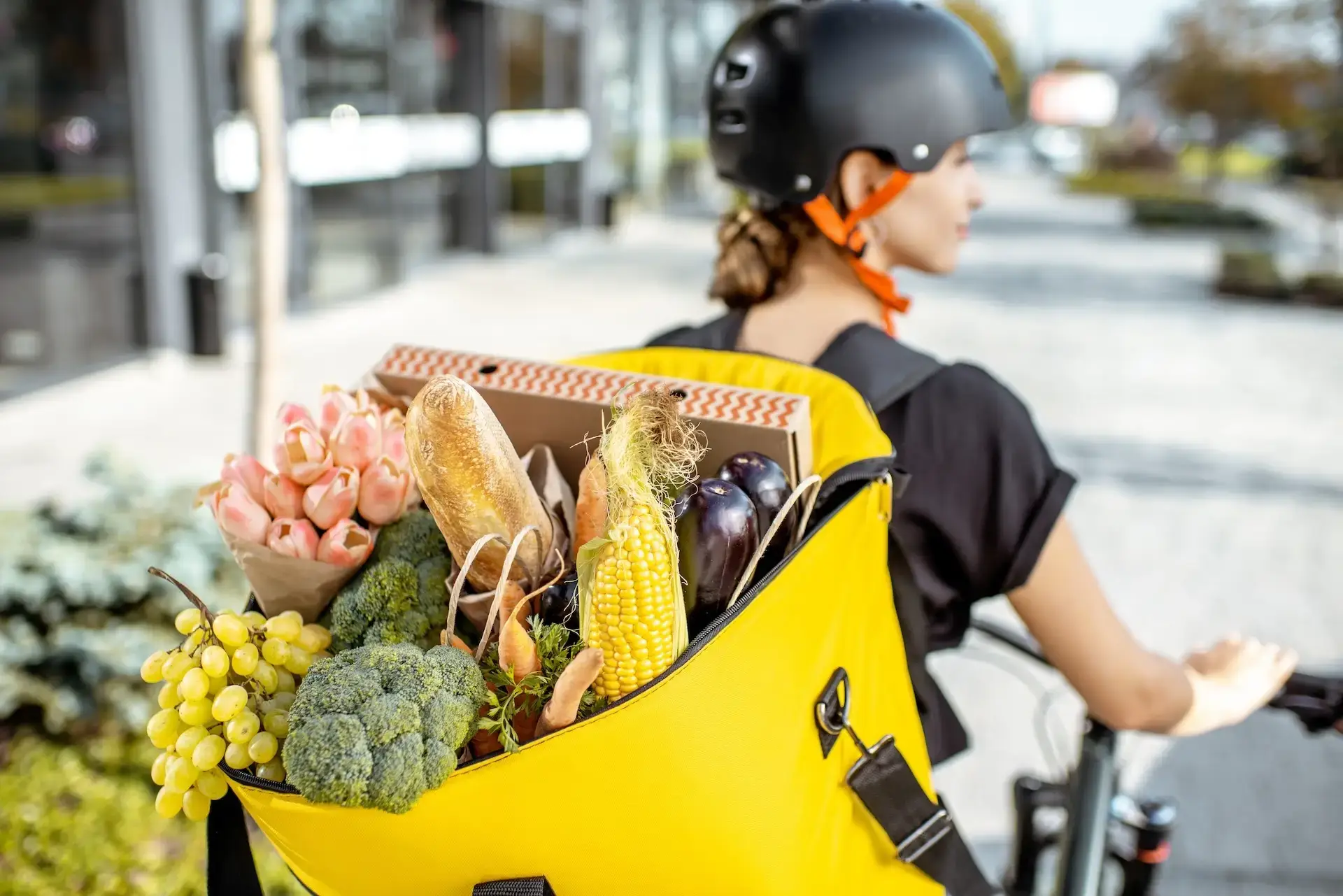
Courier delivering a box of fresh products to a doorstep, the page image of the Blinkit Clone.01
Pick it if: your priority is speed from one nearby hub, not a wide roster of storesBlinkit Clone

Fast-delivery software built around nearby hubs: branches pack the orders and riders carry them out.

Explore Solution

Kitchen worker sending out food delivery orders, the page image of the Swiggy Clone.02
Pick it if: meals and parcels must sit in the same app as the groceriesSwiggy Clone

A multi-category delivery app where meals, groceries and parcels all appear together in one place.

Explore Solution
Ubereats Clone food delivery platform shown across a laptop, a tablet and a phone.03
Pick it if: you sell cooked dishes rather than packaged goodsUbereats Clone

Ordering and delivery for restaurants, organized around menus, kitchens and couriers instead of grocery shelves.

Explore Solution
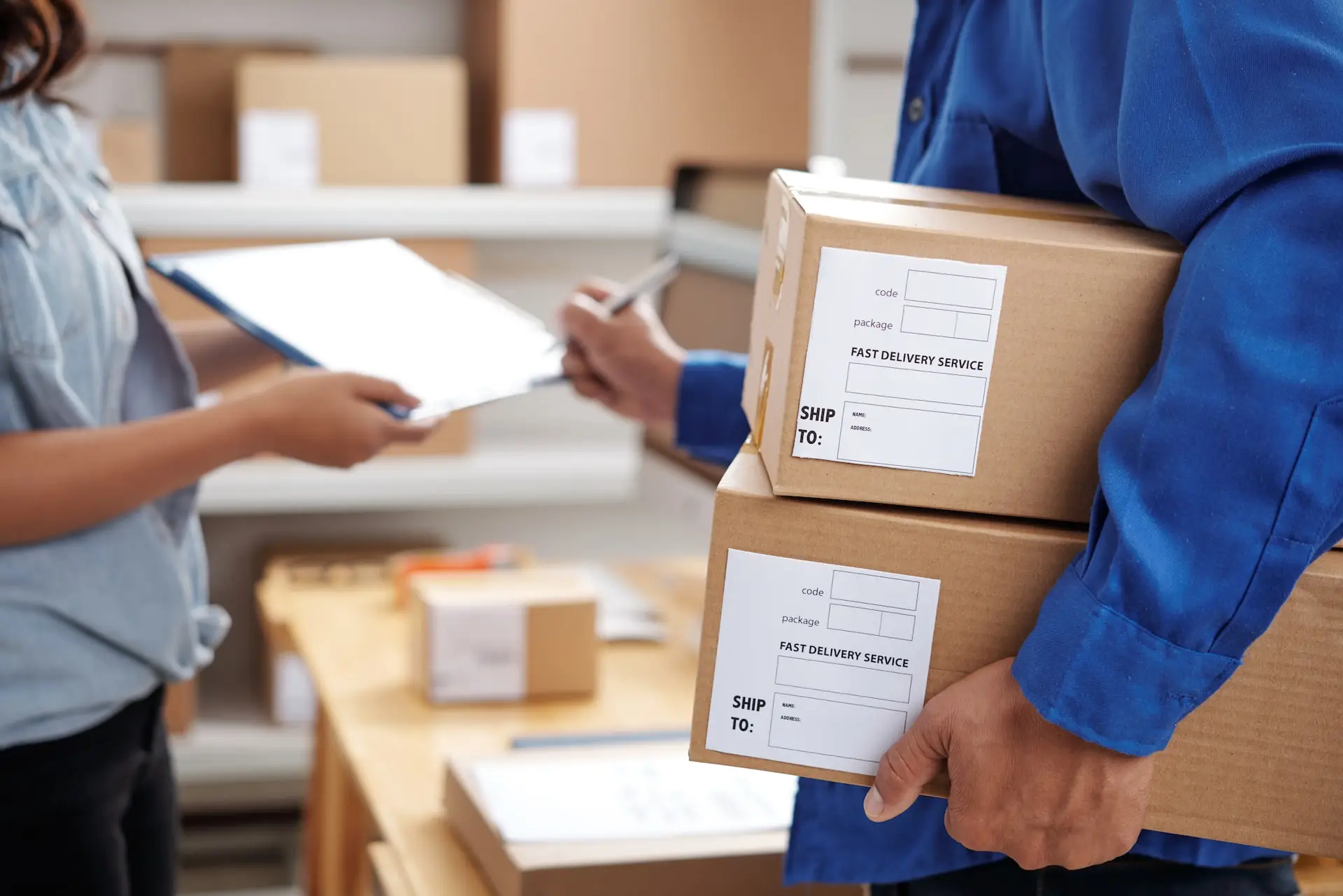
Courier carrying a parcel to a doorstep, the page image of the Uber Delivery Clone.04
Pick it if: the thing you carry is a parcel, not a basketUber Delivery Clone

Parcel-courier software with a driver app, dispatch from one console and live tracking for each job.

Explore Solution
Full catalogueExplore the 90+ ready-made products

09The business case

Market Benchmarks

Grocery Delivery Market Benchmarks - Independent 2025-2026 Data

The revenue models above are ours. The figures below are not. They come from the Instacart (Maplebear) and Walmart annual reports on Form 10-K, Kroger's full-year 2025 results and Swiggy's Q4 FY2026 shareholder letter, reproduced as published. Together they show what grocery delivery looks like at scale in the US and India, so you can test a business case against numbers you can check.

Instacart 10-K01

$37.2bn in Instacart Order Value in 2025

Maplebear, the parent of Instacart, reports in its 2025 annual report on Form 10-K that gross transaction value (GTV) increased 11 percent to $37,224 million on 338.8 million orders, up 15 percent. Revenue was $3,742 million, made up of $2,677 million in transaction revenue and $1,065 million in advertising and other revenue. Transaction revenue is about 7.2 percent of GTV.

Kroger02

$16bn+ in Kroger eCommerce Sales in 2025

Kroger reports in its fourth quarter and full-year 2025 results, released 5 March 2026, that it delivered more than $16 billion in eCommerce sales in fiscal 2025, and that adjusted eCommerce sales increased 20 percent in the fourth quarter. Kroger also reports it completed an eCommerce strategic review expected to deliver $400 million of operating profit improvement in 2026.

Swiggy03

Instamart GOV Up 68.8% to INR 7,881 Crore

Swiggy's Q4 FY2026 shareholder letter reports that quick commerce gross order value (GOV) grew 68.8 percent year on year to INR 7,881 crore, with average order value up 33 percent to INR 700 and 1,143 dark stores across 129 cities. Contribution margin improved to negative 1.8 percent of GOV, and negative 1.1 percent for March 2026.

Walmart 10-K04

eCommerce Added 4.3% to Walmart U.S. Comp Sales

Walmart's annual report on Form 10-K for the fiscal year ended 31 January 2026 states that Walmart U.S. eCommerce sales positively contributed approximately 4.3 percent to comparable sales, against 2.9 percent in fiscal 2025. Walmart attributes the growth primarily to store-fulfilled pickup and delivery, alongside customer and Walmart+ member engagement with omnichannel offerings.

Where each figure comes from.

Maplebear Inc. (Instacart), Annual report on Form 10-K for the fiscal year ended December 31, 2025, filed February 2026 - sec.gov

The Kroger Co., Kroger Reports Fourth Quarter and Full-Year 2025 Results and Announces Guidance for 2026, 5 March 2026 - s202.q4cdn.com

Swiggy Limited, Q4 FY2026 Shareholder letter, May 2026 - swiggy.com

Walmart Inc., Annual report on Form 10-K for the fiscal year ended January 31, 2026, filed March 2026 - sec.gov

All figures are the publishers’ own reported results and statements, reproduced as published. The 7.2 percent transaction-revenue ratio is our arithmetic on reported figures ($2,677 million divided by $37,224 million). They describe the market, not the performance of any platform Miracuves builds, and nothing here is a revenue projection for your business.

Commercial Logic

Marketability, Revenue Potential & Business Prospects

Any multi-store marketplace, Miracuves' OneCart clone included, has to win over two groups: the stores that list and the shoppers that buy. The points below show how the platform serves both and keeps the relationship with you.

  1. 01

    Commission on Every Store Order

    A sale at any store pays the operator a percentage, so income follows the number of stores and orders and not the size of your payroll.

  2. 02

    Several Income Lines, One Console

    Delivery charges, featured stores, campaign slots, pickup orders and wallet top-ups are switched on one by one from the admin panel, so any of them can start earning with no redesign.

  3. 03

    Relationships That Stay With You

    Store accounts, reviews, wallet balances and order histories sit in your own database, so the value accumulates with you and not on someone else's listing site.

  4. 04

    Freedom to Move

    Because you hold the full source, any later change of host, team or direction is yours to make, with no sign-off needed from anyone.

Main Revenue Levers
  • Commission Per Order
  • Pickup Orders
  • Delivery Charges & Free-Delivery Value
  • Promoted Stores & Banners
  • Campaign & Flash-Deal Slots
  • Wallet Top-Ups
Long-Term Value

Durability comes from stores that stay and shoppers who return, more than from a longer feature list.

  1. 01A store with a built catalog and reviews rarely leaves
  2. 02Favorites and a wallet balance bring shoppers back
  3. 03All of this builds up from day one inside your own database
  4. 04Screening new stores carefully adds a further layer
Example Revenue Scenarios

The cases below grow in size, and each notes which income line leads at that stage. They are tools for planning, not promises of earnings.

One District, Few Stores5Stores Listed

Commission and delivery charges cover the early running costs.

One district with a handful of stores, a few dozen households ordering, and commission plus delivery charges paying for hosting and support. An illustration of scale, nothing more.

A City in Several Zones60Stores Listed

Pickup orders and featured stores start to count next to commission.

A city divided into several zones, where pickup orders and paid home-screen slots begin to matter beside commission and the dashboard shows where effort pays. An illustration of scale, nothing more.

Regional Marketplace300Stores Listed

Campaign slots and wallet top-ups enter the mix.

A regional marketplace of many store types, in which campaign slots, featured stores and wallet top-ups add to commission over numerous zones. An illustration of scale, nothing more.

10Why Miracuves

Why Miracuves

How Miracuves Compares With Other OneCart Clone Developers

Operators can take one of four routes: an off-the-shelf multi-vendor script or multi-store shopping cart software, a freelance developer on contract, an agency engagement, or a ready-made multi-store base whose team has delivered it already. Put the same tests to each: can a store join without your developers, does each store keep its own terms, what happens at the door, and who owns readable code at handover. The OneCart Clone answers every one in its demo and its package.

What Operators Value Here

  • 01

    Store Tools Come Ready

    A store roster, approval, a panel and an app for every seller, low-stock warnings and restock requests all ship in the base, parts that many scripts shrink to a plain listing page.

  • 02

    Money Wired From Day One

    The wallet, gateway APIs and commission on each order are live from the outset, so you can trace each dollar back to its first sale.

  • 03

    Apps That Already Talk

    The three apps and the four web surfaces come pre-linked, so nobody has to join separate projects together afterwards.

  • 04

    No-Strings Source

    The full codebase and project codes reach you with no encryption, so nobody can reprice the product or change the deal afterwards.

  • 05

    Release Notes You Can Audit

    Every release records what it added, so you can verify the contents of the product instead of trusting a brochure.

  • 06

    Honest Scope Language

    Here the base, the optional extras and your own obligations (a gateway, hosting and developer accounts) are kept in three separate lists.

Development Company

How to Choose a OneCart Clone Development Company

Before hiring a builder for a OneCart-style app, check that a grocer can apply, get approved and run its orders and stock from a store panel with no developer involved.

What to look for Miracuves

  • Store onboarding without developers Sellers apply, you approve, each gets a panel and app
  • Each store keeps its terms Its own minimum order, rating and delivery time
  • Proof in the product Test logins for the shopper, store and courier apps
  • Checkout choices Home Delivery or Take Away, a promo code and a courier tip
  • Source ownership The full codebase, handed over unencrypted
  • Support after launch Guidance covers 60 days, priority bug fixes 6 months, product updates 12 months

Walk away from any vendor who

  • Gives stores only a bare seller form
  • Forces one minimum order on every store
  • Has no pickup option
  • Takes a cut of store sales
  • Holds back readable code at handover

Miracuves OneCart Clone Next to Scripts and Agency Builds

CriterionMiracuvesMiracuves OneCart CloneOff-the-Shelf ScriptAgency Build
Time to LaunchSix working days of buildingDifficult to forecastMonths, billed per task
Who Owns the CodeYou, unencryptedFrequently restrictedNormally you
Marketplace CoverageStores, catalogs, cart, checkout, wallet, tracking and chatMostly product listingsAs far as the budget stretches
Joining a StoreApplication, approval, a panel and an app for each storeOften a bare seller formCommissioned as an extra
PaymentsWallet, cash on delivery and gateway APIs includedVaries by scriptCustom integration
Operator ReportingZone-aware dashboard, refunds and reportsSparse or absentWritten on request for a fee
Security StanceRole logins, approvals and stated limitsMinimalRanges widely
Price vs Speed vs QualityA set fee, quick delivery, a base that already shipsCheap yet riskyPricey and slow
Support & Upgrades60 days of guidance, 6 months of bug fixes, 12 months of updatesSeldom includedDefined in the contract

Weak spots tend to surface in the first busy month, long after the sales call is forgotten.

Talk It Over With Us

Changelog

What Changed in Each Product Release

Newest first, for the web platform and the apps. The releases carry no dates, and modules this build lacks are not listed.

ReleaseScopeDetails
V15.08 new, 2 fixedAdded or changed
Made the Flutter apps compatible with Flutter SDK 3.27.1
Enhanced various UI elements and content across the platform.
Redesigned the refund details page for better usability and design.
Improved the user experience on the login page
Managed COD on/off from the admin panel
Made the system compatible with Google Tag Manager, Google Analytics, Meta Pixel, LinkedIn Insight Tag, TikTok Pixel, Snapchat Pixel, X (Twitter) Pixel, and Pinterest Pixel.
Added a Call-to-Action section in product details for improved engagement
Stock Clearance Discount Offer Section: Introduced a new section for stock clearance discounts in the store details and the home page.
Fixed
Resolved issues with order calculation in the POS system
Resolved multiple issues to improve overall system performance and reliability.
V14.9.16 new, 1 fixedAdded or changed
Made the Flutter app compatible with Flutter SDK 3.24.5
Improved overall user experience with UI/UX refinements
Updated system messages and labels to improve clarity and usability
Refined and optimized asset files to enhance application responsiveness and overall performance
Note: In this release, we prioritize business settings and list related APIs
Introduced caching mechanisms in both the backend and front end to enhance speed and reduce load times.
Fixed
Fixed various issues for increased stability
V14.98 new, 1 fixedAdded or changed
Made the Flutter app compatible with Flutter SDK 3.24.4
Enhanced UI and content across apps for improved user experience
Optimized database queries with caching and improved performance
Redesigned admin panel login and related pages with a modern look
Improved POS section in the admin panel, store panel and store app including a new feature to show Paid amount and change Amount
Managed export with filters for customers in the Admin Panel
Managed restock requested product list in the customer profile
Added product restocking request feature for both admin and store and Send notifications for the customer when restocked products become available
Fixed
Fixed various issues for increased stability
V14.88 new, 2 fixedAdded or changed
Made the Flutter app compatible with Flutter SDK 3.24.3
Enhanced some UI and content for apps.
Added shipping policy page
Integrated Firebase Authentication using mobile OTP
Centralized login by three login methods: Manual, OTP-based, and Social media. All options are managed by the admin.
Redesigned some UI
Added advanced maintenance mode with more detailed control options for specific modules
Managed redirection to specific pages from push notification on click.
Fixed
Fixed some issues
Improved some queries and optimized performance
V14.79 new, 3 fixedAdded or changed
Make the apps compatible with Flutter's latest version 3.22.2
Added a feature to send printable invoices via email for easier record-keeping.
Enabled adding multiple products at a time in Flash Deal & Feature Deal setup.
Enhanced chatting functionality for smoother communication.
Improved user experience across the platform.
Added a review reply feature, allowing sellers to respond to customer reviews.
Enhanced translation features for multi-language support.
Implemented an SEO section control for better search engine visibility.
Integrated 3rd party storage connection with Amazon S3 for efficient and scalable storage solutions.
Fixed
Fixed some issues in the Admin panel, Vendor panel and Website
Fixed some issues in the vendor app
Fixed known issues to enhance system stability and performance.
V14.69 new, 1 fixedAdded or changed
Made the apps compatible with Flutter SDK 3.19.6
Migrate firebase push notification API from legacy FCM APIs to HTTP v1
Managed buy now checkout separately without removing other items from the cart
Enhanced the seller registration page to be more informative and user-friendly
Create account checkmark for the guest users on the checkout page with already inputted data
Improved design and format of Excel for all vendor-related export data options
Enabled selected product checkout and ensured that remaining products stayed in the cart after placing an order
Warning with popup notification in both admin and vendor panels for low stock
Introduced custom sorting for all kinds of lists from the admin panel, with a dynamic email template for all kinds of emails
Fixed
Fixed lots of improvements related issues in both web panels and app
V14.510 new, 1 fixedAdded or changed
Made the apps compatible with Flutter SDK 3.19.4
Improved design and format of Excel for some export data options
Prioritized in-house shop to appear at the top of the vendor list
Improved overall UI interactions and design for the whole admin, store panel, apps, and website
Managed empty states across the entire system
Redesigned invoices with some custom data and translation-supported
Ability to block/unblock and approve/deny for different users with notifications via email
Added option to toggle Google Map display
Improved all chatting in the admin panel and seller panel
Allow admin to browse the website in maintenance mode
Fixed
Fixed lots of improvements related issues in both web panels and app
V14.47 new, 1 fixedAdded or changed
Made the apps compatible with Flutter SDK 3.16.9
Improved lots of database queries
Added some new mail and push notifications for different cases.
Chatting with admin option added from user website and app
Improvements on the order review section.
Optimized and restructured the full codebase for apps, and modified some business logic in both web and apps.
Improved overall UI interactions and design for the whole admin, store panel, Default theme, and apps.
Fixed
Fixed lots of improvements related issues in web panels, websites, and apps.
V14.014 new, 2 fixedAdded or changed
Made the apps compatible with flutter latest version 3.13.6
Apple login for user app
Order delivery verification by image and OTP
Dynamic url managed from admin for admin and admin's employee login (Default route is your_domain/login/admin)
Managed Refer and earn (The customer will get the amount after referral customer's first order successfully delivered)
Reorder option from previous orders
Free delivery over amount (If the order amount cross this value the delivery charge will be free)
Minimum order amount managed by both admin and seller
Delivery/ Billing address edit option
Guest checkout (Now customer can place an order with login/signup)
Add fund bonus
Add fund to wallet from user web and app
Made the app and web compatible with new payment and sms gateways addon
Redesigned the user app
Fixed
Fixed translation related issues
Fixed some small issues

Start the conversation

Your stores can share one app and keep every shopper they already have.

Book a free consultation and walk away with a firm timeline and honest answers. Winning your trust in that first conversation matters to us more than a quick sale.

  • First reply in under 2 hours
  • Free consultation
  • No lock-in contracts
  • Full source code ownership

11Learn more

Blog & Resources

Three Blog Posts for Anyone Building an App Like OneCart

Three blog posts: one comparing clone scripts, one on winning shoppers once the app is live, and one on what building such an app involves.
Basics6 questions

01Which kinds of store can the OneCart Clone bring together?

Any store that can keep a catalog: grocers, butchers and fish sellers, bakeries, personal-care and stationery shops, and even fashion or electronics sellers, because the category tree is shared and editable. The demo already mixes lines such as Fish & Meat, Skin Care and Office Stationery with Footwear and Electronics. Licensing for sensitive goods such as medicines stays with you as the operator.

02What is a OneCart Clone?

White-label marketplace software, handed over ready-made, that lets a business gather several stores in one app. Shoppers search items and stores together, each store maintains its own catalog, delivery men carry the orders and a single admin panel governs the lot. You receive three phone apps, a storefront and a set of web panels, in the same category as OneCart but with no tie to that company.

03Can I customize the OneCart Clone to suit my brand?

Branding is part of the package: your logo, icons and colors are placed on the web and on the apps. The source code becomes yours, so screens, flows and integrations can be altered later, and a change beyond the base is scoped and priced in writing before it starts.

04Is the OneCart Clone scalable for large operations?

Growth is mostly a matter of settings and capacity, because the product is built from separate pieces: a panel per role, a catalog per store and a dashboard readable zone by zone. Caching and quicker queries arrived in 14.9 and 14.9.1, and files can sit on Amazon S3. Very heavy traffic may need larger hosting, which we size with you during deployment.

05What technology stack is used to build the OneCart Clone?

Mobile apps for Android and iOS are built in Flutter. The web and admin side runs on PHP with Bootstrap, with MySQL as the database. Outside services supply maps, messaging, push, payments and translation, among them Google Maps, Twilio and Firebase, tied in through accounts and keys that belong to you.

06Do you provide technical support after deployment?

Launch day starts three coverage clocks at once. Dedicated platform guidance covers 60 days, priority bug fixes cover 6 months, and product updates cover 12 months.

Shopping & checkout9 questions

07How do I order groceries using the OneCart Clone app?

Start with an address, then search or tap a category and pick a store from Best Stores Nearby. Add items with their quantities, go to checkout, select Home Delivery or Take Away, complete the address, enter a promo code and a courier tip if wanted, and press Confirm Order.

08Can a shopper collect an order instead of having it delivered?

Checkout presents Home Delivery and Take Away as two options. If pickup is central to your plan, a guided call shows how the store is informed and how the shopper collects.

09How do I track my grocery delivery?

Open the tracking screen to see the destination on a map and five named stages, from Order Placed to Delivered, while a bar on the home screen reports any open order. Until a delivery man takes the order, the screen says that nobody has yet.

10What proves that an order was delivered?

Version 14.0 of the product lists delivery verification by image and OTP in its release notes. A guided call shows how that step works in practice before you launch.

11What payment methods are supported?

The wallet balance can pay for an order, and cash on delivery appears only if the admin leaves it on. Cards and local wallets are handled by whichever gateways you attach to your own merchant account, which means your gateway line-up sets what shoppers can use.

12How can I report issues with my order?

Problems go to the admin team through chat on the website or in the app, and an Inbox tab on the account hub opens the thread. If money needs to return to the shopper, the admin works from the Order Refunds menu and its details page.

13Can I schedule my grocery delivery for a later time?

Scheduled or express delivery windows are available as custom work, with scope and price agreed in writing first.

14Does the base cover a single checkout across stores, multiple delivery addresses, combo bundles or bulk orders?

These are available as custom work. Shoppers already search items and stores side by side and keep several saved addresses, and a merged cart across stores or an order split over addresses is built to your brief. Should your plan call for a merged cart, combos, several delivery addresses per order, bulk pricing or subscriptions, we would scope it as custom work with a written quote.

15What if the item a shopper wants is sold out?

A restock request (v14.9) lets the shopper ask for the item and receive a notice when it returns. Requests gather in the customer profile, and both the admin and the store can act on them.

Stores & catalog7 questions

16How can grocery stores register on the platform?

Registration happens in the vendor portal: the store enters business details, loads its catalog and then waits in the New Stores queue. The admin has two other routes, creating a store by hand with Add Store or importing many with Bulk Import.

17How do vendors manage their inventory and orders?

Inside the store panel or the store app a vendor edits products and prices, handles incoming orders and checks sales. Low-stock pop-ups (v14.6) warn vendor and admin panels, and the admin can follow all the stores in one console.

18Which promotions can the marketplace run?

The admin has campaign, banner, coupon, cashback, push and flash-sale menus, and since v15.0 a clearance section shows discounted stock on store pages and on the home screen. A single flash or feature deal can hold many products (v14.7).

19What commission do vendors pay per order?

Operators choose the rate in the admin panel, and the platform computes it for each store order. Most pick a percentage of order value, and the rate can change whenever the model does.

20How are payments processed for vendors?

The platform keeps a record of every order payment. Settling with each store then follows a schedule the admin decides.

21Can the operator's own shop lead the store list?

An admin-run shop can be placed at the top of the vendor list (v14.5) with outside stores beneath it, and a store remains hidden from shoppers until you approve it.

22Can staff ring up in-person sales?

New Sale is a point-of-sale screen. It lives in the admin panel, and from v14.9 store owners get it too, in their panel and in their app, with the amount paid shown beside the change.

Couriers & the console8 questions

23How do I become a delivery partner on the platform?

The route starts at Join as a Delivery Man in the account menu. Documents are uploaded and verified, and no orders come in until the admin approves the application.

24How are delivery assignments managed?

Until a delivery man accepts it, an order counts as unassigned. The admin follows that queue in Dispatch Management and on the dashboard tiles, which count unassigned, accepted, packaging and out-for-delivery orders.

25Can delivery partners track their earnings?

A screen for delivery men lists finished deliveries, earnings and bonuses, and the Top Deliveryman list on the dashboard ranks couriers by orders handled.

26What features are included in the admin panel?

Expect a zone-aware grocery dashboard, order status tiles, store management, product setup with categories, attributes and units, dispatch, promotion menus, refunds, transaction and report menus, the New Sale screen and settings for languages and sign-in methods.

27Can I manage operations in multiple regions?

The dashboard has an All Zones selector, which lets you read the figures one zone at a time. How far you extend across cities beyond that depends on configuration and hosting capacity, both of which we plan with you.

28How do I approve vendors and delivery partners?

Each group has an approval list in which the admin accepts or rejects applications, and any user can also be blocked or unblocked with an email notice (v14.5).

29Can I integrate custom payment gateways?

Gateways attach through their APIs to your own merchant account. Several work immediately, and further ones are added as scoped jobs.

30Does the admin panel provide performance analytics?

Totals, a gross sales chart that separates admin from delivery commission, user statistics and ranked lists of stores, items, most-rated items, delivery men and customers all appear on the dashboard. Money questions go to the Transactions & Reports menus.

Money, add-ons & launch16 questions

31How do wallet top-ups and Refer & Earn work?

Shoppers load money into a wallet from the website or the app, and a bonus can be added to top-ups. When an invited friend's first order arrives, Refer & Earn pays the reward. Both features came with version 14.0 and sit on the account hub.

32How does a multi-store marketplace earn its first revenue?

The first income usually arrives as commission on orders at the stores you approve, then as delivery charges once enough shoppers sit in one zone and baskets grow. Promoted stores and campaign slots come later, when sellers start competing for visibility. A wallet bonus is a cost you set, and any brand or supplier arrangement depends on deals you negotiate.

33What stops a store marketplace from being copied?

Durability comes from stores that stay and shoppers who return, more than from a longer feature list. A store with a finished catalog, reviews and a familiar panel rarely moves on, and a shopper with favorites, past orders and a wallet balance has reasons to return. All of that starts accumulating on day one in your own database, and careful approval of new stores adds another layer, since a curated marketplace is harder to imitate.

34Which modules cost extra?

Four add-ons carry separate quotes: a virtual assistant, a community wishlist, recipe integration and smart shopping lists. The demo runs without any of them, and none is included in the base price.

35How quickly can I launch?

Launch happens on your hosting right after our 6 build days. Review by Apple and Google follows its own calendar, and any custom addition beyond the base is delivered with a scope and a date in writing.

36Will I own the source code?

Yes. The source for the website, all three apps and the whole project reaches you unencrypted, and it is entirely yours.

37What must I supply before launch?

You bring verified developer accounts for the app stores, hosting and a domain, branding and legal details, third-party keys if needed and a payment gateway account with KYC completed. We bring the rebranding, the deployment and the app submissions made from your accounts. Applying for gateways, drafting legal pages and operating the hosting are not ours to do.

38Why choose Miracuves to build a OneCart clone?

The starting point is store tooling that already works: approval, a panel and an app per store, a wallet, a dashboard and release notes you can read. Behind it stands a history of 9,000+ projects for more than 6,000 clients, plus 90+ ready-made solutions. The OneCart Clone costs a fixed $2,499, goes live after 6 working days of building and includes 60 days of guidance, 6 months of priority bug fixes and 12 months of updates. First replies arrive within 2 hours, Monday to Saturday, 10:00-19:00 IST.

39How much does a OneCart clone cost?

The OneCart Clone is bought outright for a flat $2,499: one search across stores, store pages with their own minimum order, a Delivery or Take Away checkout, the shopper, store and delivery apps, four web surfaces, branding, deployment and the unencrypted source. Requests such as one cart spanning several stores or pin-code service areas are custom work, priced in a written quote before anything is built.

40Is a ready-made OneCart clone better than custom development?

For an operator bringing several stores into one app, the ready-made base wins on time: store approval, a panel and an app per store, low-stock warnings, dispatch and commission already work, and it runs on your hosting after 6 working days. Custom development earns its place for needs the base does not cover, such as live sync with a store's own system or booked delivery slots, quoted in writing, with delivery usually landing in 2-8 weeks.

41How long until my OneCart clone is live on the App Store and Google Play?

Six working days after the brief, your multi-store marketplace is running on your hosting. The shopper, store and delivery apps are submitted under accounts registered to you at Apple and Google, and each store reviews them on its own clock. The listings go live as those reviews finish, while stores and shoppers can already use the web surfaces.

42What is the business model of an app like OneCart?

A store aggregator earns from the stores it brings together. Commission on each store order comes first, then delivery charges, pickup orders, featured stores and campaign slots add further income, and wallet top-ups keep shoppers' money on your platform between orders. Each lever is a setting in the admin panel you switch on when you are ready.

43What is the step-by-step process to launch my OneCart clone?

Begin with the demo in all three roles. Then tell us your first district, the stores you will onboard, your branding and your gateway. Within 6 working days we rebrand the marketplace and deploy it on your hosting, then submit the three apps from your developer accounts. Orders can open as soon as you are ready, and app store review runs outside those 6 days.

44Is the OneCart clone full multi-store shopping cart software or just an app?

It is a complete marketplace platform and not only an app: a public web storefront, shopper, store and delivery apps, a panel for each role and an admin console with approvals and commission. Each store keeps its own catalog and checkout. Combining items from several stores in one cart is offered as custom work, quoted in writing.

45Can each store set its own minimum order on a OneCart clone?

Yes. Store pages carry their own minimum order amount, so a bakery and a grocer in the same marketplace can set different thresholds. Shoppers search items and stores together, choose Home Delivery or Take Away at checkout, and each store maintains its own catalog and prices from its panel or app.

46What custom work can I add to a OneCart clone?

Several extras are quoted in writing before work starts: a single cart combining items from several stores, delivery areas drawn by pin code, linking a store's own stock system, and booked delivery slots. Scheduled or express delivery windows fall in the same category. The base build runs without them, and four add-on modules carry separate quotes.

Disclaimer

Miracuves is an independent software development company. We are not affiliated with, connected to, sponsored by, or endorsed by OneCart.

Read our full Legal Notice & Disclaimer →
Why this name

“OneCart Clone” is used descriptively. It is how the software industry refers to building a platform with functionality similar to OneCart, and how clients search for it.

Who built this

The entire design and codebase is built by our own team. The product contains no code, design, graphics, or content originating from the OneCart website or applications.

Trademarks

OneCart and all other third-party names and marks are the property of their respective owners, referenced here solely to describe the category of software offered.