
Indeed Clone App - White-Label High-Volume Job Marketplace
Miracuves' ready-made, white-label Indeed clone is made for search and apply at volume: a job site, an employer panel, an admin console and native Android and iOS apps for job seekers and employers, with full source code that becomes yours, launched in six working days.
Seekers search by keyword and location, apply from the job page and follow every application in a list marked Active or Expired, while employers post openings, pick how visible each one is and review who applied. Internships, skill assessments and video interviews are add-ons, each priced separately. Another approval step or a different plan structure is costed in writing first and typically takes 2-8 weeks.
Launch in 6 Days with
- Source Code
- Job Site
- Seeker App
- Employer App
- Employer Panel
- Admin Console
StackSwift · Kotlin · Java · PHP · Bootstrap · MySQL
Job board activity
- New application receivedApplications
- Employer plan purchasedPlans
- Job sent for approvalApprovals
- Job expires in 2 daysListings
- Job approved and liveListings
- Job alert sent to seekersAlerts
- Featured post orderedOrders
- Employer account verifiedEmployers
- New application receivedApplications
- Employer plan purchasedPlans
- Job sent for approvalApprovals
- Job expires in 2 daysListings
- Job approved and liveListings
- Job alert sent to seekersAlerts
- Featured post orderedOrders
- Employer account verifiedEmployers

- 2Native Code BasesAndroid in Java and Kotlin, iOS in Swift
- 3Post Visibility Levelsfree, paid and featured
- 0%Revenue Share With Miracuvesno royalty on any post, plan or placement
- 6Revenue Linespaid posts, employer plans, featured jobs, sponsored slots, ad spaces and premium seeker access
- 6Days to Launchand if the delay is ours, we keep going free
- $2,499Paid Once, Not Rentedsource code yours, no per-seat fee, no monthly rental
Live in six working days, or we keep working free until you launch. Every build carries 60 days guidance, 6 months bug fixes and 12 months updates.Verify every figure
Posts Can Wait for Approval
You decide whether new job posts publish at once or wait for admin review, and the dashboard counts pending, active and expired jobs.
No Recruitment Client Named
No deployment of this product has a published case study, so no client name or result appears; two live demos and a six-day record on other bases stand in.
Plan Payments Via Your Gateway
Employers pay for plans through the gateways you connect, under your own onboarding and KYC, and each order is logged with its provider and paid status.
01See it live
Live in Action
Indeed Clone Demo - Seeker App, Employer App, Web Panels & Admin
Get hands-on with the Miracuves Indeed clone through two demos. MXHire covers jobs and applications, while MXHireX also includes an intern panel. Seeker and employer logins are listed below as the demos use them, and the admin login is given out during a guided call.
Job Seeker App - Android & iOS
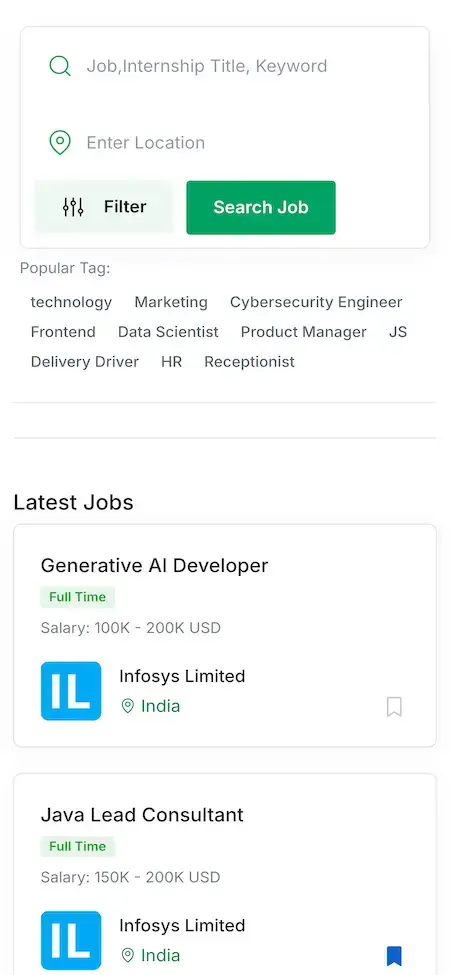
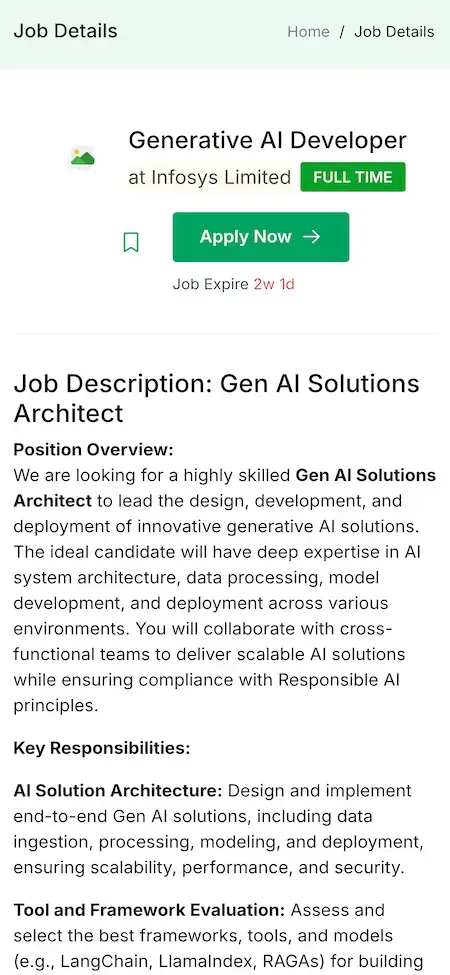
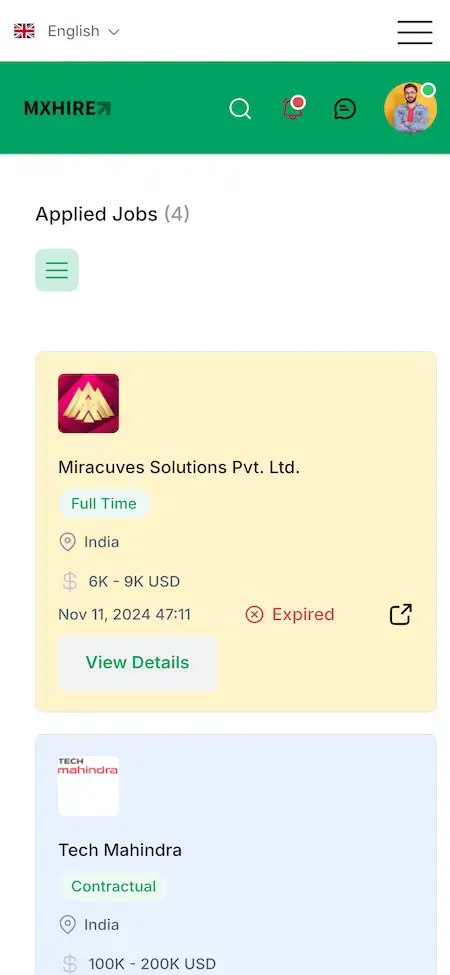
The candidate side of the recruitment app on a phone: search by keyword and location, open a job, apply, and follow every application from a list that shows its status.
- 1Ask us for the Android or iOS demo build
- 2Sign in with the demo login below
- 3Explore: Search, Job page, Applied Jobs
user@demo.com | User_321
Employer App - Posting & Applicants
The hiring side on a phone: post a job, choose how visible it is and look at the people who applied. The MXHireX demo uses its own company login.
- 1Ask us for the Android or iOS demo build
- 2Log in with an employer login below
- 3Explore: Post a Job, Applicants, Messages
employer@demo.com | Employer_321 or company1@demo.com | Company_321
Job Site & Employer Panel
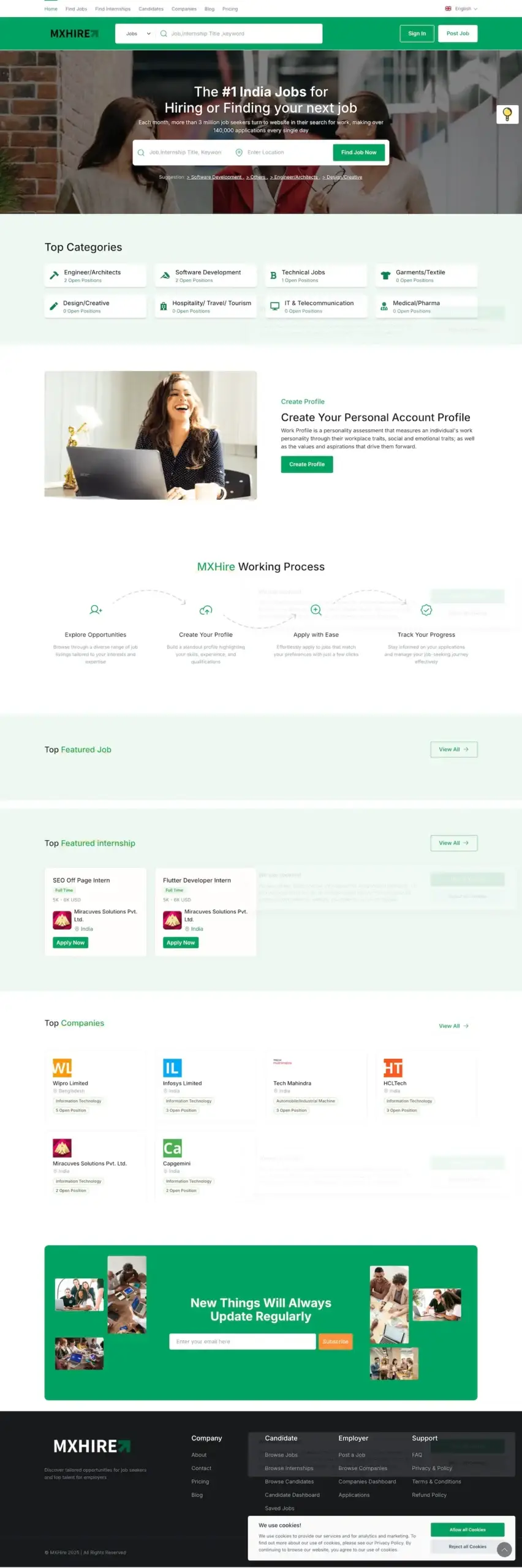
The responsive job site with its search, categories and Post Job button, and the employer panel behind it. The MXHireX web demo adds the intern panel, and one message to the team opens it for you.
- 1Open the MXHire demo in a browser tab
- 2Sign in as a seeker or as an employer
- 3Explore: Search, Jobs, Post Job
user@demo.com | User_321 or employer@demo.com | Employer_321
Admin Panel - Jobs, Plans, Orders & Users
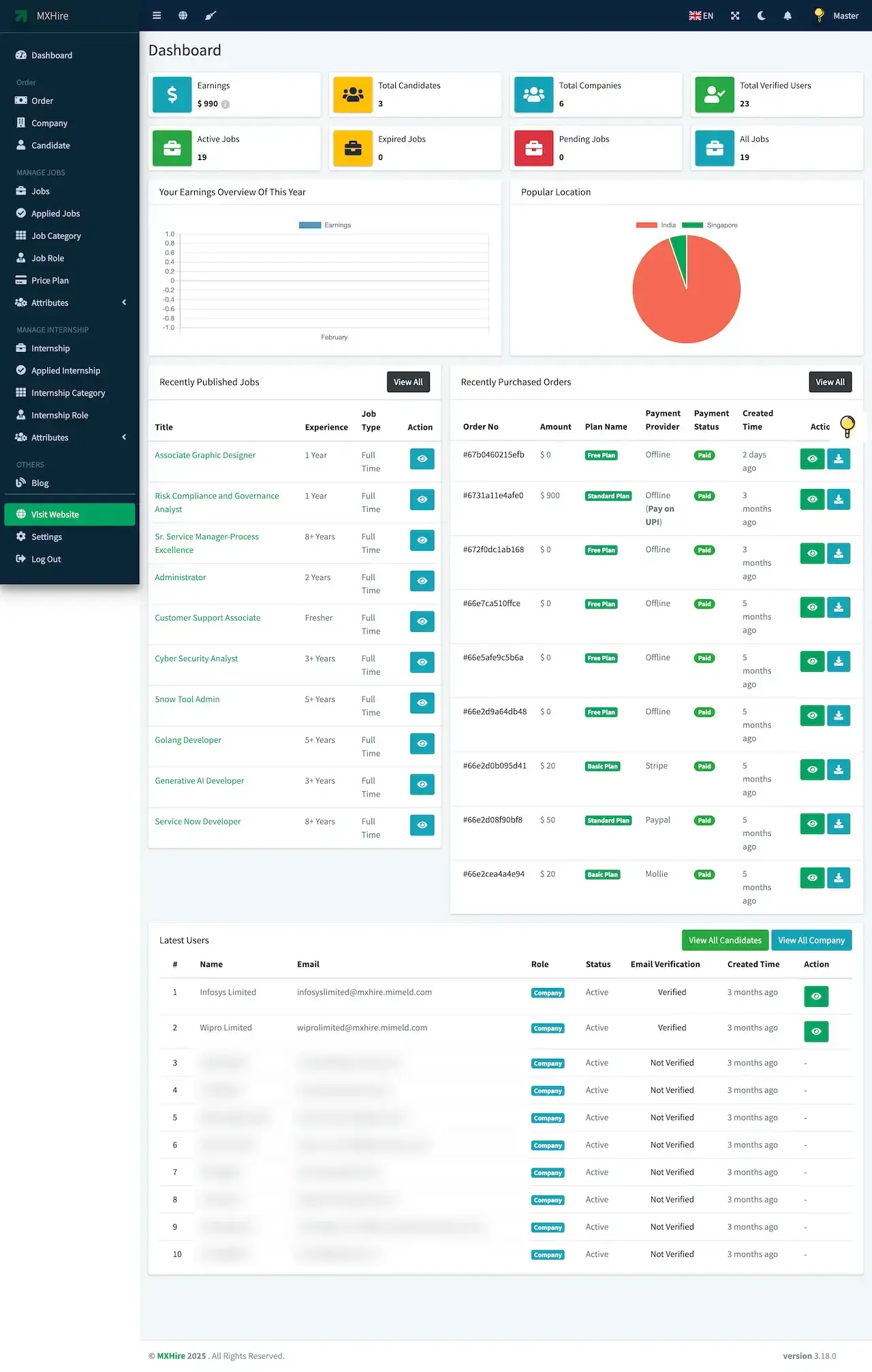
The operator console: earnings, candidates and companies, active, expired and pending jobs, categories, price plans, orders and settings.
- 1Go to the admin login page on the demo host
- 2Ask the team for the admin login
- 3Explore: Dashboard, Jobs, Price Plan, Orders
shared on a guided call
See It With Us
Indeed Clone Walkthrough: Search, Apply, Employer Panel & Admin Console
The fastest way to see the whole loop is a live call. In 30 minutes we open the job seeker side, the employer side and the admin console and tie each to your plan: your categories, your posting prices, your approval rule and your launch date.
Schedule a live walkthrough call.Every Screen Mapped
Job Search App Like Indeed - Phone Screens, Admin Dashboard & Job Site Home Page
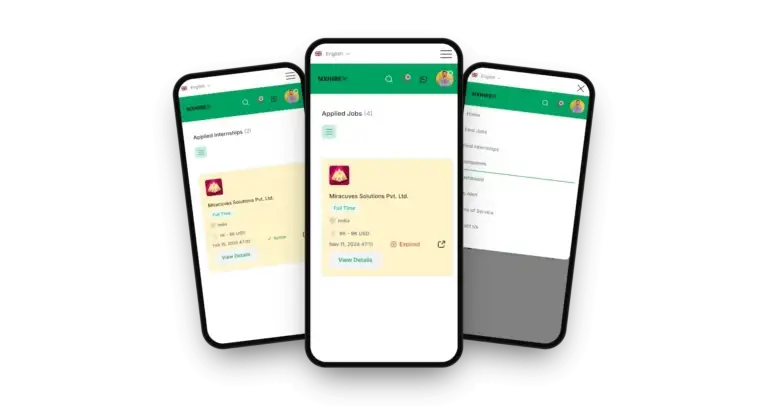
Here are the real demo screens of Miracuves' Indeed clone app, in the order a job search actually moves: menu, search, job page, applications and internships on a phone, then the admin dashboard and the job site home page.
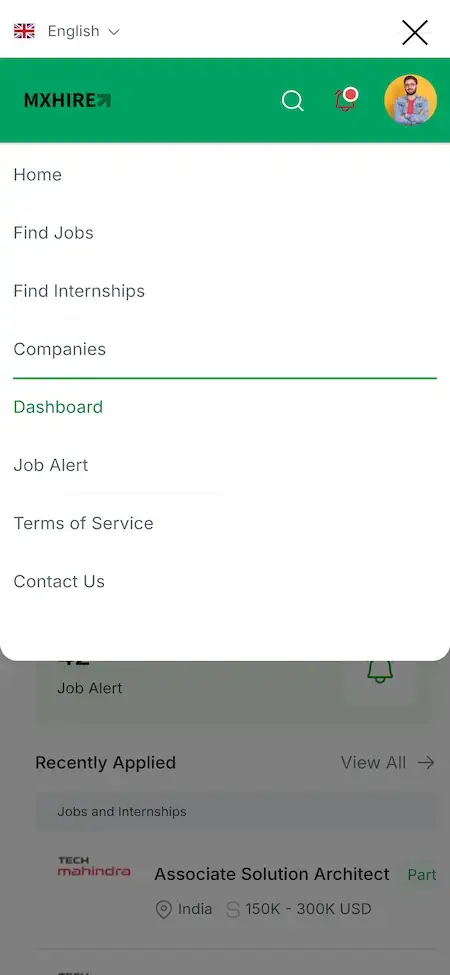


Follow a seeker from the menu through a keyword and location search, a job page and an application to an applied list with its status, and an employer from Post Job to the admin dashboard that counts active, expired and pending jobs.
02Proof
Client Voices
Indeed Clone Client Reviews - Founders in Their Own Words
This page has no job-board client to quote. The one adjacent voice is Madhur Yadav of Truxfinder, whose creator marketplace launched in six working days and had paying brands within a month; it pairs listed creators with searching brands.
“We were building a creator marketplace — influencers list themselves, brands search and book them, the platform handles briefs, deliverables, and payouts. Building the matching, messaging, escrow, and the brand/creator apps from scratch was always going to be the slowest part. Miracuves's MXInfluencer suite gave us exactly that foundation. We added our own brief-template engine, the escrow-with-milestones flow, and our branding. We launched in 6 working days and had paying brands on the platform within the first month. We estimate it saved us 4–5 months of build time.”
Honest Status
Indeed Clone Case Study - What Is Published and What You Can Check
No named client has launched a job marketplace on this base with a case study we can publish. Rather than borrow another vertical's result, this section says what exists and what you can verify yourself.
There is no /portfolio/ page for a deployment of this product, so there is no client name, logo or result to show here. Two live demos and a six-day delivery record on other bases are the evidence we can point to today.

- Search by keyword and location on the MXHire job site
- Open a job, apply and see it in Applied Jobs
- Log in as an employer and post a job
- Open the admin login and find the job approval setting
- Ask for the MXHireX intern panel demo
- A case study is published only for a real, finished deployment
- Results from other models do not describe a job board
- Client names, logos and figures are never invented
- When a recruitment client allows it, this section becomes a real case study
- Show a quote or a number we cannot trace to a client
- Present a demo screen as a client result
- Promise applications, hires or revenue for your board
- Hide that the demo accounts are shared and public
03The product
The Basics
What an App Like Indeed Does for Employers and Job Seekers
An Indeed clone is a ready-made job marketplace, and the Miracuves version pairs keyword and location search with an optional approval step for every new job post. Employers post openings, job seekers search by keyword and location, open a job and apply, and you run the whole thing from an admin console that counts jobs, candidates, companies and plan orders.


Built Around the Search-and-Apply Loop
Keyword, location, filters, a job page and one Apply button are the center of the product. Everything else, from alerts to plans, hangs off that loop.
Code You Can Open
The complete source code arrives with no encryption, so your team can reshape a screen, a field or a flow as the board grows, with nothing to pay per seat.
Clear About Add-Ons
Priced separately as add-ons: an internship module, skill assessments, video interviewing, predictive analytics and gamification. None of them is part of the base feature set.
Web, Android & iOS
What Is an Indeed Clone Script?
A job board lives or dies on volume: how many people search, how many jobs they can open and how many applications flow through. This script is built around that loop, with a job site, native apps and the panels to moderate it, so you can spend your time on supply and demand.

- 01Job site with keyword, location and filter search
- 02Job pages with Apply Now, bookmark and expiry
- 03Applied Jobs list with a status on every application
- 04Employer app and panel to post jobs and review applicants
- 05Admin panel for approvals, price plans and orders
You receive the job site, seeker and employer apps for Android and iOS, an employer panel and an admin panel, plus the complete source code. Two live demos show it working.
Everything Included
Indeed Clone Features - Search, Job Pages, Applications, Alerts, Employer Tools & Admin
Every capability of the Miracuves Indeed clone shows up in the demo, the admin console or the release notes, and anything sold separately is named in the add-ons block below. AI matching, resume parsing and the dedicated internship module sit outside the base, so plan them as add-ons or custom work.
Keyword & Location Search
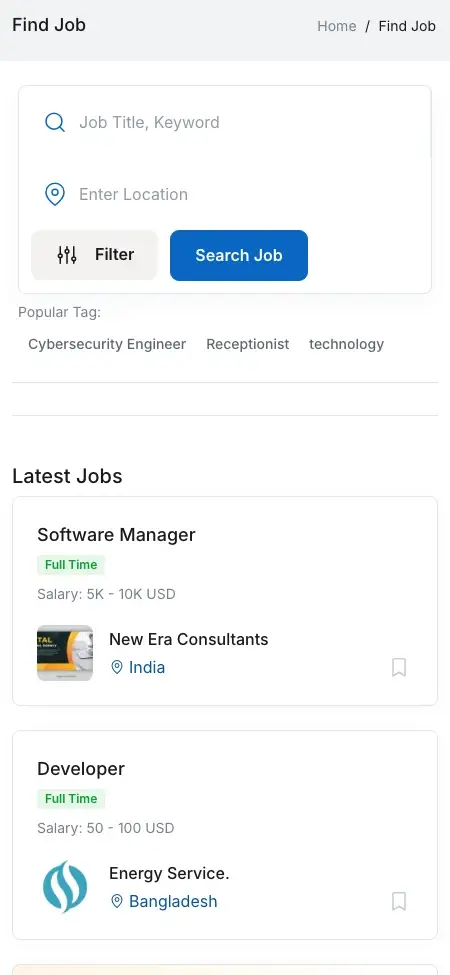
Every visit starts from a keyword box and a location field. On a phone, a Filter button and a row of popular tags sit under the box, and the latest jobs list follows.
- Job or internship title and keyword search
- Location field beside the keyword box
- Filter button on the jobs list
- Popular tags under the search box
- Jobs and internships searched from one box
Categories & Browsing
Top categories show how many open positions each one holds, and the menu puts Find Jobs, Find Internships and Companies one tap away.
- Top categories with open position counts
- Find Jobs and Find Internships in the menu
- Companies directory in the menu
- Candidates list in the web header
- Blog link in the menu
Job Pages That Convert
A job page leads with the title, the company and an Apply Now button, then runs through the description, the position overview and the responsibilities.
- Apply Now button above the description
- Full Time and other job type tags
- Bookmark icon to save a job
- Expiry countdown such as 2 weeks 1 day
- Overview and key responsibilities in the body
Apply & Track
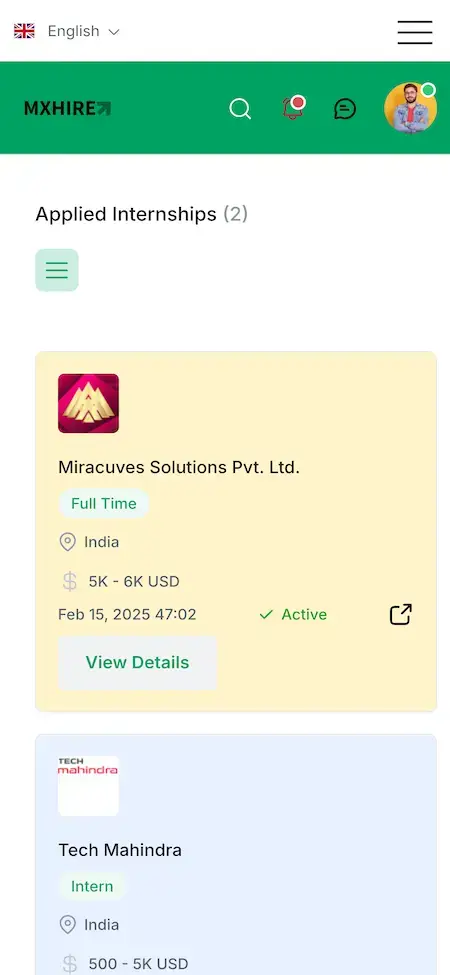
Applied Jobs lists every application with its salary range, its date and a status such as Active or Expired, and View Details opens the full job.
- Applied Jobs list with View Details
- Active and Expired status labels
- Applied Internships list beside it
- Salary range and company on every card
- Application date and time shown
Seeker Profiles & Sign-Up
A Create Profile call to action sits on the home page. After sign-up the seeker verifies an email address, uploads a resume and chooses what the profile shows.
- Create Profile button on the home page
- Email verification after sign-up
- Resume upload when applying
- Privacy settings for the profile
- Dashboard with recently applied jobs
Job Alerts & Notifications
Seekers can set job alerts, a notification bell sits in the header, and the mobile apps send push notifications for application and job updates.
- Job Alert option in the candidate menu
- Alerts set up after registration
- Notification bell in the header
- Push notifications in the mobile apps
Employer Posting & Company Pages
A Post Job button sits in the header of the site. Employers choose how visible a post is, and each employer has a company page that seekers can open from a job.
- Post Job button in the site header
- Visibility choice: free, paid or featured
- Employer app and employer web panel
- Company details page for each employer
- Applications reviewed and shortlisted by the employer
Messaging Between Both Sides
Employers can message a candidate inside the portal, or receive applications by email when that is their preference. The mobile apps include in-app messaging.
- Employers message candidates in the portal
- Applications can also arrive by email
- In-app messaging in the mobile apps
- Push notification when a message lands
Employer Plans & Checkout
The admin panel has a Price Plan menu and an Order menu. The demo orders carry a plan name, a payment provider, an amount and a paid status.
- Price Plan menu in the admin panel
- Free Plan and Standard Plan in the demo orders
- Offline payment shown as a provider
- Order list with number, amount and status
- Payment gateways managed from the admin panel
Approval & Moderation
Admins decide whether new job posts go live at once or wait for review, and the dashboard counts pending, active and expired jobs so the queue is never hidden.
- Switch for job post approval on or off
- Pending Jobs and Expired Jobs counters
- Job Category and Job Role menus
- Attributes menus for job fields
- Candidate and Company lists
Admin Dashboard & Reports
The admin home shows earnings, candidates, companies and verified users, four job counters, an earnings chart for the year and a popular locations chart.
- Earnings, Total Candidates and Total Companies tiles
- Active, Expired, Pending and All Jobs counters
- Earnings overview chart for the year
- Popular Location chart
- Recently Published Jobs and Recently Purchased Orders
Branding, Languages & Content
The platform arrives under your logo, icons and colors. A language switcher sits on the site and in the phone menu, and a Blog menu supports content marketing.
- Language switcher on the site and the phone menu
- Blog menu for job-market articles
- Settings menu for site options
- Help widget toggle added in release 3.23.0
- Logo, icons and colors changed to yours on every surface
Before you buy, note this: The platform is delivered complete and rebranded to your identity. On your side you supply hosting and a domain, verified Apple and Google developer accounts for the apps, your branding and business details, an onboarded payment gateway with KYC completed, and any third-party keys. Store review is handled by Apple and Google and sits outside our 6-day build time.
How Operators Earn
Indeed Clone Revenue Models - Job Posts, Employer Plans, Featured Jobs & Ads
A job board like the one Miracuves delivers is paid by the side with a budget. Employers fund it, seekers usually do not, and the platform keeps each revenue line separate so that changing one leaves the others as they were.
Posting fees and employer plans usually carry the base, and boosted placement is the line that grows when many employers compete for the same searches.
- 01
Paid Job Posts
Employers pay to publish a job. The admin panel lets you set pricing for job listings, so a post can be free, paid or featured depending on the plan.
- 02
Employer Plans
A Price Plan menu holds the plans employers buy, and the order list records which plan was bought, through which provider and whether it was paid. This is the recurring line.
- 03
Featured Jobs
A featured post rises above the free listings for the period an employer buys, which makes placement a product you can price by category or by city.
- 04
Sponsored Placements
Beyond a featured badge, a sponsored slot can sit in a fixed position on search results or category pages for a negotiated fee.
- 05
Advertisement Spaces
Spaces on the site can be sold to training providers, HR services and other advertisers who want to reach people who are job hunting.
- 06
Premium Seeker Access
The subscription role can offer seekers a paid tier, such as more visibility, while the basic search and apply loop stays free to use.
| Revenue stream | How it is charged | Take rateTypical take rate | What sets the ceiling |
|---|---|---|---|
| Paid Job Posts & Employer Plans | A flat fee for a period or a post. The Price Plan menu sets the amounts and the order list tracks each purchase. | ZipRecruiter reports $345.2m of its $449.0m 2025 revenue from flat-rate plans, about 77%. | What an employer will pay against a free option. ZipRecruiter plans run from a day to a year, and LinkedIn lets an employer keep one free post open at a time. |
| Featured & Sponsored Placements | A paid boost over free listings, billed per click or per view against an employer budget on the large boards. | ZipRecruiter's per-click revenue was $103.8m in 2025, about 23%; LinkedIn bills per job view. | The budget cap the employer sets. ZipRecruiter caps clicks per campaign, and LinkedIn's own example is a $10 daily budget, $300 or less over 30 days. |
| Premium Seeker Access | An optional paid tier for candidates. Most large boards leave the seeker side free and charge employers. | ZipRecruiter states that its marketplace is free to job seekers: $0 is the benchmark. | Seekers are the audience employers pay to reach, so a fee has to buy visible value or it shrinks the pool. |
| Plan Checkout by Card | A gateway fee on each plan or boost bought on the web, absorbed or passed on. | Stripe lists 2.9% + 30 cents per card payment in the US. | Your gateway, country and card mix. Stripe publishes its US rate as a starting point, not a flat guarantee. |
| Plans Sold Inside the Apps | Store billing, when a plan is sold as an in-app digital purchase on iOS or Android. | Apple: 30%, or 15% for Small Business Program members and qualifying subscriptions. Google Play: 10% + 5% billing fee on subscriptions in the US, UK and EEA; 15% in the remaining markets. | Store rules decide whether a purchase must use their billing and which rate applies, so check both stores for your plan type and country before pricing. |
How to read this. The job-board figures come from the ZipRecruiter 2025 annual report and the LinkedIn job posting pricing page, the card rate from a Stripe support article, and the store terms from Apple and Google Play. The 77 and 23 percent shares are our arithmetic on reported revenue. Treat all of it as raw material for your own model: it is not a quote, and it says nothing about what any board will earn.
Indeed Clone Revenue Model, Stage by Stage
A volume board rarely needs all six lines on day one: posting fees fund the launch, while sponsored slots and premium seeker access wait until search traffic justifies them.
First posts
With the first employers on board, paid job posts carry the income, approval keeps every listing relevant, and free posts stay open so the catalog grows quickly.
Regional pull
When more employers chase the same searches, employer plans become the recurring line and featured jobs sell placement by category or by city.
Multi-market
Spanning several countries, sponsored slots on search results, ad spaces for training providers and a premium tier for seekers add income on top of posting fees.
Every paid post, employer plan and featured slot is income you keep in full, with each sale logged in the admin order list alongside its provider and paid status.
Operate It Day to Day
Admin Panel for an Indeed-Style Job Board - Jobs, Companies, Price Plans & Orders
In the Miracuves Indeed clone, one console covers the job marketplace operator's day: which jobs are live, which are waiting, who has signed up on each side and what has been bought.


Admin Panel Sections
- 01
Dashboard & Earnings
Earnings, candidates, companies and verified users as tiles, an earnings chart for the year, a popular locations chart and two short lists: recent jobs and recent orders.
- 02
Jobs & Applications
Menus for jobs, applied jobs, job categories, job roles and job attributes, so the whole catalog can be organized without touching code.
- 03
Companies & Candidates
Separate company and candidate lists, with a count of verified users on the dashboard so growth on each side is visible.
- 04
Price Plans
A Price Plan menu where the plans employers can buy are defined, the base for free, standard and featured posting.
- 05
Orders & Payments
An Order menu lists each purchase with its number, amount, plan name, payment provider and status, and the dashboard repeats the latest ones.
- 06
Internship Menus
The demo admin also carries a group for internships, with menus for internships, applied internships, internship categories and internship roles.
- 07
Blog & Content
A Blog menu for articles, a language switcher in the header and a shortcut that opens the public site in one click.
- 08
Settings & Site Tools
A Settings menu for the platform options, plus the switch that decides whether job posts need approval before they appear.
Quality Control
The controls that keep the board clean as it grows.
- Approval switch for new job posts
- Pending, active and expired job counters
- Category, role and attribute menus
- Verified user count on the dashboard
Plans & Revenue
The finance side of the console, from the plan to the order.
- Price Plan menu for employer plans
- Order list with provider and paid status
- Earnings tile and yearly earnings chart
- Payment gateways managed in settings
Need the console to do more? Extra reports, another approval step, more languages or a different plan structure are scoped on their own. Tell us what your operations team needs and we will quote it in writing.
04Package and price
The Full Package
Package Contents: Source Code, Native Apps & Deployment for Your Indeed-Like Job Platform
Miracuves hands you a complete job marketplace ready to run: the job site, a seeker app and an employer app, both web panels and every line of their source. It is yours outright, and no seat or usage fee ever applies. Outside bills stay with their providers: hosting, store developer accounts, gateway fees and keys such as Google Maps or Twilio.
$ git clone your-job-board Complete Source Code
The full source for the web platform and both native apps, with no encryption, so your developers can change anything to match your model.
- Web and admin source, unencrypted
- Android project in Java and Kotlin
- iOS project in Swift on Xcode
- Yours to modify, extend and redeploy
Rebranding & Deployment
We rebrand the web and the apps with your logo, icons and color scheme, then deploy them to your hosting.
- Branding with your own logo, icons and colors throughout the product
- Deployment to your own hosting
- Domain and SSL connected
- Demo content replaced with yours
App Publishing Support
We help publish the apps from your own developer accounts. Store review belongs to Apple and Google and runs outside the 6 days.
- Publishing from your Google and Apple accounts
- Store listing assets prepared with you
- Review time not counted in the 6 days
- Accounts and keys stay yours

Job Site & Employer Panel
The responsive job site with search, categories, Sign In and Post Job, plus the employer panel where openings and applicants are handled.
- Keyword and location search with filters
- Top categories and company pages
- Post Job and applicant review
- Language switcher and blog menu
Seeker & Employer Apps
Two native apps, one for job seekers and one for employers, covering search, applying, tracking, posting and messages.
- Seeker app: search, apply, track
- Employer app: post and review
- In-app messaging and push notifications
- Native Android and native iOS builds


Admin Panel
The operator console with dashboard tiles, job counters, categories, roles, price plans, orders, companies, candidates and settings.
- Dashboard with earnings and job counters
- Jobs, categories, roles and attributes
- Price Plan and Order menus
- Companies, candidates, blog and settings
Plans & Payment Setup
The Price Plan and Order modules with the payment gateway hooks, ready for you to price your own plans.
- Price Plan menu with free and paid plans
- Order list with provider and status
- Gateways connected with your own account
- KYC and gateway onboarding stay with you
Handover & Support
A handover with the source, plus three support periods that run side by side from launch.
- 60 days of platform guidance
- 6 months of priority bug fixes
- 12 months of product updates
- Demo logins replaced before launch
Want to see it before deciding? Log in to the demo as a seeker or an employer, or ask for a guided tour. We can take you through a search, a job page, an application and the admin counters, each tied to your own board plan.
Transparent Pricing
How Much Does It Cost to Build a Job Marketplace Like Indeed?
The launch-ready white-label Indeed Clone is a fixed price of $2,499. Work beyond the base, such as add-ons, extra integrations or custom flows, is scoped and quoted separately in writing.
Professional
Ready-Made Launch PackageChosen by: Niche job board founders, regional job marketplaces, campus and internship platforms
The platform arrives as the demos show it, rebranded to your logo, icons and colors, and deployed on your own hosting.
Get StartedEnterprise
Custom Builds for Larger ScopeChosen by: Staffing groups, multi-country boards, recruitment networks
Need flows the base does not have? We build to your requirements and agree the scope and price before work starts.
Request a QuoteIndeed Clone Development Cost in 2026
Miracuves prices its MXHire job board stack at $2,499, paid once: a job site with keyword and location search, the employer panel, the admin console, plus Android and iOS apps built natively for seekers and employers, with your branding applied, the board launched in six working days and the source unencrypted.
What moves your total sits outside the software invoice
- Your hosting, domain and server capacity as search traffic climbs
- Google Play and Apple developer accounts, and store fees on in-app purchases
- A gateway account with onboarding and KYC complete
- Google Maps, Twilio, Firebase or similar keys the apps call
- Internships, skill assessments, video interviews and other add-ons you choose
A second approval stage for job posts or a new employer plan layout is quoted in writing as custom work and typically takes 2-8 weeks.
Compare Your Options
Ready-Made Indeed Clone vs Custom Development vs SaaS
Three routes lead to a job board like Indeed: buy the finished Indeed clone from Miracuves, commission a job portal build from scratch, or rent a hosted job-board tool. Here is how they differ on time, money and control.
| Criteria | MiracuvesReady-Made Indeed Clone | Custom Development | SaaS |
|---|---|---|---|
| Launch time | Live in 6 working days | Quoted in writing, often months | Sign up and configure quickly |
| Upfront cost | $2,499 once | Quoted per scope, usually higher | Low setup, recurring plan |
| Source code ownership | Full unencrypted web and app source | Yours if the contract says so | Vendor keeps the code |
| Customization | Any change, quoted extras take 2-8 weeks | Built to your brief | Limited to vendor settings |
| Ongoing fees | No per-seat fee or monthly rental | Your own maintenance team | Monthly or per-job subscription |
| Branding & app-store listing | Your brand, your native seeker apps | Your brand, your listings | Often vendor-branded, rarely own apps |
| Best for | Founders launching a job board fast | Unusual hiring workflows, big budgets | Testing demand before investing |
Same product, other editions: Glassdoor Clone · Job Portal · Browse all Job Board solutions
Where It Fits
Ways to Use a White-Label Indeed-Style App - Niche Boards, Regional Markets, Internships & Agencies
Niche boards, regional marketplaces, internship portals and agencies each put a different part of the Miracuves job platform first. A niche board puts approvals and featured posts first, a campus portal puts internships first, and an agency puts its own employers first. You set the emphasis in configuration.
Swipe · 6
Run a board for one profession. Set the categories and roles that fit it, review each post before it appears and charge employers for listings and featured spots.

Organize jobs by city and category so seekers start from where they live, with location search, popular tags and company pages that carry local employers and job opportunities.

Pair a fresher-friendly job site with internship listings and an applied internships list, then add the internship module when the board needs its own intern panel.

Give a staffing agency a branded site where its clients post roles and candidates apply, tracked from the same admin console.

Offer members of an association or a community a place to post and find work, with approval turned on so every listing is checked.

Build the whole model on employer spend: price plans, featured posts and ad spaces sold to the companies that need to hire.

Indeed Clone Business Model: Three Ways to Run It
In an Indeed clone business model, employers fund the board through posts, plans and featured spots, and the same MXHire codebase covers three volume plays.
Niche volume board
One profession, such as nursing or logistics, with categories and roles set for it, every post reviewed before it appears and employers paying per listing.
Regional marketplace
A city-first board where location search and popular tags surface nearby openings, company pages showcase local employers, and those employers buy plans and featured spots to stand out.
Internship portal
A campus-facing site where students browse Find Internships and track Applied Internships next to entry-level jobs, while the separate Internship Module add-on brings a dedicated intern panel.
Employer plan prices sit in the Price Plan menu, so each niche, city or campus board can test its own rates.
One product, six ways to use it. All six share the job site, the apps and the admin panel. What changes is which categories you open, which employers you invite, what you charge and how it is branded, so there is a single codebase to look after.
Talk to Our TeamMarket Timing
Why Build a Job Marketplace in 2026?
A job board is a two-sided market, and the side with the budget is easy to name: employers. The harder part is the audience. A Miracuves board under your own brand lets you build that audience once and keep it.
01Hiring Is Still Posted Across Many Places
Employers spread openings over big boards, social feeds and their own career pages. A focused board that does one audience well can be the place they put their budget.
02Candidates Search on a Phone First
People look for work between other things. A short search, a clear job page and one Apply button on a native app meet them where they already are.
03Employers Pay for Reach, Not for Features
Plans, featured posts and ad spaces turn the audience you gather into revenue, and the admin panel prices each of them separately.
04Moderation Builds the Trust a Board Lives On
An approval switch, expiry on every post and a pending counter let you keep stale or doubtful listings away from the people you want to keep.
05Your Brand, Not a Listing on Another Site
When the board carries your name, the candidate list, the employer relationships and the repeat postings stay with you.
06Buy Versus Build Is Quick to Settle
Search, job pages, applications, apps and an admin console are most of a job board. After 6 days of our build time, a white-label copy is running on your own hosting.
Platform by the Numbers
Live Demos
Native Apps
Surfaces, One Codebase
Days of Build Time
The unglamorous middle of a job board is search, listing expiry, application status and plan orders. Here it is already built, and tested through two demos.
Industries
Industries We Serve
The Indeed Clone suits any field where people look for work through a website or an app. Technology and healthcare staffing boards run on role and location search. Hospitality and retail boards live on high-volume entry-level hiring. Education and campus programs use the internship side. Logistics and construction employers want local reach. Remote-work and freelance communities add flexible roles. Finance, public-sector and non-profit boards value approvals and a trusted audience. Regional boards serve one city or country under their own name.
one codebaseMXHire
- 01ThTech Hiring
- 02HsHealthcare Staffing
- 03HjHospitality Jobs
- 04RlRetail & Logistics
- 05EcEducation & Campus
- 06FcFinance Careers
- 07CtConstruction Trades
- 08RwRemote Work
- 09PsPublic Sector
- 10FgFreelance & Gig
- 11NpNon-Profit Roles
- 12RbRegional Boards
Miracuves’ Indeed Clone is a job marketplace you can adapt to any hiring niche, with the search, apps and admin panel carrying your name from the first screen.
06Under the hood
End to End
How the Indeed Clone Works - Sign Up, Search, Open, Apply, Track & Post
To a seeker on Miracuves' Indeed clone app, applying for a job is a few taps. Underneath it is a chain of search, listing, application and plan records. Below is that chain from sign-up to a tracked application, followed by the architecture that carries it.
Seeker Journey - From the Menu to a Tracked Application
Swipe · 6
- 1Create a Job Seeker Account
On the Indeed clone app a job seeker registers, confirms the email address and opens a menu listing Find Jobs, Find Internships, Companies, Dashboard and Job Alert.
- Email verification after sign-up
- Menu with jobs, internships and companies
- Dashboard and Job Alert entries
- 2Search Jobs by Title and City
Job search works the way people expect: type a title or keyword plus a location, narrow it with Filter, or tap a popular tag or the latest jobs list.
- Keyword and location fields
- Filter button and popular tags
- Latest jobs with salary and company
- 3Read the Job Listing
Each job listing names the role, the employer and the job type, counts down to its expiry and puts Apply Now above the full job description.
- Apply Now and bookmark icons
- Full Time and other type tags
- Description, overview and responsibilities
- 4Apply for a Job and Track It
Once the seeker applies, the listing moves into Applied Jobs, showing its salary range, the date applied and whether it is still Active or Expired.
- Application date and time
- Status label on each application
- View Details for the full job
- 5Find Internships Too
Internship hunting has separate Find and Applied lists, and every card carries a job type like Intern or Contractual plus a stipend range.
- Applied Internships list
- Job type and stipend range
- Same flow as a full-time job
- 6Post a Job and Review Applicants
Hiring companies and recruiters use Post Job, choose the listing's visibility and screen the candidates who apply, and a published vacancy shows up in the same jobs list seekers browse.
- Post Job from the site header
- Free, paid or featured visibility
- Applicants reviewed and shortlisted
How It's Built
Architecture of a Job Portal Like Indeed & the Job Lifecycle
- 01Part 01
Three Surfaces, Separate Logins
Seeker, employer and admin sign in to separate surfaces with separate demo logins, so an applicant never reaches the moderation console.
- 02Part 02
Native Apps Beside the Web
The Android and iOS apps are separate native projects that sit beside the web platform, so the phone experience is not a web page in a wrapper.
- 03Part 03
Job Lifecycle
A post is created, optionally approved, goes live, collects applications and then expires. The dashboard counts pending, active and expired jobs.
- 04Part 04
Search & Filters
Keyword, location, categories, popular tags and filters all point at the same job records, which is why one search box serves both jobs and internships.
- 05Part 05
Applications & Status
Each application is a record with a date and a status, shown to the seeker in the Applied lists and to the employer in the applicant view.
- 06Part 06
Plans & Orders
Employer purchases are recorded as orders against a plan, with a provider and a paid status, and the dashboard repeats the latest ones.
Under the Hood
Indeed Clone Script Tech Stack: PHP, MySQL & Native Android and iOS
A job board needs a dependable web tier, a database that keeps listings and applications consistent and phone apps that feel native. Here is what Miracuves built this Indeed clone script with, as listed on the product pages.
Web Platform
- Job site, employer panel and admin panel
- Bootstrap-based responsive interface
- Language switcher on the public site
- Release 3.23.6 is the latest in the log
Data Tier
- MySQL for jobs, users, applications and plans
- Orders with provider and status
- Job expiry and status fields
- Rebuildable from the source you receive
Android Apps
- Seeker app and employer app
- Full-component apps on current dependencies
- Push notifications and in-app messaging
- Published from your own developer account
iOS Apps
- Seeker app and employer app
- Native Swift projects on Xcode
- Same features as the Android apps
- Published from your own Apple account
Third-Party Services
- Google Maps for location features
- The integrations list includes Twilio and Firebase
- Social logins and translation services
- Payment gateway APIs, your own accounts
Source & Documentation
- Web, Android and iOS source
- Deployment configuration written down
- Mobile projects with signing documented
- Architecture notes transferred
The web and admin sides are listed as PHP using the Bootstrap framework, plus MySQL. Java and Kotlin power the Android app, while the iOS app uses Swift 4 and 5 in Xcode. For third-party services - Google Maps, social logins, Twilio, Firebase, translation and payment gateways - you bring your own accounts and keys at deployment. Every piece is a mainstream tool, so developers are easy to hire.
Build to Scale
Built for Volume - Search, Listing Expiry & Room to Grow
The Indeed clone from Miracuves grows by volume: more employers, more jobs, more searches and far more applications than listings. The platform keeps each of those as its own set of records on a conventional stack, so growth is a matter of capacity and tuning rather than a rewrite.
Search Is the Hot Path. Keyword, location and filter queries run on every visit, so they are the first thing to index and cache as traffic climbs.
Expiry Keeps the Catalogue Lean. Every job carries an expiry and the dashboard counts expired posts, which stops old listings from crowding the search results.
Applications Outnumber Jobs. Each application is a record with a date and a status, so the Applied lists stay quick to open for a seeker with many of them.
Money Records That Reconcile. Plan purchases are stored as orders with a provider and a status, so what the earnings tile shows can be checked against the order list.
Separate Surfaces
Seeker, employer and admin each have their own login and panels, so each can change without touching the others.
Tunable Search
Keyword, location and filter search runs on MySQL, which is the right place to start. At volume you tune indexes and caching, or swap in a dedicated search service, because the code is yours.
- Keyword, location and filters
- Popular tags and categories
- Indexes tuned to your volume
- Search service can be swapped in
Application Records
Every application is stored with its date and status, which is what the Applied Jobs and Applied Internships lists read from.
- Date and time per application
- Active and Expired status
- View Details for each job
- Applicant view for employers
Native Apps, Shared Back End
The Android and iOS apps are separate native projects. Each ships and updates on its own track while the web platform keeps its own.
- Android in Java and Kotlin
- iOS in Swift on Xcode
- Push notifications
- Store releases on your accounts
Expiring Listings
A job expires after its period and is counted as expired, so the active catalogue is always the one people should be searching.
- Expiry countdown on each job
- Expired Jobs counter
- Pending Jobs counter
- Approval switch for new posts
Documented Hand-Over
Source, deployment configuration and architecture notes are handed over so another team can run the platform unaided.
Room to Change and Grow. Every board ends up needing something particular to its field or its region. With the complete source code and a conventional stack, adding a filter, a field or an integration is ordinary development work that your team or ours can carry out.
If you are launching a board: Start with the categories and employers you can bring in, on the one deployment you already have. As traffic rises, capacity becomes a hosting, indexing and caching decision, and anything beyond the base is scoped and quoted on its own.
07Security and trust
Built to Be Checked
Security in an Indeed-Like Job Platform - Separate Roles, Verified Accounts & Honest Limits
A job board holds names, contact details, resumes and plan payments, so the controls that matter most are who can sign in where, which accounts are real and what happens before launch. This section says what the Miracuves platform does and what remains your work.
- 01 · RolesSeparate Roles
Seekers, employers and admins sign in to separate surfaces, and the demos use different logins for each, so an applicant does not reach the admin console.
- Admin Access: The demo logins are shared and public. Replace them with your own accounts before launch and keep the admin login to the few people who need it.
- 02 · AccountsVerified Accounts
New seekers verify an email address, and the base can delete users who never verify, which keeps throwaway sign-ups from piling up.
- Unverified Accounts: The base removes accounts that never verify their email.
- 03 · ApprovalApproval Before Publishing
Admins can require every new job post to be approved before it goes live, or let posts publish at once, depending on how much moderation you want.
- Listing Approval: The approval switch is off or on by your choice. For a new board, turning it on is the simplest defence against fake or misleading listings.
- 04 · PrivacyProfile Privacy Settings
Seekers choose privacy settings for their profile, so the visibility of a resume and its details is a decision the candidate makes.
- Resume Data: Resumes and profiles are personal data. How long you keep them, who can see them and what you tell candidates is your policy, written with your own legal adviser.
- 05 · PaymentsPayments Through Gateways
Plan purchases go through the payment gateways you connect, and the admin panel records each order with its provider and status.
- Gateway Accounts: Plan payments run through the gateways you connect, with your own onboarding and KYC. How card data is handled is governed by that provider and by your agreement with it.
- 06 · HardeningHardening Before Launch
A job board is public from day one, so the last stretch before launch is security work: testing, secrets, backups and a restore drill.
- Named Launch Tasks: Penetration testing, key rotation, a restore drill and a check of your domain and HTTPS setup are listed as pre-launch work, not assumed to be done.
Email verification, removal of unverified accounts and admin approval before a job goes live come built in. A pen test, secret rotation and a restore check get calendar slots with you before go-live. Seeker profiles and plan payments are handled by code that takes its controls from ISO 27001, SOC 2 and GDPR. Your firm holds the attestation; independent audit partners guide the audit toward it (see our ledger record).
Discuss Security Before LaunchMarketplace Readiness
Running a Job Site Like Indeed - Software Duties Versus Operator Duties
A job board connects employers with people who hand over personal details in the hope of work. Miracuves builds the posting, search, application and plan tooling; deciding which employers and jobs you accept, how you treat candidate data and what employment rules apply where you operate stays with you as the operator.
On this page, ready describes software you can see working in a demo or the admin panel. It is not a statement that the platform or Miracuves has been licensed, certified or approved by anyone, and nothing here is legal advice.
Built Into the Software
Job posts with free, paid or featured visibility, keyword and location search, job pages with Apply Now, an Applied list with statuses, seeker and employer apps, price plans and orders, an approval switch and an admin dashboard.
Left to the Operator
Your terms of use and privacy policy, which employers you verify, what you do about fake or misleading listings, how complaints are handled and how you refund or credit a plan beyond the defaults you set.
Candidate Data
Resumes and profiles are personal data. How long you keep them, who may see them and which data-protection rules apply to your candidates are your decisions, taken with local advisers. The platform has privacy settings; it does not make you compliant.
Where You Operate
Employment advertising rules, anti-discrimination law, rules on hiring minors for internships and the treatment of paid listings differ by country and often by state. Check them for each market you serve before you open the board.
08Grow the platform
- Search, job pages & applications
- Seeker & employer apps
- Price plans & orders
- Admin panel & counters
Adding a module
- 1Pick what you need
Internships, assessments, interviews, analytics or gamification, now or after launch.
- 2Price agreed first
Each module gets its own written scope and quote before any work begins.
- 3Handed over as code
The module is added to the source you already hold.
Go Further
Optional Add-Ons for an App Like Indeed - Internships, Assessments, Video Interviews, Analytics & Gamification
As Miracuves delivers it, the Indeed clone runs search, applying and job posting end to end, all visible in the demos. The five modules below are the extras buyers ask about most, and each is priced separately because the scope depends on your board.
Drag to explore · hover to pause
- 01Hiring
Internship Module
A dedicated internship product for fresher-focused boards: internship listings, categories and roles, applications and an intern panel. The MXHireX demo shows what that panel looks like.
Internship · Module - 02Hiring
Skill Assessment Modules
Skill tests that candidates take on the board, giving employers objective results beside a resume when they compare applicants.
Skill · Tests
- 03Hiring
Video Interviewing Platform
A video interview feature so employers can meet candidates remotely from inside the platform, without switching to another tool.
Video · Interviews - 04Engagement
AI-Driven Predictive Analytics
Predictive insight into candidate suitability, using historical hiring data and performance indicators to help employers judge likely success.
Predictive · Analytics - 05Engagement
Gamification for Engagement
Challenges, badges or points that give job seekers and employers a reason to come back and keep their profiles up to date.
Gamified · Engagement
The Work & Talent Suite
Building a Hiring or Freelance Product? We Have the Neighbors Covered.
The Indeed Clone is one platform in a wider work-and-talent suite. If your plan reaches past full-time job listings, these four sit naturally beside it.
01A professional network with profiles, a feed and an admin console, where jobs sit beside the people and companies posting them.
Explore Solution
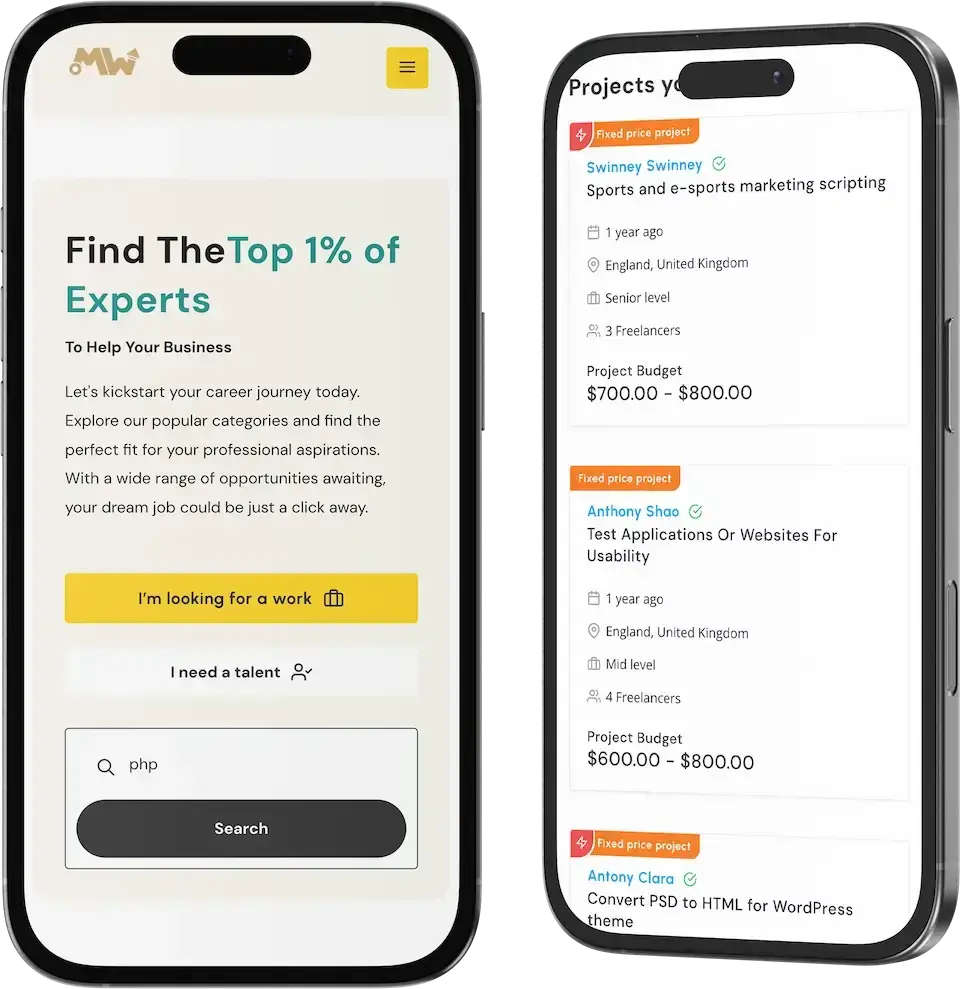
02A freelance marketplace with profiles, project listings and proposals, for work that is done by the project rather than the position.
Explore Solution
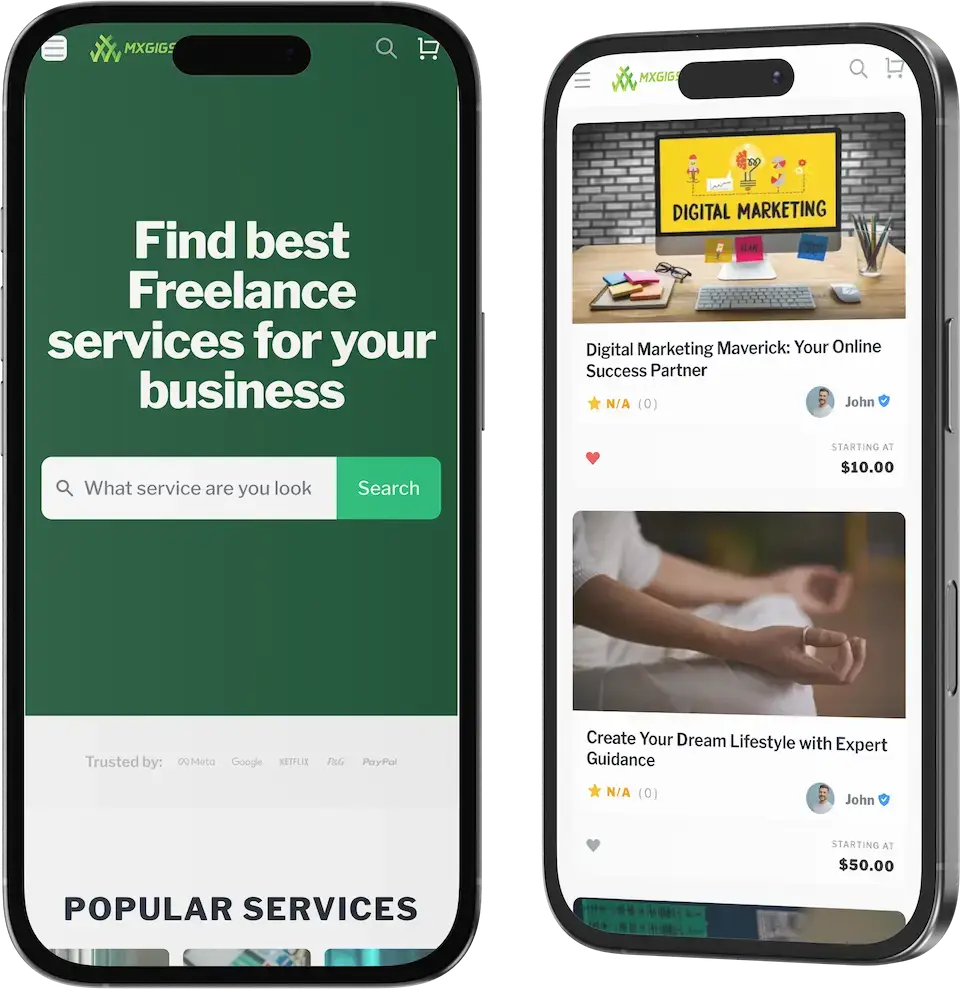
03A marketplace of packaged services where freelancers publish offers with prices and buyers pick one and order it.
Explore Solution
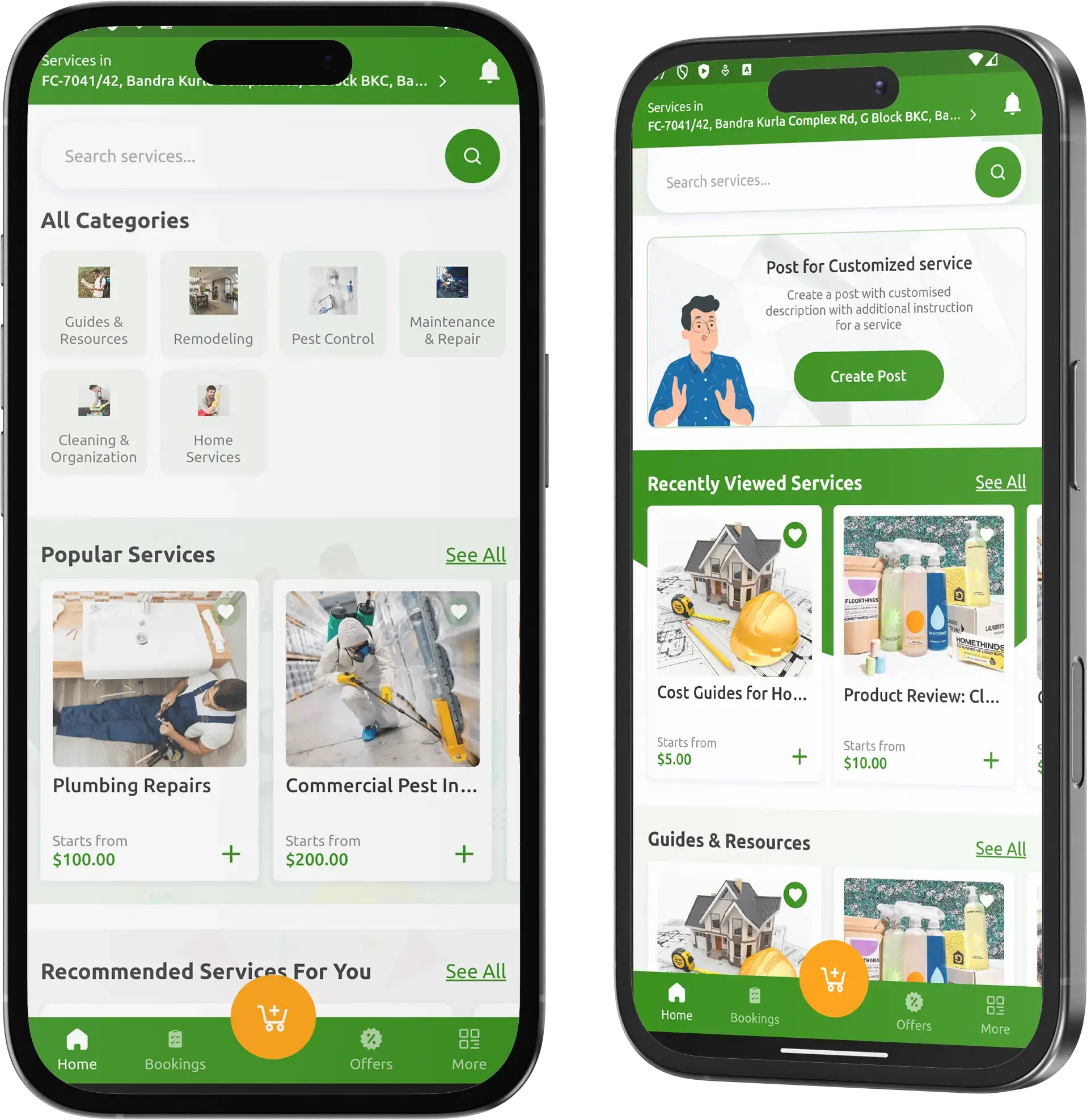
04A home-services marketplace where customers search by category, compare professionals and book or post a request for a customized service.
Explore Solution09The business case
Market Benchmarks
Online Recruitment Market Benchmarks - Independent 2025-2026 Data
The revenue models above are ours. The figures below are not. They come from the ZipRecruiter and Microsoft (LinkedIn) annual reports on Form 10-K, the US Bureau of Labor Statistics and Indeed Hiring Lab, reproduced as published. Together they show how a listed job board earns its revenue and what hiring demand looks like in the US, so you can test a business case against numbers you can check.
$449.0m in ZipRecruiter Revenue in 2025
ZipRecruiter reports in its 2025 annual report on Form 10-K that revenue was $449.0 million, down 5 percent. Subscription revenue, from flat-rate job posting plans, was $345.2 million; performance-based revenue, paid per click, was $103.8 million. Quarterly Paid Employers reached 59,104 in the fourth quarter, up 2 percent, and Revenue per Paid Employer was $1,889, down 2 percent.
7.1m US Job Openings in August 2026
The US Bureau of Labor Statistics JOLTS release of 29 September 2026 reports 7.1 million job openings in August, a rate of 4.3 percent. Hires were 5.2 million, a rate of 3.3 percent, and quits were 3.1 million, a rate of 1.9 percent. The figures show the size of the demand an employer-paid job board sells into.
LinkedIn Revenue Up 11% in Microsoft FY2026
Microsoft's annual report on Form 10-K for the year ended 30 June 2026 states that LinkedIn revenue increased 11 percent. Microsoft defines LinkedIn revenue as the sum of Talent Solutions, Marketing Solutions, Premium Subscriptions and Sales Solutions, so hiring products are one of four revenue lines, and says it is mainly affected by demand from enterprises and professionals.
Indeed Job Postings Index at 103.5 in Sept 2026
Indeed Hiring Lab's US Labor Market Snapshot of 24 September 2026 puts its Job Postings Index at 103.5, the highest level since late March and about 3 percent above the pre-pandemic level. The index showed 1.5 percent monthly growth as of 18 September, and 60 percent of occupational sectors were above their pre-pandemic baseline.
ZipRecruiter, Inc., Annual report on Form 10-K for the fiscal year ended December 31, 2025, filed 25 February 2026 - sec.gov
US Bureau of Labor Statistics, Job Openings and Labor Turnover Summary - August 2026, 29 September 2026 - bls.gov
Microsoft Corporation, Annual report on Form 10-K for the fiscal year ended June 30, 2026, filed 29 July 2026 - sec.gov
Indeed Hiring Lab, US Labor Market Snapshot, September 2026, 24 September 2026 - hiringlab.indeed.com
All figures are the publishers’ own reported results and statistics, reproduced as published. They describe the market, not the performance of any platform Miracuves builds, and nothing here is a revenue projection for your business.
The Commercial Case
Marketability, Revenue Potential & Business Prospects
A job board earns when employers trust it enough to pay and candidates trust it enough to apply. Everything that follows is about making those two decisions easier, and about owning the relationship once they have been made.
- 01
Employer Spend, Several Ways
Paid posts, employer plans, featured jobs and ad spaces are independent monetization levers, so income rises with each employer you sign rather than with staff numbers. Every sale is logged as an order, and Miracuves keeps no percentage of it.
- 02
Volume on Both Sides
Search and Apply are the habit that brings candidates back, and a bigger candidate pool is what makes an employer renew a plan.
- 03
Owned Audience
Candidate accounts, company pages and application history sit in your database, so the value of the board builds with you and not with a listing site.
- 04
Exit Optionality
You hold the complete source code, so a future change of host, team or direction needs nobody's permission.
- Paid Job Posts
- Employer Plans
- Featured Jobs
- Sponsored Placements
- Advertisement Spaces
- Premium Seeker Access
Audience and trust, not the feature list, are what protect a job board.
- 01Employers who have posted and paid do not casually move
- 02Candidates with a profile and history have a reason to return
- 03That accumulation starts at launch and stays in your database
- 04Good moderation of listings is the second moat
These three cases differ only in how many employers are active, and each names the lever that leads at that size. They are examples for planning conversations, not predictions of what any board will earn.
Posting fees carry early revenue.
A focused board where a few dozen employers pay to post and approvals keep every listing relevant. Illustrative size, not a forecast.
Posts plus employer plans and featured jobs.
A regional board where many employers compete for the same searches, so plans and featured placement start to matter beside posting fees. Illustrative size, not a forecast.
Several markets, with plans and placement both active.
A board spanning several countries, where plans, boosted jobs and ad spaces add up, and the dashboard counters show where to focus. Illustrative size, not a forecast.
10Why Miracuves
Why Miracuves
Miracuves Compared With Other Developers of Apps Like Indeed
Job boards get built from generic scripts, by freelancers or agencies, or on a proven base from a team that has launched them before. Whoever you consider, ask to run search, apply and posting yourself before paying, and ask whether every line of source arrives unencrypted; our demo and handover answer both.
Why Founders Choose Miracuves
- 01
Search and Apply Already Built
Keyword and location search, job pages, an Apply button and an Applied list with statuses arrive working, and the demo lets you click through all of it.
- 02
Native Apps, Not Wrappers
The seeker and employer apps are native Android in Java and Kotlin and native iOS in Swift, not a web page in a frame.
- 03
Three Surfaces, One Codebase
Job site, employer panel and admin console come together as one product with separate logins, instead of three projects to join.
- 04
Full Source Code Ownership
The whole codebase arrives unencrypted, so nobody can reprice it or change the terms later.
- 05
A Revenue Model Included
Price plans, orders and a visibility choice of free, paid or featured are in the base, so you can charge employers on day one.
- 06
Plain Readiness Language
This page names what ships in the base, quotes each add-on separately and lists the accounts you plug in yourself: hosting, a payment gateway and your store developer accounts.
How to Choose an Indeed Clone Development Company
Before you pay any job marketplace developer, run the search and apply loop yourself.
What to look for Miracuves
- Search you can test Keyword, location and filter search running in two live demos
- Applications with status An Applied Jobs list that marks each application Active or Expired
- Moderation built in An approval switch plus pending, active and expired job counters
- Truly native apps Native seeker and employer apps: Kotlin and Java on Android, Swift on iOS
- Full code ownership Unencrypted web, Android and iOS source that your developers own outright
- Proven delivery 9,000+ projects delivered and a six-day launch for this product
Walk away from any vendor who
- Cannot run a keyword and location search in a live demo
- Lets job posts stay up forever with no expiry
- Offers no approval step for new listings
- Lists your apps under its own developer name, not yours
- Charges a royalty on posts or featured placements
How the Indeed Clone Stacks Up Against Scripts and Agencies, Row by Row
| Criteria | MiracuvesMiracuves Indeed Clone | Generic Job Script | Custom Dev Agency |
|---|---|---|---|
| Time to Launch | 6 days of our build time | Unknown or DIY | Scoped per project, usually months |
| Source-Code Ownership | Complete, unencrypted | Often limited or locked | Usually yes |
| Search & Apply Depth | Keyword, location, filters, applied lists | Basic listing pages | Whatever the budget allows |
| Employer Tools | Employer app, panel and plans | Sometimes a posting form | Built to order |
| Mobile Apps | Native Android and iOS | Rarely included | Built to order, extra cost |
| Admin & Reports | Dashboard, counters, plans and orders | Thin or absent | Built to order, extra cost |
| Moderation & Trust | Approval switch, verified accounts | Minimal | Varies widely |
| Cost vs Speed vs Quality | Fixed price, fast, tested base | Low price, high risk | Expensive and slow |
| Ongoing Support & Updates | 60 days guidance, 6 months bug fixes, 12 months updates | Rarely offered | Set by the contract |
Few routes to a job board come through a first year unchanged. This is where they part ways.
Talk to Our TeamChangelog
Release Log for Our Indeed-Style Job Board Software - Versions & Updates
Release notes for the web platform, newest first. The notes carry no dates, and each entry is worded from the original change note.
| Version | Changes |
|---|---|
| V3.23.6 | Added or updated Closed an issue that let an unauthorized account be created |
| V3.23.5 | Fixed Digit limit on the price plan amount A stray page menu item that showed without a use |
| V3.23.3 | Added or updated Better job location search Fixed A confirmation message when a job bookmark is removed Video rendering on the job details page |
| V3.23.0 | Added or updated A switch to turn the help widget on or off Fixed Translation issues |
| V3.22.0 | Added or updated Unverified users are deleted automatically |
| V3.21.5 | Fixed An HTTPS request issue Missing data in the candidate details window |
Let's build together
Ready to put your own job board in front of employers and candidates?
Book a free consultation and leave with a clear timeline and honest answers to your questions. We would rather earn your trust than close a fast sale.
- First reply in under 2 hours
- Free consultation
- No lock-in contracts
- Full source code ownership
11Learn more
Blog & Resources
Indeed Clone App: Newest Guides & Insights
Guides on how to build a job board, which features matter most and the mistakes that cost founders time and money.



The product6 questions
01What is the Indeed Clone?
The Indeed Clone is a ready-made job marketplace. Employers post openings, job seekers search by keyword and location, open a job and apply, and an admin console runs the platform. Miracuves delivers it white-label, with the job site, native Android and iOS apps, an employer panel, an admin panel and the complete source code.
02Can I customize the Indeed Clone?
Yes. Rebranding with your logo, icons and colors is part of delivery, and because you receive the source code without encryption, your team can change the design, the categories, the fields and the business model. Larger changes are scoped and quoted separately in writing.
03Do I need coding knowledge to operate the platform?
No. Day-to-day work happens in the admin panel: jobs, categories, companies, candidates, price plans and orders. You get the source code, the deployment notes and 60 days of dedicated platform guidance, so changes to the code itself can be handed to a developer.
04Are the apps native for Android and iOS?
Yes. The seeker app and the employer app are native: Android in Java and Kotlin, iOS in Swift on Xcode. The job site is responsive in a browser. We help publish the apps from your own developer accounts, and store review is handled by Apple and Google outside the 6-day build time.
05Does the Indeed Clone include AI matching or resume parsing?
Not in the base. The base is search, filters, job pages, applications and alerts. AI-driven predictive analytics is available as a separately priced add-on, and any matching or resume parsing beyond that would be scoped as custom work.
06Is it legal to launch a job board like Indeed?
Building software with job-board features is ordinary practice. The Miracuves Indeed Clone uses no code, design or content from Indeed, and you launch it under your own brand. Running a board is a separate matter: employment advertising rules and candidate data protection depend on where you operate, so take local advice before you open it.
Seekers & employers6 questions
07How do I sign up as a job seeker?
Choose Sign Up, enter your details and verify your email address. After that you can upload a resume, apply for jobs and internships, save jobs with the bookmark icon and set job alerts.
08How do I apply for jobs?
Search by keyword and location, open a listing and use Apply Now. Depending on the employer, the application is submitted through the portal or sent by email, and each one then appears in your Applied Jobs list with its status.
09Is my personal information secure?
Seekers choose the privacy settings for their profile, accounts are email-verified and the platform removes users who never verify. Resume data is personal data, and you, as the operator, handle it under the rules where you operate.
10How do I post a job?
An employer uses Post Job, fills in the job details and picks the visibility: free, paid or featured. Depending on the approval setting an admin has chosen, the post goes live at once or waits for review.
11How do I contact job applicants?
Employers can message candidates inside the portal, and the mobile apps include in-app messaging. Where an employer prefers email, applications can also arrive in the inbox.
12Are there paid options for better visibility?
Yes. Employers can buy featured job listings, sponsored placements or a premium employer plan, and you set the prices in the admin panel. Free listings stay available beside them.
Admin, money & demos7 questions
13What features can I manage from the admin panel?
The admin panel covers jobs, applied jobs, categories, roles and attributes, companies, candidates, price plans, orders, internships, the blog and settings. The dashboard shows earnings, candidate and company counts, active, expired and pending jobs, an earnings chart and a popular locations chart.
14Can I enable/disable job posting approvals?
Yes. An admin can switch approval on, so every new post waits for review before it is published, or off, so posts go live immediately. Many new boards start with approval on to keep listings relevant.
15How do I monetize the platform?
Set the prices in the admin panel for job posts, featured posts and employer plans, and sell ad spaces on the site. Payments run through the gateways you connect, and the order list records each purchase with its plan, provider and status.
16Which payment methods are supported?
Gateways are configured in the admin panel, and the demo orders list offline payment as one provider. Further gateways, regional ones included, are integrated for your market as scoped work. The gateway account is yours to supply, with onboarding and KYC already completed.
17What is the realistic path to first revenue?
Most job boards start with posting fees, because an employer can see the value in one listing and the price plan can be set on the first day. Employer plans and featured jobs come next, once enough employers compete for the same searches to want placement. Other lines named for this kind of platform, such as advertisement spaces or licensing the white-label deployment to another operator, depend on your own commercial arrangements and are agreed rather than built in.
18How defensible is a job marketplace?
A job board is hard to displace because of its audience and the trust behind it, not its features. An employer that has posted, paid and gotten applications is unlikely to leave on a whim, and a candidate with a profile and application history has reasons to come back. From the first day live, the platform lets that build-up start, and it stays in your own database. Careful moderation of listings is the second moat, since a board people trust is hard to copy.
19What do the two demos show, and are internships included?
MXHire is the jobs demo, with the seeker and employer logins and an admin panel. MXHireX adds an intern panel. Internships appear in the demo screens as a Find Internships list and an Applied Internships list, while the dedicated Internship Module is sold as a separate add-on. Ask the team and the MXHireX web demo is opened for you.
Launch & Miracuves12 questions
20What does the deployment schedule look like?
Ready-made delivery takes 6 days of Miracuves build time, covering rebranding, deployment to your hosting and help with publishing the apps. Store review and gateway onboarding are handled by Apple, Google and your provider, so they run outside the 6 days.
21Will the full source code be handed over to me?
Yes. You receive the complete source code for the web platform, the Android app and the iOS app with no encryption, with no per-seat fee and no license to keep it running, plus the deployment configuration and architecture notes.
22What do I have to bring along before going live?
Hosting and a domain, verified Google Play and Apple developer accounts, your branding and business details, an onboarded payment gateway with KYC complete, and any third-party keys such as Google Maps, Twilio or Firebase.
23What support is included after launch?
Support starts the day you launch and comes in three layers that overlap: the first 60 days bring dedicated platform guidance, the first 6 months give priority to bug fixing and 12 months deliver continuous product evolution. Our first reply lands in under 2 hours, Monday to Saturday, 10:00-19:00 IST.
24Why would you pick Miracuves to produce your Indeed clone?
Because search, apply, employer tools, native apps and the admin console arrive working, with two live demos you can click through before you decide. Miracuves brings a record of 9,000+ projects delivered, a fixed price of $2,499 and the complete source code, and says plainly what is an add-on and what you supply.
25How much does an Indeed clone cost?
Our Indeed Clone costs $2,499 as a single payment. That covers the job site, both native apps, the employer and admin panels and the complete source, rebranded and installed in 6 working days. Internships, skill assessments and video interviews are add-ons with their own price, and a different approval step or plan structure is quoted in writing before work starts.
26Is a ready-made Indeed clone better than custom development?
For most new job boards it is. Search, job pages, Apply Now, alerts, employer posting, price plans and the admin console already work, so you can sell listings within 6 working days. Custom work still fits an unusual hiring flow, and it can sit on top of the clone later, priced in writing first and typically finished within 2-8 weeks.
27What is the business model of an app like Indeed?
Employers pay for reach while candidates search and apply free. On this job portal the paying side buys job posts, featured listings, sponsored placements or a premium employer plan, and you can also sell ad spaces to training providers and HR services. Every price is set from the admin panel, so you can test what local employers will pay.
28What is the step-by-step process to launch my Indeed clone?
Click through the MXHire demo as seeker, employer and admin. Share your brand files, job categories and plan prices together with hosting, a domain and store developer accounts. Our team rebrands the site, both apps and the panels, installs everything, sets up plans and approval and submits the apps inside 6 working days. Store approval follows on Apple's and Google's own clock, and then employers can post.
29How are fake or misleading job posts kept off an Indeed clone?
Switch on post approval in the admin panel and every new vacancy waits for an admin to review it before seekers can see it. Accounts must verify an email address, unverified users are removed, and listings expire on the date they carry, so stale jobs drop out of search. Many new boards keep approval on until they know their employers, then relax it for trusted companies.
30How does an app like Indeed work for job seekers and employers?
Employers post openings and choose whether each is free, paid or featured, while seekers search by keyword and location, open a job and apply. Each application then appears in the seeker's Applied Jobs list with its status. Employers can message candidates, and an admin console runs the whole marketplace behind both sides.
31Which kinds of job boards can run on an Indeed clone?
It suits any field where people look for work through a website or an app. Technology and healthcare staffing boards run on role and location search, hospitality and retail boards live on high-volume entry-level hiring, and education and campus programs can use it too. Employers fund the board through posts, plans and featured spots.
Go Deeper on Our Job Board Like Indeed
Open our delivery service, companion products, a market overview and further reading from here.
Marketplace development
See the service→GuideWhite-label Indeed App Security: Is It Really Safe in 2026?
Read the guide→Business model
How a job marketplace is structured and where its revenue comes from.
Read the guide→Related platformLinkedIn Clone
A professional network with profiles, a feed and an admin console, where jobs sit beside people and companies.
See the platform→Disclaimer
Miracuves is an independent software development company. We are not affiliated with, connected to, sponsored by, or endorsed by Indeed.
Read our full Legal Notice & Disclaimer →“Indeed Clone” is used descriptively. It is how the software industry refers to building a platform with functionality similar to Indeed, and how clients search for it.
The entire design and codebase is built by our own team. The product contains no code, design, graphics, or content originating from the Indeed website or applications.
Indeed and all other third-party names and marks are the property of their respective owners, referenced here solely to describe the category of software offered.
















