
Glassdoor Clone App - White-Label Employer Profile Job Platform
Built by Miracuves, this Glassdoor clone puts employers on show: seekers browse a Companies directory of company pages, employers post jobs from their panel or native Android and iOS apps, and you own the ready-made, white-label source, live in six working days.
Each company fills a profile with industry, size, website and a map, and its open jobs list beneath it, so seekers move from an employer's page straight to applying. Companies pay for plans, featured jobs and profile views. The base build has no employee reviews, star ratings or salary reports. Adding employee reviews to company pages is scoped with you and priced in writing up front, typically 2-8 weeks.
Launch in 6 Days with
- Source Code
- Company Pages
- Employer Panel
- Admin Panel
- Seeker App
- Employer App
StackKotlin · Java · Swift · PHP · Bootstrap · MySQL
Employer activity
- Company joined the directoryCompanies
- Standard plan purchasedOrders
- Featured job sent for approvalApprovals
- Job closes in 3 daysListings
- Company email verifiedVerification
- Highlighted job went liveHighlights
- Candidate profile openedViews
- Application shortlistedApplications
- Company joined the directoryCompanies
- Standard plan purchasedOrders
- Featured job sent for approvalApprovals
- Job closes in 3 daysListings
- Company email verifiedVerification
- Highlighted job went liveHighlights
- Candidate profile openedViews
- Application shortlistedApplications

- 3Directory Filtersindustry, organization type and team size
- 4Plan Allowancesjobs, featured jobs, highlights and candidate profile views
- 0%Revenue Share With Miracuvesno cut of any employer plan or job post
- 4Native App Buildsseeker and employer, each for Android and for iOS
- 6Days to Launchand if the delay is ours, we keep going free
- $2,499Paid Once, Not Rentedsource code yours, no per-seat fee, no monthly rental
Live in six working days, or we keep working free until you launch. Every build carries 60 days guidance, 6 months bug fixes and 12 months updates.Verify every figure
A Green Tick for Verified Employers
A tick can sit beside a company name, every plan card offers company profile verification, and the admin user list shows who confirmed an email.
Two Demos to Test
Two working demos are the evidence: open the job board as a seeker and as an employer and check each feature on this page yourself.
Plans Paid Through Your Gateway
Employers buy plans through gateways you connect; demo orders show offline, Stripe, PayPal and Mollie payments, and card data handling follows your provider's terms.
01Try it live
Hands-On Demos
Try the Glassdoor Clone Live - Seeker, Company, Web & Admin Surfaces
Miracuves keeps two demos of its Glassdoor clone open to try. MXHire is the complete job board, company directory included, and MXHireX layers an intern panel over it. Logins for seekers and companies are printed on each card, whereas admin access is granted during a guided call.

Seeker App for Android & iOS
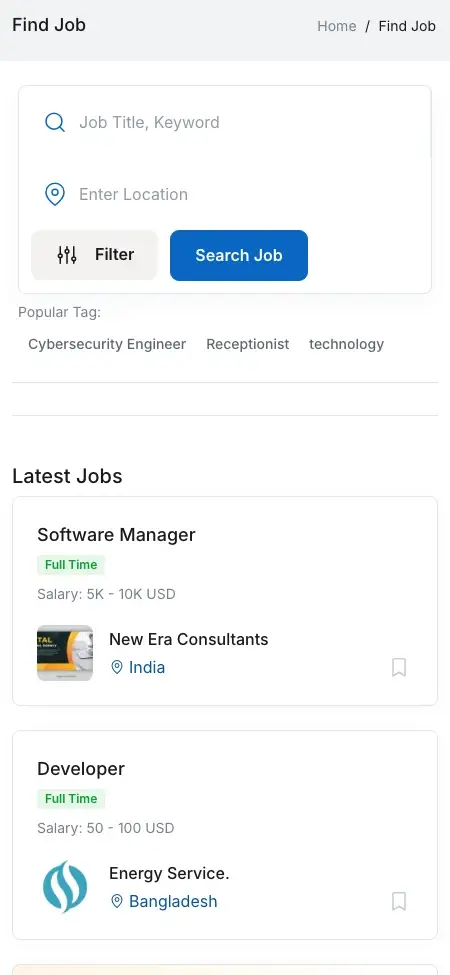
A candidate on a phone searches jobs and internships, opens a listing, taps through to the employer behind it, applies and follows each application in a status list.
- 1Request a demo build of the Android or iOS app
- 2Log in with the seeker credentials shown here
- 3Look at: Jobs, Company page, Applied Jobs
user@demo.com | User_321
Employer App for Profile & Postings
Employers on a handset update the company page, publish jobs, decide how prominent each one is and read the applications as they arrive.
- 1Request a demo build of the Android or iOS app
- 2Log in as a company with the credentials shown
- 3Look at: Profile, Post a Job, Applicants
employer@demo.com | Employer_321
company1@demo.com | Company_321
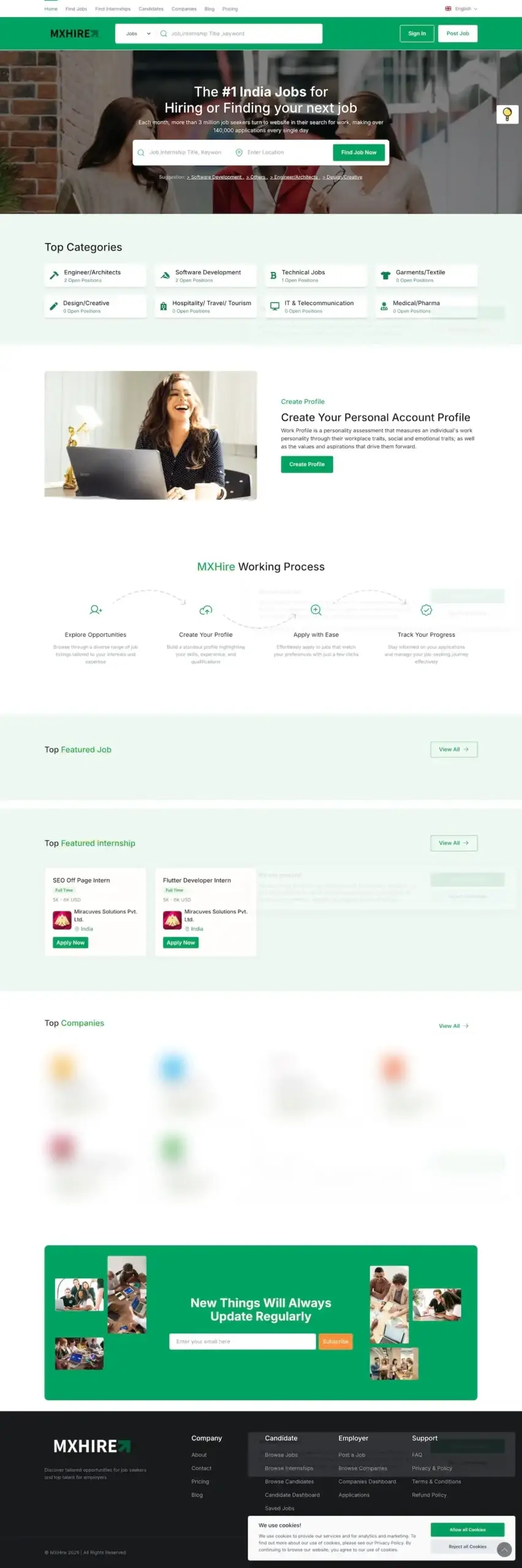
Public Site, Directory & Employer Panel
The responsive website: a Companies directory, public company pages, a jobs list, a candidate list and a Pricing page. The MXHireX web version adds the intern panel, and our team opens it for you alongside the main demo.
- 1Load the MXHire site in a new tab
- 2Pick Companies, then View Profile on a card
- 3Look at: Directory, Jobs, Pricing
user@demo.com | User_321
employer@demo.com | Employer_321
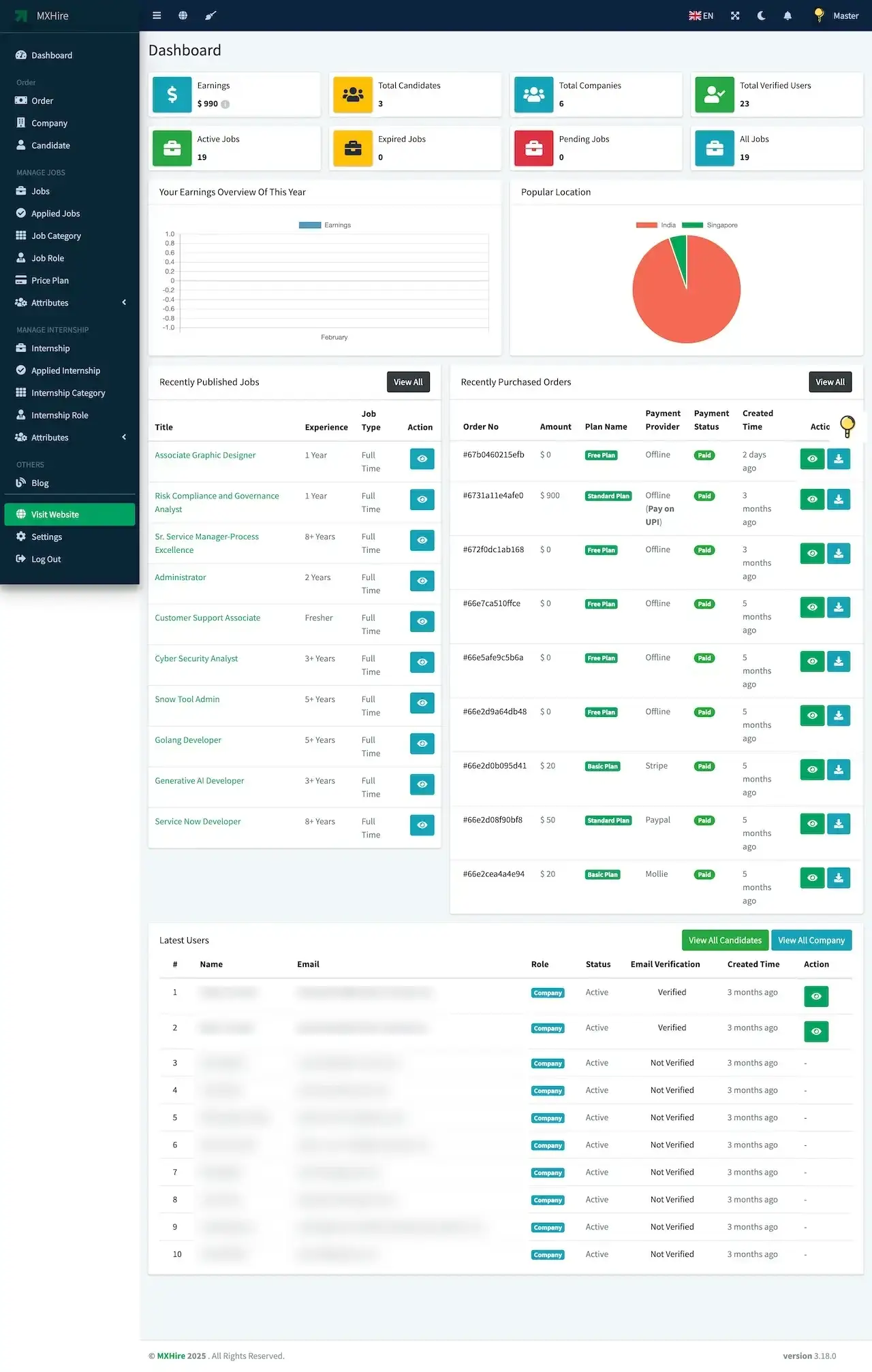
Admin Panels for Companies, Plans & Orders
The operator console with dashboard tiles, company and candidate lists, job queues, price plans, orders and settings. Each demo has its own admin sign-in page.
- 1Reach the sign-in page on either demo host
- 2Request admin credentials from the team
- 3Look at: Company, Price Plan, Order
provided on a guided call
Walk Through It Live
Glassdoor Clone Walkthrough: Company Pages, Job Posting, Plans & Admin
A call is the quickest way to see how a company page, a job post and a plan order hang together. In half an hour we open the directory, a profile, the posting flow and the admin console, and match each one to your own plan prices, categories and approval rules.
Book a guided walkthrough.Screens in Sequence
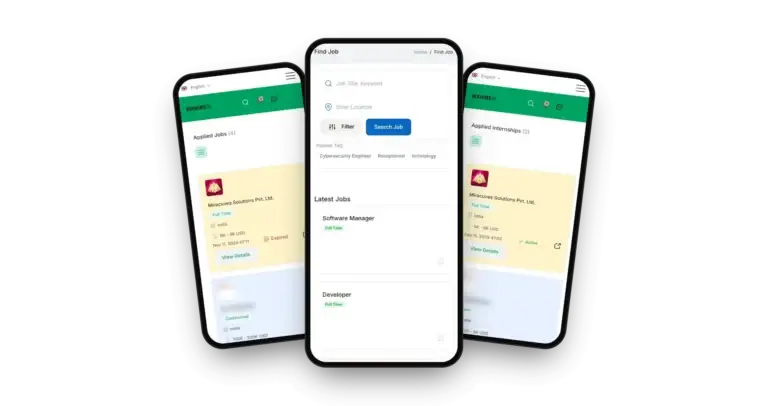
Screens From a Job Board App Like Glassdoor - Mobile Journey, Admin Console & Public Home Page
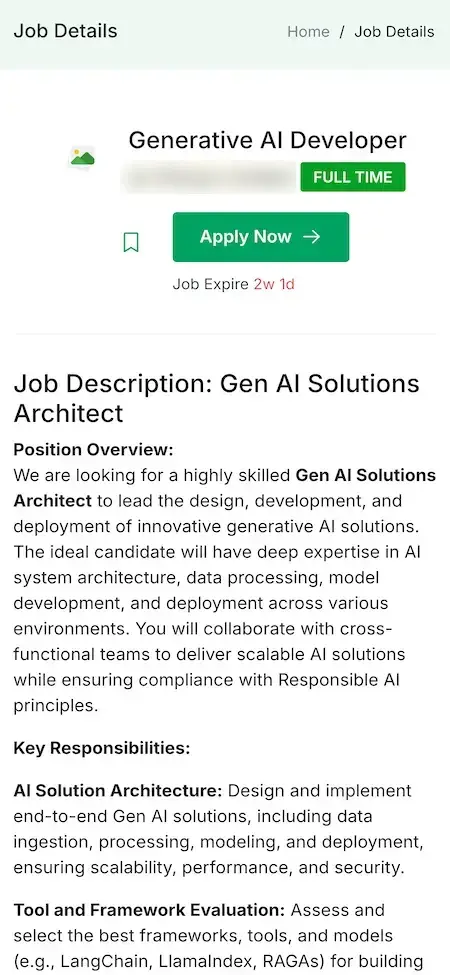
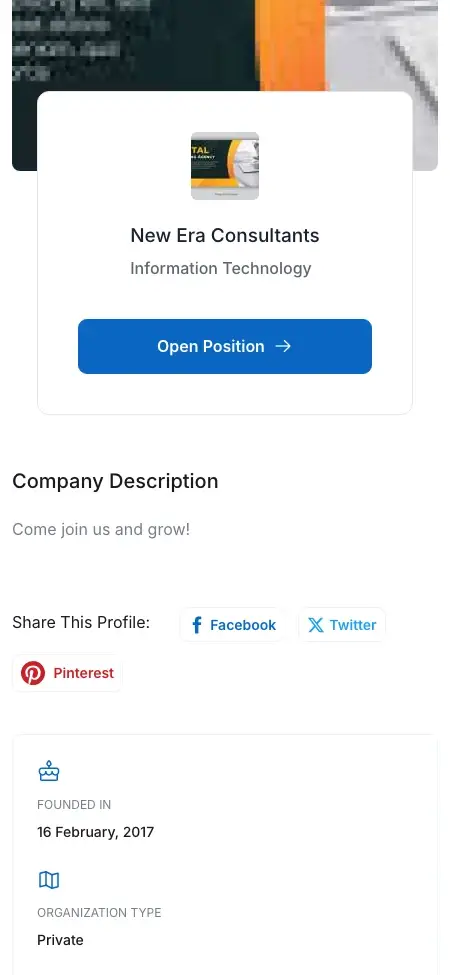
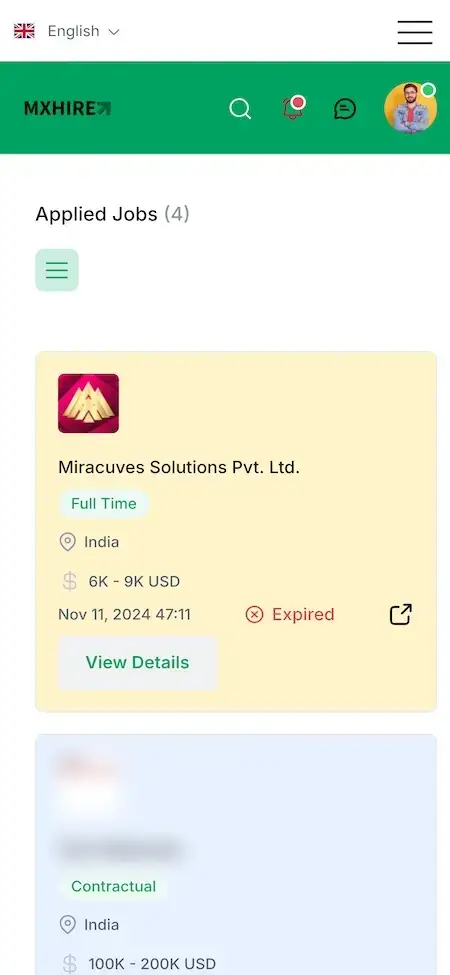
Genuine demo screenshots, ordered the way a visit unfolds: menu, jobs list, job page, employer page and applied lists on a handset, followed by the operator console and the public front page.
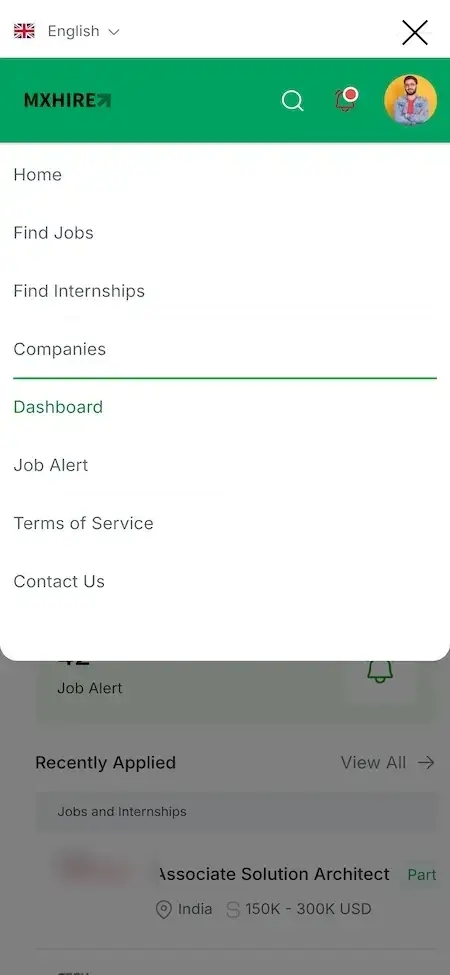
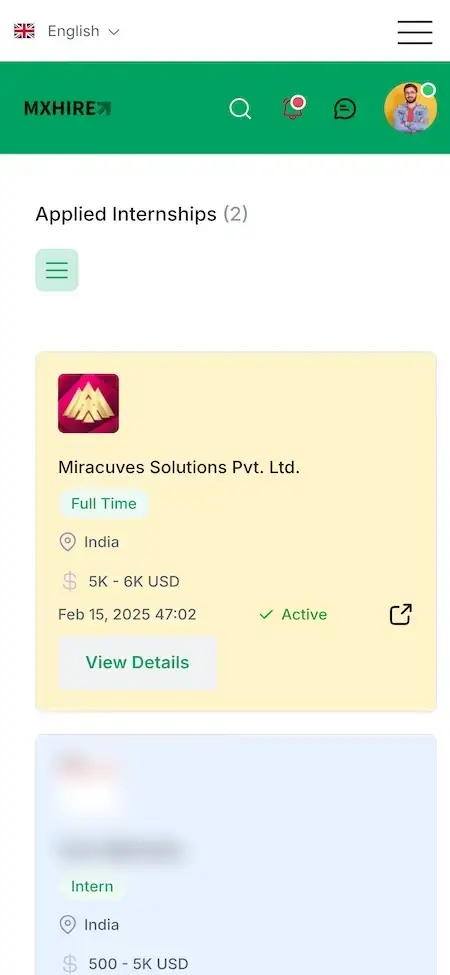


Trace one seeker from the app menu to a job, from that job to the employer who posted it, and on to an application waiting in an applied list. Then switch tabs for the admin counters that tally companies, candidates and jobs.
02Proof
Client Voices
Glassdoor Clone Client Reviews - Founders in Their Own Words
Six clients explain what building on a Miracuves base was like. None of them runs a recruitment business; they work in dermatology, car rental, delivery, boat charters, telehealth and logistics, and every quote below is printed exactly as the client gave it.
“Every HMS I tried was built for general physicians, with no lesion mapping, no before/after tracking, and no procedure-based billing. Their MXHealth base gave us the patient app, doctor app, EMR and video consult out of the box. Front-desk time on scheduling and follow-ups is down ~70%, and we went fully digital in 9 months, where a fully custom job would have been 18.”
“Turo is the obvious reference, but the Caribbean specifics, from different insurance norms to different payment rails, meant we needed a real partner, not just a clone. Miracuves’s MXCar base covered the listing, the trip flow, and the host payouts. We launched in 6 working days and are live in three islands.”
“The team was running it on a dispatcher and a Google Sheet, and we needed a real platform quickly, because we were about to onboard a major retail client. Miracuves’s Delivery Genie base gave us the rider app, the dispatch console, and live tracking. We launched in 6 weeks and cleared 4x the previous order volume in the first month.”
“We were running it on phone calls and a paper calendar, and we were losing bookings to bigger OTAs. Miracuves’s GetmyBoat Clone base gave us the calendar, the booking flow, and the payment engine. Online bookings are up roughly 70% in the first six months, and the ops team finally has a live view of the fleet.”
“Building a compliant telehealth stack from scratch in three markets would have been a year-plus effort. Miracuves’s MXHealth base covered the patient and doctor apps, video consult, e-prescription and the pharmacy integrations. We launched in our first market in 9 weeks and rolled out to two more in the following six months.”
“We were juggling spreadsheets, a third-party GPS provider, and a phone. We needed a single operations console. Miracuves’s MXLogistics base covered the trip lifecycle, the driver app, and the customer tracking page. We’ve cut operations admin time by about 40%.”
Where Things Stand
Glassdoor Clone Case Study - What We Can Show and What You Can Test Yourself
We have no named client running an employer-profile job board on this base whose story we may publish. Rather than lend you the result of a different vertical, this block states what is real and what you can examine yourself.
No /portfolio/ page exists for a launch of this exact product, so we show no client name, logo or outcome. The evidence on offer is a pair of working demos and our six-day delivery record on other bases.

- Use the industry, organization and size filters in the Companies directory
- Read a company page down to its open positions
- Compare the allowances on the Pricing page
- Look for the Company and Price Plan menus behind an admin sign-in
- Ask to see the intern panel in MXHireX
- We publish a case study only for a finished deployment that exists
- Outcomes from other business models say nothing about a job board
- We never make up a client, a logo or a figure
- Once a hiring client agrees, this block turns into a genuine case study
- No quote or number that lacks a client behind it
- No demo screenshot passed off as a customer result
- No guarantee of applications, hires or income for your site
- No hiding the fact that demo accounts are public and shared
03The product
In Short
What You Get With an App Like Glassdoor - Company Pages Plus a Job Board
In the Glassdoor clone Miracuves ships, company pages lead the way, making it a ready-made job board with the employer front and center. Every company owns a public profile in a searchable directory next to its open jobs, seekers search and apply, with AI-powered job recommendations available as an add-on, and the operator manages all of it from one console with company, candidate, plan and order lists.


Company Pages, Not Company Ratings
The profile presents the employer in its own words. The base build has no employee reviews or star ratings; anything of that kind would be a separate, scoped piece of work.
Salary Ranges on Jobs, Not Salary Reports
Each job carries the salary range the employer sets. There is no salary database or comparison tool in the base product.
Source You Control
Every file is delivered unencrypted, so developers can adjust a field, a page or a plan as the platform matures, and no seat fees ever apply.
Web, Android & iOS
What Is a Glassdoor Clone Script?
Here the employers are visible, and not only their listings. A company page holds the name, industry, description, size, website and map, which lets a seeker size up who is hiring before applying. You bring the audience and the companies, and the plumbing is already in place.

- 01A public site with a Companies directory and company profile pages
- 02A jobs list that marks featured jobs and filters by type, salary and category
- 03Applications carrying a resume and cover letter, followed in an applied list
- 04An employer panel, with plans that govern posting and prominence
- 05An admin panel listing companies, candidates, plans and orders
Inside the package: the public site with company pages, an employer panel, an admin panel, two native mobile apps (one per audience) for each of Android and iOS, and every line of source. Two demos let you watch it run.
Everything Included
Glassdoor Clone Features - Company Pages, Directory, Featured Jobs, Applications & Admin
You can check every Glassdoor clone capability below on the public demo, in the admin screens or in the release log. Where a module sits outside the base build, the add-ons section further down names it.
Companies Directory
The Companies page presents each employer as a card: country, industry, open position count and a View Profile button. The home page echoes it with a Top Companies row.
- A search field just for companies
- Cards showing country, industry and open positions
- View Profile button on each card
- Top Companies row on the home page
- Live Jobs, Companies and Candidates counters in the footer band
- View All link from the home page row to the full directory
Directory Filters
A visitor can narrow the directory by industry, organization type and team size, so finding a mid-sized private energy firm takes only a few clicks.
- Industry list of 26 options, from agriculture to AI and data science
- Organization types: government, semi government, public, private, NGO and international agencies
- Team sizes from a single person up to 500+ members
- An Apply Filter button
Company Profile Pages
A profile opens on a banner and logo block with the company name, its industry and an Open Position button, then a description, a founding date, an organization type and a company size.
- Banner image and logo block
- Company Description section
- Founded In, Organization Type and Company Size fields
- Website and location in the contact block
- Map Location panel
- Open Positions list at the foot of the page
Verified Company Marker
A green tick can appear next to a company name, and each plan card lists the ability to verify the company profile. The admin user list shows whether an account has confirmed its email.
- Green tick beside a verified company name
- Verify company profile appears on every plan card
- Email Verification column in the admin user list
- Total Verified Users tile on the dashboard
Shareable, Reachable Profiles
Profiles can be passed around with share buttons, while phone numbers and addresses stay hidden until a visitor asks to see them.
- Share This Profile buttons for Facebook, Twitter and Pinterest
- Show Contact Information button
- Website link in the contact block
- Map for the company location
- Profile reachable from the company name on any job card
- Open Position button on the profile header
Featured & Highlighted Jobs
A Featured tag lifts a job in the list. Plans count featured and highlighted jobs as separate allowances, and a company can instead pay for one post and feature or highlight it.
- Featured badge on the jobs list
- Featured job allowance on each plan
- Highlighted job allowance on each plan
- Pay Per Job option for single posts
- Highlight or feature offered when paying for one post
Job Search & Filters
The Find Job page filters by job type, salary band, category and remote work, with popular tags above a Latest Jobs list that shows each employer and its country.
- Job types: full time, part time, contractual, intern and freelance
- Salary slider with a minimum and a maximum, plus preset bands
- Category list and a Remote Job choice
- Load More button below the results
Apply with Resume & Cover Letter
Pressing Apply opens a form asking for a resume and a cover letter. The finished application then sits in an applied list with a date and a status, and View Details reopens the job.
- Choose Resume and Cover Letter fields
- Applied Jobs list beside an Applied Internships list
- Active or Expired label on each entry
- Bookmark icon for saving a job
- Candidate dashboard counting applications, favorites and alerts
Candidate Directory for Employers
A Candidates page lists people by profession, availability and experience, and can be filtered by skills, years of experience, education and remote work.
- I am available marker on each profile
- Filters for skills, experience and education
- View Resume and Download buttons
- Save To option that sorts candidates into categories
- Names partly hidden while logged out
- Popular Profession shortcuts at the top
Messages & Alerts
An employer can write to a candidate straight from the directory. Seekers receive job alerts and see a notification bell, and the apps add push notifications and in-app messaging.
- Message Candidate form with a text box
- Applications may also be delivered by email
- Job Alert entry in the candidate menu
- Push notifications on the phone apps
Plans, Pay Per Job & Orders
The Pricing page lays out plan cards with allowances for jobs, featured jobs, highlights and candidate profile views. In the admin, a Price Plan menu defines them and an Order menu logs each purchase.
- Plan cards on the Pricing page
- Allowances for jobs, featured jobs, highlights and profile views
- Order rows showing plan name, provider and paid status
- Demo orders paid offline, by Stripe, PayPal and Mollie
Admin Console & Settings
Dashboard tiles count earnings, candidates, companies and verified users, plus active, expired, pending and total jobs, and the menus reach companies, candidates, jobs, plans, internships, the blog and settings.
- Earnings and Total Candidates tiles
- Total Companies and Total Verified Users tiles
- Job Category, Job Role and Attributes menus
- Language switcher, blog menu and a help widget toggle
Before you decide: You receive the finished platform, rebranded to your identity. Your side of the bargain is hosting and a domain, Apple and Google developer accounts that you own and have verified, your branding and company details, a payment gateway with onboarding and KYC complete, and any third-party keys. The two stores review apps on their own clock, which lies outside our 6-day build.
How Operators Earn
Glassdoor Clone Revenue Models - Employer Plans, Featured Jobs, Pay Per Job & Checkout
On an employer-led site like the Glassdoor clone Miracuves delivers, the companies pay and the seekers browse for nothing. Every revenue line has its own price, so adjusting one leaves the others alone.
Plans usually form the steady base. Featured and highlighted jobs are where income climbs, once several companies chase the same eyeballs.
- 01
Employer Plans
A company buys a plan that fixes how many jobs it can post, how many may be featured or highlighted and how many candidate profiles it can open. You define the plans in the admin Price Plan menu.
- 02
Free-to-Paid Upgrades
The demo ships a free plan with a small allowance next to paid tiers that raise every limit, so a company that keeps hiring has a reason to move up. You set each tier and its price.
- 03
Featured & Highlighted Jobs
The Featured tag floats a job above the rest. Plans count featured and highlighted jobs separately, so a company can buy as much exposure as it needs.
- 04
Pay Per Job Posts
A company that avoids subscriptions can pay for one post and choose to highlight or feature it.
- 05
Candidate Profile Views
Plans put a cap on how many candidate profiles a company may open, so access to the candidate directory becomes something you can put a price on.
- 06
Advertisement Spaces
Banner positions can be sold to course providers, HR service firms and other advertisers hoping to reach active job hunters.
| Revenue stream | How it is billed | Take rateTypical take rate | What limits it |
|---|---|---|---|
| Employer Plans & Upgrades | A subscription that bundles posts, featured slots and profile views for a chosen period. | In 2025, flat-rate plans brought ZipRecruiter $345.2m of its $449.0m revenue: about 77%. | What a company will pay when a free option exists. ZipRecruiter plans run from one day to a year, and Q4 2025 Revenue per Paid Employer was $1,889. |
| Featured & Highlighted Jobs | A paid lift above unpaid listings, charged per click or per view against a budget the employer sets. | Pay-per-click made up $103.8m of ZipRecruiter's 2025 revenue, about 23%; LinkedIn charges by job view. | The employer's own budget. ZipRecruiter limits clicks per campaign, and LinkedIn's sample budget of $10 a day costs $300 or less across 30 days. |
| Pay Per Job Posts | A single charge for one post, with no subscription behind it. | LinkedIn leaves one free post open at a time and bills promoted posts by job view. | The free route an employer can take. A paid single post must reach further than a free one, or companies stay with the free listing. |
| Card Payments at Checkout | A processing fee on each plan or boost paid by card on the website, which you absorb or pass on to the buyer. | Stripe gives 2.9% + 30 cents per credit card payment as a US example. | The gateway you use, your country and the mix of cards. The Stripe number is a US example, not a guarantee in every market. |
| Plans Bought Inside the Apps | Commission charged by the store when a plan is purchased as an in-app digital good on iPhone or Android. | Apple: a 30% commission, falling to 15% for members of the Small Business Program and for qualifying subscriptions. Google Play: 10% plus a 5% billing fee on US, UK and EEA subscriptions, and 15% in other markets. | Each store decides whether in-app billing is mandatory and which rate fits, so confirm both for your plan type and country before you set prices. |
How to read this. The job board numbers come from ZipRecruiter's report for fiscal 2025 and LinkedIn's job post pricing page. The card figure appears in a Stripe support article, and store commissions are on the pages of Apple and Google Play. We worked out the 77 and 23 percent splits ourselves from reported revenue. Treat every row as raw material for your own model: none of it is an offer, and none of it forecasts what a particular board will make.
Glassdoor Clone Revenue Model, Stage by Stage
Every employer-side charge above carries its own price in the Glassdoor clone Miracuves delivers, so the company page earns first and the other levers switch on as the directory fills.
Launch
While the directory is still small, employer plans and pay per job posts bring in the first money, and a free plan persuades new employers to publish a profile.
Traction
Once many companies compete for the same visitors, featured and highlighted jobs start to earn beside plan fees, and capped candidate profile views reward the busiest recruiters.
Scale
Across several countries, banner positions for course providers and HR firms join the mix, and the earnings tile and order list show which market deserves the next push.
The Order menu records each purchase with provider and paid status, and Miracuves keeps none of it.
The Operator's Desk
Admin Panel of the Glassdoor-Style Job Board - Companies, Candidates, Price Plans & Orders
Miracuves gives the operator a single console for the working day: which companies have registered, which jobs are live or queued, who has signed up as a candidate and which plans were purchased.


Admin Panel Sections
- 01
Dashboard Tiles & Charts
Eight tiles tally earnings, candidates, companies, verified users and four job counts, with a yearly earnings chart and a popular locations chart beneath them.
- 02
Company List
The Company menu lists each employer account with its role, status and email verification, so you can tell which companies have confirmed their address.
- 03
Candidate List
The Candidate menu holds the seeker accounts, and a dashboard total shows how big that side of the board has become.
- 04
Jobs & Applied Jobs
Separate menus for jobs and applied jobs, plus job categories, job roles and attributes, let you organize the catalog without touching code.
- 05
Price Plan Menu
Define here what companies can buy, including the posting, featured, highlight and profile-view allowances that the public Pricing page then shows.
- 06
Orders
The Order menu logs every purchase with a number, amount, plan name, payment provider and paid status, and the dashboard echoes the newest few.
- 07
Internship Group
A dedicated group handles internships through four menus of their own: the internships themselves, who applied, and the categories and roles that organize them.
- 08
Blog, Site Link & Settings
An article menu for the blog, a shortcut that opens the public site, a language switcher in the top bar and a Settings menu for platform options.
Keeping the Directory Tidy
Controls that stop the company list and the jobs list from filling with clutter. Turn post approval on, see at a glance which companies confirmed their email, and keep the green tick for profiles you have checked.
- Switch that holds new job posts for approval
- Counters for pending, active and expired jobs
- Company and candidate lists with verification status
- Menus for categories, roles and attributes
Plans & Income
The money side of the console, from defining a plan to seeing it paid.
- Price Plan menu that sets the employer tiers
- Orders showing provider and paid status
- Earnings tile with a chart for the year
- Gateways configured under settings
Need the console to cover more ground? Additional reports, a second approval stage, extra languages or another plan layout are scoped on their own. Describe what your team needs and we will put a quote in writing.
04The offer and the price
What Is in the Box
What You Receive: Source, Native Apps, Deployment & Handover for Your Glassdoor-Like Hiring Platform
From Miracuves you receive a working employer-profile job board rather than loose parts: the public site with its company pages, a seeker app, an employer app, the employer and admin panels, and every line of code behind them. You own it outright, and no fee is ever levied per seat or per run. Bills from other providers stay separate: hosting, Apple and Google developer accounts, gateway charges and third-party keys.
$ git clone your-hiring-site Complete Source Code
All of the web code and the code of both mobile apps comes unencrypted, so your developers can reshape anything to fit your model.
- Web and admin code with no encryption
- Android project written in Java and Kotlin
- iOS project written in Swift for Xcode
- Yours to adapt and to redeploy
Rebranding & Deployment
We apply your logo, icons and color scheme to the web and the apps, then deploy everything to your hosting.
- Your identity on every surface
- Deployed onto hosting you control
- Domain and SSL wired up
- Demo companies and jobs swapped for yours
App Publishing Support
We assist with publishing the apps under your own developer accounts. Apple and Google do their reviews on their own timetable, outside the 6 days.
- Submission through your Google and Apple accounts
- Store listing material prepared together
- Review waiting time sits outside the 6 days
- Accounts and keys stay in your hands

Public Site & Company Pages
A responsive website holding the Companies directory, public company profiles, the jobs list, the candidate list and the Pricing page, with the employer panel behind it.
- Companies directory with its three filters
- Profile pages that list open positions
- Jobs list with type, salary and category filters
- Pricing page and blog
Seeker & Employer Apps
A native app for job seekers and another for employers, which between them cover searching, applying, tracking, posting and messaging.
- Seeker app for search, applying and tracking
- Employer app for profile, posting and review
- Push notifications and in-app chat
- Native builds for Android and for iOS


Operator Console
The back office: dashboard tiles, job tallies, company and candidate lists, categories, roles, plans, orders and settings.
- Dashboard with earnings and job tallies
- Company and candidate lists
- Price Plan and Order menus
- Blog, settings and internship menus
Plan Tiers & Gateways
Price Plan and Order modules wired to payment gateways, ready for you to name your own tiers and single-post prices.
- Plans with job, featured, highlight and view allowances
- A Pay Per Job route
- Orders that record provider and paid status
- Gateway onboarding and KYC remain yours
Handover & Support
The source is handed over, then three support periods run in parallel from launch.
- 60 days of platform guidance
- 6 months of priority bug fixes
- 12 months of product updates
- Demo logins removed before launch
Prefer to test it first? Sign into a demo as a job seeker or as a company, or book a guided tour. We will click through the directory, a company page, an application and the admin counters with your own plan in mind.
Transparent Pricing
What Does It Cost to Launch a Job Board With Employer Profiles?
Ours is a white-label Glassdoor Clone priced at a flat $2,499, launch-ready on delivery. Anything outside the base, from add-ons to integrations and custom flows, gets its own written quote first.
Professional
Launch-Ready PackageChosen by: Employer-directory founders, single-industry job boards, city and country hiring sites
What the demos show is what you receive: your logo, icons and colors, running on hosting that you own.
Get StartedEnterprise
Bespoke Builds for Bigger NeedsChosen by: Large staffing firms, boards in several countries, hiring networks
Looking for something the base lacks, such as employee reviews on company pages? We scope it with you and agree a price before any work begins.
Request a QuoteGlassdoor Clone Development Cost in 2026
Pay $2,499 once and Miracuves hands over the employer-profile board seen in the demos: the public site with its Companies directory and company pages, the employer and admin panels, native seeker and employer apps for both mobile platforms, and the full unencrypted source, installed on the hosting you pick and launched inside six working days.
What else an employer-profile job board costs to run
- Hosting, a domain and SSL for the public site
- App Store and Google Play publisher accounts, and the stores' cut of plans employers buy in-app
- Gateway fees and onboarding with Stripe, PayPal, Mollie or a local provider
- Keys for Google Maps, Twilio and Firebase
- Add-ons such as skill tests, the internship module or video interviewing
Want employee reviews or star ratings on each employer profile? That module is quoted before work begins and typically ships in 2-8 weeks.
Compare Your Options
Ready-Made Glassdoor Clone vs Custom Development vs SaaS
A Glassdoor alternative, an employer-profile job board, can be bought finished from Miracuves, built from nothing or rented as a service. This table sets our Glassdoor Clone against the other two on speed, price, ownership and control.
| Criteria | MiracuvesReady-Made Glassdoor Clone | Custom Development | SaaS |
|---|---|---|---|
| Launch time | 6 working days to your hosting | 2-8 weeks per scoped change | Quick signup, vendor's timetable |
| Upfront cost | $2,499 flat, paid once | Written quote, scope-dependent | Small start, monthly charges |
| Source code ownership | Every line, unencrypted, yours | Depends on the agency contract | None, you rent access |
| Customization | Company pages, fields, plans all editable | Whatever you specify and fund | Only the toggles offered |
| Ongoing fees | Nothing per seat or per run | Developer retainers you arrange | Recurring license while you run |
| Branding & app-store listing | Your name on site and native apps | Your name, if apps are built | Shared platform look, few store apps |
| Best for | Company-profile boards launching now | Highly specific employer products | Short trials with no app plans |
Same product, other editions: Indeed Clone · Job Portal · Browse all Job Board solutions
Putting It to Work
White-Label Glassdoor-Style App Use Cases - Employer Directories, Industry Boards, Campus Hiring & Agencies
The Glassdoor-style app Miracuves ships serves several kinds of operator. A directory leans on company pages and filters, an industry board on approvals and categories, a campus site on internships. The emphasis is a configuration choice.
Swipe · 6
Let the company page star. Seekers browse employers by industry, organization type and size, read the profile and then open the jobs listed underneath.

Devote the site to a single field: tune the categories and roles, turn approvals on and charge companies for featured jobs.

Gather the local employers of one market, let seekers pick a country and sell plans in the local currency.

Present student-friendly companies with their internships, send seekers to Applied Internships and add the internship module when a separate intern panel is needed.

Give a staffing agency a site of its own where each client company has a profile and posts roles, all tracked in one admin console.

Build income on employer spend: tiered plans, featured and highlighted jobs, pay per job and vacancy posts and candidate profile views.

Glassdoor Clone Business Model: Three Ways to Run It
On a Glassdoor clone, employers pay for their company page and job reach while job seekers browse free, and one Miracuves install can run three quite different employer-led businesses.
Directory-led
An employer directory sells the company page itself: firms buy a plan to publish a verified profile with its open positions, and seekers filter by industry, organization type and team size.
Sector-led
A board for one field, such as energy or pharma, leans on the industry and team-size filters, turns on job approval and charges a premium for featured slots where specialists look.
Agency-led
A staffing agency hosts its client companies, each with a profile and postings, and bills them through plans while one admin console tracks every order.
Whichever shape you choose, every plan and boost price is yours to set in the Price Plan menu.
One product, six ways to run it. Every variant shares the public site, the company pages, the apps and the admin panel. Only the invited employers, the promoted filters, the pricing and the look differ, so a single codebase needs maintaining.
Talk to Our TeamMarket Timing
Why Launch an Employer-Led Job Board in 2026?
A job board has two audiences, yet only the employers bring a budget. A profile page makes the site worth revisiting for them, and a branded site lets you keep the audience you gather.
01Seekers Want to Know the Employer
People look at who is hiring before they apply. A page with industry, size, founding date and open positions answers that on your own site.
02Employers Want a Home, Not Just a Listing
A company that appears only as a line on a job card has no presence. A profile lets it describe itself and gives it a reason to keep its jobs current.
03Visibility Is Easy to Price
Featured jobs, highlighted jobs, pay per job and candidate profile views are distinct purchases, each priced separately in the admin panel.
04A Directory Builds Its Own Audience
Industry, organization and size filters give visitors a reason to land on a company page and not just on a job page.
05Owning the Relationship Beats Renting It
When the platform wears your brand, the company accounts, the candidate list and the repeat purchases all belong to you.
06Buying Is Faster Than Building
The directory, profiles, jobs, applications, plans, apps and admin make up most of this product. When our six build days end, the white-label copy is live on a server you control.
The Numbers Behind the Platform
Live Demos
Directory Filters
Native Apps
Days of Build Time
The unglamorous core of an employer-led board is the directory, the profile, the plan allowances and the order list. Those parts already exist here, and two demos let you test them.
Industries
Industries We Serve
The demo directory comes with 26 industry options, among them information technology, pharmaceuticals, energy, construction, banking, logistics, hotels, retail, government, NGOs and media. Edit the list to suit your niche, and let seekers sort employers by industry, organization type and team size. A board may serve one sector, one city or a whole country under its own name.
in the demoMXHire
- 01ItInformation Technology
- 02PhPharma & Hospitals
- 03BfBanking & Finance
- 04CaConstruction & Architecture
- 05EpEnergy & Power
- 06MaManufacturing
- 07LtLogistics & Transport
- 08HtHotels & Travel
- 09RwRetail & Wholesale
- 10GpGovernment & Public Sector
- 11NdNGO & Development
- 12MaMedia & Advertising
Miracuves’ Glassdoor Clone is a job board with employer profiles that bends to any hiring niche, putting your name on the directory, the apps and the admin panel from day one.
06Under the hood
Step by Step
How the Glassdoor Clone Works - Register, Build a Profile, Post, Search, Apply & Review
For an employer on the Miracuves Glassdoor clone, starting out means a form and a page. Beneath it runs a chain of company, job, application and order records. Next comes the chain from registration to a reviewed application, and after it the architecture underneath.
Company Journey - From a New Account to a Reviewed Application
Swipe · 6
- 1Create a Company Profile
On the Glassdoor clone app an employer registers and builds its public company profile: name, industry, description, founding date, organization type, size, website and location.
- Company account with email verification
- Description, founded date, type and size
- Website, location and map
2Publish a Job OpeningHiring managers draft each vacancy in the employer panel and decide how prominently it appears; with approval enabled, an admin signs it off before publication.
- Free, paid or featured visibility
- Approval step you can turn on
- Counted against the plan allowance
- 3Search Jobs With Filters
Job seekers enter a title and a location, and filters for job type, salary, category and remote work narrow the results.
- Keyword and location fields
- Type, salary, category and remote filters
- Popular tags and a Load More button
- 4Research the Employer
Before applying, a seeker can open the employer's profile from the job card or the Companies directory to learn about the company and see what else it is hiring for.
- Directory filters for industry, type and size
- Description, size and contact details
- Open positions on the page
- 5Apply With a Resume
The application form takes a resume and a cover letter, and every submitted application is listed with the date sent and its current status.
- Choose Resume and Cover Letter
- Status such as Active or Expired
- View Details reopens the job
- 6Shortlist and Contact Candidates
Hiring teams read new applications, shortlist the strongest candidates, message them directly and search the candidate directory to find more talent.
- Applications in the employer panel
- Message Candidate from a profile
- Filters for skills, experience and education
What Sits Behind It
How a Company-Page Job Board Like Glassdoor Is Built: Architecture & Data Flow
- 01Part 01
Separate Logins for Each Role
Seeker, company and admin accounts sign in separately, each with a demo login of its own, so a candidate cannot wander into the back office.
- 02Part 02
Mobile Apps Beside the Site
Both phone apps are native projects that stand next to the website, so a handset user gets a real app, not a page in a shell.
- 03Part 03
Company Lifecycle
A company registers, verifies its email, completes its page, buys a plan and posts jobs. In the admin lists you can read its role, status and verification.
- 04Part 04
How a Job Moves
A post is written, may be approved, goes live, gathers applications and finally lapses. Dashboard counters separate pending, active and expired jobs.
- 05Part 05
Directory & Search
Directory filters and job filters read from the same company and job records, which is why a company page can show its open positions without extra work.
- 06Part 06
Plans & Orders
Buying a plan creates an order that records the plan, the provider and whether it is paid, and the plan allowances then govern what the company may do.
Under the Hood
PHP, MySQL & Native Mobile Apps Behind the Glassdoor Clone Script
An employer directory leans on a reliable web tier, a database that stays coherent across companies, jobs and orders, and mobile apps with a native feel. The list below is what Miracuves built the Glassdoor clone script on, per its product pages.
Web & Admin Tier
- Public site, company pages and employer panel
- Admin panel running on the same base
- Responsive pages built with Bootstrap
- Language switcher for visitors
MySQL Database
- Companies, candidates, jobs and applications
- Plans and orders with provider and status
- Expiry and verification fields
- Reconstructable from the code you are given
Android Builds
- One app for seekers, one for employers
- Full-component apps on up-to-date dependencies
- Push alerts and in-app chat
- Submitted from your developer account
iOS Builds
- One app for seekers, one for employers
- Native Swift projects opened in Xcode
- Same capabilities as the Android pair
- Submitted from your Apple account
Connected Services
- Google Maps behind the company map and location search
- Twilio and Firebase named among the services
- Social sign-in and translation
- Payment gateway APIs under your own accounts
Code & Documentation
- All web, Android and iOS code
- Written-down deployment settings
- Mobile signing steps documented
- Architecture notes passed on
According to the product pages, the web and admin layers use PHP with the Bootstrap framework, plus MySQL. Android apps are written in Java and Kotlin, and iOS apps in Swift 4 and 5 using Xcode. Google Maps, social sign-in, Twilio, Firebase, translation and payment gateways all call for accounts and keys of your own, which you provide at deployment. Because the stack is mainstream, developers are easy to hire.
Room to Grow
Designed to Grow - From the Directory to the Order List
An employer-led board expands along three lines: more companies, more jobs and applications that outnumber both. Each is stored as separate records on a conventional stack, which turns growth into capacity planning and tuning, with no rewrite needed.
The Directory Is Mostly Reads. Visitors browse and filter companies far more often than companies edit profiles, so caching the directory gives the first and cheapest speed-up.
Search Draws on Two Record Types. Job filters and company filters pull from the same company and job tables, so indexes on industry, location and category help in both places.
Applications Outnumber Jobs. Every application is its own record with a date and a status, which keeps the applied lists responsive for a seeker who has sent many.
Orders Have to Balance. A plan purchase is stored with its provider and paid status, so the earnings tile can be cross-checked against the order list.
Role-Based Surfaces
Seekers, companies and admins each get a login and panels of their own, so any one of them can evolve without disturbing the rest.
Cacheable Directory
The Companies directory and its profile pages are mostly reads, which makes them straightforward to cache and index. The code is yours to tune.
- Industry, type and size filters
- Company cards with open job counts
- Profile pages listing open positions
- Indexes sized to your traffic
Application Records
Each application keeps its date and status, and those records feed the applied lists for jobs and for internships.
- Date and time on each application
- Active or Expired status
- View Details back to the job
- Applicant view for the employer
Apps on Their Own Release Track
Android and iOS are independent projects. Each can be released and updated on its own schedule while the web platform follows another.
- Android written in Java and Kotlin
- iOS written in Swift for Xcode
- Push alerts for both
- Releases through your store accounts
Listings That Expire
Once its period ends a job is marked expired, so the active list stays the one that people should be searching.
- Expiry countdown on every job
- Counter for expired jobs
- Counter for pending jobs
- Optional approval for new posts
Handover Documents
Code, deployment settings and architecture notes are passed on, so a different team could operate the platform unaided.
Space to Adapt. Sooner or later every board needs something specific to its sector or its region. With the full source and a conventional stack, a new filter, profile field or integration is ordinary development that your team or ours can do.
Heading for launch? Start with the companies you can bring on board, using the single deployment you already own. As traffic builds, capacity becomes a question of hosting, indexing and caching, and work past the base gets its own written scope and quote.
07Security and trust
Open to Inspection
Security on a Glassdoor-Like Hiring Site - Role Separation, Verified Accounts & Plain Limits
An employer board keeps company details, candidate resumes, contact information and plan payments. What matters is who may sign in where, which accounts have proved themselves and what still has to happen before launch. This section lists what the Glassdoor clone from Miracuves does and what falls to you.
- 01 · RolesSeparate Roles
Candidates, companies and admins use separate surfaces, and the demos give each a different login, so an applicant has no path into the admin console.
- Shared Demo Logins: Anyone can use the demo logins, so replace them with accounts of your own before going live, and keep the admin login with as few people as you can.
- 02 · VerificationVerified Accounts
New users confirm an email address, and the base can remove those who never do, which stops throwaway sign-ups from filling the company and candidate lists.
- Company Verification: The base can purge accounts that never confirm their email.
- 03 · ModerationApproval Before Publishing
An admin can hold every new job post for approval or let posts go live straight away, depending on the amount of moderation you want.
- Listing Approval: Whether new jobs publish instantly or wait for review is your decision. On a young board, approval is the easiest guard against fake or misleading listings.
- 04 · DataProfile Privacy
Candidates can adjust privacy options on their profile, and the logged-out candidate list shows names only in part, so exposure is a choice and not a default.
- Candidate Records: A resume and a profile are personal information. How long you keep them, who may open them and what candidates are told form your policy, drafted with your own legal adviser.
- 05 · BillingPayments Through Gateways
Buying a plan goes through whichever payment gateways you connect, and each order lands in the admin with its provider and paid status.
- Gateway Accounts: Plan payments flow through gateways that you connect, using your own onboarding and KYC. The way card data is handled follows that provider and your agreement with it.
- 06 · Launch checksHardening Before Launch
The site is open to the world from its first day, which makes the run-up to launch a time for security work: tests, secrets, backups and a rehearsal of restoring them.
- Named Launch Tasks: A restore drill, key rotation, penetration testing and a review of the domain and HTTPS configuration count as pre-launch tasks, never as work presumed done.
The base follows the sort of controls security teams check, with evidence open to any reviewer. Together with you we plan the launch work: a penetration test, rotating secrets and a restore rehearsal. Resumes and plan payments sit on a base whose controls come from ISO 27001, SOC 2 and GDPR. Independent audit partners take the assessment on with you, and your company is the holder of the attestation. Source: public fact entry.
Plan the Security Work With UsBefore You Open the Doors
Operating a Job Board Like Glassdoor - What We Supply and What Remains Yours
A company page tells candidates who is hiring, and candidates share personal details in hope of work. Miracuves supplies the directory, profile, posting, application and plan tooling. Which companies you accept, what they may claim about themselves, how you treat candidate data and which hiring laws apply in your markets are decisions for you as operator.
For the employer-review site, ready covers the screens you can open and click through today, and employer-review rules for your market run through your operating entity.
Built Into the Software
A Companies directory with filters, company profile pages, a verified marker, jobs that can be featured or highlighted, job and candidate search, applications with a status, plans and orders, an approval switch, seeker and employer apps and an admin dashboard.
Remains With the Operator
Your own terms and privacy notice, the checks you run on a company before it appears, your response to a misleading profile or job, how complaints get handled and when a plan is refunded or credited.
Company Content
Companies type in their own descriptions, names and logos. Making sure they may use them, and taking down a profile that infringes someone else's rights, is the operator's job. The base build has no employee reviews or ratings, so nobody can post opinions about an employer on it.
Where You Operate
Rules on job advertising, anti-discrimination, hiring minors for internships, protection of candidate data and paid listings vary by country and frequently by state. Check each market before opening the board there.
08Extend the platform
- Company pages & directory
- Seeker & employer apps
- Plans, orders & verification
- Admin panel & tallies
Adding a module
- 1Choose a module
Any of the five, at launch or at a later date.
- 2Price agreed first
Every module gets a written scope and quote before work begins.
- 3Delivered as code
The finished module joins the codebase you already own.
Go Further
Add-On Options for a Glassdoor-Style App: Skill Tests, Internships, Video Calls, Analytics & Gamification
The Glassdoor clone that Miracuves delivers runs end to end, as both demos show. Listed below are the five extras that buyers request most, each priced by itself because the scope differs from one board to the next.
Drag to explore · hover to pause
- 01Candidates
Internship Module
An internship product for boards aimed at students and freshers, with its own listings, categories, roles, applications and an intern panel. You can see that panel in the MXHireX demo.
Internship · Module - 02Candidates
Skill Assessment Modules
Tests that seekers sit on the board, putting objective scores beside the resume when a company compares applicants.
Skill · Tests
- 03Candidates
Video Interviewing Platform
Video calls built in, so a company can meet candidates remotely without leaving the platform for another tool.
Video · Interviews - 04Activity
AI-Driven Predictive Analytics
Forecasts of candidate fit built on past hiring data and performance signals, which help an employer estimate who will do well.
Predictive · Analytics - 05Activity
Gamification Features
Points, badges or challenges that keep both sides active and their profiles current.
Gamified · Engagement
Work & Talent Family
Building Something Beyond a Job Board? These Neighbors Are Ready.
The Glassdoor Clone belongs to a wider family of work and talent products. When your plan reaches past company pages and job listings, these four fit naturally next to it.
01A professional network in which people and companies hold profiles, backed by a feed and an admin console, with jobs alongside.
Explore Solution
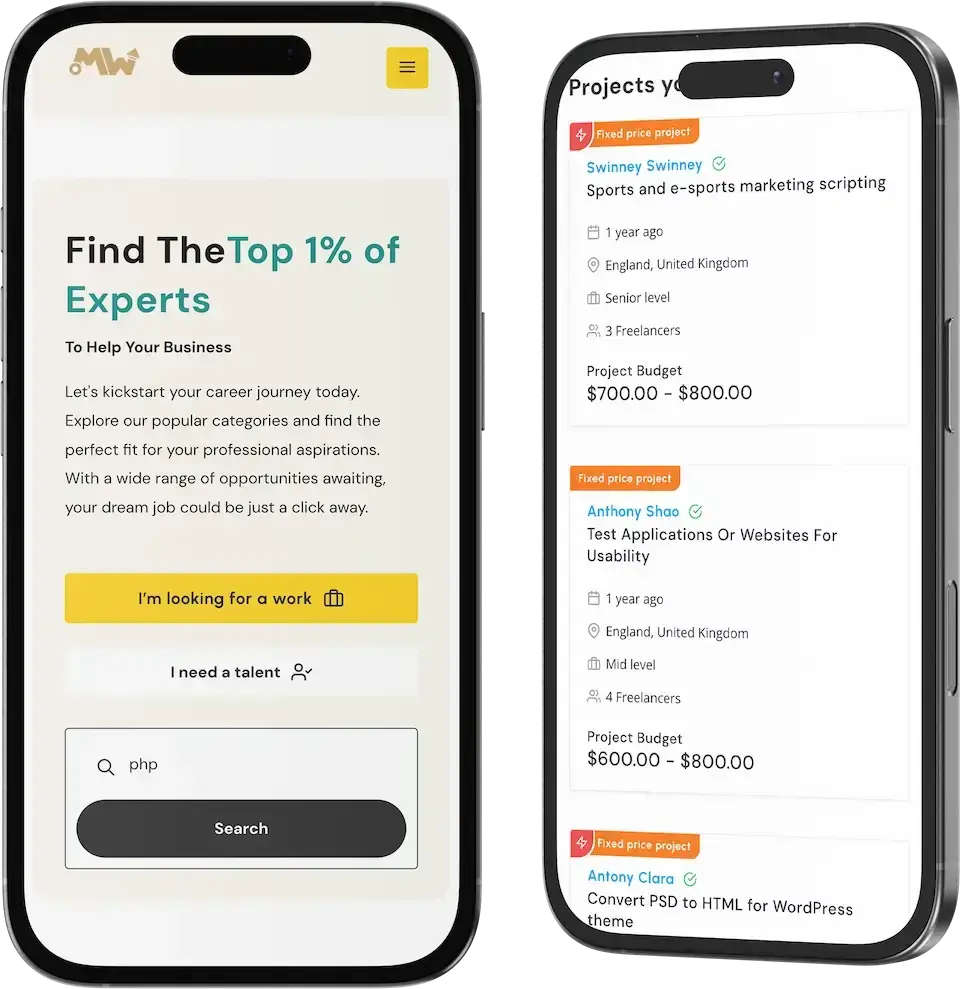
02Clients post projects and freelancers send proposals, each side backed by a profile, for work billed per project.
Explore Solution
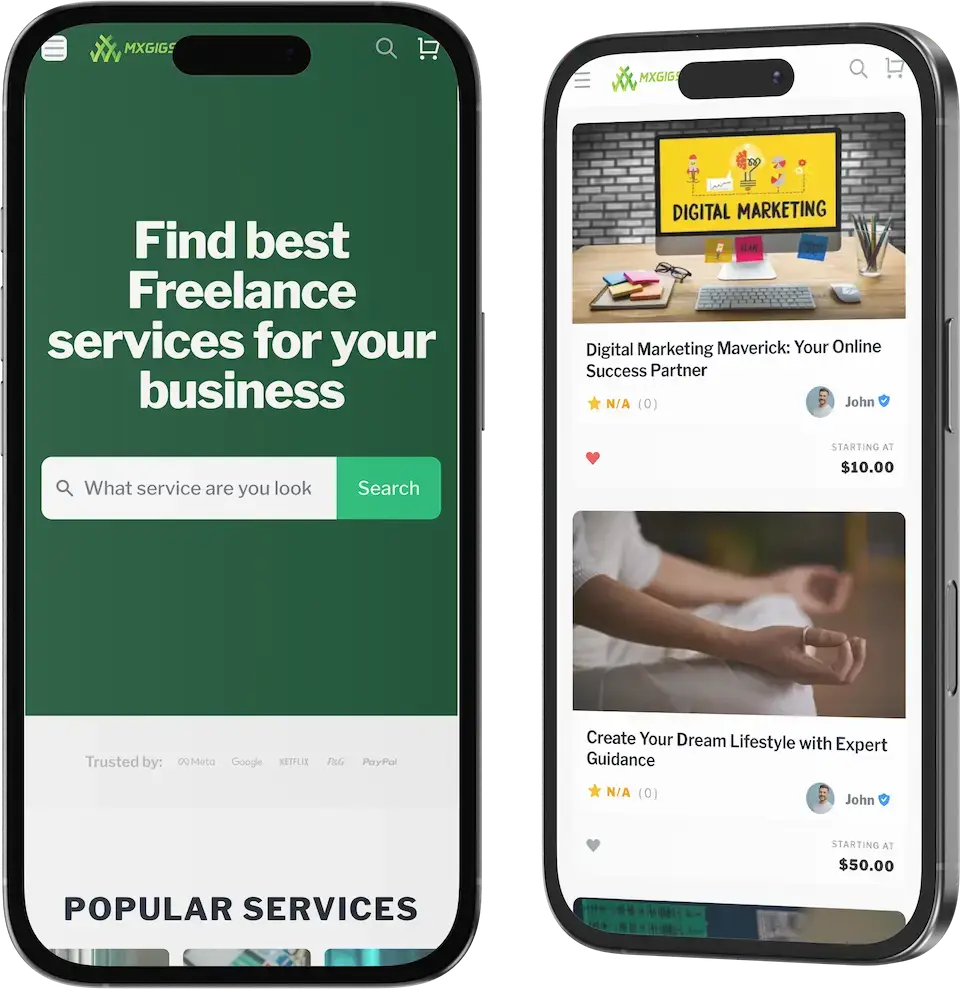
03Freelancers list services with prices, and buyers choose a listing and place an order.
Explore Solution
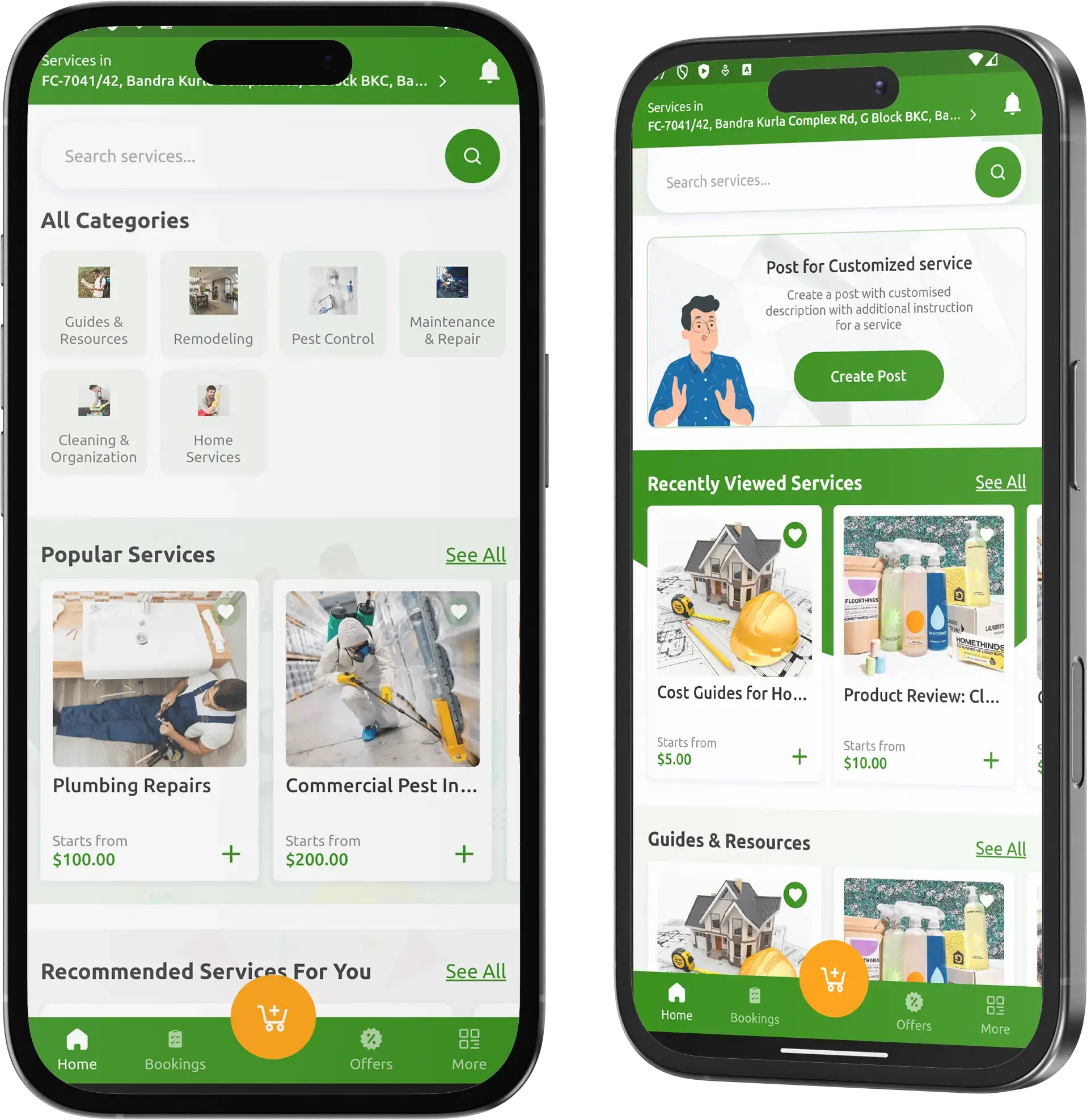
04Customers look through categories, compare providers and either book a home service or request a custom one.
Explore Solution09Money and market
Market Benchmarks
Online Recruitment Market Benchmarks - Independent 2025-2026 Data
The revenue models above are ours. The figures below are not. They come from the ZipRecruiter and Microsoft (LinkedIn) annual reports on Form 10-K, the US Bureau of Labor Statistics and Indeed Hiring Lab, reproduced as published. Together they show how a listed job board earns its revenue and what hiring demand looks like in the US, so you can test a business case against numbers you can check.
$449.0m in ZipRecruiter Revenue in 2025
ZipRecruiter reports in its 2025 annual report on Form 10-K that revenue was $449.0 million, down 5 percent. Subscription revenue, from flat-rate job posting plans, was $345.2 million; performance-based revenue, paid per click, was $103.8 million. Quarterly Paid Employers reached 59,104 in the fourth quarter, up 2 percent, and Revenue per Paid Employer was $1,889, down 2 percent.
7.1m US Job Openings in August 2026
The US Bureau of Labor Statistics JOLTS release of 29 September 2026 reports 7.1 million job openings in August, a rate of 4.3 percent. Hires were 5.2 million, a rate of 3.3 percent, and quits were 3.1 million, a rate of 1.9 percent. The figures show the size of the demand an employer-paid job board sells into.
LinkedIn Revenue Up 11% in Microsoft FY2026
Microsoft's annual report on Form 10-K for the year ended 30 June 2026 states that LinkedIn revenue increased 11 percent. Microsoft defines LinkedIn revenue as the sum of Talent Solutions, Marketing Solutions, Premium Subscriptions and Sales Solutions, so hiring products are one of four revenue lines, and says it is mainly affected by demand from enterprises and professionals.
Indeed Job Postings Index at 103.5 in Sept 2026
Indeed Hiring Lab's US Labor Market Snapshot of 24 September 2026 puts its Job Postings Index at 103.5, the highest level since late March and about 3 percent above the pre-pandemic level. The index showed 1.5 percent monthly growth as of 18 September, and 60 percent of occupational sectors were above their pre-pandemic baseline.
ZipRecruiter, Inc., Annual report on Form 10-K for the fiscal year ended December 31, 2025, filed 25 February 2026 - sec.gov
US Bureau of Labor Statistics, Job Openings and Labor Turnover Summary - August 2026, 29 September 2026 - bls.gov
Microsoft Corporation, Annual report on Form 10-K for the fiscal year ended June 30, 2026, filed 29 July 2026 - sec.gov
Indeed Hiring Lab, US Labor Market Snapshot, September 2026, 24 September 2026 - hiringlab.indeed.com
All figures are the publishers’ own reported results and statistics, reproduced as published. They describe the market, not the performance of any platform Miracuves builds, and nothing here is a revenue projection for your business.
Why It Pays
Marketability, Revenue Potential & Business Prospects
An employer-led board built by Miracuves earns once companies feel their page and their jobs get seen, and candidates trust it enough to apply. The points below make both decisions easier and keep the resulting relationships in your hands.
- 01
Several Ways to Charge a Company
Plans, featured and highlighted jobs, pay per job and metered profile views work as separate levers, so earnings climb with every employer that joins. What a company really pays for is a page that gets seen; each purchase becomes an order in your console, and Miracuves takes no cut.
- 02
A Reason to Return on Both Sides
Profiles give candidates somewhere to research employers, and a lively candidate pool gives each company a reason to renew its plan.
- 03
An Audience You Own
Company accounts, profile pages and application history live in your database, so the value builds up with you and not on someone else's site.
- 04
Freedom to Leave
You hold the entire source code, so switching host, team or direction needs no outside approval.
- Employer Plans
- Free-to-Paid Upgrades
- Featured & Highlighted Jobs
- Pay Per Job Posts
- Candidate Profile Views
- Advertisement Spaces
The moat is the employers and the audience, not the feature list.
- 01Companies with a profile, a plan and applications rarely leave
- 02Candidates with a saved profile and past applications return
- 03The build-up begins at launch, in your own database
- 04Moderation of profiles and listings is a further moat
Three cases, one variable: how many employers are active. Each case names the lever in front at that size. They serve planning conversations and predict nothing about any board's earnings.
Plans and single posts carry the early income.
A directory for one sector where a few dozen companies hold a profile and pay to post, with approvals keeping it relevant. Illustrative sizes; nothing here forecasts results.
Plans plus featured and highlighted jobs.
A regional hub in which many companies chase the same visitors, so boosted jobs begin to matter beside plan fees. Illustrative sizes; nothing here forecasts results.
Many markets, with plans and exposure both in play.
A site covering several countries, where plans, boosts and ad spaces accumulate and the dashboard counters reveal where to concentrate. Illustrative sizes; nothing here forecasts results.
10Why Miracuves
Why Miracuves
Choosing a Developer for a Job Board Like Glassdoor: Miracuves Against the Alternatives
Employer job boards are bought as generic scripts, built by freelancers or agencies, or licensed from Miracuves as a proven base with deliveries behind it. Ask any builder to show a real employer page, the directory filters and a logged order before you pay; our public demo shows all three.
What Founders Value in Miracuves
- 01
Company Pages Come Built
A Companies directory with three filters and public company profiles listing open positions works on day one, and the demo lets you click through every part.
- 02
Real Native Apps
Both apps are genuinely native, Android in Java and Kotlin and iOS in Swift, and neither is a website dressed up in a frame.
- 03
One Codebase, Three Surfaces
The public site, employer panel and admin console are a single product with separate logins, so nobody has to stitch three projects together.
- 04
You Own the Source
The full codebase is delivered unencrypted, which means no one can reprice it or rewrite the terms afterwards.
- 05
Plans Included From Day One
Price plans, allowances, pay per job and an order list sit in the base, so employers can be charged from the first day you are live.
- 06
Plain Readiness Language
Every base feature here is stated as built, each add-on carries its own quote, and the accounts you connect, from hosting to gateways and store developer accounts, are named up front.
How to Choose a Glassdoor Clone Development Company
A company-profile job board should be judged on a live employer page, not a sales deck.
What to look for Miracuves
- A working company page Profiles with industry, size, map and open positions in the public demo
- Native mobile apps Seeker and employer apps in Java and Kotlin for Android and Swift for iOS
- Billing that reconciles An Order menu that records provider, amount and paid status for every plan
- Source you can open Every file handed over unencrypted
- A fixed launch date Employer and seeker apps live in six working days, with free work if we slip
- Help after go-live Guidance, priority fixes and updates running side by side from launch
Walk away from any vendor who
- Calls a bare listing form a company profile
- Cannot show a verified employer marker in a live demo
- Ships a website in an app frame and calls it native
- Takes a share of the plans your employers buy
- Locks the PHP source or rents the board back yearly
Glassdoor Clone Versus Off-the-Shelf Scripts and Agencies
| What you compare | MiracuvesMiracuves Glassdoor Clone | Off-the-Shelf Script | Bespoke Agency Build |
|---|---|---|---|
| Time to Launch | Miracuves builds it in six days | Unknown, or do it yourself | Quoted per project, often months |
| Source-Code Ownership | Complete and unencrypted | Frequently restricted or locked | Normally yes |
| Company Profiles | Directory, filters and profile pages | A bare listing form | As far as the budget stretches |
| Employer Tools | Employer app, panel and plans | Occasionally a posting form | Made to order |
| Mobile Apps | Native for Android and iOS | Seldom part of the offer | Made to order, billed extra |
| Admin & Reports | Dashboard, company list, plans and orders | Sparse or absent | Made to order, billed extra |
| Moderation & Trust | Approval switch and verified accounts | Barely any | Differs from vendor to vendor |
| Cost vs Speed vs Quality | Fixed price, quick, a tested base | Cheap but risky | Costly and slow |
| Ongoing Support & Updates | 60 days guidance, 6 months bug fixes, 12 months updates | Seldom offered | Defined by the contract |
Not many routes to an employer job board survive year one unchanged. This is where they diverge.
Talk to Our TeamVersion History
Release History of the Employer-Profile Job Board - Fixes & Updates
Notes for the web platform, latest first. The notes were never dated, and every line is paraphrased from the source change note.
| Release | What changed |
|---|---|
| V3.23.6 | New or improved Closed a gap through which an unauthorized account could be created |
| V3.23.5 | Corrected A limit on how many digits a plan price may have A stray menu item for an extra page that appeared without purpose |
| V3.23.3 | New or improved Improved job location search Corrected Removing a bookmark now shows a confirmation message Job pages with an embedded video failed to render it |
| V3.23.0 | New or improved A switch that turns the help widget on or off Corrected Translation problems |
| V3.22.0 | New or improved The platform deletes users who never verify their account |
| V3.21.5 | Corrected A problem with HTTPS requests A candidate pop-up that lacked some of its data |
Start the conversation
Ready to give every employer a home on your own hiring site?
Book a free consultation and you leave with a clear timeline and honest replies to your questions. Winning your trust comes before making a fast sale for us.
- Get a response within 2 hours, Mon-Sat
- Free first consultation
- No lock-in contracts
- The source code is yours
11Keep reading
Blog & Resources
Glassdoor Clone Reading List: Fresh Guides & Insights
Posts on how a Glassdoor-style platform earns its money, how the business is structured and what a ready-made script includes.




The product7 questions
01What exactly is the Glassdoor Clone?
It is a job board that arrives ready-made, with a public company page for every employer. Companies register, publish a profile and post jobs, seekers browse a Companies directory and a jobs list, and an admin console governs the lot. Miracuves hands it over white-label with the public site, an employer panel, an admin panel and native Android and iOS apps, plus all of the source.
02Does the Glassdoor Clone include employee reviews, star ratings or salary data?
No. The base product is a job board with employer profiles. Company pages carry what the employer writes about itself, and each job shows the salary range its employer chooses, but there is no module for reviews, ratings or salary reports. Adding one would be custom work, scoped and quoted separately in writing.
03Can the design, features and business model be changed to fit my plan?
Yes. The complete source arrives unencrypted, so branding, fields, filters, plans and flows can all be altered by your developers or by ours. Work past the base gets a written scope and quote before it starts.
04Do I need technical skills to run the platform?
No. Daily work takes place in the admin panel, whose menus cover companies, candidates, jobs, plans and orders. The package includes documentation, and 60 days of platform guidance means your team learns the console with us beside it.
05Do the mobile apps run natively on Android and iOS?
They do. Android apps are written in Java and Kotlin and iOS apps in Swift using Xcode, with one app for seekers and another for employers on each platform. Each is a native project, not a website inside a wrapper.
06Does the Glassdoor Clone use AI to match jobs with candidates?
Not in the base build. The Find Job page offers keyword and location search with filters for type, salary, category and remote work. AI-driven predictive analytics is an add-on, priced on its own according to your data and goals.
07Is it lawful to run a job board that features company profiles?
In most places it is, although the rules depend on where you operate. Job advertising, anti-discrimination, hiring minors for internships, protection of candidate data and paid listings all vary by country and often by state. The software supplies the tooling, Miracuves offers no legal advice and you should take local advice before opening the board.
Companies & seekers8 questions
08How does a company set up its profile?
A company registers and confirms its email, then completes its page with a name, industry, description, founding date, organization type, company size, website and location. The page shows a banner and logo block and lists the company's open positions.
09What can a seeker learn from a company page?
The page reveals the company's industry, its description, when it was founded, its organization type and size, and its website and location on a map, together with the jobs it has open. Contact details stay behind a Show Contact Information button, and share buttons cover Facebook, Twitter and Pinterest.
10How does a job seeker create an account?
A seeker registers, confirms an email address and fills in a profile. From then on they can upload a resume, save jobs, set alerts and apply, while the dashboard counts their applications, favorites and alerts.
11What are the steps for applying to a job?
Open a job from the list and press Apply. The form asks for a resume and a cover letter, and once it is sent the application shows up in the applied list with its date and a status. View Details reopens the job.
12What are the steps for an employer to publish a job?
The employer picks Post Job, enters the details, chooses a visibility (free, paid or featured) and publishes. If approval is switched on, an admin reviews the job first, and the post counts against the allowance of the employer's plan.
13How do employers reach applicants?
An employer reads applications in the employer panel and can write to a candidate with Message Candidate, or receive applications by email if it prefers. The candidate directory, filtered by skills, experience and education, helps it find people who have not applied.
14Which paid options increase a company's visibility?
Plans hold allowances for featured jobs and highlighted jobs, and an employer can also pay for a single post and have it highlighted or featured. Candidate profile views are metered by plan as well. You define every plan and its price in the admin panel.
15How is personal information protected?
Seekers choose privacy options for their profile, new users confirm their email and the base removes users who never do, and the logged-out candidate list shows names only in part. Payments run through gateways you connect. Pre-launch security work, such as penetration testing and a restore drill, is listed on this page for you to complete.
Admin, money & demos7 questions
16What can the admin panel manage?
Its menus cover companies, candidates, jobs, applied jobs, job categories, job roles, attributes, price plans and orders, plus an internship group, a blog and settings. The dashboard tallies earnings, candidates, companies, verified users and jobs that are active, expired, pending or all.
17Can job post approval be switched on and off?
Yes. An admin decides whether new job posts go live immediately or wait for review. Many new boards begin with approval on and relax it once they trust their employers.
18How do I earn money from the platform?
In the admin panel you set the price of each plan, of featured and highlighted jobs, of single posts and of candidate profile views, and you may sell advertising spaces as well. Employers pay through the gateways you connect, and each purchase appears in the order list.
19Which payment providers can employers use?
The demo orders show offline payment, Stripe, PayPal and Mollie, and the admin panel manages the gateways. The providers you can actually use depend on your country and on the accounts you open and onboard yourself.
20Where does the first revenue usually come from on an employer-led job board?
Typically from plans and single posts, since a company sees the value of one listing right away and a price can be set on day one. Featured and highlighted jobs come next, once enough companies compete for the same seekers to want exposure. Revenue from advertisement spaces, or from licensing the white-label deployment to another operator, rests on your own commercial arrangements, so it is negotiated and not built in.
21What makes an employer-led job board hard to copy?
The moat is the employers and the audience, not the feature list. Companies that hold a profile, a plan and a record of applications rarely switch, and candidates with a profile and an application history have reasons to come back. The platform lets that build-up begin at launch and stores it in your own database. Moderating profiles and listings with care is another moat, since a board that people trust is difficult to imitate.
22What do the demos show, and do they include internships?
The MXHire demo is the complete job board, with the Companies directory, company pages, jobs, candidates and a Pricing page. MXHireX adds an intern panel. Both demos already show internship screens and menus, and the dedicated internship module with its own intern panel is offered as an add-on.
Launch & Miracuves13 questions
23How long does deployment take?
Six days of Miracuves build time for the ready-made platform, covering rebranding, deployment to your hosting and publishing support. Apple and Google review apps on their own schedule, so store approval falls outside those six days.
24Do I receive the source code?
Yes, all of it: web, admin, Android and iOS, unencrypted. Nothing is billed per seat or per run, and your developers may change whatever they like.
25What am I required to hand over before launch?
Hosting and a domain, Apple and Google developer accounts that you own and have verified, your logo and branding, your business and legal details, a payment gateway that is onboarded with KYC finished, and any third-party keys for maps, SMS or push services.
26What support follows the launch?
Three periods run in parallel from launch day at no extra cost: 60 days of platform guidance, 6 months of priority bug fixes and 12 months of product updates.
27How does a project run from the first call to deployment?
We confirm your requirements and goals, agree the design and branding, then rebrand and configure the platform. It is tested before going onto your servers, and the support periods start after launch. Work beyond the base follows its own written scope.
28How does Miracuves stand out as the builder of a Glassdoor clone?
Because the directory, company pages, jobs, applications, plans, native apps and admin console arrive working, and two demos let you try them before you commit. Miracuves has delivered 9,000+ projects, charges a flat $2,499 for this product, includes every line of source and states plainly which parts are add-ons and which you provide.
29How much does a Glassdoor clone cost?
A flat $2,499, paid once. For that you get the public site with company profiles and the Companies directory, native seeker and employer apps, the employer and admin panels and every file of source, live on your hosting in 6 working days. Skill tests, internships, video calls and analytics are add-ons with separate prices, and new modules are quoted in writing.
30Is a ready-made Glassdoor clone better than custom development?
If you want company profiles and a working job board quickly, yes. The directory, profile pages, job posting, applications, plans and admin console already run, so your money goes into employers and seekers rather than rebuilding them. A custom build makes sense only for an unusual product, and even then you can begin on the clone and commission changes, quoted in writing and typically finished in 2-8 weeks.
31What is the business model of an app like Glassdoor?
Companies pay for presence, prominence and access to talent: plans, featured or highlighted jobs, single paid posts and metered candidate profile views, plus advertising spaces you can sell. You set every price in the admin panel. Employee reviews and salary data are not part of the base, so a review-led model would be custom work on top of this employer-profile board.
32What is the step-by-step process to launch my Glassdoor clone?
Open the MXHire demo and explore company pages, jobs and the console. Decide what kind of employer board you want, then pass us your logo, categories, plan prices, server, domain and store accounts. Over the 6 working days your brand goes onto the site, panels and apps, everything is installed and configured with plans and approval, a full hiring cycle is rehearsed and the apps are submitted for Apple and Google review.
33What features should a job portal like Glassdoor include?
A strong employer-led board needs company pages, job search, seeker accounts, an employer panel and an admin console. The Miracuves Glassdoor clone has all of these. Seekers filter jobs by type, salary, category and remote work, upload a resume, save jobs and set alerts. Employers publish jobs, message candidates and browse a candidate directory, while plans set what each employer can feature.
34How do I solve the cold-start problem for a new job board?
Start with the employers, because they are the ones who pay. While the directory is small, employer plans and pay-per-job posts bring in the first money, and a free plan persuades new employers to publish a profile. Many new boards also begin with job approval switched on and relax it once they trust their employers.
35Can I run a Glassdoor clone for the local employers of one country?
Yes. You can gather the local employers of one market, let seekers pick a country and sell plans in the local currency. The demo directory comes with 26 industry options, such as information technology, banking, logistics and media, and you can edit that list to suit your niche.
Go Deeper on the Glassdoor-Style Board
Browse the guides, the neighboring platforms and the services around this product.
Marketplace development
View the service→GuideRevenue model
The income lines of a Glassdoor-style platform, from employer plans to featured jobs, explained one by one.
Read the post→Business model
How the original company is organized and where its money comes from, as a template for yours.
Read the post→Related platformLinkedIn Clone
A professional network in which people and companies hold profiles, with a feed, jobs and an admin console.
View the platform→Disclaimer
Miracuves is an independent software development company. We are not affiliated with, connected to, sponsored by, or endorsed by Glassdoor.
Read our full Legal Notice & Disclaimer →“Glassdoor Clone” is used descriptively. It is how the software industry refers to building a platform with functionality similar to Glassdoor, and how clients search for it.
The entire design and codebase is built by our own team. The product contains no code, design, graphics, or content originating from the Glassdoor website or applications.
Glassdoor and all other third-party names and marks are the property of their respective owners, referenced here solely to describe the category of software offered.
















