


Key Takeaways
- Video streaming player development requires protocols like HLS and MPEG-DASH to deliver scalable, adaptive, and reliable playback across devices.
- HLS is widely used for Apple ecosystem compatibility and stable OTT delivery, while MPEG-DASH offers flexible adaptive streaming for modern cross-platform video systems.
- Both protocols work by splitting videos into small chunks and dynamically adjusting video quality based on user bandwidth and device conditions.
- A custom video player must support adaptive bitrate streaming, buffering optimization, CDN integration, analytics, DRM security, and multi-device playback.
- The strongest streaming platforms combine smooth playback, scalable delivery, secure streaming, and low buffering across global audiences.
Streaming Infrastructure Signals
- HLS streaming uses playlist files and segmented video chunks to support adaptive bitrate playback across mobile apps, browsers, and smart TVs.
- MPEG-DASH improves streaming flexibility by supporting multiple codecs, advanced adaptive streaming workflows, and efficient bandwidth management.
- Adaptive bitrate streaming helps reduce buffering by automatically changing video quality based on internet speed and playback conditions.
- Modern streaming apps depend on CDNs, transcoding pipelines, caching systems, and edge delivery to handle large-scale video traffic efficiently.
- Development complexity changes based on DRM integration, video encoding formats, CDN architecture, playback analytics, latency goals, and multi-platform support.
Real Insights
- A custom streaming player is not only about playing videos; it must manage quality adaptation, buffering control, security, and playback consistency.
- HLS works well for broad OTT compatibility, while MPEG-DASH often provides stronger flexibility for advanced streaming architectures.
- Founders should choose streaming protocols based on audience devices, latency requirements, infrastructure budget, and content delivery scale.
- Poor adaptive streaming setup can increase buffering, playback failures, bandwidth costs, and user churn across streaming platforms.
- The best video streaming player development strategy combines HLS, MPEG-DASH, adaptive bitrate streaming, CDN optimization, DRM protection, and scalable playback infrastructure.
Video streaming looks simple to users. They tap play, the video starts, quality adjusts, and buffering ideally stays invisible. But behind that smooth experience sits a technical chain that includes encoding, segmenting, manifest files, CDN delivery, adaptive bitrate logic, DRM, analytics, and player-level error handling.
That is why video streaming player development is not just about placing a video element on a page. For OTT platforms, creator apps, sports streaming apps, e-learning platforms, and enterprise video portals, the player becomes one of the most important parts of the product experience.
For founders building a subscription-based OTT platform or a Netflix clone, HLS and MPEG-DASH planning matters from day one because playback quality, content protection, CDN performance, and user retention are directly connected to the player architecture.
Two protocols dominate modern adaptive streaming workflows: HLS and MPEG-DASH. Apple describes HLS as a streaming technology that works over ordinary web servers and CDNs while dynamically adapting playback to available network conditions. MPEG-DASH is widely implemented through players such as dash.js, the DASH Industry Forum’s JavaScript reference client for MPEG-DASH playback in HTML5 browsers that support Media Source Extensions and Encrypted Media Extensions.
For founders, the real question is not only “Which protocol should we use?” The better question is: How should we set up HLS and MPEG-DASH so the video platform can scale, monetize, protect content, and deliver consistent playback across devices?
Miracuves helps founders build ready-made and white-label video streaming app solutions with scalable backend workflows, admin control, branded user experiences, and monetization-ready features. When HLS and MPEG-DASH are planned correctly, they become part of a stronger product foundation rather than a patch added after users start complaining about playback quality.
What HLS and MPEG-DASH Actually Do Inside a Streaming Player
A normal MP4 file is not enough for a serious streaming platform. If every user downloads or streams one fixed-quality file, users on poor networks buffer, users on strong networks may not get the best quality, and the platform has limited control over delivery efficiency.
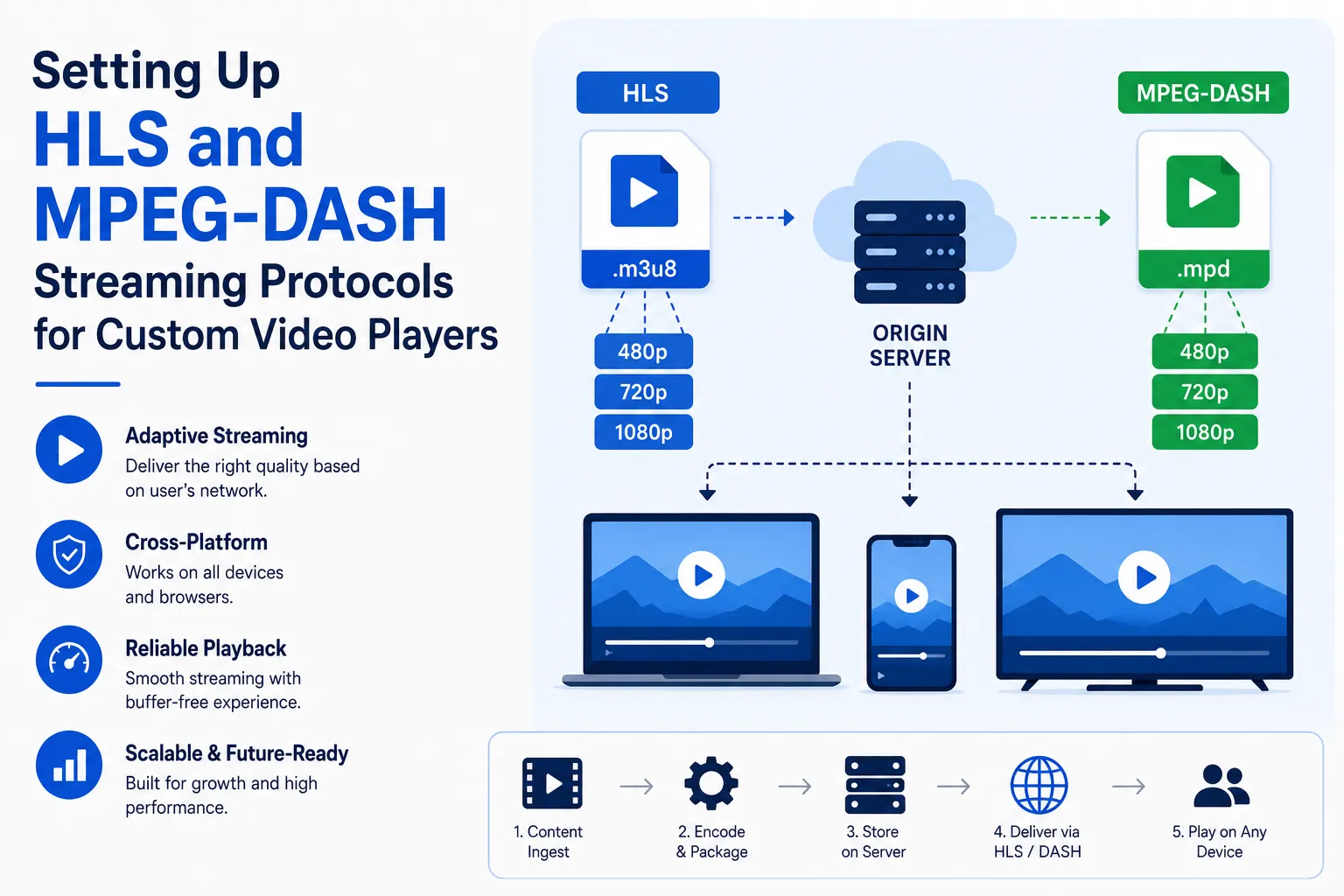
HLS and MPEG-DASH solve this by breaking video into smaller segments and providing a manifest file that tells the player which versions are available. The player can then switch between different quality levels depending on network speed, device performance, screen size, and buffer health.
In simple terms:
| Layer | HLS | MPEG-DASH |
|---|---|---|
| Manifest format | M3U8 playlist | MPD manifest |
| Main purpose | Adaptive video delivery over HTTP | Adaptive video delivery over HTTP |
| Strong use case | Apple ecosystem, broad streaming support | Standards-based web playback and DRM workflows |
| Player logic | Native support in Safari; JavaScript player often used elsewhere | Usually needs JavaScript player support in browsers |
| Business value | Reliable playback across many devices | Flexible adaptive streaming and advanced player control |
HLS and MPEG-DASH are not competitors in every roadmap. Many serious streaming platforms support both because device ecosystems are fragmented. Apple devices often make HLS essential, while DASH can be valuable for browser-based playback, Android ecosystems, Smart TVs, and DRM-heavy implementations.
Why Custom Video Player Development Needs More Than the HTML5 Video Tag
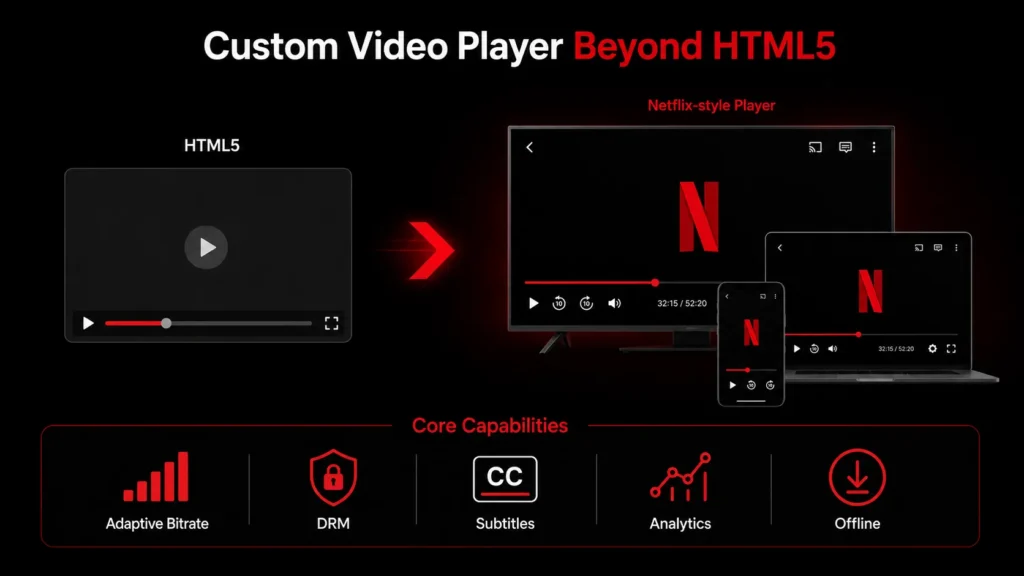
The HTML5 <video> element is useful, but it is not a full streaming product by itself.
For basic MP4 playback, the browser can usually handle video directly. But adaptive streaming requires more intelligence. On many browsers, JavaScript player libraries are needed to parse HLS or DASH manifests, fetch segments, manage buffer state, switch quality levels, and handle errors. MDN explains that Media Source Extensions allow JavaScript to create media streams for audio and video elements, enabling plugin-free web-based streaming media.
A production-grade custom player usually needs to support:
- Adaptive bitrate switching
- Playback resume
- Subtitles and captions
- Multiple audio tracks
- DRM license acquisition
- Tokenized playback URLs
- Error recovery
- Quality selector
- Playback speed controls
- Analytics events
- Ads or subscription gates
- Picture-in-picture
- Mobile gestures
- Smart TV controls
- Offline playback where relevant
This is why video streaming player development should be planned as part of the product architecture. The player affects user retention, support tickets, CDN cost, subscription value, ad delivery, and content protection.
HLS vs MPEG-DASH: Which Protocol Should Your Platform Use?
The right answer depends on your platform, devices, monetization model, DRM needs, and content type.
HLS vs MPEG-DASH for Custom Video Player Development
| Decision Area | HLS | MPEG-DASH | Founder Impact |
|---|---|---|---|
| Apple device support | Strong choice because HLS comes from Apple and is widely used across Apple ecosystems. | May require more careful compatibility planning on Apple devices. | If iPhone, iPad, Safari, or Apple TV users matter, HLS should usually be part of the roadmap. |
| Browser-based playback | Works natively in Safari; often uses hls.js or other libraries in browsers with MSE support. | Commonly uses dash.js, Shaka Player, or commercial player SDKs. | Browser fragmentation should be tested early, not after launch. |
| DRM workflows | Often used with FairPlay for Apple environments. | Often used with Widevine and PlayReady workflows through EME-enabled players. | Premium content platforms should plan DRM before encoding and packaging decisions. |
| Live streaming | Strong option for live and low-latency HLS workflows when optimized properly. | Supports live and low-latency DASH depending on player, packaging, and CDN setup. | Sports, events, and creator live streams need latency targets from the beginning. |
| Implementation flexibility | Simple to distribute over HTTP/CDN and widely supported. | Strong standards-based flexibility for multi-device streaming. | Many platforms benefit from supporting both rather than forcing one protocol everywhere. |
Step-by-Step Workflow for Setting Up HLS and MPEG-DASH Streaming
Setting up HLS and MPEG-DASH is not one task. It is a workflow. Each layer affects the next one.
1. Start With the Playback Requirements
Before choosing tools, define the product use case.
A short video app needs fast start time and feed-based playback. An OTT platform needs high-quality long-form playback, subscriptions, DRM, subtitles, and watch history. A sports platform may need low latency and live event reliability. An e-learning platform may need offline access, progress tracking, and controlled content access.
Clarify these decisions first:
- Is the platform video-on-demand, live streaming, or both?
- Which devices matter most?
- Does the platform need DRM?
- Will videos support subtitles and multiple audio tracks?
- Will content be monetized through subscriptions, ads, pay-per-view, or creator payouts?
- What is the acceptable latency for live content?
- Does the admin need control over video quality, availability, and access rules?
This prevents a common mistake: building a player that works in a demo but fails under real user behavior.
2. Encode the Video Into Multiple Renditions
Adaptive bitrate streaming requires multiple versions of the same video. These versions are often called renditions.
Netflix’s official research on video encoding and quality shows why encoding strategy matters before playback begins. For founders building a Netflix or OTT platform, this means HLS and MPEG-DASH setup should start with the right bitrate ladder, encoding workflow, and device-quality targets.
A practical ladder may include:
| Resolution | Use Case |
|---|---|
| 240p | Poor network conditions or low-data mode |
| 360p | Entry-level mobile playback |
| 480p | Standard mobile playback |
| 720p | HD mobile and desktop playback |
| 1080p | Full HD playback |
| 4K | Premium large-screen playback where relevant |
The player does not magically create quality options. The backend encoding pipeline prepares them first. Tools such as FFmpeg are commonly used in video pipelines to transcode videos into multiple resolutions and bitrates. Miracuves’ existing short video architecture content also highlights FFmpeg-based transcoding and adaptive streaming technologies such as HLS and MPEG-DASH for scalable video platforms.
The founder decision here is cost versus experience. More renditions can improve playback flexibility, but they also increase encoding time, storage usage, and CDN complexity.
3. Package Content Into HLS and DASH Outputs
After encoding, the content must be packaged.
For HLS, the system creates:
.m3u8manifest files- Video/audio segments
- Variant playlists for different qualities
For MPEG-DASH, the system creates:
.mpdmanifest files- Media segments
- Adaptation sets for video, audio, and subtitles
The manifest is the player’s map. It tells the player what quality levels exist, where the segments are located, how long they are, and how playback should proceed.
A poor packaging setup can cause playback stalls, audio/video sync issues, subtitle problems, or failed quality switching.
4. Host Segments on a CDN-Ready Storage Layer
HLS and MPEG-DASH both work over HTTP-based delivery. This makes CDN planning central to the experience. Apple’s HLS documentation specifically notes that HLS can be deployed using ordinary web servers and content delivery networks.
For a scalable video platform, the storage and CDN layer should support:
- Fast segment delivery
- Cache-friendly URLs
- Signed URLs or tokenized access
- Regional delivery optimization
- Origin protection
- HTTPS delivery
- Cache invalidation rules
- Separate handling for public and protected content
For founders, CDN strategy directly affects cost and user experience. A poorly cached streaming setup can increase bandwidth bills and still deliver unstable playback.
5. Integrate the Right JavaScript Player Library
For browser-based custom players, common options include hls.js, dash.js, Shaka Player, Video.js integrations, or commercial player SDKs.
HLS.js is a JavaScript library that implements an HLS client and relies on HTML5 video and Media Source Extensions for playback. dash.js is the DASH Industry Forum’s reference JavaScript client for MPEG-DASH and works in HTML5 browsers that support MSE and EME.
6. Add Adaptive Bitrate Rules and Quality Controls
Adaptive bitrate streaming is where HLS and DASH create real user value. The player monitors network and buffer conditions, then chooses the most suitable video quality.
MDN explains that DASH allows video streams to switch between bitrates based on network performance to keep video playing. HLS is also designed to adapt playback to network conditions.
A good custom player should decide:
- Should quality switching be fully automatic?
- Should users be allowed to manually select quality?
- What is the startup quality strategy?
- How much buffer should be maintained?
- Should mobile users default to lower data usage?
- Should premium subscribers get higher maximum quality?
- Should 4K be available only on supported devices?
This is where product logic meets technical logic. A streaming platform may use ABR to reduce buffering, but it may also use plan-based controls to support monetization.
7. Configure DRM and Playback Authorization
For premium content, DRM and authorization should not be treated as optional extras.
Encrypted Media Extensions allow web applications to interact with content protection systems for encrypted audio and video playback. In practice, streaming platforms may use FairPlay, Widevine, PlayReady, or a multi-DRM provider depending on devices and content rights.
Security planning may include:
- Tokenized playback URLs
- User session validation
- Subscription checks
- Device limits
- DRM license expiry
- Geo-restrictions
- Watermarking where relevant
- Admin-side content access rules
- Audit logs for playback events
Use careful language here: DRM reduces unauthorized access risk, but no implementation should claim absolute piracy prevention.
8. Add Subtitles, Captions, and Multiple Audio Tracks
A custom video player should not focus only on video quality. Accessibility and localization are part of product scalability.
For OTT, e-learning, and international content platforms, the player should support:
- Subtitles
- Closed captions
- Multiple audio languages
- Audio description where relevant
- Subtitle styling
- Admin upload and management
- Sync testing across renditions
This improves usability and expands the potential market. For educational and enterprise video platforms, captions can also improve comprehension and content accessibility.
9. Connect Analytics and Quality-of-Experience Monitoring
A founder cannot improve what the platform does not measure.
A production video player should track:
- Play attempts
- Successful starts
- Startup time
- Buffering events
- Rebuffer ratio
- Average bitrate
- Quality switches
- Error codes
- Watch duration
- Drop-off points
- Device and browser issues
- CDN performance patterns
These metrics help teams identify whether a playback issue is caused by encoding, CDN, player logic, DRM, device compatibility, or user network conditions.
Without video analytics, founders often guess. With the right monitoring, they can prioritize fixes that actually improve retention.
Player Architecture for OTT, Creator, and Short Video Platforms
A custom video player does not exist alone. It connects to the larger video platform architecture.
For a serious streaming product, the player usually connects with:
| Platform Layer | Player Connection |
|---|---|
| User app | Playback UI, watch history, resume, favorites |
| Admin dashboard | Video upload, availability, quality settings, access rules |
| Encoding pipeline | Renditions, thumbnails, preview clips, subtitles |
| CDN | Segment delivery and caching |
| Subscription system | Plan-based access and playback authorization |
| Ad system | Pre-roll, mid-roll, post-roll, or sponsorship placements |
| Analytics | Viewing behavior and QoE monitoring |
| Moderation system | Content safety for user-generated videos |
| Notification system | New episode, live event, or creator upload alerts |
For short video platforms, the player must be optimized for fast feed loading, prefetching, quick swipe behavior, and low startup delay. For OTT apps, the player needs long-session stability, DRM, subtitles, profiles, continue watching, and multi-device consistency. For e-learning apps, the player may need progress tracking, chapter markers, quizzes, and offline controls.
If your roadmap includes short video or creator-led streaming, Miracuves’ related guides on video streaming infrastructure for short video apps, cloud infrastructure for short video platforms, and background processing for creator platforms can support deeper planning.
Founder Decision Signals for HLS and MPEG-DASH Setup
Founder Decision Signals
Speed
If the goal is faster launch, use proven streaming libraries and a tested backend workflow instead of building every player feature from zero.
Cost
Streaming cost is shaped by encoding volume, storage, CDN traffic, DRM, analytics, and device support. Player planning helps avoid expensive rebuilds.
Scalability
A scalable player should support adaptive bitrate, CDN delivery, error recovery, analytics, and future DRM or monetization requirements.
Market Fit
Different platforms need different playback logic. A creator app, OTT product, e-learning platform, and live sports app should not use the same player assumptions.
Mistakes Founders Should Avoid in Video Streaming Player Development
Mistakes Founders Should Avoid
Using only a basic video tag for adaptive streaming
The HTML5 video tag is useful, but adaptive HLS and DASH workflows often require JavaScript player logic, MSE support, DRM handling, and analytics integration.
Choosing HLS or DASH without device research
Device support should guide protocol strategy. Apple-heavy audiences, Android users, web browsers, Smart TVs, and DRM requirements may need different playback paths.
Ignoring CDN and segment caching
Even a well-built player can fail if video segments load slowly, cache poorly, or create excessive origin requests.
Adding DRM after launch
DRM affects encoding, packaging, player configuration, license flows, and user access logic. It should be planned early for premium content platforms.
Not tracking playback analytics
Without startup time, buffering, quality switch, and error data, teams cannot identify where the playback experience is breaking.
How Miracuves Helps With Video Streaming Player Development
A strong streaming product needs more than protocol setup. It needs a complete app ecosystem around the player.
Miracuves helps founders build video streaming and creator platform solutions with ready-made, white-label, source-code-owned foundations that can be customized around the business model. Depending on the product scope, this may include user apps, admin dashboards, creator or publisher panels, video content management, subscription workflows, monetization modules, CDN planning, playback logic, and scalable backend workflows.
For founders planning to launch an OTT platform, the Netflix clone app solution can provide a launch-ready foundation for long-form video streaming, content libraries, user profiles, subscription monetization, watch history, admin control, and custom branding. For broader OTT or video streaming products, Miracuves can help plan the right HLS, MPEG-DASH, backend, and custom video player development strategy around your target users.
Final Thoughts: Build the Player as a Product Layer, Not a Playback Button
HLS and MPEG-DASH are essential parts of modern video streaming, but the protocol alone does not create a great product. The real value comes from how the player uses those protocols to deliver smooth playback, protect content, support monetization, track quality, and adapt across devices.
For founders, the smarter decision is to treat video streaming player development as a core product foundation. A well-planned player can reduce buffering, improve retention, support subscriptions or ads, protect premium content, and give the business better control over growth.
The goal is not just to make a video play. The goal is to make the video experience reliable enough that users keep watching.
FAQs
What is video streaming player development?
Video streaming player development is the process of building a custom video player that can stream content reliably across devices. It usually includes HLS or MPEG-DASH support, adaptive bitrate playback, custom controls, subtitles, DRM, analytics, error recovery, and monetization hooks.
Which is better for custom video players: HLS or MPEG-DASH?
HLS is often essential for Apple ecosystems and broad streaming support, while MPEG-DASH is useful for standards-based adaptive streaming and many browser or DRM workflows. Many serious platforms support both to improve cross-device compatibility.
Do I need MPEG-DASH if I already use HLS?
It depends on your target devices, DRM needs, and playback strategy. HLS may be enough for some platforms, but MPEG-DASH can be useful when you need broader adaptive streaming flexibility, browser-based player control, or specific DRM workflows.
Can I use the HTML5 video tag for HLS and DASH?
The HTML5 video tag can handle basic playback and native HLS in Safari, but many adaptive streaming workflows require JavaScript player libraries such as hls.js, dash.js, Shaka Player, or commercial player SDKs. MSE enables JavaScript-driven streaming media in supported browsers.
What is an M3U8 file in HLS streaming?
An M3U8 file is the HLS playlist or manifest file. It tells the player where video segments are located and what quality levels are available.
What is an MPD file in MPEG-DASH?
An MPD file is the MPEG-DASH manifest. It describes available video, audio, subtitle, and segment information so the player can stream and switch quality levels.
Does a video streaming player need DRM?
DRM is strongly recommended for premium, licensed, subscription, pay-per-view, or creator-owned content. DRM helps control playback access, license validity, and device-level content protection, but final implementation depends on platform requirements and legal review.
How does adaptive bitrate streaming improve user experience?
Adaptive bitrate streaming lets the player switch between video qualities based on network conditions and buffer health. This helps reduce buffering and keeps playback stable when user bandwidth changes.