


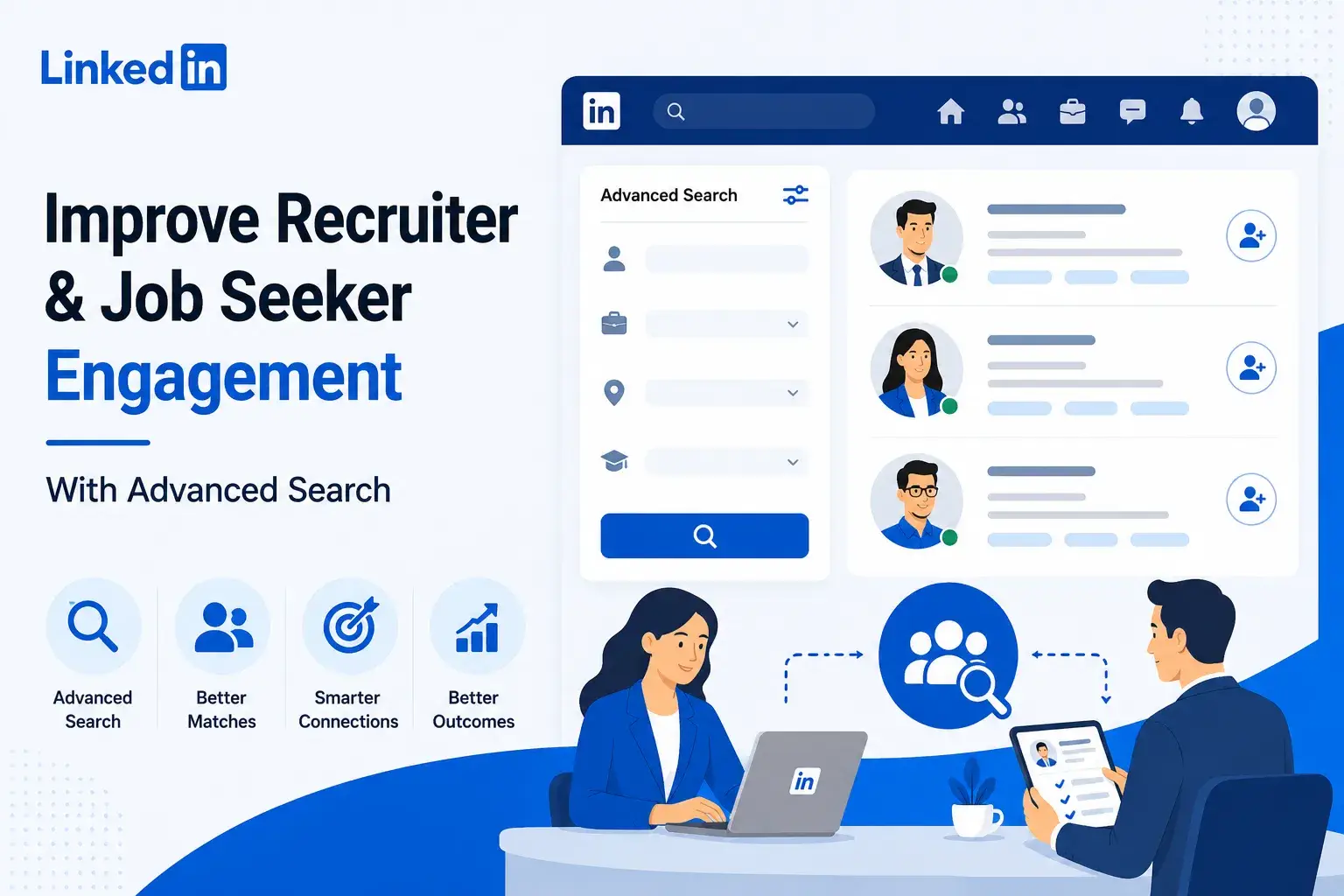
Advanced job search in LinkedIn clone app is one of the most important features for improving recruiter productivity, job seeker engagement, and hiring platform retention. For founders building a LinkedIn-style professional networking app, search is not just a filter panel; it is the discovery engine that connects the right talent with the right opportunities.
Basic search helps users find something. Advanced search helps them find what matters. Recruiters get fewer irrelevant profiles, stronger shortlists, and faster hiring workflows. Job seekers get more relevant recommendations, better visibility, saved opportunities, and less time wasted on roles that do not match their goals.
For founders, the lesson is clear: search is not a secondary feature. In a recruitment-focused LinkedIn app, search is one of the strongest drivers of engagement, retention, monetization, and marketplace quality.
Why Advanced Search Matters in a LinkedIn Clone App
Advanced job search in LinkedIn app matters because professional networking users search with high intent, not casual browsing behavior.
A recruiter may want to find “senior React Native developers in Bengaluru with fintech experience and immediate availability.” A job seeker may want “remote product manager roles in SaaS companies that accept career switchers.” A founder may want to connect with “startup investors focused on healthtech in the UAE.”
A basic keyword search cannot handle these layered intents properly.
Advanced search solves this by combining structured filters, keyword logic, profile attributes, job metadata, and sometimes AI-powered relevance scoring. This improves the quality of matches and reduces the effort users need to invest before they see value.
For a LinkedIn app, this matters because engagement depends on relevance.
When recruiters repeatedly find useful candidates, they come back. When job seekers repeatedly find suitable jobs, they apply, save, share, and update their profiles. When both sides see value, the platform becomes more than a database. It becomes a working talent marketplace.
What Advanced Job Search Means in a LinkedIn Clone App
Advanced job search is not just a longer filter list.
In a LinkedIn-style platform, advanced search should help users refine results across multiple intent layers:
- Who the user is searching for
- What skill, role, or opportunity they need
- Where the person or job is located
- How experienced the candidate should be
- Whether the role is remote, hybrid, full-time, contract, or freelance
- Which industry, company size, or salary range matters
- How recently the profile or job was updated
- Whether the user has mutual connections, shared groups, or similar interests
For recruiters, advanced search usually means candidate discovery. For job seekers, it means job discovery. For platform operators, it means higher engagement quality.
A strong LinkedIn app should support both sides.
How Advanced Search Improves Recruiter Engagement
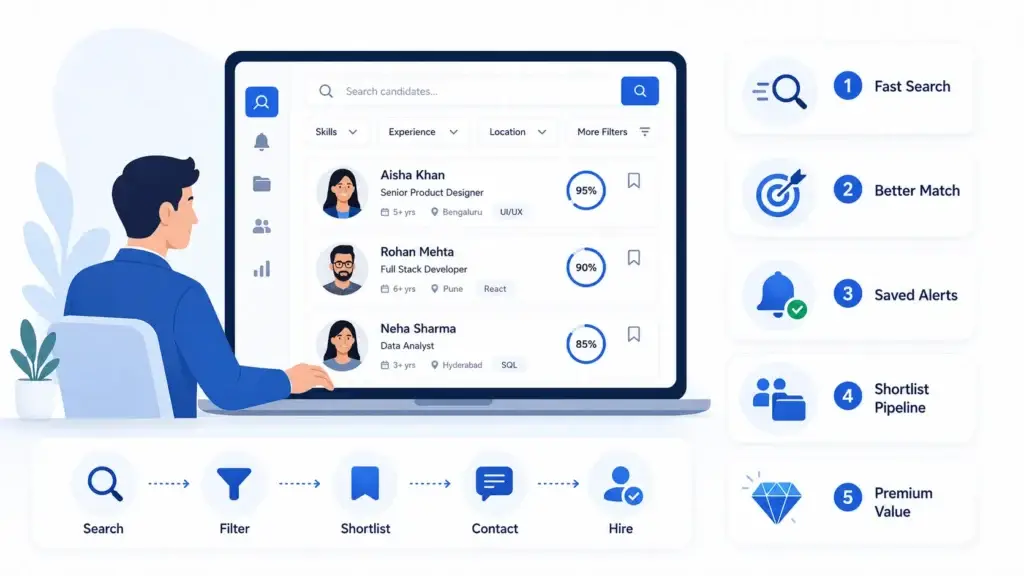
Recruiters are time-sensitive users. They are not browsing for entertainment. They are trying to reduce hiring friction.
If your platform helps recruiters move from a broad talent pool to a qualified shortlist faster, they are more likely to return, pay, and recommend the platform.
1. Faster Candidate Discovery
Recruiters need to narrow thousands of profiles into a realistic shortlist. Advanced search helps them filter by skills, job title, experience level, location, education, certifications, current company, past company, notice period, and availability.
This reduces search fatigue.
Instead of typing generic keywords and manually opening dozens of profiles, recruiters can run precise searches that align with the role. LinkedIn’s own Recruiter documentation shows that Boolean-style search and filters are used to refine candidate results more effectively.
2. Better Hiring Intent Matching
A recruiter may not only want someone with a skill. They may want someone actively open to work, recently active, located within a hiring region, or connected to a specific industry.
Advanced search can rank candidates using multiple signals, such as:
- Profile completeness
- Skills match
- Work history relevance
- Activity recency
- Location fit
- Job preference alignment
- Availability status
- Connection proximity
This makes the recruiter experience feel more intelligent and less manual.
3. Saved Searches and Candidate Alerts
Recruiters do not want to repeat the same search every day.
Saved searches allow them to store hiring criteria and receive alerts when new matching candidates join, update their profile, or become available. This turns search into an ongoing engagement loop.
For a founder, this is important because saved searches create repeat usage. Recruiters come back not because they remember the platform, but because the platform reminds them that new relevant talent is available.
4. Shortlisting and Pipeline Control
Advanced search becomes more valuable when it connects directly to recruiter workflow.
Recruiters should be able to:
- Save candidate profiles
- Add candidates to hiring projects
- Tag candidates by role
- Move candidates through pipeline stages
- Send messages
- Share profiles with hiring managers
- Add internal notes
- Track contacted candidates
This transforms search from a discovery feature into a productivity system.
5. Higher Willingness to Pay
Recruiters pay for time savings and hiring outcomes. If advanced search improves candidate quality and reduces manual screening, it becomes a premium feature.
A LinkedIn app can monetize recruiter-side search through premium filters, unlimited saved searches, candidate contact credits, AI-assisted matching, team accounts, analytics, and hiring campaign tools.
How Advanced Search Improves Job Seeker Engagement
Job seekers have a different problem. They are not shortlisting candidates. They are trying to find roles that feel relevant, realistic, and worth applying to.
Poor search creates frustration. If a job seeker searches for product manager roles and sees unrelated sales roles, expired listings, or irrelevant locations, they lose trust quickly.
Advanced search improves job seeker engagement by making the platform feel useful from the first session.
1. More Relevant Job Results
Job seekers should be able to filter jobs by:
- Job title
- Skill match
- Location
- Remote, hybrid, or onsite type
- Experience level
- Salary range
- Company type
- Industry
- Job freshness
- Application deadline
- Visa or relocation support
- Full-time, contract, freelance, or internship type
This makes discovery faster and reduces irrelevant scrolling.
2. Better Career Fit
The most useful job search experience does not only match keywords. It understands career direction.
A job seeker may not know the exact title they should search for. For example, a customer support professional may be suitable for customer success, account management, or implementation specialist roles.
AI-assisted or semantic search can help by interpreting intent beyond exact keywords. LinkedIn’s AI-powered job search is an example of this broader shift, where users describe what they want in natural language and the system matches intent against job descriptions.
3. Saved Jobs and Personalized Alerts
Job seekers often search in multiple sessions. They compare roles, update resumes, check company details, and apply later.
A LinkedIn app should let users:
- Save job searches
- Bookmark jobs
- Get alerts for new matching roles
- Track applications
- Receive similar job recommendations
- Hide irrelevant roles
- Follow companies
- Set job preference rules
These features create habit loops. The user does not need to start from zero every time.
4. Higher Profile Completion
Advanced job search can also encourage job seekers to improve their profiles.
For example, the app can show messages such as:
“Add your salary preference to improve job matches.”
“Add your top skills to appear in recruiter searches.”
“Complete your experience section to unlock better role recommendations.”
This creates a direct connection between profile quality and search visibility.
5. More Application Confidence
When users understand why a job matches them, they are more likely to apply.
A smart LinkedIn app can show relevance explanations such as:
- “Matches 7 of your listed skills”
- “Similar to your previous role”
- “Hiring in your preferred location”
- “Recently posted by a company you follow”
- “Your profile appears strong for this role”
This transparency helps users trust the platform.
Core Advanced Search Features Every LinkedIn Clone App Should Include
Advanced Search Features and Their Business Value
| Feature | Business Value | Founder Impact |
|---|---|---|
| Skill-based search | Helps recruiters and job seekers find better matches based on capability, not just titles. | Improves relevance and reduces search frustration. |
| Location and remote-work filters | Supports local, regional, hybrid, and remote hiring models. | Makes the platform useful across different markets. |
| Boolean search | Allows recruiters to combine, include, or exclude keywords for precise candidate discovery. | Creates a power-user feature for premium recruiter plans. |
| Experience-level filters | Helps users filter entry-level, mid-level, senior, leadership, or internship roles. | Improves job seeker relevance and recruiter efficiency. |
| Saved searches | Allows users to reuse search intent and receive new updates. | Creates recurring engagement and notification-driven return visits. |
| AI-assisted search | Lets users search by intent instead of exact keywords. | Differentiates the platform from basic job boards. |
| Candidate and job ranking | Sorts results based on relevance, freshness, activity, and fit. | Improves trust in search results and reduces manual effort. |
| Admin search analytics | Shows what users search, where searches fail, and which filters drive engagement. | Helps the platform operator improve listings, recommendations, and monetization. |
Advanced Search as a Monetization Layer
Advanced search can directly support revenue.
For a LinkedIn app, monetization should not depend only on ads or job posting fees. Search can become part of the paid value proposition.
Recruiter Monetization Options
Recruiters may pay for:
- Advanced candidate filters
- Boolean search access
- Unlimited profile views
- Saved candidate searches
- Candidate contact credits
- Team hiring dashboards
- AI candidate recommendations
- Talent pool alerts
- Pipeline management tools
Job Seeker Monetization Options
Job seekers may pay for:
- Premium job filters
- Salary insights
- Profile visibility boosts
- AI job matching
- Application tracking
- Resume improvement suggestions
- Early access to selected listings
- Skill-gap recommendations
Employer Monetization Options
Companies may pay for:
- Featured job listings
- Employer branding pages
- Sponsored hiring campaigns
- Analytics on job views and applications
- Priority candidate recommendations
- Access to filtered talent pools
The stronger your search system becomes, the easier it is to justify premium tiers. Users pay when they feel the platform saves time, improves relevance, or gives them better access.
Technical Logic Behind Scalable Job Search
A LinkedIn app with advanced search needs more than frontend filters. The backend must be designed to support speed, relevance, and scale.
Search Indexing
Search indexing helps the app retrieve jobs, profiles, companies, and posts quickly. Instead of scanning the entire database every time a user searches, the platform uses indexed fields such as skills, location, job title, company, experience, and keywords.
Structured Data
Profiles and job posts must be structured properly. Skills, job types, industries, locations, education, and experience levels should not exist only as plain text. They should be stored as searchable fields.
This improves filtering accuracy.
Semantic Matching
Semantic search helps the platform understand related terms. For example, “frontend developer,” “React developer,” and “UI engineer” may represent overlapping talent pools. A smarter search system can connect related terms instead of relying only on exact-match keywords.
Recent research in job matching also highlights the limitations of basic keyword filters and explores hybrid systems using semantic search, knowledge graphs, and explainable ranking to improve matching quality.
Ranking Logic
Not every matching result should appear at the top. A good search system should rank results based on multiple signals, such as:
- Relevance to query
- Profile completeness
- Job freshness
- User activity
- Skill match
- Location fit
- Availability
- Searcher behavior
- Sponsored placement rules
Search Analytics
The admin dashboard should show:
- Most searched skills
- Searches with no results
- Popular job locations
- Recruiter filter usage
- Job seeker search patterns
- Saved search frequency
- Conversion from search to application
- Conversion from search to message
This helps founders understand demand and improve marketplace supply.
Founder Decision Signals Before Building Advanced Search
Founder Decision Signals
Speed
If your platform needs to launch quickly, start with high-impact filters such as skills, job title, location, experience, job type, and saved searches before adding deeper AI search.
Cost
Advanced search complexity affects development scope. Semantic search, AI recommendations, and recruiter analytics require stronger backend planning than simple filter-based search.
Scalability
If you expect large profile and job volumes, search indexing, structured data, caching, and ranking logic should be planned early instead of patched after launch.
Market Fit
If your niche depends on precise matching, such as tech hiring, healthcare staffing, freelance recruitment, or executive search, advanced search should be treated as a core product feature.
Mistakes Founders Should Avoid
Mistakes Founders Should Avoid
Treating Search as a Basic Filter Panel
Advanced search should be connected to user intent, saved searches, alerts, ranking, profile quality, and monetization. A basic filter panel may work at launch, but it will not create long-term engagement by itself.
Ignoring Recruiter Workflow After Search
Recruiters need to shortlist, message, tag, compare, and manage candidates after discovery. If search ends at a profile result page, the product loses a major engagement opportunity.
Showing Too Many Irrelevant Results
More results do not always mean better search. If users keep seeing irrelevant jobs or candidates, they stop trusting the platform. Ranking quality matters as much as result quantity.
Adding AI Search Without Clean Data
AI-assisted search works better when profiles, jobs, skills, industries, and locations are structured properly. Poor data quality can weaken even the most advanced search layer.
How Miracuves Helps Founders Build LinkedIn-Style Recruitment Platforms Faster
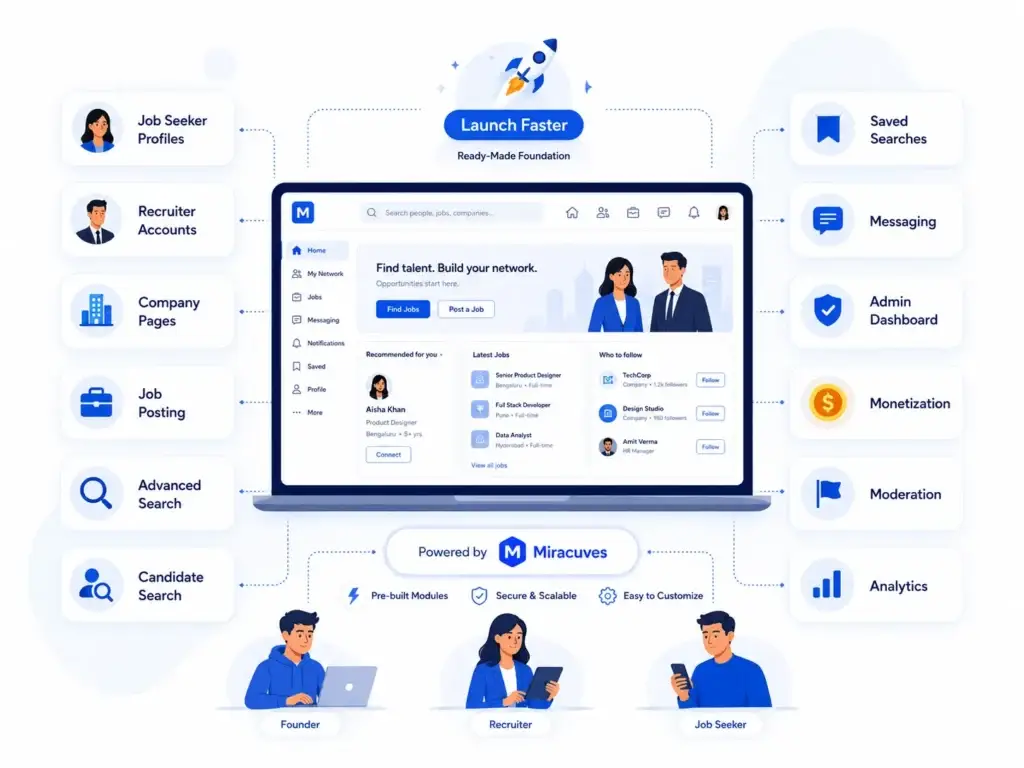
For founders who want to build a professional social networking app with job search, recruiter tools, company pages, and engagement features, Miracuves can help create a launch-ready foundation that supports both networking and recruitment workflows.
A LinkedIn-style platform should not work like a simple job listing website. It should connect job seekers, recruiters, companies, and admins through one smooth professional networking system. With Miracuves, founders can start with a ready-made foundation instead of building every module from scratch.
For a LinkedIn-style social networking app, Miracuves can help structure important modules such as:
- Advanced job search for filtering roles by skills, location, experience, salary, job type, and company
- Candidate search so recruiters can find suitable talent based on skills, experience, availability, and location
- Messaging workflows to connect recruiters, job seekers, and professionals inside the app
- Admin dashboard to manage users, jobs, companies, payments, reports, and platform activity
- Subscription and monetization controls for recruiter plans, featured jobs, premium visibility, and paid access
Along with these, Miracuves can also support job seeker profiles, recruiter accounts, company pages, job posting systems, saved searches, content moderation, profile moderation, analytics, and reporting. Together, these modules help turn a LinkedIn-style social networking app into a complete hiring, networking, and engagement platform.
This approach is useful for founders planning a niche hiring platform, professional community, executive search marketplace, freelance talent network, or industry-specific job portal. With Miracuves, founders can focus more on recruiter onboarding, job seeker engagement, platform growth, and monetization instead of spending months building the basic product layer from zero.
Security, Privacy, and Trust in a LinkedIn Clone App
Search quality is important, but trust decides whether users keep their profiles and hiring data on the platform.
A LinkedIn clone app should include security and admin control layers such as:
- Role-based access control
- Encrypted data transfer
- Secure login and authentication
- Recruiter verification
- Company verification
- Profile moderation
- Abuse reporting
- Spam detection
- Admin activity logs
- Permission-based dashboards
- Secure payment gateway integration
- Data privacy controls
For recruitment platforms, trust is not only a compliance topic. It affects candidate confidence, recruiter credibility, and employer brand reputation.
Final Thoughts: Advanced Search Turns a LinkedIn Clone App Into a Real Hiring Marketplace
The real value of advanced job search in a LinkedIn clone app is not that users get more filters. The value is that recruiters and job seekers get better outcomes with less effort.
Recruiters engage when they can find suitable candidates faster. Job seekers engage when they discover relevant opportunities without endless scrolling. Platform operators benefit when search creates repeat sessions, saved intent, alerts, premium upgrades, and stronger marketplace liquidity.
For founders, advanced search should be treated as a product strategy, not a decorative feature.
Miracuves helps founders build ready-made, white-label, source-code-owned app foundations with admin control, branding flexibility, and faster deployment. If you are planning a LinkedIn-style recruitment platform, advanced search can become one of the strongest features for engagement, retention, and monetization.
FAQs
What is advanced job search in a LinkedIn clone app?
Advanced job search in LinkedIn clone app is a search system that helps users find jobs, candidates, companies, and professional profiles using detailed filters, keyword logic, saved searches, ranking, and AI-assisted recommendations.
How does advanced search improve recruiter engagement?
Advanced search improves recruiter engagement by helping recruiters find relevant candidates faster. Filters such as skills, experience, location, current role, availability, industry, and profile activity reduce manual screening and make the platform more useful for repeated hiring tasks.
How does advanced job search help job seekers?
Advanced job search helps job seekers discover roles that match their skills, location preferences, salary expectations, experience level, and career goals. Saved searches, alerts, and personalized recommendations also encourage users to return regularly.
Should a LinkedIn clone app include Boolean search?
Yes, Boolean search can be valuable for recruiter-heavy platforms. It allows recruiters to include, exclude, and combine keywords to create more precise candidate searches. This can be offered as a premium recruiter feature.
Can advanced search become a paid feature?
Yes. Advanced filters, saved searches, AI-assisted matching, candidate contact credits, recruiter analytics, and premium visibility tools can all support monetization inside a LinkedIn clone app.
Is AI-powered search necessary for a LinkedIn clone app?
AI-powered search is not always necessary for the first version, but it can become a strong differentiator. Founders can start with structured filters and saved searches, then add semantic matching or natural-language search as the platform grows.