


Key Takeaways
What You’ll Learn
- Skype clone scripts provide a ready-made foundation for building voice, video, and messaging apps without starting from scratch.
- Core features include video calls, VoIP, chat, and screen sharing, forming the base communication experience.
- Advanced features like AI noise cancellation, transcription, and low-bandwidth optimization improve usability and scalability.
- Pricing varies widely, from ready-made solutions to high-cost custom development depending on features and scale.
- Choosing the right script depends on your use case — business meetings, telehealth, education, or internal communication tools.
Stats That Matter
- Custom Skype-like app development can cost $45,000 to $220,000+ depending on complexity and scale.
- Ready-made clone solutions significantly reduce cost and time, enabling faster go-to-market.
- Deployment timelines vary from months to days based on development approach.
- Feature-rich communication apps require scalable infrastructure to handle real-time calls and user growth.
Real Insights
- The biggest advantage of clone scripts is speed, allowing founders to launch faster than custom builds.
- Real-time communication apps require strong backend systems, not just frontend features.
- Feature selection should match your niche, such as telehealth, education, or enterprise collaboration.
- Scalability and call quality are critical for long-term success and user retention.
- A successful Skype clone combines performance, features, and monetization readiness into one platform.
Sure, we all love our emojis, memes, and quick texts—but when it really matters, we turn to voice or video. Whether it’s a job interview, a team huddle, or a late-night catch-up with a friend on another continent, real-time communication apps still sit at the top of the tech stack. And for over a decade, Skype was the gold standard.
Now, with Zoom, Google Meet, and FaceTime all carving out their space, there’s more room than ever for entrepreneurs to launch their own video calling apps—especially ones tailored to niche audiences or enhanced with modern features like low-bandwidth optimization or AI-powered transcription. That’s where Skype clones step in.
If you’re looking to build a VoIP and video chat app that’s fast, secure, and customizable, 2026 is a fantastic time to get started. Here’s a deep dive into the best Skype clone script available right now—along with pricing, features, and recommendations based on your goals.
Why Launch a Skype Clone App in 2026?
1. Remote Work Is the New Normal
More companies are hiring remote-first or globally distributed teams. They want communication tools tailored to their needs—some even white-label internal tools for privacy and control.
2. Messaging Apps Are Getting Saturated, But Voice/Video Isn’t
Most platforms focus on text-based messaging, but voice and video call quality is often inconsistent. A dedicated real-time communication app stands out by offering reliability.
3. Endless Niches to Serve
Think therapists doing virtual consultations. Tutors teaching students face-to-face. Gamers syncing up before a match. The Skype clone model fits more use cases than ever.
4. Monetization Potential Is Strong
From freemium models to usage-based billing, subscription tiers, or API licensing, real-time communication isn’t just useful—it’s profitable.
Read More : Reasons startup choose our skype clone over custom development
What Features Matter in a Skype Clone Script?
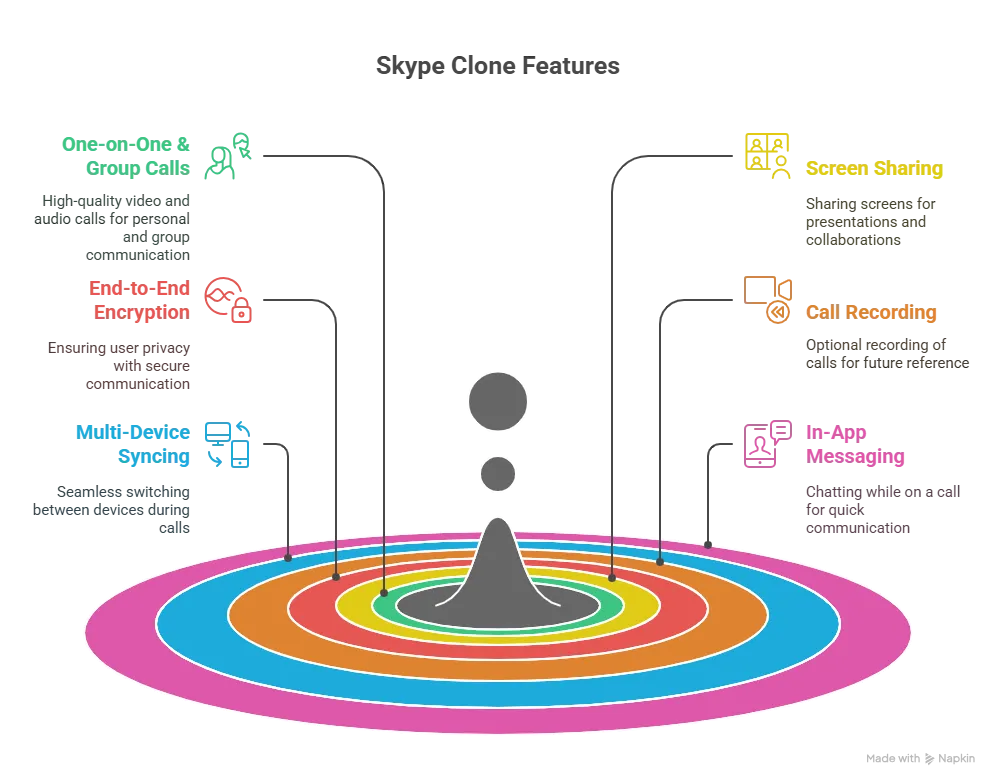
Video and VoIP aren’t just about pressing “call.” Your app needs infrastructure that supports real-time syncing, quality fallback, and user trust.
Must-Have Features
- One-on-One & Group Calls: With HD video and clear audio
- Screen Sharing: For presentations, tutorials, or collabs
- End-to-End Encryption: Protect user privacy
- Call Recording: Optional for users or admins
- Multi-Device Syncing: Switch between desktop and mobile
- In-App Messaging: Chat while on a call
Advanced Capabilities
- Low Bandwidth Optimization: Auto-switching resolution for weak networks
- Noise Cancellation: AI-based filters for background noise
- Real-Time Transcription: Especially useful for meetings
- Cloud Storage Integration: Save and share call recordings
- Custom Call Rooms: With links, waiting rooms, and passcodes
Global Cost Factors & Pricing Breakdown
PHP/Laravel is often the most practical choice for launching a communication platform quickly and affordably. Node.js/Python supports real-time messaging and calls, while microservices architecture is ideal for enterprise-level communication systems.
Miracuves Skype-Like App Solution Cost and Tech Stack
Miracuves Pricing for a Skype-Like App developed in PHP/Laravel with Flutter Apps for $1,899 USD (One-Time Price) in just 6 days
Get a fully developed, deployment-ready platform modeled after the Skype-style communication system. Built on a reliable PHP/Laravel backend with Flutter mobile apps, this complete solution helps you launch and scale a real-time messaging and calling platform quickly and efficiently.
- Core Workflows: User registration, contact management, real-time messaging, voice calls, video calls, and communication between users.
- Built-in Operations: Messaging infrastructure, call handling logic, notification system, user presence tracking, and secure data transmission.
- Management Hub: Centralized admin panel to manage users, conversations, call logs, platform activity, moderation, and overall system performance.
- Launch-Ready: Fully prepared for your branding, configuration, and immediate go-to-market execution.
Why is it so affordable?
Most modern communication platforms are built using complex architectures like Node.js or microservices. While powerful, these approaches require large engineering teams, longer timelines, and significantly higher development costs.
We took a smarter and more practical approach:
- You Aren’t Paying for Ground-Up Development: Our communication platform engine is already developed, tested, and ready to deploy. You skip months of development time and avoid the high costs of building from scratch.
- The Power of PHP / Laravel: Built on one of the most trusted and widely used frameworks globally, this solution keeps upfront costs low while ensuring long-term flexibility. With a large developer ecosystem, it becomes easier and more cost-effective to maintain, scale, and customize your platform.
- Built for Practical Growth: You get a strong, market-ready Skype-like platform with essential features like messaging, voice/video calling, and real-time communication—without the complexity and expense of enterprise-level builds.
You get a scalable, production-ready platform without paying inflated development costs.
Note: This cost is for the solution, re-branding, deployment, and source code only.
Read More : Top Features Every Skype Clone Must Have for 2026
Popular Use Cases for Skype Clones
- Telehealth Platforms: Secure, HIPAA-ready video consults
- E-Learning Tools: Interactive virtual classrooms
- Customer Support Apps: In-app voice/video support
- Intranet Tools: For internal meetings in enterprises
- Creator Tools: Podcast interviews, Q&A rooms, fan chats
Read More : Pre-launch vs Post-launch Marketing for Skype Clone Startups
Why Choose Miracuves for Your Skype Clone?
Miracuves offers one of the most reliable, scalable, and fully-featured Skype clone script available today. Built on WebRTC and optimized for both mobile and web, it includes secure voice/video, cloud-based call recording, messaging, and even screen share—all wrapped in a beautiful UI.
Need HIPAA compliance? Localization? Third-party API support? Miracuves offers all of that, with white-label options and room to grow.
Conclusion
Video and voice apps might not feel “new,” but the demand for fast, private, and reliable communication isn’t slowing down. A Skype clone built with purpose can serve niches better than the big players—and deliver stronger monetization too.
At Miracuves, we help innovators launch high-performance app clones that are fast, scalable, and monetization-ready. Ready to turn your idea into reality? Let’s build together.
FAQs
Is it legal to build a Skype clone?
Yes. You’re recreating the functionality—not the brand, code, or trademarks. Miracuves uses 100% original components.
Can I support both voice and video?
Absolutely. All Miracuves clones support high-quality VoIP and HD video calls, including screen share.
What infrastructure is needed?
You’ll need TURN/STUN servers, cloud storage (if using recording), and scalable backend resources like WebRTC-compatible media servers.
Can I monetize the app?
Yes. Options include freemium tiers, call credits, ads, enterprise licenses, or API access to third parties.
Does it support mobile?
Yes. The Miracuves Skype clone is fully responsive and comes with Android/iOS builds or PWA options.
Is it secure?
All calls are encrypted (E2E optional), and user data is protected using modern authentication protocols and secure APIs.
Related Articles