
Key Takeaways
- Refund automation improves trust after order issues.
- Dispute workflows protect both buyers and sellers.
- Rules should cover returns, refunds, replacements, and cancellations.
- Admin review is needed for high-risk refund cases.
- Clear refund logic reduces support load and fraud risk.
Refund System Signals
- Check order status before approving any refund.
- Verify payment gateway status before wallet or bank refunds.
- Use evidence uploads for damaged or wrong products.
- Track seller responses inside dispute tickets.
- Maintain audit logs for every refund decision.
Real Insights
- Refunds are part of marketplace trust architecture.
- Poor refund logic can increase disputes and chargebacks.
- Partial refunds need tax, shipping, and coupon handling.
- Fraud checks help stop repeat refund abuse.
- Miracuves builds retail apps with refund and dispute control layers.
Retail apps do not lose customer trust only because a product arrives late, damaged, or different from what was expected. They lose trust when the customer raises a refund request and then hears nothing. They lose trust when the refund status is unclear, the seller rejects the claim without proof, the payment reversal takes too long, or the support team has no single view of the case.
That is why modern retail apps need more than a basic “request refund” button. A scalable retail platform needs automated refund logic, dispute ticketing, seller response workflows, fraud checks, payment gateway integration, admin review controls, customer notifications, and evidence logs.
For founders building an Alibaba clone, Amazon-style marketplace, grocery app, fashion app, B2B retail platform, or custom ecommerce product, refund and dispute automation should be designed early. Adding it after customer complaints begin usually creates messy backend patches, manual support dependencies, and avoidable trust problems.
Miracuves helps founders build retail and ecommerce marketplace apps with launch-ready product foundations, admin dashboards, seller workflows, payment integration, and scalable backend systems. For refund and dispute management, the goal is not just automation. The goal is operational control.
Why Refund and Dispute Automation Matters in Retail Apps
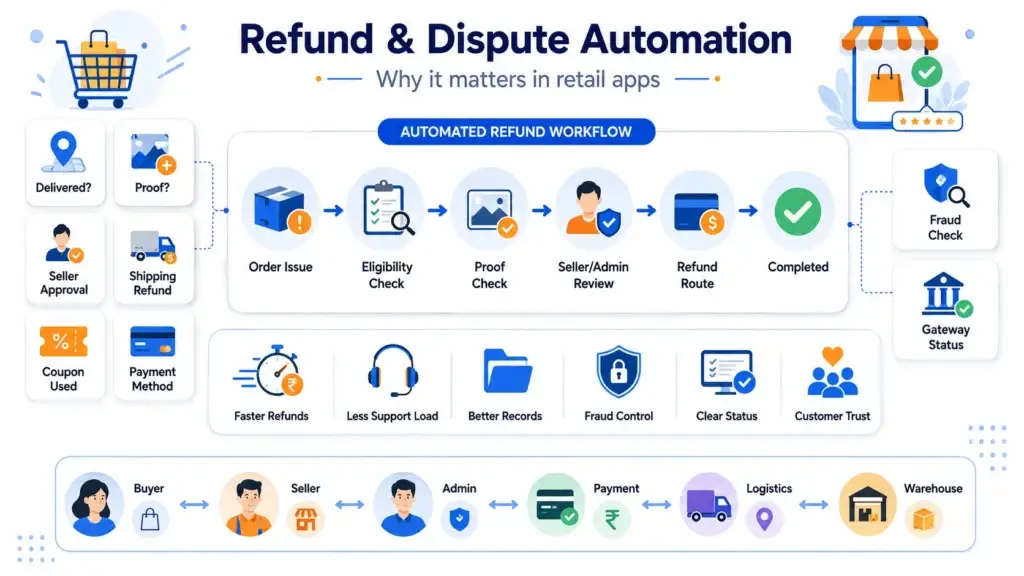
Refunds are not only a customer service function. In a retail app, refunds affect payment reconciliation, inventory accuracy, seller liability, revenue reporting, fraud control, and customer retention.
A manual refund process may work during the first few orders. But once order volume grows, the support team begins facing repeated questions:
- Is this order eligible for a refund?
- Was the item delivered?
- Did the customer upload proof?
- Should the seller approve the refund?
- Should the refund include shipping charges?
- Was a coupon used?
- Was payment made by card, wallet, UPI, COD, or store credit?
- Has this customer requested too many refunds recently?
- Has the payment gateway confirmed refund completion?
Refund automation solves these questions through structured workflows. Kissflow’s retail refund workflow content highlights the value of moving from disjointed manual refund handling into connected automated flows that can scale with business operations.
For founders, the business impact is direct. Faster refund approvals reduce support tickets. Consistent policy enforcement reduces team dependency. Better evidence records reduce disputes. Fraud checks protect margins. Clear refund status improves customer confidence.
In a marketplace or Alibaba clone platform, the value is even higher because refunds involve multiple parties: buyer, seller, platform admin, payment provider, logistics partner, and sometimes the warehouse or inspection team
What an Automated Refund System Does Inside a Retail App
An automated refund system works like a smart approval layer between the customer request and the final payment action. It does not simply collect refund requests. It checks the business rules behind each request and decides whether the case can move forward automatically or needs admin review.
When a customer requests a refund, the system reviews key details such as:
- Whether the order was delivered, cancelled, failed, or partially fulfilled
- Whether the payment was successful, pending, refunded, or disputed
- Whether the return window is still valid
- Whether the product category allows refunds
- Whether the seller has specific refund rules
- Whether coupon, wallet, shipping, or tax adjustments are needed
- Whether the customer has repeated or suspicious refund behavior
Based on these checks, the system can approve a simple refund, calculate a partial refund, reject an ineligible request, or move the case to a manual review queue.
For retail apps and Alibaba clone marketplaces, this matters because refund automation connects customer experience with payment accuracy, seller accountability, inventory updates, fraud control, and admin visibility.
Read More: Best Alibaba Clone Script in 2026: Features & Pricing Compared
How Retail App Dispute Resolution Works When Refunds Are Not Straightforward
A dispute resolution system comes into play when a refund request becomes unclear, contested, or risky. Unlike a normal refund flow, a dispute needs proof, communication, review, and a clear final decision.
For example, a customer may claim that the item was damaged, while the seller says it was packed and shipped correctly. Another customer may say the refund was not received, while the payment gateway shows it was already processed. These cases cannot be handled only through basic refund rules.
Common dispute situations include:
- Item not received
- Wrong item delivered
- Damaged or defective product
- Fake or duplicate product claim
- Refund not received
- Seller rejects the refund request
- Payment deducted but order failed
- Chargeback raised by the customer
- Return abuse or suspected fraud
- Replacement not completed
- Partial order mismatch
A strong dispute system gives every party a structured role. The buyer submits proof. The seller responds with evidence. The admin reviews the full timeline, including order details, delivery proof, payment status, refund policy, fraud signals, and previous communication.
In an Alibaba clone or multi-vendor retail app, this dispute layer protects marketplace trust. It helps the platform make decisions that are fair, trackable, and easier to defend.
Core Modules of an Automated Refund and Dispute Resolution System
A complete refund and dispute resolution system needs multiple modules working together.
| Module | Purpose | Founder Impact |
|---|---|---|
| Refund Request Module | Lets customers raise refund requests from order history | Reduces support dependency and creates structured intake |
| Refund Policy Engine | Checks eligibility based on rules | Keeps refund decisions consistent |
| Payment Gateway Module | Processes full, partial, wallet, or store-credit refunds | Connects business decision with actual money movement |
| Dispute Ticket Module | Tracks disputes from creation to closure | Gives every case a clear lifecycle |
| Evidence Collection Module | Stores order proof, chat, delivery proof, images, invoices, and payment records | Helps admins make defensible decisions |
| Fraud Detection Module | Flags suspicious refund or return behavior | Protects margin and reduces abuse |
| Admin Review Panel | Allows manual approval, rejection, escalation, or adjustment | Gives the platform operator control |
| Seller/Vendor Panel | Lets sellers respond to buyer complaints | Essential for marketplace and Alibaba clone models |
| Notification Engine | Sends updates by email, SMS, push, or WhatsApp | Reduces refund anxiety and repeated support messages |
| Analytics Dashboard | Tracks refund rate, dispute rate, approval time, fraud trends, and seller issues | Helps founders improve operations |
Marketplace security should be treated as a foundation, not a marketing add-on. For eCommerce marketplaces, important controls include secure payments, refund and dispute workflows, admin approval controls, fraud detection signals, booking/order history, role-based dashboards, and transparent records.
Automated Refund Workflow: From Request to Resolution
A strong automated refund workflow should make refunds simple for customers and controlled for the business. The customer only submits a request, but the system must verify whether the order, payment, product, seller policy, and refund reason are valid before any money is released.
| Workflow Stage | What Happens |
|---|---|
| Customer raises request | The customer selects an order and chooses refund, return, replacement, or store credit. |
| Reason and proof are collected | The app captures the refund reason, product images, invoice, delivery proof, or issue description. |
| Order and payment are verified | The backend checks delivery status, payment success, cancellation, failed order, or partial fulfilment. |
| Refund rules are applied | The policy engine checks return window, product category, seller rules, payment method, and refund reason. |
| Refund amount is calculated | The system adjusts for item price, partial refund, coupon usage, wallet credit, shipping fee, and tax. |
| Risk is reviewed | Fraud signals such as repeat claims, high-value returns, suspicious accounts, and seller history are checked. |
| Decision is routed | Clean, eligible requests are auto-approved; complex or risky cases move to admin review. |
| Payment is processed | The payment gateway refund API is triggered, and webhook updates confirm refund progress. |
| Case is closed properly | Customer is notified, inventory is updated, seller liability is recorded, and audit logs are stored. |
Simple Refund Flow
Customer Refund Request
↓
Order + Payment Verification
↓
Policy Eligibility Check
↓
Refund Amount Calculation
↓
Fraud Risk Review
↓
Auto Approval or Admin Review
↓
Payment Gateway Refund
↓
Customer Update + Audit Log
For retail apps and Alibaba clone marketplaces, this workflow should be visible inside the admin dashboard. It helps the team understand why a refund was approved, rejected, delayed, or escalated without switching between order management, seller panels, payment gateways, and customer support tools.
Read More: Customs, Duties, and Tax (VAT) Calculation APIs for Cross-Border B2B Platforms
Refund Rule Engine: The Brain of the System
The refund rule engine is the most important part of refund automation. Without it, every refund becomes a manual judgment call.
A good refund rule engine should support rules for:
- Product category
- Return window
- Delivered or not delivered status
- Failed payment or failed order
- Used, damaged, perishable, or non-returnable products
- Seller-specific return policies
- COD vs prepaid refund rules
- Wallet refund vs original payment method
- Coupon and discount adjustment
- Shipping fee refund logic
- Tax, GST, or VAT adjustment
- Partial refund scenarios
- Replacement vs refund decisioning
- Subscription or membership-based refund rules
- High-value order review
- Bulk order and B2B purchase rules
For an Alibaba clone, this becomes more complex because B2B orders may involve RFQs, bulk pricing, supplier agreements, negotiated shipping terms, partial shipment, and seller-specific commercial conditions.
A simple example:
| Condition | System Decision |
|---|---|
| Product returned within window and unused | Auto-approve refund |
| Product damaged and proof uploaded | Send to seller/admin review |
| Payment deducted but order failed | Auto-trigger payment refund |
| High-value order with repeated refund history | Send to fraud review |
| Coupon used on order | Recalculate refund after discount adjustment |
| Seller rejects claim | Create dispute ticket |
| Customer requests refund after window | Reject or escalate based on policy |
| Partial shipment delivered | Calculate item-level refund only |
The rule engine should be configurable from the admin panel. Founders should not depend on developers every time refund rules change for a category, campaign, seller group, or market.
How Retail Apps Should Manage Disputes From Claim to Resolution
A dispute resolution system should not work like a scattered support inbox. In a retail app, each dispute needs a clear lifecycle that connects the customer, seller, payment, delivery, refund policy, and admin team.
The workflow starts when a customer raises a complaint. The system creates a dispute ID and links it to the order, product, payment, shipment, seller, and customer profile. It should also pull key evidence automatically, such as order history, payment status, delivery proof, invoice details, chat records, and refund policy.
The seller or vendor then receives a notification with a response deadline. The customer can upload proof, while the seller can submit dispatch details, packaging images, product verification, or delivery documents. After this, a rule engine or AI layer can classify the dispute and decide whether it can be auto-resolved or should move to admin review.
For marketplace and Alibaba clone-style retail apps, this workflow is important because the platform must decide who is responsible: the buyer, seller, delivery partner, or marketplace operator. The final action may be a refund, replacement, store credit, partial refund, seller penalty, or rejection.
A complete dispute record should show:
| Dispute Data | Why It Matters |
|---|---|
| Buyer claim | Explains the customer issue |
| Seller response | Gives the vendor a chance to respond |
| Product details | Verifies SKU, quantity, and return eligibility |
| Delivery status | Confirms shipment, delivery, delay, or loss |
| Payment status | Shows whether payment succeeded, failed, refunded, or disputed |
| Uploaded evidence | Supports the final decision |
| Refund policy applied | Shows which rule was used |
| Fraud score | Flags suspicious patterns |
| Admin decision | Records the final platform action |
| Timeline of actions | Creates transparency |
| Final outcome | Confirms refund, replacement, credit, penalty, or rejection |
The goal is to connect claim intake, evidence collection, seller response, decisioning, payment action, and documentation into one lifecycle. This makes dispute handling faster, more consistent, and easier to defend.
Payment Gateway and Chargeback Integration
Refund automation is incomplete unless it connects with payment gateways and payment dispute systems.
Retail apps may need to integrate with:
- Stripe refunds
- Razorpay refunds
- PayPal disputes
- Card chargeback systems
- Visa Rapid Dispute Resolution
- Mastercard / Ethoca alerts
- Wallet refunds
- Store credit refunds
- Bank transfer refunds
- Failed payment refund logic
- Refund status webhooks
- Partial refund APIs
- Chargeback evidence submission
Payment gateway integration should support both outgoing refund triggers and incoming status updates. For example, once the refund API is called, the retail app should not blindly mark the refund as complete. It should wait for a webhook or confirmation event from the payment gateway.
Stripe’s Smart Disputes documentation shows how modern payment dispute systems are moving toward automated evidence collection and submission for eligible card disputes. Stripe’s dispute product page also highlights AI-supported evidence tailoring and reusable dispute evidence, showing how important structured evidence has become in payment dispute workflows.
For ecommerce founders, the lesson is clear: store clean evidence from day one. If the app does not keep order records, delivery proof, customer communication, refund history, seller response, and payment logs, the platform becomes weak during chargebacks.
Fraud Detection in Refund and Return Systems
Refund automation should not approve every request instantly. Fast refunds improve customer experience, but uncontrolled refunds can create abuse.
Common suspicious refund signals include:
- Too many refunds from one user
- Multiple accounts using the same device
- High-value orders returned repeatedly
- Return raised immediately after delivery
- Product mismatch
- Empty box return
- Wardrobing
- Fake damaged product claims
- Repeated COD cancellations
- Seller-side refund abuse
- Multiple users using the same address for suspicious claims
- Refund requests for products with high resale value
- Repeated “item not received” claims
Reuters reported that UPS-owned Happy Returns is using AI to flag suspicious returns using signals such as suspicious return timing, linked email addresses, and purchase history, with flagged items sent for human audit.
A retail app should combine rules and AI carefully. Low-risk refund requests can be automated. High-risk cases should be reviewed by a human admin, warehouse team, or seller operations team.
Practical Fraud Score Inputs
| Fraud Signal | Example |
|---|---|
| Customer refund history | 7 refund requests in 30 days |
| Product risk | High-value electronics returned repeatedly |
| Device fingerprint | Multiple accounts from same device |
| Address pattern | Many refund claims from same address |
| Seller history | Seller has high dispute rate |
| Order timing | Refund requested immediately after delivery |
| Evidence quality | Blurry or reused product images |
| Payment behavior | Repeated failed payment and refund claims |
The goal is not to block legitimate customers. The goal is to separate simple refunds from risky cases that require review.
Admin Dashboard Features for Refund and Dispute Control
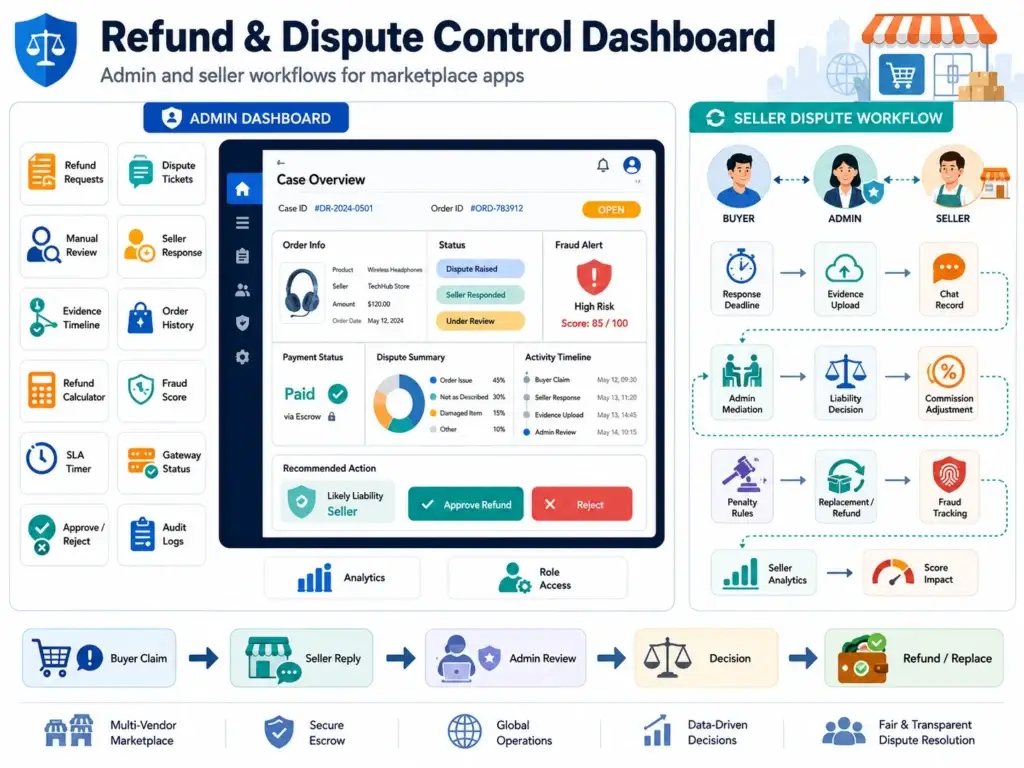
The admin dashboard is where refund automation becomes practical for daily operations. It should not only list refund requests and dispute tickets. It should help the team review evidence, check payment status, identify fraud risk, track seller responses, and take the right action faster.
A strong refund and dispute dashboard should include:
| Dashboard Feature | Why It Matters |
|---|---|
| Refund request list | Shows all refund cases in one place |
| Dispute ticket list | Tracks customer, seller, and payment-related disputes |
| Manual review queue | Helps admins focus on cases that need human approval |
| Seller response panel | Lets vendors reply with proof, notes, or acceptance |
| Evidence timeline | Shows buyer proof, seller proof, delivery records, and chat history |
| Customer order history | Helps identify repeat refund behavior or genuine issues |
| Refund amount calculator | Supports full, partial, shipping, coupon, and tax adjustments |
| Fraud score | Flags risky refund or return patterns |
| SLA timer | Shows how long a case has been open |
| Escalation queue | Moves complex cases to senior admins or finance teams |
| Payment gateway status | Confirms whether the refund is pending, processing, failed, or completed |
| Approval and rejection actions | Lets admins approve, reject, partially refund, or offer replacement |
| Case notes and audit logs | Records every decision for future reference |
| Reports and analytics | Tracks refund rate, dispute rate, seller issues, and fraud trends |
| Role-based admin access | Controls who can approve refunds, issue payments, or close disputes |
When an admin opens a case, the dashboard should show the full decision context: order value, product category, customer history, seller history, return reason, uploaded proof, policy result, payment status, fraud score, and recommended next action.
This is especially important for Alibaba clone and multi-vendor retail apps, where the admin may need to decide whether the buyer, seller, logistics partner, or platform is responsible for the refund. A well-designed dashboard turns refund handling from guesswork into a controlled operational process.
Seller and Vendor Dispute Management in Marketplace Apps
Single-store ecommerce refund systems are simpler. Marketplace refund systems are more complex because the seller is part of the decision chain.
An Alibaba clone, Amazon clone, Shopee-style marketplace, or B2B retail platform needs seller-side dispute management.
Seller dispute workflows should support:
- Seller response deadline
- Seller evidence upload
- Buyer-seller communication
- Admin mediation
- Commission adjustment
- Seller penalty rules
- Replacement approval
- Refund liability decision
- Seller fraud tracking
- Product quality dispute records
- Seller-level refund analytics
- Seller performance score impact
A marketplace should not allow disputes to disappear into private chats. Every seller response should be attached to the dispute record.
For example, if a buyer claims that the product was fake, the seller may upload packaging proof, invoice details, product certification, dispatch image, or delivery records. The admin then reviews buyer and seller evidence before deciding whether to refund, replace, penalize, or reject.
This is one of the biggest content gaps in current SERP results. Most refund automation pages focus on single-brand ecommerce workflows, not multi-vendor marketplace conflict resolution.
Customer Experience Features That Reduce Refund Anxiety
Customers do not always become angry because the refund takes time. They become angry because they do not know what is happening.
A strong retail app should include customer-facing refund experience features such as:
- Self-service refund request
- Refund status tracker
- Clear refund policy messaging
- Estimated refund timeline
- Push notification updates
- SMS or WhatsApp updates
- Dispute ID
- Evidence upload option
- Chat support connection
- Reopen case option
- Refund method visibility
- “Waiting for seller response” status
- “Payment gateway processing” status
- “Refund completed” confirmation
The language should be clear. For example:
“Your refund request has been approved. The refund has been sent to your original payment method. Your bank or payment provider may take additional time to reflect the amount.”
This reduces repeated support tickets and improves trust even when the refund cannot be instant.
Database Tables Needed for Refund and Dispute Management
A technical blog on refund automation should not stop at workflows. Founders and product teams also need to understand the data structure.
Here are core database tables for automated refund and dispute management:
| Table | Purpose |
|---|---|
| orders | Stores order details |
| order_items | Stores item-level order data |
| payments | Stores payment transaction data |
| refunds | Stores refund request, amount, method, and status |
| refund_reasons | Stores reason categories |
| refund_rules | Stores automation rules |
| disputes | Stores dispute tickets |
| dispute_messages | Stores buyer, seller, and admin messages |
| dispute_evidence | Stores images, invoices, delivery proof, and documents |
| fraud_scores | Stores refund and dispute risk signals |
| admin_actions | Stores admin decision logs |
| seller_responses | Stores seller replies and proof |
| notifications | Stores communication history |
| payment_webhooks | Stores payment gateway refund and chargeback events |
| return_shipments | Stores reverse logistics and pickup status |
| audit_logs | Stores policy decisions and system actions |
Suggested Refund Table Fields
| Field | Purpose |
|---|---|
| refund_id | Unique refund reference |
| order_id | Connected order |
| user_id | Customer who requested refund |
| seller_id | Seller involved, if marketplace |
| refund_reason | Reason selected by customer |
| refund_amount | Approved refund amount |
| refund_method | Wallet, card, UPI, bank, store credit |
| refund_status | Requested, approved, rejected, processing, completed |
| fraud_score | Risk score |
| admin_id | Reviewing admin, if applicable |
| gateway_reference | Payment gateway refund ID |
| created_at | Request date |
| updated_at | Last status update |
A clean database design makes refund analytics, dispute tracking, seller performance reports, and payment reconciliation easier later.
API Flow for Automated Refund Processing
Retail apps should expose refund and dispute operations through clean API endpoints.
Example API flow:
| API Endpoint | Purpose |
|---|---|
| POST /refund/request | Customer creates refund request |
| GET /refund/status/{refund_id} | Customer checks refund status |
| POST /admin/refund/approve | Admin approves refund |
| POST /admin/refund/reject | Admin rejects refund |
| POST /admin/refund/partial | Admin approves partial refund |
| POST /dispute/create | Customer creates dispute |
| GET /dispute/{dispute_id} | Fetch dispute details |
| POST /dispute/evidence/upload | Upload buyer or seller proof |
| POST /seller/dispute/respond | Seller responds to dispute |
| POST /payment/refund/webhook | Payment gateway sends refund status |
| POST /chargeback/webhook | Payment provider sends chargeback event |
| POST /admin/dispute/resolve | Admin resolves dispute |
Example Refund Request Payload
{
  "order_id": "ORD_10249",
  "item_ids": ["ITEM_8871"],
  "refund_reason": "damaged_product",
  "refund_method": "original_payment",
  "customer_note": "The item arrived broken.",
  "evidence_urls": [
    "https://cdn.example.com/evidence/image1.jpg"
  ]
}
Example Refund Decision Response
{
  "refund_id": "REF_55291",
  "status": "manual_review_required",
  "reason": "High-value product requires admin approval",
  "estimated_resolution": "24-48 hours"
}
These APIs help mobile apps, web apps, admin dashboards, seller dashboards, and payment systems communicate with the same source of truth.
AI Use Cases in Refund and Dispute Resolution
AI should be used carefully in refund systems. It should improve speed, categorization, and admin decision support without replacing human judgment for sensitive or high-risk cases.
Practical AI use cases include:
- Refund eligibility prediction
- Auto-categorization of refund reasons
- Fraud risk scoring
- Evidence summarization
- Chatbot-guided refund request
- Sentiment detection
- SLA priority prediction
- Auto-generated admin summaries
- Dispute outcome recommendation
- Duplicate claim detection
- Seller risk pattern detection
- Image comparison for return proof
For example, AI can summarize a dispute like this:
“Customer claims wrong item delivered. Seller uploaded dispatch image. Delivery partner proof shows package delivered on June 2. Customer uploaded image of a different SKU. Seller has a low dispute rate. Recommended action: admin review required.”
This saves time for support teams while keeping the final decision under admin control.
Metrics Founders Should Track
Refund and dispute analytics help founders improve product quality, seller quality, customer experience, and fraud control.
| Metric | Why It Matters |
|---|---|
| Average refund approval time | Measures operational speed |
| Refund rate by category | Finds product quality or sizing issues |
| Dispute rate | Shows customer trust problems |
| Auto-resolution rate | Measures automation effectiveness |
| Chargeback rate | Tracks payment risk |
| Fraud refund rate | Measures abuse |
| Seller dispute rate | Identifies weak sellers |
| Reopen rate | Shows poor resolution quality |
| Customer satisfaction after refund | Measures trust recovery |
| Refund amount by seller | Identifies margin leakage |
| Manual review percentage | Shows automation bottlenecks |
| Payment refund failure rate | Reveals gateway or integration issues |
A founder should not only ask, “How many refunds did we process?” The better question is, “What do refunds tell us about product quality, seller reliability, customer expectations, and operational risk?”
Founder Decision Signals
Speed
If your support team manually checks every refund, automation can reduce delays by routing simple cases instantly and sending only risky cases to review.
Cost
Manual refund handling increases support workload. A rule-based system helps founders control repetitive tasks, chargeback risk, and avoidable refund leakage.
Scalability
Marketplace apps need buyer, seller, payment, logistics, and admin workflows connected. Without this, growth creates support chaos.
Market Fit
Clear refund and dispute handling improves buyer confidence, especially in new retail apps where trust has not yet been established.
Speed
If your support team manually checks every refund, automation can reduce delays by routing simple cases instantly and sending only risky cases to review.
Cost
Manual refund handling increases support workload. A rule-based system helps founders control repetitive tasks, chargeback risk, and avoidable refund leakage.
Scalability
Marketplace apps need buyer, seller, payment, logistics, and admin workflows connected. Without this, growth creates support chaos.
Market Fit
Clear refund and dispute handling improves buyer confidence, especially in new retail apps where trust has not yet been established.
Refund and Dispute Mistakes Founders Should Avoid
Many retail apps face refund issues because the system is added too late. As order volume grows, manual handling creates delays, payment confusion, seller conflicts, and poor customer trust.
| Mistake | Why It Hurts |
|---|---|
| No refund status tracking | Customers keep asking for updates. |
| Manual approvals only | Refunds become slow and inconsistent. |
| No evidence storage | Claims are hard to verify. |
| No seller response flow | Marketplace disputes become difficult to resolve. |
| No chargeback integration | Payment dispute deadlines may be missed. |
| No fraud scoring | Suspicious refund abuse goes unnoticed. |
| No partial refund logic | The app may over-refund. |
| No audit trail | Decisions become hard to defend. |
| Same policy for every product | Category-specific refund rules are ignored. |
| No payment webhook handling | Refund status may be inaccurate. |
Refunds are not just a support task. In retail apps and Alibaba clone marketplaces, they affect payments, sellers, inventory, fraud control, customer trust, and analytics.
Read More: Alibaba Features Explained: A Guide for Startup Founders
How Miracuves Helps Build Retail Apps with Refund and Dispute Automation
Miracuves helps founders build ecommerce and retail marketplace apps with refund workflows, dispute ticketing, admin dashboards, seller panels, payment gateway integrations, fraud checks, order tracking, notification systems, and scalable backend logic.
For founders building an Alibaba clone, Amazon-style marketplace, Shopee-style retail app, fashion commerce app, grocery delivery platform, or custom retail marketplace, refund and dispute flows should be part of the product foundation from day one.
A ready-made ecommerce or marketplace foundation can reduce development time because the core app flows, admin control, seller workflows, payment integrations, and backend modules are already structured. Miracuves’ broader positioning focuses on ready-made, white-label, source-code-owned clone app solutions, admin dashboards, scalable backend logic, monetization-ready platforms, and 6-day launch for ready-made solutions where applicable.
Final Thoughts: Refund Automation Is a Trust System, Not Just a Support Feature
A refund system decides how customers feel after something goes wrong. A dispute system decides whether a marketplace can stay fair when buyers and sellers disagree.
For retail apps, this is not a small backend feature. It is part of the trust architecture.
Founders building Alibaba clone platforms, ecommerce marketplaces, grocery apps, fashion retail apps, or custom commerce products should plan refund and dispute automation early. The right system reduces manual support, controls fraud, protects seller accountability, improves payment visibility, and gives customers confidence that the platform is fair.
Miracuves helps founders build retail and marketplace app foundations with the control layers needed for real operations: admin dashboards, seller workflows, payment integration, dispute handling, refund logic, and scalable backend architecture.
To build a retail app with smarter refund and dispute automation, schedule a consultation with Miracuves and discuss the right product workflow for your business model.
FAQs
What is an automated refund system in a retail app?
An automated refund system checks order status, payment status, delivery status, return window, product category, seller policy, customer history, and refund reason before deciding whether a refund should be approved, rejected, partially approved, or sent for manual review.
How does dispute resolution work in ecommerce apps?
Dispute resolution starts when a customer, seller, or platform raises a conflict. The system creates a dispute ID, collects evidence, notifies the seller or admin, tracks messages, applies policy rules, and records the final decision with an audit trail.
Can refunds be approved automatically?
Yes. Low-risk refunds can be approved automatically when the order meets policy rules. For example, a failed payment, cancelled order, or eligible return within the return window may be auto-approved. High-value, suspicious, or unclear cases should go to manual review.
What is the difference between a refund request and a dispute?
A refund request is a standard operational workflow where the customer asks for money back based on policy. A dispute is a conflict that needs evidence, seller response, admin review, chargeback handling, or deeper investigation.
How can retail apps prevent refund fraud?
Retail apps can reduce refund fraud through fraud scoring, customer history checks, device fingerprinting, seller dispute tracking, return proof validation, high-value order review, suspicious timing detection, and human escalation for risky cases.
What payment gateways support automated refunds?
Common payment gateways such as Stripe, Razorpay, PayPal, and other regional providers support refund APIs, webhook updates, and payment dispute workflows. The exact refund and dispute features depend on the gateway, region, payment method, and integration scope.
How do marketplace apps handle seller-related refund disputes?
Marketplace apps need seller response workflows, evidence upload, admin mediation, refund liability rules, seller penalties, commission adjustments, and seller performance tracking. This is especially important for Alibaba clone and Amazon-style marketplace platforms.
How can Miracuves help build a retail app with refund automation?
Miracuves helps founders build ecommerce and retail marketplace apps with refund workflows, dispute ticketing, seller panels, admin dashboards, payment gateway integrations, fraud checks, notification systems, and scalable backend logic.
Can AI help in refund and dispute resolution?
Yes. AI can help categorize refund reasons, score fraud risk, summarize evidence, guide customers through chatbot flows, detect sentiment, and recommend dispute outcomes. However, high-risk or sensitive decisions should still support human review.
Why is an audit trail important in dispute management?
An audit trail records every action in the dispute lifecycle, including customer claims, seller responses, uploaded evidence, admin decisions, payment status, and final resolution. This helps the platform defend decisions, reduce confusion, and maintain transparent records.
Miracuves is an independent software development company. We are not affiliated with, connected to, sponsored by, or endorsed by any company or product named in this article.
Terms such as “X Clone” are used descriptively. It is how the software industry refers to building a platform with functionality comparable to a known service, and how clients search for it.
The entire design and codebase of our products is built by our own team. Our products contain no code, design, graphics, or content originating from any third-party website or applications.
All third-party names and marks referenced in this article are the property of their respective owners, referenced solely to identify the services discussed.