


Key Takeaways
- A video platform needs user, creator, and admin workflows.
- Upload, streaming, storage, and CDN setup are core modules.
- Monetization can include ads, subscriptions, and creator payouts.
- Content moderation helps protect users and platform trust.
- Scalable video architecture reduces buffering and hosting waste.
Platform Feature Signals
- Users need feeds, search, watch history, likes, and subscriptions.
- Creators need upload tools, dashboards, analytics, and earnings.
- Admins need control over content, users, payments, and reports.
- Video transcoding improves playback across devices and networks.
- Push notifications help drive repeat viewing and creator engagement.
Real Insights
- Video apps fail when storage and CDN costs are ignored.
- Poor playback quality can reduce user retention quickly.
- Creator monetization must be clear before launch.
- Analytics help track viewing, revenue, and content performance.
- Miracuves builds video sharing and streaming apps with scalable media workflows.
Video is no longer just entertainment. It is now a business model, a creator economy engine, a learning channel, a product discovery tool, and a community-building platform. From YouTube-style video sharing apps to Netflix-like OTT platforms and TikTok-style short video feeds, founders are using video platforms to build subscription businesses, ad-driven communities, premium content networks, creator marketplaces, and niche streaming products.
But building a video sharing and streaming platform app is not the same as building a normal mobile app. A video platform needs smooth playback, fast uploads, compression, cloud storage, CDN delivery, creator tools, admin moderation, monetization, analytics, and scalable infrastructure. If the architecture is weak, users face buffering, creators face upload issues, and founders face high server bills before the platform even grows.
In this guide, we will explain how to build a video sharing and streaming platform app in 2026, including features, architecture, tech stack, monetization, development cost, launch timeline, common mistakes, and how Miracuves helps founders launch faster with ready-made and customizable video platform solutions.
What Is a Video Sharing and Streaming Platform App?
A video sharing and streaming platform app allows users, creators, brands, educators, or media companies to upload, watch, stream, manage, and monetize video content. Depending on the business model, the platform may support short videos, long-form videos, live streaming, OTT subscriptions, creator channels, paid content, private communities, or ad-supported video libraries.
A YouTube-like platform focuses on user-generated videos, channels, subscriptions, recommendations, comments, and ad monetization.
A Netflix-like platform focuses on premium video content, subscriptions, categories, watchlists, user profiles, and secure streaming.
A TikTok-like platform focuses on short-form videos, vertical feeds, creator discovery, engagement, and recommendation algorithms.
A Twitch-like platform focuses on live streaming, real-time chat, creator communities, tips, and event-based monetization.
This means the first step is not coding. The first step is deciding what kind of video platform you want to build.
Why Founders Are Building Video Platforms in 2026
Video content has become one of the strongest digital business models because users prefer watching over reading, creators want direct monetization, and brands want higher engagement. Startups are no longer limited to building broad platforms like YouTube or Netflix. Many founders now build niche video platforms for fitness, education, regional entertainment, religious content, sports training, creator subscriptions, short learning videos, online events, and premium communities.
A video platform can generate revenue from subscriptions, advertisements, pay-per-view content, creator commissions, premium channels, sponsored content, in-app purchases, and brand partnerships. This makes video apps attractive for founders who want recurring revenue and long-term user engagement.
However, the opportunity also comes with technical pressure. Video files are heavy. Streaming costs can grow fast. Content moderation becomes difficult at scale. Copyright protection matters. App performance must remain smooth on mobile networks. That is why founders need the right architecture from day one.
Types of Video Platform Apps You Can Build
YouTube-Like Video Sharing App
A YouTube-like video sharing app allows creators to upload videos and build channels. Users can search, watch, like, comment, subscribe, save videos, and receive recommendations. This model works well for education, entertainment, reviews, tutorials, creator communities, and user-generated content platforms.
Key modules include creator channels, video upload, comments, likes, playlists, subscriptions, video search, recommendations, analytics, ad placements, and admin moderation.
Netflix-Like OTT Streaming App
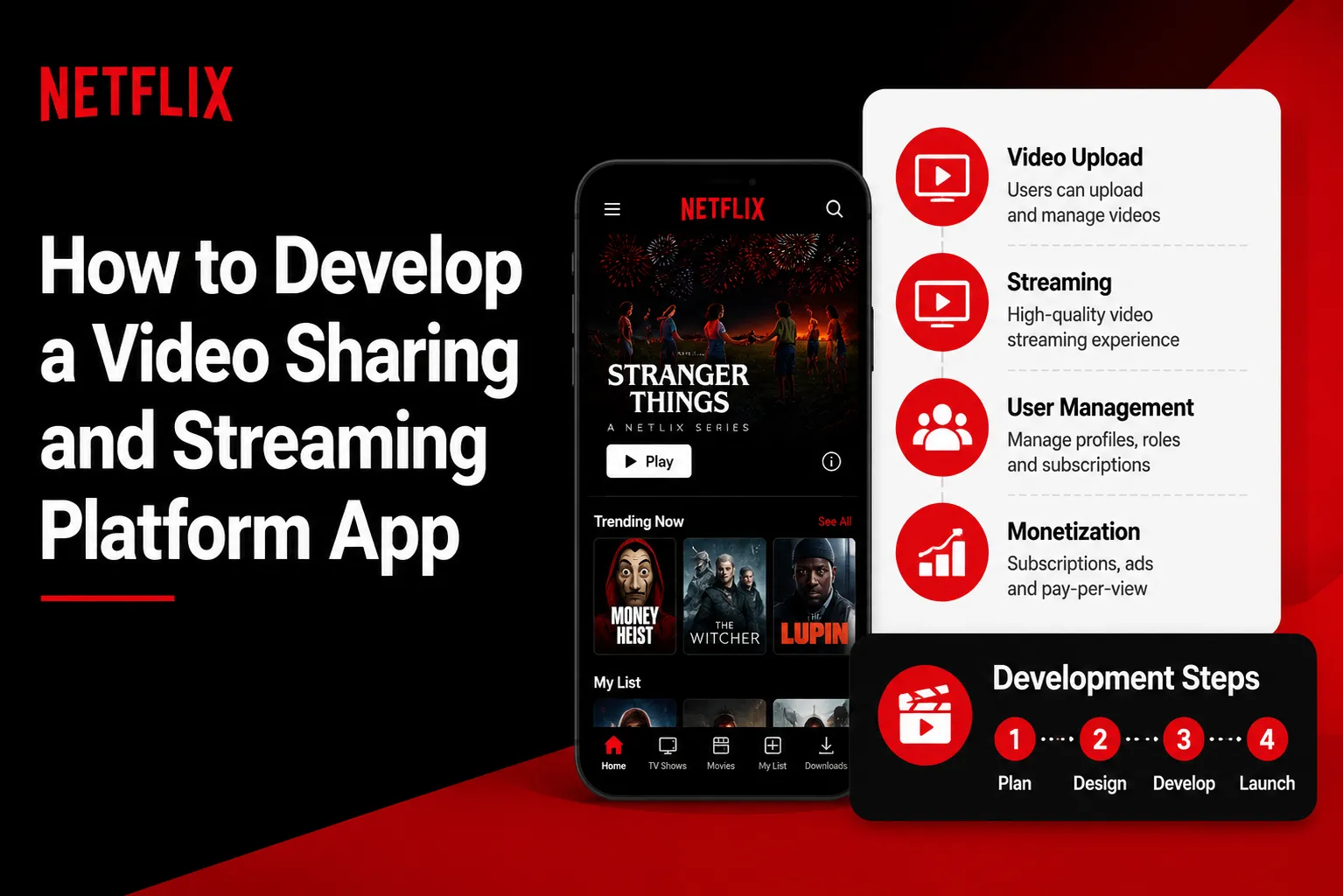
A Netflix Clone App is better for founders who want to offer premium movies, shows, web series, courses, or exclusive content through subscriptions. Instead of open user uploads, the admin or content owner controls the video library.
Key modules include subscription plans, user profiles, watch history, continue watching, categories, parental controls, secure playback, DRM, multi-device access, and content management.
TikTok-Like Short Video App
A TikTok Clone focuses on fast vertical video consumption. Users swipe through short videos, follow creators, use filters, add music, react, comment, and share content. The recommendation engine is the most important part of this model.
Key modules include vertical video feed, short video upload, music library, effects, creator profile, engagement tracking, algorithmic recommendations, hashtags, comments, shares, and reporting.
Twitch-Like Live Streaming App
A live streaming platform works well for gaming, education, webinars, sports, events, coaching, religious sessions, and creator communities. The platform must support low-latency streaming and real-time user interaction.
Key modules include live broadcast, viewer chat, reactions, tips, paid events, stream recording, creator dashboard, event scheduling, and moderation tools.
Creator Subscription Video Platform
This model allows creators to publish free and paid videos for subscribers. It can work for fitness trainers, coaches, entertainers, educators, influencers, and private communities.
Key modules include creator subscriptions, paid videos, tips, private content, content locking, creator earnings, payout tracking, and commission management.
Read More:Offline Video Streaming App Development: Building Secure Download Capabilities for Video Apps
Core Features of a Video Sharing and Streaming Platform App
A successful video platform needs separate features for users, creators, admins, and monetization. Each role must have a smooth experience because the platform depends on both content supply and viewer engagement.
User App Features
Users should be able to sign up easily using email, phone number, or social login. Once inside the app, they should be able to browse videos, search content, follow creators, watch videos smoothly, save favorites, create playlists, like videos, comment, share, and receive personalized recommendations.
Important user-side features include:
- User registration and login
- Personalized home feed
- Video search and filters
- Video player with playback controls
- Like, comment, share, and save options
- Creator follow or channel subscription
- Watch history
- Continue watching
- Playlist or watchlist
- Push notifications
- Report content option
- Subscription and payment options
- Multi-language support
- Dark mode
The video player is especially important. It should support adaptive streaming, fast loading, pause/resume, full-screen mode, subtitles, quality selection, and smooth playback across devices.
Creator App Features
Creators need tools to upload, manage, analyze, and monetize content. If creator tools are weak, content supply becomes weak. A strong creator dashboard helps creators stay active and publish more videos.
Important creator-side features include:
- Creator profile
- Video upload
- Thumbnail upload
- Title, description, and tags
- Category selection
- Public, private, or paid video settings
- Short video upload
- Live streaming option
- Content analytics
- View count and watch time
- Audience engagement report
- Subscriber count
- Earnings dashboard
- Payout request
- Comment management
- Content status tracking
Creators should also be able to see which videos are performing well, where viewers are dropping off, and how much revenue each video generates.
Admin Panel Features
The admin panel is the control center of the platform. It helps the business owner manage users, creators, content, payments, reports, moderation, subscriptions, and platform performance.
Important admin features include:
- Admin dashboard
- User management
- Creator management
- Video content management
- Category management
- Reported content review
- Comment moderation
- Subscription plan management
- Payment tracking
- Payout management
- Commission settings
- Ad management
- Banner and promotion control
- Analytics dashboard
- Notification management
- CMS page management
- Role-based admin access
- Revenue reports
- Server and storage usage reports
A strong admin panel is important because video platforms can become difficult to manage once content volume grows.
Video Streaming App Architecture: How It Works Behind the Scenes
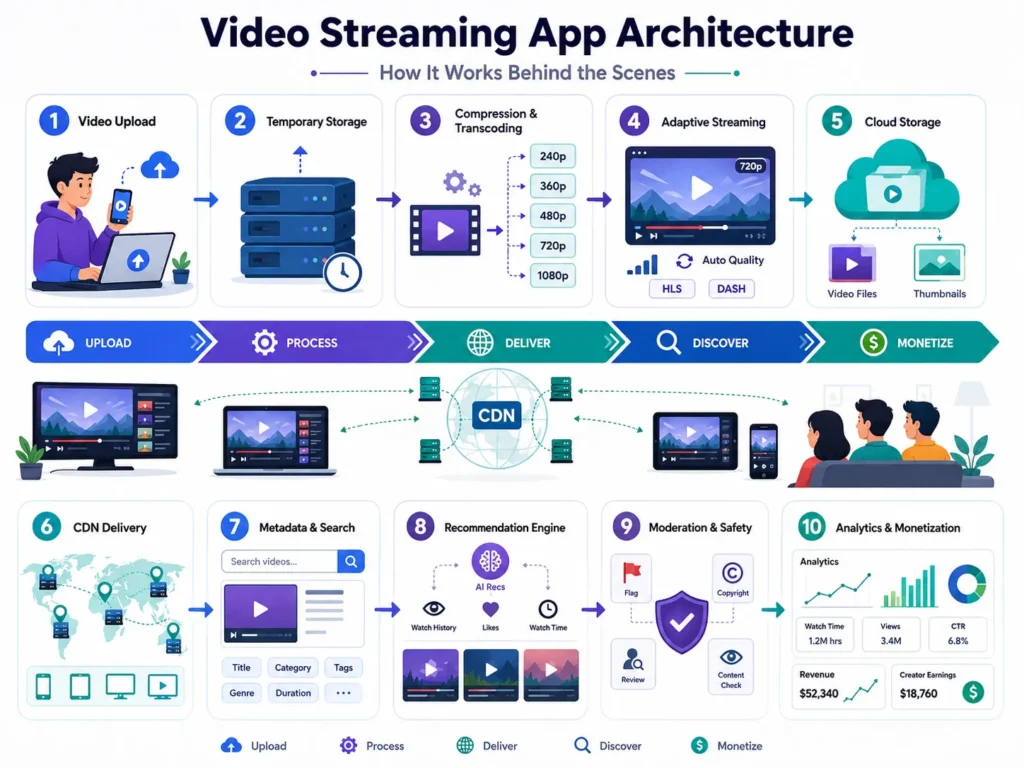
A video platform looks simple to users, but the backend architecture is complex. When a creator uploads a video, the platform must process it before users can watch it smoothly.
Step 1: Video Upload
The creator uploads a video from the mobile app or web dashboard. The system validates file type, size, duration, format, and content rules. Large video uploads should use chunk-based uploading so creators do not lose progress if the internet connection drops.
Step 2: Temporary Storage
The raw uploaded video is stored temporarily before processing. This prevents heavy files from directly affecting the main application server.
Step 3: Compression and Transcoding
The video is compressed and converted into multiple formats and resolutions. For example, one uploaded video may be converted into 240p, 360p, 480p, 720p, and 1080p versions.
This helps users watch videos according to their internet speed. A user on slow mobile data may receive a lower-resolution version, while a user on fast Wi-Fi may receive HD playback.
Step 4: Adaptive Bitrate Streaming
Adaptive bitrate streaming allows the video player to change quality automatically based on network speed. This reduces buffering and improves viewing experience.
Common streaming formats include HLS and MPEG-DASH. HLS is widely used for mobile and web streaming, while MPEG-DASH is also used for high-quality streaming workflows.
Step 5: Cloud Storage
Processed video files are stored in cloud storage such as AWS S3, Google Cloud Storage, Wasabi, or similar platforms. The main database should not store heavy video files. It should only store video metadata such as title, description, category, file path, thumbnail, creator ID, and status.
Step 6: CDN Delivery
A CDN delivers video from servers closer to the viewer’s location. This reduces loading time and improves playback speed. Without CDN delivery, the platform may face slow streaming, buffering, and high server load.
Step 7: Metadata and Search Indexing
Video metadata is stored and indexed for fast search. Tags, titles, descriptions, categories, creator names, and engagement signals help users discover content quickly.
Step 8: Recommendation Engine
The platform uses user behavior to recommend videos. Signals may include watch time, likes, shares, comments, follows, search history, skipped videos, and category interest.
Step 9: Moderation and Safety
Before or after publishing, videos may go through automated or manual moderation. The system should support user reports, admin review, blocked keywords, content flags, copyright checks, and creator verification.
Step 10: Analytics and Monetization
The platform tracks views, watch time, engagement, subscription revenue, ad revenue, creator earnings, and payout data. These insights help admins and creators improve content strategy.
Best Tech Stack for Video Sharing and Streaming App Development
The right tech stack depends on your business model, expected traffic, content type, and launch budget. A small niche video platform does not need the same infrastructure as a global OTT platform.
Mobile App
Flutter is a strong choice for building Android and iOS apps from one codebase. It helps reduce development time and gives users a smooth mobile experience.
React Native can also be used for cross-platform development, especially if the project already uses a JavaScript-based ecosystem.
Web Frontend
React.js or Next.js can be used for a fast and SEO-friendly web platform. For OTT or creator platforms, a responsive web experience is useful because many users may watch videos on desktop or tablet.
Backend
PHP Laravel works well for admin panels, user management, payments, subscriptions, content management, and business workflows.
Node.js is useful for real-time features such as live chat, notifications, streaming events, and high-concurrency interactions.
Python can support AI recommendations, moderation, tagging, and analytics workflows.
Database
MySQL or PostgreSQL can manage users, creators, subscriptions, payments, comments, categories, and video metadata.
MongoDB can be used for flexible content data, activity logs, or event-based tracking.
Redis can support caching, sessions, queues, and high-speed temporary data.
Video Processing
FFmpeg is commonly used for video compression, transcoding, thumbnail generation, and format conversion.
Cloud-based services can also be used for video encoding depending on budget and scale.
Streaming Protocols
HLS is widely used for mobile and web video streaming.
MPEG-DASH is useful for adaptive streaming and high-quality delivery.
RTMP is often used for ingesting live streams.
WebRTC can be used for low-latency real-time video interactions.
Cloud Storage and CDN
AWS S3, Google Cloud Storage, DigitalOcean Spaces, or Wasabi can be used for storing videos.
CloudFront, Cloudflare, Akamai, or similar CDN providers can deliver video content faster to users across regions.
Search and Discovery
ElasticSearch or Meilisearch can improve video search, creator search, hashtag search, and category discovery.
Analytics
Firebase, Mixpanel, Google Analytics, or a custom analytics dashboard can track user behavior, retention, video performance, and revenue.
Must-Have Video Player Features
The video player is the heart of the app. Even if your content is strong, users will leave if playback is slow or broken.
A strong video player should include:
- Fast video loading
- Adaptive quality switching
- Play, pause, forward, and rewind
- Full-screen mode
- Playback speed control
- Subtitles and captions
- Quality selector
- Picture-in-picture support
- Continue watching
- Auto-play next video
- Secure playback URLs
- Offline download for premium users
- Watermarking for protected content
For OTT platforms, secure playback and DRM become more important. For short video apps, instant loading and smooth swiping matter more. For live streaming apps, low latency and stable broadcasting are critical.
Read More:Live Streaming Monetization: How Video Platforms Use Gifts, Subscriptions, and Creator Rewards
Monetization Models for Video Platforms
A video sharing and streaming app can generate revenue in multiple ways. The best model depends on your audience, content type, and platform positioning.
Subscription Revenue
Users pay monthly, quarterly, or yearly to access premium videos. This works well for OTT platforms, education apps, fitness apps, and exclusive creator communities.
Advertising Revenue
The platform shows video ads, banner ads, sponsored content, or pre-roll ads. This works well for platforms with high traffic and free content.
Pay-Per-View
Users pay to watch a specific video, movie, course, event, or live stream. This model works well for premium events, sports, webinars, and exclusive content.
Creator Commission
Creators earn from subscriptions, tips, paid videos, or live events, while the platform takes a commission. This works well for creator economy platforms.
Tips and Donations
Users can support creators through one-time tips, live stream gifts, or donation buttons.
Premium Channels
Creators or brands can create paid channels where users subscribe for exclusive content.
Sponsored Content
Brands can pay creators or the platform to promote products through videos, banners, or featured placements.
In-App Purchases
Users can buy coins, credits, badges, gifts, filters, or premium access features.
Freemium Model
Users can watch limited free content and upgrade to unlock premium features, ad-free viewing, downloads, or exclusive videos.
Security and Content Protection Features
Video platforms need strong security because they handle user data, creator content, payments, and copyrighted media.
Important security features include:
- Secure login
- Two-factor authentication
- Encrypted payment flow
- Tokenized video playback
- Signed video URLs
- DRM for premium content
- Watermarking
- Copyright takedown system
- Geo-blocking
- Age-restricted content controls
- Report and abuse management
- Admin moderation queue
- Creator verification
- Role-based admin access
- Data backup
- Activity logs
- Secure API access
For premium video platforms, piracy protection is a major concern. Features like DRM, watermarking, signed URLs, and download restrictions help reduce content theft.
Content Moderation for Video Platforms
Moderation is one of the most important parts of video platform development. As the platform grows, users may upload spam, harmful content, copyrighted material, or policy-breaking videos.
A good moderation system should include:
- Automated flagging
- Manual admin review
- User reporting
- Blocked keywords
- Comment moderation
- Creator verification
- Content status control
- Suspension and ban system
- Copyright complaint handling
- Appeal system
- Audit logs
AI moderation can help detect unsafe visuals, abusive language, spam patterns, or suspicious uploads. But for serious platforms, manual review should still be available through the admin panel.
How to Scale a Video Streaming App Without Buffering
Scalability is where many cheap video app scripts fail. A normal app mainly handles text, images, and database records. A video platform handles heavy files, continuous playback, storage, bandwidth, and real-time engagement.
To scale properly, the platform should separate the main app server from video processing and video delivery.
The app server should manage users, payments, metadata, comments, and business logic.
The video processing layer should handle compression, transcoding, and thumbnail generation.
The storage layer should store video files.
The CDN should deliver videos to users.
The database should store structured information, not heavy media files.
The queue system should process heavy jobs in the background.
This architecture prevents one heavy upload or viral video from slowing down the whole platform.
How to Reduce Video Hosting and CDN Costs
Video hosting cost is one of the biggest hidden expenses in streaming platform development. If videos are uploaded in large raw formats and delivered without optimization, the founder may face high cloud bills very quickly.
To reduce cost, the platform should use:
- Video compression before storage
- Multiple resolution versions
- Adaptive bitrate streaming
- Regional CDN routing
- Lazy loading for feeds
- Thumbnail optimization
- Caching for metadata
- Storage lifecycle rules
- Separate hot and cold storage
- Bandwidth monitoring
- Auto-scaling only when needed
For short video apps, feed optimization is especially important because users swipe quickly and generate many video requests. For OTT platforms, long watch sessions increase bandwidth usage, so compression and CDN planning matter even more.
How Much Does It Cost to Build a Video Sharing and Streaming App?
The cost of building a video sharing and streaming app depends on platform type, features, design, mobile apps, web app, admin panel, video processing, storage, CDN, monetization, security, and scalability requirements.
A basic video sharing app may include user login, video upload, video feed, likes, comments, search, categories, and admin management.
A mid-level video streaming platform may include creator dashboards, subscriptions, analytics, CDN, adaptive streaming, recommendations, notifications, and monetization tools.
An advanced platform may include live streaming, AI recommendations, DRM, creator payouts, multi-language support, advanced analytics, ad server integration, and enterprise-grade cloud architecture.
Custom video platform development can become expensive because video infrastructure requires more planning than normal app development. Cloud usage, storage, encoding, and CDN delivery also affect long-term operating cost.
Miracuves helps reduce launch time and development cost by offering ready-made video platform solutions that can be customized based on your business model. Whether you want a YouTube Clone, Netflix Clone App, TikTok Clone, or creator video platform, Miracuves can help you launch faster with source code, branding, admin panel, mobile apps, and deployment support.
How Long Does It Take to Launch a Video Platform App?
A custom video platform built completely from scratch can take several months depending on features, design, backend complexity, video infrastructure, security, and testing.
With Miracuves, founders can launch a ready-made and customizable video sharing or streaming platform in 6 days. This is possible because the core modules are already built, including user app, admin panel, video workflows, monetization logic, and platform structure. The launch timeline may vary based on branding, integrations, advanced features, and custom business requirements.
For founders who want to test the market quickly, a ready-made video platform solution is often faster and safer than building every module from zero.
Clone-Based Development vs Custom Development
Founders usually choose between two development paths: clone-based development and custom development.
Clone-based development means starting with a ready-made solution inspired by successful platforms like YouTube, Netflix, TikTok, Twitch, or creator subscription apps. This helps reduce launch time, cost, and technical risk.
Custom development means building everything from scratch. This gives full flexibility but usually requires more time, higher budget, deeper planning, and longer testing.
For many startups, the smartest approach is a hybrid model: start with a ready-made video platform foundation, customize the design and features, launch quickly, collect user feedback, and then scale with advanced modules.
This is where Miracuves helps founders move faster. Instead of spending months building basic modules, founders can start with a working platform and customize it for their niche, brand, audience, and revenue model.
Common Mistakes Founders Should Avoid
Choosing Cheap Scripts Without Scalable Architecture
Many low-cost scripts look good in demos but fail when real users upload videos or stream at the same time. Always check whether the platform supports compression, CDN, background processing, and scalable storage.
Ignoring CDN Costs
Video bandwidth can become expensive. Founders should plan CDN usage, compression, and storage optimization before launch.
Storing Videos Directly on the Main Server
This is a serious mistake. Videos should be stored in cloud storage, not on the main application server.
Not Adding Moderation Tools
Without moderation, the platform can quickly face spam, harmful content, copyright problems, and user trust issues.
Weak Admin Panel
A video platform needs strong admin control. The admin should be able to manage users, creators, videos, reports, payments, subscriptions, and revenue.
No Monetization Planning
Many founders launch video apps without a clear revenue model. Decide early whether your platform will use subscriptions, ads, pay-per-view, creator commissions, or a mix of models.
Poor Video Player Experience
Slow loading, buffering, broken subtitles, or missing quality controls can reduce user retention.
Ignoring Creator Experience
If creators cannot upload, manage, and monetize content easily, the platform will struggle to grow.
Read More:Setting Up HLS and MPEG-DASH Streaming Protocols for Custom Video Players
How Miracuves Helps You Build a Video Sharing and Streaming Platform App
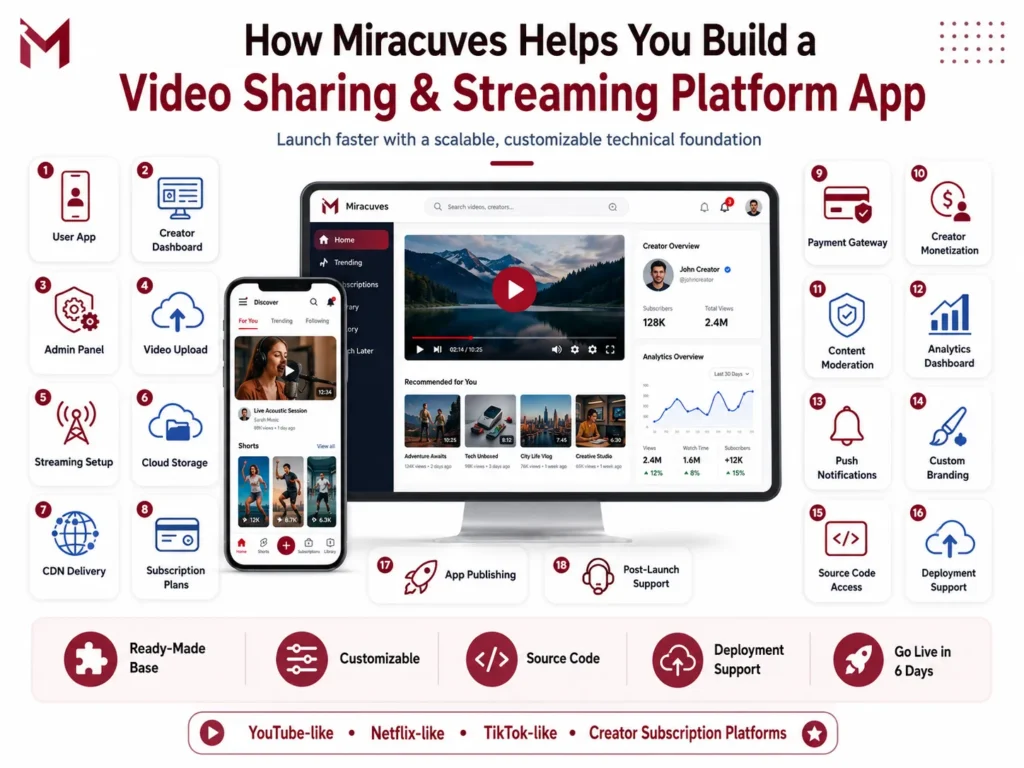
Miracuves helps founders launch scalable video sharing and streaming platform apps with ready-made and customizable solutions. Whether you want to build a YouTube-like video sharing app, Netflix-like OTT app, TikTok-like short video app, or creator subscription video platform, Miracuves provides the technical foundation to launch faster.
Miracuves can help with:
- User app development
- Creator dashboard
- Admin panel
- Video upload system
- Video streaming setup
- Cloud storage integration
- CDN integration
- Subscription plans
- Payment gateway integration
- Creator monetization
- Content moderation
- Analytics dashboard
- Push notifications
- Custom branding
- Source code access
- Deployment support
- App publishing support
- Post-launch technical support
The goal is simple: help founders avoid long development delays and launch a video platform faster with a strong technical base.
Why Choose Miracuves for Video Platform Development?
Miracuves focuses on fast-launch, scalable, and customizable app development solutions for founders and businesses. Instead of forcing every client to start from zero, Miracuves provides ready-made clone app foundations that can be customized according to business needs.
For video platform businesses, this approach is useful because many core modules are common across platforms. User login, video upload, video feed, admin management, payments, subscriptions, and analytics do not need to be rebuilt from scratch every time.
With Miracuves, founders can reduce launch risk, save development time, get source code access, customize branding, and go live in 6 days depending on selected modules and integration requirements.
Final Thoughts
Building a video sharing and streaming platform app in 2026 requires more than a good idea. You need the right platform model, smooth user experience, strong creator tools, reliable video streaming, secure content delivery, monetization systems, admin controls, and scalable infrastructure.
A weak video platform may work during demo testing, but it can fail when creators upload large videos, users stream at the same time, or CDN bills start increasing. That is why founders should plan architecture, monetization, moderation, and scalability from the beginning.
If you want to build a YouTube-like, Netflix-like, TikTok-like, or creator-focused video platform, Miracuves can help you launch faster with ready-made, customizable, and scalable video platform solutions.
Launch your video sharing and streaming platform with Miracuves in 6 days and start building your content business with the right technology foundation.
FAQs
Still have questions about launching your video sharing app? Let’s clear them up.
What is a video sharing and streaming platform app?
A video sharing and streaming platform app allows users to upload, watch, stream, share, and monetize video content. It can work like YouTube, Netflix, TikTok, Twitch, or a creator subscription platform depending on the business model.
How much does it cost to build a video streaming platform app?
The cost depends on features, mobile apps, web app, admin panel, video upload, streaming quality, CDN, cloud storage, subscriptions, payments, live streaming, and customization. A ready-made solution from Miracuves can reduce development time and cost compared to building everything from scratch.
How long does it take to launch a video sharing app?
With Miracuves, founders can launch a ready-made and customizable video sharing or streaming platform in 6 days. Final timeline depends on branding, integrations, advanced modules, and custom requirements.
What features should a video streaming app include?
A video streaming app should include user login, video player, video upload, categories, search, likes, comments, watchlist, creator dashboard, admin panel, subscriptions, payments, notifications, analytics, content moderation, and CDN-based streaming.
Can I build an app like YouTube or Netflix?
Yes. You can build a YouTube-like video sharing app, Netflix-like OTT platform, TikTok-like short video app, or Twitch-like live streaming app depending on your target audience and business model. Miracuves offers customizable clone solutions for different video platform models.
How does a video platform make money?
A video platform can make money through subscriptions, advertisements, pay-per-view content, creator commissions, tips, premium channels, sponsored content, in-app purchases, and brand partnerships.