
AppFolio Clone App - White-Label Property Management SaaS
Built by Miracuves, the ready-made, white-label AppFolio clone serves companies running buildings for owners: Flutter resident and landlord apps, a browser portal, a vendor panel and the operator's admin, with unencrypted source you own, installed on your hosting in six working days.
Owners sign in to read income and expense reports, residents pay rent and file repair requests from a phone, and the operator works from one portfolio view with quick actions into buildings, residents and leases. Each role opens the same records, so a number in one place matches everywhere else. A second sign-off or an accounting sync is priced in writing as its own job, and the bigger changes run 2-8 weeks.
Launch in 6 Days with
- Source Code
- Resident App
- Landlord App
- Browser Portal
- Vendor Panel
- Operator Admin
StackFlutter · Vue.js · Laravel · PHP · MySQL · MongoDB
Portfolio feed
- Owner opened income reportOwners
- Rent payment receivedRent
- Work order waitingWork orders
- Tenant added to Unit 4BTenants
- Work order closedWork orders
- Payment history viewedTenant app
- Occupancy figure refreshedProperties
- Lease renewal coming upLeases
- Owner opened income reportOwners
- Rent payment receivedRent
- Work order waitingWork orders
- Tenant added to Unit 4BTenants
- Work order closedWork orders
- Payment history viewedTenant app
- Occupancy figure refreshedProperties
- Lease renewal coming upLeases

- 3Doors Into One Portfolioowner, tenant and operator homes over shared records
- 4Operator Countersbuildings, residents, work orders and revenue
- 0%Revenue Share With Miracuvesno royalty per building, per resident or per rent payment
- 6Modules Outside the Baseaccounting, owner statements, vendor bills, applications, screening and e-signature
- 6Days to Launchand if the delay is ours, we keep going free
- $5,199Paid Once, Not Rentedsource code yours, no per-seat fee, no monthly rental
Live in six working days, or we keep working free until you launch. Every build carries 60 days guidance, 6 months bug fixes and 12 months updates.Verify every figure
Upkeep Already in the Log
Release 1.1 refreshed packages, release 1.3 redesigned the alert card and release 1.4 cleared unused code: the maintenance a portfolio platform needs before it takes on more buildings.
Store Review Is Apple and Google's
Android and iOS builds publish from developer accounts you own, and app review at Apple and Google runs on its own clock, apart from the six-day build.
Card Data Stays With Your Gateway
Rent is collected through the gateway you connect, so card numbers never sit in your database; the app shows each payment's status, and the gateway keeps the ledger you reconcile against.
01See it live
Live in Action
Try the AppFolio Clone Demo - Admin Dashboard, Owner Portal & Tenant Home
Open the Miracuves AppFolio Clone demo yourself. Miracuves packs its AppFolio clone demo into one app: a single sign-in screen gives each of the three roles its own one-tap button, so you can look at the rental portfolio from the operator desk, an owner's seat or a tenant's phone without registering. The web portal and the vendor panel are opened for you on a call.
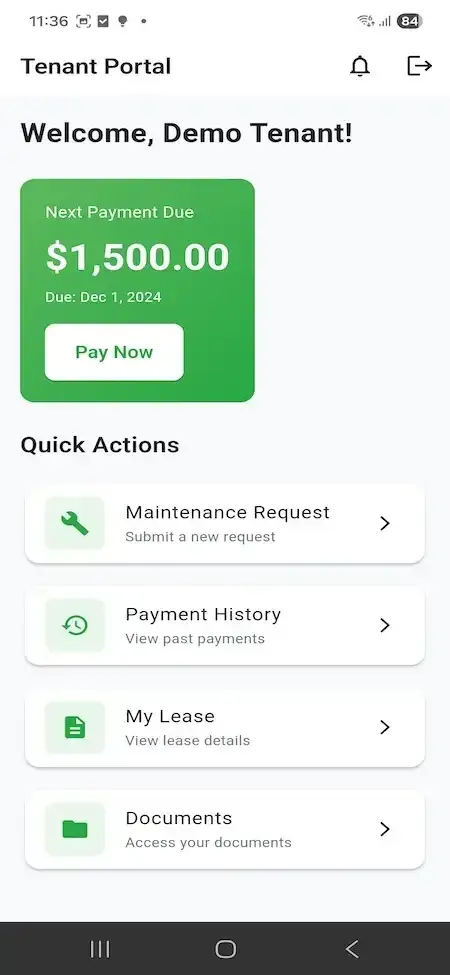
Tenant Home in the AppFolio Clone
What a resident sees in the tenant portal: the amount of the next rent and its due date with a Pay Now button, then four shortcuts - maintenance request, payment history, lease and documents.
- 1Install the demo app from the portal
- 2First screen: tap the Tenant entry
- 3Look at: rent due, repair request, lease
alice.tenant@email.com
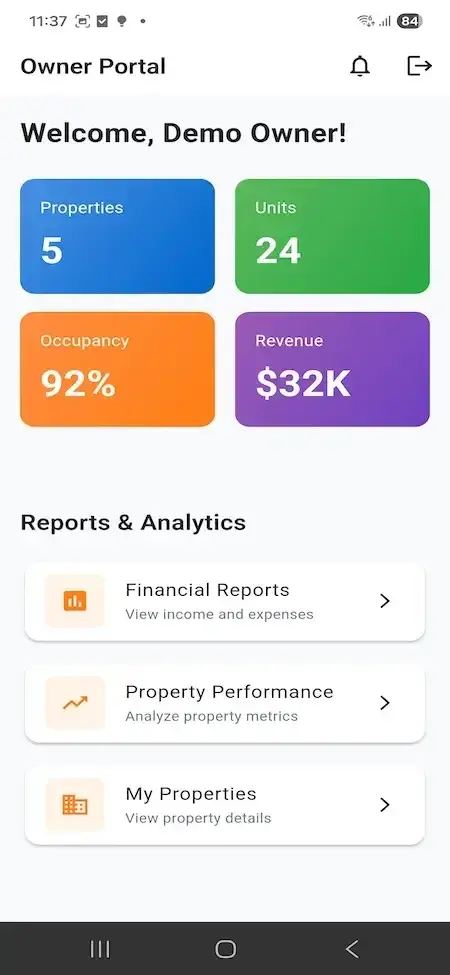
Owner Portal in the AppFolio Clone
What a building owner sees: four tiles for properties, units, occupancy and revenue, then Financial Reports for income and expenses, Property Performance and a My Properties list.
- 1Install the demo app from the portal
- 2First screen: tap the Owner entry
- 3Look at: income reports and property metrics
owner1@buildium.demo
Portfolio Dashboard in the AppFolio Clone
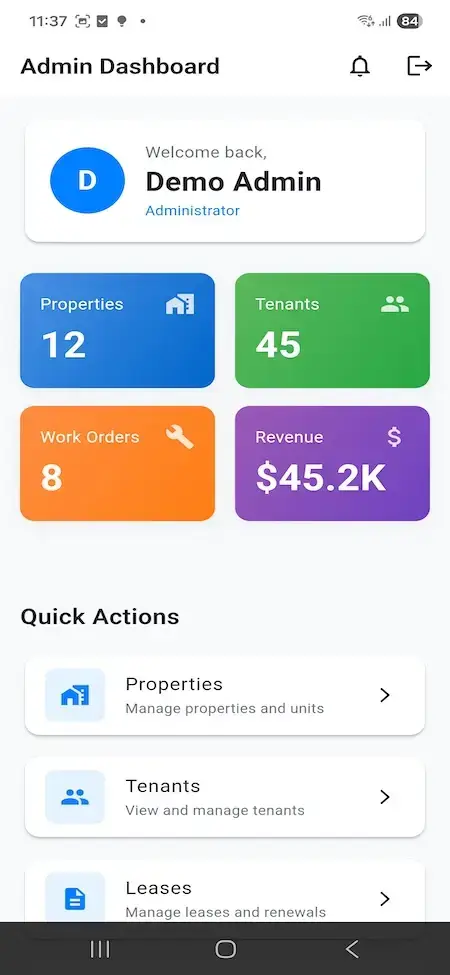
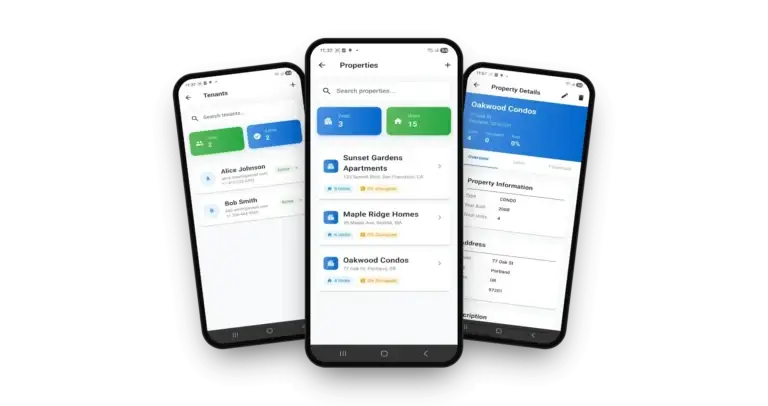
What the operator sees: the whole portfolio as four counters - properties, tenants, work orders and revenue - with quick actions into property records, tenant records and leases.
- 1Install the demo app from the portal
- 2First screen: tap the Admin entry
- 3Look at: the four counters, then buildings, residents, leases
admin@buildium.demo
Browser Portal and Vendor Panel
The web portal and the vendor panel are part of the package, and we open both on screen for you during a guided call.
- 1Request a time slot
- 2We share the portal and vendor panel on screen
- 3Ask what the vendor panel handles for repairs
on request only

Walk It With Us
Video Tour of a Property Management App Like AppFolio: Portfolio Dashboard, Owner Reports & Property Records
The fastest way to judge it is a live call with our team. For half an hour we open the admin dashboard, the owner portal and the tenant home side by side and load them with your own numbers in mind: how many buildings, how many owners, how many repairs a week, and when you want to go live.
Book a live walkthrough.Screens by Role
AppFolio Clone App Flows - Owner, Tenant & Operator Screens
These nine captures come straight from the running demo of the Miracuves AppFolio clone, sorted by who opens them: the owner, the resident and the operator. No mock-ups were used.


Trace one owner from the portfolio tiles to the income and expense report, one resident from the rent card to a repair request, and one operator from the counters to a single building's record.
02Proof
Client Voices
What Miracuves Clients Say About Starting From a Ready-Made Platform
Nobody here sells property-management software, but Renido and Ischia Booking do run property work: Renido on listings, search and agent inquiries, and Ischia Booking on a property manager and channel manager for a few dozen units. GoToRawanda and BNBinGreece, short-stay hosts, add the neighboring view.
“Listings, search, media handling and enquiries were all ready. Our work was the local property types, the map behaviour and how agents actually get leads. Live inside a month.”
“We were running a few dozen properties off a static site, email and a phone. Calendar, booking flow and the property manager came off the shelf. They added a channel manager for our OTAs, a guest portal and a multilingual interface. The operations team no longer lives in the inbox.”
“Listings, calendar, booking flow and payments came off the shelf. We added the property types and the seasonal pricing rules that matter here, plus a multilingual guest experience. Online bookings replaced the inbox inside a month.”
“Hosts, listings, calendars and payments were solved. Our work was the local payment methods, the languages our guests use and the property types we actually list. It replaced a phone-and-email process inside a month.”
Proof You Can Check
Is There an AppFolio Clone Case Study? Where the Published Evidence Stands
Miracuves has no named client deployment of the AppFolio Clone to show, so this section does not invent one. It lists what you can verify and what we refuse to do.
A case study needs a client who allowed their name and a page we can link to. We have neither for this product today, so this section tells you that instead of showing someone else's logo.

- Step into the demo as an owner, a tenant or the operator
- Open a building and read its units, occupancy and address
- Watch the portfolio counters on the admin dashboard
- Request the web portal and vendor panel in a live session
- Put a name on a client who has not agreed to it
- Quote results from a deployment nobody can inspect
- Present demo figures as customer results
- Apply your logo, icons and colors across apps and panels
- Put it on the hosting you provide
- Publish from your own store developer accounts
- Transfer the full source code to you
- Six working days of build time on the ready-made base
Need proof before you buy? Ask us on a call which parts of this product we can show now and which we cannot.
03The product
The Basics
What an Operator Gets From a White-Label AppFolio App
Miracuves made this AppFolio clone app for people who manage buildings on behalf of owners: the operator gets a portfolio view of properties, tenants, work orders and revenue, the owner gets an income-and-expense sign-in, and the resident carries rent and repair requests in a pocket.


One Portfolio, Three Doors
The operator, the owner and the tenant each open the same data through a home screen made for them, so a number in one place is the number everywhere else.
Code You Can Change
The source arrives unencrypted so your engineers can reshape screens and rules as the portfolio grows. Running it costs nothing per building and nothing per tenant.
Honest About the Edges
Accounting, owner statements, vendor bills, applications, screening and e-signature are ready to add as modules. Each is scoped and priced on its own, on top of the base.
Apps & panels
What Is an AppFolio Clone Script?
Managing property is mostly keeping relationships straight: which owner holds which building, which resident lives in which unit, what has been settled and which repair is still open. Those links, together with a separate entry for owner, tenant and operator, arrive already working.

- 01Buildings with units, address and occupancy
- 02Tenants with a status and contact details
- 03Owner reports on income and expenses
- 04A work orders counter on the operator side
- 05Separate owner, tenant and admin sign-in
Listed in the package: tenant app, landlord app, web portal with vendor panel, admin panel. The apps are Flutter, and the full source code is part of it.
Everything Included
AppFolio Clone Features - Portfolio Dashboard, Owner Reports, Property & Tenant Records, Work Orders & Rent
Every feature Miracuves lists below for the AppFolio clone can be found in the demo screens or in the release log. A capability that needs an extra module is labeled as an add-on further down this page.
Sign-In by Role
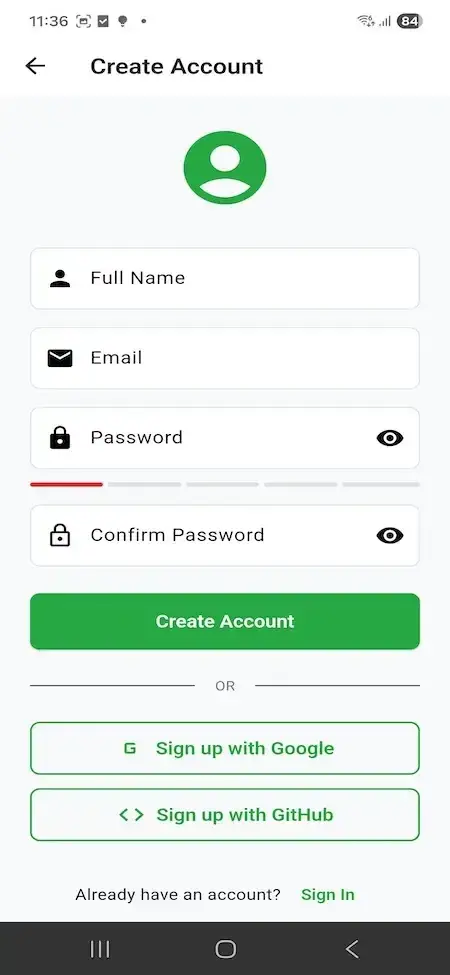
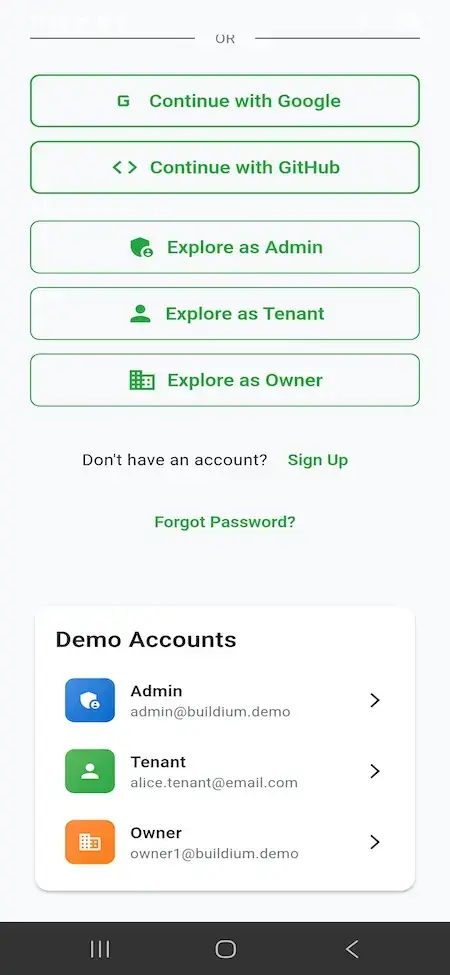
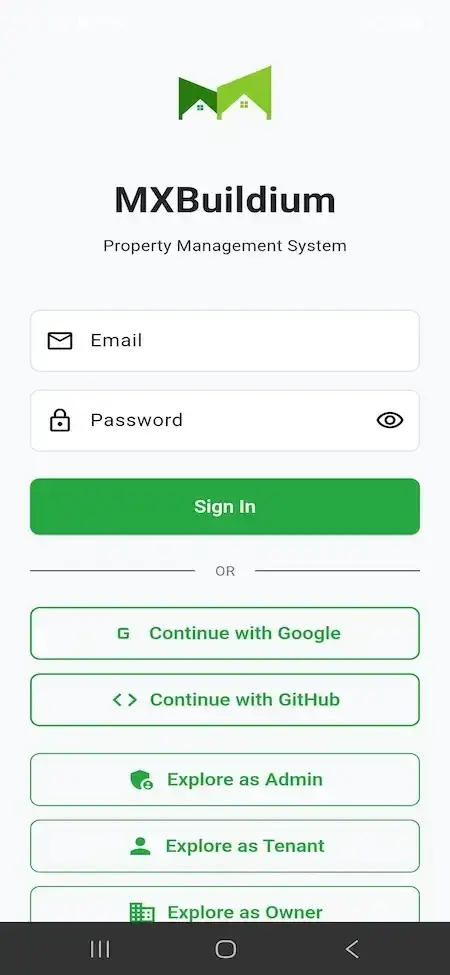
People register or sign in with an email address, a Google account or a GitHub account, and the first screen also offers one-tap entry to the owner, tenant and admin sides.
- Email-and-password form
- Google and GitHub buttons
- Sign-up with a password strength meter
- Three one-tap role entries
- Password reset link under the sign-in form
Portfolio Dashboard
The operator home opens on four counters covering buildings, residents, repairs and revenue, under a welcome card, with quick actions beneath.
- Four counters visible on one screen
- Properties action: manage buildings and units
- Tenants action: view and manage residents
- Leases action: manage leases and renewals
- Welcome card naming the Administrator role
Property Records
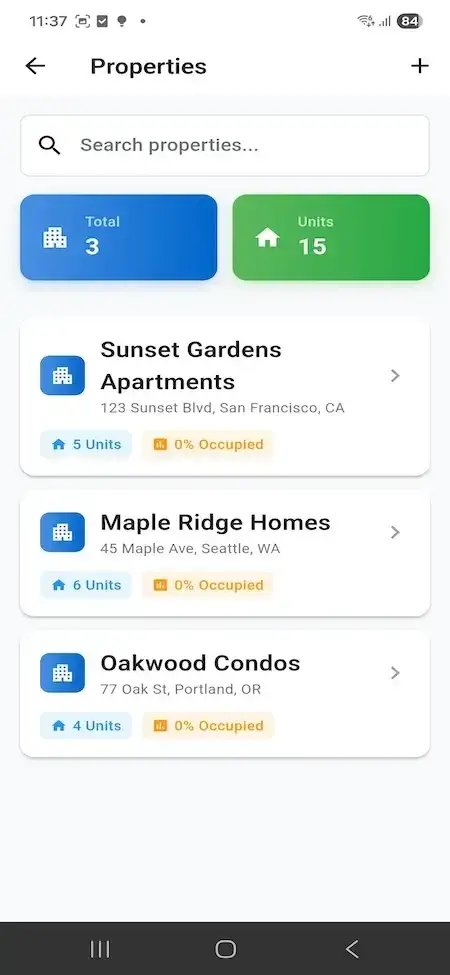
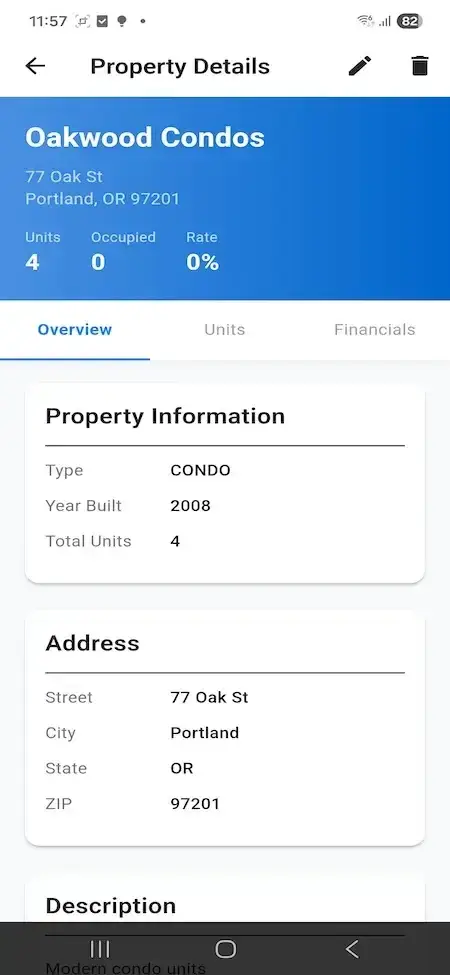
Every building keeps its name, address, type, year built and unit total, with Overview, Units and Financials tabs on its details screen.
- Searchable list with a total at the top
- Street, city, state and ZIP on each record
- Property type, build year, unit total
- Units, occupied and rate across the header
- Edit and delete controls on the record
- Plus button to add a building
Units & Occupancy
A building lists how many units it holds and how many are occupied, and the owner and admin screens roll those numbers up into totals.
- Unit count on each property card
- Occupancy displayed as a percent
- Properties and units totals
- Occupancy shown as an owner tile
- Units tab on every record
Owner Reporting
Owners land on four tiles - buildings, units, occupancy, revenue - and move on to Financial Reports for income and expenses or to Property Performance for property metrics.
- Four tiles: properties, units, occupancy, revenue
- Financial Reports: view income and expenses
- Property Performance: analyze property metrics
- My Properties: view property details
- A dedicated owner entry
Tenant Records
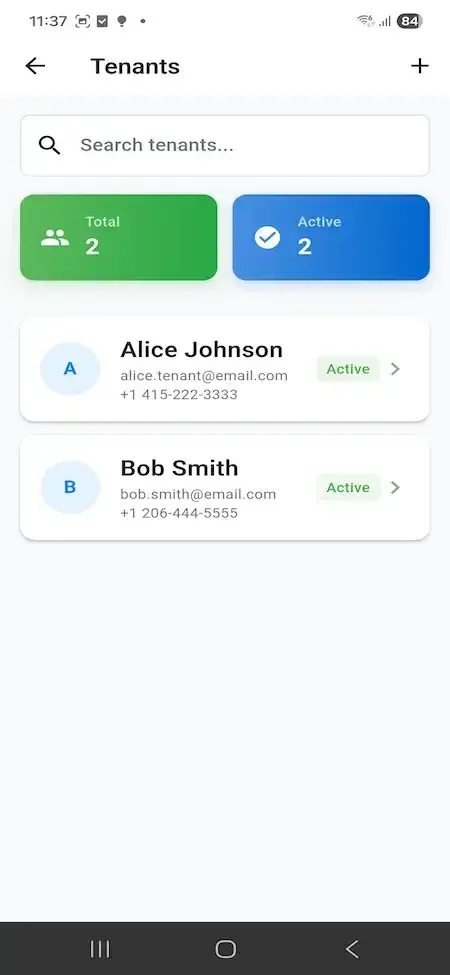
The tenant list can be searched, shows total and active counts, and gives each tenant a card with name, email, phone and a status.
- Search box above the list
- Total and active tenant counts
- Each card carries name, email and phone
- Active status label on every tenant
- Plus button to add a resident
Work Orders
Residents send a repair request from a quick action, while the operator home keeps a work orders counter right next to revenue.
- Maintenance Request quick action: submit a new request
- Work Orders counter on the admin dashboard
- Bell icon for updates in each portal
- Ticket-related issues fixed in release 1.4
Rent Card & Pay Now
The first thing a resident sees is the next rent payment: its amount, its date and a Pay Now button. Payment history waits one tap lower.
- Next Payment Due card
- Amount and due date side by side
- Pay Now sits inside the rent card
- Payment History quick action
- Revenue counter on the operator side
Leases & Documents
Operators have a Leases action for lease management, covering leases and renewals; tenants open My Lease to read their own lease and Documents to reach their files.
- Leases quick action for the operator
- Manage leases and renewals
- My Lease: view lease details
- Documents: access your documents
Alerts
The header of the owner, tenant and admin portals carries a bell next to the sign-out control, and release 1.3 redesigned the card behind it.
- A header bell on each portal
- Release 1.3 redesigned the alert list card
- Sign-out control next to the bell
- Release 1.1 reworked account management
Your Brand, White-Labeled
Web and apps are delivered wearing your logo, icons and colors, installed for you and ready to be published from store accounts you hold.
- Rebranding across web and apps
- Logo, icons and palette swapped for yours
- Installation on your own hosting
- Full white-labeling
- Help publishing to the stores from accounts you own
Code Ownership & Updates
The whole source arrives unencrypted, and three support periods start together at launch.
- Complete source code, no encryption
- Flutter code for both phone apps
- 60 days of platform guidance
- 6 months of priority bug fixes
- Product updates for 12 months
Before you buy: we rebrand the platform and install it for you. In return you provide hosting with a domain, a verified developer account on each app store, your branding and company details, a gateway that has finished KYC, and any outside API keys. App review at Apple and Google runs on its own clock, apart from our 6-day build.
Where the Money Comes From
Revenue Models for the AppFolio Clone - Per-Unit Plans, Portfolio Plans, Rent Collection, Payouts & Value-Added Services
Property management software like the Miracuves AppFolio clone earns at the points where a portfolio grows or money moves. This product keeps those points apart, so you can price one without disturbing another.
The two that usually carry the first year are the per-unit plan and the fee on rent that passes through.
- 01
Per-Unit Subscriptions
Charge each management company a monthly rate for every unit it runs on your platform, so your income moves in step with the size of their portfolio.
- 02
Flat Portfolio Plans
Offer fixed monthly tiers for smaller operators who prefer one predictable bill, with larger portfolios moved to a negotiated price.
- 03
Rent Collection Fees
Take a fee on each rent payment that flows through the tenant home, by bank transfer or by card, according to the gateway terms you agree.
- 04
Owner & Vendor Payouts
Money also leaves the system: distributions to owners and payments to repair vendors can each carry a small per-payout fee once you connect a gateway for them.
- 05
Value-Added Services
Payments, screening and renters insurance sold alongside the software pay out per use. Each one runs through a module and a provider you contract.
- 06
White-Label Licensing
Holding the source lets you license a copy of the deployment to a different management company, wearing its own brand, under terms you negotiate.
| Revenue stream | How it is charged | Take rateTypical take rate | What sets the ceiling |
|---|---|---|---|
| Per-Unit Subscriptions | A monthly price multiplied by the number of units under management. | AppFolio's listed starting prices are $1.49 / $3.20 / $5.00 per unit each month, from entry plan to top plan. | Portfolio size. AppFolio adds a 50-unit minimum and a minimum spend to its entry plan, so a small operator pays for units it may not have. |
| Flat Portfolio Plans | A fixed monthly price per plan, whatever the unit count within the tier. | Buildium lists $62, $192 and $400 per month. | The tier boundary. Buildium sends portfolios above 5,000 units to a sales call, so the flat price stops at a defined size. |
| Rent Collection Fees | A fee for each incoming rent payment, by bank transfer or by card. | Per bank transfer Buildium charges $2.35, $1.35 or $0.60 depending on plan, and 2.99% on a card payment. Stripe publishes 2.9% + 30 cents. | Your gateway contract. Buildium waives the Premium bank-transfer fee for the first 12 months, so a free opening period deserves a place in the model. |
| Owner & Vendor Payouts | A flat fee for each payment sent out to an owner or a vendor. | Buildium lists $0.99 per outgoing bank transfer on every plan. | Payout volume. The rate is the same on every plan, so the total follows how many owners and vendors you pay in a month. |
| Value-Added Services | Payments, screening and insurance revenue earned on top of the subscription. | In 2025 AppFolio booked $721.5 million from Value Added Services, roughly 76% of its $950.8 million, and its reported units imply about $101 of revenue per unit a year. | How much money truly flows through the platform. The filing states no per-transaction price, so the share shows scale and is not a rate. |
How to read this. Per-unit plan prices come from AppFolio's pricing page; the flat plans, bank-transfer fees and card fee from Buildium's pricing page. The revenue split and unit count are taken from AppFolio's Form 10-K annual report, and the card yardstick from a Stripe support page. App-store commissions follow Apple's developer program page and the Google Play fee table, revised for the US, UK and EEA on 30 June 2026. Prices are what other companies list and the per-unit revenue is our own division of reported totals, so treat them as inputs for your model rather than a quote or an earnings forecast.
AppFolio Clone Revenue Model, Stage by Stage
Per-unit plans, Pay Now rent fees and owner and vendor payouts run as separate lines in the Miracuves AppFolio clone, so a firm bills for buildings first.
Launch
The first management firms pay a per-unit subscription or a flat portfolio plan, which needs nothing beyond the base and starts billing from the first building loaded.
Traction
Once residents pay through the Pay Now card under agreed gateway terms, a fee on each rent payment joins the plan, and wiring a gateway to owner distributions and repair-vendor bills lets those transfers carry a small charge.
Scale
At scale, screening or renters insurance run through modules and providers you contract, and white-label licensing lets you sell the deployment to other management companies under their own brand.
You set every rate, and Miracuves takes 0% of plans, rent or payouts.
Run the Portfolio
Operator Dashboard in the AppFolio Clone - Counting Buildings, Residents, Repairs & Revenue
At portfolio scale, the operator dashboard in Miracuves' AppFolio clone tells you at a glance how many buildings and residents you carry, how many repairs are waiting and what revenue looks like. One dashboard answers all three and points to the lease records behind them.


What the Operator Desk Holds
- 01
Four Counters
Buildings, residents, repairs and revenue are the four numbers on top of the operator home, below a welcome card for whoever is signed in as administrator.
- 02
Buildings & Units
A searchable list of buildings with a running total, units and occupancy on every card, a plus button, and a record screen where entries can be edited or removed.
- 03
Tenant Roster
The tenant list can be searched, shows total and active counts, puts contact details on each card and has an add button for the next resident.
- 04
Lease Desk
The Leases action opens lease and renewal management, next to the actions for properties and tenants.
- 05
Repair Load
A work orders counter sits beside revenue and occupancy, so the size of the repair queue is visible from the first screen the operator opens.
- 06
Revenue Figure
Revenue is a headline number on the operator home and on the owner portal, where financial reports are one tap away.
- 07
Alerts
A header bell collects updates for whichever role is signed in, and the notification list card was redesigned in release 1.3.
- 08
Three Entry Points
Operators, owners and tenants each sign in through an entry of their own, so each person lands on screens written for their job.
Where the Money Shows
From the resident's rent card to the owner's report.
- Revenue counter on the operator home
- Pay Now and history for residents
- Income and expense reports for owners
- Property metrics for owners
Records & Permissions
Which roles open which records, and what stands behind each screen.
- Owner, tenant and admin entry points
- Building, unit and resident records
- Lease and file actions
- Bell and sign-out on every header
Want the desk to do more? Added reports, a second sign-off, accounting sync or another rent calendar are quoted on their own, as are owner statements and payouts, vendor bills recorded against work orders, and rental applications with screening and e-signature. Describe what your team does today and we will price it in writing.
04Package and price
The Full Package
What the AppFolio Clone Script Package Includes: Code, Apps, Panels & Hosting Setup
Miracuves hands over the AppFolio clone as a complete property platform instead of a bundle of parts: two phone apps, a browser portal with a vendor panel, an admin panel and every line of code under them. Ownership passes entirely to you, with no per-unit charge and no license needed to operate it. Bills from your own providers stay separate: a domain and hosting, your payment gateway, maps, messaging and push alerts, translation or other APIs, any screening or e-signature provider, and store accounts with your legal pages.
$ git clone your-platform Full Source Code
Complete source for the web platform and the mobile apps, with no encryption, so your developers can adapt it to how you run buildings.
- Web platform source, unencrypted
- Flutter source for Android and iOS apps
- Yours to modify, extend and redeploy
- Delivered to your own repository
Records & Data
The records behind buildings, units, residents, leases and payments come with the source, so your engineers can study them and extend them.
- MySQL and MongoDB, as the stack lists them
- Building and unit tables
- Resident and lease tables
- Payment and repair tables
Alerts
The header bell in each portal and the list card behind it, which release 1.3 redesigned.
- Bell on the owner, tenant and admin headers
- Alert list card
- Rent card on the resident home
- Repair request action for residents
Web Portal & Vendor Panel
The package also names a browser portal and a vendor panel. We walk you through both on a guided call.
- Browser portal for operators
- Vendor panel
- Wears your logo and colors
- Installed on your hosting
Resident & Landlord Apps
A pair of Flutter apps - one for residents, one for landlords - behind the sign-in that sends each person to the owner, tenant or admin home.
- Resident app: rent, repairs, lease, files
- Landlord app: buildings, units, reports
- Builds for Android and for iOS
- Publishing from developer accounts you own

Admin Panel
The operator dashboard: four counters and quick actions that lead into buildings, residents and leases.
- Counters for buildings, residents, repairs, revenue
- Building and unit management
- Resident and lease shortcuts
- Bell and sign-out

Access & Security Layer
Each role signs in separately, with Google and GitHub choices and a password reset path; rent is collected through the gateway you connect.
- One entry per role
- Sign in with a Google or GitHub account
- Strength meter when choosing a password
- Card data stays with your gateway
Handover & Support
We do the rebranding and installation, help you publish from your accounts, and start three support periods together at launch.
- Logo, icons and colors swapped for yours
- Installation on your hosting
- Help with store publishing
- 60 days of guidance, 6 months of bug fixes, 12 months of updates
Prefer to look first? Open the demo as an owner, a tenant or the operator, or book a tour. We can step through a building record, the resident roster, the owner reports and the work orders counter as you describe what you manage.
Transparent Pricing
What Does an AppFolio-Style Property Management Platform Cost to Launch?
One fixed price covers the launch-ready white-label AppFolio Clone: $5,199. Whatever sits beyond that base, be it a module, an added integration or a custom flow, gets scoped and priced separately in writing.
Professional
Ready-Made Launch PackageChosen by: Management firms, owner-services startups, regional portfolio operators
The platform comes exactly as the demo shows it, rebranded in your logo, icons and colors and installed on hosting you provide.
Get StartedEnterprise
Custom Builds for Larger ScopeChosen by: Property groups, franchise systems, multi-region operators
Does your operation need accounting sync, owner statements or vendor billing that the base lacks? We build to your brief and agree scope and price first.
Request a QuoteAppFolio Clone Development Cost in 2026
Miracuves sells the AppFolio clone for $5,199, paid once, for the platform the demo shows: Flutter resident and landlord apps, the browser portal, the vendor panel and the operator admin, handed over as unencrypted code. Within six working days the owner portal and tenant app carry your logo on your server, with no per-unit or license fee as buildings grow.
What moves your total sits outside the software invoice
- Hosting and a domain for the platform
- Your payment gateway, with KYC finished before launch
- Google Maps, Twilio, Firebase and translation API accounts
- Store developer accounts and your own legal pages
- Any module you add, such as accounting sync or owner statements
Bigger changes, such as a second sign-off or accounting sync, are priced in writing as their own job and usually take 2-8 weeks.
Compare Your Options
Ready-Made AppFolio Clone vs Custom Development vs SaaS
Property firms weighing an AppFolio-style platform usually choose between buying Miracuves' working base, commissioning their own build or renting software per unit; this is how the three routes differ.
| Criteria | MiracuvesReady-Made AppFolio Clone | Custom Development | SaaS |
|---|---|---|---|
| Launch time | Running on your own servers within 6 working days | Quoted in writing, typically 2-8 weeks | Sign up quickly, migrate on their terms |
| Upfront cost | $5,199 once for the whole platform | Set by a written scope | Low start, billed every month |
| Source code ownership | Unencrypted source for apps, portal and admin | Owned if your contract assigns it | Remains the provider property |
| Customization | Change owner reports, rent and repair flows freely | Shaped around your own processes | Limited to vendor configuration |
| Ongoing fees | No per-unit fee or royalty to Miracuves | Developer time for every change | Per-unit or per-portfolio subscription |
| Branding & app-store listing | Your brand on resident and landlord apps in both stores | Your brand once the apps are built | Vendor name often shown to residents |
| Best for | Management firms that want their own portfolio software | Firms with workflows no base covers | Small landlords happy to rent tools |
Same product, other editions: Buildium Clone · Browse all Rentals solutions · Browse all Rentals solutions
Setups It Serves
Use Cases for Property Management Software Like AppFolio - Managed Portfolios, Owner Reporting, Repairs, Shared Housing & Proptech
Not every operator on the Miracuves AppFolio clone opens the same screen first. A management firm begins at the dashboard, an owner-services brand begins at the owner portal, and a proptech founder begins with the entire stack. Configuration decides the emphasis.
Swipe · 6
Run buildings that belong to different owners from one operator desk, with a counter for properties, one for tenants and a revenue figure on the first screen.

Give each owner a sign-in where properties, units, occupancy and revenue sit above income and expense reports and a property performance view.

Residents raise a request from the phone, and the operator sees how many work orders are open next to occupancy and revenue.

Give every resident one home screen with the amount owed, the date it is owed and Pay Now, plus payment history and lease details below.

Track many units and many residents together, with occupancy on each building card and an active label beside every tenant.

Launch a property software brand of your own with the source in hand, sell plans to management firms and let the base supply the records.

AppFolio Clone Business Model: Three Ways to Run It
Because the operator desk, the owner portal and the tenant app all read the same buildings, units and leases, three kinds of property company can run their business on the Miracuves AppFolio clone.
Third-party manager
A management firm runs buildings for several owners from one operator desk, and the owner portal's income and expense reports answer each owner before the monthly call.
Owner-services brand
An owner-services startup makes the owner portal its front door, while the resident app and operator admin handle rent, repairs and leases behind it.
Proptech vendor
A proptech brand sells per-unit or flat plans to other management firms, and because the source is yours, each firm can receive its own branded deployment on licensing terms you set.
Whichever you pick, the plans, rent fees and payouts you bill stay yours, with nothing owed to Miracuves per tenant.
One product, six setups. All six run on the same apps and admin side. The differences are whose buildings you load, which gateway you plug in and how the brand looks, which is why a single codebase can serve each.
Talk to Our TeamMarket Timing
Why Launch a Portfolio Management Platform in 2026?
Running buildings for other people repeats each month: the same owner questions, the same repair queue, the same rent calendar. Under your own name, that repetition becomes records you control, and both owner and resident remain your customers.
01Owners Expect Numbers Without Asking
An owner who hires a manager wants income, expenses and property performance on demand. A sign-in that opens those reports removes the monthly request.
02A Spreadsheet Breaks Around the Tenth Building
Once ownership, units, residents and repairs multiply, a single sheet stops being the system of record. Linked property and tenant records take its place.
03Residents Pay and Ask From Their Phones
A rent card with a Pay Now button and a repair request a few taps away match how residents already deal with every other service they use.
04Repairs Decide How Residents Rate You
A request that is filed in the app and counted on the operator dashboard turns a phone call into a tracked piece of work.
05Your Brand Holds the Relationship
When the apps carry your name, the owner relationship, the payment history and the reports stay with you rather than with a vendor.
06Buying the Base Beats Building It
Entry points by role, building records, resident records and a portfolio dashboard form most of a management product. Six days of build time later, a white-label copy is running on your hosting.
Platform by the Numbers
Roles on One Codebase
Captured Demo Screens
Features Itemized
Working Days to Build
The bulk of a property product is its plain middle: building and resident records, a rent calendar, repair requests and the dashboard tying them together. Here that middle is already built.
Industries
Industries That Run an AppFolio-Style Portfolio
Any business that looks after rented space for other people can use the AppFolio Clone. Management firms answer to owners, agencies add management to their lettings business, and landlords of homes or offices hold building records and tenant contacts in one place. Shared-housing and student operators fill many units under one roof, condo associations follow their members, and build-to-rent and serviced-apartment businesses watch occupancy. Proptech founders can resell the full platform in their own name.
one codebaseCore
- 01PmProperty Managers
- 02CaCondo Associations
- 03RlResidential Landlords
- 04CpCommercial Property
- 05ReReal Estate Agencies
- 06ShStudent Housing
- 07ClCo-Living
- 08BtBuild-to-Rent
- 09SaServiced Apartments
- 10PsProptech Startups
- 11HdHousing Developers
- 12FsFacility Services
Miracuves’ AppFolio Clone is a portfolio platform that bends to nearly any rental model and shows your brand from the very first sign-in.
06Under the hood
End to End
Inside the AppFolio Clone: From Opening a Building to Reporting to Its Owner
In the AppFolio clone Miracuves delivers, a resident pays and asks for repairs in a few taps, and an owner opens a report in one. Behind both stands a chain of building, resident, lease, payment and request records. The chain comes first below, in the order a portfolio uses it, followed by the parts that hold it up.
Operator, Owner and Resident - One Cycle of the Portfolio
Swipe · 6
- 1Sign In as Operator, Owner or Resident
New users register with an email address or a Google or GitHub account, and one tap in the demo opens the operator, owner or resident side of the property management app.
- Registration repeats the password for confirmation
- Google and GitHub buttons
- One-tap Admin, Tenant and Owner entries
- 2Add Rental Properties and Units
From a searchable building list showing units and occupancy, the operator adds a new rental property with the plus button.
- Search the property list
- Units and occupancy on each card
- Add button on the list
- 3Add Tenants to the Portfolio
The tenant roster counts total and active residents, shows contact details on each card and adds another resident from the plus button.
- Search the tenant list
- Total and active counts
- Each card carries name, email and phone
- 4Check Occupancy and Building Financials
A building record lists its units, how many are occupied and the rate, with an information card, the address and Overview, Units and Financials tabs.
- Property type, build year, unit total
- Address split into street, city, state and ZIP
- Pencil and bin controls
- 5Collect Rent and Log Maintenance Requests
Residents land on the next payment with a Pay Now button, and quick actions below send a repair request or open history, the lease and files.
- Amount and date at the top
- A repair request within a few taps
- History and the lease itself
- 6Track the Whole Rental Portfolio
Four counters on the operator home sum up buildings, residents, repairs and revenue, and its actions jump to buildings, residents and leases.
- Four counters on top
- Actions for buildings, residents and leases
- Alert bell up in the header
How It's Built
Architecture of an AppFolio-Style Portfolio Platform
- 01Step 01
Three Entry Points
Owner, tenant and operator each arrive at a home screen designed for them, so a resident works from rent and repairs and the operator from the portfolio counters.
- 02Step 02
Buildings Carry Their Units
A property holds its units and occupancy, and the owner and operator dashboards total the same figures, so every screen quotes one source.
- 03Step 03
One Lease Record
The operator manages leases and renewals while the resident opens their own lease, so both ends read the same record.
- 04Step 04
Rent Due to Payment
A card with an amount and a date leads into Pay Now, and the history is a tap away on that same screen.
- 05Step 05
Repair Intake to Counter
Residents file a request through a quick action and the dashboard counts it among work orders, so taking in a repair and chasing it happen in the same place.
- 06Step 06
Alerts in Every Header
Each portal has a bell that gathers updates, backed by the list card redesigned in release 1.3.
Under the Hood
The AppFolio Clone Stack: Laravel and Vue.js on the Web, Flutter on Phones, MySQL and MongoDB Below
AppFolio-style portfolio software from Miracuves relies on a steady web tier, storage that keeps owner, resident and payment records in agreement, and phone apps with a native feel. The parts are listed below as the product listing gives them.
Server & Web Layer
- Operator portal, vendor panel and admin panel
- Laravel runs the server side
- Vue.js draws the interface
- Rebranded to your identity
Databases
- MySQL and MongoDB are the two named stores
- Building, unit and resident rows
- Lease and payment rows
- Runs on infrastructure you own
Phone Apps
- Flutter full-component apps on current dependencies
- One resident app, one landlord app
- Owner, tenant and admin doors
- Submitted under developer accounts in your possession
Sign-In Methods
- A classic email and password form
- Sign in with Google
- Sign in with GitHub
- Password-reset and registration screens
Connected Services
- Google Maps appears in the integration list
- Twilio appears in the integration list
- Firebase appears in the integration list
- Payment gateway and translation APIs
Code Handover
- The whole source, unencrypted
- Packages refreshed in release 1.1
- Unused code cleared in release 1.4
- Three support periods begin at launch
Web and admin are listed as PHP on the Laravel framework with Vue.js, over MySQL and MongoDB. The mobile apps are written in Flutter. Services such as Google Maps, Twilio, Firebase, payment gateways and translation run on your own accounts and keys, supplied at deployment. All of these are mainstream tools that are easy to hire for.
Build to Scale
Scaling an AppFolio-Like Platform: Separate Roles, Two Data Stores & Headroom for More Units
Because Miracuves gives owners, residents and operators separate doors around one set of records, more buildings, units and tenants become a matter of capacity and settings, not a redesign.
Three Doors, Three Home Screens. Owner, tenant and operator each start on their own screen, so a growing group of residents does not crowd the operator.
Searchable Lists. Building and resident lists carry a search box and a total, so even a long roster stays workable as the portfolio widens.
Two Databases Named. The stack names MySQL and MongoDB, letting core records and other data live in whichever store fits each.
Upkeep on Record. Package refreshes, cleared unused code and fixes all appear in the release notes, the sort of care a growing platform needs.
Separate Entry Points
Owners, residents and operators each land on a home screen of their own, so a bigger crowd in one group changes nothing for the others.
Two Data Tiers
MySQL and MongoDB are both named for the web platform, giving structured records and everything else a store that fits.
- MySQL holds core records
- MongoDB is listed beside it
- Building, unit and resident data
- Databases on hosting you control
One Flutter Code Base
Both phone apps are written in Flutter, so a single code base yields the Android and the iOS builds.
- One Flutter code base builds Android and iOS
- Current dependencies at delivery
- Packages refreshed in release 1.1
- Published from accounts you hold
Rosters That Lengthen
Each of buildings, units, residents and leases is its own record type, and the lists can be searched, so a bigger portfolio simply adds rows.
- Search across buildings
- Search across residents
- Unit counts for every building
- Total and active tallies
Code That Is Tended
Release 1.4 cleared unused code and release 1.1 refreshed packages, the upkeep a growing platform needs.
- 1.1: packages refreshed
- 1.3: fixes and refinements
- 1.4: unused code cleared
- Product updates for 12 months
A Handover You Can Run
The complete source goes to your engineers with the rebranded build, so scaling work never waits for us.
Room to Change. Sooner or later every portfolio needs a rule peculiar to its city or its owners. Because you hold the full source on a conventional stack, a new screen, rule or integration is routine development that your team or ours can take on.
Planning a launch? Begin with today's buildings and residents and grow on the single deployment you own. As units multiply, capacity is a hosting and configuration choice; anything past the base is scoped and quoted separately.
07Security and trust
Security, Plainly Stated
Security in an AppFolio Alternative: Roles, Access, Gateway-Held Payments & What Is Still Open
Each AppFolio clone that Miracuves installs stores names, contact details, leases and payment references. What matters most is who can open which record, how people get in and what remains to be done before launch. The notes below separate what the demo shows from what is still your task.
- 01 · RolesRole Separation
Owner, resident and operator sign in to separate home screens, so every role works from screens designed for it and not from one shared view.
- Resident Data Care: Resident records hold names, emails and phone numbers. Deciding who may open them, how long they are kept and what your privacy policy promises falls to you as the operator.
- 02 · Sign-inWays to Sign In
The sign-in screen offers email and password, Google and GitHub, plus a reset link; creating an account asks for the password twice.
- Screening Is an Add-On: Applications, background checks and credit checks are available as an add-on. Adding them means bringing in a screening provider and following your region's rules.
- E-Signature Is an Add-On: Digital lease signing is available the same way. It is a separate module built around an e-signature provider you pick.
- 03 · PasswordsPassword Handling
Registration displays a strength meter and a repeat field.
- 04 · RecordsRecords on Your Hosting
Records for buildings, residents, leases and payments are stored in databases on hosting you supply, so the choice of where data lives, and who can get to the server, is yours.
- Proving the Backup: Backups are planned as part of deployment, and a restore gets rehearsed before launch, since a backup nobody has restored is only a hope.
- 05 · PaymentsPayments Through Your Gateway
Rent moves through the gateway account you connect. Handling card numbers is the gateway's job; the platform keeps status and history.
- Reconciling Payments: Once a month, set the payment history shown in the app against your gateway statements: the app displays status, the gateway keeps the ledger.
- 06 · HandoverHandover & Access
Source and build files transfer to you at delivery, while hosting, store accounts and the gateway remain under accounts that you own.
- Listed Launch Tasks: Penetration testing, key rotation, a restore drill and a review of your gateway settings are written down as work to finish before launch, not assumed to be done.
Separate role entries, a password strength meter and a readable evidence trail come in the base. A penetration test, a credential refresh and a recovery trial are written into the go-live plan with your team. Separate role entries and the evidence trail are coded against ISO 27001, SOC 2 and GDPR requirements. Your team and independent audit partners carry out the audit together, and the attestation belongs to your own business. See the public facts entry.
Talk Through Security Before LaunchOperator Readiness
Where the AppFolio-Style Software Ends and the Operator's Job Begins
A property platform stands between an owner, a resident and a payment. The software supplies the records, the access control and the screens. Who may rent, what a lease states, how deposits and fees are treated and what the law requires where you operate stay your responsibility as operator.
In this view, ready means a property-management feature running in the demo. Brokerage or management licensing for your market runs through your own company.
What Ships in the Software
Entries by role, building and unit records, resident records with a status, a rent card with Pay Now and history, a repair request action, lease and file actions, owner income and expense reports and an operator dashboard counting work orders and revenue.
Stays With You as Operator
Your lease wording, privacy policy and terms of service, which owners and residents you accept, how long resident data is retained, the handling of late fees and deposits, and the way disputes and repairs are settled beyond the configured screens.
Accounting, Screening & Compliance
Accounting, applications, background checks, e-signature, automated rent collection and compliance tooling are available as modules. Each is its own scoped module, and each brings provider terms, consent duties and equal-treatment rules that rest with you rather than with the software.
Where You Operate
Deposit limits, late-fee caps, notice periods, rent-payment rules and landlord-tenant law change from country to country and often from state to state or city to city. Ask qualified local advisers to check each market before residents are invited in.
08Grow the platform
- Owner, tenant & admin sign-in
- Properties, units & tenants
- Owner financial reports
- Work orders counter & rent due
Adding a module
- 1Choose what you need
Accounting, statements, vendor bills or screening, at launch or later.
- 2Price first, build second
Every module gets a written scope and quote before work starts.
- 3Delivered as source
The module joins the code you already own.
Extend It
Add-On Modules for Portfolio Software Like AppFolio - Accounting Sync, Owner Statements, Vendor Bills & Screening
Out of the box the platform runs everything the demo shows. Miracuves offers the four modules that follow as the usual next steps for a portfolio operator. None sits in the base. Every module carries a separate price, because its scope turns on your region and on the providers you choose. Autopay with late-fee rules and compliance tracking are likewise scoped when requested.
Drag to explore · hover to pause
- 01Owner money
Accounting & Ledger Sync
Push income, expense and payment records into the accounting package your firm already runs, going further than the reports the owner portal displays. Scoped and quoted when you ask.
Accounting · Ledger - 02Owner money
Owner Statements & Payouts
A recurring statement for every owner, plus the payout that follows it, built on the owner portal and a gateway you connect. Scoped and quoted when you ask.
Statements · Payouts
- 03Operations
Vendor Bills Against Work Orders
Record a vendor invoice against its work order and carry the cost through to the building record. Scoped and quoted when you ask.
Vendors · Bills - 04Operations
Applications, Screening & E-Signature
Rental applications, background and credit checks via a provider you sign, and lease signing via an e-signature provider you pick. Scoped and quoted when you ask.
Screening · E-Sign
The Property Suite
Managing a Portfolio or Building a Property Product? These Neighbors Fit Alongside.
The AppFolio Clone looks after owners, residents and repairs. Should your plans stretch to listings, stays or fractional ownership, these four products fit right beside it.
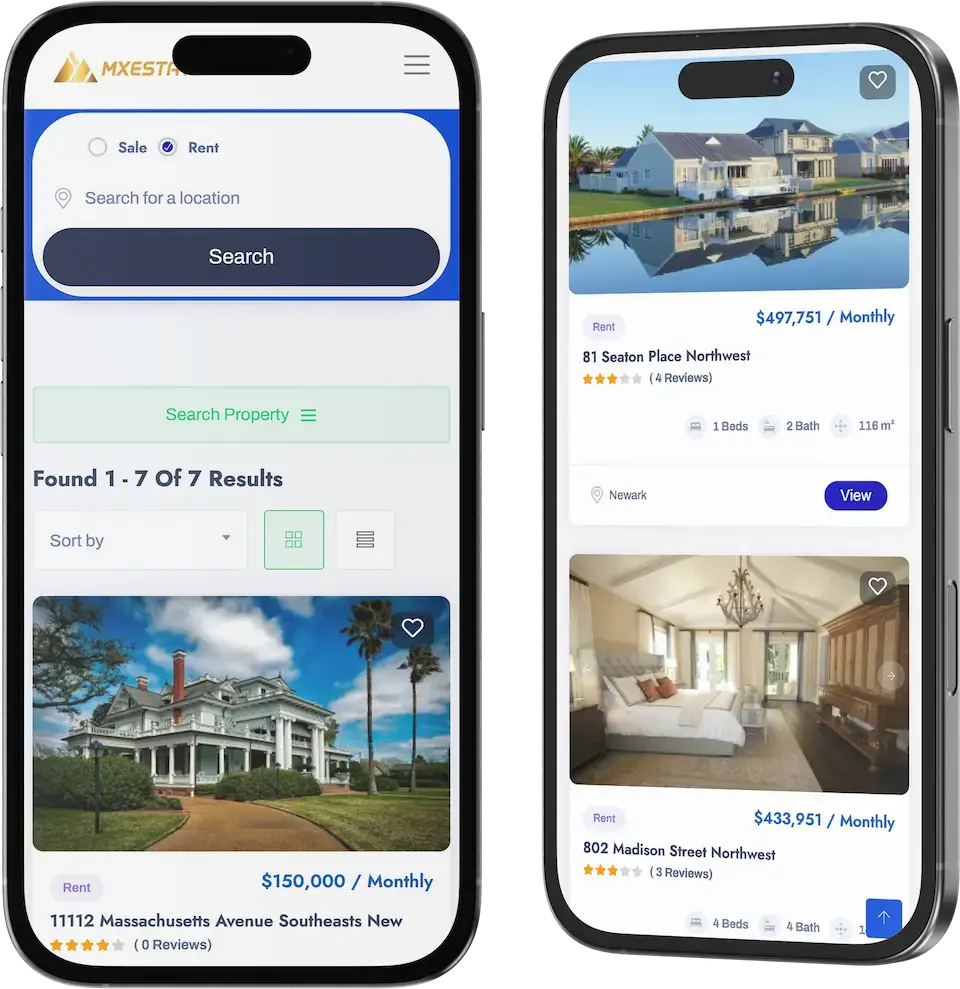
01A listings portal on which visitors look for homes to rent or buy and agents publish their stock, run from an operator admin.
Explore Solution
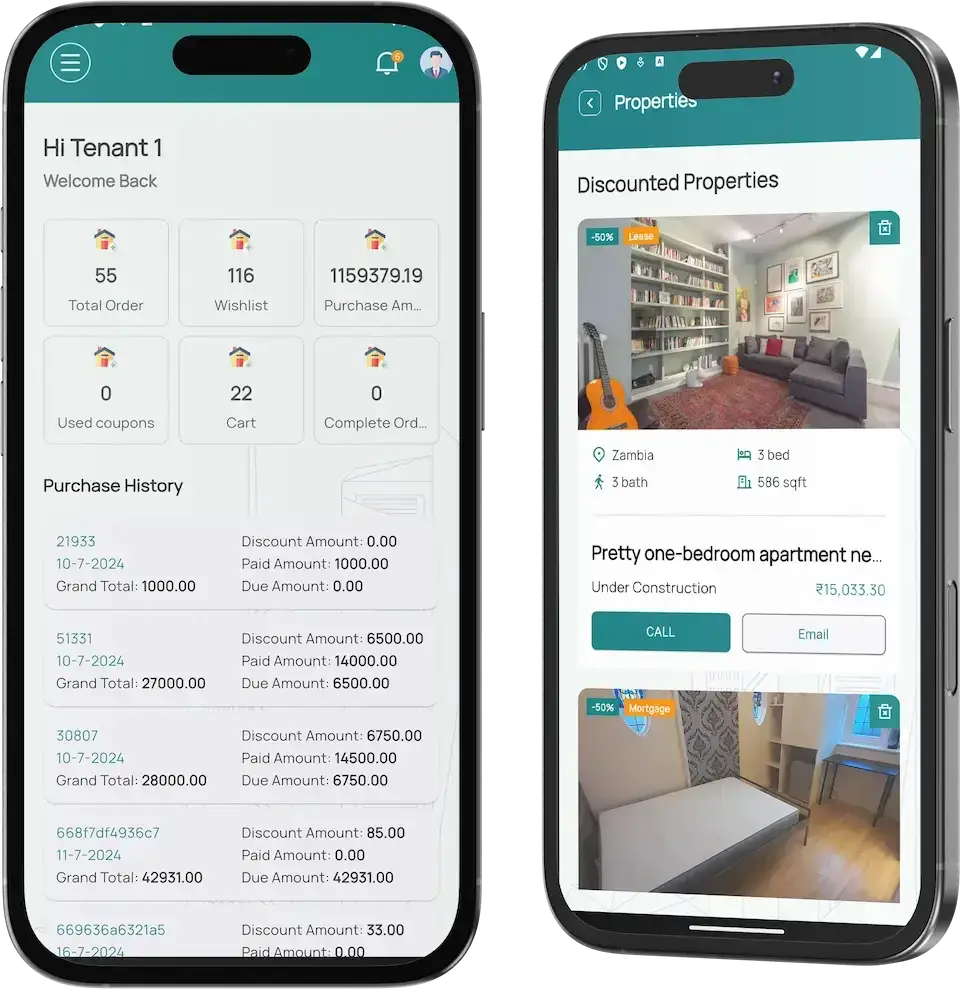
02Furnished flexible-stay housing with listings, an availability calendar, reservations and a resident dashboard.
Explore Solution
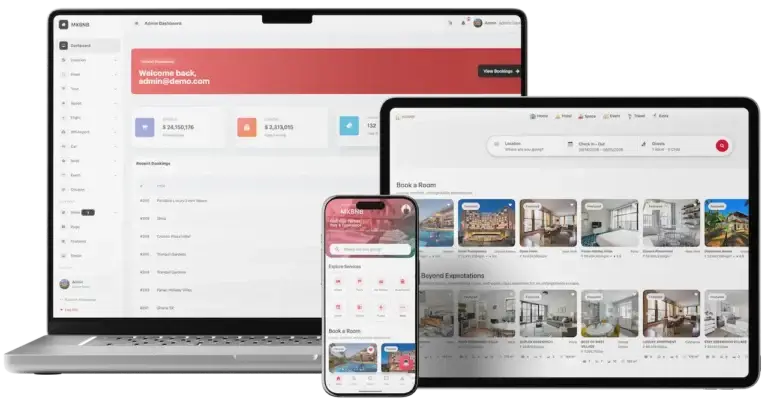
03A marketplace for nightly stays, with a console for hosts, a side for guests and an admin panel for the operator.
Explore Solution
04Fractional property ownership: investors hold a slice of a building and are paid their share of its rental income.
Explore Solution09The business case
Market Benchmarks
Property Management Software Market Benchmarks - Independent 2025-2026 Data
The revenue models above are ours. The figures below are not. They come from AppFolio's annual report on Form 10-K and the Bureau of Labor Statistics, reproduced as published. Together they show how a listed property management platform earns its revenue and how fast US shelter costs are rising, so you can test a business case against numbers you can check.
9.4m Units Under Management at AppFolio
AppFolio reports in its 2025 annual report on Form 10-K that property management units under management grew 8 percent year over year to 9.4 million at 31 December 2025, served across 22,096 property management customers, up from 20,784. Revenue grew 20 percent to $950.8 million, a scale benchmark for a listed property management platform.
$721.5m of AppFolio Revenue Is Value Added
AppFolio's 10-K reports Value Added Services revenue of $721.5 million in 2025, up 19 percent, against $211.5 million from Subscription Services, up 17 percent. Value Added Services were about 76 percent of the $950.8 million total, and AppFolio says a significant majority of them comes from its electronic payment services.
Shelter Costs Up 3.2% in the Year to September
The US Bureau of Labor Statistics Consumer Price Index release of 14 October 2026 reports that the shelter index increased 3.2 percent over the last year and rose 0.4 percent in September after rising 0.3 percent in August. The index for rent increased 0.2 percent in September, context for the rents a property manager collects.
AppFolio, Inc., Annual report on Form 10-K for the fiscal year ended December 31, 2025, filed 5 February 2026 - sec.gov
US Bureau of Labor Statistics, Consumer Price Index - September 2026, 14 October 2026 - bls.gov
All figures are the publishers’ own reported results and statistics, reproduced as published. The 76 percent Value Added Services share is our arithmetic on reported figures ($721.5 million divided by $950.8 million). They describe the market, not the performance of any platform Miracuves builds, and nothing here is a revenue projection for your business.
The Commercial Case
Marketability, Revenue Potential & Business Prospects
The AppFolio clone Miracuves builds earns when management firms trust it with their buildings, and when owners and residents keep using it. What follows is about making both habits easier to form, and about keeping the relationship yours once they have.
- 01
Income That Scales With Units
Per-unit plans, rent fees and payout fees each rise with the units you serve, so income climbs with the portfolio and not with your payroll.
- 02
Separate Levers, One Platform
Subscriptions, collection fees, payout fees and value-added services are independent, so you can switch one on without touching the others. Plans can be priced per unit or as flat portfolio tiers, and the same base serves a firm running its own book or a proptech brand selling to other firms.
- 03
Owners and Residents You Hold
Owner reports, resident records and payment history stay in your database, so what the platform accumulates belongs to you and to nobody else.
- 04
A Clean Exit Path
You own the full source code, so a later change of host, team or direction needs nobody's consent.
- Per-Unit Subscriptions
- Flat Portfolio Plans
- Rent Collection Fees
- Owner & Vendor Payouts
- Value-Added Services
- White-Label Licensing
Stickiness comes from records and routine, not from features.
- 01Loaded buildings rarely move
- 02Owners who read reports there stay
- 03The record builds from launch day
- 04Quick help is the second anchor
The three cases differ only in unit count, and each names the lever that leads at that size. They are examples for planning conversations and not predictions of what any platform will earn.
A plan and rent fees carry the early months.
A small firm handling a few dozen units for a handful of owners, where a monthly plan plus the fee on collected rent pays for the running costs. Example size only, not a forecast.
Plans, payout fees and a paid module.
A firm with several hundred units and many owners, where plans, collection fees, payout fees and a module like accounting sync all begin to count. Example size only, not a forecast.
Every lever running, with licensing on top.
An operator spread across many buildings and owners, where subscriptions, fees, modules and white-label licensing combine and the dashboard shows where to look. Example size only, not a forecast.
10Why Miracuves
Why Miracuves
How Miracuves Compares With Other Ways to Get an AppFolio-Style Platform
A portfolio platform can come from a packaged rental script, one hired developer, a software firm or a pre-built base made by a team with prior experience. Each route balances cost, speed and ownership differently. Before choosing, ask to sit in the owner seat yourself, check that all three seats read the same records, and find out where resident data will live, who can reach it, how owners are kept out of each other's buildings and who touches the rent money.
Why Founders Choose Miracuves
- 01
Owner, Tenant and Operator Doors
Each role enters through its own door onto its own home screen. Off-the-shelf rental scripts usually stop at listings and a single shared login.
- 02
Owner Reports From Day One
The owner portal opens income and expenses and property performance, so the reporting story can be shown at the first demo.
- 03
Linked Portfolio Records
Buildings, units, residents and leases come as connected records with search, instead of four separate projects you must stitch together afterwards.
- 04
Full Source Ownership
The entire codebase is delivered unencrypted, so no one can reprice it or alter the terms after launch.
- 05
Work Orders Counted
A repair request action for residents and a work orders counter for operators both sit in the base, while many scripts leave repairs to the telephone.
- 06
Plain Readiness Language
This page separates the base from add-ons and from what you supply yourself, including gateway, hosting and store developer accounts.
How to Choose an AppFolio Clone Development Company
Before signing with a property management software company, ask to sign in as the operator, then as an owner reading an income report, then as a resident filing a repair, all against one portfolio of buildings.
What to look for Miracuves
- Proof in the product One-tap Admin, Owner and Tenant entries, no registration
- Owner reporting that works today Income, expense and Property Performance reports in the owner portal
- Linked portfolio records Buildings, units, residents and leases ship as connected records
- Source ownership Unencrypted source for apps, portal and admin
- Time to launch Six working days, or Miracuves keeps working free
- Support after launch Guidance for 60 days, bug fixes for 6 months, updates for 12 months
Walk away from any vendor who
- Offers a listing page and one shared login
- Cannot open an owner seat and a tenant seat on the same records
- Leaves repair requests to the telephone
- Charges a fee per unit or per building after launch
- Ships encrypted source
Where the AppFolio Clone Stands Against Rental Scripts and Agencies, Item by Item
| What You Compare | MiracuvesMiracuves AppFolio Clone | Off-the-Shelf Rental Script | Bespoke Agency Build |
|---|---|---|---|
| Time to Launch | 6 days of our build time | Unknown or DIY | Scoped per project, usually months |
| Source-Code Ownership | Complete, unencrypted | Often limited or locked | Usually yes |
| Portfolio Depth | Buildings, units, residents, rent, repairs, leases | Bare listing pages | As far as the budget stretches |
| Owner Side | Owner portal with income and expense reports | Thin or absent | Built to order, extra cost |
| Tenant App | Rent card, history, lease, files and repair requests | Rarely included | Built to order |
| Accounting & Screening | Separate modules, outside the base | Depends on the script | Custom integration |
| Security & Compliance | Separate role logins, card data kept by the gateway, stated limits | Minimal | Differs from firm to firm |
| Cost vs Speed vs Quality | Fixed price, fast, tested base | Low price, high risk | Expensive and slow |
| Ongoing Support & Updates | 60 days guidance, 6 months bug fixes, 12 months updates | Rarely offered | Set by the contract |
Few routes to a portfolio platform get through a first busy month unchanged. This is where they diverge.
Talk to Our TeamRelease History
Release Notes for the Portfolio Platform - Version by Version
Release notes for the platform, latest first. No dates were recorded, so versions are listed alone.
| Release | Summary | Details |
|---|---|---|
| V 1.4 | 1 improvement, 1 repair | New or improved Unused code stripped from the project to improve performance Repaired Ticket-related problems fixed |
| V 1.3 | 1 improvement, 1 repair | New or improved Notification list card redesigned for a smoother experience Repaired Problem in the tenant profile settings fixed |
| V 1.2 | 1 improvement | New or improved Brand card redesigned for a more finished look |
| V 1.1 | 2 improvements, 1 repair | New or improved All packages brought up to their newest versions Account management reworked for better performance Repaired Problems in the category issue list fixed |
Let's build together
Let's turn your portfolio plans into a platform that carries your brand.
Book a free consultation and leave with a clear timeline and candid answers. We would sooner earn your trust than rush a sale.
- First reply under 2 hours
- Free consultation
- No lock-in contracts
- Full source code ownership
11Learn more
Blog & Resources
Latest Reading on AppFolio-Style Property Management Software
Recent articles on what portfolio management software holds, what a ready-made script costs and how its revenue model is built.


The product4 questions
01What is the AppFolio Clone?
It is a ready-made property management platform from Miracuves for firms that run buildings on behalf of owners. The operator watches buildings, units, tenants and leases on one dashboard, owners sign in to read income and expense reports, and residents pay rent and send repair requests from a phone. Two Flutter apps, a browser portal, a vendor panel and an admin panel are delivered under your own brand.
02What can I actually open in the demo?
One Flutter app, with three one-tap entries on its first screen: Admin, Owner and Tenant. Choose Admin to see counters for properties, tenants, work orders and revenue, plus shortcuts to properties, tenants and leases. Choose Owner to see four tiles, then Financial Reports, Property Performance and My Properties. Choose Tenant to see the next rent payment with Pay Now, then four actions: repair request, history, lease and files. The web portal and the vendor panel are opened for you during a guided call.
03Is it lawful to launch a property management app modeled on AppFolio?
Creating and selling rental-management software is generally lawful. The Miracuves AppFolio Clone takes nothing from AppFolio's code, design or content, and the name is used only to describe a category. Your own obligations as an operator, for instance deposit limits, late-fee caps, notice periods and applicant screening, depend on where you work. Miracuves offers no legal advice, so ask a local lawyer to look at each market.
04What is included in the base, and what costs extra?
Everything the demo shows is in the base: entries by role, building and unit records, resident records, rent due with Pay Now and history, a repair request action, lease and file actions, owner income and expense reports and the admin dashboard. Accounting, owner statements and payouts, vendor bills, rental applications, screening, background checks, e-signature, automated rent collection and compliance tooling are available on top of the base. Each becomes a separate module with a written quote before work starts.
Owners, tenants & vendors7 questions
05Do owners get their own view of income and expenses?
In the demo, yes. An owner entering through the Owner button lands on tiles for properties, units, occupancy and revenue, and can open Financial Reports for income and expenses, Property Performance for property metrics, or My Properties for building details. Formal owner statements and payouts are available as a scoped module.
06Can tenants see what they have paid and look after their own account?
They can. Beneath the next-payment card the tenant app has a Payment History action, alongside My Lease and Documents, and residents can register their own account with an email address, Google or GitHub. Release 1.1 reworked account management.
07Does the platform run on both iOS and Android?
It does. Both phone apps are written in Flutter, so a single code base produces the Android and the iOS builds, and we help you publish them from developer accounts that you own. Apple and Google review every app on their own timetable, outside the 6-day build.
08How well is tenant data protected?
What you can see in the demo: separate entries for each role, a password strength meter with a repeat field, and Google or GitHub sign-in. Resident records sit in databases on your own hosting, and card details go to your chosen payment gateway. Penetration testing and a credential refresh are built into the launch plan we draw up together.
09Can one operator hold many buildings in the platform?
Yes, the properties list accepts as many buildings as you add. Each has an address, a type, a build year, a unit total, a description and three tabs: Overview, Units and Financials. The list is searchable, shows a running total and has a plus button, and the dashboards add up units and occupancy across all of them.
10Does the landlord side screen tenants before a lease is signed?
Screening is an add-on. The landlord and owner screens cover buildings, units, occupancy, income and reports, and the resident list shows contact details with an active label. Applications and screening can be added as a scoped module, using a provider that you contract, at a separate price.
11How are vendors and repair work handled?
The demo covers the resident side of repairs: a quick action opens a maintenance request, and the admin dashboard counts work orders. The package also names a vendor panel beside the web portal, and we show it live on a guided call. Recording vendor bills against a work order is available as a scoped module.
Admin, money & reporting7 questions
12What can the admin panel control?
The dashboard shows four counters for properties, tenants, work orders and revenue and links to property and unit records, resident records and lease renewals. Building records can be created, edited and removed, and the resident list can be searched. We show the web admin panel during a guided call.
13Can I define roles and permissions beyond the three in the demo?
The demo splits access three ways, owner, tenant and admin, each with an entry and a home screen of its own. Narrower permissions, for example a vendor or technician login that sees only a few screens, are custom work.
14Is there reporting and analytics for the whole portfolio?
The admin dashboard gives headline counters, and the owner side adds two report views: one for income and expenses, one for how each property performs. Anything past those views, such as a custom report builder, is quoted as extra work.
15What happens when a resident pays rent in the app?
The resident home opens on the next payment, with its amount, its due date and a Pay Now button. The money moves through the gateway account you connect, which must have finished KYC before launch. Autopay with late-fee rules is available as an add-on.
16Does the platform include accounting?
The base gives you a revenue counter and, for owners, income and expense reports, which are reporting views rather than a ledger. Syncing with an accounting package, owner statements and payouts would each be a scoped module with its own quote.
17What does the first year of revenue usually look like?
Most portfolio platforms begin with the per-unit or flat plan, since no extra build is needed for it: the first management firm to sign up pays for its units. Collection fees follow once residents really pay through the app and the gateway terms are agreed. Value-added services such as screening or insurance, and licensing the white-label deployment to another firm, depend on your own contracts and are agreed rather than built in.
18What makes a property management platform hard to leave?
Stickiness comes from records and routine, not from features. A firm that has loaded its buildings, owners and residents does not casually move them, and an owner who reads reports there each month has a reason to stay. The platform lets that accumulation begin on launch day and keeps it in your database. Reliable help with rent and repairs is the second anchor, because a system people open every month is hard to swap out.
Launch & Why Miracuves10 questions
19What is the price of the AppFolio Clone?
$5,199, fixed, buys the launch-ready white-label AppFolio Clone with its full source code. Modules, extra integrations and bespoke flows are priced on their own, in writing. You supply the hosting and domain, developer accounts for the stores and a payment gateway.
20How soon can it go live?
Our side of a ready-made build is 6 working days: rebranding, installation on your hosting and help publishing from your developer accounts. Store review at Apple and Google, onboarding with your gateway and the content you write all sit outside that window.
21What support comes with it?
Three periods start together at launch and cost nothing extra: 60 days of platform guidance, 6 months of priority bug fixes and 12 months of updates. We reply within 2 hours, Monday to Saturday, 10:00 to 19:00 IST.
22What do I need to bring?
Hosting plus a domain, a verified developer account on every store you target, branding and company details, a gateway with KYC finished, and outside API keys such as Google Maps, Twilio or Firebase. Lease templates, a privacy policy and terms of service are yours to write; Miracuves does not draft them.
23What are the advantages of having Miracuves build an AppFolio clone?
Because entries by role, building and resident records, owner reports and the rent and repair screens arrive working, with the whole source code at a fixed $5,199. Miracuves has delivered 9,000+ projects for more than 6,000 clients, and this page separates plainly what ships in the base from what is a paid add-on.
24Is a ready-made AppFolio clone better than custom development?
For a management firm that wants owners and residents on a platform soon, yes. Role entries, building and resident records, owner reports and the rent and repair screens already work in a demo you can open today. A custom build must design and code all of that first, with a price known only after scoping. Use custom work for modules your firm needs beyond the base, quoted in writing.
25What is the business model of a property management app like AppFolio?
A platform like AppFolio earns on the units it manages and the payments it carries. The revenue section of this page lists per-unit plans, portfolio plans, rent collection fees, owner and vendor payouts and value-added services. You set every rate, the dashboard and owner reports show the result, and Miracuves takes a 0% revenue share, with no royalty per building, resident or rent payment.
26What is the step-by-step process to launch my AppFolio clone?
Open the demo in all three seats: operator, owner and tenant. Then send a brief with your brand, hosting, store accounts and gateway. We rebrand the apps and panels, install them on your servers, set up the seats, walk a sample portfolio with your team and pass you the source; the platform is live within 6 working days. Apple and Google review the apps after that, on their own timetable.
27Is there a tenant portal in the AppFolio clone?
Yes. The tenant side is a Flutter app for Android and iOS where a resident sees the next rent payment with Pay Now, then opens a repair request, payment history, the lease and files. Residents can register their own account with an email address, Google or GitHub, and the apps are published from your own developer accounts.
28How does an AppFolio clone compare with paying AppFolio per unit?
With the Miracuves clone, ownership passes entirely to you, with no per-unit charge. You pay once for the platform and receive every line of code, which runs on your own hosting. Per-unit plans can instead become one of your own revenue lines when you bill the firms and owners who use your platform.
Go Deeper on Property Software Like AppFolio
Guides, related platforms and the service behind them, collected below.
Real estate app development
See the service→Related platformPrypco Clone
Fractional property ownership: investors hold a slice of a building and are paid their share of its rental income.
Open this product→Business model
How a portfolio management platform is organized and where its income originates.
Read the guide→Related platformZillow Clone
Home search for renters and buyers, with agents publishing their stock from an operator admin.
Open this product→Disclaimer
Miracuves is an independent software development company. We are not affiliated with, connected to, sponsored by, or endorsed by AppFolio.
Read our full Legal Notice & Disclaimer →“AppFolio Clone” is used descriptively. It is how the software industry refers to building a platform with functionality similar to AppFolio, and how clients search for it.
The entire design and codebase is built by our own team. The product contains no code, design, graphics, or content originating from the AppFolio website or applications.
AppFolio and all other third-party names and marks are the property of their respective owners, referenced here solely to describe the category of software offered.
















