Key Takeaways
- AI-generated database schemas can create latency problems when tables grow without proper indexing.
- Founders often see apps work during MVP testing but slow down when real users and real data arrive.
- Indexes, query planning, relational structure, foreign keys, and caching are core performance layers.
- Latency depends on schema design, database size, query patterns, missing indexes, and backend architecture.
- A well-planned database architecture can prevent exponential slowdown and protect user experience at scale.
Architecture Signals
- Developers need clear relational models, indexed columns, optimized joins, query logs, and performance monitoring.
- Founders need database structures that support users, transactions, search, filters, reports, and admin workflows.
- Admins need visibility into slow queries, failed requests, database load, usage spikes, and operational reports.
- Composite indexes and query-specific indexing help reduce scan time on high-traffic tables.
- Real-time alerts help detect slow endpoints, database bottlenecks, connection pressure, and growing latency patterns.
Real Insights
- An AI-built MVP can look functional while hiding database problems that only appear after data volume increases.
- Unindexed tables can force full-table scans, making common searches and filters slower as rows grow.
- Good indexing should follow real query patterns instead of being added randomly after performance issues appear.
- Database audits, schema refactoring, and backend optimization help apps stay stable during traffic growth.
- Miracuves builds scalable app backends with relational database design, indexing, query optimization, caching, and admin control.
AI database schema latency is one of the hidden reasons AI-generated apps feel fast during demos but slow down as real users, records, transactions, and admin workflows start growing.
The demo loads instantly. The admin panel opens. The user table stores records. The order history page works. The founder sees screens, buttons, forms, and data flowing through the product and assumes the backend is ready.
Then the app meets real usage.
A few hundred users become a few thousand rows. Search takes longer. Dashboards spin. Reports timeout. Push notifications queue slowly. The server bill rises even though traffic has not exploded. The product that felt “done” starts acting fragile.
The problem is often not the frontend. It is not always the cloud provider. It is not even always the AI model. The hidden issue is the database schema behind the app.
More specifically, it is the un-indexed table trap.
AI generators are good at creating tables that look logical in a demo. They are much less reliable at designing query-aware, indexed, normalized, production-ready database structures. That difference decides whether an app can grow or collapse under its own data.
For founders using AI tools to generate app backends, this is the architectural risk that rarely appears on day one.
The Speed Illusion: Why AI Apps Only Run Fast on Day 1
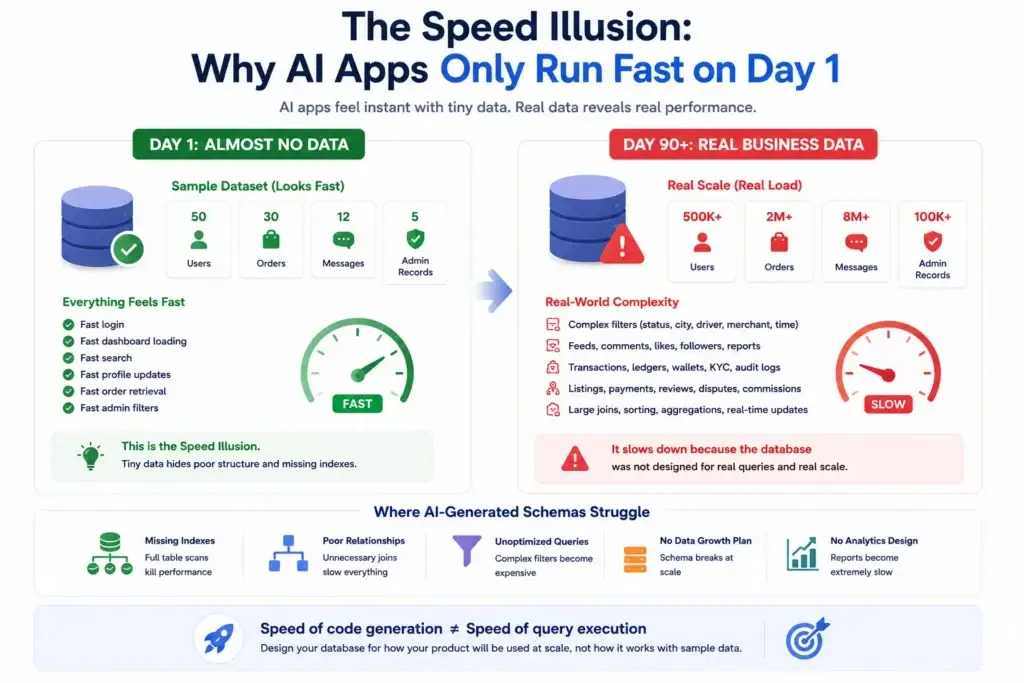
Image Source: AI-generated visual by Miracuves
AI-generated applications often run fast because they are running against almost no data.
A table with 50 users, 30 orders, 12 messages, and 5 admin records is not a performance test. It is a sample dataset. The database has so little work to do that even poor structure can appear acceptable.
This creates the speed illusion.
The founder sees:
- Fast login
- Fast dashboard loading
- Fast search
- Fast profile updates
- Fast order retrieval
- Fast admin filters
But the database is not being tested against the real conditions of the business.
A delivery app must filter orders by status, city, driver, merchant, payment state, and delivery time. A creator platform must retrieve feeds, comments, likes, followers, reports, payouts, and moderation queues. A fintech app must protect transaction history, ledger accuracy, KYC status, wallet balances, and audit logs. A marketplace must connect users, listings, payments, reviews, disputes, availability, and commissions.
That is where AI-generated schemas start to reveal their weakness.
The app does not slow down because data exists. It slows down because the database was not designed around how the product actually queries that data.
Founders often treat backend generation as a code-speed advantage. But speed of code creation is not the same as speed of query execution.
What the Un-Indexed Table Variable Really Means
The un-indexed table variable is simple:
An AI generator creates SQL tables, but does not create the right indexes for the app’s real query patterns.
A table may have a primary key. That is not enough.
Most production apps also need indexes on columns used in:
- Search
- Filtering
- Sorting
- Foreign-key joins
- Status lookups
- Date ranges
- Payment states
- Location-based queries
- User ownership checks
- Admin dashboards
- Notification queues
- Reporting workflows
For example, an AI-generated order table might look complete:
CREATE TABLE orders (
id SERIAL PRIMARY KEY,
user_id INT, merchant_id INT,
driver_id INT, status VARCHAR(50),
payment_status VARCHAR(50),
created_at TIMESTAMP
);
This table can store data. It can pass a demo. It can even support basic CRUD operations.
But now imagine the app repeatedly runs queries like:
SELECT * FROM orders
WHERE merchant_id = 42
AND status = 'pending'
ORDER BY created_at DESC;
Without the right composite index, the database may need to scan far more rows than necessary. As the table grows, the query becomes slower. If this query appears inside a dashboard, polling job, notification workflow, or admin report, the slowdown multiplies.
A production-aware schema would consider indexes such as:
CREATE INDEX idx_orders_merchant_status_created
ON orders (merchant_id, status, created_at DESC);
That one decision can separate a usable business dashboard from a frozen admin screen.
Statistical Reality: The Missing Indexes in LLM SQL Prompts
There is not yet a widely accepted public benchmark that says, “X% of AI-generated app schemas miss production indexes.” Any article claiming an exact universal percentage without a clear study should be treated carefully.
But the research signal is still strong.
Current prompt-to-app and LLM database research shows that AI-generated software needs structured validation, especially when moving from demo output to production systems. In one evaluation of a prompt-to-app generation framework, comprehensive validation achieved a 73.3% viability rate, while only 30% of tasks reached perfect quality scores. The takeaway is not that AI is useless. The takeaway is that validation is the system, not an optional step.
Database-focused research points in the same direction. A study evaluating 11 language models on complex SQL workloads found that current generative AI models fell short on accurate decision-making queries and that generated SQL accuracy was insufficient for practical real-world application. Another study found that schema structure significantly affects LLM behavior, with models producing very different SQL answers across equivalent schemas.
This matters because indexing is not just syntax. It is workload interpretation.
A model can generate CREATE TABLE. A professional database architecture process asks deeper questions:
- Which columns will be filtered most often?
- Which joins happen on every screen load?
- Which dashboards need date-range queries?
- Which tables will grow fastest?
- Which records need unique constraints?
- Which queries need composite indexes?
- Which writes will be harmed by too many indexes?
- Which reports should use pre-aggregation or background processing?
Index recommendation itself is a specialized database task. Research on LLM-based index advisors describes index recommendation as crucial for optimizing database performance, while earlier database-indexing research notes that configuring databases for efficient querying requires substantial database and domain knowledge.
That is the statistical reality founders should care about: AI-generated SQL may be syntactically valid, but production performance depends on schema structure, workload behavior, and validation.
Why “It Works” Is Not the Same as “It Scales”
A working query and a scalable query are different things.
A working query returns the right result.
A scalable query returns the right result quickly when the table has 10 million rows, multiple joins, concurrent users, background jobs, admin filters, and reporting workloads.
This distinction is where founders get trapped.
An AI-generated backend may pass these early checks:
- The API route works
- The database accepts the record
- The admin panel shows the result
- The mobile app displays the data
- The test user flow completes
But it may fail these production checks:
- Query plan review
- Index coverage
- Join efficiency
- Write/read tradeoff analysis
- Foreign-key consistency
- Data duplication control
- Report-generation strategy
- Slow query monitoring
- Transaction boundary review
- Background job isolation
In strict database terms, an unindexed lookup often grows closer to linear scan behavior as table size increases. But founders experience the slowdown as “exponential” because real app screens rarely run one query in isolation.
A single dashboard may trigger 15 queries. A background job may scan the same table repeatedly. An admin report may join three growing tables. A feed may combine user actions, content, comments, likes, and moderation status. When these unoptimized paths stack together, latency feels like it is multiplying every week.
That is why the un-indexed trap is so dangerous: it hides behind early success.
The Founder Cost of Bad Database Architecture
Bad schema design is not only a technical issue. It becomes a business issue.
When database latency rises, founders face real operating pressure:
| Database Problem | Product Symptom | Founder Impact |
|---|---|---|
| Missing indexes | Search, filters, and dashboards slow down | Users lose trust and support tickets increase |
| Weak normalization | Duplicate or inconsistent records appear | Admin teams spend time correcting data |
| Poor join planning | Reports timeout or load slowly | Business decisions are delayed |
| No query monitoring | Slowdowns are discovered by users first | Debugging becomes reactive |
| Overloaded tables | Background jobs block user workflows | Infrastructure cost rises without product growth |
| No data constraints | Invalid states enter the system | Payment, order, or booking errors increase |
The problem is not that AI-generated apps cannot be useful. They can help founders explore ideas, generate drafts, and accelerate early thinking.
The risk begins when founders confuse generated structure with engineered architecture.
A database is not just where the app stores information. It is where the product’s business rules become enforceable.
If those rules are loose, the product becomes loose.
Relational Perfection: The Miracuves Database Standard
A professional app foundation starts with the product’s operating logic, not just the visible screens.
Miracuves approaches app architecture around business workflows: users, roles, transactions, statuses, admin actions, reports, monetization flows, and operational controls. For founders building AI-powered apps, marketplaces, delivery platforms, fintech products, creator platforms, or white-label app ecosystems, the backend needs to support real growth from the beginning.
That means the database layer should include:
- Clear relational modeling
- Proper primary and foreign keys
- Indexes based on real query patterns
- Composite indexes for frequent filters
- Unique constraints where duplication would damage trust
- Normalized structures where data integrity matters
- Selective denormalization only where performance justifies it
- Audit-friendly activity logs
- Role-based admin access controls
- Background processing for heavy workloads
- Reporting structures that do not overload user-facing flows
This is where a ready-made solution from Miracuves becomes different from a prompt-generated backend. A launch-ready app foundation is not just a collection of screens. It is a business system with admin control, source-code ownership, backend workflows, and scalability decisions already considered.
For founders evaluating AI-generated backend output, Miracuves’ related guide on AI-generated app backend limitations is a useful next read because it explains why backend architecture needs more than generated snippets.
AI-Generated Schema vs Production-Ready Schema
AI-Generated Schema vs Production-Ready Database Schema
| Layer | Typical AI-Generated Output | Production-Ready Standard |
|---|---|---|
| Table design | Creates tables based on visible entities. | Models business workflows, relationships, lifecycle states, and reporting needs. |
| Indexes | Often relies on primary keys unless explicitly prompted. | Uses query-aware single-column and composite indexes for high-frequency reads. |
| Relationships | May create loose ID fields without strong relational discipline. | Defines foreign keys, ownership rules, and referential integrity where appropriate. |
| Normalization | May mix repeated fields into broad tables for simplicity. | Reduces duplication while balancing read performance and operational clarity. |
| Admin reporting | Usually treated as basic filtering. | Designed around date ranges, statuses, revenue views, disputes, and operational dashboards. |
| Growth readiness | Works for small test datasets. | Prepared for higher row counts, concurrent users, background jobs, and analytics load. |
The AI Prompt Problem: It Builds What You Ask, Not What Production Needs
Most founders do not prompt AI tools like database architects.
They ask:
“Build me a food delivery app backend.”
“Create a marketplace database.”
“Generate a social media app schema.”
“Make a booking app with users, providers, payments, and admin.”
The AI model responds with tables because tables are visible and easy to represent. But production behavior is not fully visible from the prompt.
The model does not automatically know:
- Which table will grow fastest
- Which filter will run every second
- Which dashboard the founder will check daily
- Which user action will trigger background jobs
- Which relationship needs strict integrity
- Which query will become expensive at scale
- Which tables need partitioning later
- Which reports should be separated from transactional reads
This is why prompt-generated schemas often need human review.
A better prompt would not simply ask for tables. It would ask for:
- Data model
- Query patterns
- Index strategy
- Constraints
- Transaction boundaries
- Read/write workload assumptions
- Admin dashboard queries
- Slow-query testing plan
- Migration strategy
- Monitoring setup
But even then, the output should be treated as a draft, not the final architecture.
Founder Decision Signals
Founder Decision Signals
Speed
If the app is fast only with test data, you have not validated speed. You have validated the demo.
Cost
Unindexed queries can increase infrastructure pressure because the database works harder for the same user action.
Scalability
A scalable backend needs schema design, indexing, monitoring, and workload planning before data volume becomes painful.
Market Fit
Users judge the product by response time. Slow search, checkout, feed, booking, or admin flows can damage validation signals.
How Founders Should Audit an AI-Generated Database
Founders do not need to become database administrators, but they should know what to ask before trusting an AI-generated backend.
Start with these audit questions:
1. Does every high-frequency query have an index strategy?
Look at the queries behind login, search, order history, feed loading, admin filters, payment history, booking lists, notifications, and reports.
Ask whether the database has indexes for the columns used in WHERE, JOIN, ORDER BY, and frequent status filters.
2. Are foreign-key columns indexed where joins are frequent?
A foreign key helps maintain relationships. It does not automatically guarantee every query is fast in every database setup. If the app repeatedly joins orders to users, merchants, drivers, payments, and disputes, those join paths need review.
3. Are composite indexes designed around real filters?
A single-column index is not always enough.
For example, a marketplace dashboard may filter by vendor, status, and creation date together. A composite index may be more useful than three disconnected indexes.
4. Does the schema prevent duplicate or invalid business states?
A professional schema should protect the business from bad data.
That may include:
- Unique constraints
- Required fields
- Valid status values
- Referential integrity
- Transaction boundaries
- Audit logs
- Role-based access controls
5. Is reporting separated from core user actions?
If admin reports scan large tables during peak user activity, the whole product may slow down. Production systems often need background jobs, cached summaries, read replicas, or pre-aggregated reporting tables depending on the app’s scale and business model.
6. Has anyone reviewed the query plan?
A query that looks clean in SQL can still be expensive. Tools like EXPLAIN or EXPLAIN ANALYZE help reveal whether the database is using indexes or scanning far more rows than expected.
This step is where many AI-generated apps fail because the schema was created from syntax, not workload behavior.
Mistakes Founders Should Avoid
Mistakes Founders Should Avoid
Treating AI-generated SQL as final architecture
Generated SQL can be a useful starting point, but production schemas need review for relationships, constraints, indexes, query plans, and future data growth.
Testing performance with demo data only
An app that works with 100 rows may behave very differently with 100,000 rows, concurrent users, and admin reports running in the background.
Adding indexes randomly after the app slows down
Indexes should match workload patterns. Too few indexes hurt reads. Too many irrelevant indexes can hurt writes and storage efficiency.
Ignoring admin dashboard performance
Founders often test customer screens first, but admin dashboards, financial reports, dispute queues, and moderation panels can become the heaviest database users.
Why Ready-Made App Foundations Can Be Safer Than Prompt-Built Schemas
A ready-made app foundation is not valuable because it avoids development. It is valuable because it starts from a known product pattern.
For founders, that matters.
A delivery app has known order flows. A ride-hailing app has known rider, driver, trip, fare, and payout flows. A marketplace has known listing, booking, payment, review, and dispute flows. A creator platform has known feed, upload, engagement, moderation, and monetization flows.
These patterns help define the database.
Miracuves helps founders build launch-ready, white-label, source-code-owned app foundations with admin dashboards, monetization workflows, and backend logic aligned with real product operations. For AI-heavy products, founders can also explore development services or AI app development when the product needs LLM workflows, automation, retrieval, or AI-powered features.
The stronger decision is not “AI or no AI.”
The stronger decision is: use AI where it accelerates execution, but do not let AI invent the database foundation without professional review.
The Miracuves Standard for Scalable Database Architecture
A scalable app backend should be built around how the business operates.
At Miracuves, that means the database layer is not treated as a storage afterthought. It is part of the product foundation.
A stronger backend standard includes:
- Entity relationship clarity
- Query-aware indexing
- Clean API-to-database mapping
- Admin workflow support
- Payment and transaction records where relevant
- Audit logs for sensitive actions
- Secure data access patterns
- Background processing for heavy jobs
- Monitoring for slow queries
- Migration planning as the product evolves
For founders planning a custom product, custom mobile app development may be the better route when the product requires unique workflows. For founders validating a known app model, a ready-made or white-label foundation from the Miracuves services ecosystem can reduce avoidable architecture risk.
The goal is not to over-engineer the first release. The goal is to avoid building on a schema that collapses the moment users create real data.
Related reading: The Un-Indexed Trap: Why AI Schemas Cause Exponential App Latency.
Final Thoughts: Do Not Let the Database Become Your Growth Ceiling
The un-indexed trap is not obvious at launch.
That is what makes it dangerous.
AI-generated apps can create the feeling of speed because they turn prompts into screens, tables, routes, and dashboards quickly. But founders should not confuse a working demo with a scalable product foundation.
The real test starts when the app collects data, users repeat actions, dashboards become important, payments need accuracy, reports need speed, and the backend has to support business decisions every day.
A professional database schema is not just a technical asset. It is a growth asset.
If the schema is weak, every new user adds pressure. If the schema is designed well, every new user adds value.
FAQs
Why do AI-generated apps slow down after launch?
AI-generated apps often slow down because the backend is designed for basic functionality, not real workload behavior. Missing indexes, weak relationships, unoptimized joins, overloaded tables, and poor reporting queries can cause latency as app data grows.
What is an unindexed database table?
An unindexed table is a table where important search, filter, join, or sorting columns do not have supporting indexes. Without indexes, the database may need to scan many rows to find the required records, which becomes slower as the table grows.
Do AI tools create database indexes automatically?
AI tools can create indexes if prompted clearly, but they may not reliably infer the right index strategy for real product workloads. Indexing depends on query patterns, table growth, filtering logic, joins, sorting behavior, and business workflows.
Is app latency always caused by the database?
No. Latency can come from frontend rendering, APIs, cloud infrastructure, third-party services, AI model calls, media processing, or network issues. However, database latency is one of the most common hidden causes when an app works well with demo data but slows as records grow.
Can adding more indexes fix a slow AI-generated app?
Sometimes, but not always. Indexes should be added based on query plans and workload patterns. Too few indexes can slow reads, while too many irrelevant indexes can increase write overhead and storage usage. A proper database audit is safer than random index additions.
What should founders ask before using an AI-generated schema?
Founders should ask whether the schema includes primary keys, foreign keys, query-aware indexes, composite indexes, unique constraints, normalized relationships, slow-query monitoring, and a plan for admin reports, background jobs, and future migrations.
How does Miracuves help founders avoid backend performance issues?
Miracuves helps founders launch with ready-made, white-label, source-code-owned, and custom app foundations that include backend workflows, admin control, scalable architecture thinking, and product-specific database logic. AI can support execution, but the core system should be professionally structured.
Miracuves is an independent software development company. We are not affiliated with, connected to, sponsored by, or endorsed by any company or product named in this article.
Terms such as “X Clone” are used descriptively. It is how the software industry refers to building a platform with functionality comparable to a known service, and how clients search for it.
The entire design and codebase of our products is built by our own team. Our products contain no code, design, graphics, or content originating from any third-party website or applications.
All third-party names and marks referenced in this article are the property of their respective owners, referenced solely to identify the services discussed.