



Key Takeaways
- AI-generated authentication failures often start with weak session logic.
- Login loops happen when frontend and backend auth states do not match.
- JWT, refresh tokens, cookies, and expiry rules must stay synchronized.
- Session desync can block users even when credentials are correct.
- Pre-built auth modules reduce MVP launch risk and security gaps.
Authentication Failure Signals
- Check token expiry before redirecting users.
- Handle refresh token failure with a clean logout flow.
- Keep cookie, local storage, and server session rules aligned.
- Avoid hardcoded auth states inside generated frontend code.
- Log failed refreshes, redirect loops, and invalid session events.
Real Insights
- Auth is product infrastructure, not just a login screen.
- AI can generate syntax without understanding session architecture.
- Broken refresh logic can create silent user drop-offs.
- Role-based access needs backend enforcement, not only UI hiding.
- Miracuves builds app foundations with structured auth and session workflows.
AI-generated apps often look impressive in the first demo. The login page opens, the signup form submits, the dashboard loads, and the founder feels close to launch.
Then real testing begins.
A user logs in on mobile and gets pushed back to the login screen. Another user refreshes the browser and loses access. A third user changes tabs and suddenly sees an unauthorized error. The admin dashboard works for one account but fails for another. The app is not completely broken, but it is not stable enough to trust.
That is the authentication loop.
For founders using AI-generated code to build a first market version, this problem is more common than it appears. AI tools can generate login forms quickly, but authentication is not just a form. It is a state system. It must coordinate access tokens, refresh tokens, expiration timing, frontend memory, backend validation, role permissions, device behavior, and logout logic.
This is where many AI-generated authentication flows fail. The code may pass a simple demo, but it does not reliably manage the full lifecycle of a user session.
Miracuves helps founders avoid this risk by starting with ready-made, white-label app foundations that already include structured registration, login, admin control, and role-based workflows. For founders struggling with session drops or login loops, the faster path is often not prompting another auth function. It is using a tested authentication foundation that can be customized safely.
Why AI-Generated Authentication Breaks After the Demo
A login demo usually tests one simple path:
- User enters email.
- User enters password.
- Server returns success.
- Dashboard opens.
That is not real authentication. That is only the first step.
Real authentication must answer more difficult questions:
- What happens when the access token expires?
- What happens when the refresh token is missing, reused, or expired?
- What happens when two browser tabs try to refresh the session at the same time?
- What happens when the backend says the user is valid but the frontend still thinks the user is logged out?
- What happens when a role changes while the session is active?
- What happens when the user closes the app and returns later?
- What happens when the same user logs in from another device?
AI-generated code often handles the happy path first. It may create a token, store it, and redirect the user. But authentication reliability depends on edge cases. Session stability is built in the spaces between login, refresh, logout, role verification, and expired-token recovery.
For founders, this becomes a product risk. A user does not care whether the issue came from a JWT lifecycle mistake or a frontend route guard. The user only sees one thing: the app does not let them stay logged in.
The Complexity of State: Why AI Fails at JWT Lifecycles
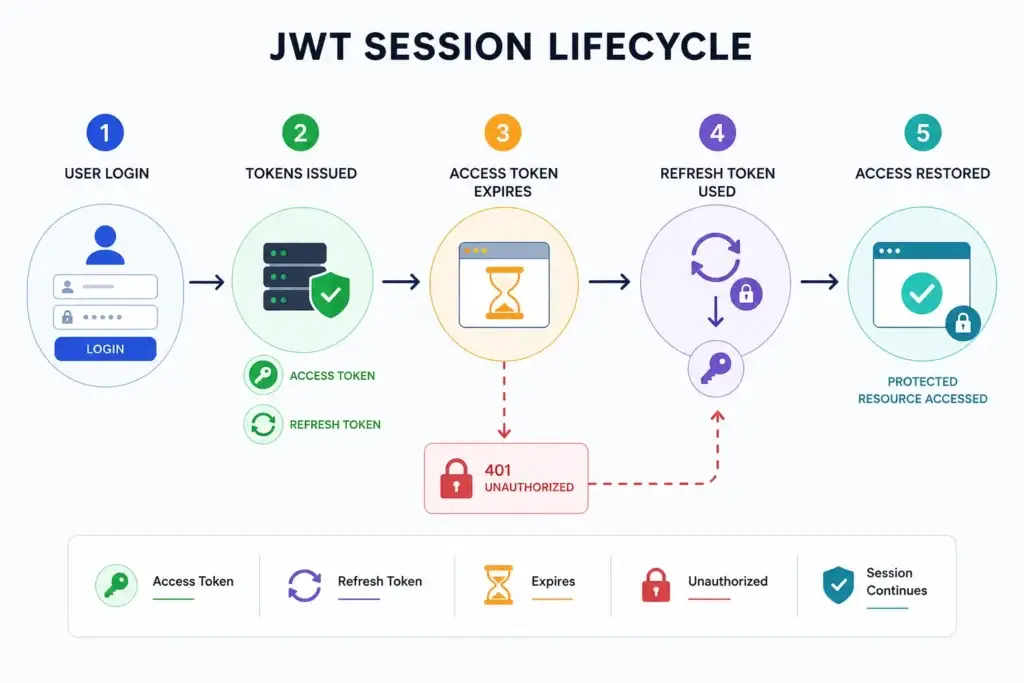
Image Source: AI-generated visual by Miracuves
JWT-based authentication looks simple on the surface because the token itself is compact. The app receives a token, attaches it to requests, and the server verifies it.
But the lifecycle is not simple.
Most production-grade systems separate authentication into multiple states:
| Authentication Layer | What It Does | Why It Matters |
|---|---|---|
| Access token | Allows short-term access to protected resources | Keeps requests fast and limits exposure if stolen |
| Refresh token | Helps issue a new access token after expiry | Keeps users logged in without forcing repeated login |
| Expiration window | Defines when tokens become invalid | Prevents stale sessions from lasting forever |
| Rotation logic | Replaces refresh tokens after use | Reduces replay and token theft risk |
| Session storage | Decides where session data lives on the client | Affects persistence, security, and logout behavior |
| Backend validation | Confirms token signature, expiry, and permissions | Prevents fake or expired access |
| Frontend auth state | Controls what the user sees | Prevents login loops and incorrect redirects |
OAuth references explain that access tokens may expire and refresh tokens can be used to obtain new access tokens without requiring the user to interact again. Refresh token rotation is also used to improve security by issuing new refresh tokens and invalidating older ones.
This is where prompt-only AI code often struggles. It may generate the parts separately but fail to maintain the relationship between them.
A common example:
- The access token expires after 15 minutes.
- The frontend still believes the user is authenticated.
- The next API request fails with a 401 error.
- The app redirects to login.
- At the same time, a refresh token exists but is never used correctly.
- The user gets logged out even though the session could have been renewed.
- This is not a UI problem. It is a state synchronization problem.
Read More: AI MVP Security Audit: The 14-Point Checklist for Founder Survival
The Session Desync Variable: How Login Loops Start
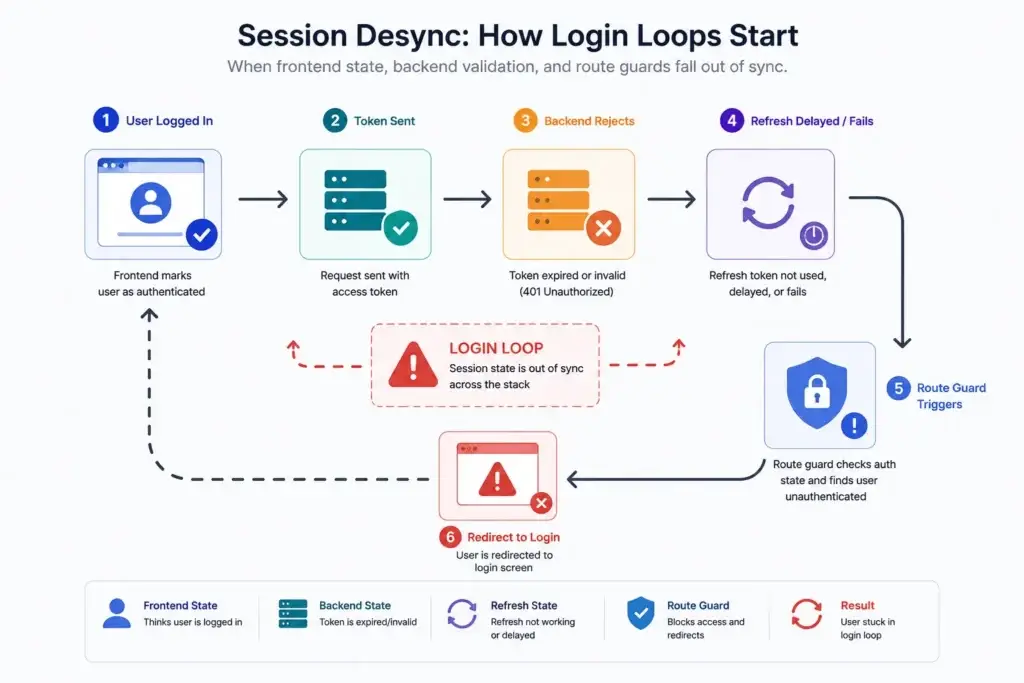
Image Source: AI-generated visual by Miracuves
The strongest way to analyze AI-generated authentication failure is through the Session Desync Variable.
Session desync happens when different parts of the app disagree about the user’s authentication state.
For example:
- The browser says the user is logged in.
- The backend says the access token has expired.
- The refresh endpoint says a new token is available.
- The route guard says the user is unauthorized.
- The UI redirects to login before the refresh flow completes.
That mismatch creates the loop.
A simple analytical model looks like this:
Session Desync Risk = Token Expiry Mismatch + Refresh Delay + Storage Inconsistency + Route Guard Aggression + Role State Drift
Each variable increases the chance that the app will send a valid user back to login or show an unauthorized screen.
Token Expiry Mismatch
This happens when the frontend assumes the access token is valid longer than the backend allows. AI-generated code often stores a token but does not consistently decode or track expiration.
Refresh Delay
This happens when the app waits until after a request fails before refreshing the token. That can be acceptable if handled cleanly, but poorly generated code often triggers multiple failed requests at once.
Storage Inconsistency
This happens when auth state is split across local storage, cookies, memory, Redux, Zustand, context providers, or mobile secure storage without a single reliable source of truth.
Route Guard Aggression
This happens when protected routes redirect users too quickly. The app checks authentication before the refresh process finishes, so valid users get pushed to login.
Role State Drift
This happens when the user’s role or permission changes on the backend, but the frontend still uses an old token or cached role state.
For founders, the important lesson is simple: login loops are rarely caused by the login page itself. They are caused by broken coordination between session layers.
Analyzing the Token Drop Rate in Prompted Codebases
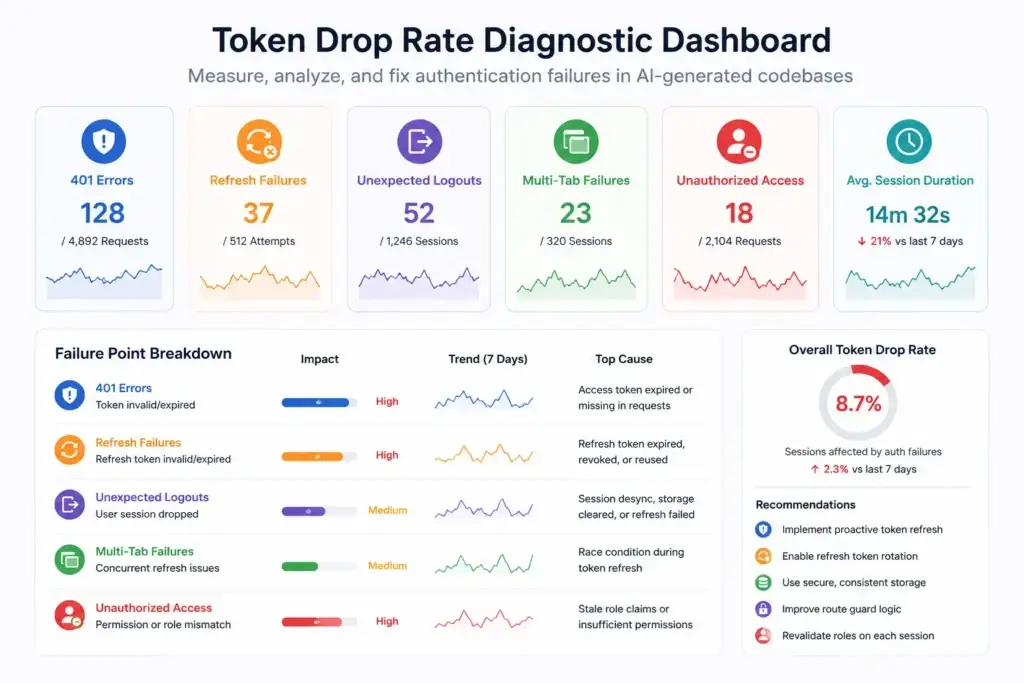
Image Source: AI-generated visual by Miracuves
“Token drop rate” should not be treated as a fake universal statistic. It should be measured inside the codebase.
For a founder testing an AI-generated app, token drop rate can be defined as:
Token Drop Rate = Failed Authenticated Requests ÷ Total Authenticated Requests
A more useful product version is:
Session Drop Rate = Unexpected Logouts ÷ Active Authenticated Sessions
The goal is not just to know that the app failed. The goal is to identify where the session broke.
| Failure Point | What to Measure | What It Usually Reveals |
|---|---|---|
| 401 responses after login | Number of unauthorized responses after successful login | Token not attached, expired, or incorrectly verified |
| Refresh failures | Failed refresh attempts divided by total refresh attempts | Broken refresh endpoint, expired refresh token, or storage issue |
| Login redirects | Redirects to login while a refresh token still exists | Route guard fires before refresh logic completes |
| Multi-tab failures | Session failures across two or more tabs | Race condition during token refresh |
| Role-based errors | Permission errors after role change | Stale claims or missing role revalidation |
| Mobile session drops | Logouts after app backgrounding | Poor persistence or missing secure storage handling |
This gives founders a way to move from frustration to diagnosis.
Instead of saying, “The AI login is broken,” the team can ask:
- Are access tokens expiring before refresh logic runs?
- Is the refresh token stored securely and consistently?
- Is the frontend redirecting before the backend responds?
- Are multiple tabs trying to rotate the refresh token at the same time?
- Are roles being checked from stale frontend state?
AI-generated code often misses these lifecycle relationships because the prompt asks for “login functionality,” not an authentication state machine.
Read More: From Wireframe to App Store in 144 Hours: A Marketplace MVP Scope Breakdown
Why Unauthorized Access Errors Are Usually State Errors
An unauthorized access error does not always mean the user is truly unauthorized.
Sometimes it means the system lost track of the session.
This matters because founders often misread the symptom. They may ask the AI tool to “fix unauthorized access,” and the AI may loosen route guards, remove middleware checks, or bypass validation to make the error disappear.
That is dangerous.
A secure app should not remove authorization checks to improve convenience. It should handle state correctly.
Common causes of false unauthorized errors include:
- Expired access token with no refresh retry
- Refresh token stored in the wrong place
- Backend token secret mismatch across environments
- Role claims not updated after profile changes
- Frontend route guard running before session hydration
- API requests firing before auth headers are attached
- Logout clearing one state layer but not another
- Admin permissions cached after backend updates
The founder sees a broken app. The user sees a trust problem. The developer sees a state management failure.
This is why authentication should be treated as a core architecture layer, not a small feature to generate in one prompt.
Hardcoded Auth: Why AI-Generated Login Logic Becomes Fragile
AI-generated authentication often becomes fragile because it is hardcoded around the demo path.
That may include:
- Fixed token expiry assumptions
- Static redirect routes
- Hardcoded user roles
- No refresh token rotation
- No secure cookie strategy
- No device/session management
- No proper logout invalidation
- No admin visibility into user access
- No audit logs for suspicious session behavior
The problem is not that AI cannot write an auth function. The problem is that authentication must adapt to real product behavior.
A marketplace app may need user, provider, vendor, and admin roles.
A delivery app may need customer, merchant, delivery partner, and admin sessions.
A fintech app may need user verification, transaction monitoring, audit logs, and compliance-ready workflows.
A social app may need creator accounts, moderation roles, privacy controls, and abuse reporting.
A single hardcoded login flow cannot support these product realities.
Miracuves’ ready-made and white-label app approach helps founders begin with structured authentication flows that already consider different user roles, admin control, and app-specific access logic. That reduces the risk of building a product where login works in the demo but fails during real usage.
Pre-Built Registration Flows: Why Founders Need Tested Auth Modules
Pre-built authentication is not just about saving development time. It is about reducing failure points in the most sensitive part of the product.
A strong registration and login foundation should include:
- User signup and login
- Secure password handling
- Token-based session logic
- Role-based access control
- Admin approval or verification where relevant
- Password reset workflows
- Logout and session invalidation
- Protected routes
- User status management
- Activity logs where required
- Mobile and web session persistence
- Secure API integration
- Admin-side user control
For founders, the advantage is practical. Instead of spending weeks debugging session drops, the team can focus on product differentiation, onboarding, monetization, and user feedback.
This is especially important for founder-led products where speed matters. Miracuves helps founders launch faster with ready-made, source-code-owned, white-label app foundations that include core app flows, admin dashboards, and customization support. For ready-made solutions, Miracuves can support a 6-day launch path where the selected modules and customization scope fit that model.
The key decision is not AI versus no AI. The better decision is where AI should be used.
AI can help with content, interface drafts, test cases, documentation, and non-critical workflow acceleration. But authentication, payments, permissions, session management, and security-sensitive flows need stronger engineering control.
Founder Decision Signals Before Launching an AI-Generated App
Before launching an AI-generated app, founders should test authentication beyond the happy path.
| Decision Signal | What to Test | Why It Matters |
|---|---|---|
| Session persistence | Close the browser or app and return later | Confirms whether login survives normal user behavior |
| Token expiry | Wait until the access token expires | Shows whether refresh logic works |
| Multi-device login | Login from phone and desktop | Reveals state and session conflicts |
| Multi-tab usage | Open the app in two tabs | Exposes refresh race conditions |
| Role changes | Change user role from admin panel | Checks whether permissions update correctly |
| Logout behavior | Logout and try protected routes | Confirms session invalidation |
| Network interruption | Disable and restore internet | Tests recovery logic |
| Admin visibility | Review user status and access logs | Helps operators diagnose issues |
If the app fails these tests, it is not launch-ready.
A founder does not need to panic, but they should avoid treating authentication bugs as minor polish. Authentication failure affects activation, retention, support workload, and user trust.
Where AI-Generated Authentication Creates Business Risk
Authentication bugs are not only engineering issues. They affect business outcomes.
Lower Activation
If users cannot stay logged in, onboarding completion drops. A user who is forced to log in repeatedly may leave before reaching the product’s core value.
Higher Support Load
Login issues create repetitive support tickets. “I cannot access my account” becomes a daily operational drain.
Poor Investor or Client Demos
A product that logs out during a live demo looks unstable, even if the core idea is strong.
Weak Trust
Users trust apps that behave predictably. Session drops make the product feel unsafe or unfinished.
Delayed Launch
Fixing authentication after the app is built can be harder than starting with the right auth architecture. Route guards, API middleware, user roles, storage, refresh logic, and admin controls are already connected across the product.
That is why founders should not treat authentication as a commodity feature.
Why Miracuves Positions Auth as a Product Foundation
Miracuves treats authentication as part of the product foundation, not as a small login feature added near the end of development. For founders, startups, and agencies, this matters because user access, session control, admin permissions, and secure API communication affect how confidently the product can move from demo to real users.
A ready-made, white-label, source-code-owned app foundation gives founders a stronger starting point because critical flows are already structured for practical use. Instead of building authentication from scattered prompts, the product can be planned around real access behavior from the beginning.
For authentication-heavy products, this means the app foundation should support:
- User registration
- Login and session control
- Role-based dashboards
- Admin user management
- Secure API flows
- Permission-based access
- Custom branding
- Source-code ownership
- Future customization
Founders exploring a broader launch-ready app foundation can review Miracuves’ solution ecosystem to understand which product model fits their business. For AI-driven products, AI and automation solutions can be useful when authentication needs to connect with workflow tools, assistants, or intelligent product features. For teams that need production-grade backend communication, API development services can support secure request handling, token validation, and app-to-server reliability.
The point is not to avoid AI completely. AI can still help with interface drafts, documentation, workflow ideas, and testing support. The real risk begins when AI becomes the only architect for security-sensitive state logic. Authentication needs structure, review, and a foundation that can support real users after launch.
Mistakes Founders Should Avoid With AI-Generated Auth
Mistake 1: Testing Only the Happy Path
A login form that works once is not proof of authentication reliability. Founders should test token expiry, refresh, logout, role changes, multi-tab behavior, and mobile persistence.
Mistake 2: Asking AI to Remove the Error Instead of Fixing the State
If an app shows unauthorized errors, the answer is not always to loosen middleware or bypass route guards. The correct fix may be refresh sequencing, token validation, or frontend state hydration.
Mistake 3: Hardcoding Roles Too Early
Hardcoded admin, user, vendor, or provider roles may work during demo testing but fail when the product grows. Role-based access should be designed as a controlled system.
Mistake 4: Ignoring Admin Control
Founders need backend visibility. If users are locked out, admins should be able to inspect status, roles, verification state, and access-related activity.
Mistake 5: Treating Authentication as a Low-Cost Add-On
Authentication is part of the product’s trust layer. Weak auth can damage retention, support efficiency, and launch confidence.
Final Thoughts: Authentication Is Not a Screen, It Is a System
The authentication loop is a warning sign. It tells founders that the app may have a deeper state problem beneath the login page.
AI-generated code can create fast demos, but authentication requires lifecycle thinking. Access tokens expire. Refresh tokens rotate. Sessions persist across devices. Route guards must wait for state resolution. Roles must stay synchronized. Admin controls must support real operations.
The founder’s decision is not whether AI can generate a login page. It can.
The real decision is whether prompt-generated authentication is stable enough to carry real users, real sessions, real roles, and real business trust.
For founders who want to move faster without rebuilding every core module from zero, Miracuves offers ready-made, white-label, source-code-owned app foundations with structured registration, authentication, admin control, and customization support.
FAQs
Why do AI-generated apps have login loops?
AI-generated apps often have login loops because the frontend, backend, token storage, refresh logic, and route guards are not synchronized. The login screen may work, but the app fails when tokens expire, sessions refresh, or protected routes load before authentication state is ready.
What is session desync in app authentication?
Session desync happens when different parts of the app disagree about whether the user is logged in. For example, the frontend may still show the user as authenticated while the backend rejects an expired token.
Why do JWT token failures happen in AI-generated code?
JWT token failures often happen when AI-generated code stores tokens incorrectly, forgets refresh logic, ignores expiration timing, or fails to update frontend state after backend validation.
How can founders measure token drop rate?
Founders can measure token drop rate by tracking failed authenticated requests divided by total authenticated requests. They should also monitor refresh failures, unexpected logouts, login redirects, and unauthorized errors after successful login.
Is AI safe for building authentication systems?
AI can help draft authentication code, but security-sensitive systems need expert review, proper testing, and production-grade architecture. Authentication should not be treated as a simple prompt-generated feature.
What is the safer alternative to AI-generated authentication?
A safer approach is to use a tested authentication foundation with structured registration, login, session management, role-based access, admin controls, and source-code ownership. Miracuves provides ready-made app foundations that can support this approach.
Can Miracuves help fix login loops in an AI-generated app?
Miracuves can help founders evaluate whether the issue should be fixed inside the existing codebase or whether it is faster to move to a more stable ready-made app foundation with structured authentication and admin control.