


Key Takeaways
- Stripe payment desync happens when Stripe marks a payment as successful but the AI app database does not update correctly.
- Founders, users, admins, payment teams, and backend systems need reliable payment reconciliation workflows.
- Webhook listeners, database updates, idempotency checks, subscription status, and retry logic are core payment layers.
- Revenue risk depends on webhook reliability, backend architecture, event handling, and payment-state accuracy.
- A strong Stripe webhook system helps protect revenue, user access, and subscription trust after launch.
Payment Signals
- Users need instant access after payment, clear subscription status, receipts, renewal updates, and failed-payment alerts.
- Founders need payment logs, webhook history, reconciliation reports, retry handling, and billing visibility.
- Admins need control over users, plans, invoices, refunds, access status, disputes, and subscription records.
- Backend systems should verify Stripe events before updating user access, credits, subscriptions, or premium features.
- Real-time alerts help detect failed webhooks, duplicate events, unpaid access, paid-but-locked users, and revenue mismatches.
Real Insights
- A Stripe checkout page can work perfectly while the app backend still fails to unlock paid features.
- Weak webhook handling can create lost revenue, wrong subscription states, support tickets, and user frustration.
- Idempotency, event verification, retry queues, and audit logs help prevent duplicate or missing payment updates.
- Founders should test payment success, failure, refund, renewal, cancellation, and webhook replay flows before launch.
- Miracuves builds AI apps with secure Stripe integrations, webhook reconciliation, subscription workflows, payment logs, and admin control.
Stripe checkout looks successful. The customer sees the payment confirmation. The card is charged. Stripe shows the transaction.
But inside your AI app, nothing changes.
The user’s premium access is not unlocked. Credits are not added. The subscription status stays inactive. Your admin panel shows unpaid. Your database does not match Stripe. Support messages start coming in with screenshots that say, “I paid, but I still cannot access my account.”
This is the panic query behind the problem: Stripe payments not reconciling.
For founders building AI apps with fast-generation tools, prompt-based code, no-code layers, or rushed development teams, the issue is rarely the Stripe checkout button itself. The real problem is usually deeper: the app starts a Stripe Checkout Session but fails to correctly process the asynchronous webhook events that should update the database after payment.
Stripe Checkout is not your revenue source of truth. Your webhook listener, database update logic, transaction ledger, entitlement system, and admin reconciliation layer are.
At Miracuves, this is exactly why payment architecture is treated as a core product layer, not a bolt-on checkout screen. A founder should not lose revenue because the app can collect money but cannot reliably recognize what happened after the payment.
The Asynchronous Trap: Why Your AI App Misses Stripe Webhooks
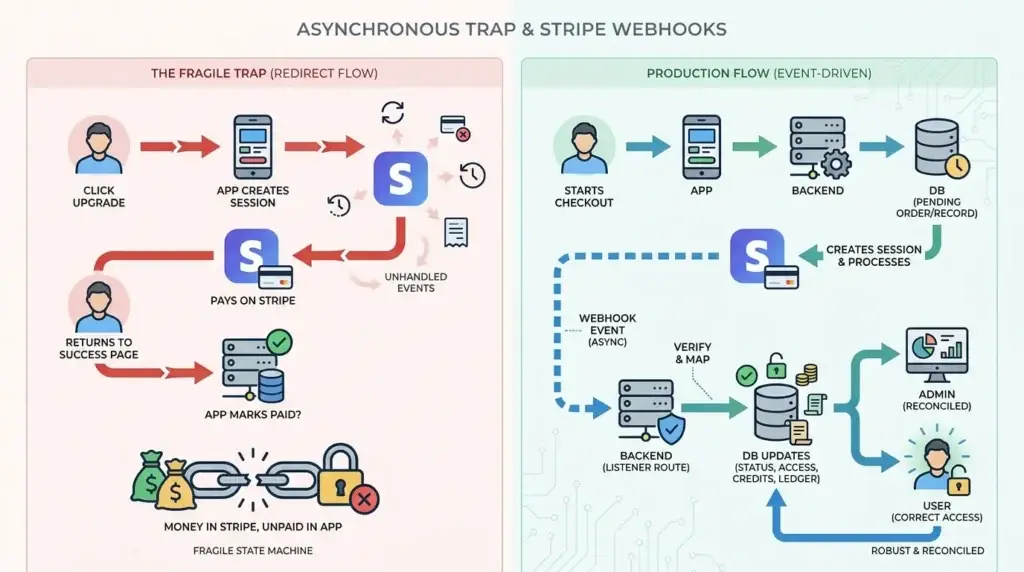
The biggest mistake founders make is assuming this flow is complete:
- User clicks “Upgrade”
- App creates a Stripe Checkout Session
- User pays on Stripe
- User returns to success page
- App marks user as paid
That looks logical. It is also fragile.
A payment system is not only a redirect flow. It is an event-driven system. Stripe may confirm payments, send subscription updates, retry failed webhooks, process disputes, update invoices, handle delayed payment methods, or trigger payout records outside the exact moment the user sees the success page.
That means your app needs a backend route that listens for Stripe events and safely updates your internal state.
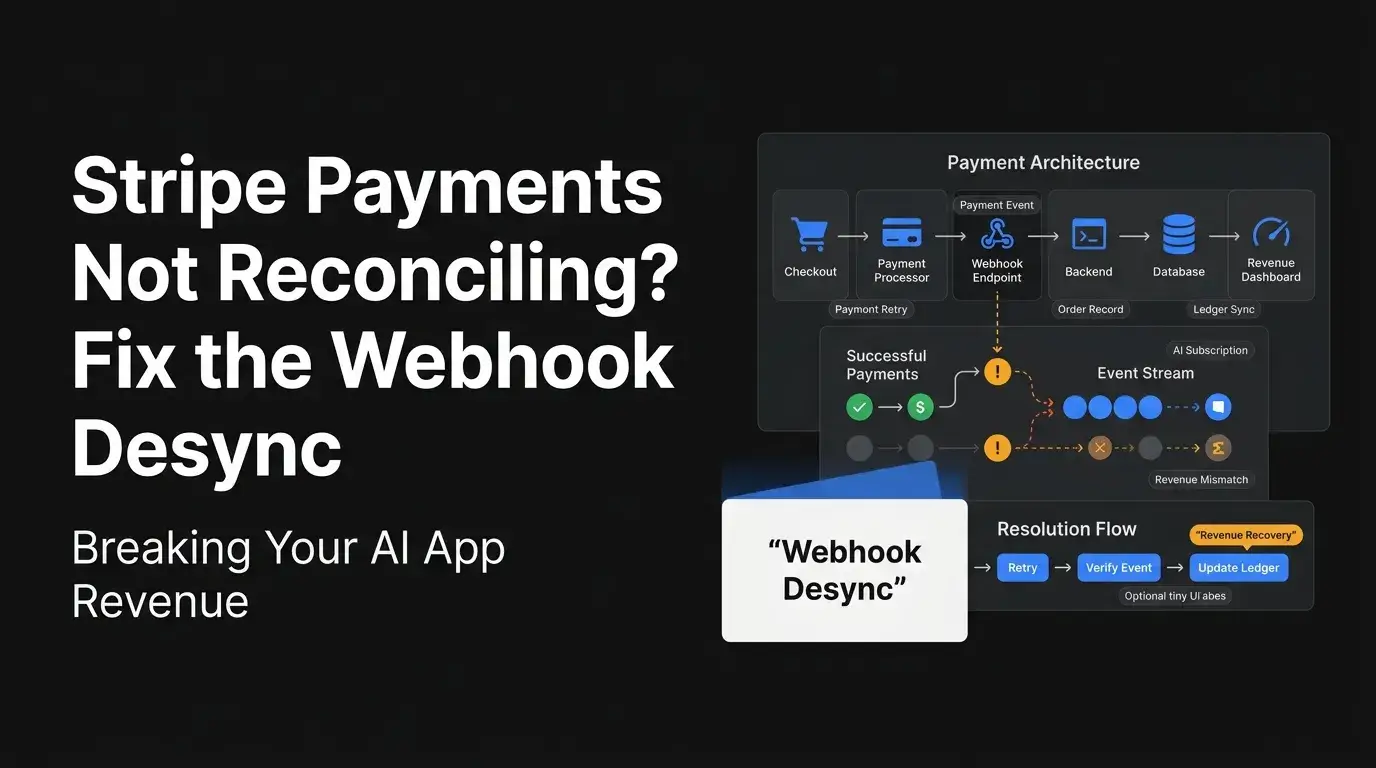
The real production flow should look more like this:
- User starts checkout from your AI app.
- Your backend creates a Stripe Checkout Session.
- Your database creates a pending internal order, subscription, credit purchase, or billing record.
- Stripe processes the payment.
- Stripe sends a webhook event to your backend.
- Your webhook verifies the event came from Stripe.
- Your backend maps the Stripe object to the internal user or order.
- Your database updates payment status, subscription access, wallet credits, invoices, and ledger records.
- Your admin panel shows a reconciled transaction.
- Your user receives the correct access automatically.
When Stripe payments are not reconciling, the break usually happens between steps 5 and 8.
The founder sees money in Stripe but unpaid status in the app. The engineering team says, “Stripe works.” The customer says, “Your app is broken.” Both are partly right.
Stripe worked. Your app’s payment state machine did not.
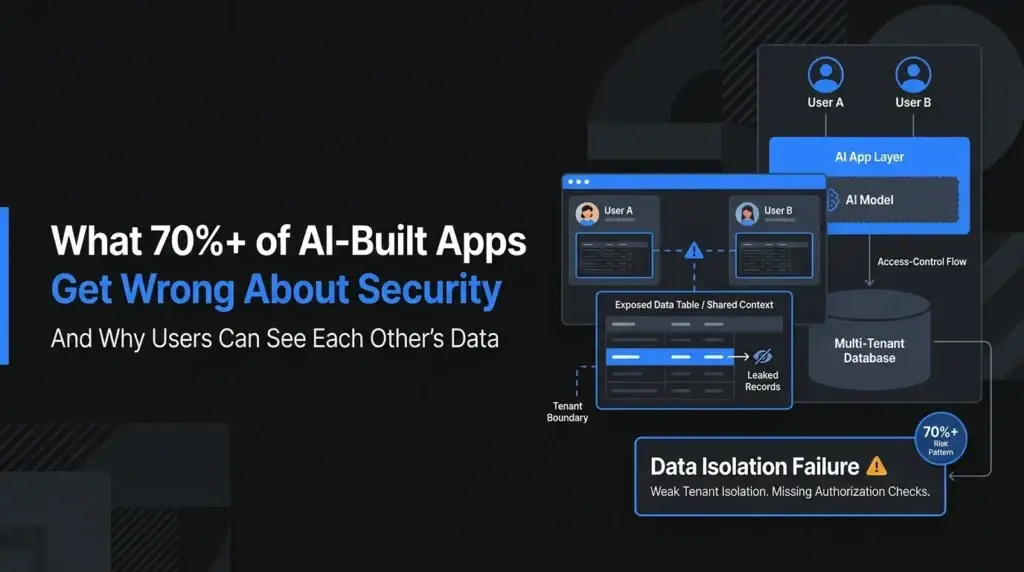
Read More: What 70%+ of AI-Built Apps Get Wrong About Security — And Why Users Can See Each Other’s Data
Why AI-Built Apps Break After Checkout
AI app builders are good at producing visible features quickly. They can generate a checkout button, a pricing page, a redirect handler, and even a sample webhook route. But payment reliability depends on invisible backend rules.
Most broken AI-built Stripe integrations fail because one of these layers is missing:
| Broken Layer | What Happens | Business Impact |
|---|---|---|
| No webhook endpoint | Stripe cannot notify your app after payment | Paid users stay locked out |
| Endpoint not registered in Stripe | Your app has a route, but Stripe does not know where to send events | Checkout works, database never updates |
| Wrong webhook secret | Signature verification fails | Valid Stripe events are rejected |
| Body parser changes raw payload | Signature check fails because request body is modified | Webhook returns errors |
| No metadata mapping | App cannot connect Stripe session to internal user/order | Payment is orphaned |
| No idempotency logic | Same event is processed twice | Duplicate credits, duplicate access, wrong ledger |
| No subscription cancellation listener | User cancels but app keeps access active | Revenue leakage |
| No failed payment listener | Failed renewal does not revoke or downgrade access | Free usage continues |
| No admin reconciliation view | Team cannot see mismatch quickly | Manual support burden grows |
This is why a working checkout button is not the same as a working payment integration.
For an AI app, the payment layer is often tied to usage credits, token quotas, subscriptions, team seats, document processing limits, AI agent runs, API consumption, or premium workflows. If the payment event does not update the entitlement layer accurately, your product can lose revenue silently
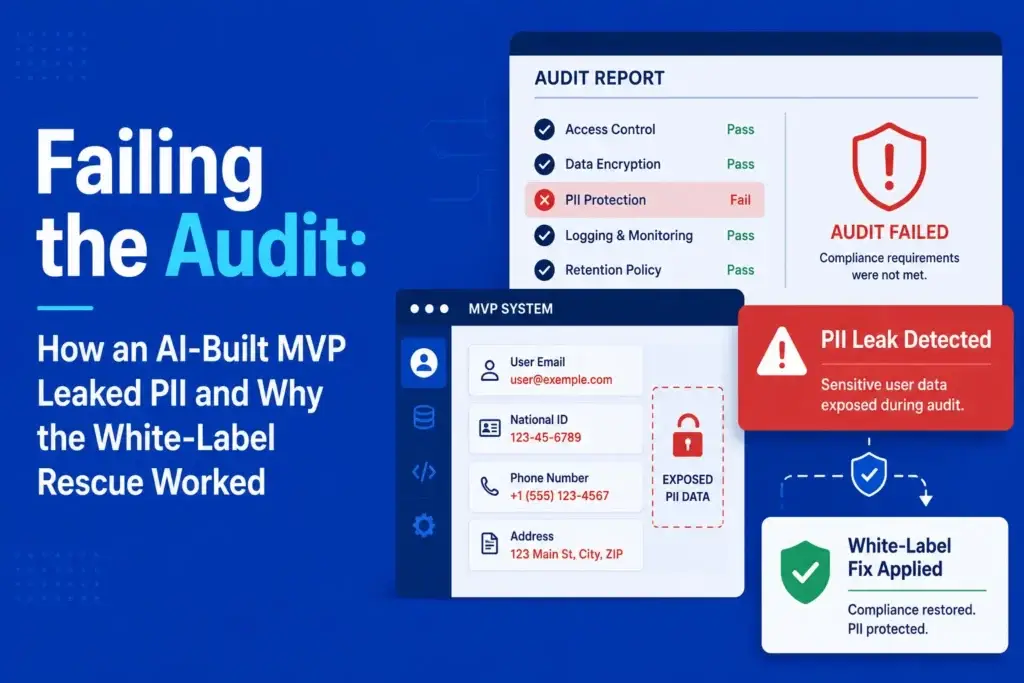
Read More: How an AI-Built MVP Leaked PII and Why the White-Label Rescue Worked.
Fast Diagnostic: Is Stripe or Your App the Problem?
Before rebuilding anything, separate Stripe-side payment success from app-side reconciliation failure.
Stripe Payment Desync Diagnostic Table
| Symptom | Likely Cause | Founder Impact |
|---|---|---|
| Stripe shows payment succeeded, but app shows unpaid | Webhook not updating the database | Paid users cannot access premium features. |
| Webhook route exists, but no events arrive | Endpoint not registered, wrong environment, or wrong Stripe account mode | Checkout appears live, but the backend never receives payment truth. |
| Webhook delivery shows 400 error | Invalid payload, signature mismatch, wrong raw body handling, or bad secret | The app rejects valid Stripe events. |
| Webhook delivery shows 500 error | Backend crashed while processing the event or database update failed | Revenue records become unreliable. |
| Users get duplicate credits | No event deduplication or transaction lock | Financial leakage and support confusion increase. |
| Canceled subscribers still have access | Missing subscription deletion or invoice failure event logic | Users consume paid AI resources without paying. |
Step-by-Step: Rebuilding the Webhook Listener Logic
A strong Stripe webhook listener is not just a route that receives JSON. It is a controlled financial update pipeline.
Here is the rebuild sequence founders should ask their technical team to follow.
Step 1: Create a Pending Payment Record Before Redirecting to Stripe
Do not wait until after payment to create your internal record.
Before sending the user to Stripe, create a local record such as:
payment_intent_pendingcheckout_session_pendingsubscription_pendingcredit_purchase_pendingorder_pending
This record should include:
- internal user ID
- product or plan ID
- amount
- currency
- internal order ID
- expected Stripe price ID
- current status
- created timestamp
- metadata reference
Then pass the internal ID into Stripe metadata when creating the Checkout Session.
Example metadata logic:
metadata: {
  internal_user_id: user.id,
  internal_order_id: order.id,
  product_type: "ai_credit_pack"
}
This matters because webhook events arrive later. If your webhook has no reliable internal ID to map back to, the payment becomes difficult to reconcile.
Step 2: Register the Webhook Endpoint in Stripe
A common AI-app failure is that the code contains a route like /api/stripe/webhook, but Stripe is never configured to send events to that route.
Your team should confirm:
- The endpoint is registered in the correct Stripe mode: test or live.
- The endpoint URL is public and uses HTTPS in production.
- The selected events match your payment model.
- The webhook signing secret in your backend matches the endpoint.
- Test mode and live mode use separate keys and secrets.
For most AI subscription or credit-based apps, the event set may include:
checkout.session.completedpayment_intent.succeededpayment_intent.payment_failedinvoice.paidinvoice.payment_failedcustomer.subscription.updatedcustomer.subscription.deletedcharge.refundedcharge.dispute.created
Do not listen to every Stripe event unless you need it. A focused event set reduces noise and makes debugging easier.
Step 3: Verify the Stripe Signature Before Trusting the Event
Never trust a webhook payload just because it reaches your server.
A secure webhook handler verifies the Stripe-Signature header using the endpoint secret. If verification fails, the event should not update payment state.
A simplified Node.js pattern looks like this:
import Stripe from "stripe";
import express from "express";

const stripe = new Stripe(process.env.STRIPE_SECRET_KEY);
const router = express.Router();

router.post(
  "/stripe/webhook",
  express.raw({ type: "application/json" }),
  async (req, res) => {
    const signature = req.headers["stripe-signature"];
    let event;

    try {
      event = stripe.webhooks.constructEvent(
        req.body,
        signature,
        process.env.STRIPE_WEBHOOK_SECRET
      );
    } catch (error) {
      console.error("Stripe webhook signature verification failed:", error.message);
      return res.status(400).send("Invalid signature");
    }

    res.status(200).send("received");

    await processStripeEvent(event);
  }
);

export default router;
The key point is the raw request body. Many frameworks parse JSON automatically, which can break signature verification. Your webhook route often needs special body parsing rules.
Step 4: Process the Event Through a Payment State Machine
Do not scatter payment updates across random controller files.
Use one payment service that owns state transitions:
async function processStripeEvent(event) {
  const eventId = event.id;
  const eventType = event.type;

  const alreadyProcessed = await db.webhookEvents.findUnique({
    where: { stripe_event_id: eventId }
  });

  if (alreadyProcessed) {
    return;
  }

  await db.webhookEvents.create({
    data: {
      stripe_event_id: eventId,
      event_type: eventType,
      status: "processing"
    }
  });

  switch (eventType) {
    case "checkout.session.completed":
      await handleCheckoutCompleted(event.data.object);
      break;

    case "invoice.paid":
      await handleInvoicePaid(event.data.object);
      break;

    case "invoice.payment_failed":
      await handleInvoicePaymentFailed(event.data.object);
      break;

    case "customer.subscription.deleted":
      await handleSubscriptionDeleted(event.data.object);
      break;

    default:
      await markUnhandledEvent(eventId);
  }

  await db.webhookEvents.update({
    where: { stripe_event_id: eventId },
    data: { status: "processed" }
  });
}
This gives your app an audit trail. When a founder asks, “Why was this user not upgraded?”, the team can inspect the webhook event log instead of guessing.
Step 5: Make Database Updates Atomic
Payment events should not partially update your app.
For example, when a user buys AI credits, the app should not update the ledger but fail to update the user balance. It should not unlock access but fail to record the invoice. It should not mark a subscription active while leaving the admin record unpaid.
Use database transactions where possible.
Example logic:
async function handleCheckoutCompleted(session) {
  const internalOrderId = session.metadata.internal_order_id;

  await db.$transaction(async (tx) => {
    const order = await tx.orders.findUnique({
      where: { id: internalOrderId }
    });

    if (!order || order.status === "paid") {
      return;
    }

    await tx.orders.update({
      where: { id: internalOrderId },
      data: {
        status: "paid",
        stripe_session_id: session.id,
        paid_at: new Date()
      }
    });

    await tx.aiCredits.create({
      data: {
        user_id: order.user_id,
        order_id: order.id,
        credits_added: order.credit_quantity,
        source: "stripe_checkout"
      }
    });

    await tx.ledgerEntries.create({
      data: {
        user_id: order.user_id,
        order_id: order.id,
        amount: order.amount,
        currency: order.currency,
        type: "payment_received",
        provider: "stripe"
      }
    });
  });
}
This is where “payment integration” becomes real product architecture. The app is not simply collecting money; it is preserving financial truth.
Step 6: Separate Payment Status From User Entitlements
One of the most dangerous shortcuts is adding a simple field like:
user.isPaid = trueThat may work for a demo. It fails for real AI monetization.
A better structure separates payment records from entitlements.
For example:
- Payment record: Was money collected?
- Subscription record: Is the recurring plan active?
- Entitlement record: What can the user access?
- Credit ledger: How many AI credits were purchased, used, refunded, or expired?
- Admin ledger: What does the platform operator see?
- Reconciliation status: Does internal record match Stripe state?
This separation helps when users upgrade, downgrade, cancel, fail renewal, request refund, receive bonus credits, or move between plans.
Founder Decision Signals
Speed
If checkout is live but reconciliation is broken, stop adding new features until webhook state is stable. Every new paid user can create more support debt.
Cost
The expensive part is not fixing one endpoint. It is cleaning up corrupted payment states, duplicate credits, missed renewals, and manual refund disputes later.
Scalability
A webhook listener that works for five test payments may fail during subscription renewals, retries, delayed events, or multi-plan usage unless it has queueing and deduplication logic.
Market Fit
Paid users judge your AI app by whether access works instantly after payment. Broken reconciliation damages trust before product-market feedback becomes useful.
Reconciliation Is Bigger Than “Payment Succeeded”
Many founders use the word reconciliation to mean “my app should show paid after Stripe charges the card.”
That is only the first layer.
A real reconciliation workflow should answer:
- Did Stripe collect the payment?
- Did the webhook arrive?
- Did the app process the event?
- Did the database update correctly?
- Did the user receive the correct access?
- Did the ledger entry match the payment amount?
- Did fees, refunds, chargebacks, credits, and payouts remain traceable?
- Can the admin team see unresolved mismatches?
For AI apps, this becomes even more important because monetization may involve:
- monthly subscriptions
- metered usage
- AI credit packs
- document upload limits
- team seats
- token-based usage
- pay-per-generation tools
- API access tiers
- creator or expert payouts
- marketplace-style split payments
If your app sells AI credits, the credit ledger matters. If your app supports expert consultations, creator payouts, or prompt marketplace monetization, split routing matters. If your app supports agencies or teams, subscription and seat-level entitlements matter.
This is why a payment gateway should not be hardcoded as a one-off route. It should be part of the app’s financial architecture.
Read More: The Authentication Loop: Analyzing Session Failures in AI-Generated MVPs
Hardcoding Revenue: The Benefit of Pre-Built Payment Gateways
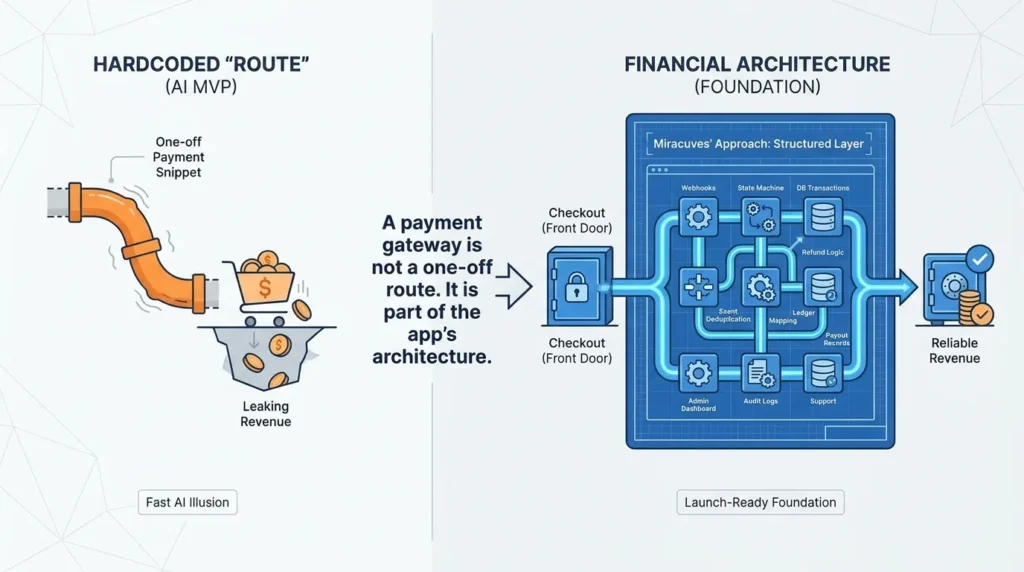
Fast AI app generation often creates a dangerous illusion: because the app can create a Stripe Checkout Session, the revenue model is ready.
It is not.
Checkout initiation is only the front door. Revenue reliability needs:
- webhook verification
- payment state machine
- database transactions
- event deduplication
- order and subscription mapping
- refund and chargeback logic
- wallet or credit ledger
- payout records where needed
- admin reconciliation dashboard
- audit logs
- role-based admin controls
- support visibility
- environment separation between test and live mode
Miracuves’ approach is different from one-off AI-generated payment snippets. In a source-code-owned clone app foundation, payment gateways, admin controls, transaction records, and monetization workflows can be structured from the beginning around the business model.
For example, a creator platform may need escrow-style fund holding, split payouts, refund windows, and creator balance visibility. A SaaS AI assistant may need subscriptions, failed-renewal handling, seat management, and credit top-ups. A marketplace AI product may need commission logic, vendor payouts, dispute handling, and payout reconciliation.
The point is not to copy Stripe code from a tutorial. The point is to build a financial routing layer that matches how your app earns money.
Miracuves helps founders avoid the “checkout works but revenue is leaking” problem by starting from launch-ready, white-label foundations where payment workflows, admin dashboards, and source-code ownership are treated as part of the product foundation.
Common Mistakes Founders Should Avoid
Using the Success URL as Payment Truth
The success page is useful for user experience, but it should not be your source of truth. Payment confirmation should come from verified backend events.
Not Passing Internal IDs Into Stripe Metadata
If the webhook cannot map a Stripe session back to your user, order, subscription, or credit purchase, reconciliation becomes guesswork.
Ignoring Duplicate Webhook Events
Payment systems can send repeat events. Without deduplication, your app may grant duplicate AI credits, extend access twice, or create messy ledger records.
Only Handling Successful Payments
A real payment system must also handle failed invoices, canceled subscriptions, refunds, disputes, expired checkout sessions, and delayed payment outcomes.
No Admin Reconciliation View
If the admin team cannot see Stripe ID, internal order ID, webhook status, user ID, payment status, and entitlement state in one place, support becomes slow and reactive.
What a Reliable Payment Architecture Should Include
A founder does not need to personally write every webhook handler. But a founder should know what to demand before trusting a payment system with real users.
| Layer | What It Should Do | Why It Matters |
| Checkout initiation | Create a Stripe session and pending internal record | Prevents orphaned payments |
| Metadata mapping | Attach internal user/order/subscription IDs | Helps webhooks update the right database record |
| Webhook verification | Validate Stripe signature using endpoint secret | Prevents fake payment events |
| Event log | Store processed webhook IDs and event types | Supports auditability and deduplication |
| State machine | Move payment from pending to paid, failed, refunded, disputed, or canceled | Keeps payment logic consistent |
| Ledger | Track credits, subscriptions, commissions, refunds, and payouts | Helps financial reconciliation |
| Entitlements | Control what the user can access after payment state changes | Prevents paid access failures and free usage leakage |
| Admin dashboard | Show mismatches and transaction history | Reduces manual support chaos |
| Retry handling | Process delayed or retried events safely | Improves reliability during gateway or network issues |
| Audit logs | Record who changed what and when | Builds operational trust |
For high-value AI apps, this architecture is not optional. It is the difference between collecting payments and running a monetization-ready business.
Read More: AI MVP Security Audit: The 14-Point Checklist for Founder Survival
Miracuves Perspective: Build the Payment Foundation Before Scaling Acquisition
When founders search for “Stripe payments not reconciling,” the issue is rarely just a payment gateway error. It usually signals a deeper product weakness: the app cannot reliably connect payment events with user access, usage limits, subscriptions, credits, and admin records.
That gap becomes more expensive as the app grows. Paid ads bring more failed activations. Influencer launches create more support tickets. Product Hunt traffic exposes every broken checkout path. Agency resale adds client pressure. Enterprise demos turn small reconciliation errors into trust issues before the product even gets a fair chance.
Before scaling acquisition, founders should stabilize the payment foundation:
- every payment should have an internal record
- every Stripe event should be traceable
- every successful payment should update entitlement correctly
- every failed payment should trigger the right downgrade or retry logic
- every refund or dispute should reflect in admin reporting
- every payout or split should remain visible in the ledger
For founders building AI apps, Miracuves can help move beyond fragile checkout snippets toward a structured product foundation. Whether you need an AI app, a ChatGPT-style platform, a SaaS workflow tool, or a clone app with marketplace-style payments, the stronger decision is to build revenue logic into the architecture instead of patching it after customers complain.
Explore Miracuves’AI development services and generative AI development pages to understand how AI product workflows can be planned beyond the visible interface. For founders building AI apps, the real challenge is not only adding prompts, chat flows, agents, or automation features. The stronger foundation is built around secure backend logic, scalable usage handling, role-based access, data flow control, and reliable monetization workflows that can support real users after launch.
You can also review Miracuves’ payment gateway development and clone app development pages to see how source-code-owned foundations support secure payment logic, admin control, and scalable product execution. Instead of patching payment issues after customers complain, founders can start with a product structure where checkout, webhook handling, transaction records, subscriptions, credits, refunds, and admin reconciliation are treated as core architecture from the beginning.
Final Thoughts: Stripe Checkout Is Not the Finish Line
The real risk in AI-built apps is not that Stripe cannot process the payment. It is that the app does not know what to do after Stripe processes it.
A payment succeeds, but the database stays stale. A subscription cancels, but premium access remains active. A refund happens, but credits stay usable. A duplicate event arrives, and the app grants value twice. A founder checks revenue and cannot explain why Stripe, the database, and the admin dashboard disagree.
That is the webhook desync problem.
The fix is not another checkout button. The fix is a reliable payment lifecycle: pending records, verified webhooks, event deduplication, atomic database updates, entitlement control, ledger visibility, and admin reconciliation.
For founders, the stronger decision is to stop treating payments as a plugin and start treating them as financial infrastructure inside the product. Miracuves helps founders build app foundations where monetization, admin control, payment routing, and source-code ownership are part of the architecture from day one.
FAQs
Why are Stripe payments not reconciling in my AI app?
Stripe payments usually fail to reconcile when Stripe records the payment but your app does not process the webhook event that should update your database. The issue may be a missing endpoint, wrong webhook secret, body parser problem, failed database update, or missing internal order mapping.
Why does Stripe show payment succeeded but my app still shows unpaid?
This usually means checkout completed on Stripe, but the app did not update its internal payment, subscription, user access, or credit records. The webhook listener should handle events such as checkout.session.completed, invoice.paid, and payment_intent.succeeded.
Should I update my database from the Stripe success URL?
No. The success URL is useful for user experience but should not be the source of truth for payment confirmation. Use verified backend webhook events to update payment status, access, subscriptions, and credit balances.
What is webhook desync in Stripe payments?
Webhook desync happens when Stripe sends or records a payment event, but the app’s backend does not process it correctly. This creates a mismatch between Stripe records and your internal database.
How do I prevent duplicate AI credits from Stripe webhooks?
Store processed Stripe event IDs and check them before applying business logic. Use database transactions and event deduplication so the same webhook cannot add credits, unlock access, or create ledger entries twice.
What Stripe events should an AI subscription app listen to?
Common events include checkout.session.completed, invoice.paid, invoice.payment_failed, customer.subscription.updated, customer.subscription.deleted, payment_intent.succeeded, payment_intent.payment_failed, charge.refunded, and charge.dispute.created. The exact list depends on your billing model.
Can Miracuves fix Stripe reconciliation problems in AI-built apps?
Miracuves can help founders build or rebuild app foundations with structured payment gateway workflows, admin dashboards, source-code ownership, and monetization-ready architecture. Final scope depends on the app type, payment model, integrations, and current codebase condition.
Is a pre-built payment gateway better than AI-generated Stripe code?
A pre-built payment architecture can be safer when it includes verified webhooks, ledger logic, admin reconciliation, entitlement updates, refunds, disputes, and payout routing. AI-generated snippets may help with speed, but production payment reliability needs engineered backend rules.