




Key Takeaways
What You’ll Learn
- Clone script choice affects launch speed, cost, and flexibility.
- Core features include uploads, downloads, sharing, and admin tools.
- Pricing comparison helps founders plan the right budget.
- White-label control supports branding and customization.
- Scalable setup helps manage users, files, and growth.
Stats That Matter
- Ready-made scripts reduce early development effort.
- Secure sharing improves user trust and file privacy.
- Admin dashboard manages users, storage, plans, and activity.
- Monetization features support subscriptions and paid upgrades.
- Post-launch support matters for stability, updates, and scaling.
Real Insights
- The cheapest script may limit quality and growth.
- Founders should compare features, pricing, security, and support.
- File-sharing platforms need speed, trust, and simplicity.
- Customization helps match the brand and business model.
- The best choice balances cost, features, security, and scalability.
Ever tried to send a massive video file to a client and hit that dreaded “file too large” error? Or maybe your cloud drive insists on making the recipient log in, verify their email, and sacrifice a goat just to download a single PDF. That’s exactly why WeTransfer earned its cult following—minimalism, ease, and no-nonsense file sharing.
In 2026, more startups are realizing the value of replicating this experience—but with their own branding, business model, or niche twist. From creative agencies and SaaS platforms to enterprise productivity tools, launching a WeTransfer-style file-sharing service is no longer a pipe dream.
Thanks to ready-made clone script, you can get a secure, sleek file transfer platform up and running in weeks—not months. In this post, we’ll compare the top WeTransfer clone script in 2026, looking at key features, pricing, and what to watch for before you buy.
If you’re serious about launching your own branded file transfer service, Miracuves has you covered—but more on that in a bit.
Why Build a WeTransfer Clone?
WeTransfer did one thing really well: made sending big files feel effortless. And that’s still a huge gap in many industries—especially where collaboration is messy or email just doesn’t cut it.
Building your own clone gives you the ability to:
- Add branding for your agency, team, or product suite
- Offer password-protected transfers for added privacy
- Charge for storage, bandwidth, or features
- Integrate analytics or monetization features
- Run on your own infrastructure and keep full control
No more sending clients to third-party tools that steal attention. You own the experience—and the user data.
Read More : Top 5 Mistakes Startups Make When Building a wetransfer clone
Must-Have Features in a WeTransfer Clone Script
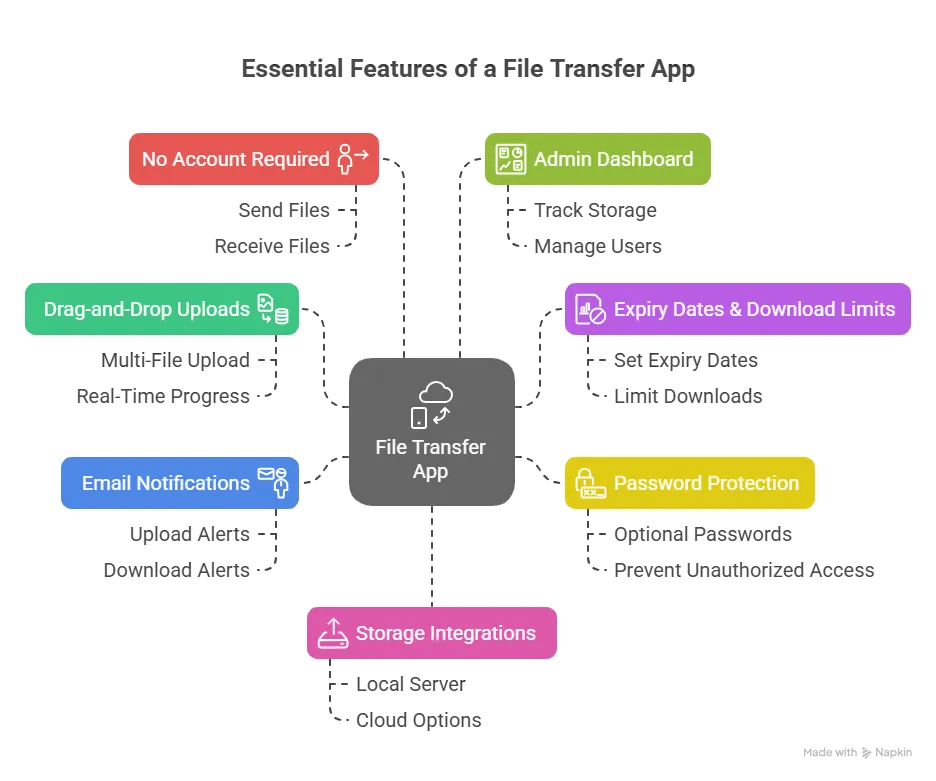
Before we compare platforms, let’s talk about the essential building blocks of a high-quality file transfer app.
1. Drag-and-Drop Uploads
Simple, intuitive UI with multi-file drag-and-drop and real-time progress bars.
2. Expiry Dates & Download Limits
Let users set when the download link expires and how many times it can be used.
3. Password Protection
Optional passwords to prevent unauthorized access.
4. Email Notifications
Senders and recipients should receive email alerts when a file is uploaded/downloaded.
5. No Account Required
The key to virality: let users send and receive files without mandatory sign-ups.
6. Admin Dashboard
Track storage, active links, users, abuse reports, and billing if needed.
7. Storage Integrations
Local server or cloud options (AWS S3, Wasabi, Google Cloud Storage)
Read More : Pre-launch vs Post-launch Marketing for Wetransfer Clone Startups
Best WeTransfer Clone Script of 2026
We reviewed script based on UX, flexibility, pricing, and tech support. Here’s how the best options stack up:
1. Miracuves WeTransfer Clone
Overview:
A clean, production-ready clone with all the essentials—and the ability to scale into an enterprise tool or SaaS product.
Features:
- File uploads up to 10GB (configurable)
- Set link expiration, passwords, and download limits
- Drag-and-drop UI (React-based)
- Admin panel with analytics
- Cloud storage support (AWS, Wasabi, local)
- Optional user registration for premium plans
Time to Launch: 6 Days
Support: 3 months included + branding/customization assistance
Best For: Founders who want a plug-and-play SaaS or internal tool with strong UX
Learn more about our WeTransfer Clone Development services
2. Droply Lite (Code Marketplace)
Overview:
A minimalist open-source clone with limited features but good for personal use or MVPs.
Features:
- Upload files up to 2GB
- Basic email notifications
- PHP backend with MySQL
- Static HTML frontend, not responsive
Pricing: Free (MIT license)
Limitations: No password protection, no UI customization, not mobile-friendly
Best For: Internal tools or solo developers learning the ropes
3. TransferIt Pro
Overview:
A premium SaaS-style clone built for branded resellers and file-sharing businesses.
Features:
- Custom subdomains
- User accounts with dashboards
- Subscription system with Stripe integration
- File preview + download logs
- File size limit up to 20GB
- Node.js + MongoDB architecture
Best For: Startups planning to monetize file transfers at scale
Cost Factors & Pricing Breakdown
WeTransfer-Style Large File Sharing Platform — Market Price
These amounts reflect the broader market cost of building a WeTransfer clone script based on the selected backend architecture, transfer workflow complexity, storage and delivery requirements, integration depth, and long-term scalability goals.
Miracuves Wetransfer-Like App Solution Cost and Tech Stack
Get a fully developed, deployment-ready platform modeled after WeTransfer. Built on a rock-solid PHP/Laravel foundation, this complete package includes everything you need to launch and scale:
- Core Workflows: File upload, secure sharing, download links, and transfer management.
- Built-in Monetization: Free and premium plan logic, storage limits, ads, and subscription setup.
- Management Hub: User management, file controls, plan management, reports, and centralized admin backend.
- Launch-Ready: Fully prepped for your custom branding, configuration, and immediate market entry.
Why Miracuves’s WeTransfer Clone Script is so affordable?
Most file-sharing platforms force you into expensive custom architectures with heavy backend development, cloud storage logic, file security setup, and subscription workflows. Building from scratch with those systems requires specialized engineering teams, which drives the cost into tens of thousands of dollars.
We took a smarter, more practical approach:
- You Aren’t Paying for Ground-Up Development: Our file-sharing engine is already developed, tested, and ready to deploy. You skip the inflated costs and months of waiting associated with building from scratch.
- The Power of PHP / Laravel: We built this on one of the most reliable, globally adopted frameworks in the world. Not only does this keep our upfront costs down, but it also protects your future budget. PHP has a massive global talent pool, making it easy and cost-effective for you to find developers for future scaling or customizations.
You get an enterprise-capable, file-sharing platform foundation without the inflated Silicon Valley price tag.
Note: The cost mentioned above is for the solution, re-branding, deployment and source code only.
Choosing the Right Script for Your Use Case
Ask yourself these questions before pulling the trigger:
- Do I want to offer this as a service, or use it internally?
- Will I monetize with subscriptions, branding, or upsells?
- How much control do I want over UI/UX?
- Do I need cloud scalability?
- What type of files will users be sending (creative, legal, enterprise)?
For most use cases—especially commercial—Miracuves strikes the right balance of flexibility, speed, and affordability.
Common Pitfalls to Avoid
1. Ignoring Storage Costs
Some scripts rely on your hosting for file storage. If you’re transferring 10GB videos regularly, this can eat your bandwidth and balloon hosting bills.
2. No Rate Limiting
Without upload/download limits or abuse protection, you could end up a target for file spammers or even illegal uploads.
3. Missing Mobile Optimization
Most transfers now happen on smartphones. A clunky mobile experience can kill user adoption.
Read More : The Smart Revenue Model of WeTransfer Explained
Add-Ons Worth Considering
As your app scales, these add-ons become game-changers:
- Cloud storage integration (for auto-scaling)
- Email tracking (did they open the download link?)
- Analytics (who’s sending what, how often, to where?)
- White-labeling tools (custom URLs, logos, email templates)
- Team collaboration (invite others to access or manage files)
Final Thoughts
WeTransfer built an empire by doing one thing well—making file transfer feel effortless. Now, you can build your own streamlined, branded version tailored to your audience or niche.
Choose a clone script that’s flexible, mobile-optimized, and secure. And more importantly—work with a dev partner who gets your vision.
At Miracuves, we help innovators launch high-performance app clones that are fast, scalable, and monetization-ready. Ready to turn your idea into reality? Let’s build together.
FAQs
Is it legal to clone WeTransfer?
Yes. You’re replicating the functionality, not the trademark or branding. As long as you use your own design and codebase, you’re in the clear.
Can I use this clone to run a SaaS?
Absolutely. Many scripts (especially Miracuves’) are built for white-label SaaS deployment with admin panels and monetization tools.
How secure are file transfer clone scripts?
That depends on the code. Good scripts use encrypted uploads, virus scanning, and password protection. Always confirm if security audits are available.
Will users need to sign up?
That’s optional. The best clones let you offer both anonymous transfers and registered accounts for premium features.
Can I limit file sizes?
Yes. File size limits can usually be adjusted in the config files or admin panel depending on your server capacity.
How fast can I go live?
With Miracuves, your branded file-sharing app can be live in as little as 6 Days, fully functional and ready for real users.
Related Articles