

Key Takeaways
- Short-form video platform performance depends heavily on Time to First Frame because viewers expect videos to begin almost immediately as they scroll through the feed.
- Slow video startup, buffering, delayed feed loading, and playback interruptions can increase skips and reduce session depth, engagement, and repeat viewing.
- Fast playback requires coordinated video encoding, CDN delivery, caching, preloading, adaptive bitrate streaming, network handling, and efficient mobile app performance.
Playback Performance Signals
- Time to First Frame measures how quickly the first visible video frame appears after playback is requested, making it an important indicator of perceived streaming speed.
- Video prefetching, CDN edge caching, optimized file sizes, multiple bitrate renditions, efficient APIs, and adaptive streaming can reduce startup delays across changing network conditions.
- Operators should monitor TTFF, startup failures, rebuffering rate, playback errors, CDN response time, feed latency, and device-level performance to identify bottlenecks.
Viewer Retention Insights
- Fast video starts help maintain scrolling momentum, while repeated startup delays can encourage viewers to skip content or leave the short-form video feed.
- TTFF should be evaluated alongside watch time, completion rate, skip rate, session depth, rebuffering, return viewing, and retention to understand the full user experience.
- Miracuves develops customizable short-form video platforms with optimized video delivery, vertical feeds, CDN integration, adaptive streaming, recommendations, engagement analytics, and admin controls.
In a short-form video platform, speed is not just a technical detail. It is the first impression.
A user opens the feed, swipes to the next clip, and expects the video to appear almost instantly. If the screen flashes black, shows a loader, starts audio late, or buffers before the first frame appears, the experience feels broken even when the app has strong features.
That is why Time to First Frame, commonly called TTFF, matters so much for viewer retention. TTFF measures how long it takes for the first visible video frame to appear after playback is requested. For a vertical video feed, this small delay can decide whether a viewer keeps watching, swipes away, or leaves the platform.
For founders comparing a ready-made video sharing platform, performance should be reviewed as early as features, design, and monetization. A platform may look polished in a demo, but the real test begins when users swipe quickly through multiple videos on different devices and network conditions.
What Time to First Frame Means in a Short-Form Video Feed
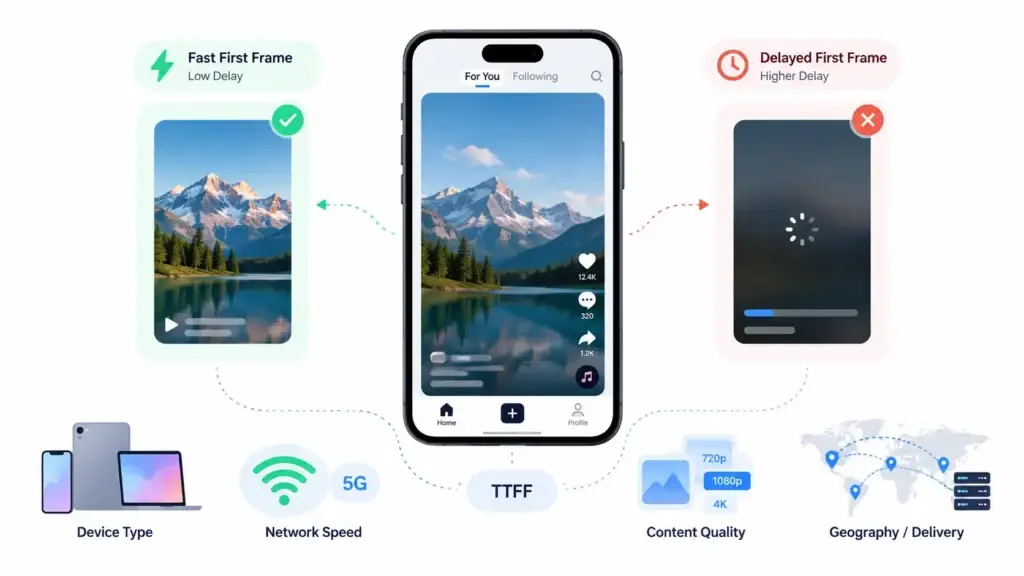
Time to First Frame is the delay between the moment playback is requested and the moment the first visible frame appears on the user’s screen.
In a normal long-form streaming app, users may tolerate a small loading period because they are preparing to watch one longer video. In a short-form video feed, the behavior is different. Users are not waiting for one piece of content. They are moving through many clips quickly, often deciding within seconds whether a video deserves attention.
That makes TTFF a direct product-quality signal.
If the first frame appears quickly, the feed feels alive. If it appears late, the feed feels heavy. This difference becomes even more important when the app serves users across different device types, network conditions, content qualities, and geographies.
Why TTFF Matters for Viewer Retention
Viewer retention in short-form video is shaped by momentum. The more seamless the feed feels, the easier it is for users to continue watching, discovering creators, liking content, commenting, sharing, and returning later.
A slow first frame breaks that momentum.
When TTFF is high, users may experience:
- A blank screen between videos
- A loader before playback begins
- Audio and video starting out of sync
- A swipe action that feels delayed
- Early abandonment before the content gets a chance
- Lower session depth
- Lower creator discovery
- Lower ad or monetization opportunities
This is why TTFF should not be treated only as an engineering metric. For founders, it is a retention metric, a monetization signal, and a product-readiness checkpoint.
The Difference Between Smooth Scrolling and Fast Playback
Many teams confuse smooth scrolling with fast playback. They are connected, but they are not the same.
Smooth scrolling means the interface responds well when a user swipes. Fast playback means the next video becomes visible and playable quickly after the swipe. A feed can scroll smoothly and still feel slow if the video player is not ready.
For short-form video platforms, both layers must work together.
| Performance Layer | What It Controls | Why It Matters |
|---|---|---|
| Scroll smoothness | Gesture response, UI rendering, feed transitions | Keeps the app feeling fluid |
| Player readiness | Video controller setup and playback start | Reduces visible waiting time |
| Preloading | Preparing upcoming videos before the user reaches them | Makes the next swipe feel faster |
| Cache logic | Keeping recent and likely-next content available | Reduces repeated network dependency |
| CDN delivery | Serving media from closer locations | Improves playback across regions |
| Playback analytics | Measuring TTFF, rebuffering, errors, and dropped frames | Helps teams improve retention after launch |
The strongest short-form video experiences do not rely on a single optimization. They coordinate the feed interface, player lifecycle, backend, CDN, analytics, media preparation, and short-video app features together so the product feels fast, usable, and ready for real creator-led engagement.
What Causes High Time to First Frame?
High TTFF usually comes from multiple small delays stacking together. One delay may not break the experience, but several combined delays can make the platform feel slow.
Common causes include:
- Late video player initialization
- No preloading for upcoming clips
- Large video files without adaptive delivery
- Weak compression or poor encoding profiles
- No CDN or poorly configured CDN delivery
- Backend delay in returning video metadata
- Too many network requests before playback
- Heavy UI rebuilds during feed movement
- Poor memory handling on lower-end devices
- Missing cache rules for recently watched content
- Analytics scripts or monetization calls delaying playback
Many TTFF issues begin deeper in the product stack, which is why founders should review the scalable short-video backend architecture before judging the platform only by its visible screens. Feed APIs, media requests, metadata delivery, and user activity events all affect how quickly the next video becomes visible.
This is why founders should not judge performance only from a clean demo. A demo may work well on strong Wi-Fi with a limited content set. Real users will scroll faster, use different phones, switch networks, revisit older clips, and watch content from different regions.
How Video Preloading Improves First-Frame Speed
Preloading prepares the next likely video before the user reaches it.
In a vertical feed, the app can usually predict what the viewer may watch next because the most likely action is moving to the next item. That does not mean the app should download every upcoming video. Overloading the device with too much preloaded media can waste bandwidth, increase memory pressure, and hurt performance.
A smarter approach is selective preloading.
The platform can prepare the first playable segment of the next video, keep the previous video warm for reverse scrolling, and adjust preload depth based on network strength, battery state, and device memory.
A practical preloading strategy should answer:
- Which video should be prepared next?
- How much of the next video should be loaded?
- When should preloading pause?
- How should the app behave on weak networks?
- How should the cache clear older video segments?
- How should analytics confirm that preloading improved TTFF?
This is where source-code ownership becomes important. As user behavior changes, your technical team may need to adjust preloading rules, cache expiration, playback analytics, and custom video feed architecture instead of depending on a fixed black-box product.
Why Caching Is Critical for Short-Form Video Performance
Caching helps the app avoid requesting the same media again and again.
For short-form video platforms, caching is useful because users often move forward, swipe back, rewatch, pause, replay, and revisit content. Without a proper cache strategy, the app may repeatedly depend on the network even when content was recently loaded.
A strong cache layer can improve:
- First-frame speed for recently loaded clips
- Reverse-scroll experience
- Playback continuity in weak network conditions
- Bandwidth efficiency
- Rebuffer reduction
- Perceived feed speed
However, caching also needs control. Keeping too much video data can consume storage and memory. Keeping too little can make the feed depend too heavily on the network. The right balance depends on device type, average video duration, content quality, network profile, and launch geography.
Why CDN Delivery Affects Viewer Retention
Short-form video platforms are media-heavy by nature. Every swipe can trigger a playback request, metadata request, thumbnail load, analytics event, and engagement action.
If video assets are served from infrastructure far from the user, playback may start slowly. A CDN helps by delivering media from locations closer to viewers, reducing avoidable distance-related delay.
For founders, CDN planning should not be left until after traffic grows. It affects the user experience from the first launch, especially when the platform targets multiple cities, regions, or countries.
A CDN-aware video setup should consider:
- Target launch regions
- Video file sizes
- Adaptive bitrate variants
- Cache behavior at edge locations
- Thumbnail and preview delivery
- Failover behavior
- Cost control during viral traffic spikes
- Analytics visibility by region
This is also where video hosting and CDN cost planning becomes important. Faster playback and infrastructure efficiency need to scale together, especially when creator uploads, watch time, and regional traffic begin to grow.
Fast playback and cost control should be planned together. A feed that is fast but financially inefficient can become expensive as creator uploads and viewer sessions grow.
The Benchmark Metrics Founders Should Track
A short-form video platform should be tested with real performance metrics, not vague claims like “fast” or “smooth.”
Here are the most useful metrics to track before and after launch:
| Metric | What It Measures | Why It Matters |
|---|---|---|
| Median TTFF | Typical first-frame speed | Shows the average user experience |
| P95 TTFF | Slower experience for a meaningful user group | Reveals hidden performance problems |
| Rebuffer count | Number of playback interruptions | Shows whether video delivery is stable |
| Rebuffer duration | How long users wait during stalls | Helps estimate frustration during sessions |
| Cache hit ratio | How often content loads from cache | Shows whether preloading and caching work |
| Playback failure rate | Failed video starts | Reveals serious product-quality issues |
| Dropped frames | Frames skipped during rendering | Shows device and rendering pressure |
| Feed API latency | Time to retrieve feed metadata | Connects backend performance to playback speed |
The goal is not to chase a vanity benchmark. The goal is to understand whether real users can move through the feed without friction.
A Practical TTFF Testing Methodology
A useful TTFF test should include different devices, networks, cache states, and scroll behaviors. Testing only one flagship phone on high-speed Wi-Fi will not show how the app behaves in the market.
Use this testing structure before publishing any performance claim:
| Test Area | Recommended Setup | Why It Matters |
|---|---|---|
| Devices | Flagship phone, mid-range phone, low-memory phone | Short-form platforms must perform beyond premium devices |
| Network | Wi-Fi, 5G, 4G, weak network simulation | Playback speed changes sharply by network quality |
| Cache state | Cold cache, warm cache, partial preloaded cache | Separates first-load behavior from optimized feed behavior |
| Scroll behavior | Normal swipe, rapid swipe, reverse swipe | Matches real viewing habits |
| Video quality | Multiple bitrate and resolution variants | Tests adaptive playback readiness |
| Session length | Short and extended scroll sessions | Reveals memory pressure and controller issues |
| Metrics | Median TTFF, P95 TTFF, rebuffering, failures | Turns performance into measurable evidence |
Before claiming a hard number, attach real test logs. A safer and more credible approach is to say the architecture is designed to target faster first-frame delivery under specific cache, network, and device conditions.
Performance Is Also a Monetization Issue
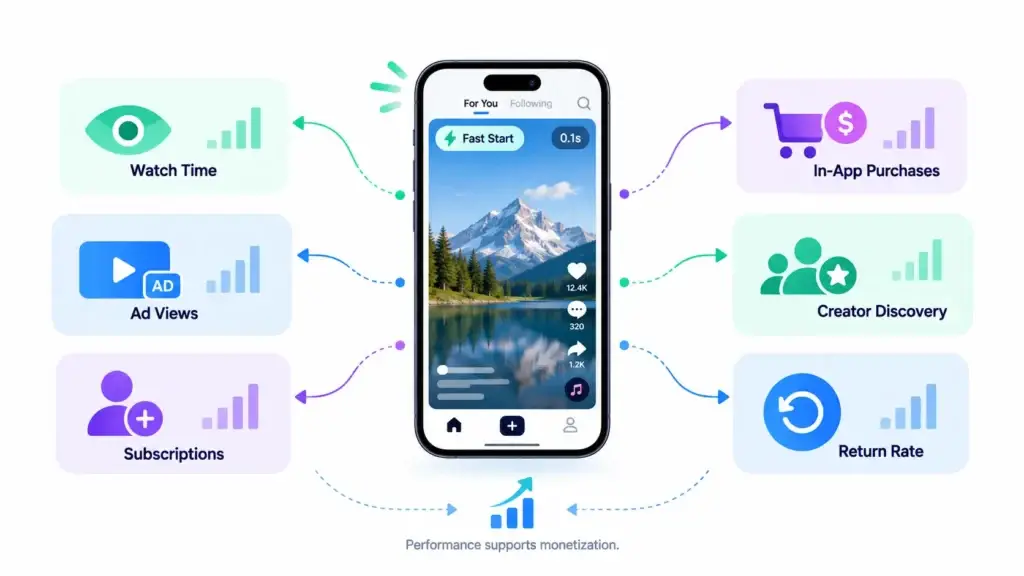
A slow feed does not only affect user experience. It affects business outcomes.
When viewers leave early, the platform has fewer chances to show ads, promote creators, drive subscriptions, encourage in-app purchases, support live commerce, or improve content recommendations. Every delayed first frame reduces the opportunity for engagement.
Performance can influence:
- Watch time
- Session depth
- Creator discovery
- Ad impressions
- Paid content visibility
- Subscription conversion
- In-app gifting
- Creator retention
- User return rate
- Brand campaign performance
A strong short-video business model depends on watch time, creator activity, ad visibility, paid content discovery, and smooth repeat viewing. When playback feels slow, the platform loses valuable engagement moments before monetization can happen.
For founders, this means TTFF should be discussed during product planning, not only after launch. A performance-ready platform gives the business more room to test monetization models with real user behavior.
Founder Decision Signals
Speed
If viewers see loaders between swipes, the feed will struggle to feel addictive. Ask for TTFF testing, preload logic, cache behavior, and real-device performance checks before launch.
Cost
Performance problems become more expensive when they are discovered late. Fixing video storage, encoding, CDN setup, analytics, and player lifecycle after launch may require deeper rework.
Scalability
A short-form video platform should be prepared for rising creator uploads, higher feed requests, regional traffic, user-generated content, and changing network conditions.
Control
Source-code ownership matters because playback optimization is never finished. Your team may need to adjust preloading, cache policies, feed ranking, analytics, monetization, and moderation.
Founders should review short-form video platform cost drivers early because performance fixes usually affect infrastructure, backend logic, video delivery, analytics, QA scope, and post-launch optimization.
How Miracuves Helps Founders Launch Performance-Ready Short-Video Platforms
Miracuves helps founders build white-label short-form video platforms with creator tools, admin control, monetization modules, scalable backend readiness, and source-code ownership. If your team wants a technical partner for a performance-ready creator video product, Miracuves can act as a short-video platform development partner with 6-day solution delivery where the selected ready-made launch scope fits.
The advantage is not only faster launch. It is the ability to start with a ready-made foundation and then customize the platform around your audience, region, business model, and performance requirements.
For founders who want to validate the market quickly, Miracuves can support 6-day solution delivery where the selected ready-made scope fits. This gives teams a faster path to test the product, study user behavior, and improve the video experience without building every core module from zero.
Natural internal link placement:
Founders planning to launch a creator-focused video product can explore Miracuves’ launch-ready short-video app foundation to understand how a white-label platform can support faster deployment, source-code ownership, admin control, creator workflows, and monetization-ready features.
Mistakes Founders Should Avoid
Judging the platform only by visible features
Video upload, likes, comments, creator profiles, sharing, and admin tools matter. But they do not prove that the feed will feel fast during real user behavior. Performance testing should sit beside feature review.
Ignoring lower-end devices
A feed that works on premium devices may still struggle on lower-memory phones. Test device diversity early, especially if the target audience includes regional or mobile-first markets.
Over-preloading content
Preloading can improve TTFF, but aggressive preloading can waste bandwidth and increase memory pressure. The platform should adjust based on device state, network quality, and viewing behavior.
Publishing hard benchmark claims without logs
Do not publish a specific TTFF claim unless your team has real test data. Include device type, network profile, cache state, app version, video format, and sample size.
Treating performance as a post-launch fix
Performance is harder to repair after users already feel friction. Plan media delivery, analytics, CDN, caching, and playback behavior before scaling traffic.
Final Thoughts
Short-form video platforms win attention through speed, continuity, and discovery. A strong feature list may get users to install the app, but fast first-frame delivery helps keep them watching.
Time to First Frame is one of the clearest ways to evaluate whether a vertical video feed is ready for real users. It connects technical performance with retention, monetization, creator discovery, and long-term product quality.
For founders, the better question is not only “Can the platform play video?” The stronger question is “How quickly does the next video become visible when users swipe?”
Miracuves helps founders answer that question with a white-label short-video platform foundation built for faster launch, admin control, source-code ownership, monetization flexibility, and performance-conscious execution.
FAQs
What is Time to First Frame in a short-form video platform?
Time to First Frame is the time between a playback request and the first visible video frame appearing on the screen. In a short-form video feed, lower TTFF helps the next video feel ready when the user swipes.
Why does TTFF matter for viewer retention?
TTFF matters because users move quickly through short-form feeds. If the next video takes too long to appear, the viewing rhythm breaks and users may swipe away or leave before engaging.
What causes slow first-frame loading?
Slow first-frame loading can be caused by late player initialization, weak cache logic, heavy video files, poor encoding, missing CDN delivery, backend latency, low device memory, or too many requests before playback starts.
How can preloading improve short-video playback?
Preloading prepares the next likely video before the viewer reaches it. This reduces the amount of work the app must do after the swipe and can make playback feel faster.
Should founders ask for TTFF benchmarks before launch?
Yes. Founders and CTOs should ask for TTFF benchmarks across devices, networks, cache states, and scroll behaviors. This helps separate a polished demo from a platform that can handle real usage.
Is source-code ownership important for video performance?
Yes. Source-code ownership gives teams more control over feed behavior, cache rules, preload strategy, analytics events, CDN configuration, monetization logic, and future performance improvements.
Can Miracuves help launch a short-form video platform quickly?
Yes. Miracuves offers ready-made and white-label short-video platform development with source-code ownership, admin control, creator workflows, monetization modules, and 6-day solution delivery where the selected launch scope fits.
Miracuves is an independent software development company. We are not affiliated with, connected to, sponsored by, or endorsed by any company or product named in this article.
Terms such as “X Clone” are used descriptively. It is how the software industry refers to building a platform with functionality comparable to a known service, and how clients search for it.
The entire design and codebase of our products is built by our own team. Our products contain no code, design, graphics, or content originating from any third-party website or applications.
All third-party names and marks referenced in this article are the property of their respective owners, referenced solely to identify the services discussed.