


Key Takeaways
- VOD DRM protection helps creator apps secure premium videos from piracy and unauthorized access.
- Encrypted playback protects content during streaming, downloads, and device access.
- License-based viewing controls decide who can watch, when, and on which device.
- Secure video workflows need DRM, watermarking, access control, and backend validation.
- A strong DRM setup improves creator trust, revenue protection, and platform security.
What You’ll Learn
- How VOD DRM protection works inside creator apps.
- DRM systems help control video access through encryption and license checks.
- Secure streaming architecture protects creator content across web and mobile apps.
- Watermarking and anti-sharing controls reduce content leaks and misuse.
- Growth depends on secure playback, creator confidence, payment access, and content protection.
Real Insights
- Premium creator content needs protection before users can stream or download it.
- Weak video security can hurt revenue through leaks, sharing, and unpaid access.
- DRM should work with subscriptions, PPV content, creator tiers, and user permissions.
- Monitoring helps detect misuse such as abnormal playback, sharing, or suspicious access.
- The best strategy is to build creator apps with DRM-ready streaming, secure access, and revenue-safe video delivery.
Creator apps are no longer simple media libraries. They are paid content ecosystems where creators earn through subscriptions, PPV videos, locked posts, fan memberships, tips, and premium video access. That means every leaked video is not just a content security issue. It is a revenue, trust, and platform reputation issue.
For founders building adult creator platform software, fan subscription apps, private video communities, or premium creator marketplaces, basic video hosting is not enough. If videos are delivered as unsecured MP4 files or simple public URLs, users can download, share, scrape, or redistribute paid content with very little friction. This is where VOD DRM protection becomes a core infrastructure decision.
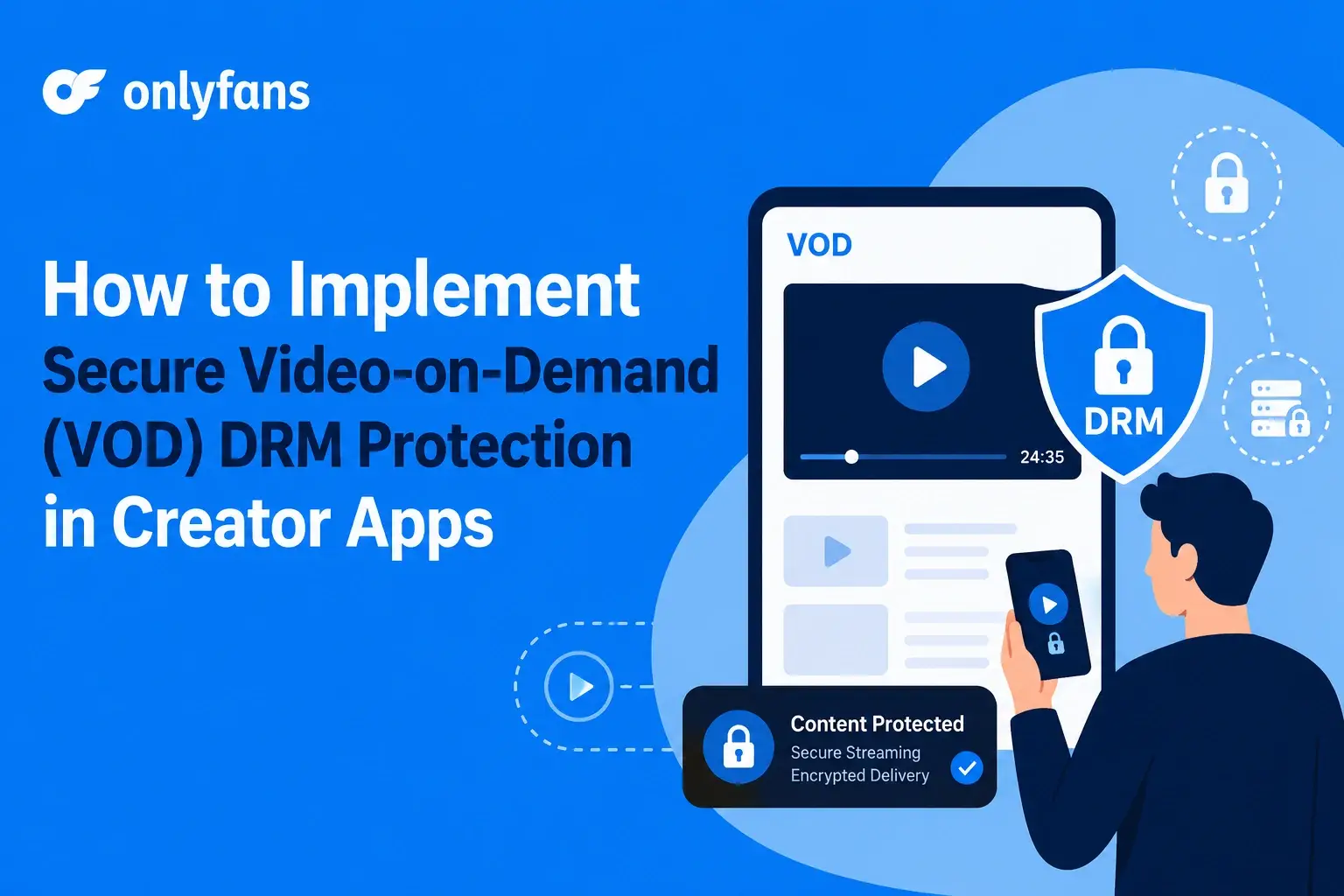
Digital Rights Management protects premium video by encrypting the content, controlling who can get the decryption license, limiting playback conditions, and enforcing platform rules such as subscription status, PPV purchase, device limits, session expiry, and geographic access. Widevine, FairPlay, and PlayReady are the three major DRM systems used across Android, Chrome, Apple devices, Windows, Edge, smart TVs, and modern streaming ecosystems. Google describes Widevine as a content protection system for premium media, Apple positions FairPlay Streaming as a way to secure streaming media through HLS, and Microsoft PlayReady is designed to protect digital content from unauthorized usage while enforcing policies such as expiration and output restrictions.
For Miracuves, the real founder question is not “What is DRM?” The better question is: How do you design secure creator app infrastructure so premium videos remain monetization-ready, access-controlled, and harder to pirate at scale?
Why Creator Platforms Need DRM Protection
Creator apps operate differently from generic OTT apps. An OTT platform usually protects studio-owned movies, shows, or sports content. A creator platform protects thousands of individual creators, each with their own content library, audience, pricing, and monetization rules.
That changes the security problem.
In a creator app, one leaked video can affect a creator’s trust in the platform. A subscriber sharing paid content outside the app can damage creator earnings. A PPV buyer recording or downloading a locked video can weaken the value of the entire monetization model. For adult creator platform software, the stakes are even higher because privacy, content ownership, takedown workflows, and creator confidence directly influence platform growth.
Creator platforms need DRM protection because premium content usually sits behind one of these access rules:
- Monthly subscription
- PPV unlock
- Paid message attachment
- Limited-time access
- Creator-specific fan club
- Region-specific availability
- Device-limited playback
- Offline viewing with expiry
- Refund-sensitive access removal
Without DRM, the video may still be hidden behind login, but the media file itself can remain vulnerable once the playback URL is exposed. Signed URLs help reduce link sharing, but they do not encrypt the video or control decryption keys. DRM adds a deeper layer by making the video file unusable without a valid license.
The strongest creator platforms treat DRM as part of the monetization engine, not just a security feature.
How VOD DRM Actually Works in Creator Apps
VOD DRM protection works by separating video delivery from video decryption.
A normal unsecured video flow looks simple: user requests video, server returns video URL, player streams the file. The problem is that once the video URL or MP4 asset is exposed, it may be copied or downloaded.
A DRM-protected flow is different. The video is encrypted before delivery. The player can fetch the encrypted video segments, but it cannot play them until it receives a valid license from the DRM license server. That license is issued only after the backend confirms that the user has the right to view the content.
In a creator app, that validation may include:
- Is the user logged in?
- Is the subscription active?
- Has the user purchased this PPV video?
- Is the creator account active?
- Is the video still published?
- Is the device allowed?
- Has the session expired?
- Is the region allowed?
- Has the user exceeded concurrent stream limits?
- Has the account triggered abuse signals?
The DRM license server does not simply hand out keys. It should work with the platform backend to enforce access rules. Microsoft notes that PlayReady can enforce policies such as expiration dates, security levels, and output restrictions, while Apple’s FairPlay Streaming protects playback by encrypting content and securely exchanging keys across Apple platforms.
Understanding Widevine, FairPlay, and PlayReady
Most creator platforms that want serious DRM protection use a multi-DRM approach. That means they support different DRM systems depending on the user’s device, browser, and playback environment.
| DRM System | Common Platform Coverage | Typical Creator App Use |
|---|---|---|
| Widevine | Android, Chrome, many smart TVs | Android creator app playback, Chrome web playback |
| FairPlay | iOS, iPadOS, macOS Safari, tvOS | iPhone, iPad, Safari, Apple TV playback |
| PlayReady | Windows, Edge, Xbox, many smart TVs | Windows browser, smart TV, console, premium OTT-style playback |
Google’s Widevine documentation describes Widevine as Google’s content protection system for premium media. Apple’s FairPlay Streaming is designed to secure streaming media through HLS on Apple platforms. Microsoft PlayReady supports controlled digital media access and can enforce provider-defined rules.
Widevine L1 vs L3 for Creator Apps
Widevine has different security levels. In simple terms, L1 uses hardware-backed protection and is generally preferred for higher-value HD or premium content. L3 is software-based and offers weaker protection. Bitmovin’s developer documentation explains that Widevine L1 performs decryption and processing inside a Trusted Execution Environment, while L3 performs decryption and processing in software.
For creator platforms, this matters because not all devices offer the same protection. A founder may decide:
- Allow HD playback only on stronger security devices.
- Restrict downloads on lower-trust devices.
- Use watermarking more aggressively for L3 playback.
- Limit concurrent sessions for premium creator content.
- Use different rules for free previews, subscriber videos, and high-value PPV videos.
A practical creator platform does not need Netflix-level rules from day one, but it should be designed so stronger policies can be added later.
Best Tech Stack for DRM-Based Creator Apps
A founder does not need to build every DRM component from zero. Most secure creator platforms combine cloud services, DRM providers, media packaging tools, backend authorization, and app-level playback libraries.
Recommended Stack for Secure VOD DRM
| Layer | Recommended Options | Purpose |
|---|---|---|
| Video storage | AWS S3 or equivalent object storage | Store encrypted VOD assets |
| Transcoding | AWS MediaConvert, Bitmovin, or cloud encoding pipeline | Create adaptive bitrate video |
| Packaging | AWS MediaConvert, Shaka Packager, Bento4 | Create HLS/DASH outputs |
| DRM provider | BuyDRM, EZDRM, Axinom, castLabs, or custom DRM integration | License and key management |
| CDN | AWS CloudFront or similar CDN | Deliver encrypted segments |
| Access control | Signed URLs, signed cookies, tokenized playback URLs | Limit unauthorized CDN access |
| Backend | Node.js, NestJS, Laravel, or similar | Validate users, purchases, subscriptions |
| Cache/session | Redis | Manage playback sessions and device limits |
| Web player | Shaka Player, Bitmovin Player, THEOplayer, Video.js integrations | DRM playback on browsers |
| Android playback | ExoPlayer / Media3 | Widevine playback on Android |
| iOS playback | AVFoundation / AVPlayer | FairPlay playback on Apple devices |
| App framework | Flutter, React Native, native apps | Cross-platform creator app experience |
Shaka Packager supports Widevine and PlayReady key fetching, raw keys, and multiple DRM protection systems. Android’s ExoPlayer uses Android’s MediaDrm API for DRM-protected playback, while Apple documents FairPlay Streaming as the key delivery method for HLS protection on Apple platforms.
For Miracuves creator app builds, the right stack depends on the business model. A startup validating a creator niche may begin with managed DRM services and signed CDN delivery. A larger subscription platform may need advanced multi-DRM orchestration, forensic watermarking, device fingerprinting, and more detailed admin controls.
Read more : The Future Beyond OnlyFans: Creator : Led Platforms, Fan Ownership, and AI Monetization
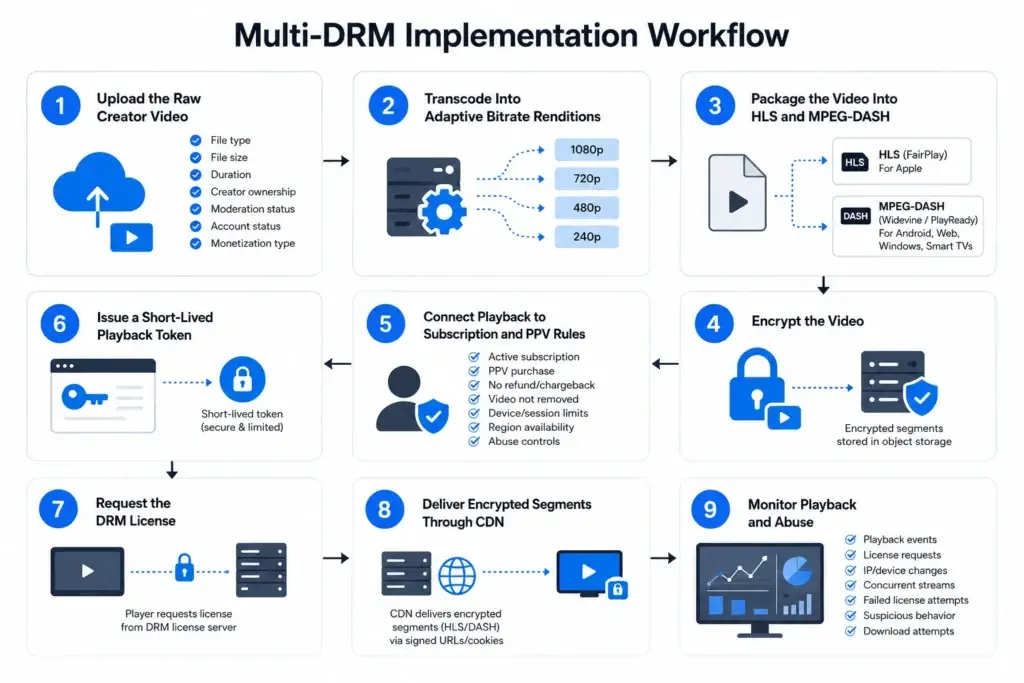
Multi-DRM Implementation Workflow
A multi-DRM workflow allows one creator platform to support protected playback across Android, iOS, web browsers, and smart TVs.
Step 1: Upload the Raw Creator Video
The creator uploads a video from the creator dashboard. The backend stores the raw file in a secure temporary bucket and creates a processing job.
Important checks include:
- File type
- File size
- Duration
- Creator ownership
- Moderation status
- Account status
- Monetization type: free, subscriber-only, PPV, private message, bundle
Step 2: Transcode Into Adaptive Bitrate Renditions
The platform transcodes the original video into multiple resolutions such as 240p, 480p, 720p, and 1080p. This helps users stream based on device capability and network conditions.
For creator platforms, adaptive bitrate is important because fans may access content from mobile networks, tablets, desktops, and international regions.
Step 3: Package the Video Into HLS and MPEG-DASH
Apple ecosystems commonly use HLS with FairPlay. Android and Chrome commonly support MPEG-DASH with Widevine. Windows and some smart TV environments may use PlayReady.
A practical implementation often generates:
- HLS stream for Apple/FairPlay playback
- MPEG-DASH stream for Widevine and PlayReady playback
- CMAF-based packaging where supported for operational efficiency
AWS MediaConvert’s SPEKE support documentation includes DRM and container support considerations, including compatibility between output groups and DRM systems.
Step 4: Encrypt the Video
The packager encrypts the video segments using keys from the DRM/key provider. The encrypted files are stored in object storage. Even if someone accesses the file, it is not useful without a valid license.
Step 5: Connect Playback to Subscription and PPV Rules
This is the creator economy layer most generic DRM content misses.
Before issuing a license, the backend should verify:
- Active subscription to creator
- Successful PPV purchase
- No refund or chargeback restriction
- Creator has not removed the video
- User has not exceeded device or session limits
- Video is available in the user’s region
- User has not triggered abuse controls
Step 6: Issue a Short-Lived Playback Token
The backend generates a short-lived playback token. This token should represent the user, video, creator, session, device, and purchase state. It should expire quickly and should not expose sensitive information.
Step 7: Request the DRM License
The player requests the license from the DRM license server. The request includes authorization data, usually through headers, tokens, or backend-mediated license proxy logic.
Step 8: Deliver Encrypted Segments Through CDN
The CDN delivers encrypted HLS/DASH segments. Signed URLs or signed cookies can limit access to users with valid session permissions.
Step 9: Monitor Playback and Abuse
The platform should log playback events, license requests, IP/device changes, concurrent streams, suspicious behavior, repeated failed license requests, and unusual download attempts.
How Netflix-Like Platforms Prevent Piracy and What Creator Apps Can Learn
No video platform can guarantee zero piracy. Even major streaming services face screen recording, camera recording, credential sharing, and device-level attacks. The founder goal is to make piracy harder, traceable, and less scalable.
Creator platforms can learn from OTT-grade security patterns without overbuilding from day one.
1. DRM License Expiration
Licenses should not last forever. Subscription videos may use short license windows. Offline downloads may use time-bound licenses that expire when subscription access ends.
2. Device Limits
A user should not be able to log into unlimited devices and distribute access. Device management helps reduce account sharing and suspicious playback behavior.
3. Concurrent Session Limits
Limit how many streams a user can run at the same time. This matters for subscription creator apps where one account may otherwise be shared among multiple viewers.
4. Forensic Watermarking
Watermarking adds user-specific or session-specific identifiers to playback. If a leaked video appears outside the platform, the operator has a better chance of tracing the source.
5. Geo-Blocking
Some creators may restrict content by region. Geo-rules can also support legal, licensing, or business restrictions.
6. Output Restrictions
Some DRM systems support output protection rules. For example, high-value playback may be restricted on insecure displays or unsupported device paths.
7. Anti-Download Restrictions
DRM can control offline licenses, but not every creator app should offer offline downloads. Adult creator platform software and private subscription communities often need tighter controls because downloaded content increases leak risk.
8. Admin Abuse Controls
The admin dashboard should allow platform operators to suspend access, revoke sessions, remove devices, block users, disable leaked content, and review suspicious activity.
DRM vs Signed URLs vs Watermarking: What Should Creator Apps Use?
Many startups confuse DRM, signed URLs, and watermarking. They are related, but they solve different problems.
| Protection Method | What It Does | What It Does Not Do | Best Use |
|---|---|---|---|
| DRM | Encrypts video and controls license-based playback | Does not fully stop camera recording or all screen recording | Premium VOD, subscriptions, PPV videos |
| Signed URLs | Limits access to video URLs for a specific time/session | Does not encrypt playable video by itself | CDN access control and link sharing prevention |
| Watermarking | Adds visible or invisible user/session identity to video | Does not stop playback or encryption bypass by itself | Leak tracing and piracy deterrence |
| Token validation | Confirms user/session/purchase before playback | Needs integration with DRM and CDN to be effective | Subscription and PPV authorization |
| Screen recording detection | Attempts to detect or block recording on supported devices | Not reliable across all devices and platforms | Extra protection layer, especially on mobile apps |
Founder Decision Signals
Speed
If you need to launch quickly, start with managed DRM, signed CDN delivery, and subscription-aware playback validation instead of building a custom DRM server from zero.
Cost
DRM cost depends on encoding volume, CDN bandwidth, license requests, DRM provider fees, storage, and player integrations. Cost should be planned around expected video consumption, not only app features.
Scalability
A creator app should separate upload, processing, playback, license validation, and analytics so the platform can scale creator libraries without breaking user experience.
Market Fit
If creators are charging for premium videos, DRM becomes part of creator trust. The more private or high-value the content, the stronger the protection model should be.
Common DRM Mistakes Startups Make
Mistakes Founders Should Avoid
Relying Only on Signed URLs
Signed URLs help protect CDN access, but they do not provide full DRM protection. If the video file is not encrypted, a determined user may still capture or reuse the stream.
Ignoring License Validation Logic
DRM becomes weak when licenses are issued without checking subscription, PPV purchase, device limits, session validity, and creator publishing status.
Using Insecure MP4 Delivery for Premium Videos
Direct MP4 delivery may be acceptable for free previews, but it is risky for paid creator videos because files can be downloaded and redistributed more easily.
Skipping Mobile DRM Planning
Many creator apps are mobile-first. Ignoring Widevine on Android and FairPlay on iOS can create inconsistent protection across the platforms where users actually watch videos.
Not Combining DRM With Watermarking
DRM controls playback access, while watermarking improves leak accountability. Premium creator platforms often need both.
Cost of Implementing DRM in Creator Platforms
DRM cost is not one single line item. It depends on the video pipeline, DRM provider, usage volume, cloud setup, app platforms, and content protection rules.
A realistic cost model includes:
| Cost Area | What Affects It |
|---|---|
| Encoding | Number of videos, resolutions, bitrate ladder, processing frequency |
| Storage | Size of encrypted video library and backup rules |
| CDN | Playback traffic, regions, bandwidth, cache efficiency |
| DRM provider | License requests, DRM systems supported, service plan |
| Player licensing | Web, iOS, Android, smart TV support requirements |
| Backend development | Subscription validation, PPV logic, license proxy, token rules |
| Watermarking | Visible, invisible, forensic, or session-based watermarking |
| Monitoring | Playback analytics, abuse detection, logs, alerts |
| App integration | Flutter, React Native, native Android, native iOS, web |
| Support and maintenance | DRM updates, device compatibility, browser changes |
Founders should avoid treating DRM as an afterthought. Retrofitting DRM after launching thousands of unsecured videos can be more complex than building the right video pipeline from the start.
Miracuves’ ready-made and white-label approach can help founders move faster because the product foundation can include creator workflows, monetization logic, admin control, and secure video architecture planning. Final pricing depends on features, integrations, tech stack, customization, and launch scope.
Future of DRM in Creator Economy Apps
Creator platforms are moving toward stronger protection because creator revenue models are becoming more sophisticated. Subscription content, private communities, paid videos, and fan-based memberships all require better control over access.
The future of DRM in creator apps will likely include:
- AI-based piracy detection
- Automated leak monitoring
- Forensic watermarking at scale
- Device-risk scoring
- Edge-based security controls
- Secure offline viewing with expiring licenses
- Creator-level protection settings
- Dynamic license rules based on content value
- Stronger admin investigation dashboards
- Blockchain-style ownership records for premium digital content
For adult creator platform software, privacy-conscious design will matter even more. Platforms will need better content ownership records, stronger access logs, creator-controlled availability, takedown workflows, secure payouts, and moderation controls.
The strongest creator platforms will not rely on one security feature. They will combine DRM, identity, monetization, content moderation, payment controls, and admin visibility into one secure platform foundation.
Miracuves Perspective: Build Creator Apps With Security Built Into the Product Foundation
A secure creator app is not just a video player with DRM switched on. It is a connected product system where user roles, creator earnings, subscriptions, content access, payment status, device limits, and video infrastructure all work together.
Miracuves helps founders build white-label creator and video streaming platforms with business-ready workflows such as creator profiles, premium content libraries, subscription access, PPV monetization, admin dashboards, and scalable video delivery planning. For founders exploring OnlyFans-like creator platforms, video streaming app development, or subscription-based creator ecosystems, the goal should be to launch faster without weakening long-term control.
Final Thoughts
For creator platforms, DRM is not only about stopping piracy. It is about protecting subscriptions, PPV purchases, creator confidence, platform reputation, and long-term monetization.
The safest approach is layered. Use DRM to protect encrypted playback. Use signed URLs to control delivery. Use backend validation to enforce subscription and PPV rules. Use watermarking to improve accountability. Use admin dashboards to monitor abuse and respond quickly.
The creator economy is moving toward more premium, private, and high-value video experiences. Founders who build secure VOD infrastructure early will be better positioned to earn creator trust, reduce content leakage, and scale premium video monetization with more control.
FAQs
What is VOD DRM protection in creator apps?
VOD DRM protection is a security approach that encrypts creator videos and allows playback only after the user receives a valid license. In creator apps, the license should depend on subscription status, PPV purchase, device rules, session validity, and platform access controls.
Is DRM necessary for adult creator platform software?
Yes, DRM is strongly recommended for adult creator platform software because premium videos are often private, paid, and creator-owned. DRM helps reduce unauthorized access by encrypting the video and controlling playback licenses, especially when combined with watermarking, signed URLs, and abuse monitoring.
Which DRM system should a creator app use?
Most serious creator apps should use a multi-DRM setup. Widevine is commonly used for Android and Chrome, FairPlay for Apple devices and Safari, and PlayReady for Windows, Edge, and many smart TV environments.
What is better: DRM or signed URLs?
DRM and signed URLs solve different problems. DRM encrypts the video and controls playback licenses. Signed URLs limit access to CDN resources for a specific time or session. Premium creator platforms should usually use both.
Can DRM protect PPV creator videos?
Yes. DRM can protect PPV videos when the backend validates that the user has purchased the content before issuing a playback license. This is especially useful for paid messages, locked videos, premium drops, and limited-time access content.
How much does DRM implementation cost?
DRM cost depends on encoding volume, CDN bandwidth, DRM provider fees, license request volume, player SDKs, backend development, watermarking, and mobile/web integrations. Founders should request a quote based on their video volume, monetization model, and platform scope.