


Key Takeaways
What You’ll Learn
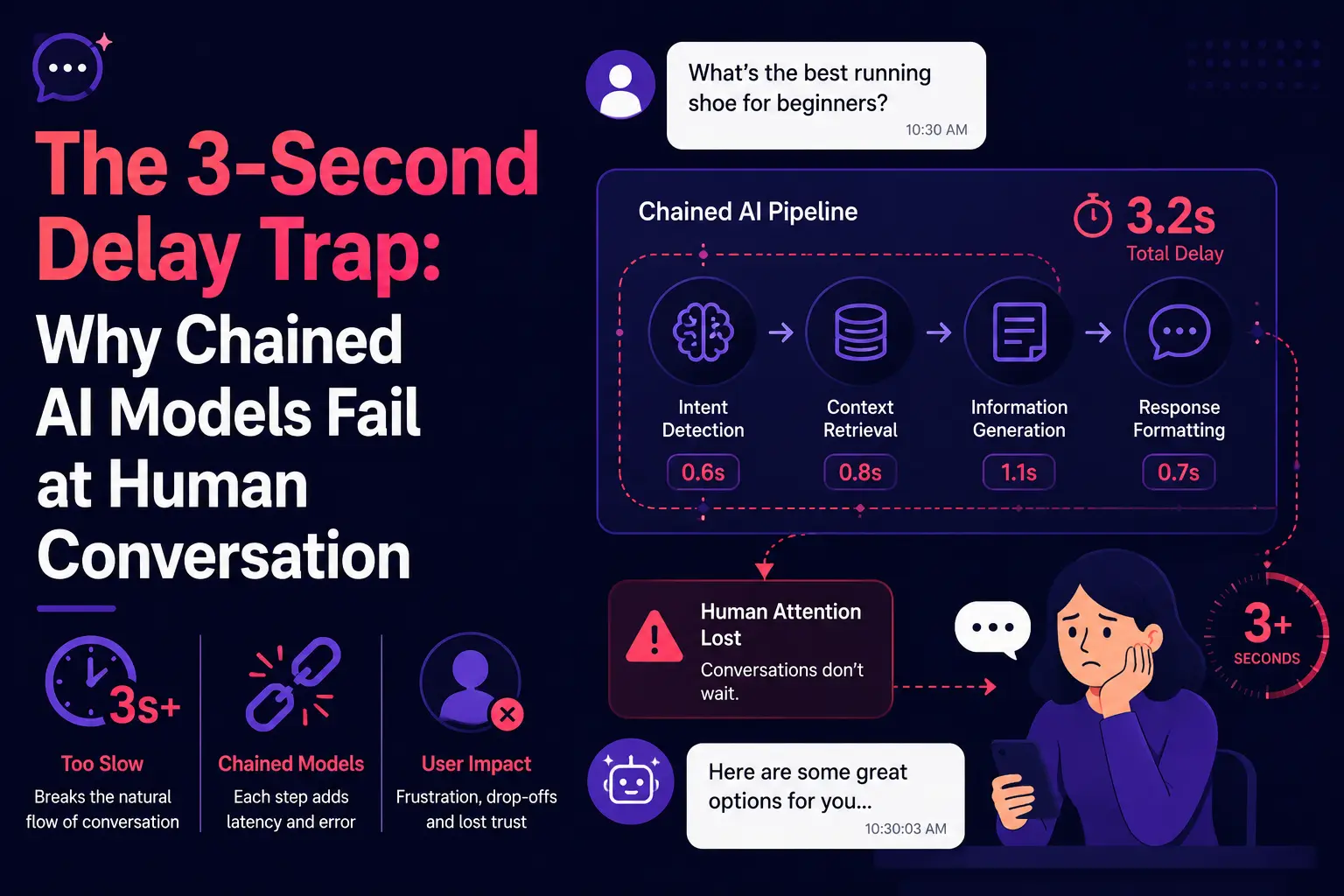
- A three-second pause feels unnatural during a live voice conversation.
- Delay builds across multiple stages such as transcription, reasoning, tools, speech, and playback.
- Sequential AI chains often sound robotic because every service waits for the previous one.
- Streaming improves response speed by moving partial output between components earlier.
- The main lesson is to optimize the full conversation, not only the language model.
Stats That Matter
- Latency can come from seven layers: network, turn detection, speech recognition, reasoning, tools, speech generation, and playback.
- Streaming cascades can begin audio sooner without waiting for every stage to finish.
- Average response time can hide problems such as long-tail delays, retries, and slow tool calls.
- Useful metrics include time-to-first-audio, interruption-stop time, tool latency, and task completion.
- Testing should include weak networks, noise, accents, corrections, interruptions, and long conversations.
Real Insights
- Silence feels like failure in voice apps because users cannot see a typing indicator.
- Barge-in support is essential so users can interrupt and correct the assistant naturally.
- Native audio is not always faster than a well-optimized streaming pipeline.
- Tool calls can become the slowest layer when the assistant uses CRM, booking, search, or payment systems.
- For founders, build an AI voice assistant around streaming, interruption handling, low-latency tools, recovery, and end-to-end monitoring.
A three-second pause does not sound catastrophic on a product roadmap.
Inside a voice conversation, however, it can feel enormous.
The user asks a question. Silence follows. They wonder whether the system heard them. They begin speaking again just as the assistant starts answering. Both sides overlap, the assistant loses context, and the conversation becomes awkward.
The underlying language model may be intelligent. The voice may sound polished. The transcription may be accurate. Yet the product still feels robotic because its components do not behave as one real-time conversational system.
After years of building digital products and navigating major shifts in software architecture, one lesson becomes clear: users do not experience your models individually. They experience the delay, interruptions, mistakes, and recovery behaviour of the complete system.
That is why AI voice assistant latency should not be treated as a minor optimization task. Whether you are building a ChatGPT clone, Gemini clone, or another real-time AI voice product, latency is one of the core product decisions that determines whether the experience feels responsive and natural or slow and artificial.
The Voice Bot May Be Intelligent—But the Pause Makes It Feel Broken
Text interfaces are forgiving.
When a chatbot takes several seconds to answer, the interface can display a typing indicator. The user understands that a response is being generated.
Voice is different. Silence has conversational meaning.
A pause can signal uncertainty, disconnection, confusion, hesitation, or the end of a call. When an AI voice assistant pauses for too long, users do not perceive an infrastructure pipeline. They perceive a conversational failure.
The problem becomes more visible in situations such as:
- Customer-support calls involving frustrated users
- Appointment booking with dates and corrections
- Sales qualification where the prospect changes direction
- Healthcare or field-service intake involving specialized terms
- Voice commerce where users revise quantities or products
- In-car assistants where attention must remain on the road
Realtime sessions are specifically designed for live audio interactions that require low latency, while request-based audio processing is better suited to bounded recordings and non-live tasks.
The architectural mistake is assuming that a voice assistant is simply a chatbot with a microphone attached.
It is not.
A credible voice product must listen, interpret, decide, respond, monitor the user, stop when interrupted, and preserve context—all while the conversation is still moving.
Read more: Most Profitable Multimodal AI platform Apps to Launch in 2026
The Frankenstein Build: Why Chained APIs Sound Like Robots
A common voice-assistant prototype connects three separate components:
- A speech-to-text service converts the user’s audio into words.
- A language model reads those words and produces a text answer.
- A text-to-speech service converts the answer into synthetic audio.
On an architecture diagram, this looks clean.
In an actual conversation, every handoff can introduce delay.
The speech recognizer may wait to decide whether the user has finished. The transcript then travels to another service. The language model waits for context, tools, or retrieved information. The generated text moves to the speech engine. The audio is synthesized, buffered, transmitted, and played.
This creates what we call Frankenstein latency: no individual component appears disastrously slow, but the stitched-together product feels unnatural because small delays accumulate across the chain.
Where the delay accumulates
A voice assistant’s latency budget may include:
| Latency layer | What happens | Why it matters |
|---|---|---|
| Network transport | Audio travels between the user, media server, model providers, and application services | Geographic distance and unstable networks create jitter |
| Turn detection | The system decides whether the user has finished speaking | Waiting too long feels slow; stopping too early cuts the user off |
| Speech recognition | Audio is converted into partial or final text | Batch transcription delays the entire pipeline |
| Language reasoning | The model interprets intent and creates a response | Large prompts, retrieval, and tool calls increase processing time |
| Speech generation | Text becomes audio | Waiting for a complete answer prevents early playback |
| Application logic | CRM, database, booking, payment, or search operations run | External tools can become the slowest layer |
| Playback control | Generated audio is buffered and played to the user | Poor cancellation makes interruption handling fail |
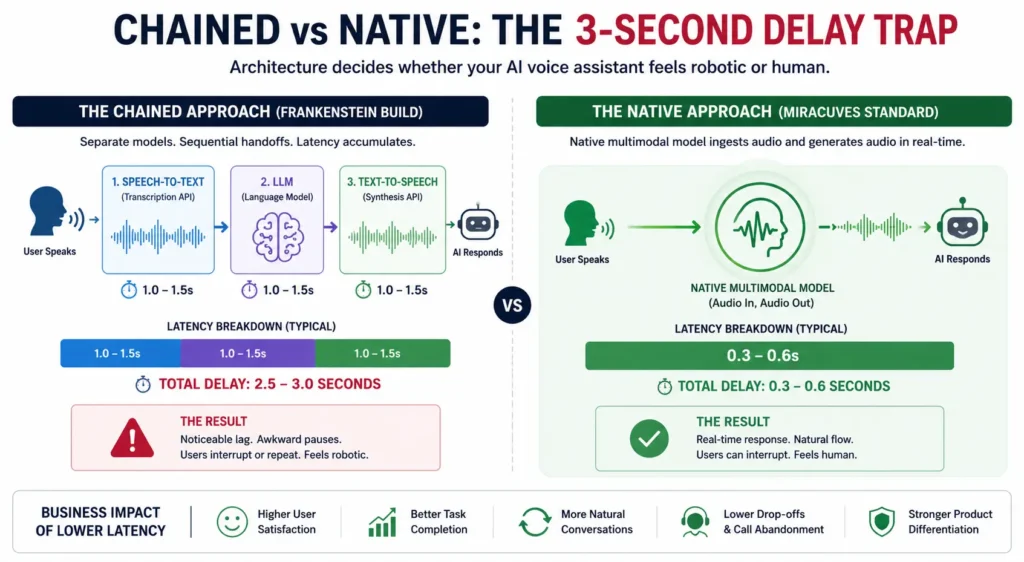
The fatal mistake is not using separate components. It is forcing them to operate sequentially.
Research published in 2026 demonstrated that a streaming cascaded pipeline could achieve a median time-to-first-audio below one second by streaming output between speech recognition, language reasoning, and speech generation. The same research also found that one evaluated native model was substantially slower. This shows that the real enemy is often serial execution without streaming, rather than modularity itself.
Why average latency hides the real product problem
A product team may report an acceptable average response time while users still complain that the assistant feels slow.
That happens because average latency hides:
- Long-tail delays
- Slow tool calls
- Incorrect endpoint detection
- Audio buffering
- Network variation
- Delayed cancellation
- Repeated retries
- Recovery after interruptions
For founders, the correct question is not:
“How fast is the language model?”
It is:
“How quickly does the user hear a relevant response under real network conditions, with retrieval and business integrations running?”
That is an end-to-end product metric.
The Interruption Problem: Humans Do Not Wait for Perfect Turns
Human conversation is not a sequence of perfectly separated audio files.
People interrupt. They correct themselves. They say “actually” halfway through a sentence. They pause to think. They use filler words. They start speaking before the other person has completely finished.
Consider this exchange:
User: “Book a meeting with Sarah tomorrow at—actually, make it Thursday afternoon.”
A primitive voice bot may treat “tomorrow” as final, initiate a booking operation, and miss the correction.
A stronger conversational system recognizes that the user is still shaping the request. It maintains a live understanding of the utterance, delays irreversible action, and updates intent when the correction arrives.
Why basic voice activity detection is not enough
Voice activity detection can identify whether sound is present. It cannot always determine what the sound means.
A short pause may indicate:
- The end of a sentence
- A comma-like hesitation
- The user searching for a word
- Background noise
- A connection issue
- An invitation for the assistant to respond
An overly aggressive endpoint detector interrupts the user. An overly cautious detector creates silence.
Natural interaction therefore requires semantic turn detection in addition to acoustic detection. The system must evaluate the evolving meaning of the utterance rather than relying only on silence duration.
What true barge-in requires
“Barge-in” means the user can interrupt the assistant while it is speaking.
Implementing it properly requires the system to:
- Detect new speech while generated audio is playing
- Distinguish the user’s voice from echo or background audio
- Stop playback immediately
- Cancel unneeded generation
- Record what the user heard before the interruption
- Preserve the relevant conversational state
- Interpret the new instruction
- Resume without repeating outdated information
Native and end-to-end speech systems are well suited to turn-taking, backchanneling, and interruption because they operate directly on the conversational audio stream. Hybrid research is also exploring systems that combine a fast speech path with a more capable reasoning path.
This is why the interruption problem is not solved by choosing a more realistic synthetic voice. It requires an architecture that treats listening and speaking as concurrent processes.
Read more: Revenue Model for Multimodal AI Platform: How to Actually Make It Rain
Native Audio Ingestion: A Better Foundation for Fluid Conversation
A native audio model processes the incoming audio signal directly rather than requiring a finalized transcript before reasoning begins.
This can reduce handoffs and preserve signals that may disappear during transcription, including:
- Tone
- Pace
- Hesitation
- Emphasis
- Emotion
- Non-verbal audio
- Pronunciation
- Conversational rhythm
A transcript can tell the system what words were spoken. The original audio can provide clues about how they were spoken.
That distinction matters when a customer is uncertain, angry, hurried, joking, or attempting to interrupt.
Native speech models can also support full-duplex interaction, where the system listens while speaking instead of switching rigidly between listening mode and response mode. Research systems have reported practical full-duplex latency below one second, demonstrating the potential of audio-native interaction.
What native audio preserves that transcription can lose
Suppose a caller says:
“That is exactly what I needed.”
The same words can express satisfaction, sarcasm, impatience, or relief.
A text-only reasoning stage receives the sentence. A native audio model may also receive the vocal cues needed to understand the likely intent.
For applications involving customer experience, coaching, support, education, accessibility, or emotionally sensitive conversations, those cues can materially affect the response.
Why native audio is not automatically production-ready
Native audio should not be treated as a magic switch.
A production system may still require:
- Business-data retrieval
- Permission checks
- Tool calling
- Deterministic workflows
- Conversation logs
- Moderation
- Human escalation
- Cost controls
- Regional deployment
- Security policies
- Monitoring and evaluation
Cascaded architectures remain attractive because their intermediate transcripts are inspectable and can support text-based guardrails, debugging, analytics, and compliance workflows. Industry architecture comparisons therefore emphasize a trade-off between conversational naturalness and operational control.
The correct decision is not “native is always good” or “cascaded is always bad.”
The decision depends on the interaction.
Native, Cascaded, or Hybrid: Which Architecture Should a Founder Choose?
Voice-Agent Architecture Decision Table
| Architecture | Strongest Advantage | Main Trade-Off | Best Fit |
|---|---|---|---|
| Serial cascade | Simple to prototype | Accumulated delay and weak interruption handling | Non-live demos, recordings, or low-urgency tasks |
| Streaming cascade | Control, inspectability, and model flexibility | Requires careful orchestration across components | Enterprise workflows, tool-heavy agents, regulated operations |
| Native speech-to-speech | Natural timing, prosody, and interruption behaviour | May provide less visibility or deterministic control | Conversational companions, live support, coaching, voice-first products |
| Hybrid architecture | Balances fast interaction with deeper reasoning | Higher system complexity | Products needing fluid conversation and sophisticated business actions |
Founder Decision Signals
Conversation Type
Choose native or hybrid architecture when interruptions, emotion, pacing, and fluid turn-taking are central to the product experience.
Operational Control
Choose an optimized streaming cascade when transcripts, deterministic tools, detailed logs, or component-level guardrails are essential.
Latency Budget
Measure time-to-first-audio, interruption-stop time, tool latency, and long-tail performance instead of relying on a model provider’s headline speed.
Product Defensibility
The moat is rarely the voice API alone. It comes from orchestration, workflow knowledge, memory, integrations, evaluation, and recovery behaviour.
The Miracuves Standard for Real-Time AI Voice Products
At Miracuves, we do not evaluate a voice assistant by asking whether it can produce spoken answers.
That is the minimum requirement.
The stronger questions are:
- Can it begin responding without an unnatural pause?
- Can the user interrupt it?
- Can it stop speaking immediately?
- Can it understand a mid-sentence correction?
- Can it preserve the conversation after a tool call?
- Can it recover when transcription or endpoint detection fails?
- Can the product team observe latency across every layer?
- Can the architecture support future model changes?
For highly conversational products, Miracuves prioritizes native multimodal or hybrid interaction patterns that process live audio as an evolving stream. For workflow-heavy systems, an optimized streaming cascade may provide the control, auditability, and integration flexibility the business requires.
The standard is not loyalty to one model architecture.
The standard is a voice product that responds at human speed while retaining the controls required by the operating model.
Miracuves already explores related real-time architecture principles in its guide to building a real-time multimodal support assistant. Teams planning broader multimodal products can also review the multimodal AI chatbot development guide and the guide to building a multimodal AI platform.
Read more: How to Build a Profitable Multimodal AI Platform: Turning Intelligence into Income
Mistakes Founders Should Avoid
Mistakes Founders Should Avoid
Optimizing Each Model Instead of the Entire Conversation
A fast speech recognizer cannot compensate for slow endpoint detection, blocking tool calls, audio buffering, or delayed playback cancellation.
Testing Only in Quiet Demo Conditions
Production testing should include background noise, weak networks, accents, interruptions, corrections, long calls, repeated tool use, and ambiguous pauses.
Treating Barge-In as an Optional Feature
Without interruption handling, users must adapt their natural speaking behaviour to the software. That is the opposite of a human-like experience.
Assuming Native Audio Solves Every Enterprise Requirement
Native speech may improve conversational flow, but the product still needs permissions, observability, workflow controls, secure integrations, escalation logic, and reliable tool execution.
Building Around a Single Provider’s Demo
A defensible product should isolate provider-specific dependencies where practical and maintain an evaluation layer for latency, quality, cost, and failure recovery.
Conclusion:
The three-second delay trap is not simply a speed issue.
It reveals whether a team designed a real conversation system or connected several intelligent services and hoped they would feel human when combined.
A basic serial chain may be enough to prove that audio can enter and speech can come out. It is rarely enough to create a product people want to speak with repeatedly.
Founders exploring AI and automation solutions should evaluate voice architecture based on natural turn-taking, streaming behaviour, interruption handling, tool latency, context recovery, observability, and business control.
Native audio offers a compelling foundation for fluid speech because it reduces translation boundaries and preserves more of the original signal. Optimized streaming cascades remain valuable where inspection, control, and complex workflow execution matter. In many serious products, the strongest answer will be a carefully designed hybrid.
The competitive advantage does not come from adding a voice API.
It comes from engineering the entire interaction so the intelligence arrives at the speed of conversation.
Ready to build a low-latency, interruptible AI voice assistant? Contact us to discuss the right native, streaming, or hybrid architecture for your product.
FAQs
Why do AI voice assistants sometimes take three seconds to respond?
The delay usually accumulates across turn detection, transcription, language-model reasoning, external tool calls, speech synthesis, network transport, and playback buffering. A strictly sequential pipeline must complete several of these stages before the user hears anything.
What is a cascaded AI voice-agent architecture?
A cascaded architecture uses separate components for speech recognition, language reasoning, and speech generation. It is commonly represented as speech-to-text → LLM → text-to-speech. Cascades provide flexibility and inspectable intermediate text, but poor orchestration can create noticeable latency.
Are native speech-to-speech models always faster?
No. Some native models offer excellent conversational timing, while others may be slower than optimized streaming cascades. Performance depends on the model, deployment environment, networking, turn detection, tool use, and audio-delivery architecture.
What is Frankenstein latency?
Frankenstein latency is the accumulated delay created when individually capable AI services are stitched together without effective streaming, concurrency, cancellation, or latency management. Each component may appear fast in isolation, while the complete product still feels slow.
How does an AI voice assistant handle interruptions?
The system must detect the user’s new speech, stop audio playback, cancel irrelevant generation, determine how much of the response was heard, interpret the interruption, update the conversation state, and continue from the revised intent.
What is native audio ingestion?
Native audio ingestion allows a model to process the audio stream directly instead of depending entirely on a finalized text transcript. This can preserve vocal signals such as tone, pace, hesitation, emphasis, and conversational rhythm.
Is native audio better than speech-to-text, LLM, and text-to-speech?
It is often better for highly fluid conversation, but not necessarily for every business workflow. A streaming cascade may be preferable when a product needs detailed transcripts, strict tool controls, component flexibility, or text-based guardrails. Hybrid systems can combine strengths from both approaches.
What should founders measure when testing a voice assistant?
Measure time-to-first-audio, interruption-stop latency, turn-detection errors, task-completion time, tool-call latency, response relevance, long-tail latency, recovery success, and performance under realistic network and noise conditions.