
Key Takeaways
- Cheap delivery scripts often treat menus as static content.
- Out-of-stock items create cancellations and refunds.
- Weak menu sync damages restaurant partner trust.
- POS-aware item updates help prevent invalid orders.
- Restaurant retention depends on operational reliability.
Menu Sync Signals
- Sync item availability from POS or restaurant systems.
- Update sold-out items before customers place orders.
- Track modifier-level stock and combo availability.
- Allow restaurants to pause orders during rush hours.
- Show sync errors and manual changes in admin logs.
Real Insights
- Restaurants blame the platform for bad orders.
- Canceled orders hurt local app reputation quickly.
- Manual menu updates are too slow during peak hours.
- Source code control helps future POS integration.
- Miracuves builds food delivery apps with live menu and vendor workflows.
A food delivery platform does not lose restaurant partners because the app icon looks outdated.
It loses them when the lunch rush is already chaotic, the restaurant has run out of biryani, the POS says the item is unavailable, but your app still lets five customers order it.
That is the moment your platform stops looking like a growth channel and starts looking like an operational liability.
For non-technical founders, restaurant aggregators, and local platform operators, this is one of the most underestimated risks in buying a cheap food delivery script. The demo looks smooth. The customer app opens. Restaurants can upload menus. Drivers can accept orders. The admin panel has enough buttons to feel complete.
But the real test begins when menus change during live service.
Restaurants run out of items. Modifiers change. Combos become unavailable. Kitchen capacity drops. POS data changes faster than a manual restaurant panel can keep up. If your script treats menu availability as a static database field instead of a real-time operational signal, your platform will create cancellations, refunds, support tickets, and angry restaurant partners.
That is the Menu Sync Nightmare.
Miracuves helps founders build food delivery platforms with stronger vendor-side workflows, admin control, and real-time operational logic so the app does not simply “take orders” but supports the restaurant ecosystem behind those orders.
The Hidden Cost of Cached Menus and Manual Updates
Most cheap food delivery scripts are built around one assumption: the restaurant menu is relatively stable.
That assumption is wrong.
A restaurant menu is not just a list of dishes. It is a living operational system. Item availability changes based on ingredient stock, kitchen capacity, preparation time, location, delivery radius, combo rules, pricing, and even staff availability.
A basic script usually stores menu data like this:
| Menu Field | What Cheap Scripts Usually Store | What Real Food Delivery Operations Need |
|---|---|---|
| Item name | Static dish name | POS-linked item identity |
| Price | Fixed platform price | Synced or rule-based price control |
| Availability | Manual on/off toggle | Real-time item status from restaurant/POS |
| Modifiers | Simple add-ons | Modifier-level availability |
| Combos | Static bundle | Dynamic combo logic based on item stock |
| Restaurant status | Open/closed | Open, paused, overloaded, location-specific, kitchen-capacity aware |
The problem is not that cheap scripts have menu pages. Most of them do.
The problem is that they treat the menu as content, not as operations.
When a customer sees “Paneer Tikka Combo” on your app, they assume the restaurant can make it now. If the item was sold out 12 minutes ago but your platform is still showing an old cached menu, the customer does not blame the POS system. They blame your app.
The restaurant also does not blame the database schema.
They blame your platform for sending bad orders.
That is why POS and menu sync cannot be treated as an optional advanced feature. DoorDash’s developer documentation recommends item availability updates to prevent customers from ordering out-of-stock items, while Uber Eats notes that POS inventory integration helps stores maintain accurate stock levels on the delivery platform.
For platform operators, this is the difference between being a reliable restaurant growth partner and being another tablet that causes chaos during peak hours.
Read More: Sub-2 Second Tracking: Load-Testing GPS Delivery Updates on Flutter and Laravel
Why Cheap Delivery Scripts Break During the Lunch Rush
Cheap delivery scripts usually perform well in a controlled demo because the demo does not simulate operational pressure.
A real lunch rush is different.
At 12:45 PM, a restaurant may have:
- 40 dine-in orders
- 18 delivery orders
- Two staff members handling packing
- One item suddenly unavailable
- A delayed supplier delivery
- A kitchen station overloaded
- A manager too busy to log into your app dashboard
If your platform depends on the restaurant manually opening a web panel, finding the item, toggling availability, saving the change, and waiting for cache refresh, the system is already too slow.
By the time the restaurant updates the item, customers may have placed multiple orders for something the kitchen cannot prepare.
This is where the hidden cost appears.
Not in development.
In operations.
Every unavailable item creates a chain reaction:
| Failure Point | Immediate Impact | Business Damage |
|---|---|---|
| Item still visible after stockout | Customer places invalid order | Refund or substitution needed |
| Restaurant rejects order | Customer loses trust | Lower repeat ordering |
| Support team intervenes | Higher manual workload | Increased operating cost |
| Delivery partner waits | Delayed dispatch | Poor driver experience |
| Restaurant receives complaints | Vendor frustration | Higher partner churn |
| App rating drops | Local reputation damage | Harder acquisition |
The founder may think they saved money by buying a low-cost script.
But the restaurant partner pays for it in stress.
The customer pays for it in disappointment.
The platform pays for it in churn.
The Menu Sync Nightmare Explained
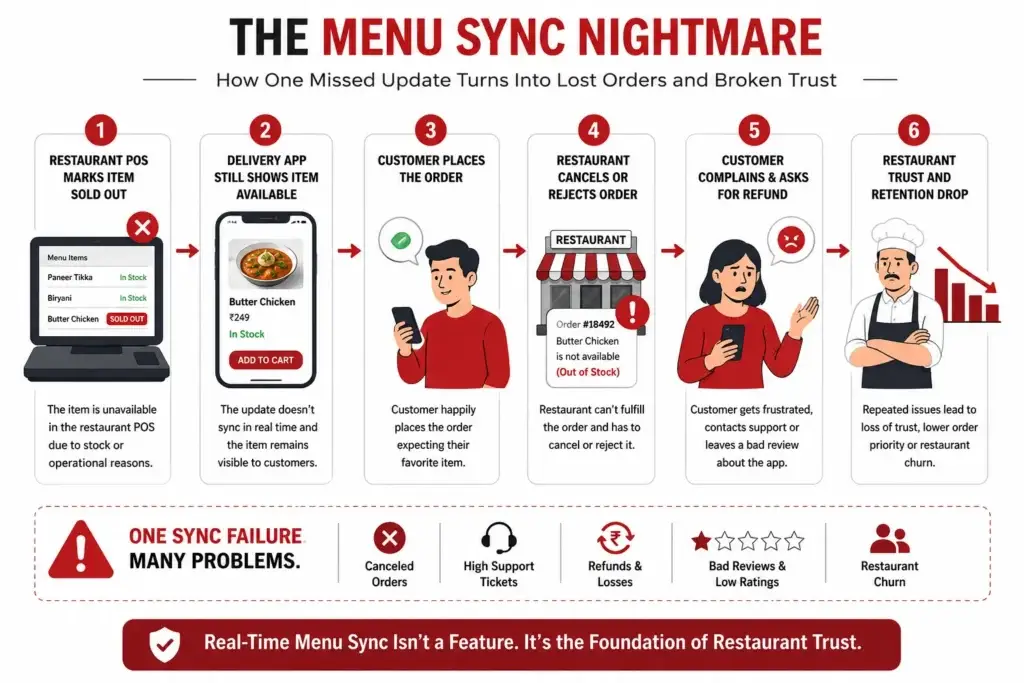
Image Source: AI-generated visual by Miracuves
The Menu Sync Nightmare happens when the food delivery platform, restaurant POS, restaurant dashboard, and customer-facing menu do not share the same version of reality.
A typical broken flow looks like this:
- The restaurant marks an item as sold out in its POS.
- The cheap delivery script does not receive that change.
- The customer app continues showing the item as available.
- The customer orders the item.
- The restaurant rejects or cancels the order.
- The customer contacts support or leaves a bad review.
- The platform operator asks the restaurant to “update the menu manually next time.”
- The restaurant starts questioning whether your platform is worth the trouble.
This is not a UI problem.
It is a data consistency problem.
The platform must know which system is the source of truth. In most serious restaurant operations, the POS or restaurant inventory system is closer to the truth than a separate delivery-script dashboard.
That means your food delivery app should be designed around:
- POS item ID mapping
- Menu version control
- Real-time item status updates
- Modifier-level availability
- Restaurant-level pause controls
- Automated sold-out handling
- Cache invalidation rules
- Admin override logs
- Sync error alerts
- Fallback workflows when POS sync fails
Without these layers, your platform is operating on guesswork.
And guesswork is expensive in food delivery.
Why Canceled Orders Kill Your App’s Local Reputation
Food delivery is hyperlocal. A few bad experiences in one neighborhood can damage your platform faster than a weak ad campaign.
When customers receive cancellations, they do not usually think:
“The restaurant’s POS inventory did not sync properly with the third-party delivery database.”
They think:
“This app is unreliable.”
That perception spreads quickly because food ordering is time-sensitive. A canceled order is not like a delayed ecommerce delivery. The customer is hungry now. They may be at work, hosting guests, feeding a family, or ordering during a short lunch break.
A cancellation means they lose time, trust, and patience.
Restaurants feel the damage too. They may receive angry calls, bad reviews, or blame for mistakes caused by your platform’s technical weakness. If the restaurant already works with larger platforms, they will compare your reliability against those systems.
That is a dangerous comparison for a new platform operator.
You may win a restaurant partner with lower commission.
You keep them with operational reliability.
The Restaurant Partner Does Not Care That Your Script Was Affordable
This is where many non-technical founders misread the market.
Restaurants do not judge your platform by how affordable your software was. They judge it by whether it makes their day easier or harder.
A top-tier restaurant partner wants:
- Accurate menus
- Fewer cancellations
- Clear order acceptance
- Fast kitchen communication
- Modifier control
- Easy sold-out handling
- Reliable payout records
- Low support friction
- Visibility into platform orders
- Control during peak demand
If your platform creates additional work, the restaurant will either pause your app, deprioritize your orders, or leave completely.
That is why “restaurant onboarding” is not the real challenge.
Restaurant retention is.
And retention depends heavily on the operational quality of the restaurant panel, POS sync, menu logic, and admin control layer.
Founder Decision Signals Speed
A fast launch only matters if the restaurant-side workflows can survive real order pressure. Do not confuse quick deployment with operational readiness.
Cost
A low-cost script can become expensive if it increases refunds, support tickets, canceled orders, and restaurant churn.
Scalability
Menu sync must work across restaurants, branches, item modifiers, kitchen status, and POS systems as the platform grows.
Market Fit
Restaurant partners stay when your platform reduces operational pain. They leave when your app creates avoidable chaos.
Speed
A fast launch only matters if the restaurant-side workflows can survive real order pressure. Do not confuse quick deployment with operational readiness.
Cost
A low-cost script can become expensive if it increases refunds, support tickets, canceled orders, and restaurant churn.
Scalability
Menu sync must work across restaurants, branches, item modifiers, kitchen status, and POS systems as the platform grows.
Market Fit
Restaurant partners stay when your platform reduces operational pain. They leave when your app creates avoidable chaos.
Real-Time Inventory Sync: The Miracuves Standard
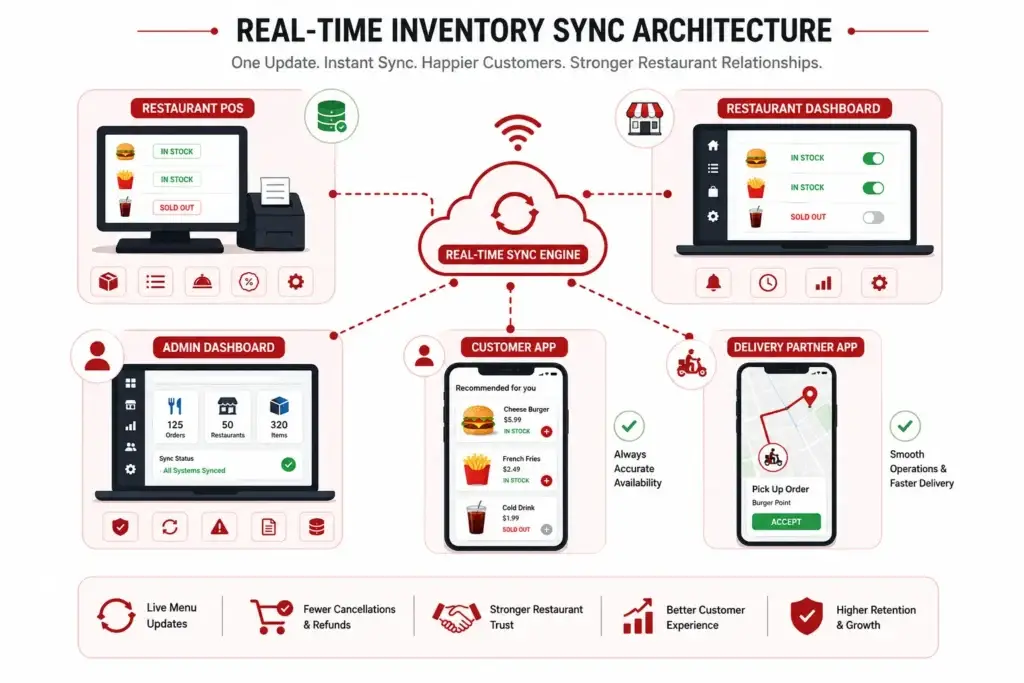
Image Source: AI-generated visual by Miracuves
A reliable food delivery platform should not depend entirely on manual restaurant updates.
Manual controls are still useful, but they should not be the only defense against out-of-stock orders.
A stronger platform architecture treats menu availability as a live operational signal.
For founders planning a serious food delivery marketplace, Miracuves recommends thinking through five layers before choosing any food delivery script.
1. POS and Menu Data Mapping
Every menu item should have a clean relationship between the restaurant’s internal item record and the platform’s visible item.
This matters because “Chicken Burger” in the POS and “Crispy Chicken Burger Meal” on the app may not be identical. A weak script stores only display names. A stronger system maps item IDs, variants, modifiers, and availability rules.
2. Real-Time Availability Updates
When an item is marked unavailable, the customer-facing app should reflect that quickly.
This may happen through webhooks, API polling, middleware, or direct POS integration depending on the restaurant’s systems. DoorDash like app now supports item availability workflows and automatic availability polling for real-time accuracy after menu updates, showing how important this layer has become in mature delivery operations.
3. Modifier-Level Stock Control
Many cancellations are not caused by the main dish. They are caused by unavailable add-ons.
A pizza may be available, but extra cheese may not be. A rice bowl may be available, but one protein option may be sold out. A cheap script may only let the restaurant disable the full item, while a stronger platform lets restaurants manage item options and modifiers separately.
4. Restaurant Pause and Capacity Controls
Sometimes the restaurant is not out of stock. It is overloaded.
A reliable platform should allow restaurants or admins to pause orders, extend preparation time, limit order volume, or temporarily hide selected categories. This prevents the kitchen from accepting more orders than it can fulfill.
5. Admin Visibility and Error Logs
Platform operators need to know when sync breaks.
If the POS update fails, the admin should see it. If a menu update is delayed, the platform should log it. If a restaurant manually overrides availability, the system should track who changed it and when.
This is not just technical hygiene.
It is vendor trust infrastructure.
Read More: AI in Food Delivery Apps: Features, Benefits & Future
Cheap Script vs Operationally Reliable Food Delivery Platform
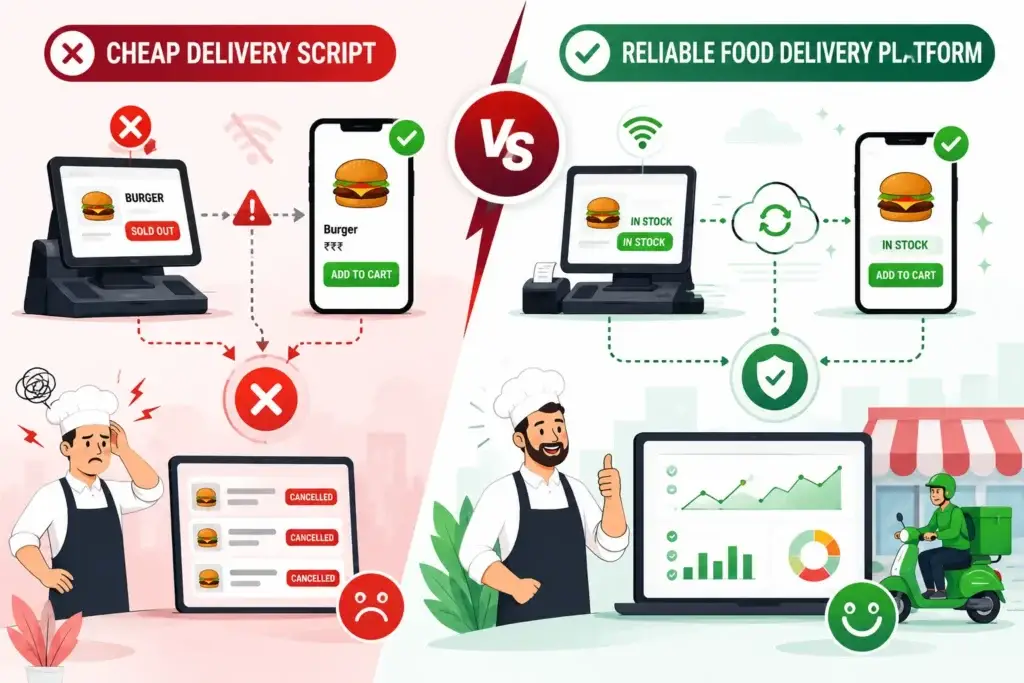
Image Source: AI-generated visual by Miracuves
| Decision Area | Cheap Food Delivery Script | Operationally Reliable Food Delivery Platform |
|---|---|---|
| Menu updates | Manual dashboard edits | POS-aware menu sync and admin controls |
| Item availability | Basic on/off toggle | Real-time item and modifier availability |
| Restaurant status | Open/closed | Open, paused, overloaded, delayed, branch-specific |
| Order cancellations | Handled after failure | Prevented through better availability logic |
| Admin dashboard | Basic management | Sync logs, vendor controls, exceptions, reports |
| Restaurant trust | Fragile | Built through operational reliability |
| Scalability | Breaks as restaurants grow | Designed for multi-vendor complexity |
| Founder risk | Looks affordable upfront | Reduces avoidable operational damage |
A ready-made food delivery app is not automatically bad.
A cheap, poorly engineered one is.
The difference is whether the platform has been designed around the realities of restaurants, not just the appearance of a delivery app.
What Platform Operators Should Check Before Buying a Food Delivery Script
Before choosing a food delivery script, ask these questions:
- Can restaurants mark items and modifiers unavailable quickly?
- Can the platform sync item status from POS systems or middleware?
- Does the customer app update availability without long caching delays?
- Can each restaurant branch control its own menu and stock?
- Does the admin panel show sync failures or menu update logs?
- Can restaurants pause orders during rush hours?
- Can the system handle different pricing for delivery menus?
- Can menu changes be reviewed, approved, or rolled back?
- Can the platform support multiple restaurant panels and branch-level permissions?
- Does the source code allow future integration upgrades?
The final question is especially important.
If you do not own or control the source code, you may be stuck with whatever menu logic the script vendor originally built. For a food delivery platform, that can become a serious growth limitation.
Miracuves’ white-label food delivery app approach is designed for founders who want faster launch without losing control over branding, admin workflows, vendor operations, and future customization.
Read more: The “Ghost Driver” Problem: Comparing GPS Accuracy in Cheap Scripts vs. Enterprise Engines
Mistakes Founders Should Avoid
Mistakes Founders Should Avoid
Choosing a Script Based Only on Customer App Design
The customer app may look polished, but restaurant operations happen in the backend. Always inspect vendor panels, menu controls, order acceptance flows, and admin override capabilities.
Ignoring POS Integration Until After Launch
POS integration is easier to plan before launch than to retrofit after restaurants start complaining. Even if every restaurant does not need POS sync on day one, the architecture should support it.
Treating Cancellations as a Support Issue
Repeated cancellations are usually a product and operations issue. Support teams can apologize, but only better menu availability logic can prevent the failure from repeating.
Assuming Restaurants Will Manually Update Everything
During peak hours, restaurant staff are focused on the kitchen, counter, delivery packing, and customer calls. Your platform should reduce manual effort, not depend on it completely.
How Better Menu Sync Protects Restaurant Relationships
Restaurant relationships are built on reliability.
A restaurant partner is more likely to stay with your platform when your system helps them:
- Avoid unavailable orders
- Reduce customer complaints
- Control peak-hour demand
- Update menus quickly
- Maintain branch-level accuracy
- Manage delivery pricing
- Reduce tablet fatigue
- Track order issues clearly
- Protect staff from avoidable pressure
This is why menu sync is not a technical afterthought.
It is a retention feature.
A platform with strong menu logic tells restaurants: “We understand your operations.”
A platform with weak menu logic tells restaurants: “You need to work around our software.”
That difference decides whether restaurants stay.
Read More: Best DoorDash Clone Script 2026 — Launch Your On-Demand Food Delivery App
Where Miracuves Fits for Food Delivery Founders
If you are building a food delivery marketplace, a restaurant aggregator platform, or a local delivery app, your goal should not be to buy the cheapest script available.
Your goal should be to launch with a foundation that can support restaurant trust.
Miracuves helps founders create ready-made and white-label food delivery app solutions with customer apps, restaurant workflows, delivery partner modules, admin dashboards, branding control, and source-code ownership. For ready-made solutions, Miracuves can support faster deployment while still giving founders room to customize workflows based on restaurant operations and market needs.
Final Thoughts: The Real Risk Is Not the Script Price. It Is Restaurant Trust.
The out-of-stock trap is one of the fastest ways to damage a food delivery platform.
Not because customers cannot tolerate one unavailable item.
But because repeated availability failures reveal a deeper problem: the platform does not understand restaurant operations.
Cheap food delivery scripts often look attractive because they promise a fast start. But if the menu architecture is weak, every sold-out item becomes a cancellation risk. Every cancellation becomes a support cost. Every support issue becomes a restaurant relationship problem.
For founders, the smarter decision is not simply to launch fast.
It is to launch with operational credibility.
A food delivery app should help restaurants sell more without creating extra chaos. That requires real-time menu thinking, POS-aware workflows, vendor control, admin visibility, and a technical foundation that can grow beyond the first few restaurants.
Miracuves helps founders build that foundation with white-label, source-code-owned food delivery solutions designed for faster launch and practical execution.
FAQs
Why do cheap food delivery scripts cause out-of-stock orders?
Cheap food delivery scripts often rely on manual menu updates or delayed cache refreshes. If a restaurant runs out of an item but the customer app still shows it as available, customers can place invalid orders that later need to be canceled or changed.
What is POS menu sync in a food delivery app?
POS menu sync connects the restaurant’s point-of-sale system with the food delivery platform so item availability, prices, modifiers, and order details can stay aligned. This helps reduce manual updates and prevents customers from ordering unavailable items.
Why is real-time inventory sync important for restaurant partners?
Real-time inventory sync protects restaurants from receiving orders they cannot fulfill. It reduces cancellations, customer complaints, staff stress, and refund issues, making the platform more reliable for restaurant partners.
Can a ready-made food delivery app support POS integration?
A ready-made food delivery app can support POS integration if the architecture allows API connections, middleware integration, item ID mapping, and future customization. Founders should confirm this before choosing a script.
What features should a restaurant panel include in a food delivery platform?
A strong restaurant panel should include menu management, item availability controls, modifier management, order acceptance, preparation time updates, payout visibility, branch controls, pause mode, and support for sync workflows where needed.
How do canceled orders affect a food delivery startup?
Canceled orders reduce customer trust, increase support costs, frustrate delivery partners, and damage restaurant relationships. In local markets, repeated cancellations can quickly hurt the app’s reputation.
Is a cheap food delivery script always a bad choice?
Not always. The issue is not price alone. The risk comes from weak architecture, limited source-code access, poor restaurant workflows, and lack of real-time menu control. Founders should evaluate operational depth before buying.
How can Miracuves help with food delivery app development?
Miracuves helps founders build ready-made and white-label food delivery app solutions with source code, custom branding, restaurant workflows, delivery partner modules, admin dashboards, and faster deployment options.
Miracuves is an independent software development company. We are not affiliated with, connected to, sponsored by, or endorsed by any company or product named in this article.
Terms such as “X Clone” are used descriptively. It is how the software industry refers to building a platform with functionality comparable to a known service, and how clients search for it.
The entire design and codebase of our products is built by our own team. Our products contain no code, design, graphics, or content originating from any third-party website or applications.
All third-party names and marks referenced in this article are the property of their respective owners, referenced solely to identify the services discussed.