Key Takeaways
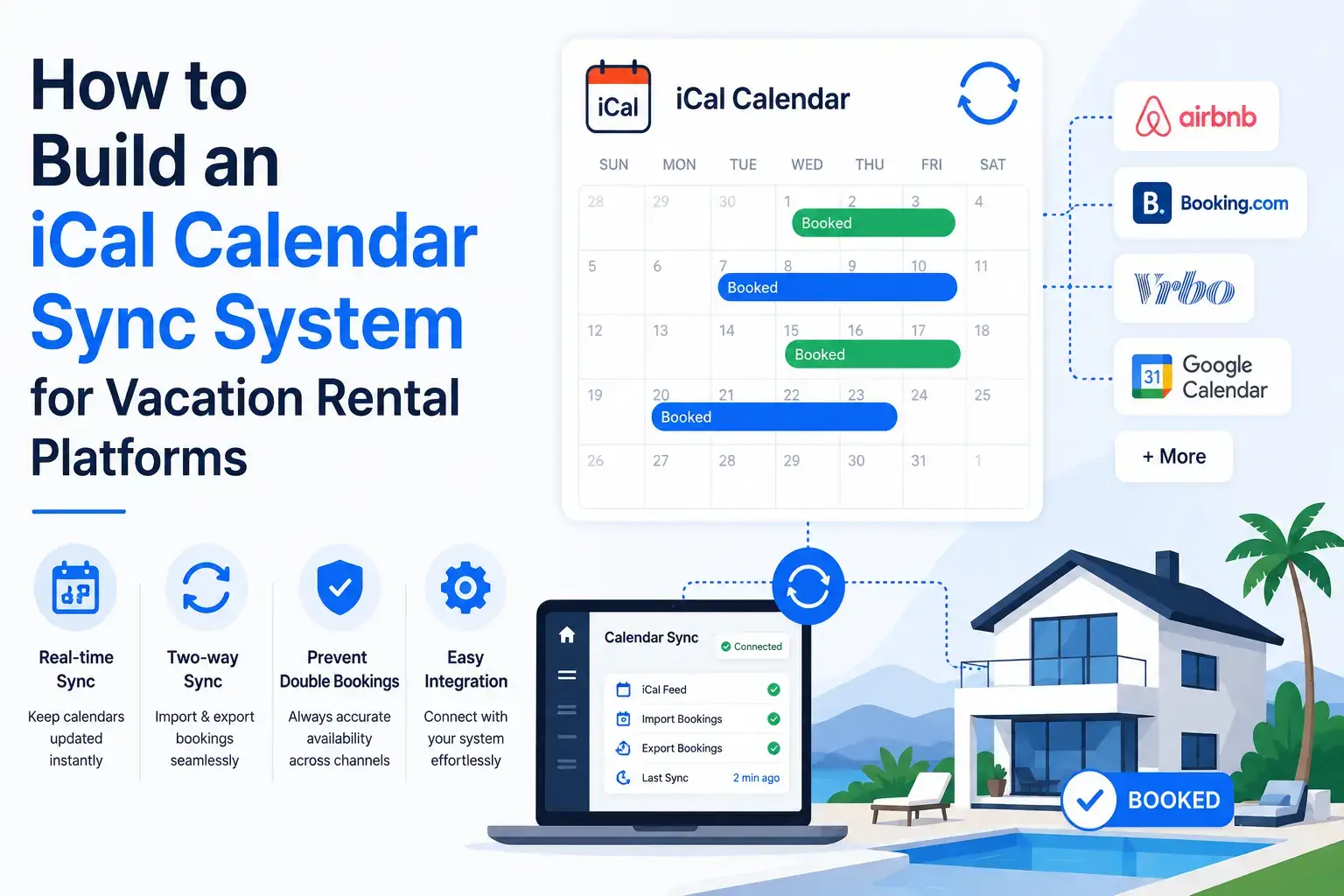
- iCal calendar sync helps vacation rental platforms manage property availability across multiple channels.
- ICS import and export allow calendars to share booking data with external platforms.
- Double-booking prevention is the main business reason behind calendar sync.
- Sync delays must be handled carefully because iCal does not update instantly.
- A strong booking engine should combine iCal sync with database-level availability checks.
What You’ll Learn
- How iCal calendar sync works in vacation rental app development.
- Calendar import logic helps pull blocked dates from external booking sources.
- Calendar export feeds help share your platform’s bookings with other channels.
- Conflict handling protects hosts from overlapping reservations.
- Growth depends on sync reliability, booking accuracy, host trust, and platform scalability.
Real Insights
- iCal is useful but not perfect because polling gaps can create booking risks.
- Atomic booking checks matter when two users try to book the same dates.
- Hosts need visibility into synced calendars, errors, blocked dates, and conflicts.
- API integrations may be needed later for faster and deeper OTA connectivity.
- The best strategy is to use iCal for compatibility and strong backend logic for booking safety.
Calendar sync looks simple from the outside. A host copies a calendar link from Airbnb, pastes it into Vrbo or Booking.com, and blocked dates start appearing across platforms.
For a founder building a vacation rental platform, the reality is very different.
An iCal calendar sync system is not just a small feature inside a booking app. It is the availability protection layer that decides whether your platform can prevent double bookings, coordinate OTA calendars, support direct bookings, and scale across hundreds or thousands of properties.
In vacation rental app development, calendar synchronization becomes one of the most business-critical modules because every booking depends on accurate availability. If your platform shows a property as available when it is already booked somewhere else, the result is not just a technical bug. It can create refund issues, host frustration, guest dissatisfaction, poor reviews, and lost marketplace trust.
This guide explains how to build an iCal calendar sync system for vacation rental platforms, Airbnb clone marketplaces, booking engines, and property management software. We will cover iCal basics, ICS parsing, architecture, database design, conflict handling, scaling logic, and where iCal fits compared to API-based OTA integrations.
For founders planning a rental app solution, this is also a practical way to understand what your development team must build before your platform can safely handle multi-channel bookings.
What Is iCal Calendar Sync?
iCal calendar sync is a method of sharing calendar availability through an .ics file, which follows the iCalendar format defined by RFC 5545. In vacation rental platforms, an iCal feed usually contains booking events or blocked dates for a property.
A simple iCal file may include event fields such as:
- UID: unique event identifier
- DTSTART: booking start date
- DTEND: booking end date
- SUMMARY: event title
- DESCRIPTION: booking or blocked-date detail
- STATUS: event status
- LAST-MODIFIED: last update timestamp
For vacation rentals, these calendar events usually represent unavailable dates. When a guest books a property on Airbnb, that reservation appears in the Airbnb calendar. The platform can export that calendar as an iCal URL. Another platform, such as Vrbo, Booking.com, a direct booking website, or a custom rental marketplace, can import the URL and block the same dates.
A basic iCal event may look like this:
BEGIN:VCALENDAR
VERSION:2.0
PRODID:-//Example Vacation Rental Platform//Calendar Sync//EN
BEGIN:VEVENT
UID:booking-12345@example.com
DTSTAMP:20260529T090000Z
DTSTART;VALUE=DATE:20260610
DTEND;VALUE=DATE:20260615
SUMMARY:Reserved
STATUS:CONFIRMED
END:VEVENT
END:VCALENDAR
In this example, the property is blocked from June 10 to June 15. The DTEND date is typically treated as non-inclusive, which means the checkout date is not counted as an occupied night. This matters because a mistake in check-in/check-out handling can accidentally block one extra night or allow a same-day booking incorrectly.
For a small host, iCal sync is a convenience feature. For a vacation rental platform, it is part of the platform’s booking integrity system.
Why Calendar Sync Matters in Vacation Rental App Development
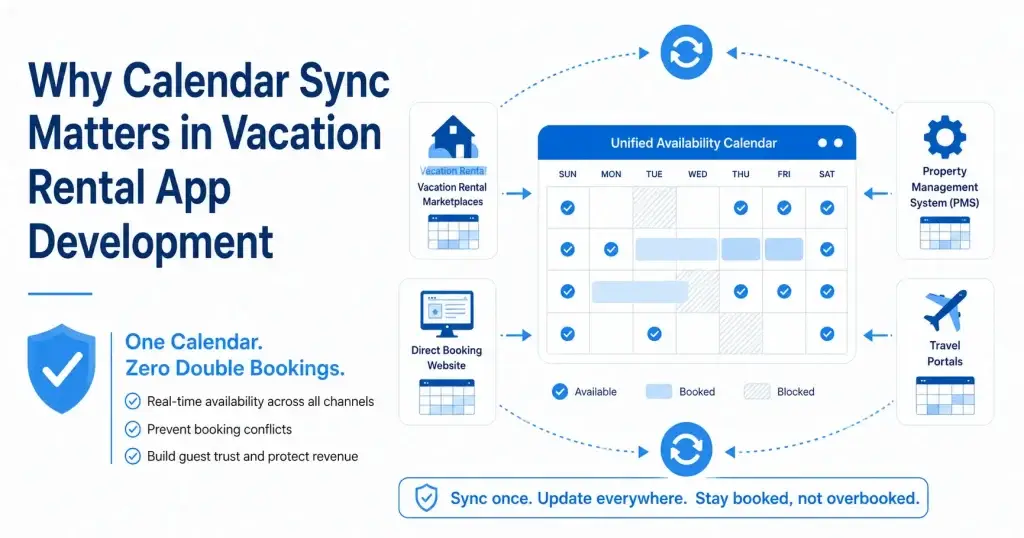
Vacation rental platforms operate on trust. Guests trust that a property shown as available can actually be booked. Hosts trust that the platform will not create overlapping reservations. Platform operators trust that the system will reduce manual work, not create operational chaos.
Calendar sync matters because most rental inventory is not listed in one place. A host may use:
- Airbnb
- Vrbo
- Booking.com
- Google Vacation Rentals
- A direct booking website
- A property management system
- A local travel agency portal
- A custom vacation rental marketplace
Without calendar synchronization, every external booking must be manually copied into every other calendar. That may work for one property. It fails quickly when a host manages 10, 100, or 10,000 listings.
For founders, the risk is larger than inconvenience. Poor sync can create:
- Double bookings
- Guest cancellations
- Host disputes
- Refund costs
- Support tickets
- Marketplace distrust
- Negative reviews
- Lower repeat usage
- Operational dependency on manual staff
That is why vacation rental app development should treat calendar sync as a core booking system, not a secondary integration.
A strong rental platform should be able to answer these questions:
- Where did this blocked date come from?
- Was it imported from Airbnb, Vrbo, Booking.com, or the direct booking engine?
- When was the calendar last synced?
- Did the latest sync fail?
- Was an event changed, cancelled, duplicated, or removed?
- Which source has priority when two calendars conflict?
- Can the admin manually override availability?
- Can the system prevent a booking while sync is still processing?
These are product and business questions, not just technical questions.
Read more: How to Start an Online Travel Booking and Agency Business
How iCal Sync Works Between Airbnb, Vrbo, Booking.com, and Direct Booking Platforms
iCal sync usually works through import and export calendar links.
A platform exports an .ics calendar URL for a listing. Another platform imports that URL and periodically checks it for new events. When it finds unavailable dates, it blocks those dates in its own calendar.
The simplified flow looks like this:
- Host connects Airbnb calendar to your vacation rental platform.
- Your platform stores the Airbnb
.icsfeed URL. - A scheduler periodically fetches the feed.
- The ICS parser extracts booking events.
- Your availability engine converts events into blocked date ranges.
- The booking calendar is updated.
- The admin or host can see sync status, conflicts, and imported blocks.
- Your platform may also expose its own iCal export URL for other platforms to import.
Airbnb’s help documentation explains that imported calendars automatically refresh every 3 hours, with manual refresh available from the connected calendar area. Vrbo also supports calendar export by copying a calendar URL from the property dashboard, and Booking.com documents third-party calendar synchronization through its extranet calendar tools.
For your own vacation rental app, the important lesson is this: iCal synchronization is usually pull-based.
That means the receiving system checks the source calendar on a schedule. It does not always receive an instant push when a booking happens.
This is the main reason iCal sync can create delay risk. If a guest books a property on one OTA, another platform may not know immediately. During that gap, the same dates may still appear available elsewhere.
That is why serious platforms combine iCal sync with:
- Short polling intervals
- Booking hold windows
- Conflict detection
- Manual refresh options
- Admin alerts
- Queue-based sync workers
- API integrations where available
- Channel manager logic for high-volume operators
Core Architecture of an iCal Calendar Sync Engine
A basic iCal import feature may only fetch a URL and parse dates. A scalable vacation rental platform needs a more complete architecture.
A strong iCal sync engine usually includes these components:
| Component | Role in Calendar Sync | Business Value |
|---|---|---|
| Calendar Connection Manager | Stores external calendar URLs and connection metadata | Lets hosts connect Airbnb, Vrbo, Booking.com, or external PMS calendars |
| Sync Scheduler | Decides when each calendar should be fetched | Reduces stale availability and spreads sync load |
| Queue Workers | Process sync jobs asynchronously | Prevents slow calendar imports from blocking the app |
| ICS Parser | Reads .ics files and extracts events | Converts external calendar data into usable booking blocks |
| Availability Service | Normalizes imported events into internal availability rules | Keeps the booking engine consistent |
| Conflict Resolution Engine | Detects overlapping bookings or priority issues | Helps prevent double bookings and admin confusion |
| Sync Logs | Records success, failure, changes, and errors | Gives admins visibility and audit history |
| Admin Dashboard | Shows sync status, failed feeds, conflicts, and manual overrides | Reduces support burden and operational blind spots |
| Export Feed Generator | Creates your platform’s own .ics feed | Lets external platforms import your availability |
A practical architecture may look like this in plain terms:
External OTA Calendar URL
        ↓
Sync Scheduler
        ↓
Queue Job
        ↓
ICS Fetcher
        ↓
ICS Parser
        ↓
Event Normalizer
        ↓
Conflict Checker
        ↓
Availability Database
        ↓
Admin Dashboard + Booking Engine + Export Feed
The most important design choice is separation of responsibilities. Do not let the booking engine directly fetch and parse external iCal feeds during a live user booking session. That creates latency, failure risk, and unpredictable checkout behavior.
Instead, sync should run asynchronously, and the booking engine should read from your platform’s normalized availability database.
Read More: Property Listing Platform Development: The Decisions That Define Long-Term Success
Database Schema for Vacation Rental Calendar Synchronization
A vacation rental app needs database tables that separate listings, calendar connections, imported events, availability blocks, bookings, and sync logs.
Here is a simplified PostgreSQL-style schema.
CREATE TABLE listings (
  id UUID PRIMARY KEY,
  host_id UUID NOT NULL,
  title VARCHAR(255) NOT NULL,
  timezone VARCHAR(100) NOT NULL DEFAULT 'UTC',
  status VARCHAR(50) NOT NULL DEFAULT 'active',
  created_at TIMESTAMP NOT NULL DEFAULT NOW(),
  updated_at TIMESTAMP NOT NULL DEFAULT NOW()
);
CREATE TABLE calendar_events (
id UUID PRIMARY KEY,
listing_id UUID NOT NULL REFERENCES listings(id),
calendar_connection_id UUID REFERENCES calendar_connections(id),
external_uid TEXT NOT NULL,
source_provider VARCHAR(50) NOT NULL,
start_date DATE NOT NULL,
end_date DATE NOT NULL,
status VARCHAR(50) NOT NULL DEFAULT 'confirmed',
summary TEXT,
raw_payload JSONB,
imported_at TIMESTAMP NOT NULL DEFAULT NOW(),
updated_at TIMESTAMP NOT NULL DEFAULT NOW(),
UNIQUE(calendar_connection_id, external_uid)
);CREATE TABLE availability_blocks (
id UUID PRIMARY KEY,
listing_id UUID NOT NULL REFERENCES listings(id),
source_type VARCHAR(50) NOT NULL,
source_id UUID,
start_date DATE NOT NULL,
end_date DATE NOT NULL,
reason VARCHAR(100),
priority INT NOT NULL DEFAULT 100,
created_at TIMESTAMP NOT NULL DEFAULT NOW()
);CREATE TABLE sync_logs (
id UUID PRIMARY KEY,
calendar_connection_id UUID NOT NULL REFERENCES calendar_connections(id),
status VARCHAR(50) NOT NULL,
started_at TIMESTAMP NOT NULL,
finished_at TIMESTAMP,
events_found INT DEFAULT 0,
events_created INT DEFAULT 0,
events_updated INT DEFAULT 0,
events_removed INT DEFAULT 0,
error_message TEXT,
created_at TIMESTAMP NOT NULL DEFAULT NOW()
);This structure gives the platform several advantages:
- Imported events are stored separately from final availability blocks.
- Admins can trace where a block came from.
- Sync errors can be audited.
- Duplicate events can be controlled through external UID matching.
- Listing availability can be rebuilt if sync logic changes.
- Future OTA APIs can use the same normalized availability layer.
For marketplace founders, this matters because calendar sync will evolve. You may start with Airbnb and Vrbo iCal feeds, then later add API integrations, direct bookings, owner blocks, cleaning blocks, maintenance holds, and channel manager connections. A clean schema avoids rebuilding the booking engine every time you add a new source.
How to Build an ICS Parser for Booking Events
An ICS parser should do more than read text. It must extract meaningful booking events, validate date ranges, handle timezones, avoid duplicates, and identify deleted or cancelled events.
The parser should usually follow this flow:
- Fetch the
.icsURL securely. - Validate the response content type and size.
- Parse calendar components.
- Extract
VEVENTrecords. - Read
UID,DTSTART,DTEND,STATUS,SUMMARY, andLAST-MODIFIED. - Convert all events into the listing’s timezone.
- Normalize start and end dates.
- Ignore unsupported or invalid events.
- Upsert imported events into the database.
- Rebuild listing availability blocks.
A simple Node.js-style example may look like this:
import ical from "node-ical";

async function importICalFeed(feedUrl, listingId, connectionId) {
  const events = await ical.async.fromURL(feedUrl);

  const normalizedEvents = [];

  for (const key in events) {
    const item = events[key];

    if (item.type !== "VEVENT") continue;
    if (!item.uid || !item.start || !item.end) continue;

    normalizedEvents.push({
      listingId,
      calendarConnectionId: connectionId,
      externalUid: item.uid,
      startDate: formatDateOnly(item.start),
      endDate: formatDateOnly(item.end),
      status: item.status || "CONFIRMED",
      summary: item.summary || "Reserved",
      rawPayload: item
    });
  }

  return normalizedEvents;
}

function formatDateOnly(date) {
  return date.toISOString().slice(0, 10);
}
This is only a simplified example. A production version should add:
- URL validation
- Timeout handling
- Retry logic
- Feed size limits
- Timezone conversion
- Duplicate detection
- Cancelled event handling
- Logging
- Security checks against SSRF-style URL abuse
- Error reporting to admin users
A Laravel-style simplified version may look like this:
use Illuminate\Support\Facades\Http;

function importIcalFeed($feedUrl, $listingId, $connectionId)
{
    $response = Http::timeout(10)->get($feedUrl);

    if (!$response->successful()) {
        throw new Exception('Unable to fetch calendar feed');
    }

    $icsContent = $response->body();

    preg_match_all('/BEGIN:VEVENT(.*?)END:VEVENT/s', $icsContent, $matches);

    $events = [];

    foreach ($matches[1] as $eventBlock) {
        $uid = extractIcsValue($eventBlock, 'UID');
        $dtStart = extractIcsValue($eventBlock, 'DTSTART');
        $dtEnd = extractIcsValue($eventBlock, 'DTEND');
        $summary = extractIcsValue($eventBlock, 'SUMMARY');

        if (!$uid || !$dtStart || !$dtEnd) {
            continue;
        }

        $events[] = [
            'listing_id' => $listingId,
            'calendar_connection_id' => $connectionId,
            'external_uid' => $uid,
            'start_date' => normalizeIcsDate($dtStart),
            'end_date' => normalizeIcsDate($dtEnd),
            'summary' => $summary ?: 'Reserved'
        ];
    }

    return $events;
}

function extractIcsValue($block, $key)
{
    if (preg_match('/' . $key . '(?:;[^:]*)?:(.+)/', $block, $match)) {
        return trim($match[1]);
    }

    return null;
}
For a production-grade vacation rental app, using a mature iCalendar parsing library is usually safer than relying only on manual regex parsing. The iCalendar format includes line folding, timezones, recurrence rules, date-only events, escaped characters, and optional fields that can break simplistic parsers.
How to Prevent Double Bookings in Vacation Rental Platforms
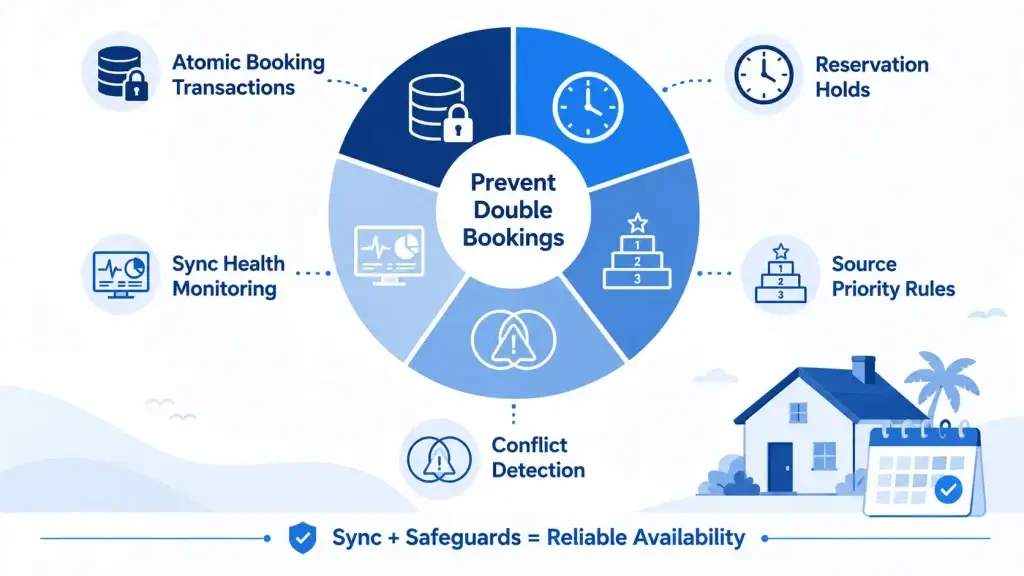
Double-booking prevention is the real business reason behind calendar sync.
A double booking happens when two reservations overlap for the same listing. This can happen because of delayed iCal polling, manual calendar errors, race conditions during checkout, failed sync jobs, or inconsistent OTA data.
Your platform should not depend on iCal alone to prevent double bookings. It should combine sync logic with booking-engine safeguards.
1. Use Atomic Booking Transactions
When a guest confirms a booking, the platform should check availability and create the reservation inside a database transaction.
BEGIN;

SELECT *
FROM availability_blocks
WHERE listing_id = :listing_id
AND daterange(start_date, end_date, '[)') && daterange(:check_in, :check_out, '[)')
FOR UPDATE;

-- If no conflict exists, create booking and block dates.

COMMIT;
The key idea is that availability checking and booking creation should happen together. If two guests attempt to book the same property at nearly the same time, the system must not allow both transactions to succeed.
2. Create Reservation Holds During Checkout
A hold temporarily blocks dates while the guest is completing payment.
Example:
- Guest selects June 10 to June 15.
- System creates a 10-minute hold.
- Payment starts.
- Other guests cannot book those dates during the hold.
- If payment succeeds, hold becomes a booking.
- If payment fails or expires, hold is released.
This protects the platform from checkout race conditions.
3. Add Source Priority Rules
Not all calendar sources should have equal priority.
A direct confirmed booking may override an imported tentative block. A host maintenance block may override OTA availability. A cancelled external event should remove only the block created by that source, not every block for that date.
Example priority model:
| Source | Priority |
|---|---|
| Confirmed direct booking | 10 |
| Confirmed OTA booking | 20 |
| Host manual block | 30 |
| Maintenance block | 40 |
| Imported iCal hold | 50 |
Lower priority number means stronger authority.
4. Run Conflict Detection After Every Sync
Every sync job should detect overlaps and raise alerts.
Examples:
- Imported Airbnb event overlaps with direct booking.
- Vrbo event overlaps with host manual block.
- Booking.com cancellation removed dates that are still blocked by another source.
- Same external UID changed date range.
Admins should be able to see these conflicts clearly.
5. Use Sync Health Monitoring
A failed calendar feed is not harmless. If a feed fails silently for days, your platform may show stale availability.
Track:
- Last successful sync
- Last failed sync
- Feed response time
- Number of events imported
- Number of conflicts detected
- Feed URL status
- Error messages
- Listings with stale sync
This should be visible in the host dashboard and admin panel.
Read more: Is It Cheaper to Build or Buy a Travel Booking Marketplace Solution?
iCal Sync vs API Sync: What Should Founders Choose?
iCal sync and API sync solve related but different problems.
iCal is easier to start with because many platforms expose calendar URLs. It is useful for availability blocking and basic calendar interoperability. API sync is stronger when you need real-time updates, rates, restrictions, messaging, guest data, listing content, and advanced channel management.
Guesty and Rentals United both highlight that iCal is more limited and slower than API-based sync, while API connections support richer, more immediate data exchange.
| Factor | iCal Sync | API Sync |
|---|---|---|
| Setup complexity | Lower | Higher |
| Best for | Basic availability sync | Full OTA/channel integration |
| Data exchanged | Mostly dates and event blocks | Availability, rates, bookings, guest data, restrictions, messages, content |
| Update style | Usually scheduled polling | Often real-time or near real-time |
| Double-booking risk | Higher if polling is delayed | Lower when implemented correctly |
| Scaling value | Good starting point | Better for serious multi-channel operations |
| Development effort | Moderate | High |
| Business fit | Early-stage platforms, direct booking websites, basic OTA blocking | PMS, channel manager, enterprise rental platforms, high-volume operators |
For founders, the right decision depends on the business model.
Choose iCal first when:
- You are building an early-stage vacation rental platform.
- You need basic Airbnb/Vrbo/Booking.com availability blocking.
- You want a faster launch.
- Your hosts manage a small number of listings.
- You do not yet need full pricing or guest communication sync.
Choose API sync or channel manager architecture when:
- You manage high booking volume.
- You need rates and restrictions synced.
- You need near-real-time availability.
- You want listing content, policies, and guest messaging connected.
- You serve professional property managers.
- You are building a PMS or channel manager product.
For many platforms, the practical path is phased:
Phase 1: iCal import/export for basic calendar sync
Phase 2: Strong availability engine and conflict detection
Phase 3: Direct OTA APIs for priority channels
Phase 4: Channel manager or PMS-grade distribution logic
This phased approach helps founders launch faster without locking the platform into weak architecture.
Scaling Calendar Sync for Thousands of Listings
Syncing one calendar is easy. Syncing thousands of listings across multiple OTAs is a system design problem.
Imagine your platform has:
- 10,000 listings
- 3 external calendars per listing
- 30,000 calendar feeds
- Sync every 30 minutes
- Network failures, slow feeds, invalid URLs, and duplicate events
If every feed is fetched by one cron job, the system will quickly become unreliable.
A scalable calendar sync system should use queues and workers.
A better architecture:
Scheduler
   ↓
Creates sync jobs in batches
   ↓
Queue system
   ↓
Worker pool
   ↓
Fetch + parse + normalize
   ↓
Database update
   ↓
Conflict detection
   ↓
Sync logs + admin alerts
Use batching rules such as:
- Sync active listings more often than inactive listings.
- Sync calendars with recent bookings more frequently.
- Slow down feeds that repeatedly fail.
- Prioritize check-in windows within the next 90 days.
- Avoid fetching every external feed at the exact same time.
- Use distributed workers for large inventory.
Recommended scaling controls:
| Scaling Challenge | Recommended Approach |
|---|---|
| Too many feeds | Batch jobs and partition by listing ID |
| Slow OTA response | Timeout and retry with backoff |
| Duplicate events | Unique key on calendar connection and external UID |
| Failed feeds | Mark as unhealthy and notify host/admin |
| Stale availability | Show last sync timestamp |
| Race conditions | Use booking transactions and locks |
| Large calendars | Limit imported date range where possible |
| Repeated full sync | Use event hash comparison and change detection |
For founders, the goal is not to over-engineer from day one. The goal is to design the system so it does not collapse when the platform grows.
Common OTA Calendar Sync Challenges
Calendar sync issues are often caused by edge cases. A serious vacation rental app should expect them.
Timezone Mismatches
A listing may be in Dubai, a host may be in London, the server may run in UTC, and an OTA may export date-only events. If timezone handling is weak, your platform may block the wrong dates.
Best practice: store normalized dates for booking nights and preserve raw event timestamps for audit logs.
Non-Inclusive Checkout Dates
In iCalendar, DTEND is commonly treated as the non-inclusive end. For rental bookings, this maps well to checkout date. A booking from June 10 to June 15 means nights of June 10, 11, 12, 13, and 14 are occupied, and checkout is June 15.
A wrong interpretation can create availability bugs.
Duplicate Events
Some feeds may resend events with the same UID. Others may change UID behavior. Your platform should deduplicate events and detect updates.
Cancelled or Removed Events
Not every OTA handles cancellations the same way in iCal feeds. Some may remove the event. Others may include a cancelled status. Your sync engine should compare the latest feed state with previously imported events.
Delayed Sync
iCal polling is not instant. Airbnb officially describes an automatic refresh cycle for imported calendars, and other platforms may use their own timing. This creates a window where availability may be stale.
Private or Expired Feed URLs
A host may paste the wrong URL, revoke the calendar, change listing settings, or remove access. Your platform should detect inaccessible feeds and surface clear error messages.
Rate and Pricing Limitations
iCal is mostly calendar-focused. It should not be treated as a full pricing, guest messaging, or policy synchronization system. For rates, rules, availability restrictions, and guest communication, API integration is usually required.
Best Tech Stack for Vacation Rental Calendar Sync
The right tech stack depends on your existing product architecture, but a scalable calendar sync system usually needs:
| Layer | Recommended Options | Why It Helps |
|---|---|---|
| Backend | Node.js, NestJS, Laravel, Django | Handles sync services, booking logic, and APIs |
| Database | PostgreSQL | Strong transaction support and date-range queries |
| Queue | BullMQ, RabbitMQ, AWS SQS, Kafka | Processes sync jobs asynchronously |
| Cache | Redis | Supports locks, queues, temporary holds, and sync state |
| Scheduler | Cron, Temporal, AWS EventBridge | Triggers sync jobs reliably |
| Storage | S3-compatible storage | Stores raw feed snapshots if needed |
| Monitoring | Datadog, Grafana, Sentry, CloudWatch | Tracks failures, latency, and sync health |
| Admin Panel | Custom admin dashboard | Helps operators manage conflicts and failed feeds |
PostgreSQL is especially useful because date-range logic can help detect overlapping bookings. Redis is useful for queue processing, temporary locks, and reservation holds.
For a founder, the tech stack should support three outcomes:
- Fast launch
- Booking accuracy
- Future scalability
A clean sync architecture matters more than choosing the trendiest framework.
Cost Factors in Building an iCal Calendar Sync System
The cost of building iCal calendar sync depends on scope. A basic import/export feature is much simpler than a full OTA synchronization engine.
Key cost drivers include:
| Cost Factor | Why It Affects Scope |
|---|---|
| Number of OTA sources | More providers mean more edge cases and testing |
| Import only vs import/export | Export feeds require additional security and feed generation |
| Conflict handling | Overlap detection, alerts, and admin workflows add complexity |
| Dashboard requirements | Hosts and admins need clear sync visibility |
| Booking engine integration | Calendar sync must connect safely with reservations and payments |
| Queue infrastructure | Needed for scale and reliability |
| API integrations | More complex than iCal but more powerful |
| Testing depth | Date logic, cancellations, timezones, and duplicate events need careful testing |
| Security rules | Feed URL validation and access protection are important |
Miracuves does not recommend treating calendar sync as a minor add-on if your product depends on booking accuracy. A weak calendar system can create more operational cost later than it saves during development.
For ready-made and white-label app foundations, Miracuves can help founders reduce development time because core app flows, admin control, booking logic, and marketplace modules may already be structured. Final pricing depends on selected features, integrations, branding, and customization scope.
Founder Decision Signals for iCal Calendar Sync
Use these signals when deciding how deeply to invest in calendar synchronization.
| Decision Signal | What It Means |
|---|---|
| You are launching with host-managed listings | Start with iCal import/export and manual conflict visibility |
| You expect professional property managers | Add stronger sync logs, dashboard controls, and channel manager roadmap |
| You need rates and restrictions sync | Plan for OTA API integrations, not just iCal |
| You want direct bookings | Build your own availability engine and export feed |
| You want fast market validation | Use a ready-made vacation rental app foundation, then customize sync depth |
| You expect high inventory volume | Use queues, workers, batching, and sync health monitoring from the start |
The right question is not “Can we add iCal?” The better question is: “What level of booking reliability does our business model require?”
How Miracuves Helps Build Vacation Rental Platforms
Building a vacation rental platform requires more than adding property listings, images, and a booking button. The platform must manage availability, bookings, host operations, payments, reviews, cancellations, and admin control in one connected system. When these parts are not planned properly, founders can face double bookings, manual coordination issues, poor guest experience, and unnecessary support workload.
Miracuves helps founders build vacation rental platforms and marketplace apps with a practical product foundation. For teams planning vacation rental app development, this means creating a platform where listings, availability, bookings, payments, host workflows, and admin decisions work together smoothly.
A scalable rental platform should allow guests to search properties, compare listings, check synced availability, complete bookings, receive notifications, and manage cancellations or refunds. At the same time, hosts need tools to add properties, update availability, block dates, review bookings, and track earnings. The admin panel gives the platform operator control over users, listings, commissions, disputes, payments, and performance.
For platforms that need calendar synchronization, Miracuves can help structure iCal import/export logic for multi-channel availability management across Airbnb, Vrbo, Booking.com, direct booking websites, and external calendars. This is especially useful for founders building an Airbnb clone app or rental marketplace where double-booking prevention and calendar accuracy directly affect trust.
For teams planning vacation rental app development, this can include:
Guest app or web booking flow
Host listing management
Property availability calendar
Booking engine
iCal import/export logic
Admin dashboard
Payment gateway integration
Commission workflows
Review and rating systems
Cancellation and refund workflows
Notification system
Source-code ownership
White-label branding
Custom feature expansion
Host earnings dashboard
Manual date blocking
Dispute and refund management
Search filters by location, price, amenities, and availability
Future integration readiness for OTA APIs or channel manager logic
The advantage of working with Miracuves is that founders do not have to treat vacation rental app development as a scattered list of features. The platform can be planned as a complete rental business system with guest experience, host operations, admin control, monetization workflows, and technical scalability in mind.
This approach is useful for founders who want to launch a white-label rental marketplace, customize an Airbnb-style product for a specific region, or build a source-code-owned rental app solution that can grow beyond the first version.
Mistakes Founders Should Avoid
Treating iCal as Real-Time Sync
iCal is helpful, but it is not the same as real-time OTA API connectivity. If your platform depends on instant updates, you need stronger architecture or API integrations.
Ignoring Admin Visibility
A sync system without logs creates support confusion. Admins should know which calendar failed, when it failed, and what dates were affected.
Allowing Bookings Without Transaction Locks
Even with perfect sync, two users can attempt to book the same dates at the same time. Booking creation must use safe transaction logic.
Forgetting Timezone Rules
Timezone mistakes can create invisible booking bugs. Every listing should have a defined timezone, and all imported events should be normalized carefully.
Building Only for One OTA
A founder may start with Airbnb, but hosts often use multiple platforms. Build a provider-neutral calendar architecture from the beginning.
Not Planning for API Growth
iCal may be enough for launch, but professional property managers often expect rates, restrictions, content, and guest communication sync. Your architecture should allow future API connections.
Related reading: vacation rental app guide.
Conclusion
An iCal calendar sync system is more than a technical feature. It is a trust layer inside a vacation rental platform.
For hosts, it reduces manual calendar work. For guests, it protects booking confidence. For platform operators, it lowers operational risk. For founders, it creates the foundation needed to launch direct bookings, connect OTA calendars, and scale toward a more advanced channel manager model.
The strongest vacation rental platforms do not rely on one feed or one integration. They build a reliable availability engine that can accept multiple sources, detect conflicts, prevent overlaps, and keep admins informed.
If you are planning vacation rental app development, calendar sync should be designed early, not patched after launch. Miracuves can help founders build launch-ready, white-label rental marketplace platforms with booking workflows, admin control, source-code ownership, and scalable architecture for future growth.
Ready to build a scalable vacation rental platform with calendar sync, booking flows, host dashboards, and admin control? Contact Us
FAQs
What is iCal calendar sync in vacation rental apps?
iCal calendar sync is a method of sharing booking and blocked-date information through .ics calendar feeds. In vacation rental apps, it helps platforms import availability from Airbnb, Vrbo, Booking.com, direct booking websites, or external property systems.
How does Airbnb iCal sync work?
Airbnb lets hosts export a calendar link and import external calendar links. When another platform imports an Airbnb .ics feed, it can read reserved dates and block those dates in its own calendar. Airbnb states that imported calendars automatically update every 3 hours, with manual refresh available.
Is iCal sync real-time?
No. iCal sync is usually polling-based, which means one system checks another calendar at scheduled intervals. This can create sync delays. For real-time or near-real-time synchronization, vacation rental platforms usually need API integrations or channel manager architecture.
What is the difference between iCal sync and API sync?
iCal sync mainly exchanges calendar availability data. API sync can support richer workflows such as rates, restrictions, guest details, booking updates, messages, listing content, and automated channel management. iCal is simpler to launch, while API sync is stronger for scale.
How do vacation rental platforms prevent double bookings?
They use a combination of calendar sync, atomic booking transactions, temporary reservation holds, conflict detection, source priority rules, admin alerts, and sync health monitoring. Calendar sync helps, but the booking engine must also prevent overlapping reservations at the database level.
Can iCal sync pricing and rates?
Usually no. iCal is mainly used for calendar availability and blocked dates. Pricing, rate plans, minimum-night rules, guest messages, and listing content typically require API integrations or channel manager connectivity.
What is RFC 5545?
RFC 5545 is the specification that defines the iCalendar data format. This format is commonly used for .ics calendar files that allow calendar data to be exchanged between systems.
Should a new vacation rental platform start with iCal or API sync?
A new platform can often start with iCal sync for basic availability sharing, especially when speed to launch matters. As the platform grows, API sync becomes more important for real-time availability, pricing, restrictions, guest data, and professional property management workflows.
Related Articles:
Miracuves is an independent software development company. We are not affiliated with, connected to, sponsored by, or endorsed by any company or product named in this article.
Terms such as “X Clone” are used descriptively. It is how the software industry refers to building a platform with functionality comparable to a known service, and how clients search for it.
The entire design and codebase of our products is built by our own team. Our products contain no code, design, graphics, or content originating from any third-party website or applications.
All third-party names and marks referenced in this article are the property of their respective owners, referenced solely to identify the services discussed.