


Key Takeaways
- WebSockets help Astrotalk clone apps manage live chat, availability, wallet updates, and session events in real time.
- Live consultation platforms need instant communication between users, astrologers, and the backend.
- WebSockets are best for events like typing status, online presence, call requests, and session timers.
- Voice and video should use WebRTC or RTC providers while WebSockets handle signaling and session control.
- A scalable real-time backend improves trust, consultation flow, wallet accuracy, and user experience.
What You’ll Learn
- How real-time WebSockets work inside an Astrotalk clone app.
- Chat flow logic includes messages, typing indicators, delivery status, and session updates.
- Wallet billing events help manage per-minute charges, low-balance alerts, and auto-end rules.
- Astrologer availability updates help users see who is online, busy, or available.
- Growth depends on real-time speed, backend stability, queue handling, and session reliability.
Real Insights
- Real-time delays can hurt trust during paid astrology consultations.
- Wallet balance checks must stay accurate before and during live sessions.
- Presence tracking improves conversion by showing users available astrologers instantly.
- Scaling needs Redis, load balancing, and socket session planning as users grow.
- The best strategy is to use WebSockets for real-time app events and dedicated RTC tools for live voice and video.
An Astrotalk clone is not just an astrology listing app. Its real value depends on how quickly users can connect with astrologers through live chat, voice calls, video consultations, wallet-based payments, and real-time availability updates.
If messages are delayed, calls fail, wallet deductions do not sync, or astrologer status is wrong, users lose trust quickly. That is why real-time architecture becomes one of the most important parts of an Astrotalk-like astrology consultation platform.
For founders building an Astrotalk clone, WebSockets help manage instant communication events such as chat messages, typing indicators, call requests, live session status, queue updates, and wallet balance notifications. But WebSockets alone are not enough for everything. Voice and video usually need WebRTC or real-time communication providers like Agora or Twilio.
Miracuves helps founders build Astrotalk-like platforms where live chat, voice calls, video consultations, wallet billing, astrologer dashboards, and admin control work together inside one scalable system.
Why Real-Time Communication Matters in Astrotalk Clone Apps
Users open astrology apps because they want fast answers. They may want to chat with an astrologer, book a paid voice call, join a video consultation, or check horoscope guidance instantly.
That means the platform cannot behave like a slow booking website. It must feel active, responsive, and live.
In an Astrotalk clone app, real-time communication matters because:
Instant Astrologer Connection
Users expect to connect with available astrologers quickly without long waiting times or repeated refreshes.
Live Availability Updates
Astrologers need accurate online, offline, busy, and available status updates so users know who can accept a session.
Fast Chat Experience
Chat messages should appear instantly without page refresh, delay, or broken conversation flow.
Quick Voice and Video Call Requests
Voice and video call requests must reach astrologers immediately so paid consultations can begin smoothly.
Live Wallet Balance Updates
Wallet balance should update during paid sessions so users can see deductions, low-balance alerts, and session limits clearly.
Admin Visibility
Admins need real-time visibility into ongoing chats, calls, disputes, failed sessions, wallet activity, and astrologer performance.
If these systems are not connected properly, the platform may face delayed consultations, payment leakage, wrong astrologer status, poor ratings, and user drop-offs.
A successful astrology consultation app needs more than a beautiful interface. It needs a strong real-time backend that keeps users, astrologers, payments, and admins connected at every step.
Read more:What is AstroTalk and How Does It Work? Complete Guide 2026
What Role Do WebSockets Play in an Astrotalk Clone?
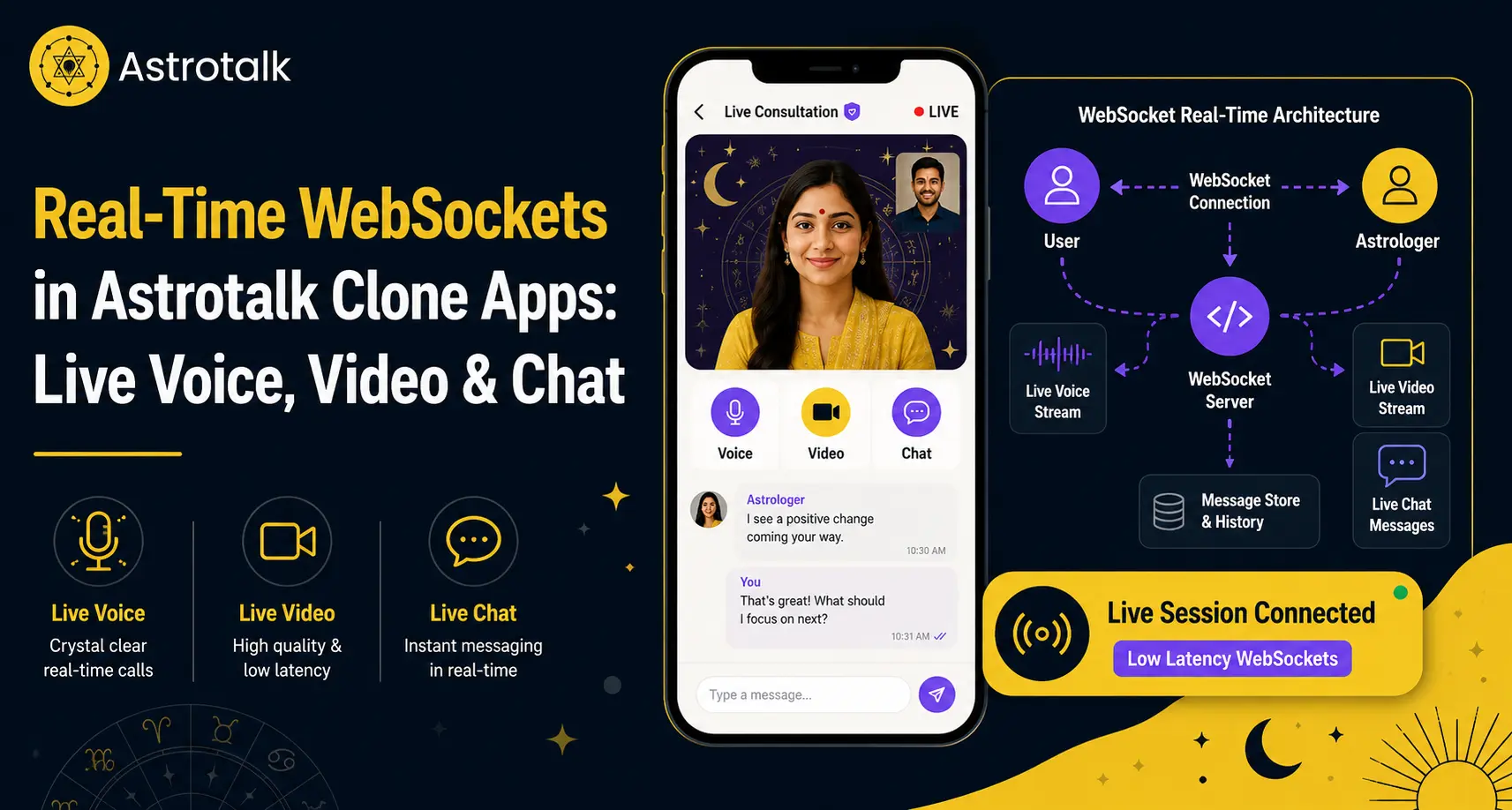
WebSockets create a persistent two-way connection between the user app, astrologer app, and backend server.
In simple words, the app does not need to keep asking the server, “Any new message?” or “Is the astrologer online now?” Instead, the server can instantly push updates to the app whenever something changes.
This is useful for live astrology platforms because the user experience depends on real-time events.
For example:
- When a user sends a message, the astrologer should receive it instantly.
- When an astrologer becomes busy, the user listing should update quickly.
- When a wallet balance becomes low, the user should receive a warning before the session ends.
- When a call request is sent, the astrologer should get the notification immediately.
- When a session ends, the backend should update billing, status, and history in real time.
WebSockets are mainly used for:
- Live chat messages
- Typing indicators
- Read receipts
- User online/offline status
- Astrologer availability
- Call request notifications
- Call accept or reject status
- Session timer updates
- Queue position updates
- Wallet balance notifications
- Admin session monitoring
This makes WebSockets one of the core technologies behind a real-time Astrotalk clone app.
| WebSocket Event | Use in Astrotalk Clone App |
|---|---|
| User Online | Shows active user session inside the platform. |
| Astrologer Online | Updates astrologer availability in real time. |
| Chat Message Sent | Delivers user and astrologer messages instantly. |
| Message Read | Shows read receipts in the chat screen. |
| Call Request | Notifies the astrologer when a user starts a voice or video call request. |
| Call Accepted | Starts signaling and prepares the live consultation session. |
| Wallet Balance Update | Shows live wallet deduction during paid consultation. |
| Session Timer | Tracks paid chat, voice, or video consultation duration. |
| Queue Update | Shows user wait time when astrologers are busy. |
WebSockets vs WebRTC: What Should Handle Chat, Voice, and Video?
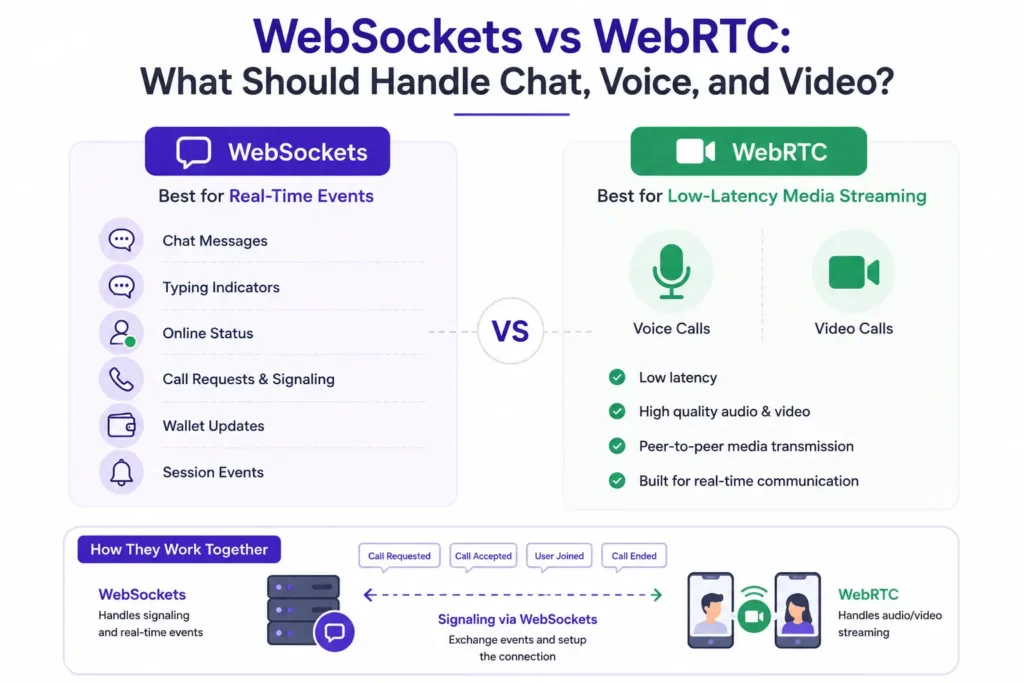
One common mistake in astrology app development is assuming that WebSockets should handle everything, including voice and video.
That is not the best approach.
WebSockets are excellent for real-time events. They work well for chat messages, typing indicators, online status, call requests, wallet updates, and session events.
But live voice and video are different. They need low-latency media streaming. For that, WebRTC or real-time communication providers like Agora and Twilio are usually better.
In an Astrotalk clone, WebSockets can help with call signaling. This means WebSockets can send events like “call requested,” “call accepted,” “call rejected,” “user joined,” or “call ended.” But the actual audio or video stream should usually run through WebRTC or RTC infrastructure.
This separation keeps the platform faster, cleaner, and more scalable.
| Feature | Best Technology | Reason |
|---|---|---|
| Text Chat | WebSocket / Socket.IO | Fast two-way message delivery. |
| Typing Indicator | WebSocket | Lightweight real-time event. |
| Online Presence | WebSocket | Shows astrologer availability instantly. |
| Call Request | WebSocket | Sends instant call notification. |
| Voice Call Media | WebRTC / Agora / Twilio | Better for real-time audio streaming. |
| Video Call Media | WebRTC / Agora / Twilio | Designed for low-latency video calls. |
| Call Signaling | WebSocket | Exchanges call state between user, astrologer, and backend. |
| Wallet Deduction | Backend + WebSocket Updates | Shows live balance changes during paid sessions. |
Real-Time Chat Flow in an Astrotalk Clone
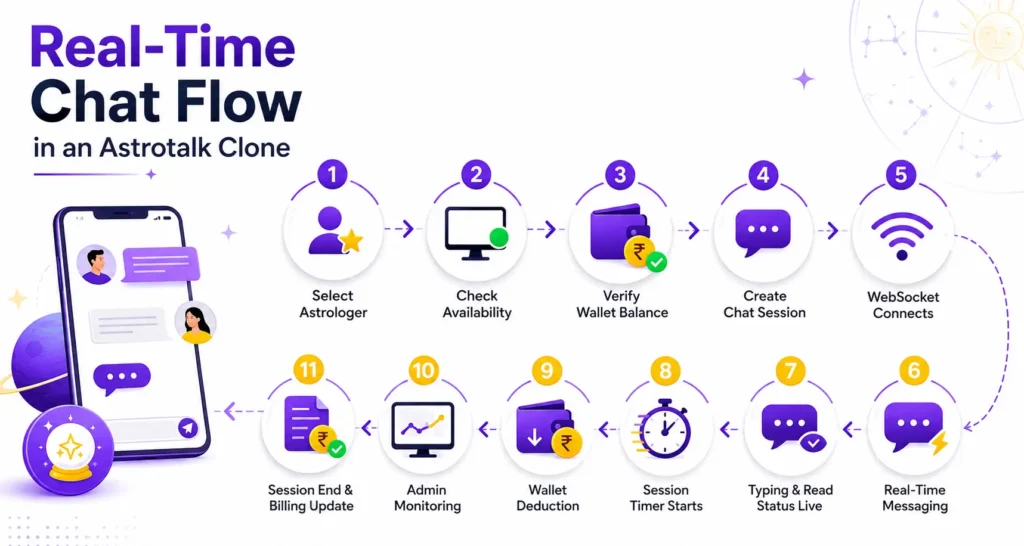
Live chat is usually the first consultation feature users try in an astrology app. It feels simple on the front end, but the backend must handle multiple real-time actions together.
A typical chat flow in an Astrotalk clone works like this:
- User selects an astrologer
The user chooses an astrologer based on availability, rating, language, expertise, or pricing. - Backend checks astrologer status
The system checks whether the astrologer is online, busy, away, or available for chat. - Wallet balance is verified
Before starting the session, the platform checks whether the user has enough wallet balance for a paid consultation. - Chat session is created
A new session is generated with user ID, astrologer ID, pricing rules, timer, and session status. - WebSocket connection opens
A real-time connection starts between the user app, astrologer app, and backend server. - Messages are delivered instantly
User and astrologer messages appear in real time without page refresh. - Typing and read status update live
Typing indicators and read receipts improve the chat experience and make the session feel active. - Session timer starts
The system tracks the consultation duration for billing and reporting. - Wallet deduction begins
The backend deducts balance based on per-minute pricing or message-based rules. - Admin can monitor the session
Admins can see active chat status, session duration, wallet activity, and dispute signals. - Session ends with billing update
Once the chat ends, the platform generates the invoice, updates astrologer earnings, and stores chat history.
This flow must also handle important edge cases:
- What happens if the user’s internet drops?
- What if the astrologer becomes unavailable?
- What if the wallet balance becomes low during the session?
- What if messages are delayed or delivered out of order?
- What if the session ends but billing does not update?
A strong real-time chat system should include:
- Message queues
- Redis pub/sub
- Read receipts
- Offline message sync
- Spam protection
- Chat history storage
- Auto-reconnect logic
- Wallet balance alerts
- Admin moderation access
Without these layers, the chat feature may work during testing but fail when real users start using it at scale.
Voice Call Architecture in an Astrotalk Clone
Voice calls need more than a call button. A paid astrology voice consultation must connect communication, wallet billing, astrologer status, session tracking, and admin control.
A strong voice call architecture should manage:
- Call Request Event
The user sends a voice call request to the selected astrologer. - Astrologer Accept or Reject Event
The astrologer can accept, reject, or ignore the call based on availability. - User Wallet Verification
The system checks whether the user has enough wallet balance before starting the call. - Minimum Balance Check
The platform can set a minimum balance rule, such as enough balance for 3 to 5 minutes of consultation. - Session Token Generation
A secure token is created so only the correct user and astrologer can join the call. - Voice Connection Setup
The actual voice stream can be handled through WebRTC, Agora, Twilio, or similar RTC providers. - Call Timer
The system tracks the call duration from the moment the consultation starts. - Per-Minute Billing
Wallet deduction happens based on the astrologer’s per-minute consultation rate. - Low-Balance Warning
The user receives a warning before the wallet balance becomes too low. - Auto-Disconnect Logic
If the user’s wallet balance ends, the system can automatically disconnect the call. - Call Quality Tracking
The platform can monitor dropped calls, weak networks, failed connections, and call duration. - Call History
The user, astrologer, and admin can view consultation records after the call ends. - Astrologer Earnings Update
Once the call ends, the astrologer’s earnings are updated based on session duration and commission rules. - Admin Reporting
Admins can track active calls, completed calls, failed calls, revenue, disputes, and astrologer performance.
For example, if a user starts a ₹20/minute consultation, the system should first check whether the user has enough balance. Once the call begins, the backend should track active minutes, deduct wallet balance, show live balance updates, and end the call automatically if the balance becomes insufficient.
WebSockets help send session updates instantly, such as call request, call accepted, timer update, low-balance alert, and call ended status. WebRTC or RTC providers handle the actual voice stream.
This makes the voice consultation feature reliable for users and revenue-safe for the platform owner.
Read more: Astrotalk Feature Breakdown for Startup Builders
Video Consultation Flow for Astrologers and Users
Video consultation in an Astrotalk clone needs more than a simple video call button. The platform must check astrologer availability, verify wallet balance, create a secure session, and request camera and microphone permissions before the call starts.
Once the session begins, WebSockets update the call status in real time, such as call requested, call accepted, user joined, call active, low-balance alert, and call ended. The actual video stream can run through WebRTC, Agora, Twilio, or similar RTC technology.
During the call, the backend should continue tracking the session timer and wallet deduction. If video quality drops, the platform can suggest switching to audio instead of ending the consultation. After the call, the user can rate the astrologer, the invoice can be generated, and astrologer earnings can be updated.
Managing Astrologer Availability in Real Time
Astrologer availability is one of the most important real-time features in an astrology consultation app.
Users should not see an astrologer as available if that astrologer is already in a paid chat or call. This creates a poor experience and may lead to failed bookings.
A real-time availability system should manage:
- Online Status
Shows astrologers who are currently active and available on the platform. - Offline Status
Removes inactive astrologers from live consultation options. - Busy Status
Shows when an astrologer is already handling a chat, voice call, or video consultation. - In-Call Status
Prevents users from starting another instant call with an astrologer who is already in a live session. - Break Mode
Allows astrologers to pause new requests without logging out completely. - Queue Length
Shows how many users are waiting for a specific astrologer. - Wait Time
Helps users understand how long they may need to wait before the astrologer becomes available. - Language-Based Routing
Connects users with astrologers who speak their preferred language. - Skill-Based Routing
Matches users with astrologers based on expertise such as Vedic astrology, tarot, numerology, or kundli reading. - Free Consultation Routing
Helps manage first-free-chat or promotional consultation flows. - Paid Consultation Routing
Prioritizes users who are ready for paid chat, voice call, or video consultation. - Priority Astrologer Listing
Highlights selected astrologers based on rating, availability, demand, or platform rules. - Auto-Routing to Next Available Astrologer
Sends users to another suitable astrologer when their selected astrologer is busy.
This helps the platform show accurate availability and reduce failed connection attempts.
For example, if an astrologer is already in a video consultation, the app can show “Busy” or “Join Queue” instead of allowing another user to start an instant call. When the astrologer becomes free, the next user in the queue can be notified automatically.
| Status | Meaning | Platform Action |
|---|---|---|
| Online | Astrologer is available. | Show in search and allow instant consultation. |
| Busy | Astrologer is already in chat or call. | Disable instant connect and show queue option. |
| Away | Astrologer is temporarily unavailable. | Hide or show wait option based on platform rules. |
| Offline | Astrologer is not active. | Remove from live consultation list. |
| Low Rating Alert | Astrologer has quality concerns. | Send profile for admin review. |
| High Demand | Multiple users are waiting. | Enable waiting list and queue notifications. |
Wallet Deduction and Live Billing During Chat or Calls
Wallet billing is a major part of an Astrotalk clone app. The platform must know when a paid session starts, how long it runs, how much should be deducted, and when the session should end.
A real-time wallet system should include:
- Balance check before session
- Minimum wallet amount
- Per-minute deduction
- Per-message billing if required
- First free chat or call logic
- Low-balance warning
- Auto-recharge prompt
- Auto-end session on insufficient balance
- Failed payment handling
- Refund logic
- Astrologer commission calculation
- Admin revenue tracking
In an Astrotalk clone, live billing must be connected with the communication layer.
For example, if a user starts a ₹30/minute call, the backend should track every active minute, deduct wallet balance, notify the user when balance is low, and close the session when funds are not enough.
WebSockets help send live balance updates without forcing the user to refresh the app. This improves trust because the user can clearly see how much balance is left during the consultation.
It also protects the business from revenue leakage.
Queue Management for High-Demand Astrologers
Popular astrologers may have multiple users waiting at the same time. Without queue management, the app can become confusing for users and difficult for astrologers.
A real-time queue system helps users know:
Their current queue position
Estimated wait time
Whether the astrologer is still busy
When the astrologer becomes available
Whether they can switch to another available astrologer
The system can also support smart routing.
For example, if a user wants a Hindi-speaking Vedic astrologer and the selected astrologer is busy, the app can recommend another available astrologer with similar expertise.
This improves conversion because users do not have to leave the app when their first choice is unavailable.
Scaling WebSockets for High-Traffic Astrology Apps
A small astrology app may start with simple WebSocket connections. But when thousands of users, astrologers, and admins are active at the same time, the system needs stronger infrastructure.
A scalable WebSocket setup may include:
WebSocket Gateway
Manages real-time connections between users, astrologers, and the backend.
Load Balancer
Distributes traffic across multiple servers to avoid overload.
Sticky Sessions
Keeps a user connected to the same server during an active WebSocket session.
Redis Adapter for Socket.IO
Helps sync real-time events across multiple backend servers.
Horizontal Server Scaling
Allows the platform to add more servers as traffic grows.
Message Broker Like Kafka or RabbitMQ
Handles background events such as billing updates, notifications, and session logs.
Presence Service
Tracks whether users and astrologers are online, offline, busy, or available.
Session Service
Manages active chat, voice, and video consultation sessions.
Wallet Service
Handles live wallet balance updates, deductions, low-balance alerts, and billing events.
Chat Service
Manages real-time messages, read receipts, typing indicators, and chat history.
Notification Service
Sends alerts for call requests, queue updates, wallet warnings, and session reminders.
Admin Monitoring Dashboard
Gives admins visibility into active users, ongoing sessions, failed calls, payments, and disputes.
Connection Heartbeat
Checks whether users and astrologers are still connected during live sessions.
Reconnection Logic
Helps users rejoin a chat or call if their internet drops.
Rate Limits
Prevents spam, bot activity, repeated requests, and server abuse.
Multi-Region Deployment
Improves speed and reliability for users in different locations.
Real-Time Logs and Alerts
Helps the technical team detect failures, slow events, dropped sessions, and payment issues quickly.
A simple architecture can look like this:
User App / Astrologer App → WebSocket Gateway → Session Service → Wallet Service → Chat Service → Notification Service → Admin Dashboard
This structure helps separate real-time communication from billing, notifications, user management, and admin operations.
That separation is important because if one service slows down, the entire platform should not fail.
Security Challenges in Real-Time Astrotalk Clone Apps
Real-time apps also create security risks. Since users may share personal questions, payment details, consultation history, and sometimes audio or video data, the platform must protect both privacy and business operations.
Important security controls include:
- Authenticated Socket Connections
Every WebSocket connection should be verified before allowing a user, astrologer, or admin to join a live session. - JWT-Based Session Tokens
Secure tokens help confirm that only the right user and astrologer can access a specific chat, voice call, or video consultation. - Role-Based Access Control
Users, astrologers, support teams, and admins should have different access levels based on their roles. - Encrypted Chat Storage
Consultation messages should be stored securely to protect user privacy and sensitive conversation history. - Secure Payment Gateway Integration
Wallet recharge, refunds, commissions, and paid session billing should be handled through secure payment systems. - Abuse Reporting
Users and astrologers should be able to report spam, harassment, fake profiles, or suspicious behavior. - Call Privacy Rules
Voice and video sessions should be protected with secure session access, permission controls, and privacy policies. - Data Retention Policy
The platform should define how long chats, call logs, invoices, and consultation records are stored. - Admin Access Logs
Every admin action should be logged to prevent misuse of user data or consultation records. - Secure APIs
Backend APIs should be protected against unauthorized access, fake requests, and data leaks. - Anti-Spam Controls
The system should detect repeated messages, bot activity, fake users, and abusive behavior. - Fake Astrologer Prevention
Verification checks can help prevent fake astrologer profiles from entering the platform. - Rate Limiting
Rate limits help stop users or bots from sending too many messages, call requests, or API requests in a short time. - Device and Session Monitoring
The platform should track suspicious logins, multiple device usage, and abnormal session activity.
The platform should make sure that only authorized users can join a chat or call. An astrologer should not access another astrologer’s consultation data. Admins should also have controlled access based on role and responsibility.
Security is not just a technical feature. It directly affects user trust, payment safety, consultation privacy, and long-term platform credibility.
Common Real-Time Failures Founders Should Avoid
Many Astrotalk clone apps fail not because the idea is weak, but because the real-time system is poorly planned.
Common failures include delayed messages, wrong astrologer status, wallet mismatch, failed calls, no reconnect logic, poor scaling, and no admin visibility.
These problems may look small during testing but become serious when real users start paying for consultations.
| Problem | Business Impact | Recommended Solution |
|---|---|---|
| Delayed Messages | Poor user trust and lower consultation quality. | Use optimized WebSocket events and message queues. |
| No Call Fallback | Failed consultation during poor network conditions. | Allow video-to-audio fallback. |
| Wallet Not Synced | Revenue leakage and user disputes. | Use backend billing events with real-time wallet updates. |
| Wrong Astrologer Status | Failed bookings and poor user experience. | Use presence tracking and live status updates. |
| No Reconnect Logic | Session drops during weak internet. | Add auto-reconnect and state recovery. |
| Poor Scaling | App crashes during high traffic. | Use WebSocket gateway, Redis, queues, and horizontal scaling. |
| No Admin Monitoring | Operational blind spots. | Build a live session dashboard for admins. |
Recommended Tech Stack for Real-Time Astrotalk Clone Development
The best tech stack for an Astrotalk clone depends on budget, scale, feature depth, and launch goals. A founder launching a focused astrology consultation app may not need the same architecture as a large platform handling thousands of live chats, voice calls, and video consultations at the same time.
For the mobile app, Flutter or React Native can be used to build user and astrologer apps for Android and iOS. For the web platform, React.js or Next.js can support a fast and responsive user experience across browsers and devices.
The backend can be built with Node.js, Laravel, or Go microservices depending on the expected traffic, real-time workload, and scalability requirements. WebSocket or Socket.IO can manage live chat, typing indicators, read receipts, online status, session updates, and wallet notifications.
For voice and video consultations, WebRTC, Agora, or Twilio can be used because these technologies are better suited for low-latency audio and video streaming. PostgreSQL or MySQL can store users, astrologers, sessions, payments, chat history, and admin records, while Redis can support cache, live presence, queue handling, and faster status updates.
For payments, Stripe, Razorpay, or regional payment gateways can manage wallet recharge, paid consultations, refunds, and transaction flows. For many founders, the goal should not be to overbuild from day one. The smarter approach is to launch with a stable and scalable foundation, then improve advanced modules based on real user behavior.
| Layer | Recommended Stack |
|---|---|
| Mobile App | Flutter / React Native |
| Web App | React.js / Next.js |
| Backend | Node.js / Laravel / Go microservices based on scale |
| Real-Time Chat | WebSocket / Socket.IO |
| Voice and Video | WebRTC / Agora / Twilio |
| Database | PostgreSQL / MySQL |
| Cache and Presence | Redis |
| Queue | RabbitMQ / Kafka |
| Notifications | Firebase Cloud Messaging |
| Payments | Stripe / Razorpay / Regional Gateways |
| Admin Panel | React / Laravel Admin |
| Hosting | AWS / GCP / Azure |
Admin Dashboard for Real-Time Astrology Platforms
Admins need clear visibility into what is happening inside the platform. In an Astrotalk clone app, the admin dashboard should not only show users and payments. It should also track live sessions, astrologer activity, wallet movement, support issues, and platform performance.
A real-time Astrotalk clone admin dashboard should show:
- Active Users
Shows how many users are currently browsing, chatting, calling, or waiting for consultation. - Online Astrologers
Displays astrologers who are available for chat, voice calls, or video consultations. - Busy Astrologers
Shows astrologers who are already in an active session and cannot accept new requests. - Ongoing Chats
Helps admins monitor active chat sessions, duration, user status, and astrologer response flow. - Ongoing Voice Calls
Shows live voice consultation sessions, call duration, user wallet status, and astrologer availability. - Ongoing Video Calls
Tracks active video consultations, connection status, session duration, and call quality signals. - Queue Length
Shows how many users are waiting for popular astrologers or specific consultation categories. - Wallet Transactions
Tracks wallet recharge, deduction, refunds, consultation billing, and astrologer commission. - Failed Payments
Helps admins identify payment issues, incomplete wallet recharges, or failed transaction attempts. - Low-Balance Session Endings
Shows sessions that ended because the user wallet balance became insufficient. - Complaints and Abuse Reports
Helps the support team review user complaints, astrologer issues, spam reports, or misuse cases. - Refund Requests
Allows admins to review refund claims related to failed calls, poor service, payment errors, or session disputes. - Astrologer Performance
Tracks ratings, completed sessions, response time, earnings, cancellations, and repeat users. - Call Quality Logs
Helps detect dropped calls, poor network issues, failed connections, or RTC provider problems. - Revenue Reports
Shows platform earnings, astrologer payouts, commission, wallet usage, and paid consultation trends.
Without admin monitoring, the platform owner cannot detect operational problems quickly. For example, if voice or video calls are failing because of a network provider issue, admins should see that pattern before users start leaving negative reviews.
A real-time dashboard helps the business team manage service quality, revenue, astrologer performance, support issues, and platform trust from one place.
Read more: AstroTalk Revenue Model: How the Platform Makes Money and Grows
How Miracuves Builds Real-Time Astrotalk Clone Platforms
Miracuves helps founders build Astrotalk-like astrology consultation platforms with real-time chat, voice/video consultation, astrologer dashboards, user wallets, admin panels, session tracking, payment integrations, and scalable backend architecture.
Instead of treating chat, voice calls, video consultations, wallets, and notifications as separate features, Miracuves connects them into one operational workflow.
This matters because live consultation platforms need coordination between multiple systems. The astrologer status must update when a call starts. The wallet must deduct balance during the session. The admin dashboard must show active consultation status. Notifications must reach users and astrologers instantly.
With the right development approach, founders can launch an astrology consultation platform that supports real-time user engagement, paid sessions, astrologer earnings, and platform revenue from one controlled system.
Conclusion
Real-time communication is the backbone of an Astrotalk clone app. Users do not just want to browse astrologer profiles. They want instant chat, smooth voice calls, reliable video consultations, live wallet updates, and accurate astrologer availability.
WebSockets help manage real-time events like messages, typing indicators, call requests, queue updates, session timers, and wallet notifications. WebRTC or RTC providers handle the actual voice and video streams. Together, they create the live consultation experience that users expect.
For founders, the key is to build real-time systems with billing, availability, security, scaling, and admin monitoring from the beginning. A weak real-time architecture can create failed sessions, payment disputes, poor ratings, and revenue leakage.
Miracuves helps businesses build Astrotalk-like platforms with real-time chat, voice/video consultation, wallet billing, admin control, and scalable backend workflows.
Contact Miracuves today to build a real-time Astrotalk clone platform designed for live astrology consultations, paid sessions, and long-term growth.
FAQs
What are WebSockets used for in an Astrotalk clone app?
WebSockets are used for real-time events such as live chat messages, typing indicators, read receipts, astrologer availability, call requests, queue updates, wallet balance notifications, and session timer updates.
Are WebSockets enough for voice and video calls?
No. WebSockets are useful for call signaling and session events, but real-time voice and video streams are usually handled through WebRTC, Agora, Twilio, or similar RTC infrastructure.
What is better for astrology video consultations: WebSocket or WebRTC?
WebRTC is better for video consultation because it is designed for low-latency audio and video streaming. WebSockets can support signaling, call status, and session updates around the video call.
How does live wallet deduction work in an Astrotalk clone?
The backend checks the user wallet before the session starts, tracks session duration, deducts balance based on pricing rules, sends low-balance alerts, and ends the session if the user does not have enough funds.
How do astrologer availability and busy status update in real time?
The app uses real-time presence tracking through WebSockets. When an astrologer comes online, joins a call, enters break mode, or goes offline, the user app and admin dashboard update instantly.