




Key Takeaways
- A blank chat box can overwhelm users because it gives them no clear starting point.
- Users want completed outcomes, not unlimited prompting possibilities or access to an AI model.
- Guided actions, structured inputs, templates, and visible results are core AI UX elements.
- Strong AI products hide technical complexity behind focused, task-based workflows.
- A workflow-driven interface can improve activation, product clarity, and long-term user retention.
UX Signals
- Users need clear use cases, guided onboarding, suggested actions, progress states, and editable outputs.
- Product teams need workflow templates, contextual data collection, validation rules, and outcome tracking.
- Admins need control over prompts, workflows, user roles, model usage, limits, and performance reports.
- Hardcoded actions can reduce prompt uncertainty and help users reach valuable results faster.
- Feedback loops help teams identify abandoned workflows, weak outputs, repeated errors, and user friction.
Real Insights
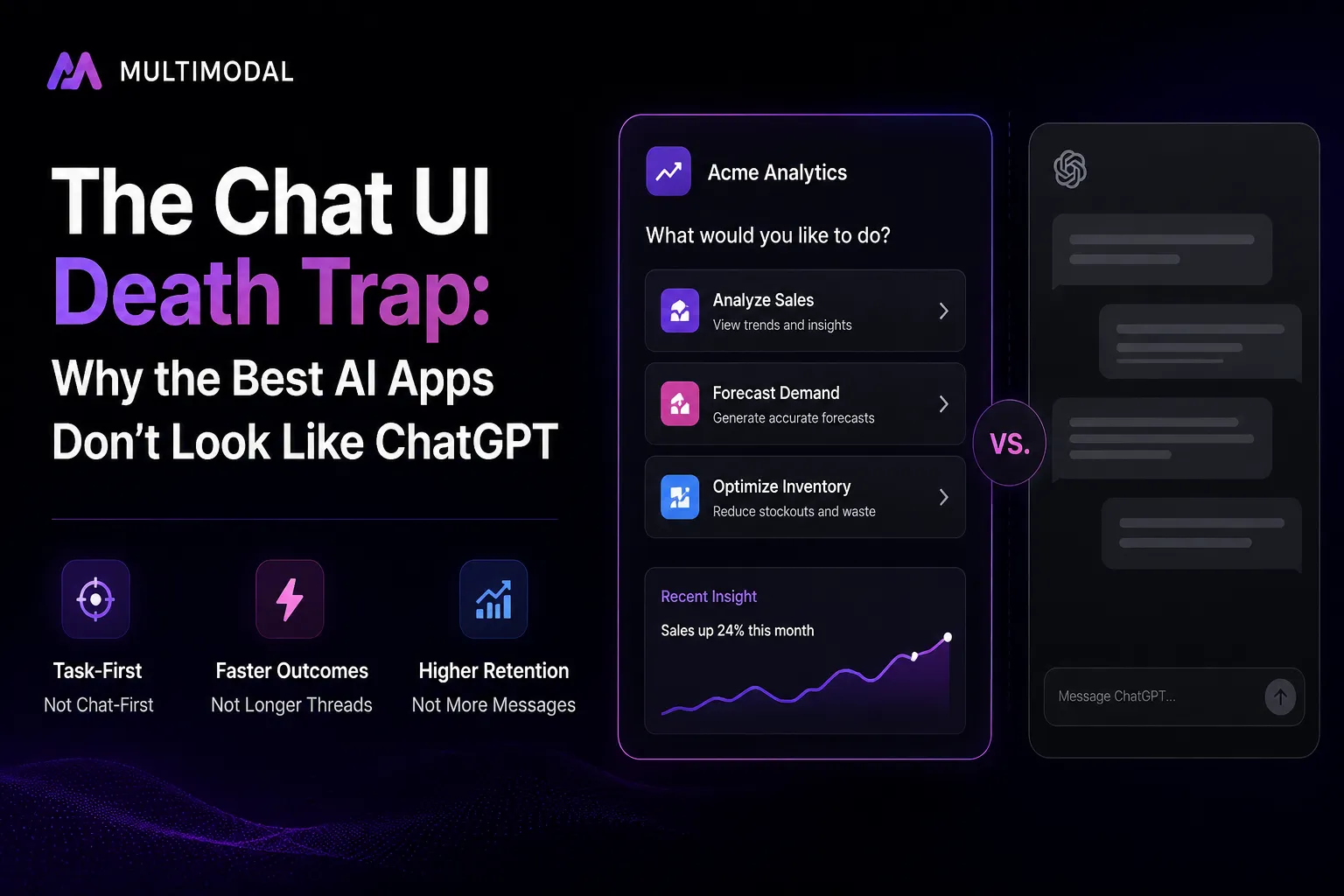
- A ChatGPT-style interface transfers discovery, prompting, evaluation, and next-step decisions to the user.
- Too much flexibility can create paralysis when users do not understand what the AI can reliably complete.
- The best AI UX begins with a defined job and guides the user toward a visible business outcome.
- Workflow design, contextual intelligence, and controlled actions make an AI product harder to replace.
- Miracuves builds AI apps with guided workflows, contextual actions, model integrations, and admin-controlled UX.
A blank text box may be the most copied interface in the AI market.
It may also be one of the most damaging.
A founder connects an application to a capable language model, designs it as a ChatGPT-like platform, places a prompt field in the middle of the screen, adds a message such as “Ask anything,” and assumes the product is ready. Technically, the AI can perform dozens of tasks. From the user’s perspective, however, the application has given them no clear starting point.
The user must decide what the product can do, whether it can handle their specific problem, how much context it needs, how to structure the request, and what a good result should look like.
That is not frictionless AI.
It is a product asking the user to perform product design.
Across nine years of building software businesses, we have repeatedly seen the same underlying mistake: teams confuse model flexibility with user value. The AI may be capable of doing almost anything, but the person opening the application usually wants to complete one specific task.
The strongest AI products do not force users to discover that task through trial and error. They make the next valuable action obvious.
The Blank Canvas Paralysis: Why Users Abandon Prompt Boxes
Imagine opening a financial-analysis application and seeing nothing except:
“What would you like to know?”
A finance professional may know the desired outcome: analyse cash flow, identify unusual expenses, prepare a board summary, or compare actual spending against the forecast.
But the interface has not exposed any of those possibilities.
The user now needs to translate a business objective into a machine instruction. They must decide which files to provide, what period to analyse, how detailed the answer should be, which assumptions the model may make, and how the output should be formatted.
Every unanswered question increases cognitive effort before value appears.
This is the weakness of the blank canvas. It creates theoretical freedom but offers little operational guidance.
Established UX research reaches a similar conclusion. Nielsen Norman Group notes that completely empty application states can confuse users and weaken confidence, whereas a well-designed empty state should improve learnability and provide a direct path to a key task.
The problem becomes more severe in AI products because users also need to understand the capabilities and limitations of an unfamiliar probabilistic system.
A conventional interface may ask the user to select a report.
A blank AI interface asks them to imagine every report the system might be able to produce.
The prompt box creates three forms of uncertainty
Capability uncertainty:
The user does not know what the product can reliably do.
Instruction uncertainty:
The user does not know what information the AI needs or how the request should be phrased.
Outcome uncertainty:
The user does not know whether the response will be trustworthy, complete, usable, or formatted correctly.
Experienced AI users may overcome these uncertainties. Mainstream users often will not.
That is why activation should not be measured only by account creation or the first submitted prompt. Product teams should examine whether users successfully complete a meaningful workflow and return to repeat it.
Read More: What is ChatGPT App and How Does It Work?
Why Copying ChatGPT Is Usually Product Imitation, Not Product Strategy
ChatGPT is a broad, general-purpose environment. Its interface must accommodate research, coding, writing, brainstorming, analysis, tutoring, and many other activities.
A specialised AI product has a different job.
A recruitment application does not need users to invent a recruiting process from a blank box. It should help them:
- create a job description
- evaluate a résumé against defined criteria
- generate structured interview questions
- compare shortlisted applicants
- prepare a candidate summary
A customer-support application should not begin with “Ask anything.” It should begin with operational actions such as:
- summarise this ticket
- find the relevant policy
- draft a response
- classify urgency
- escalate to a human
- record the resolution
When a founder copies the interface of a general-purpose AI product, the founder also copies its ambiguity.
The result may look familiar, but familiarity alone does not create a compelling product. The product still needs an opinion about what the user should do, what information is required, which sequence is safest, and how success should be measured.
Read More: How to Build an App Like ChatGPT: Developer Guide
The Shift From Conversational AI to Workflow-Driven AI
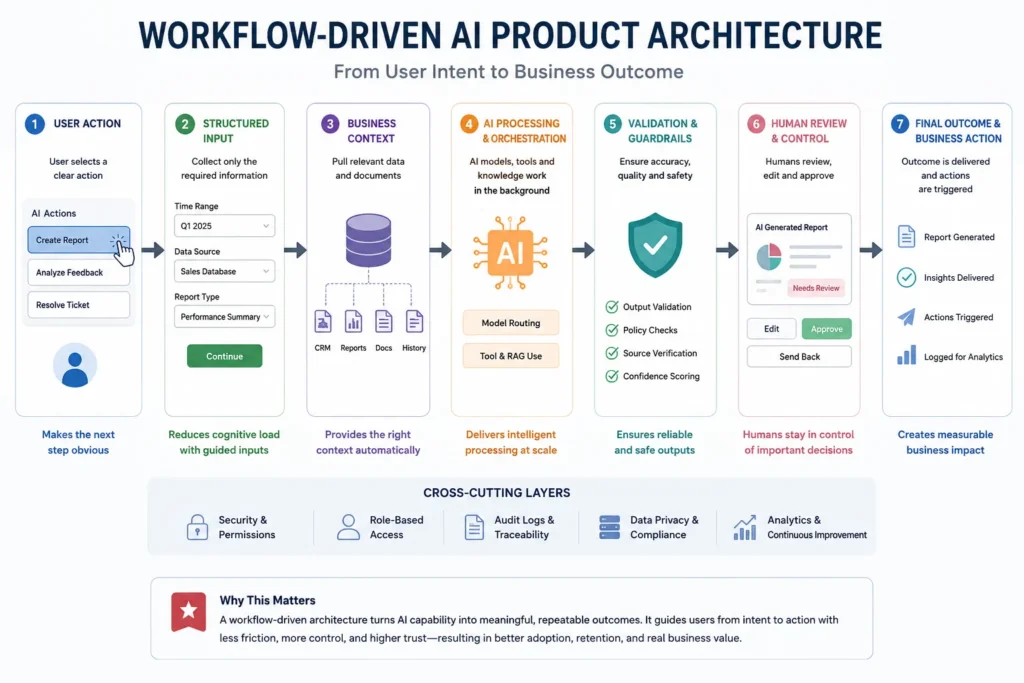
Workflow-driven AI begins with a defined outcome rather than an empty conversation.
The interface might present a set of actions:
Create campaign brief
Analyse customer feedback
Draft renewal email
Build weekly performance report
When the user selects an action, the system can request only the inputs required for that task. It can provide defaults, examples, connected data, validation rules, and a predictable output format.
The AI remains powerful, but its flexibility is contained inside an experience the user can understand.
Nielsen Norman Group describes prompt controls as interface components—such as buttons, cards, menus, and toggles—that supplement or accelerate text input. Its research on use-case prompt suggestions also notes that these elements can improve learnability and help people understand what an AI system can do.
More recent research into generative interfaces reaches an even more direct conclusion: simple controls such as buttons and checkboxes can reduce typing and memory demands while helping the system collect better context.
Chat-first and workflow-first AI are not the same product
| Product question | Chat-first interface | Workflow-driven interface |
|---|---|---|
| What can the user do? | The user must discover it | The product exposes useful actions |
| How is context collected? | Through free-form prompting | Through structured fields and connected data |
| How consistent is the output? | Highly dependent on prompt quality | Controlled through schemas, templates, and validation |
| Who designs the process? | Mostly the user | Mostly the product team |
| How easy is onboarding? | Depends on AI literacy | Designed around recognisable tasks |
| How is success measured? | Prompts, messages, and sessions | Completed workflows and business outcomes |
| Where does chat fit? | Primary interface | Refinement, exceptions, and follow-up |
Hardcoding Intent: How Miracuves Builds Click-to-Run AI Workflows
“Hardcoding intent” does not mean making the AI rigid.
It means deciding which user intentions deserve a reliable product path.
At Miracuves, the workflow begins with a business outcome, not with a language model. The product team identifies a task users perform frequently, the information needed to complete it, the systems involved, the decisions that require human control, and the final output the business can use.
The workflow can then be translated into a sequence:
- The user selects a clearly labelled action.
- The application loads relevant account or business context.
- The interface requests missing structured information.
- The backend assembles the model instructions.
- The AI generates or analyses the content.
- Validation rules inspect the output.
- The user reviews, edits, approves, exports, or triggers the next action.
- The application records the workflow result for analytics and improvement.
The user does not need to understand prompt construction, token limits, model selection, tool calling, or output schemas.
Those are product responsibilities.
Miracuves’ generative AI app development services focus on production AI applications, including agent workflows, retrieval systems, model orchestration, guardrails, and source-code ownership. The service positioning itself distinguishes production systems from thin demonstrations built around a single model call.
A workflow is more than a prewritten prompt
A button connected to a static prompt may reduce typing, but it does not automatically create a strong AI product.
A complete workflow may require:
- authenticated user context
- data retrieval from CRM, ERP, help-desk, or document systems
- structured and required fields
- role-based permissions
- predefined business rules
- model and tool routing
- output formatting
- confidence or exception handling
- human review
- audit logs
- downstream actions
- usage and outcome analytics
This is where the product earns its value.
The model produces intelligence. The workflow turns that intelligence into something the business can repeatedly use.
Read More: ChatGPT Clone Revenue Model: How AI Chat Platforms Make Money
What Workflow-Driven AI Looks Like in Real Products
Marketing: From “write something” to campaign production
A generic tool asks the marketer to describe the desired campaign.
A workflow-driven product already knows the process:
Select product → choose audience → select campaign goal → load brand voice → generate channel assets → review compliance → approve publication
The AI may still generate the content, but the interface carries the user from objective to deliverable.
Customer support: From conversation to resolution
A generic assistant waits for the agent to describe the ticket.
A stronger workflow can automatically retrieve the conversation, customer tier, order history, policy documents, and previous resolutions.
The agent clicks Prepare Resolution, and the system:
- summarises the problem
- identifies the likely category
- retrieves applicable policies
- drafts a response
- flags missing evidence
- recommends escalation when needed
- prepares a CRM note after approval
The value is not merely that the AI can write. The value is that the application understands the resolution workflow.
Recruitment: From résumé upload to structured evaluation
A blank prompt invites inconsistent evaluation.
A guided workflow can require a defined job scorecard, extract relevant experience, compare evidence against each criterion, identify missing information, generate interview questions, and require a human decision.
The workflow creates consistency without pretending that AI should make the final hiring decision.
Sales: From “analyse this account” to the next action
A seller may not know what context to include in a prompt.
An embedded AI action can draw from CRM data, recent emails, meeting notes, open opportunities, product usage, and account health.
The output can be structured as:
- account summary
- detected risk
- expansion opportunity
- unanswered stakeholder question
- recommended next action
- draft follow-up email
Again, the interface sells an outcome, not a conversation.
Operations: From raw data to an exception queue
Operational teams often need action, not prose.
Instead of asking the user to query a dataset conversationally, an AI workflow can continuously review records and surface:
- unusual transactions
- delayed orders
- missing documents
- policy violations
- inventory anomalies
- accounts requiring human review
The best interface may be a prioritised dashboard with approve, investigate, assign, and resolve actions. A chat window might only appear when a user needs an explanation.
Chat Is Not Dead—It Has a More Focused Role
The argument is not that conversational interfaces are always wrong.
Chat remains useful when:
- the user’s goal is exploratory
- the space of possible questions is genuinely broad
- follow-up questions are central to the task
- the user needs to refine an output iteratively
- no fixed sequence can represent the work
- natural language is faster than navigating controls
Research into hundreds of generative-AI interactions found that users engage in multiple conversation patterns, from vague exploratory exchanges to precise, focused requests. That means there is no single ideal conversation structure for every need.
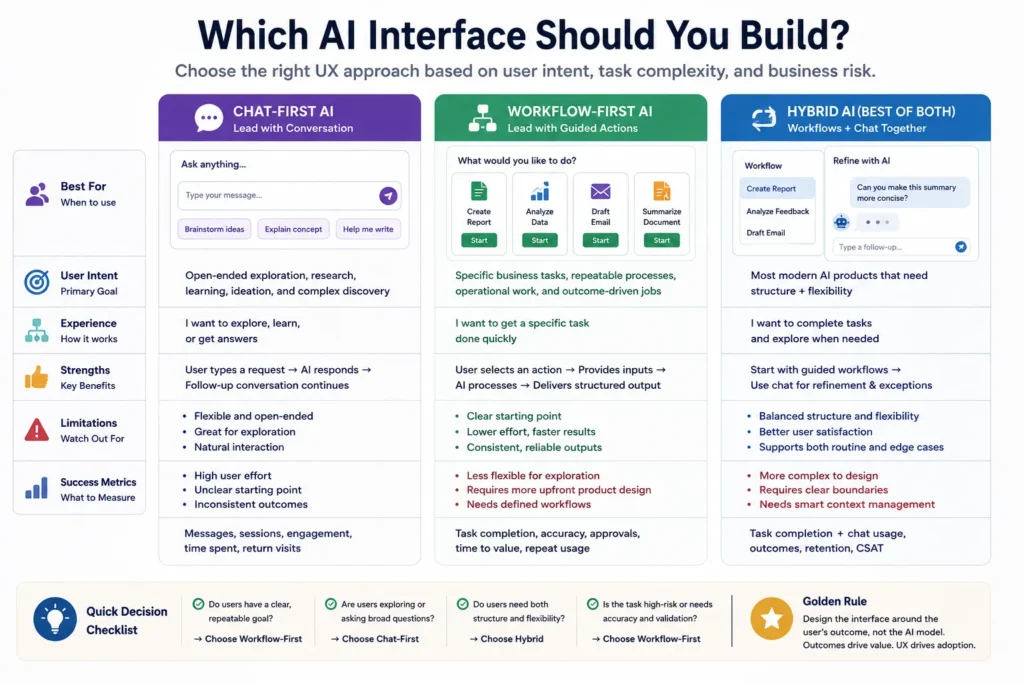
The stronger product decision is often a hybrid:
Workflow first. Conversation when useful.
For example, the application may lead with Create Quarterly Report, gather data through structured controls, and generate the report. A chat panel can then let the user ask:
- Why did you flag this metric?
- Rewrite the summary for investors.
- Compare this result with the previous quarter.
- What assumptions did you make?
Chat becomes a refinement mechanism rather than an onboarding burden.
Read More: How Safe is a White-Label ChatGPT App? Security Guide 2026
The Workflow-Driven AI Architecture Founders Need to Plan
A useful AI workflow spans more than the frontend.
1. Intent layer
This defines the business actions available to users.
Each action should have:
- a clear label
- a specific user
- a measurable outcome
- defined required inputs
- a predictable output
- known exception paths
2. Context layer
The application needs relevant business information.
Context may come from:
- user input
- uploaded files
- account records
- application databases
- connected SaaS tools
- knowledge bases
- previous workflow results
3. Orchestration layer
The orchestration layer decides which model, prompt, retrieval process, tool, or API should run.
Not every action needs the same model. A classification task, document search, numerical calculation, and long-form generation workflow may require different approaches.
4. Control layer
The product should establish what the AI may and may not do.
Controls may include:
- role-based permissions
- approved data sources
- required human review
- sensitive-data handling
- output limits
- prohibited actions
- audit logs
- escalation rules
5. Output layer
The system should return an operational result, not merely an attractive paragraph.
Useful outputs may include:
- a completed report
- an editable record
- a prioritised list
- a generated document
- an approved response
- an updated CRM entry
- a triggered automation
- a decision-support summary
6. Measurement layer
A workflow makes product performance easier to evaluate.
Instead of tracking only prompt volume, teams can measure:
- workflow starts
- workflow completions
- time to first useful result
- abandoned steps
- approval and edit rates
- exception frequency
- repeat usage
- downstream actions
- cost per completed workflow
These signals reveal whether the application is solving the intended problem.
Founder Decision Signals
Founder Decision Signals
User Intent
If most users arrive to complete one of several repeatable tasks, lead with visible workflows rather than an empty chat box.
Input Complexity
If good results require specific data, guide collection through fields, connected systems, defaults, and validation.
Output Risk
If an incorrect output affects customers, money, compliance, or operations, include review, controls, and exception handling.
Exploration
If users genuinely need open-ended discovery, retain chat—but surround it with suggestions, examples, tools, and relevant context.
Mistakes That Turn AI Products Into Thin Wrappers
Treating the model as the complete product
Model capability is infrastructure. A defensible application adds proprietary context, workflow logic, integrations, controls, data, and user experience.
Miracuves explores this distinction further in its article on closed-loop corporate chatbots, which positions private business data and controlled enterprise workflows as more valuable than another general-purpose public chatbot.
Adding prompt examples without redesigning the task
Example prompts are better than an empty screen, but they may remain superficial.
“Write an email” is still vague.
“Draft renewal email” becomes useful when the system already knows the customer, contract date, usage trend, renewal risk, account owner, preferred tone, and approved offer.
Hiding uncertainty
A polished workflow should not imply that every result is equally reliable.
The interface should identify missing context, expose assumptions, request review, and route sensitive cases to a human.
Measuring conversations instead of outcomes
A high number of prompts may indicate engagement—or confusion.
A user who sends eight prompts to complete a task may be less successful than one who completes a guided workflow in two clicks.
Automating a broken process
AI cannot rescue a workflow that has no clear owner, inconsistent data, contradictory rules, or no definition of completion.
Before adding AI, clarify the operational process.
Removing all user control
Workflow-driven does not mean fully autonomous.
Users may need to edit inputs, inspect sources, adjust settings, reject recommendations, undo actions, or send a case for human review.
A Practical Framework for Turning a Chat Idea Into an AI Product
Before development begins, product teams should answer seven questions.
1. Who is the user?
Avoid “business users” as a definition.
A customer-support agent, sales manager, compliance reviewer, recruiter, and founder have different data, risk, and decision needs.
2. What repeated job are they trying to complete?
Name the job with a verb and a deliverable:
- qualify lead
- resolve ticket
- prepare report
- review contract
- reconcile transaction
- approve campaign
3. What information is required?
Separate information the system already knows from information the user must provide.
The less the user needs to remember and retype, the stronger the workflow becomes.
4. What can AI decide?
AI may classify, summarise, draft, retrieve, compare, recommend, or detect anomalies.
Not every workflow should allow it to approve, publish, pay, reject, or delete.
5. Where is human review mandatory?
Identify decisions with financial, legal, reputational, safety, or customer consequences.
6. What does completion look like?
The final state should be visible:
- report exported
- case resolved
- response approved
- lead updated
- application reviewed
- exception assigned
7. What should the product learn?
Capture corrections, user choices, approvals, failures, and repeated exceptions. These signals are more valuable than collecting conversation logs without context.
Read More: Best ChatGPT Clone Script in 2026: Features & Pricing Compared
How Miracuves Approaches AI Product UX
Miracuves does not advise founders to remove chat merely to appear different.
The recommendation is to make the interface match the business problem.
A knowledge assistant may need conversational exploration. A claims-review product may need a structured evidence workflow. A sales copilot may need embedded actions inside the CRM. A customer-support product may need both a resolution workflow and an optional follow-up chat.
The product architecture should follow the task.
Founders considering an AI application can also review Miracuves’ guide to AI features for mobile apps and its broader AI automation platform resources for related product and workflow ideas.
Final Thoughts: Do Not Make the User Invent Your Product
The blank prompt box is attractive because it is easy to build and appears infinitely flexible.
But users rarely buy infinite flexibility.
They buy a faster report, a resolved ticket, a reviewed document, a stronger sales decision, a completed campaign, or fewer hours spent on repetitive work.
A generic chat interface transfers too much responsibility to the user. It asks them to discover the product’s capabilities, provide the right context, construct the process, evaluate the answer, and determine the next action.
Workflow-driven AI reverses that relationship.
The product expresses a clear point of view. It identifies the task, gathers the required context, runs the intelligence, controls the risk, and guides the user toward a visible result.
This is the principle behind a workflow-focused Miracuves Solution: the model remains powerful, but the experience is designed around the outcome the user actually wants.
Even when building a ChatGPT Clone, the goal should not be to reproduce an empty prompt box. The stronger opportunity is to convert conversational intelligence into structured, click-to-run workflows that solve specific business problems.
That is the difference between giving users access to an AI model and giving them a complete AI product.
FAQs
What is the chat UI death trap?
The chat UI death trap occurs when an AI application relies on an empty prompt box as its main experience without explaining what the product can do or guiding users toward useful outcomes. The model may be capable, but users must invent the workflow themselves.
Why do blank prompt boxes create friction?
They create capability, instruction, and outcome uncertainty. Users may not know which tasks are supported, how much context to provide, how to phrase a request, or whether the resulting answer can be trusted.
Should every AI application avoid chat interfaces?
No. Chat works well for exploration, follow-up questions, iterative refinement, and broad information needs. For repeatable business tasks, however, chat is often stronger as a secondary layer behind guided workflows.
What is workflow-driven AI?
Workflow-driven AI embeds models inside a defined business process. The application collects structured inputs, retrieves context, runs the appropriate models or tools, validates the output, and guides the user toward completion.
Are suggested prompts enough to improve AI app onboarding?
They help users understand possible use cases, but they are not a substitute for product design. A complete workflow may also need connected data, structured fields, defaults, permissions, validation, review stages, and downstream actions.
How do workflow-driven interfaces improve AI product retention?
They can shorten the path to a useful result, make repeatable tasks easier to complete, and give users a clear reason to return. Product teams should validate this through workflow completion, repeat usage, approval rates, and retention data rather than assume a particular interface guarantees retention.
What metrics should an AI product team track?
Useful metrics include time to first useful result, workflow-start and completion rates, abandonment points, edit rates, approval rates, exception frequency, repeat workflow usage, cost per completed task, and successful downstream actions.
Can Miracuves build a hybrid workflow-and-chat AI application?
Yes. Miracuves develops generative-AI applications with structured workflows, conversational layers, AI agents, retrieval systems, model integrations, administrative controls, and source-code ownership. The final architecture should reflect the use case, data, risk, and operating model.