Key Takeaways
What You’ll Learn
- A multimodal assistant understands voice and video during the same live support session.
- Audio and video should run separately to avoid delays and processing queues.
- Only useful frames should be analysed instead of sending every video frame to the AI.
- The 400ms target needs clear measurement because visual recognition is not the full response time.
- The main lesson is to coordinate media, AI, knowledge, and support workflows efficiently.
Stats That Matter
- Under 400ms can measure visual interpretation after a voice or camera event.
- WebRTC handles live audio and video with secure transport and network adaptation.
- Performance testing should track median, p95, and p99 latency.
- Important checks include dropped frames, timeouts, session recovery, and concurrent users.
- Compact session state lowers AI context use and keeps responses faster.
Real Insights
- Model speed alone is not enough because networks, buffering, retrieval, and speech also add delay.
- Frame selection reduces cost by analysing only relevant objects, labels, lights, or components.
- A separate orchestrator manages context, visual evidence, knowledge retrieval, and escalation.
- The system needs fallback options such as voice-only support, still images, or human transfer.
- For founders, build a real-time multimodal support assistant around WebRTC, parallel processing, selected frames, compact context, and reliable escalation.
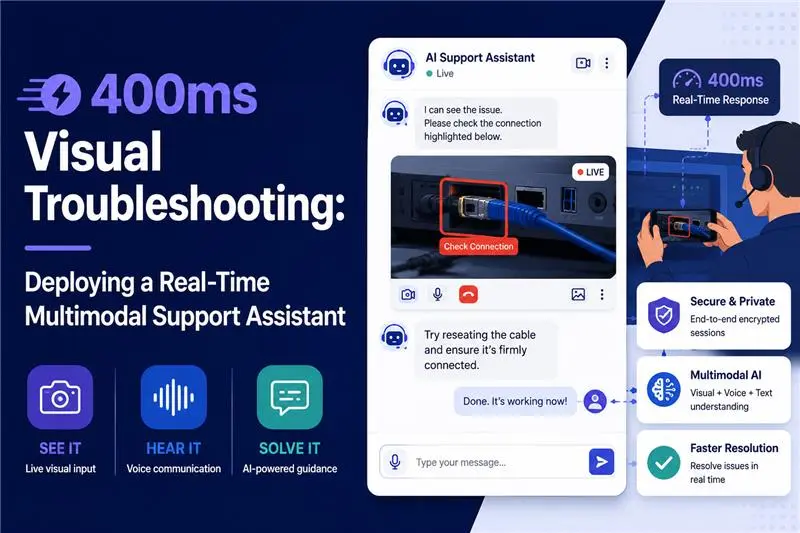
A customer points a phone camera at a malfunctioning device and asks, “Is this cable connected to the correct port?”
A useful support assistant must do several things almost simultaneously. It must continue listening to the customer, identify the relevant object in the camera feed, understand the spoken question, retrieve the correct product guidance, and respond before the interaction begins to feel delayed.
That is a different engineering problem from uploading an image to a chatbot. Businesses starting with conversational automation may explore a ChatGPT clone, while teams planning richer text, image, voice, and video interactions can consider a Google Gemini clone. However, the success of either approach depends less on the model name and more on how the complete real-time system is engineered.
The difficult part of multimodal AI chatbot development is not proving that a model can recognise a cable, read a label, or identify a warning light. The real challenge is coordinating a live audio stream, a changing visual scene, enterprise knowledge, session state, and a spoken response without allowing latency or context consumption to grow uncontrollably.
For enterprise support teams, this distinction determines whether a visual AI assistant remains an impressive demonstration or becomes a dependable operational system.
The WebRTC Bottleneck: Why Standard Chatbots Crash on Live Video
A standard AI wrapper normally expects a bounded request. The application receives text, an image, or a short audio recording, sends it to a model, waits for an answer, and displays the result.
A live troubleshooting session does not have a clean boundary.
Audio continues while the camera moves. Lighting changes. The user interrupts the assistant. A product label enters and leaves the frame. Network quality fluctuates. The assistant must decide which visual event matters without treating every frame as a new prompt.
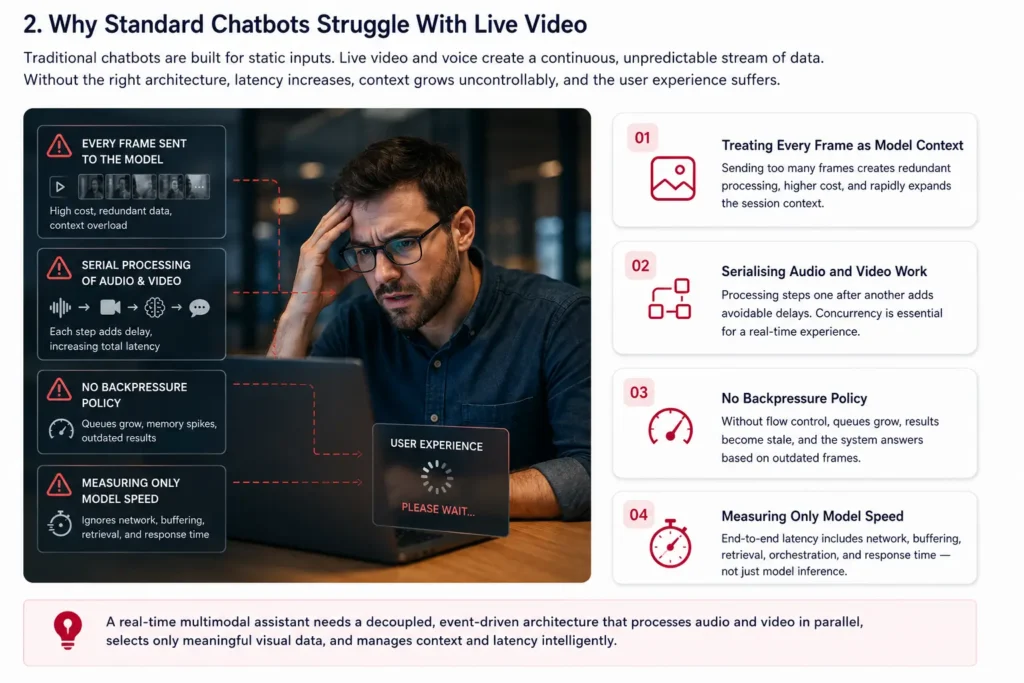
Failure Pattern 1: Treating Every Frame as Model Context
A camera operating at 30 frames per second generates 1,800 frames in one minute.
Even when the system lowers the frame rate, forwarding images at a fixed interval can create redundant model calls, unnecessary processing costs, and an expanding session history.
Most of those frames contribute no new evidence. The user may hold the device still for several seconds, move the camera between objects, or continue speaking while nothing relevant changes visually.
A production system therefore needs a visual-selection layer between the WebRTC video track and the multimodal reasoning model.
Instead of asking the model to inspect everything, the platform should select frames when:
- The scene changes significantly
- The customer refers to a visible object
- A label, barcode, connector, warning light, or component enters the frame
- The current support workflow requires visual confirmation
- The previous frame was blurred, dark, or incomplete
- The assistant explicitly asks the customer to reposition the camera
Failure Pattern 2: Serialising Audio and Video Work
A basic implementation may follow this sequence:
- Transcribe the customer’s complete sentence.
- Wait for the utterance to end.
- Capture a camera frame.
- Run visual recognition.
- Search the knowledge base.
- Generate the answer.
- Convert the answer into speech.
Each stage may work correctly in isolation, but placing them in a strict sequence makes the user pay the sum of every delay.
The stronger design is concurrent.
Voice activity detection, partial transcription, scene analysis, visual filtering, and retrieval preparation can begin before the customer finishes speaking. When the platform identifies the user’s intent, much of the supporting work is already underway.
This concurrency is what makes a multimodal assistant feel responsive rather than mechanical.
Failure Pattern 3: No Backpressure Policy
Incoming media can arrive faster than the perception layer can process it.
Without a backpressure policy, frame queues grow, results arrive after the scene has changed, memory consumption rises, and the assistant may answer a question using outdated visual evidence.
For live troubleshooting, the newest relevant frame is generally more useful than a complete queue of older frames.
A controlled system should be able to:
- Cancel stale image-processing tasks
- Drop visually repetitive frames
- Lower the camera sampling rate
- Reduce image resolution
- Prioritise the active troubleshooting step
- Temporarily continue in voice-only mode
- Ask the user to hold the camera still
- Request a single high-quality image when live processing becomes unstable
Failure Pattern 4: Measuring Only Model Speed
A model may complete a visual inference quickly while the customer still experiences a slow interaction.
The complete latency path can include:
- Network transit
- WebRTC jitter buffering
- Audio segmentation
- Partial transcription
- Video decoding
- Frame selection
- Image preprocessing
- Visual inference
- Knowledge retrieval
- Session orchestration
- Response generation
- Speech synthesis
- Audio playback
Enterprise buyers should therefore ask for end-to-end measurements rather than isolated model-inference times.
Read more: Building a Next-Gen Multimodal AI Platform from Scratch: A Complete Guide
Decoupling Audio and Visual Streams for the Multimodal LLM
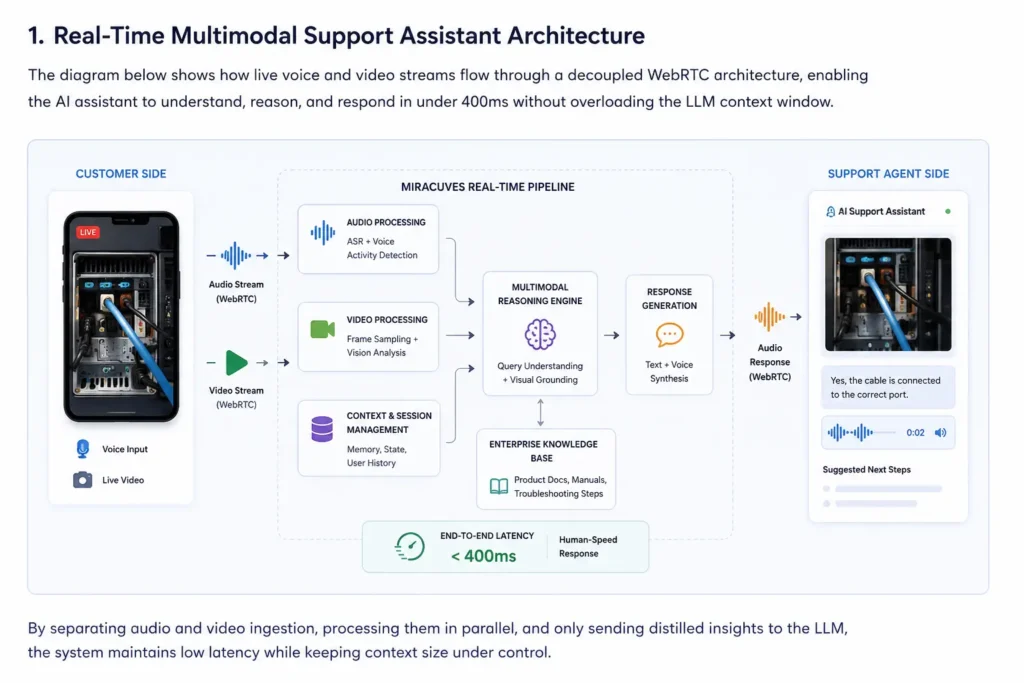
The core architectural principle is straightforward:
Audio and video belong to the same support session, but they should not be forced through the same processing queue.
A production-ready multimodal support assistant can be divided into five cooperating layers.
1. Real-Time Transport Layer
The transport layer receives audio, video, and session-control events through WebRTC.
Its responsibilities can include:
- Audio and video track management
- Secure media transport
- Codec negotiation
- Network adaptation
- Session authentication
- Reconnection handling
- STUN and TURN connectivity
- Device permission management
The transport layer should focus on delivering media reliably. It should not be responsible for reasoning about the customer’s problem.
2. Audio Intelligence Layer
The audio path can run continuously throughout the session.
It may handle:
- Voice activity detection
- Streaming speech recognition
- Partial transcription
- Speaker interruption detection
- Language detection
- Intent signals
- Silence detection
- Turn-taking logic
For example, the phrase “the red light beside the network port” gives the system several early signals.
The customer is referring to a visible indicator. The network-port region is likely to be relevant. The support workflow may require device-status documentation.
The orchestrator can send these signals to the visual path before the customer finishes speaking.
The visual service does not need to inspect every part of every frame equally. It can focus on the region or object associated with the current spoken request.
3. Visual Intelligence Layer
The visual path should use a hierarchy of increasingly expensive operations.
Transport-Level Processing
The system receives and decodes the WebRTC video track.
Lightweight Scene Analysis
Fast preprocessing can identify:
- Motion
- Blur
- Low lighting
- Camera obstruction
- Repeated frames
- Meaningful scene changes
Candidate-Frame Selection
The platform keeps frames associated with:
- A new object
- A spoken visual reference
- A barcode or product label
- An indicator light
- A connector or component
- A support workflow checkpoint
Targeted Perception
The system can then run the appropriate specialised task, such as:
- Object detection
- Optical character recognition
- Barcode reading
- Component classification
- Visual similarity matching
- Defect detection
- Region-of-interest analysis
Multimodal Reasoning
Only the selected visual evidence, relevant transcript, structured session state, and approved knowledge should be passed to the multimodal reasoning layer.
This approach protects both latency and context size.
It also allows the workload to scale more efficiently. Lightweight visual filtering can remain active across many sessions, while expensive visual reasoning is invoked only when the conversation requires it.
4. Session Orchestration Layer
The language model should not be responsible for managing the complete live-media lifecycle.
A separate session orchestrator should determine:
- Which transcript segment represents the current intent
- Which visual observation is still valid
- Whether a new frame is required
- Which knowledge source should be searched
- Whether the assistant is permitted to give the requested instruction
- Whether the response requires visual confirmation
- Whether the interaction should be escalated
- Which session information should be retained
- Which temporary evidence should be discarded
The orchestrator can maintain a compact support-state object rather than replaying the complete audio and video history.
A troubleshooting state could include:
- Device or product model
- Current component
- Confirmed visual observations
- Troubleshooting steps already attempted
- Unresolved symptoms
- User language
- Consent status
- Confidence level
- Escalation condition
5. Response and Action Layer
The final layer converts the system’s interpretation into an operational response.
That response may include:
- Spoken guidance
- On-screen instructions
- A highlighted visual region
- A confirmation question
- A support-ticket update
- A recommended knowledge-base article
- A structured human handoff
- A workflow or CRM action
This layer is where multimodal understanding becomes a support outcome rather than a descriptive answer.
Read more: How to Build a Profitable Multimodal AI Platform: Turning Intelligence into Income
How the Architecture Protects the LLM Context Window
The model context should contain conclusions and evidence, not a raw media stream.
Instead of retaining 20 nearly identical images, the session can preserve structured observations such as:
- Device identified as Model A
- Power indicator is green
- Network indicator is unlit
- Cable appears connected to Port 2
- Customer has already restarted the device
- Current question concerns network connectivity
A selected evidence frame can be attached to the active turn when visual confirmation is necessary.
Once an observation has been validated and converted into structured state, the application can remove unnecessary frame history according to the organisation’s privacy and retention rules.
This design offers several advantages:
- Lower context consumption
- Reduced visual-processing cost
- Faster reasoning
- Better session continuity
- Easier auditing
- More predictable retention
- Cleaner human handoff
- Lower risk of outdated frames influencing new answers
The 400ms Benchmark: Achieving Human-Speed Visual Recognition at Scale
“Under 400ms” is meaningful only when the measurement boundary is clearly defined.
For this architecture, the target can refer to the interval between a qualifying event and the availability of an actionable visual interpretation.
A qualifying event might be:
- A significant scene change
- A spoken reference such as “this connector”
- The appearance of a warning indicator
- An explicit request to inspect an object
- A support workflow requiring visual confirmation
The figure should not be presented as the duration of an entire conversational turn unless speech generation and playback are also included in the measurement.
An Illustrative 400ms Latency Budget
The following values are engineering targets, not guaranteed production results.
Media transit and buffering: 40–80ms
Optimisation methods:
- Regional infrastructure
- Adaptive buffering
- WebRTC codec tuning
- Healthy TURN capacity
- Connection reuse
- Edge media routing
Frame selection and preprocessing: 20–50ms
Optimisation methods:
- Motion filtering
- Blur rejection
- Image cropping
- Resolution control
- Region-of-interest extraction
- Duplicate-frame detection
Targeted perception: 50–100ms
Optimisation methods:
- Lightweight vision models
- Hardware acceleration
- Warm inference workers
- Region-specific processing
- Task-based model routing
Multimodal interpretation: 100–140ms
Optimisation methods:
- Compact prompts
- Selected evidence only
- Structured session state
- Model routing
- Cached instructions
- Warm inference capacity
Orchestration and response event: 30–50ms
Optimisation methods:
- Asynchronous retrieval
- Cached workflow rules
- Efficient session-state storage
- Preloaded product metadata
- Event-driven processing
Actual performance depends on network conditions, model choice, hosting region, hardware, media resolution, external integrations, and concurrent demand.
Measure Percentiles, Not the Best Demonstration
An enterprise benchmark should report more than the fastest successful request.
At minimum, teams should record:
- Median latency
- p95 latency
- p99 latency
- Error rate
- Timeout rate
- Dropped-frame rate
- Request-cancellation rate
- Session-recovery rate
A median below 400ms can coexist with unacceptable tail latency if a meaningful percentage of sessions takes several seconds.
The test should also disclose:
- Concurrent session count
- Audio and video bitrate
- Camera resolution
- Frame-sampling policy
- Percentage of sessions routed through TURN
- Geographic distance between users and infrastructure
- Warm versus cold inference requests
- Visual-task complexity
- Test duration
- External retrieval dependencies
Without this context, a latency figure is difficult for an enterprise buyer to evaluate.
Concurrency Changes the Meaning of Performance
A single-session latency result proves that the pipeline can operate.
It does not prove that the platform can support an enterprise helpdesk.
Load testing should increase simultaneous audio and video sessions while measuring:
- End-to-end visual interpretation latency
- Speech-response latency
- Frame-selection queue depth
- GPU saturation
- CPU saturation
- Memory consumption per session
- TURN relay utilisation
- Model throttling
- API timeouts
- Session disconnects
- Recovery time
- Human-escalation volume
The objective is not to process every incoming frame.
The objective is to preserve timely and relevant visual observations as the number of sessions increases.
Graceful Degradation Prevents a Slowdown From Becoming an Outage
A production assistant should have explicit degradation modes.
When compute or network pressure rises, the platform can:
- Lower visual sampling frequency
- Reduce image resolution
- Cancel stale frame-analysis jobs
- Prioritise active troubleshooting turns
- Continue voice support when visual analysis is unavailable
- Ask the customer to hold the camera steady
- Request a still image
- Route complex cases to a human agent
- Preserve a structured summary for the receiving agent
This is one of the clearest differences between a basic AI wrapper and an operational platform.
A wrapper assumes ideal conditions.
An enterprise system defines what happens when conditions stop being ideal.
Enterprise Decision Signals Widget
Enterprise Decision Signals
Latency
Ask whether the benchmark is measured end to end and whether p95 and p99 results are available under realistic concurrency.
Context Control
Confirm that the platform selects and summarises visual evidence rather than forwarding a continuous frame stream to the LLM.
Resilience
Review backpressure, degraded-mode, interruption, reconnect, and human-handoff behaviour.
Operational Fit
Evaluate whether the assistant connects to existing knowledge bases, ticketing systems, identity controls, and support workflows.
What Real-Time Visual Troubleshooting Changes for Customer Support
Traditional support requires the customer to translate a physical problem into words.
Customers may describe the wrong component, overlook a visible warning, or follow instructions intended for a different product variant.
A camera-assisted support assistant can reduce that translation gap.
Depending on the approved workflow, it can help:
- Identify equipment
- Read error labels
- Distinguish ports and connectors
- Confirm indicator states
- Guide installation or assembly
- Validate troubleshooting steps
- Detect when a human specialist is required
Example Enterprise Helpdesk Flow
- The customer begins a secure support session and grants microphone and camera permission.
- The assistant confirms the device or product model.
- The customer describes the problem while showing the affected area.
- The audio path identifies the intent and relevant object.
- The visual path selects a clear frame and extracts the required evidence.
- The orchestration layer searches approved product documentation.
- The assistant gives one bounded instruction.
- The assistant waits for visual or verbal confirmation.
- The platform records the completed step in structured session state.
- If confidence is insufficient or risk is elevated, the case is transferred to a human agent.
The human agent should receive more than a raw transcript.
A useful handoff package can include:
- Confirmed product or device
- Observed visual condition
- Troubleshooting steps already attempted
- Selected evidence where policy permits
- Assistant confidence
- Reason for escalation
- Customer language
- Relevant support documentation
This reduces repetition and helps the human agent continue from the correct point in the troubleshooting process.
Healthcare Operations Require a More Restrained Design
In healthcare operations, visual assistance may support carefully bounded use cases such as:
- Equipment setup
- Device-position confirmation
- Inventory verification
- Non-diagnostic workflow guidance
- Administrative support
- Maintenance procedures
- Staff training
The system’s scope must be clearly defined so that an operational assistant is not presented as an autonomous clinical decision-maker.
A healthcare-oriented deployment may require:
- Encrypted media transport
- Permission-based access
- Explicit user consent
- Audit logs
- Restricted data retention
- Regional processing controls
- Secure system integrations
- Human review for sensitive decisions
- Clear separation between operational and clinical guidance
The platform can be configured to support healthcare compliance requirements based on the target market. Final compliance depends on the jurisdiction, operating model, integrations, legal review, and organisational controls.
Security Must Be Built Into the Media Lifecycle
Live camera feeds may expose:
- Faces
- Documents
- Home environments
- Product serial numbers
- Equipment identifiers
- Patient information
- Screens containing sensitive data
- Internal enterprise systems
Security therefore cannot begin after model inference.
The design should address:
- Explicit microphone and camera consent
- Encrypted media transport
- Role-based access control
- Short-lived session credentials
- Configurable frame and transcript retention
- Redaction or masking
- Audit logs for access and automated actions
- Regional data-processing requirements
- Human review for low-confidence scenarios
- Data-deletion procedures
- Incident-response workflows
Enterprises should also distinguish between transient processing and recording.
A system may inspect a frame to create a structured observation without retaining the original image after the operational purpose has been completed.
This distinction can reduce privacy exposure and simplify data-governance policies.
Mistakes Enterprise Teams Should Avoid
Mistakes Enterprise Teams Should Avoid
Sending the Complete Camera Stream to a Multimodal Model
This increases processing cost, context pressure, and latency while introducing large amounts of redundant visual information.
Using One Queue for Audio, Video, Retrieval, and Response Generation
A slow visual operation can block the conversational path and make the entire assistant feel unresponsive.
Publishing a Best-Case Latency Number
Enterprise buyers need measurement boundaries, percentile results, concurrency levels, and failure rates—not the fastest request from a controlled demonstration.
Ignoring Human Escalation
Low confidence, sensitive data, unsafe instructions, and unsupported equipment must lead to a predictable human-review workflow.
How Miracuves Approaches a White-Label Multimodal Support Assistant
A deployable multimodal assistant must align with the organisation’s support model rather than operate as a general-purpose camera chatbot.
Miracuves can help enterprises design a white-label application layer covering:
- Secure session initiation
- WebRTC audio and video handling
- Concurrent audio and visual processing
- Enterprise knowledge retrieval
- Workflow orchestration
- Branded user interfaces
- Admin controls
- Observability
- Permission management
- Audit records
- Human-agent escalation
- CRM and ticketing integrations
The exact architecture should be selected after defining the interaction boundary.
A product-support assistant, healthcare operations assistant, and field-service inspection tool may all use voice and video, but they require different:
- Visual evidence rules
- Escalation conditions
- Retention policies
- Security controls
- Knowledge sources
- User permissions
- Workflow integrations
Organisations evaluating broader product and automation opportunities can explore the Miracuves solutions ecosystem or discuss a tailored deployment with the Miracuves team.
Read more: Cracking the Code: How to Market Your Multimodal AI Platform Post-Launch
Final Thoughts:
The strongest multimodal support architecture does not ask one model to watch everything, remember everything, and control everything.
It separates:
- Real-time media transport
- Audio intelligence
- Visual selection
- Multimodal reasoning
- Enterprise retrieval
- Workflow execution
- Response delivery
It then coordinates those layers through compact session state and explicit latency, privacy, and escalation policies.
A 400ms visual-recognition target can be a useful engineering constraint.
It becomes a credible enterprise result only when the measurement covers a defined pipeline, survives concurrent demand, and includes percentile performance rather than one successful request.
That is the standard enterprise buyers should apply: not whether an assistant can see and speak during a demonstration, but whether the complete system can do both consistently under real operating conditions.
Need a real-time multimodal support assistant built around your enterprise workflows? Contact us to discuss WebRTC architecture, voice and video processing, system integrations, security controls, and deployment requirements.
FAQs
What is a real-time multimodal support assistant?
A real-time multimodal support assistant processes more than one input type during a live interaction. It may listen to a customer’s voice, inspect selected camera frames, retrieve approved documentation, and respond through speech or on-screen guidance.
Why use WebRTC for a voice-and-video AI assistant?
WebRTC is designed for low-latency real-time media communication. It supports audio and video tracks, network adaptation, encrypted transport, codec negotiation, and connectivity across browsers and supported devices.
Should every video frame be sent to the multimodal LLM?
No. Continuous frame submission creates redundant processing, unnecessary costs, context pressure, and queue growth. A visual-selection layer should choose frames based on scene changes, spoken references, workflow events, image quality, and task relevance.
What does a 400ms multimodal benchmark measure?
It depends on the defined measurement boundary. A visual benchmark could measure from a qualifying camera or voice event to the availability of an actionable visual interpretation. It should not be described as full conversational response latency unless response generation and audio playback are included.
How should enterprises validate an under-400ms claim?
Enterprises should request median, p95, and p99 results alongside concurrent-session volume, network conditions, media resolution, model configuration, hosting region, test duration, dropped-frame rate, and failure rate.
How does the architecture prevent context-window overload?
It converts media into compact, task-specific state. Instead of retaining a long sequence of frames and transcripts, the platform preserves confirmed observations, unresolved questions, workflow progress, and only the evidence required for the active turn.
Can this architecture be used in healthcare operations?
It can support carefully bounded operational workflows such as equipment guidance, inventory verification, or administrative assistance. Security, consent, retention, access control, auditability, and jurisdiction-specific legal requirements must still be addressed.
What happens when visual processing slows down?
The platform can lower frame frequency, reduce image resolution, discard stale jobs, continue in voice-only mode, request a still image, or transfer the session to a human agent.
Miracuves is an independent software development company. We are not affiliated with, connected to, sponsored by, or endorsed by any company or product named in this article.
Terms such as “X Clone” are used descriptively. It is how the software industry refers to building a platform with functionality comparable to a known service, and how clients search for it.
The entire design and codebase of our products is built by our own team. Our products contain no code, design, graphics, or content originating from any third-party website or applications.
All third-party names and marks referenced in this article are the property of their respective owners, referenced solely to identify the services discussed.