




Launching a visual social app is not only a product challenge. It is a momentum challenge.
A founder can build beautiful profiles, image uploads, reels, stories, comments, likes, messaging, and discovery feeds. But if the first user opens the app and sees nothing meaningful, the product feels unfinished. The design may be polished, but the experience feels silent.
That is the empty-feed problem.
It happens when a social platform launches before it has enough content, creators, interactions, and return reasons. Users arrive, scroll for a few seconds, find no social proof, and leave. Creators join, see limited audience activity, and stop posting. Paid campaigns may bring installs, but the app does not yet give people enough reason to stay.
For founders building a visual social app, the goal is not to make the app look popular artificially. The goal is to create enough useful, relevant, and trustworthy activity so the first users understand what the platform is about and why they should come back.
Key Takeaways
- The empty-feed problem in social apps happens when users join before the platform has enough visible content, creator activity, and engagement signals.
- A visual social app should not launch to everyone at once. It should begin with a narrow audience, a seeded content library, and a clear creator supply plan.
- Creator onboarding, starter content, niche positioning, prompts, referrals, and moderation should be prepared before public launch.
- Paid ads cannot fix an empty product experience. Acquisition works better after the first-session experience feels active and relevant.
- Miracuves helps founders move from idea to launch faster with ready-made and white-label app solutions designed for branding, admin control, and monetization readiness.
What Is the Empty-Feed Problem in Social Apps?
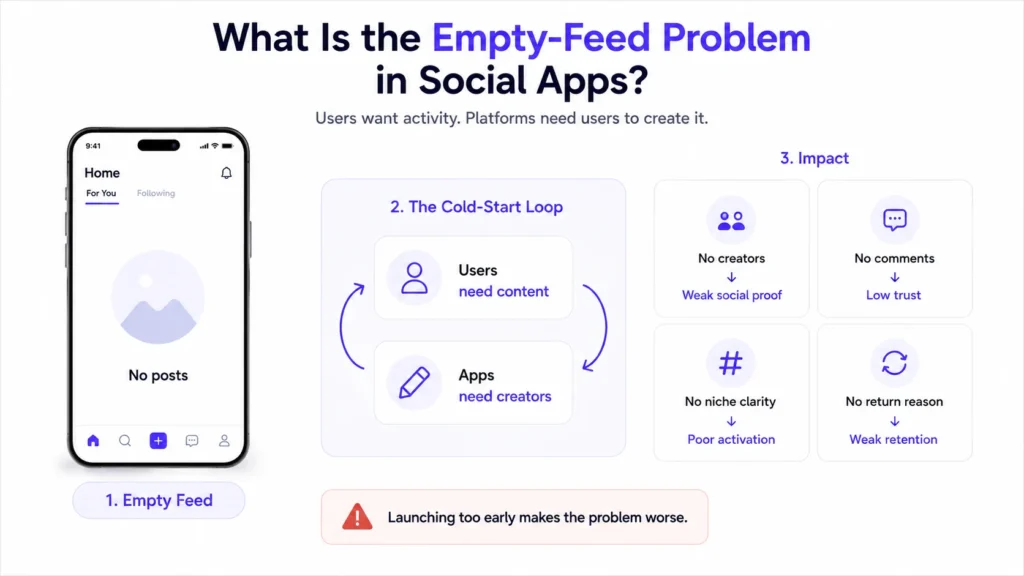
The empty-feed problem is the cold-start challenge of social platforms. A social app needs users to create content, but users need existing content and activity before they feel motivated to participate.
This creates a loop:
| Without Enough Supply | What Users Feel | Business Impact |
|---|---|---|
| No posts | “There is nothing here.” | Low session duration |
| No creators | “Nobody important is active.” | Weak social proof |
| No comments | “People are not engaging.” | Low trust |
| No niche clarity | “I do not know who this app is for.” | Poor activation |
| No return triggers | “There is no reason to come back.” | Weak retention |
| No moderation plan | “This may become unsafe or spammy.” | Reputation risk |
A visual social app depends heavily on the first impression. The feed, explore page, creator profiles, hashtags, onboarding suggestions, and notifications all tell users whether the platform is alive.
The mistake many founders make is thinking the empty-feed problem will solve itself after launch. In reality, launch usually makes the problem more visible. If a platform brings users too early, it can waste acquisition spend before the product has enough social density.
Why Visual Social Apps Feel Empty at Launch
A visual social app feels empty when product readiness and community readiness are treated as separate tasks. The app may be technically ready, but the community system is not.
There are four common reasons this happens.
1. The App Targets Everyone Instead of a Specific First Community
Broad social platforms are hard to launch because users already have alternatives. A new app needs a sharper reason to exist.
Instead of launching as a general photo-sharing platform, founders should begin with a specific first community, such as:
- local fashion creators
- fitness transformation creators
- student lifestyle creators
- travel photographers
- food discovery communities
- beauty and makeup creators
- artists and designers
- regional language creators
- niche commerce communities
A narrow audience makes seeding easier. It tells creators what to post, tells users what to expect, and helps the founder build early rituals around a focused interest.
2. Creators Are Invited Too Late
Creators are the supply side of a visual social app. If creators are not active before launch, the feed has no fuel.
A founder should not wait until launch day to recruit creators. Creator outreach should begin before public release. The goal is to build a founding creator group that understands the app’s niche, posting expectations, community rules, and visibility opportunities.
A strong creator onboarding plan should answer:
- Why should creators post here before the audience is large?
- What visibility will they get?
- What kind of content should they post first?
- Will they receive profile boosts, featured placements, or early verification?
- How will they know their posts are performing?
- What monetization path may open later?
Creators need a reason to invest early. That reason does not always have to be money. It can be visibility, ownership, early access, status, niche leadership, or a chance to shape the community.
3. The First Session Has No Guided Action
Many social apps onboard users by asking them to create an account and then dropping them into a blank or generic feed. That creates friction.
A better first session should guide users toward small actions:
- choose interests
- follow suggested creators
- react to starter posts
- save useful content
- join a challenge
- complete a profile
- invite a friend
- post from a prompt
- turn on relevant notifications
The first session should not ask users to figure out the platform alone. It should show them what to do next.
4. The Founder Measures Downloads Instead of Activation
Downloads can look exciting, but they do not prove community momentum.
For a visual social app, the stronger early metrics are:
| Metric | Why It Matters |
| Signup completion rate | Shows whether onboarding is simple |
| First follow rate | Shows whether users find relevant creators |
| First reaction rate | Shows whether content feels worth engaging with |
| First post rate | Shows whether users understand how to participate |
| Creator repeat posting rate | Shows whether creators see value |
| Day 1 and Day 7 retention | Shows whether users return |
| Feed scroll depth | Shows whether the seeded feed feels useful |
| Report rate | Shows whether moderation and safety need attention |
Founders should solve activation before scaling acquisition. Otherwise, every marketing campaign sends users into a weak experience.
Read more:
The Pre-Launch Framework for Solving the Empty-Feed Problem
The best time to fix an empty feed is before public launch. The goal is to make the app feel active, focused, and safe without pretending to be something it is not.
Step 1: Define the Social Loop Before You Build the Campaign
A social loop is the reason users come back. It should be simple enough to explain in one sentence.
Examples:
| App Type | Social Loop |
| Fitness visual community | Users return to see progress posts, transformations, and weekly challenges. |
| Fashion creator app | Users return to discover outfit ideas, creator drops, and style inspiration. |
| Food discovery app | Users return to find local dishes, save places, and follow food creators. |
| Student lifestyle app | Users return to see campus updates, trends, events, and peer content. |
| Creator commerce app | Users return to follow creators, discover products, and access exclusive content. |
Without a clear social loop, marketing becomes too broad. The founder may run ads, post announcements, and onboard creators, but the platform still lacks a repeatable reason to return.
Step 2: Build the Founding Creator List
Before launch, create a list of creators who already produce content for the niche. Prioritize relevance over follower count.
A strong founding creator profile may include:
- consistent posting history
- niche authority
- active comments from followers
- willingness to test new platforms
- strong visual quality
- community trust
- ability to cross-post launch content
- openness to feedback
Micro creators often make more sense than celebrity creators during early launch because they are more accessible and may care more about niche visibility. The founder should create a simple creator onboarding pack that explains the platform, content expectations, early benefits, and posting calendar.
Step 3: Seed the Feed With Useful Content Categories
A seeded feed should not feel random. It should teach users what the platform is about.
For example, a fashion-focused visual app may seed:
- outfit inspiration posts
- creator introduction posts
- style challenge posts
- trend breakdowns
- local shopping finds
- before-and-after styling posts
- short creator tips
- featured profile posts
A travel-focused app may seed:
- city guides
- hidden spot photos
- creator itineraries
- travel safety tips
- weekend plans
- photo challenges
- local experience recommendations
The goal is to create enough content variety so users can scroll, react, follow, and understand the community without needing thousands of users on day one.
Step 4: Use Prompts and Challenges to Reduce Posting Anxiety
New users often hesitate to post first. Prompts reduce that pressure.
Examples:
- “Share your favorite weekend photo.”
- “Post your best street food discovery.”
- “Show one outfit under ₹2,000.”
- “Share your workspace setup.”
- “Post your before-and-after fitness progress.”
- “Recommend one local creator others should follow.”
Prompts work because they give users a reason to participate without overthinking. They also help the platform collect structured content that can be featured later.
Step 5: Design Empty States That Convert Users Into Action
Some empty states are unavoidable. A new user may have no followers, no saved posts, no messages, or no notifications yet.
The mistake is showing a dead-end message such as “No posts found.”
Better empty states should guide action:
| Empty State | Weak Message | Better Message |
| No feed yet | No posts found | Follow 5 creators to build your first feed. |
| No saved posts | No saved content | Save ideas you want to revisit later. |
| No messages | No chats yet | Start a conversation with a creator or friend. |
| No notifications | No notifications | Join a challenge to get your first activity update. |
| No posts on profile | No posts yet | Share your first photo using today’s prompt. |
An empty state should not feel like an error. It should behave like a next step.
Step 6: Build Moderation and Safety Before Growth
Visual social apps depend on user-generated content. That means founders must prepare moderation early.
Important safety layers include:
- content reporting
- abuse reporting
- comment moderation
- spam detection
- creator verification where relevant
- manual review queues
- admin access controls
- community guidelines
- copyright/reporting workflows
- age-gating where required
- activity logs
Moderation is not only a compliance concern. It affects retention, advertiser trust, creator trust, and brand reputation. Users are more likely to participate when they believe the platform is actively managed.
Step 7: Prepare the Admin Dashboard for Launch Operations
A founder should not depend on developers for every small content, creator, or campaign update. The admin dashboard should help the platform operator manage the early community.
Useful admin controls include:
| Admin Capability | Business Value |
| User management | Review accounts, suspend spam, and manage user status |
| Creator management | Approve creators, highlight profiles, and track activity |
| Content moderation | Review reported posts, comments, and media |
| Feed control | Feature content, manage categories, and guide discovery |
| Push notification control | Send relevant updates without spamming users |
| Analytics dashboard | Track activation, retention, posts, follows, and reports |
| Monetization controls | Prepare ads, subscriptions, promotions, or creator earnings |
This is where a ready-made product foundation can help. Founders who are planning a visual community can explore a launch-ready visual social app foundation when they want product flows, admin control, creator tools, and monetization logic prepared before going live.
Speed
If your app is technically ready but the feed is empty, spend pre-launch time on content supply, creator onboarding, and activation flow before scaling campaigns.
Cost
Paid ads become expensive when users land on a silent app. Improve first-session engagement before increasing acquisition spend.
Scalability
Content moderation, analytics, feed controls, and creator workflows should be planned early so growth does not create operational chaos.
Market Fit
A focused niche helps founders test whether users care enough to post, follow, react, and return before expanding to broader audiences.
What Should Be Ready Before Public Launch?
A visual social app does not need millions of posts before launch. It needs enough high-quality activity to make the first community feel real.
| Pre-Launch Asset | What to Prepare | Why It Matters |
| Niche positioning | One clear audience and content theme | Makes the platform easier to explain |
| Founding creators | 20–50 relevant early creators | Gives the feed initial supply |
| Starter content | Posts, reels, stories, prompts, featured profiles | Prevents blank discovery surfaces |
| Creator onboarding pack | Guidelines, benefits, posting calendar, support process | Helps creators post consistently |
| Interest onboarding | Topic selection, suggested follows, starter actions | Builds a relevant first feed |
| Community guidelines | Content rules, safety standards, reporting process | Builds trust from the beginning |
| Analytics setup | Activation, follows, posts, reports, retention | Helps founders improve quickly |
| Referral loop | Invite links, creator codes, launch challenges | Turns early users into promoters |
| Admin controls | User, content, creator, notification, and moderation controls | Reduces operational dependency |
A 30-Day Empty-Feed Prevention Plan
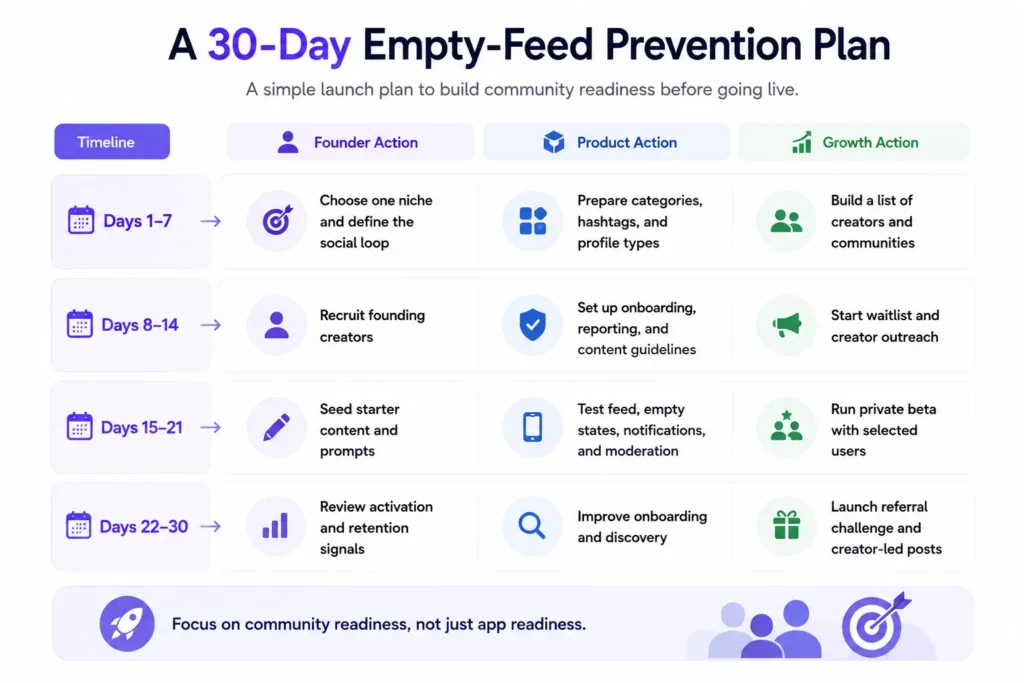
Founders can use this simple launch plan before opening the app to a broader market.
| Timeline | Founder Action | Product Action | Growth Action |
| Days 1–7 | Choose one niche and define the social loop | Prepare categories, hashtags, and profile types | Build a list of creators and communities |
| Days 8–14 | Recruit founding creators | Set up onboarding, reporting, and content guidelines | Start waitlist and creator outreach |
| Days 15–21 | Seed starter content and prompts | Test feed, empty states, notifications, and moderation | Run private beta with selected users |
| Days 22–30 | Review activation and retention signals | Improve onboarding and discovery | Launch referral challenge and creator-led posts |
This plan keeps the founder focused on community readiness, not just app readiness.
Mistakes Founders Should Avoid
Launching to Everyone at Once
A broad launch can make the app feel empty faster because different users expect different content. Start with one niche, learn from the first community, and expand after the loop works.
Spending on Ads Before Activation Works
Paid installs do not solve weak onboarding, poor content supply, or low creator activity. Fix the first-session experience before increasing acquisition spend.
Ignoring Creator Motivation
Creators need visibility, feedback, status, analytics, or monetization potential. If they do not see a reason to post consistently, the feed will lose momentum.
Treating Moderation as a Later Problem
Spam, abuse, and low-quality content can damage trust quickly. Reporting, review queues, and admin controls should be part of the launch foundation.
How Miracuves Helps Founders Launch With a Stronger Product Foundation
Solving the empty-feed problem is not only about marketing. It also depends on the product foundation.
A founder needs creator profiles, content publishing, feed logic, notifications, moderation, analytics, admin control, and monetization pathways working together. If these systems are missing, the founder may attract users but struggle to manage the community.
Miracuves helps founders build ready-made and white-label app solutions with source-code ownership, branded design, admin dashboards, and faster deployment. For social platforms, this gives founders a stronger base for creator onboarding, content management, community safety, and monetization planning.
Founders exploring broader social product strategy can also review Miracuves’ social media app development services for custom platform planning, or read the guide on short video platform user acquisition strategies when the product relies heavily on creators, video content, and retention loops.
Final Thoughts: A Social App Should Feel Alive Before It Scales
The empty-feed problem is not solved by adding more features. It is solved by creating the conditions for participation.
Before launching a visual social app publicly, founders should prepare the first community, onboard creators, seed useful content, design guided empty states, activate users during the first session, and track the signals that prove people want to return.
The strongest launch is not the loudest launch. It is the one where the first users immediately understand what the platform is, who it is for, and why joining early matters.
Miracuves gives founders a faster technical foundation, but the strongest growth comes when product readiness and community readiness work together from the start.
FAQs
What is the empty-feed problem in social apps?
The empty-feed problem happens when users open a new social app and see little or no content, creator activity, comments, or engagement. This makes the platform feel inactive and reduces the chance that users will return.
How do you prevent a visual social app from feeling empty at launch?
Start with a clear niche, recruit founding creators, seed useful content, design interest-based onboarding, create posting prompts, prepare moderation workflows, and track early activation metrics before scaling public acquisition.
Should a founder use paid ads before solving the empty-feed problem?
Paid ads should usually come after the first-session experience is ready. If users land on an empty feed, paid campaigns may increase downloads but also increase churn. Fix content supply and activation first.
How many creators do you need before launching a visual social app?
There is no fixed number for every app. A focused niche may begin with a small group of active creators if they post consistently and cover enough content categories. Quality, relevance, and posting frequency matter more than raw creator count.
What should a seeded feed include before launch?
A seeded feed should include creator introductions, niche-specific posts, useful visual content, prompts, challenges, featured profiles, category posts, and content that teaches users what the app is about.
Why is creator onboarding important for early social app growth?
Creators provide the content supply that attracts and retains users. A strong creator onboarding process gives them posting guidance, visibility incentives, community context, and a reason to stay active.
How can Miracuves support founders launching a visual social app?
Miracuves helps founders launch ready-made and white-label app solutions with branded design, source-code ownership, admin dashboards, content workflows, creator features, and monetization-ready foundations.