



















Key Takeaways
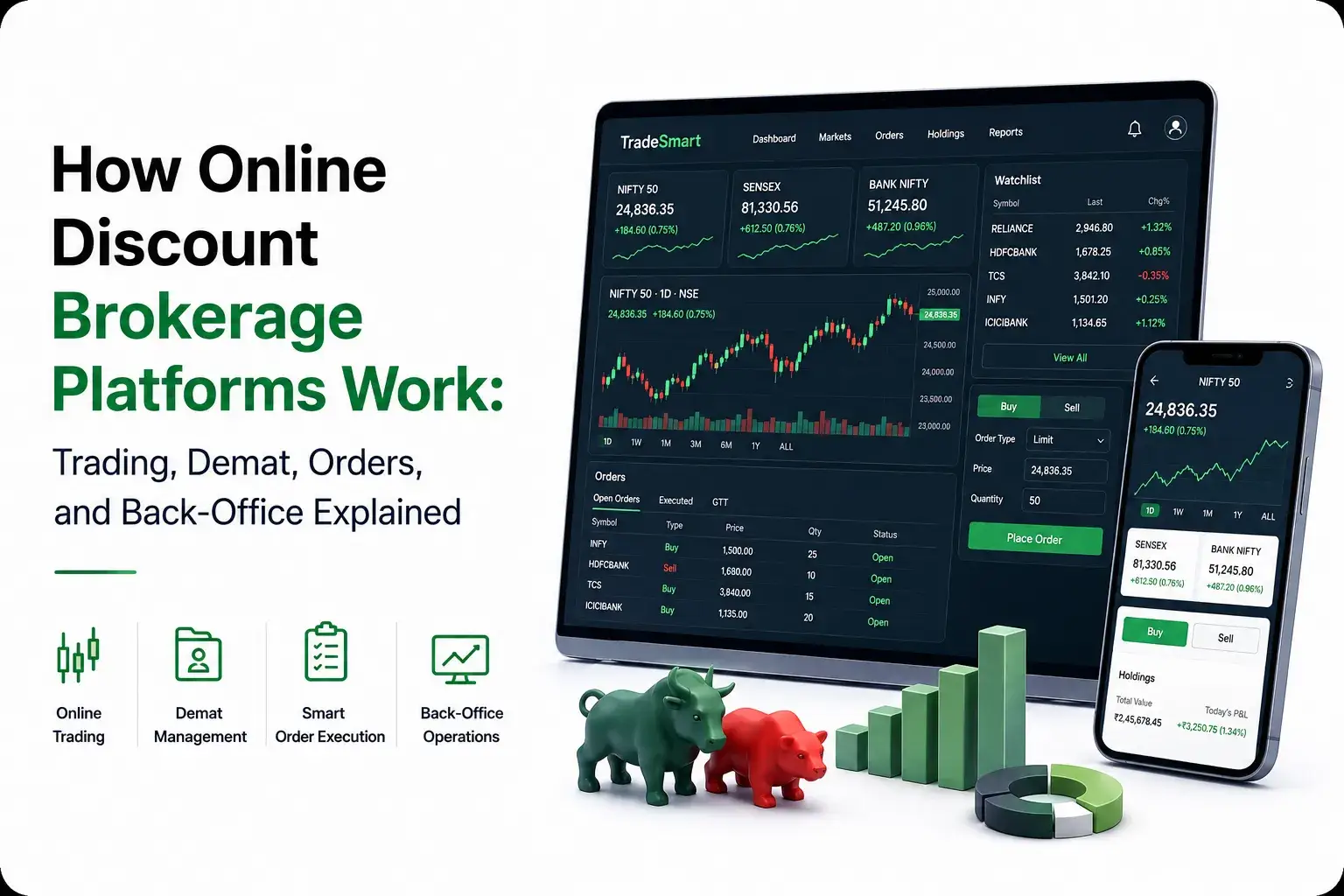
- An online discount brokerage platformconnects trading accounts, demat accounts, bank accounts, market data, order execution, portfolio tracking, and reporting in one digital ecosystem.
- Trading accounts manage market transactions, while demat accounts electronically hold purchased shares and other eligible securities after settlement.
- Reliable brokerage operations depend on order routing, risk checks, fund management, settlement, reconciliation, compliance, and back-office systems working together.
Trading & Order Flow
- Users complete KYC, link bank and demat accounts, add funds, view live market data, search securities, and place buy or sell orders through the trading platform.
- Orders pass through validation, margin and risk checks, broker infrastructure, and exchange systems before execution status is returned to the user.
- After a successful trade, positions, holdings, available funds, contract notes, and settlement records are updated across the brokerage and demat workflow.
Back-Office Insights
- Back-office systems manage ledger balances, trade reports, contract notes, fund statements, profit and loss records, tax reports, settlements, and account activity.
- Reconciliation, audit logs, margin monitoring, payment tracking, compliance controls, and user support help maintain accuracy and operational transparency.
- Miracuves develops customizable online brokerage platforms with trading and demat workflows, order management, market data, portfolio tools, risk controls, reporting, payments, and back-office administration.
Digital brokerage apps have made stock market access simpler for everyday investors. Users no longer need to depend only on offline brokers, phone-based trade requests, branch visits, or relationship managers. They can open accounts, monitor markets, place trades, manage holdings, and download reports directly from a digital dashboard.
However, the experience users see on the front end is only one part of the system. Behind every buy or sell action, multiple layers work together, including trading accounts, demat accounts, linked bank accounts, market data, order routing, risk checks, payment flows, reporting tools, and back-office operations.
For investors, understanding these layers makes online trading easier to trust. For founders and fintech operators, it shows why an online discount brokerage platform should be planned as a complete financial workflow, not just a mobile app. A reliable brokerage product needs to connect user experience, operational control, transaction accuracy, security, and trust from the beginning.
What Is an Online Discount Brokerage Platform?
An online discount brokerage platform is a digital system that helps users buy, sell, and manage securities with lower brokerage costs and a self-service trading experience.
Unlike traditional brokerage models that may depend more on offline service, advisory relationships, and manual assistance, discount brokerage platforms focus on digital access, transparent pricing, user control, and faster execution.
A typical platform may allow users to:
- Open an account online
- Complete KYC and document verification
- Add funds from a bank account
- Search stocks, ETFs, derivatives, commodities, or other instruments
- Create watchlists
- Place buy and sell orders
- Track holdings and positions
- Review portfolio performance
- Download reports and tax documents
- Manage profile, nominee, and account settings
The user sees a clean trading interface. The business, however, must operate a much deeper system that connects brokerage, compliance, payments, market data, risk checks, exchange workflows, reporting, and customer support.
Why Discount Brokerage Became Popular
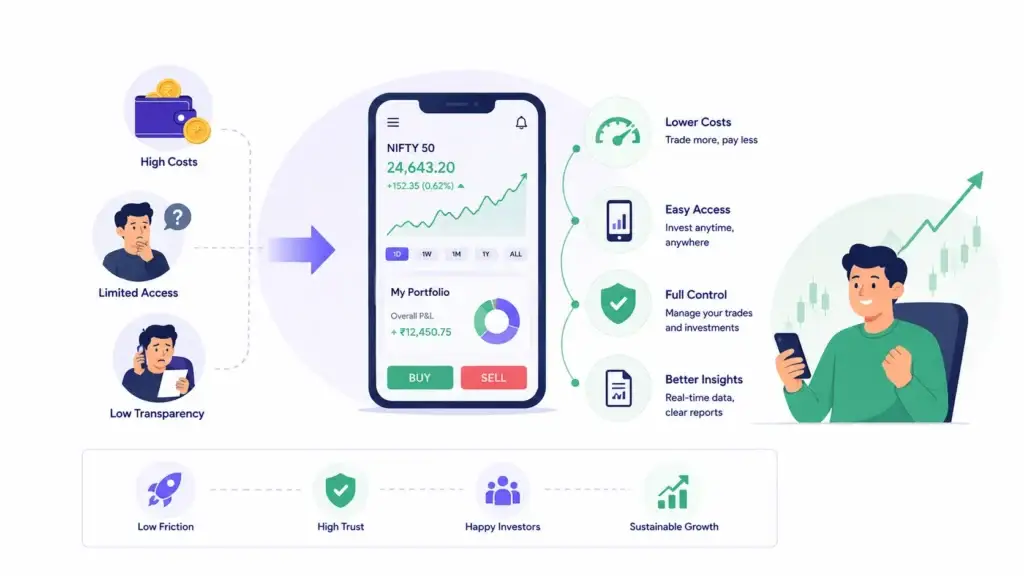
Discount brokerage became popular because it solved three major problems for retail investors: cost, access, and control.
Earlier, many investors depended on broker-assisted models where trading could feel slower, more expensive, and less transparent. Digital-first brokerage platforms changed that experience by giving users direct access to trading tools, live prices, charts, account reports, and self-service workflows.
The founder lesson is important. Financial products grow faster when they reduce friction without reducing trust. In a trading platform, users want speed, but they also want accuracy, transparency, and reliable records.
A similar shift can be seen in other mobile-first investing products that focus on simple onboarding, easy portfolio access, and low-friction trading experiences. To compare this broader model, read this guide on the commission-free trading app model.
That is why a successful digital brokerage platform is not just about low fees. It is about making investing easier to understand and easier to manage.
The Core Accounts Behind an Online Brokerage Platform
A brokerage platform usually depends on three connected accounts: a bank account, a trading account, and a demat account.
Each account has a different role.
| Account Type | What It Does | Why It Matters |
|---|---|---|
| Bank Account | Used to add or withdraw money for trading and investing. | Connects the user’s money movement with the trading platform. |
| Trading Account | Used to place buy and sell orders through a stock broker. | Acts as the transaction layer between the user and the stock exchange. |
| Demat Account | Stores purchased securities electronically. | Acts as the digital holding layer for shares and other eligible securities. |
A simple way to understand this is:
- The bank account holds money.
- The trading account places the order.
- The demat account holds the securities.
This separation matters because a brokerage platform must manage money movement, order execution, and security ownership correctly. Any confusion in these layers can lead to failed transactions, wrong balances, reporting issues, or user trust problems.
How User Onboarding and KYC Work
Before a user can trade, the platform must verify who they are. This process is usually handled through KYC workflows, document checks, identity verification, bank verification, and account setup.
A digital onboarding flow may include:
- Mobile number and email verification
- PAN or tax identity verification
- Address proof
- Bank account linking
- User profile details
- Risk disclosures
- Nominee details
- E-sign or consent flows
- In-person verification or video verification where required
- Account activation confirmation
For investors, onboarding may feel like a form-filling step. For platform operators, it is a trust and compliance layer.
If onboarding is weak, the platform may face fraud risk, duplicate accounts, incorrect user records, failed withdrawals, and compliance issues. If onboarding is too complex, users may drop off before activation.
A good brokerage workflow balances both sides. It should collect the required information without making the experience feel confusing.
How Trading and Demat Accounts Work Together
The trading account and demat account are connected, but they are not the same.
When a user buys a share, the trading account helps place and process the transaction. Once the purchase is completed and settled, the security is reflected in the demat account.
When a user sells a share, the platform must confirm that the user has the security available for sale. Depending on the operating model and market rules, the system may check holdings, authorization, pledged securities, available balance, and settlement requirements.
This is why trading platforms need accurate synchronization between:
- Holdings
- Positions
- Orders
- Funds
- Margin
- Demat-related instructions
- Trade confirmations
- Settlement records
For founders, this is one of the most important product lessons. A trading app cannot behave like a normal ecommerce app. Every number shown to the user must be accurate, traceable, and explainable.
How Order Placement Works in a Brokerage Platform
Order placement is the most visible part of a trading platform, but it depends on several invisible checks.
Here is the simplified order journey.
- The user searches for a security.
- The user opens the buy or sell screen.
- The user enters quantity, price, order type, and product type.
- The platform checks available funds, holdings, margin, and risk rules.
- The order is sent through the broker’s trading system.
- The exchange receives and timestamps the order.
- The order is matched based on market rules.
- The platform receives order status updates.
- The user sees confirmation, rejection, partial fill, or pending status.
- Reports and records are updated after execution and settlement.
The user may only see “Order placed” or “Order executed,” but the system needs to manage much more than that. It must handle failed orders, rejected orders, delayed updates, partial execution, market volatility, margin shortfalls, and reporting accuracy.
Common Order Types Users See
Most brokerage platforms support different order types to help users control price, timing, and execution.
A market order is placed at the best available market price. It is useful when speed matters, but the final execution price may vary.
A limit order is placed at a specific price or better. It gives users more price control but may not execute if the market does not reach the selected price.
A stop-loss order is used to help manage downside risk. It becomes active when the market reaches a trigger price.
A good till triggered or long-validity order allows users to define a condition that remains active for a longer period, depending on platform and market rules.
For founders, order types should not be treated as only interface buttons. Each order type requires backend validation, status tracking, risk checks, and clear user communication.
What Happens After an Order Is Executed?
After an order is executed, the transaction still needs to move through clearing, settlement, reporting, and account updates.
The user expects the app to show correct order status, updated positions, available funds, holdings, average price, realized profit and loss, and transaction history.
The platform must update:
- Order book
- Trade book
- Positions
- Holdings
- Funds
- Brokerage and charges
- Contract notes
- Ledger entries
- Tax and profit/loss reports
- Notifications and alerts
This is where many weak trading platforms fail. The frontend may look polished, but if reports, ledgers, or balances do not match, users lose confidence quickly.
What Is the Back Office in a Brokerage Platform?
The back office is the reporting and account-management layer of a brokerage platform. It helps users and operators access financial records, statements, tax reports, trade history, and account-level information.
For users, the back office usually includes:
- Contract notes
- Ledger statements
- Profit and loss reports
- Tax reports
- Capital gains reports
- Portfolio statements
- Funds history
- Charges breakdown
- Corporate action details
- Downloadable documents
For platform operators, the back office may include:
- User records
- KYC status
- Account activity
- Trade logs
- Reconciliation workflows
- Payment records
- Risk alerts
- Support tickets
- Audit logs
- Admin permissions
This layer is not glamorous, but it is essential. Trading platforms earn trust when users can verify what happened, when it happened, and how it affected their account.
Why Portfolio Tracking Matters
Portfolio tracking helps users understand what they own, how their investments are performing, and how their decisions are affecting their financial position.
A basic portfolio dashboard may show holdings, invested value, current value, day change, overall profit or loss, asset allocation, and transaction history.
A more advanced dashboard may include:
- Sector allocation
- Realized and unrealized profit/loss
- Long-term and short-term capital gains
- Dividend history
- Mutual fund investments
- IPO applications
- Tax reports
- Performance charts
- Alerts and watchlists
For investors, portfolio tracking creates clarity. For founders, it creates engagement. A user may not place trades every day, but they may check holdings, performance, and reports regularly.
How Brokerage Platforms Make Money
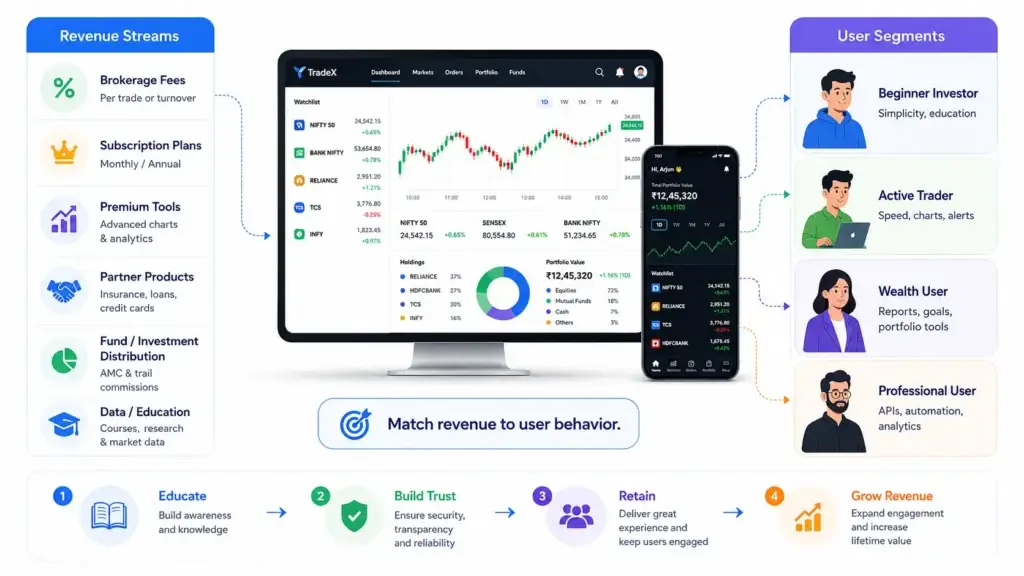
Discount brokerage platforms may use multiple revenue streams depending on their market, regulatory model, product scope, and operating strategy.
Common revenue streams include:
- Brokerage fees on eligible trades
- Account opening or maintenance charges
- Margin or financing-linked revenue
- Subscription plans
- Premium tools or advanced analytics
- API access for advanced users
- Partner-led financial products
- Mutual fund or investment product distribution where allowed
- Interest or float-linked models where applicable
- Education, advisory, or data products where permitted
Once the revenue model is clear, founders also need to think about how users will discover, trust, and continue using the platform. A brokerage product needs more than paid ads; it needs education-led onboarding, retention journeys, trust-building content, and lifecycle communication. For a deeper growth angle, read this trading platform marketing strategy.
For founders, the main point is not to copy one revenue model blindly. The stronger approach is to define the target user first, then choose revenue streams that match user behavior, trading frequency, product depth, and compliance requirements. To explore this in more detail, review this stock trading platform business model guide.
A beginner investor may value simplicity and education.
An active trader may value speed, charts, alerts, and order types.
A wealth-focused user may value reports, goal tracking, and long-term portfolio tools.
A professional user may value APIs, automation, and deeper analytics.
The monetization model should match the user segment.
Core Modules Behind a Digital Brokerage Platform
A brokerage product needs multiple modules working together.
| Module | Purpose | Business Value |
|---|---|---|
| User Onboarding | Handles signup, KYC, documents, and profile setup. | Improves activation and reduces account risk. |
| Market Watch | Allows users to search securities and create watchlists. | Encourages repeat engagement. |
| Order Management | Manages buy, sell, modify, cancel, and order status workflows. | Supports the core trading experience. |
| Portfolio Dashboard | Shows holdings, positions, performance, and allocation. | Helps users understand their investments. |
| Funds and Payments | Handles deposits, withdrawals, payment status, and reconciliation. | Protects transaction accuracy. |
| Reports and Back Office | Provides statements, tax reports, contract notes, and account history. | Builds transparency and trust. |
| Admin Dashboard | Gives operators control over users, KYC, risk, reports, and support. | Improves operational control. |
| Security and Audit Logs | Tracks access, admin actions, activity, and sensitive changes. | Supports accountability and compliance workflows. |
Founders who want to understand how these modules translate into a real product experience can review this trading platform feature breakdown. It explains how user onboarding, market watch, order management, portfolio dashboards, reports, admin controls, and security layers can work together inside a branded brokerage product.
Security and Compliance Workflows Founders Should Understand
Security in brokerage platforms should not be treated as a final checklist. It needs to be part of the product foundation.
Important security and control layers include:
- Encrypted data transfer
- Secure authentication
- Role-based access control
- Admin access permissions
- KYC workflow support
- Activity logs
- Audit trails
- Secure payment gateway integration
- Device and session controls
- Transaction monitoring
- Risk alerts
- Data privacy controls
- Support and dispute records
Final compliance depends on the target jurisdiction, brokerage model, legal review, integrations, exchange access, user flows, and operational process.
The safe way to think about this is simple: the platform should be built with compliance-ready workflows, but no app should claim automatic regulatory approval without proper legal and operational validation.
Founder Decision Signals
User Trust
If users cannot trust balances, order status, reports, and withdrawals, the product will struggle even if the interface looks modern.
Operational Control
The admin dashboard should help the operator manage users, KYC, payments, risk, support, reports, and audit logs without depending on developers for every action.
Integration Depth
Trading platforms depend on broker systems, market data, payment gateways, reporting tools, and security workflows. Weak integrations create user-facing problems.
Launch Scope
Founders should not begin with every advanced feature. The first version should focus on reliable onboarding, trading, portfolio visibility, funds, reports, and admin control.
Common Mistakes in Brokerage Platform Planning
Many founders start with screens first. That is risky.
A trading platform should not be planned only around charts, login pages, and order buttons. It should be planned around the full financial workflow.
One common mistake is ignoring the back office. Users may not notice it on day one, but they will need reports, tax documents, statements, and transaction records later.
Another mistake is underestimating payment reconciliation. Deposits, withdrawals, failed callbacks, pending transactions, and incorrect balances can create support pressure and trust issues.
A third mistake is treating admin control as optional. Without a strong admin layer, the operator may struggle to manage KYC, risk flags, users, reports, disputes, and operational exceptions.
The final mistake is assuming that a trading product can be launched like a normal consumer app. Brokerage platforms require deeper planning because onboarding, KYC, trading workflows, market data, reports, payment reconciliation, and admin controls all affect scope. Before finalizing the launch plan, founders should understand the major trading app development cost factors that influence integrations, customization, testing, and long-term scalability.
What Founders Can Learn From Discount Brokerage Platforms
The biggest lesson from online discount brokerage platforms is that simplicity must sit on top of strong infrastructure.
Users want a clean app.
Operators need reliable workflows.
Regulators expect proper controls.
Support teams need accurate records.
Founders need a product that can scale without breaking trust.
A strong brokerage platform should therefore focus on:
- Simple onboarding
- Clear account setup
- Reliable order placement
- Accurate portfolio tracking
- Transparent reports
- Secure payments
- Strong admin control
- Audit-ready activity records
- Scalable backend architecture
- User education and support
After understanding how brokerage workflows fit together, founders may also need a practical execution roadmap. This step-by-step trading app launch guide explains how product planning, feature selection, technical foundation, security, and development decisions come together when building a trading product.
Once the core workflows are clear, the next decision is execution. Founders should evaluate whether their stock trading app development partner understands onboarding, order flows, portfolio visibility, reporting, admin control, security, and compliance-ready workflows instead of only designing attractive trading screens.
This is where Miracuves can support founders who are moving from research to execution. If you are planning to launch a branded stock trading product, you can explore Miracuves white-label stock trading platform solution as a launch-ready foundation for trading workflows, investor dashboards, admin control, and faster deployment.
Final Thoughts
Online discount brokerage platforms are successful because they make investing more accessible, more transparent, and easier to manage. But the real work happens behind the interface.
Trading accounts, demat accounts, order routing, risk checks, payment workflows, portfolio dashboards, reports, and back-office operations all need to work together. If one layer fails, the user experience suffers.
For investors, understanding these layers builds confidence. For founders, it creates a clearer product roadmap.
The goal is not to copy another brokerage app. The goal is to understand the system behind digital trading, then build a product that is clear, secure, reliable, and ready for real operational use. This is where Miracuves helps founders move from research to execution with a structured, white-label trading platform foundation built around product clarity, admin control, and faster launch readiness.
FAQs
What is an online discount brokerage platform?
An online discount brokerage platform is a digital platform that allows users to trade and invest in securities with a self-service experience and usually lower brokerage costs than traditional brokerage models. It typically includes onboarding, trading, portfolio tracking, reports, payments, and account management.
What is the difference between a trading account and a demat account?
A trading account is used to buy and sell securities through a broker. A demat account holds securities electronically after purchase. The trading account handles transactions, while the demat account stores ownership records.
Why does a brokerage platform need a bank account connection?
A bank account is used to add funds for trading and receive withdrawals. It connects the user’s money movement with the trading platform and helps support deposits, withdrawals, and payment reconciliation.
How does order placement work in a stock trading app?
The user selects a security, enters order details, and submits the order. The system checks funds, holdings, margin, risk rules, and order validity before routing the order through the broker and exchange workflow. The user then receives status updates such as pending, executed, rejected, cancelled, or partially filled.
What is the back office in a brokerage platform?
The back office is the reporting and account-management system. It helps users access contract notes, ledger statements, profit and loss reports, tax reports, portfolio statements, funds history, and other account-level records.
Why is KYC important in brokerage platforms?
KYC helps verify user identity, documents, bank details, and account eligibility before trading access is enabled. It reduces fraud risk and supports regulated financial workflows.
What should founders focus on when building a trading platform?
Founders should focus on reliable onboarding, order management, portfolio tracking, funds and withdrawals, reports, admin control, security, audit logs, and compliance-ready workflows before adding advanced features.
Can Miracuves help build a digital brokerage platform?
Yes. Miracuves can help founders plan and launch a branded trading platform foundation with white-label workflows, source-code ownership, admin control, and scalable financial technology modules.
Miracuves is an independent software development company. We are not affiliated with, connected to, sponsored by, or endorsed by any company or product named in this article.
Terms such as “X Clone” are used descriptively. It is how the software industry refers to building a platform with functionality comparable to a known service, and how clients search for it.
The entire design and codebase of our products is built by our own team. Our products contain no code, design, graphics, or content originating from any third-party website or applications.
All third-party names and marks referenced in this article are the property of their respective owners, referenced solely to identify the services discussed.