Key Takeaways
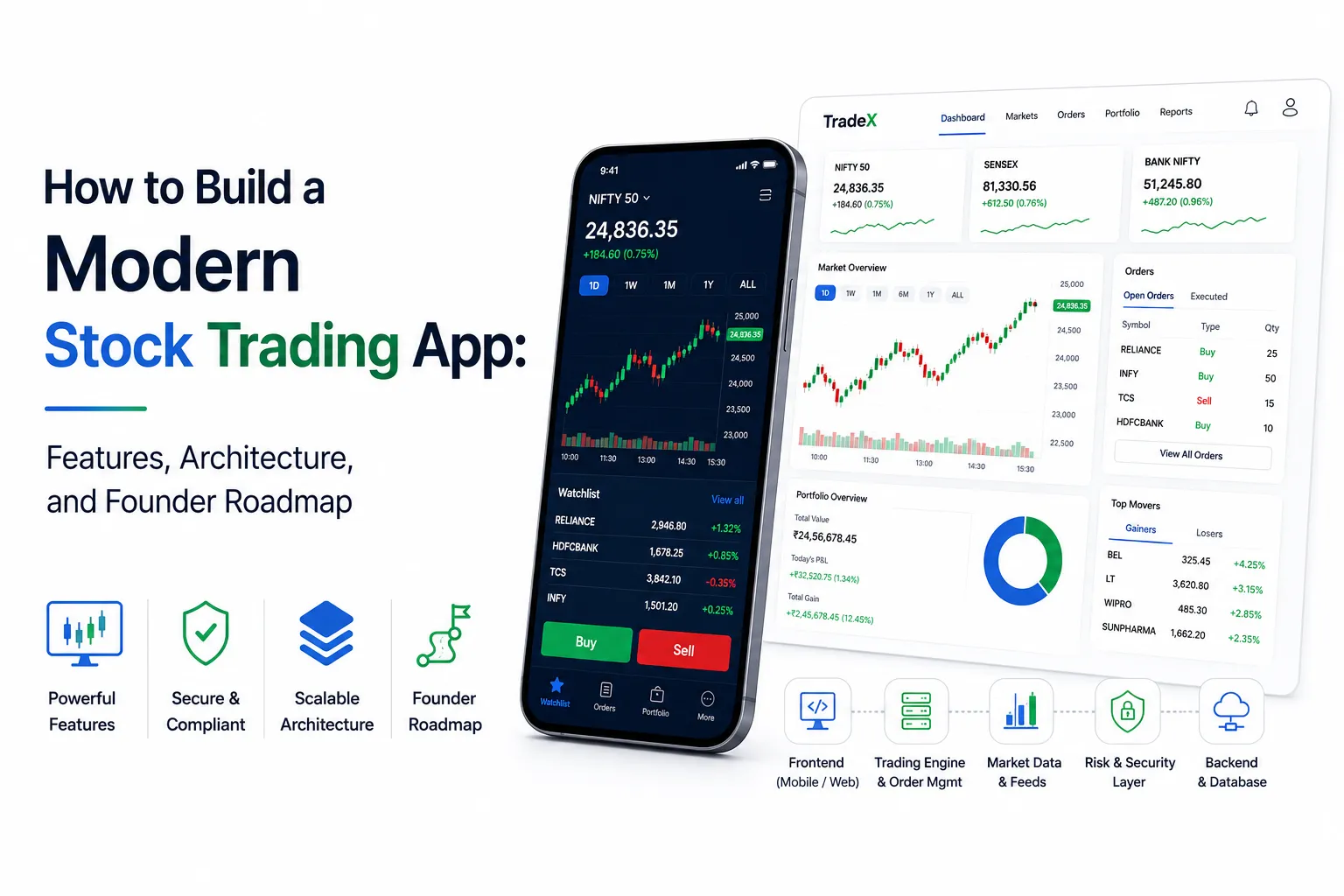
- A modern stock trading app combines digital onboarding, KYC, real-time market data, watchlists, order placement, portfolio tracking, funds, and reporting in one platform.
- Core stock trading app features include live charts, multiple order types, price alerts, holdings, positions, transaction history, risk controls, and secure account management.
- Successful trading app development requires scalable architecture, reliable broker and market data integrations, strong security, compliance workflows, and accurate real-time processing.
Architecture & Feature Signals
- The trading app architecture should connect frontend applications, backend APIs, order management systems, databases, market data feeds, payment services, and broker integrations.
- Real-time price updates, WebSocket connections, caching, scalable cloud infrastructure, monitoring, and fault handling help support responsive trading experiences.
- Encryption, secure APIs, authentication, role-based access, audit logs, KYC verification, risk management, and compliance controls should be built into the platform architecture.
Founder Roadmap Insights
- Founders should define the target market, supported asset classes, regulatory requirements, brokerage model, integrations, and MVP feature scope before development begins.
- A phased roadmap can start with onboarding, market data, watchlists, order execution, and portfolios before expanding into advanced charts, analytics, alerts, and automation.
- Miracuves develops customizable stock trading platforms with KYC, live market data, order management, portfolio tools, broker integrations, payments, risk controls, analytics, security, and admin dashboards.
Building a modern stock trading app is not just about giving users a screen where they can buy and sell stocks. A serious trading product needs secure onboarding, live or delayed market data, portfolio visibility, broker connectivity, order tracking, fund workflows, reporting, support tools, and admin control.
For founders, the bigger question is not “how many screens should we build?” The better question is “what kind of trading business are we trying to launch, and what infrastructure do we need to support it safely?”
A beginner investor may want a simple watchlist and portfolio dashboard. An active trader may expect advanced charts, order types, instant alerts, and fast order status updates. A platform operator needs KYC visibility, broker API health, user management, risk alerts, transaction logs, and reporting controls.
That is why stock trading app development should begin with product clarity, not just UI design.
Why a Modern Trading App Needs More Than a Clean Interface
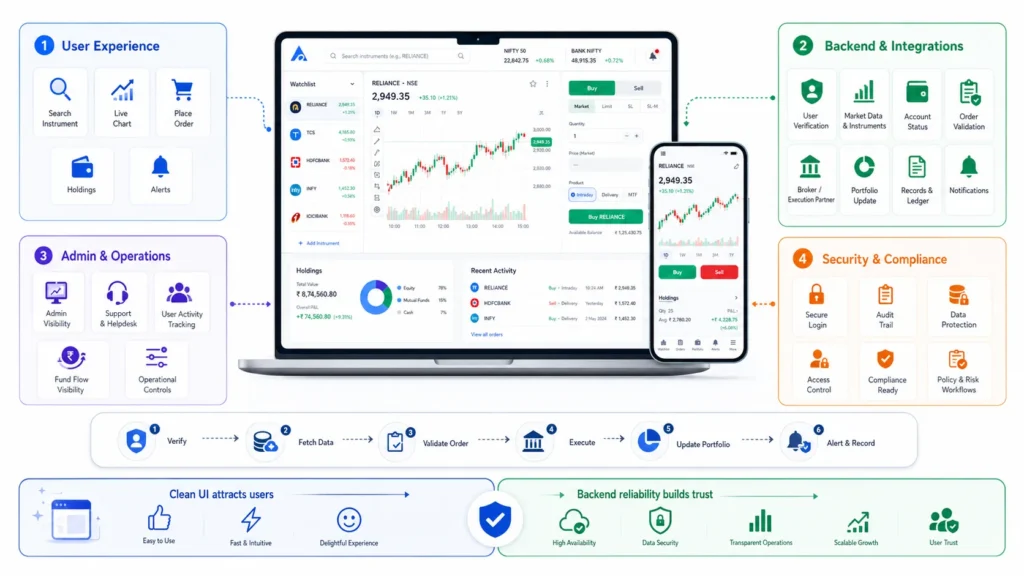
A trading app may look simple from the outside. Users open the app, search for an instrument, check a chart, place an order, and monitor their holdings. But behind that simple experience, multiple systems must work together.
The platform may need to verify the user, fetch instrument data, display market movement, check account status, validate order details, send requests to a broker or execution partner, update the order book, reflect portfolio changes, store records, trigger alerts, and give admins visibility into the activity.
This is where many founders underestimate the product.
A clean design can attract users, but backend reliability keeps them. If the app fails during market hours, delays order status, shows unclear portfolio data, or hides failed fund flows, users may lose confidence quickly. In trading products, trust is part of the user experience.
Modern trading app development should focus on four layers from day one:
- The user-facing trading experience
- The backend and integration layer
- The admin and operational control layer
- The security and compliance-ready workflow layer
When these layers are planned together, the product becomes easier to scale, support, and customize.
Step 1: Define the Trading App Business Model First
Before choosing features or technology, founders should decide what type of stock trading product they are building. Not every trading app needs the same infrastructure.
Some founders want to build a full brokerage product. Some want a broker-connected investment frontend. Some want a portfolio tracking app. Others may want a stock education, simulator, or wealth-tech platform.
Each model has different requirements.
| Business Model | What It Means | Founder Decision |
|---|---|---|
| Broker-partner trading app | The app provides a branded user experience while trade execution happens through licensed partners or broker APIs. | Useful when the founder wants faster market entry without building full brokerage infrastructure independently. |
| Portfolio tracking app | Users track holdings, watchlists, market data, allocation, and performance without live order execution. | Lower execution complexity, but still needs secure account handling and reliable data integrations. |
| Stock education or simulator app | Users learn trading, follow virtual portfolios, or practice strategies without using real money. | Suitable for communities, educators, and beginner-investor markets. |
| Wealth-tech platform | The app focuses on investment discovery, portfolio insights, advisory workflows, and long-term financial planning. | Works well for advisory firms, wealth managers, and fintech startups focused on investment journeys. |
| Licensed brokerage platform | The business operates directly or through regulated infrastructure to support real trading. | Requires deeper compliance planning, exchange or broker relationships, operational controls, and legal review. |
Founders who want to go deeper into revenue planning can review this trading platform business model before finalizing commissions, subscriptions, API access, premium data, referral income, and broker-partner monetization logic.
A founder who starts with the wrong product model may overbuild unnecessary features or underbuild critical workflows.
Step 2: Plan the Core User Experience
The user app should help investors and traders move with confidence. It should be fast, clear, and structured around real decision moments.
A basic trading app experience usually includes:
- User registration and secure login
- Identity verification or KYC workflow
- Dashboard with portfolio summary
- Watchlist creation and management
- Stock or instrument search
- Market overview
- Charting and price movement
- Buy and sell flow
- Order book
- Holdings and positions
- Funds or balance view
- Transaction history
- Alerts and notifications
- Reports and statements
- Help and support section
The goal is not to overload the app with every possible feature. The goal is to create a clear journey from onboarding to daily usage.
For a beginner, the product should explain what is happening. For an active trader, the app should reduce friction. For long-term investors, the portfolio view should build trust. For the platform operator, every user action should be traceable through the admin layer.
Step 3: Build the Trading Workflow Around Real User Actions
A trading workflow is not just a buy or sell button. It is a sequence of checks, confirmations, updates, and records.
A simple user action may trigger several backend steps:
- The user selects an instrument.
- The app fetches market data.
- The user chooses quantity, price, and order type.
- The platform validates user status, balance, margin, or permissions.
- The order request is sent to the broker or execution layer.
- The app receives order status.
- The order book updates.
- Portfolio, holdings, or positions are adjusted.
- Notifications are sent.
- Logs and reports are stored for review.
This is why order management should be planned carefully. Even if execution happens through a broker API, the product still needs clear user communication.
Users should know whether an order is placed, pending, rejected, executed, partially executed, cancelled, or failed. Confusing order status can damage trust faster than a missing feature.
Step 4: Design the Admin Dashboard as a Control Center
The admin dashboard is not a secondary feature in a trading app. It is where the platform operator manages risk, users, support, records, and daily operations.
A strong trading app admin dashboard may include:
- User management
- KYC status tracking
- Account approval controls
- Broker connection status
- Order monitoring
- Funds and payment records
- Portfolio and transaction visibility
- Support ticket management
- Notification control
- Risk flag monitoring
- Reports and analytics
- Role-based admin access
- Audit logs
- System health monitoring
- Content and app settings
Admin control matters because trading products require fast response. If a user faces a failed transaction, delayed verification, order confusion, or account issue, the support team needs visibility.
A founder who builds only the user app may later struggle with operations. The admin dashboard decides whether the business can manage users at scale without depending on developers for every small update.
Step 5: Understand the Architecture of a Modern Trading App
Trading app architecture should be planned for performance, security, and integration flexibility. The app may need to handle frequent data refreshes, market-hour usage spikes, broker API calls, user sessions, reporting, and admin activity at the same time.
A practical architecture usually includes these layers:
Frontend Layer
This includes the mobile app, web app, or both. The frontend handles user screens, watchlists, charts, order forms, portfolio views, alerts, and account settings.
Common technology choices may include Flutter, React Native, Swift, Kotlin, React, or Next.js depending on the product scope.
Authentication and User Layer
This layer manages registration, login, two-factor authentication, password recovery, user sessions, device security, and profile information.
For fintech products, authentication should not be treated casually. Strong access control helps protect sensitive financial and identity data.
KYC and Verification Layer
KYC workflows help verify user identity before giving access to regulated or sensitive financial actions. Depending on the operating model, this may include document upload, identity checks, video verification, address validation, or third-party verification APIs.
The exact requirement depends on jurisdiction, partner model, and product scope.
Market Data Layer
Market data allows users to view prices, charts, indices, historical data, and instrument information. This may come from broker APIs, data vendors, exchange-approved feeds, or delayed-data sources depending on business requirements.
This layer affects user experience, cost, infrastructure, and compliance planning.
Order Management Layer
The order management layer handles order placement, modification, cancellation, validation, status updates, and records. It connects the user action to the broker or execution infrastructure.
This is one of the most important parts of a trading app because it directly affects trust.
Portfolio and Ledger Layer
The portfolio layer shows holdings, positions, profit and loss, transaction history, allocation, and reports. It must be clear, accurate, and easy to understand.
Users should never feel uncertain about what they own, what changed, or where their funds are reflected.
Notification Layer
Notifications keep users updated about order status, price alerts, verification updates, fund activity, portfolio movement, and support messages.
This layer may include push notifications, SMS, email, and in-app alerts.
Admin and Audit Layer
The admin layer gives operators control over users, orders, risk flags, reports, and system activity. Audit logs help track who did what, when, and why.
This is especially important for internal accountability, support, and compliance-ready operations.
Step 6: Plan Security and Compliance-Ready Workflows Early
For a deeper look at security-performance tradeoffs in fintech products, read Miracuves’ guide on balancing fintech security with fast transaction workflows</a>. It explains why encrypted payloads, KYC, audit logs, secure APIs, and admin monitoring should be planned as part of the product foundation.
Important security and compliance-ready workflows include:
- Encrypted data transfer
- Encrypted data storage
- Two-factor authentication
- Device-level security controls
- Role-based access control
- Admin permission management
- KYC workflow support
- User verification
- Secure API integration
- Payment gateway security
- Activity logs
- Audit logs
- Transaction monitoring
- Suspicious activity flags
- Risk disclosures
- Compliance reporting support
For India-focused online trading products, internet-based trading and wireless trading services are governed by market infrastructure and regulatory requirements. NSE notes that members providing internet-based trading must follow SEBI directives and exchange procedures, and SEBI has issued circulars around internet-based trading and stock broker system audit supervision.
Technology can support compliance workflows, but it does not automatically make a business compliant. Final compliance depends on jurisdiction, operating model, legal review, broker partnerships, exchange permissions, data handling, and regulatory requirements.
Founders should involve legal and compliance experts before launching any product that supports real trading, advisory workflows, brokerage activity, or financial execution.
Step 7: Choose Features Based on Business Value
For a deeper module-by-module view, founders can explore this trading platform feature breakdown covering user app flows, order workflows, portfolio tools, API logic, admin controls, and compliance-ready operational modules.
| Feature | Business Value | Founder Impact |
| Secure onboarding | Helps users create accounts and access the app safely. | Builds trust from the first interaction. |
| KYC workflow | Supports identity verification and account approval. | Helps prepare the product for regulated financial workflows. |
| Watchlists | Lets users track preferred stocks and instruments. | Improves repeat usage and engagement. |
| Market data | Shows price movement, charts, and instrument information. | Helps users make informed decisions inside the app. |
| Order flow | Allows users to place, review, and track orders. | Forms the core trading experience. |
| Portfolio dashboard | Shows holdings, positions, profit/loss, and allocation. | Improves transparency and user confidence. |
| Alerts | Notifies users about price movements, order status, or account activity. | Increases engagement and timely action. |
| Admin dashboard | Gives operators control over users, KYC, support, reports, and risk flags. | Makes the business easier to manage after launch. |
| Audit logs | Tracks important actions across the platform. | Supports accountability and operational review. |
The strongest feature roadmap is not the longest one. It is the one that matches the product’s business model and launch stage.
Step 8: Select the Right Tech Stack and Integrations
The right tech stack depends on product scope. A portfolio tracking app may need a lighter backend than a broker-connected trading platform. A platform with real-time order flow, market data, and multiple integrations needs stronger architecture planning.
Common stack choices may include:
- Mobile app: Flutter, React Native, Swift, or Kotlin
- Web app: React, Next.js, Vue, or Angular
- Backend: Node.js, Java, Python, or Laravel
- Database: PostgreSQL, MySQL, MongoDB, or hybrid storage
- Cache layer: Redis
- Real-time updates: WebSockets
- Cloud infrastructure: AWS, Google Cloud, Azure, or private cloud
- Authentication: OAuth, JWT, biometric login, or device-based controls
- Integrations: broker APIs, market data feeds, KYC APIs, payment gateways, analytics tools
Founders should also think about long-term API usage, not just upfront development. This Miracuves guide on hidden API costs in poorly coded app platforms explains why inefficient API calls, weak caching, repeated requests, and poor backend logic can increase monthly operating costs after launch.
For founders who need deeper API planning, Miracuves’ API development services can support integration-heavy app workflows where backend reliability matters.
Step 9: Test the Platform Before Launch
A trading app should never be tested only like a normal mobile app. It needs functional testing, security testing, performance testing, integration testing, and edge-case testing.
Testing should cover:
- Login and authentication
- KYC workflow
- Market data display
- Watchlist behavior
- Order placement flow
- Order status updates
- Portfolio calculations
- Funds and payment flows
- Broker API responses
- Notification delivery
- Admin dashboard actions
- Audit logs
- Error messages
- Load handling
- Mobile device compatibility
- Regression after updates
Founders should also test failure scenarios. What happens if a broker API is delayed? What happens if a payment response fails? What happens if a user loses connectivity during order confirmation? What happens if market data does not refresh?
These scenarios decide whether the app feels trustworthy during real usage.
Step 10: Founder Roadmap for Building a Stock Trading App
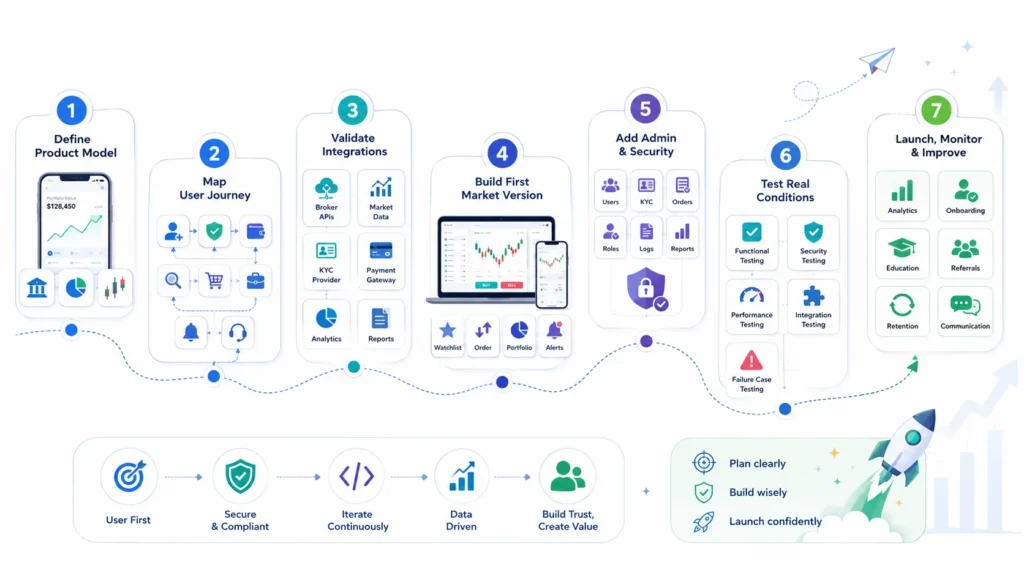
A practical roadmap helps founders avoid scattered development. Instead of jumping from idea to code, the build should move through clear stages.
Stage 1: Define the Product Model
Decide whether the app is a broker-partner platform, portfolio tracker, simulator, wealth-tech product, or full brokerage platform.
This decision shapes the entire product.
Stage 2: Map the User Journey
Document how users register, verify identity, add funds, search instruments, place orders, track portfolios, receive alerts, and access support.
Stage 3: Validate Integration Requirements
Identify broker APIs, market data sources, KYC providers, payment gateways, analytics tools, and reporting needs before development begins.
Stage 4: Build the First Market Version
Start with the core workflows required to validate user demand. Avoid overbuilding advanced features before the platform’s core value is proven.
Stage 5: Add Admin and Security Controls
Make sure the platform operator can manage users, KYC, orders, support issues, reports, roles, logs, and system activity.
Stage 6: Test for Real Operating Conditions
Run functional, security, performance, integration, and failure-case testing before launch.
Stage 7: Launch, Monitor, and Improve
Once the first version is live, founders should also plan a marketing strategy for growing a trading platform with trust-building content, onboarding campaigns, investor education, referral loops, retention workflows, and product-led communication.
Custom Development vs Ready-Made Trading App Foundation
Founders usually face two build routes: custom development from zero or a ready-made app foundation that can be customized.
Founders comparing modern app-led trading platforms with older brokerage systems can also read this guide on modern trading app foundations vs traditional brokerage software to understand the difference in flexibility, APIs, admin control, scalability, and launch speed.
Founders who want to understand how ready-made app delivery works can also read Miracuves’ guide on the rapid app development process, which explains how launch-ready foundations reduce development delays without skipping planning, QA, branding, configuration, and handover.
| Build Route | What It Means | Best For | Cost Logic |
| Custom development | Build the frontend, backend, admin panel, integrations, and infrastructure from zero. | Highly differentiated platforms with longer timelines and larger budgets. | Cost depends on features, integrations, platforms, compliance scope, and infrastructure. |
| Ready-made foundation | Start with pre-built workflows, admin control, branding support, and source-code ownership. | Founders who want faster validation and do not want to rebuild common modules. | More cost-efficient when standard fintech workflows match the launch scope. |
| Hybrid approach | Start with a ready-made foundation and customize unique workflows. | Founders who need speed now and flexibility later. | Balanced because common modules are reused while differentiating features are customized. |
To understand what actually affects the budget, review these trading app development cost factors before comparing custom builds, ready-made foundations, broker API integrations, real-time data feeds, compliance workflows, and post-launch customization.
For founders exploring a faster route, Miracuves offers a ready-made multi-broker trading platform that can support trading, investor, admin, broker, and operational workflows under a branded launch path.
This link should be used once in the article with a supportive anchor, not as the main blog keyword.
Common Mistakes Founders Should Avoid
Starting With Screens Instead of Business Model
A trading app should not begin with UI screens alone. The business model decides the features, integrations, compliance workflows, and technical depth.
Ignoring Broker API Complexity
Broker APIs can affect order flow, data sync, account status, margin checks, reporting, and user experience. Founders should validate API feasibility early.
Treating Market Data as a Simple Feature
Market data affects charts, watchlists, price refresh, user trust, infrastructure, and vendor cost. It should be planned as a core layer.
Underbuilding the Admin Dashboard
Without strong admin visibility, the operator may struggle to manage users, KYC, risk flags, support requests, and reports.
Making Security a Post-Launch Task
Trading apps need secure access, encryption, audit logs, permission controls, and activity tracking from the beginning.
Building Too Much Before Validation
Advanced tools, social trading, AI insights, complex analytics, and automation should come after the core user journey is validated.
How Miracuves Supports Founders Building Trading and Fintech Platforms
Miracuves helps founders, fintech startups, brokers, agencies, and product teams move from idea to launch with ready-made and white-label app foundations. The goal is not to copy another product blindly. The stronger approach is to understand the proven product pattern, define the business model, customize the workflows, and launch with the right control layer.
For trading and investment products, this means planning user onboarding, KYC, market data, order flow, portfolio visibility, admin control, security workflows, and future customization before launch.
Miracuves’ source-code-owned approach gives founders more control over branding, product logic, integrations, and long-term improvements. This is useful when the business wants to validate demand faster while keeping flexibility for future development.
You can also explore Miracuves’ custom mobile app development services if your product requires a fully custom trading, investment, or fintech build.
Final Thoughts: Build the Right Trading Foundation Before Scaling
A modern stock trading app is not just a mobile product. It is a fintech system that brings together user experience, backend workflows, integrations, security, admin control, and operational readiness.
Founders should avoid starting with a feature checklist alone. The better approach is to define the business model, map the trading journey, validate integrations, plan security, and build a platform foundation that can support real users.
The strongest trading products are not always the ones with the most features on day one. They are the ones with clear workflows, reliable infrastructure, strong admin visibility, and a product roadmap that fits the business model.
Founders who are still validating the larger app opportunity can also explore this guide on using ready-made app development for market validation before deciding whether to build custom, use a launch-ready foundation, or take a hybrid route.
FAQs
How do you build a modern stock trading app?
To build a modern stock trading app, start by defining the business model, then plan user onboarding, KYC, watchlists, market data, order workflows, portfolio dashboard, alerts, reports, admin controls, security, and integrations. After that, choose the tech stack, build the frontend and backend, test the platform, and launch with monitoring and support.
What are the most important features of a stock trading app?
Important features include secure login, identity verification, watchlists, market overview, charting, stock search, order placement, order book, holdings, positions, funds view, alerts, transaction history, reports, support, and admin dashboard.
Why is broker API integration important in trading app development?
Broker API integration connects the app experience with trading infrastructure. It can support account status, order placement, order updates, portfolio sync, transaction records, and other trading workflows depending on the broker and operating model.
Does every trading app need real-time market data?
Not every product needs real-time market data. A live trading app may need real-time or near-real-time feeds, while an education, simulator, or portfolio tracking app may use delayed data depending on the use case, data rights, and vendor agreement.
Do I need a license to launch a stock trading app?
Licensing depends on the target market, business model, and whether the app supports real trading, brokerage activity, advisory services, or financial execution. Founders should consult legal and compliance experts before launching any regulated trading product.
What technology stack is suitable for stock trading app development?
Common choices include Flutter or React Native for mobile apps, React or Next.js for web dashboards, Node.js, Java, Python, or Laravel for backend development, PostgreSQL or MySQL for databases, Redis for caching, WebSockets for real-time updates, and cloud infrastructure for scaling.
How much does it cost to build a stock trading app?
The cost depends on features, platforms, broker APIs, market data, security requirements, admin dashboard, compliance workflows, infrastructure, and customization scope. A portfolio tracker will usually require a different budget than a broker-connected trading platform.
Can a ready-made app foundation reduce development time?
Yes, a ready-made app foundation can reduce development time when the required workflows match the available modules. It can help founders start with existing user flows, admin controls, branding support, and source-code ownership instead of building every common module from zero.
Miracuves is an independent software development company. We are not affiliated with, connected to, sponsored by, or endorsed by any company or product named in this article.
Terms such as “X Clone” are used descriptively. It is how the software industry refers to building a platform with functionality comparable to a known service, and how clients search for it.
The entire design and codebase of our products is built by our own team. Our products contain no code, design, graphics, or content originating from any third-party website or applications.
All third-party names and marks referenced in this article are the property of their respective owners, referenced solely to identify the services discussed.