

Key Takeaways
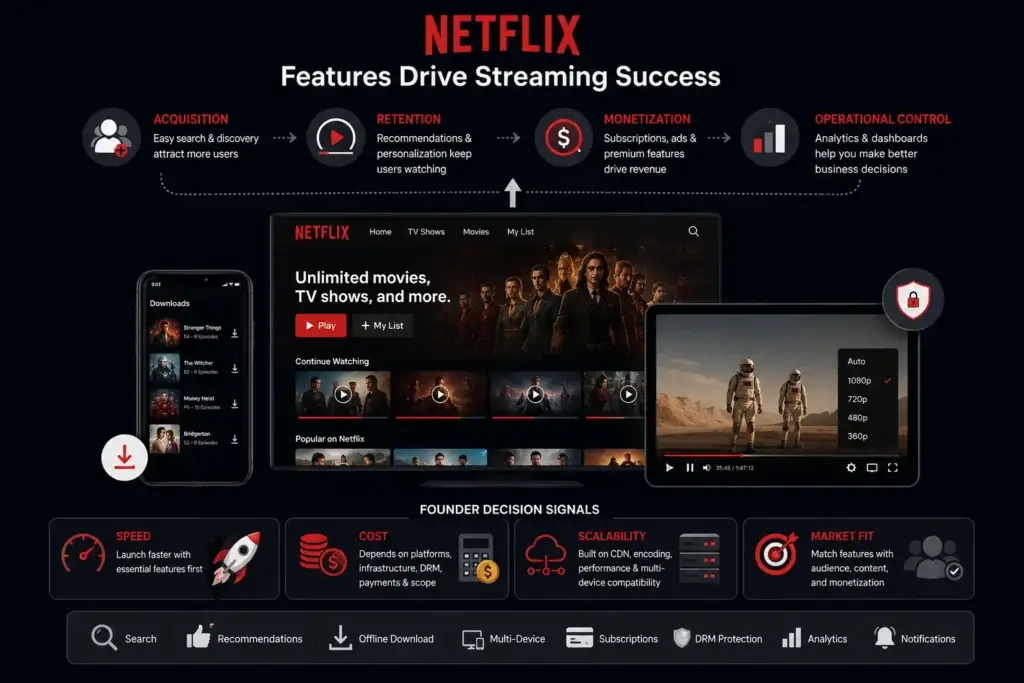
- A Netflix-like video streaming app needs more than video playback; success depends on retention-focused features, scalable infrastructure, and smooth user experience.
- Core features include adaptive streaming, personalized recommendations, watchlists, user profiles, offline downloads, subscriptions, and content management.
- Advanced OTT platforms also require DRM protection, CDN integration, analytics dashboards, multi-device sync, search optimization, and admin controls.
- The right feature set depends on audience behavior, monetization model, content category, streaming scale, and device ecosystem.
- Long-term platform growth depends on content discovery, playback reliability, user retention, infrastructure performance, and recurring subscription revenue.
Streaming Platform Signals
- Adaptive bitrate streaming helps reduce buffering by adjusting video quality automatically based on bandwidth and device conditions.
- AI-powered recommendation systems improve watch time by suggesting content based on viewing history, preferences, and engagement patterns.
- Offline downloads improve retention because users can continue watching content during travel or low-network conditions.
- Subscription management features support recurring revenue through plan upgrades, renewals, device limits, and billing automation.
- Development complexity changes based on DRM systems, CDN architecture, transcoding pipelines, analytics infrastructure, recommendation engines, and multi-platform support.
Real Insights
- A Netflix-like app is not only a media player; it is a complete OTT ecosystem built around discovery, engagement, streaming quality, and monetization.
- The strongest streaming apps focus heavily on retention because recurring subscriptions depend on continuous viewer engagement.
- Founders should prioritize launch-essential features first instead of building every advanced OTT capability before validating user demand.
- Poor playback optimization, weak recommendations, and unstable streaming infrastructure can increase churn even when content quality is strong.
- The best Netflix-like platforms combine scalable streaming infrastructure, secure video delivery, personalized experiences, subscription management, and data-driven content optimization.
A Netflix-like video streaming app needs more than a content library and a video player. Users expect fast discovery, smooth playback, personalized recommendations, secure payments, multiple profiles, subtitles, offline viewing and continuity across devices.
For founders, these features are not isolated product additions. Each one influences acquisition, viewing time, subscription conversion, retention or operational control. A polished user interface may attract initial attention, but the business also needs subscription management, content workflows, analytics, security controls and an admin dashboard that can support daily operations.
Feature prioritization is therefore one of the most important decisions in OTT product planning. Building every advanced capability before validating the audience can waste time and budget. Launching without the features that protect playback quality, monetization and retention can create an equally serious risk.
Founders who want to avoid rebuilding every standard OTT workflow can also evaluate a ready-made Netflix-style streaming platform. The objective is not to copy Netflix feature for feature. It is to create a branded streaming product aligned with the target audience, content strategy, revenue model and long-term growth plan.
What Is a Netflix Like Video Streaming App?
A Netflix like video streaming app is an on-demand OTT platform where users can browse, stream, save, and watch video content across devices. The platform may include movies, shows, documentaries, short films, educational content, regional entertainment, sports highlights, creator videos, or premium niche content.
From a business perspective, this type of app usually includes three layers:
- Viewer app: Where users register, browse content, watch videos, manage subscriptions, create profiles, and receive recommendations.
- Admin dashboard: Where the platform owner manages users, content, plans, payments, banners, categories, reports, and app settings.
- Streaming infrastructure: The backend layer that handles content storage, video processing, CDN delivery, playback, analytics, and security.
A founder planning to build a Netflix clone app should think beyond the visible interface. The platform must support content operations, subscription revenue, performance, user retention, and future expansion.
Read More: What is Netflix App and How Does It Work?
Where the Startup Opportunity Exists in Video Streaming
The strongest opportunity for a streaming startup is rarely a general entertainment platform built for everyone. Broad platforms face high content expectations, expensive acquisition and direct comparison with established streaming brands.
A more practical opportunity is to build around a defined audience or content advantage. This may include regional cinema, independent films, professional education, fitness, faith-based programming, niche sports, children’s learning, creator-led libraries or corporate training.
A focused platform gives founders clearer answers to four important questions:
- Who is willing to pay?
- What content will make users return?
- Which monetization model fits the audience?
- Which features must be available at launch?
For example, an educational streaming platform may prioritize learning paths, progress tracking and instructor workflows. A regional entertainment app may prioritize multilingual discovery, subtitles and local payment options. A sports platform may require live events, pay-per-view access and device compatibility.
The business model should shape the feature stack—not the other way around. Founders exploring a focused content strategy can also review this guide to building a hyper-niche SVOD platform.
Founder Decision Signals
Speed
If you want to test a niche streaming market quickly, start with launch-essential features instead of building every advanced OTT module from day one.
Cost
The final cost depends on platforms, content workflows, video infrastructure, payment integrations, DRM, analytics, and customization scope.
Scalability
Streaming quality depends on CDN, encoding, adaptive bitrate support, backend performance, and device compatibility.
Market Fit
The right feature set should match your audience, content type, monetization model, and regional viewing behavior.
20 Key Features of a Netflix Like Video Streaming App
1. Simple User Registration and Login
A Netflix-style app should make onboarding fast. Users should be able to sign up with email, phone number, social login, or single sign-on depending on the target market.
Registration should not feel heavy. The goal is to bring users into the content experience quickly while collecting enough information to manage accounts, subscriptions, and personalization.
Important registration elements include:
- Email or mobile login
- Social login options
- OTP verification
- Password reset
- Account security settings
- Subscription status tracking
For founders, this feature matters because poor onboarding can reduce conversion before users even explore the content library.
2. Multiple User Profiles
Multiple profiles allow one account to support different viewers. This is especially useful for families, shared households, and subscription-based OTT apps.
Each profile can have separate watch history, recommendations, language preferences, watchlist, and maturity settings. This improves personalization and prevents one user’s viewing behavior from affecting another user’s feed.
For a Netflix like video streaming app, profile management is not just a convenience feature. It improves retention because each viewer gets a more relevant content experience.
3. Personalized Home Screen
The home screen is the first major engagement layer after login. It should display content categories, trending titles, continue watching, recommended content, new releases, and promotional banners.
A strong home screen helps users decide what to watch without feeling overwhelmed. For founders, this is where content strategy and product design meet.
Useful home screen sections include:
- Continue watching
- Trending now
- New releases
- Recommended for you
- Top-rated content
- Genre-based rows
- Recently added
- Featured banners
A generic content grid can work for a basic launch, but a personalized home screen becomes important as the content library grows.
4. Advanced Content Search
Search is essential for users who already know what they want to watch. A streaming app should support title search, actor search, genre search, language filters, release year filters, and keyword-based discovery.
Advanced search improves user satisfaction because it reduces friction. If users cannot find content quickly, they may assume the platform has poor content even when the library is strong.
For niche OTT platforms, search can also support regional language discovery, creator names, course topics, sports categories, or documentary themes.
5. Smart Content Categories and Genres
A Netflix clone app should organize content into clear categories. Categories help users browse when they do not have a specific title in mind.
Common categories include:
- Movies
- Web series
- Documentaries
- Kids content
- Regional content
- Originals
- Trending
- Recently added
- Comedy
- Drama
- Thriller
- Action
- Romance
- Education
- Sports highlights
For founders, category planning should reflect the content strategy. A regional OTT platform may need language-first categories. A fitness streaming app may need workout type, duration, and difficulty filters. A creator platform may need channels, creators, and topic tags.
6. High-Quality Video Player
The video player is the heart of any Netflix like video streaming app. Users may forgive a few missing features, but they will not forgive poor playback.
A strong video player should support:
- Play and pause
- Forward and rewind
- Playback speed control
- Full-screen mode
- Subtitle selection
- Audio language selection
- Quality selection
- Resume playback
- Skip intro
- Next episode autoplay
- Casting support where required
The player should feel smooth across mobile, web, tablet, and smart TV devices. For founders, this feature directly affects user trust.
7. Adaptive Bitrate Streaming
Founders should also evaluate how bitrate ladders, CDN configuration and viewing quality affect infrastructure spending. This guide to OTT bandwidth and adaptive streaming costs explains the operational side in more detail.
For example, if a user has strong internet, the app can deliver HD or 4K content. If the connection drops, the player can shift to a lower quality instead of stopping completely.
This matters because streaming users expect instant playback. Buffering damages the user experience and can increase churn.
8. Watchlist and Save for Later
A watchlist lets users save movies, shows, or episodes for future viewing. This feature helps users return to the app because they have already created a personal queue.
From a business perspective, watchlists create intent data. The platform can understand what users are interested in, which categories are gaining attention, and which saved titles are not being watched.
This can support better recommendations, remarketing, push notifications, and content acquisition decisions.
9. Continue Watching
Continue watching is one of the most important retention features in a video streaming app. It allows users to resume content from where they stopped.
This feature reduces friction and encourages users to return. Without it, users must search again, open the title again, and manually find the right timestamp.
Continue watching should work across devices. If a user starts watching on mobile and later opens the web or TV app, the progress should sync.
10. Personalized Recommendations
Recommendations help users discover content without manually searching. A basic app may start with rule-based recommendations such as genre, watch history, and trending content. A more advanced app can use AI or machine learning to recommend titles based on deeper behavior patterns.
Recommendation signals may include:
- Watch history
- Completion rate
- Genre preference
- Language preference
- Ratings
- Search behavior
- Watchlist activity
- Similar user behavior
For founders, recommendations matter because discovery drives watch time. More relevant discovery can improve engagement and subscription retention.
11. Subtitles and Multi-Language Audio
Subtitles and audio language options make content accessible to wider audiences. This is especially important for regional OTT platforms, international content libraries, educational video platforms, and family entertainment apps.
Subtitle features may include:
- Multiple subtitle languages
- Subtitle on/off control
- Caption styling
- Closed captions
- Audio track selection
- Default language preferences
For founders entering multilingual markets, language support can become a major growth advantage.
12. Offline Download
Offline download allows users to save content and watch it without an active internet connection. This is useful for commuters, travelers, students, and users in markets where internet quality is inconsistent.
Offline viewing should include download quality selection, expiry rules, storage limits, and secure playback restrictions.
This feature is valuable, but it also requires careful planning because content licensing, storage, and DRM rules may affect how downloads are handled.
13. Subscription Plans and Payment Gateway
A Netflix like video streaming app usually depends on recurring subscription revenue. The app should support plan selection, billing cycles, coupons, upgrades, downgrades, renewals, cancellations, and payment history.
Common payment-related features include:
- Monthly and yearly plans
- Free trial support
- Coupon codes
- Auto-renewal
- Plan upgrade/downgrade
- Payment invoices
- Multiple payment gateways
- Subscription expiry reminders
The payment experience should be simple and secure. For founders, this is where product experience directly connects to revenue.
14. Multiple Monetization Models
Not every streaming app should follow the same subscription model. Founders should choose monetization based on content type, audience willingness to pay, and market positioning.
Common OTT monetization models include:
| Monetization Model | How It Works | Best For |
|---|---|---|
| SVOD | Users pay a recurring subscription fee | Premium entertainment, education, niche content |
| AVOD | Users watch content with ads | Free or low-cost mass audience platforms |
| TVOD | Users pay per movie, show, event, or title | Premium releases, sports, events, exclusive content |
| Hybrid | Mix of subscription, ads, and pay-per-view | Platforms targeting multiple audience segments |
| Freemium | Free content plus paid premium access | New platforms building user acquisition |
Netflix itself has increased focus on advertising revenue as part of its growth strategy, with its Q1 2026 shareholder letter citing increased ad revenue as one driver of revenue growth. For founders, this means monetization planning should happen early because ad-supported, subscription-only, and hybrid apps require different product features.
15. Ratings, Reviews, and User Feedback
Ratings and reviews help users decide what to watch. They also give platform owners useful signals about content quality and audience response.
A streaming app may include:
- Star ratings
- Like/dislike buttons
- Short reviews
- Content reporting
- Feedback forms
- Viewer satisfaction prompts
For admin teams, feedback data can support content renewal decisions, recommendation logic, and moderation workflows.
16. Push Notifications and Email Alerts
Notifications help bring users back to the app. However, they must be relevant. Sending too many generic notifications can create annoyance and lead users to disable alerts.
Useful notification triggers include:
- New episode release
- Subscription renewal reminder
- Watchlist content update
- New content in favorite genre
- Continue watching reminder
- Discount or plan offer
- Payment failure alert
- Device login alert
For founders, notification strategy should focus on retention, not spam.
17. Parental Controls and Kids Mode
Parental controls are essential for family-focused streaming platforms. Parents should be able to restrict content based on age ratings, create kids profiles, set PIN locks, and control viewing access.
Important parental control features include:
- Age-based content filtering
- Kids-only profile
- PIN-protected settings
- Restricted search results
- Watch time limits
- Mature content blocking
This feature improves trust and makes the app more suitable for household subscriptions.
18. Admin Dashboard and Content Management System
The admin dashboard is where the business actually operates. Without strong admin control, the platform owner becomes dependent on developers for every small change.
A strong admin dashboard should support:
- User management
- Content upload and editing
- Category management
- Subscription plan control
- Banner and promotion management
- Payment tracking
- Coupon management
- Reports and analytics
- Review moderation
- Support ticket management
- Role-based staff access
For a Netflix like video streaming app, the admin panel is not optional. It is the control center for content, revenue, operations, and growth.
Key Netflix-Like App Features and Business Value
| Feature | Business Value | Founder Impact |
|---|---|---|
| User Profiles | Improves personalization for multiple viewers under one account. | Supports family subscriptions and better retention. |
| Adaptive Streaming | Reduces buffering and improves playback quality. | Protects user experience across different internet speeds. |
| Watchlist | Captures user intent and encourages return visits. | Creates useful behavioral data for recommendations. |
| Subscription Management | Enables recurring revenue and plan control. | Gives founders pricing flexibility. |
| Admin Dashboard | Centralizes content, users, payments, and reports. | Reduces operational dependency on developers. |
19. Analytics and Reporting
Analytics help founders understand what is working. Without analytics, the platform owner may make content, pricing, and marketing decisions based on assumptions.
OTT analytics should track:
- Active users
- Watch time
- Completion rate
- Popular titles
- Drop-off points
- Search terms
- Subscription conversions
- Payment failures
- Churn signals
- Device usage
- Geographic performance
Analytics can also help decide which content to promote, renew, remove, or acquire. For a streaming business, content decisions are expensive. Good data reduces guesswork.
20. DRM, Security, and Access Control
Video content is a valuable business asset. A streaming app should protect content from unauthorized access, account misuse, and piracy risks.
Security features may include:
- DRM support
- Secure video URLs
- Token-based playback
- Encrypted data transfer
- Role-based admin access
- Device limit control
- Login alerts
- Payment security
- Abuse reporting
- Audit logs
Security should be treated as a foundation, not a marketing add-on. Final compliance and content protection requirements depend on jurisdiction, licensing terms, integrations, and operating model. For a deeper review of piracy risks, access controls, payment protection and governance workflows, read the white-label Netflix app security guide.
User App, Admin Panel, and Content Owner Controls
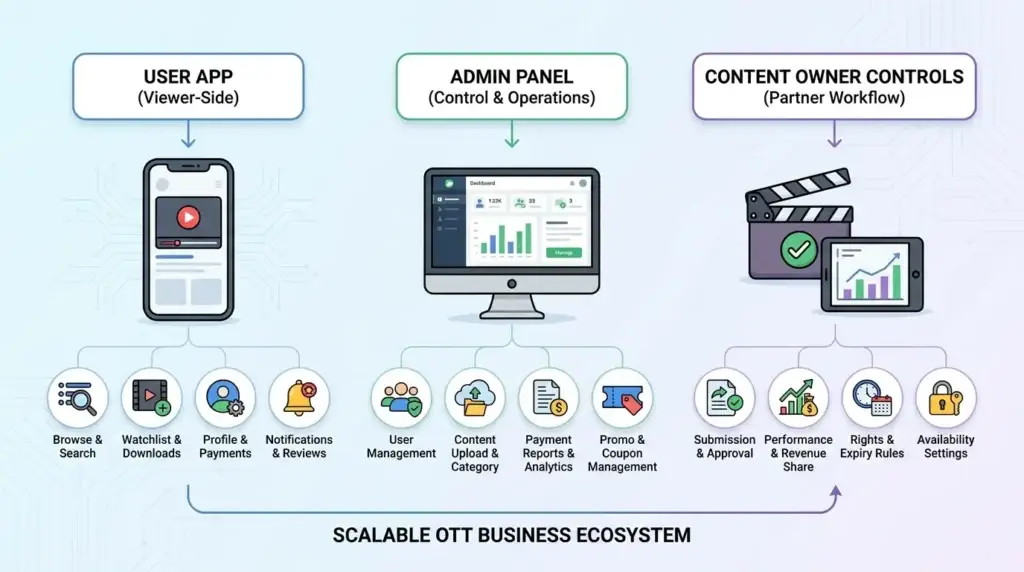
A Netflix like video streaming app should not be planned only from the viewer’s perspective. Founders should also define what the admin team and content managers need to control.
Viewer-Side Features
The user app should focus on discovery, playback, subscriptions, and convenience.
Important viewer-side features include:
- Login and profile management
- Browse and search
- Watchlist
- Continue watching
- Video player
- Subtitles and audio options
- Downloads
- Payments
- Notifications
- Ratings and reviews
Admin-Side Features
The admin panel should focus on control, reporting, and operations.
Important admin-side features include:
- User management
- Content upload
- Category and genre management
- Subscription management
- Payment reports
- Promo banners
- Coupon management
- Analytics dashboard
- Moderation tools
- Role-based access
Content Owner Controls
If the platform works with studios, creators, educators, or media partners, content owner workflows may also be useful.
These may include:
- Content submission
- Approval workflow
- Performance reports
- Revenue share tracking
- Rights and availability settings
- Content expiry rules
This structure helps founders move from a simple streaming app to a scalable OTT business.
Read More: Business Model of Netflix in 2026
Launch-Version Features vs Growth-Version Features
Not every feature needs to be built at the same time. A founder can reduce risk by separating launch-essential features from growth-stage features.
| Feature Group | Launch Version | Growth Version |
|---|---|---|
| User access | Login, profile, subscription status | Multiple profiles, device limits, advanced account security |
| Content | Categories, search, details page | Personalized rows, AI recommendations, regional personalization |
| Playback | Video player, resume watching | Adaptive bitrate, multi-audio, skip intro, smart TV casting |
| Monetization | Subscription and payment gateway | Hybrid monetization, coupons, ad module, pay-per-view |
| Admin | Users, content, plans, payments | Analytics, roles, moderation, campaign management |
| Security | Secure login and payment flow | DRM, audit logs, advanced access control |
This approach helps founders launch with clarity while leaving room for expansion.
Read More: Reasons startup choose our netflix clone over custom development
Monetization Features Every Netflix-Style App Should Consider
A streaming app should be designed around its revenue model from the beginning. Adding monetization later can create technical and user experience problems. For founders planning a Netflix clone, monetization should be mapped early because subscription access, ad-supported content, pay-per-view titles, and hybrid plans all require different product workflows.
Subscription Monetization
Subscription monetization works when users are willing to pay regularly for access. The app should support monthly, quarterly, yearly, and trial-based plans.
Advertising Monetization
Ad-supported video streaming works well when the platform wants to reduce user entry barriers. It requires ad placement logic, impressions tracking, targeting, reporting, and advertiser controls.
Pay-Per-View Monetization
Pay-per-view works for premium movies, events, live shows, sports content, or exclusive releases. The app needs title-level pricing and secure access rules.
Hybrid Monetization
Hybrid monetization allows founders to combine free, paid, ad-supported, and premium content. This gives more flexibility but requires careful product planning.
Technical Features Founders Should Not Ignore
Some streaming features are invisible to users but critical for performance.
CDN Integration
A content delivery network helps deliver video faster by serving content from servers closer to users. This reduces buffering and improves playback quality.
Video Encoding and Transcoding
Encoding prepares video files for different devices, resolutions, and bandwidth conditions. Without proper encoding, the same video may not play smoothly across mobile, web, and TV devices.
Cloud Storage
Video files require secure and scalable storage. Founders should plan storage based on content volume, quality, download options, and backup requirements.
Device Compatibility
A serious OTT app may need support for Android, iOS, web, tablets, smart TVs, and casting devices. Each platform affects design, testing, and development scope.
API and Backend Scalability
Technical teams that need a deeper view of backend structure, APIs and stack decisions can review this developer guide on how to build an app like Netflix. The backend should support user sessions, content requests, subscriptions, payment records, watch history, notifications, and analytics without slowing down as traffic grows.
Mistakes Founders Should Avoid While Building a Netflix Like Video Streaming App
Mistakes Founders Should Avoid
Building too many advanced features before validating demand
Founders often overbuild before proving that users want the content, pricing, or niche. Start with a strong launch-ready foundation and expand based on real usage data.
Ignoring the admin dashboard
A beautiful user app is not enough. Without admin control, the business cannot manage content, users, plans, reports, or operational changes efficiently.
Underestimating streaming infrastructure
Video apps depend on playback quality. Poor CDN, encoding, and backend planning can create buffering, failed playback, and user churn.
Choosing monetization too late
Subscription, ads, pay-per-view, and hybrid models need different app logic. Decide your monetization direction early to avoid expensive rework.
Ready-Made vs Custom Development for Netflix Like Video Streaming Apps
Founders usually have two main options: build from scratch or start with a ready-made foundation.
| Build Option | What It Means | Best For | Founder Consideration |
|---|---|---|---|
| Custom development | Build every module from the ground up | Highly unique OTT models with complex workflows | More control, but usually requires more time, planning, and budget |
| Ready-made solution | Start with existing core modules and customize branding/features | Founders who want faster validation and lower development risk | Faster launch path if the solution supports required features |
| Hybrid approach | Use a ready-made base and customize selected modules deeply | Startups with defined niche requirements | Balanced option for speed and customization |
What Affects the Cost of a Netflix-Like Streaming App?
The cost of a video streaming app depends on the product scope rather than the number of screens alone. A simple content library with basic playback requires a different foundation from a multi-platform OTT business with subscriptions, rentals, live TV, producer workflows, DRM and Smart TV applications.
The most important cost factors include:
- Mobile, web and Smart TV platforms
- Number of viewer and business-side panels
- Content upload, approval and rights workflows
- Subscription, rental, advertising and pay-per-view logic
- Video storage, transcoding and CDN requirements
- DRM and secure playback requirements
- Recommendation and analytics capabilities
- Payment gateway and third-party integrations
- Branding, user-interface changes and custom workflows
- Expected viewing traffic and infrastructure scale
Founders should avoid relying on generic development ranges without defining these variables. A useful estimate should clarify what is included, which platforms are covered, what infrastructure is required and which modules need customization.
A Practical Launch Process for a Streaming Platform
A structured launch process helps founders avoid building an impressive feature list without a viable content business.
1. Define the Audience and Content Model
Identify the audience, content category, content ownership structure and reason users will return. This determines the platform’s categories, discovery experience and access rules.
2. Select the Monetization Model
Choose whether the launch will use subscriptions, advertising, rentals, pay-per-view or a hybrid model. Monetization affects payments, entitlements, invoices, content access and reporting.
3. Prioritize Launch-Essential Features
Start with the viewer, payment, content, admin and security workflows required to operate the first market version. Advanced recommendations, Smart TV apps and complex integrations can be phased according to the business plan.
4. Configure Branding and Operations
Apply the brand identity, content structure, subscription plans, admin roles, payment settings, notification rules and support workflows.
5. Test the Complete Viewing Journey
Test registration, browsing, playback, subscription purchase, access control, watch history, device behavior, payment failure handling and admin reporting before launch.
The objective is not simply to publish an app. It is to launch a product that the business can operate, measure and improve.
What Should Be Customizable?
A ready-made platform should still adapt to the business rather than forcing every founder into the same content and revenue model.
Useful customization areas include:
- Logo, colors, typography and interface styling
- Content categories, genres and metadata
- Subscription plans, rentals, coupons and access rules
- Regional languages, currencies and payment gateways
- Viewer roles, admin permissions and content-owner workflows
- Homepage rows, promotional banners and discovery logic
- Notifications, emails and renewal messages
- Analytics and reporting requirements
- Third-party content, payment, CRM or marketing integrations
- Mobile, web and Smart TV rollout priorities
Customization should be guided by audience needs and operating requirements. Changing every screen without a clear business reason can increase scope without improving retention or revenue.
When a Ready-Made OTT Foundation Makes Business Sense
A ready-made OTT foundation is most useful when the business model is clear but rebuilding standard streaming modules would delay market entry. It can give founders a working base for viewer access, content discovery, playback, subscriptions, admin control and reporting while leaving room for branding and selected custom workflows.
Miracuves supports branded, white-label streaming platforms with viewer, producer and admin workflows, source-code ownership and customization options. The appropriate route still depends on the content model, target platforms, security requirements, integrations and level of product differentiation required.
Custom development remains the better option when the platform depends on highly unusual viewing experiences, proprietary infrastructure or workflows that cannot be supported through a configurable foundation.
Final Thoughts: Turn Features Into a Viable Streaming Business
A Netflix-like video streaming app succeeds when its features work together as a business system. Viewers need fast discovery, stable playback, simple payments and a reason to return. The operating team needs control over content, subscriptions, users, security, analytics and monetization.
The right launch plan is not the one with the longest feature list. It is the one that matches the audience, content model, revenue strategy and operational capacity of the business.
Start with the workflows required to deliver and monetize the content reliably. Add advanced personalization, Smart TV expansion, deeper analytics and additional revenue models as user behavior and commercial demand become clearer.
FAQs
What is a Netflix like video streaming app?
A Netflix like video streaming app is an on-demand OTT platform where users can browse, stream, save, and watch video content across devices. It usually includes user profiles, content categories, video playback, subscriptions, recommendations, watchlist, payment gateway, and an admin dashboard.
What are the must-have features of a Netflix like video streaming app?
The must-have features include user registration, profiles, content library, advanced search, video player, adaptive streaming, watchlist, continue watching, subscriptions, secure payments, admin dashboard, analytics, subtitles, offline downloads, and DRM protection.
How does a Netflix clone app make money?
A Netflix clone app can make money through subscriptions, ads, pay-per-view, premium content, rentals, brand partnerships, and hybrid monetization. The right model depends on your content type, audience, and pricing strategy.
Do I need an admin dashboard for a video streaming app?
Yes. The admin dashboard is essential because it allows the platform owner to manage users, content, categories, subscriptions, payments, banners, reports, and support workflows. Without admin control, operating the streaming platform becomes difficult.
Why is adaptive bitrate streaming important?
Adaptive bitrate streaming adjusts video quality based on the user’s internet speed. This helps reduce buffering and keeps playback smooth across different network conditions and devices.
Should a Netflix-style app include offline downloads?
Offline downloads are useful if your audience includes commuters, travelers, students, or users in regions with inconsistent internet. However, offline viewing should be planned with content rights, storage, expiry rules, and DRM protection.
What is better: custom development or a ready-made OTT app solution?
Custom development is useful when the product requires highly unique workflows. A ready-made OTT app solution is better when founders want to launch faster, validate demand, and customize a proven app foundation instead of building every module from zero.
How much does it cost to build a Netflix like video streaming app?
The cost depends on features, platforms, UI/UX complexity, video infrastructure, CDN, DRM, payment gateways, admin controls, analytics, and customization scope. Founders should confirm pricing based on the selected modules and launch requirements rather than relying on generic estimates.