Key Takeaways
- OAuth fails when callback URLs do not match exactly.
- AI builders often hardcode localhost or wrong redirect paths.
- Google and Apple login need provider, domain, and env alignment.
- Authentication failure blocks onboarding, demos, and product testing.
- A pre-configured auth module can reduce repeated login fixes.
OAuth Fix Signals
- Confirm the exact production domain before editing code.
- Match redirect URIs in Google Cloud or Apple Developer.
- Check callback routes inside the app backend.
- Remove localhost values from production environment variables.
- Test cookies, sessions, HTTPS, and user role handling.
Real Insights
- OAuth has low tolerance for guessing.
- A login button is not the same as secure authentication.
- Random AI auth rewrites can create new session bugs.
- Broken login prevents every growth experiment.
- Miracuves builds white-label apps with authentication-ready workflows.
OAuth breaks at the worst possible moment.
Your landing page works. Your dashboard loads. Your AI-generated app from Cursor, Lovable, Bolt, or another builder looks ready enough for a demo. Then someone clicks “Continue with Google” or “Sign in with Apple,” and the login flow collapses into an error like:
redirect_uri_mismatchinvalid_redirect_uriinvalid_clientcallback URL does not matchOAuth provider rejected the redirect URI
For founders, this is not a small developer annoyance. If users cannot log in, they cannot test your product, complete onboarding, invite teams, make payments, create listings, upload content, or experience the core value of the app.
The frustrating part is that AI tools often make OAuth look simple. They generate a login button, install a package, add environment variables, and create a callback route. But OAuth does not fail because the button is missing. It fails because the identity provider, your app, your deployed domain, your environment variables, and your callback route are not aligned exactly.
This guide explains how to fix broken Google and Apple OAuth redirects in AI-generated codebases, especially Cursor and Lovable builds. More importantly, it shows why authentication is one of those product foundations founders should not keep rebuilding from scratch when a pre-configured, white-label app foundation can already include secure registration flows, social login, admin control, and source-code ownership.
Why Your AI Prompt Cannot Handle OAuth Redirects
AI builders are excellent at generating visible interface logic. They can create a login screen, add a provider button, scaffold routes, and connect a library such as NextAuth, Clerk, Supabase Auth, Firebase Auth, or a custom OAuth client.
But OAuth is not just frontend code.
OAuth depends on a chain of exact agreements between multiple systems:
- The identity provider, such as Google or Apple
- Your app’s OAuth client ID and client secret
- The callback or redirect URI registered with the provider
- The callback route inside your application
- The domain where your app is running
- The environment variables used in local, staging, and production
- The authentication library’s expected callback format
- The browser flow that sends the user back after consent
AI frequently breaks this chain because it guesses.
It may generate:
http://localhost:3000/api/auth/callback/google
when your deployed app actually needs:
https://yourdomain.com/api/auth/callback/google
It may use:
https://app.yourdomain.com/auth/callback
while your provider expects:
https://app.yourdomain.com/api/auth/callback/google
It may forget that:
https://yourdomain.com/callback
and:
https://yourdomain.com/callback/
can be treated differently.
This is why “fix my OAuth login” prompts often create another broken version of the same flow. The AI can change code, but it cannot reliably inspect your Google Cloud Console, Apple Developer account, deployed domain, DNS settings, staging URL, callback path, and environment variables unless you give it every exact value.
For founders, the real issue is not that OAuth is impossible. The issue is that authentication has a low tolerance for approximation.
Read More: The Un-Indexed Trap: Why AI Schemas Cause Exponential App Latency
The OAuth Callback URI Problem in Plain English
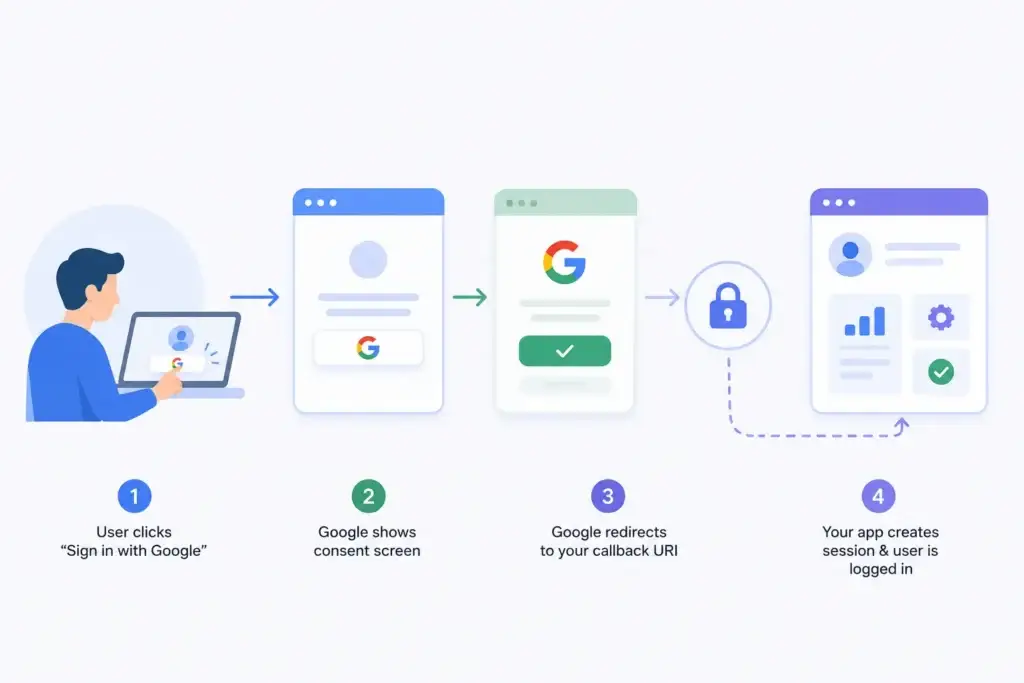
Image Source: AI-generated visual by Miracuves
A callback URI is the address where the OAuth provider sends the user after they approve or reject login.
Think of it like this:
- User clicks “Continue with Google.”
- Your app sends the user to Google.
- Google asks the user to approve access.
- Google sends the user back to your app.
- Your app receives a code.
- Your backend exchanges that code for tokens.
- Your app creates or logs in the user.
The redirect URI controls step 4.
If Google or Apple does not recognize the return address, it blocks the login. This is a security feature. Without strict redirect validation, attackers could potentially redirect tokens or authorization codes to an unauthorized domain.
That is why OAuth providers reject even small differences.
| Registered URI | Actual URI Sent by App | Result |
|---|---|---|
https://app.example.com/api/auth/callback/google | https://app.example.com/api/auth/callback/google | Works |
https://app.example.com/api/auth/callback/google | http://app.example.com/api/auth/callback/google | Fails |
https://app.example.com/api/auth/callback/google | https://www.app.example.com/api/auth/callback/google | Fails |
https://app.example.com/api/auth/callback/google | https://app.example.com/api/auth/callback/google/ | May fail |
http://localhost:3000/api/auth/callback/google | https://app.example.com/api/auth/callback/google | Fails in production |
OAuth is not being difficult for no reason. It is protecting the login flow from sending sensitive authorization responses to the wrong place.
Step-by-Step Callback URI Configuration for AI-Generated Apps
Before changing code, stop prompting and map the actual flow.
Create a simple auth configuration sheet with these fields:
| Configuration Item | Local Value | Staging Value | Production Value |
|---|---|---|---|
| App domain | http://localhost:3000 | https://staging.example.com | https://app.example.com |
| Auth base URL | http://localhost:3000 | https://staging.example.com | https://app.example.com |
| Google callback | /api/auth/callback/google | /api/auth/callback/google | /api/auth/callback/google |
| Apple callback | /api/auth/callback/apple | /api/auth/callback/apple | /api/auth/callback/apple |
| Full Google redirect URI | Full URL | Full URL | Full URL |
| Full Apple return URL | Full URL | Full URL | Full URL |
This prevents random edits. The goal is to make every system agree on the same callback value.
Step 1: Identify Your Authentication Library
The callback route depends on the auth stack your AI builder generated.
Common patterns include:
| Auth Stack | Typical Callback Pattern |
|---|---|
| NextAuth/Auth.js | /api/auth/callback/[provider] |
| Supabase Auth | Provider callback URL from Supabase dashboard |
| Firebase Auth | Firebase authorized domains and provider config |
| Clerk | Clerk callback and redirect URLs |
| Auth0 | /callback or configured application callback URL |
| Custom OAuth | Whatever route your backend explicitly handles |
Do not assume the callback URL. Search your codebase for:
callback
redirect_uri
redirectUri
NEXTAUTH_URL
AUTH_URL
GOOGLE_REDIRECT_URI
APPLE_REDIRECT_URI
oauth
provider
In Cursor, ask the model to locate references, not rewrite them immediately:
Find all OAuth callback, redirect_uri, redirectUri, NEXTAUTH_URL, AUTH_URL, Google provider, and Apple provider references in this codebase. Do not modify files. Return file paths and current values only.
This creates visibility before edits.
Step 2: Confirm the Exact Runtime URL
Many Cursor and Lovable builds work locally because the AI configured localhost. Then the build fails after deployment because the production domain is different.
Check your actual production URL:
https://yourdomain.com
Now check whether users access the app through:
https://www.yourdomain.com
or:
https://app.yourdomain.com
These are different values from an OAuth perspective.
Also check whether your deployment platform creates a preview domain such as:
https://your-project.vercel.app
https://your-project.netlify.app
https://your-app.replit.app
If your production app redirects from one domain to another, register the final domain that sends the OAuth request.
Step 3: Fix Google OAuth Redirect URI Mismatch
Google OAuth commonly fails because the authorized redirect URI in Google Cloud Console does not exactly match what your app sends.
Google OAuth checklist
Go to Google Cloud Console and check:
- Correct project selected
- OAuth consent screen configured
- OAuth client ID created for the correct application type
- Authorized JavaScript origins added where required
- Authorized redirect URIs added exactly
- Production domain included
- Staging domain included if testing staging
- Localhost URI included only for local development
- No accidental trailing slash
- Correct protocol used:
httpsfor production
For a NextAuth/Auth.js app, the Google callback is often:
https://yourdomain.com/api/auth/callback/google
For local testing, it may be:
http://localhost:3000/api/auth/callback/google
Both may need to be added if you test both environments.
Common Google OAuth mistakes
| Mistake | Why It Breaks |
|---|---|
| Adding only localhost | Production users are redirected from a different domain |
Using http in production | Production OAuth generally expects HTTPS |
| Missing provider path | /callback is not the same as /api/auth/callback/google |
| Using wrong Google Cloud project | The client ID belongs to a different project |
| Copying URL with trailing slash | Some providers treat it as a different URI |
| Wrong environment variable | App sends a different base URL than expected |
| Mixing preview and production domains | OAuth provider rejects the unregistered preview URL |
Cursor prompt to inspect Google OAuth safely
Use this prompt before allowing code edits:
Inspect the Google OAuth implementation. Find the exact redirect_uri sent during login, the callback route that handles Google, and all environment variables that influence the auth base URL. Do not edit code. Return the exact values and file paths.
Then use this prompt only after you know the correct values:
Update the Google OAuth configuration so the production callback URI is https://yourdomain.com/api/auth/callback/google and the local callback remains http://localhost:3000/api/auth/callback/google. Do not hardcode production values directly in provider code. Use environment variables and show me the changed files.
Step 4: Fix Apple Sign in Redirect URI Problems
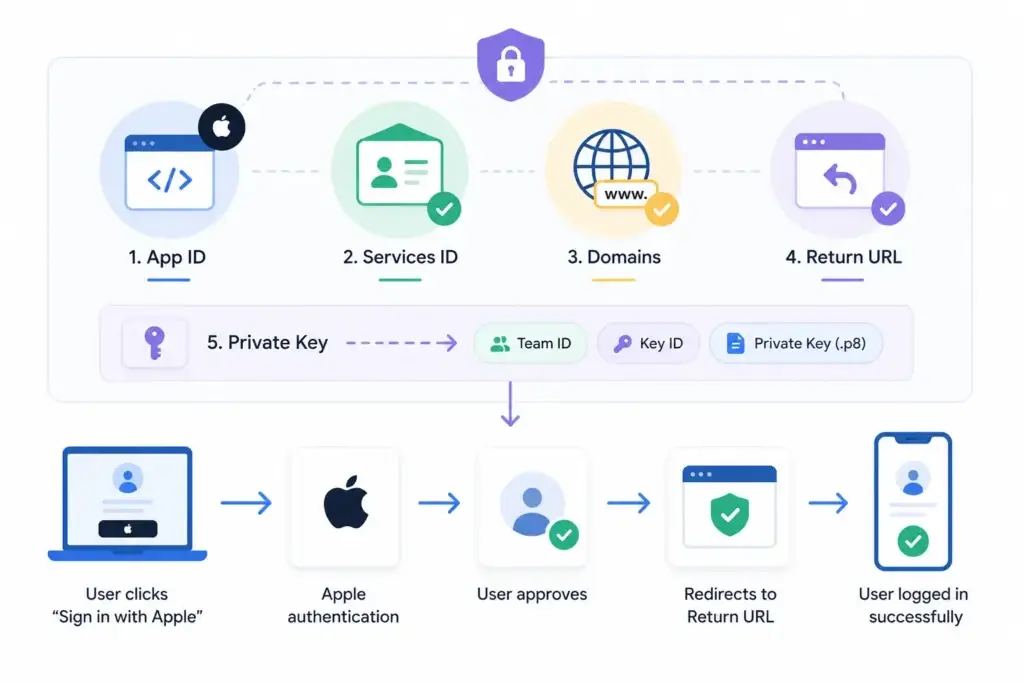
Image Source: AI-generated visual by Miracuves
Apple Sign in can be more confusing than Google because the setup usually involves App IDs, Services IDs, domains, Return URLs, Team ID, Key ID, and a private key.
The common failure is:
invalid_request: Invalid redirect_uri
or:
invalid_grant
Apple Sign in checklist
Inside Apple Developer:
- Create or confirm the App ID
- Enable Sign in with Apple
- Create or confirm the Services ID
- Configure Sign in with Apple for that Services ID
- Add Domains and Subdomains
- Add Return URLs
- Create a private key for Sign in with Apple
- Store Team ID, Services ID, Key ID, and private key securely
- Match the Apple redirect URI used in code
- Confirm HTTPS is used for production
For example, your Return URL may be:
https://yourdomain.com/api/auth/callback/apple
If the app sends:
https://www.yourdomain.com/api/auth/callback/apple
Apple may reject it unless that exact URL is configured.
Common Apple OAuth mistakes
| Mistake | Founder Impact |
|---|---|
| Using App ID instead of Services ID as client ID | Apple login fails even when the UI appears correct |
| Forgetting Return URL | Apple cannot send the user back to the app |
| Adding protocol in the wrong domain field | Domain verification or redirect flow breaks |
| Missing private key setup | Token exchange fails after redirect |
| Wrong Team ID or Key ID | App receives invalid client or token errors |
| Using localhost for Apple web flow | Production-like HTTPS setup is usually needed |
Cursor prompt to inspect Apple Sign in safely
Inspect the Apple Sign in implementation. Identify the clientId, redirectURI, Team ID usage, Key ID usage, private key loading method, callback route, and environment variables. Do not modify files. Return risks and exact file paths.
Then update only after confirming the final values.
Step 5: Check Environment Variables Across Local, Staging, and Production
AI-generated apps often fail because the code is correct locally but the deployment environment is wrong.
Check these variables depending on your stack:
NEXTAUTH_URL
AUTH_URL
NEXT_PUBLIC_APP_URL
APP_URL
BASE_URL
GOOGLE_CLIENT_ID
GOOGLE_CLIENT_SECRET
GOOGLE_REDIRECT_URI
APPLE_CLIENT_ID
APPLE_TEAM_ID
APPLE_KEY_ID
APPLE_PRIVATE_KEY
APPLE_REDIRECT_URI
SUPABASE_URL
SUPABASE_ANON_KEY
CLERK_SECRET_KEY
CLERK_PUBLISHABLE_KEY
The most dangerous mistake is setting:
NEXTAUTH_URL=http://localhost:3000
inside production.
That causes your app to send users back to localhost, which does not exist for real users. It may also cause cookies, sessions, and callback handling to fail.
A safer production setup looks like:
NEXTAUTH_URL=https://yourdomain.com
AUTH_URL=https://yourdomain.com
NEXT_PUBLIC_APP_URL=https://yourdomain.com
Only use variables that match your actual framework. Do not add duplicate variables unless the library expects them.
Step 6: Confirm the Callback Route Exists
A provider can redirect correctly, but the app can still fail if the route does not exist.
Check whether your framework actually serves the callback route.
For a Next.js app using App Router, you may have:
app/api/auth/[...nextauth]/route.ts
For Pages Router:
pages/api/auth/[...nextauth].ts
For Express:
app.get('/auth/google/callback', handler)
For a custom backend:
/api/oauth/google/callback
If your provider redirects to:
/api/auth/callback/google
but your app handles:
/auth/google/callback
the browser may return a 404 or the token exchange may never happen.
Use this prompt:
Find the backend route that receives the OAuth callback. Confirm whether it matches the redirect URI configured in Google and Apple. Do not edit files.
Step 7: Validate Cookies, HTTPS, and Session Handling
OAuth can also appear broken after the callback succeeds.
Symptoms include:
- User approves Google login but lands back on login page
- User is created but session is not stored
- Login works locally but fails on production HTTPS
- Safari blocks expected session behavior
- App redirects in a loop
Check:
- Secure cookies enabled only on HTTPS
- SameSite settings are compatible with OAuth flow
- Session secret exists in production
- Backend and frontend share the correct domain
- Reverse proxy headers are configured correctly
- App is not switching between
wwwand non-www - Callback is not inside an embedded webview where provider policies may block the flow
For founders, this is where auth debugging becomes expensive. The first error is a redirect mismatch. The second error is a missing cookie. The third error is a session callback issue. The fourth error appears only on Safari. Suddenly, the login button has consumed the week.
Read More: Failing the Audit: How an AI-Built MVP Leaked PII and Why the White-Label Rescue Worked
OAuth Rescue Checklist for Cursor and Lovable Builds
Use this checklist before prompting the AI to rewrite anything:
| Check | Question |
|---|---|
| Provider | Are you fixing Google, Apple, or both? |
| Environment | Is the failure local, staging, production, or all three? |
| Domain | What exact domain is the app running on? |
| Callback route | What exact route handles the provider response? |
| Registered URI | What exact URI is registered inside the provider dashboard? |
| Runtime URI | What exact URI is your app sending during login? |
| Env variables | Are production variables still pointing to localhost? |
| Trailing slash | Does one version include / and the other does not? |
| Protocol | Are you mixing http and https? |
| Client ID | Does the client ID belong to the same project/provider config? |
| Secret/key | Are secrets loaded correctly in production? |
| Session | Does the app create a valid session after callback? |
If you cannot answer these questions, do not let the AI keep editing the codebase blindly.
Founder Decision Signals
Speed
If OAuth has blocked login for more than a day, the issue is no longer a small setup task. It is slowing validation, demos, onboarding, and product feedback.
Cost
Repeated debugging may look free when AI generates the code, but founder time, developer review, failed demos, and broken onboarding create hidden cost.
Scalability
Authentication must support production domains, multiple providers, secure sessions, admin access, and future user roles. A quick patch can become technical debt.
Market Fit
Users cannot validate your product if they cannot enter it. Login reliability is not a growth hack, but broken login prevents every growth experiment.
Why OAuth Breaks More Often in AI-Generated Codebases
AI-generated apps tend to fail around authentication because auth logic touches areas that AI tools cannot fully infer from code alone.
1. AI does not know your real deployment domain
It may assume:
localhost:3000
or a placeholder domain.
But OAuth providers need the exact deployed callback URL.
2. AI may hardcode values instead of using environment variables
Hardcoding works once, then fails when the app moves from local to staging or production.
3. AI may mix provider documentation patterns
Google, Apple, Auth0, Clerk, Supabase, Firebase, and custom OAuth flows all have different callback expectations. AI can accidentally combine patterns from multiple providers.
4. AI may create routes that look correct but are not wired
The generated file may exist, but the framework may not actually expose that route.
5. AI may ignore provider dashboard configuration
OAuth is not fixed only in the codebase. It must also be fixed in the provider console.
This is the critical founder lesson: AI can accelerate product creation, but it cannot remove the need for system integration discipline.
Mistakes Founders Should Avoid While Fixing OAuth
Letting AI rewrite the whole auth system
When the problem is one redirect URI, a full auth rewrite can introduce new session, cookie, provider, and database bugs. Inspect first, then edit surgically.
Registering random callback URL variations
Adding every possible URL to the provider dashboard may hide the real issue. Use exact environment-specific callback URLs instead of guessing.
Leaving localhost in production variables
This is one of the most common AI-generated app mistakes. Production auth must point to the production domain, not the local development server.
Treating authentication as a minor feature
Login, registration, password recovery, social auth, user roles, and admin access are foundation layers. If they fail, every product feature above them is blocked.
Custom OAuth Fix vs Pre-Configured Authentication Module
Founders often think the decision is:
“Should I add Google login myself?”
The better question is:
“Is authentication a place where my product should be spending custom development energy right now?”
Here is the practical comparison.
Custom OAuth Debugging vs Pre-Configured Authentication
| Area | Custom AI-Generated OAuth Fix | Pre-Configured Auth Module | Founder Impact |
|---|---|---|---|
| Setup | Requires provider dashboards, callback routes, secrets, and environment variables to be aligned manually. | Comes with established registration and login flows that can be configured for the product model. | Reduces setup uncertainty during early launch. |
| Risk | Small URI mistakes can block all user access. | Core flow is already structured and tested as part of the app foundation. | Protects demos, onboarding, and user testing. |
| Scalability | Often starts with one provider and becomes messy when roles, admin access, or multiple panels are added. | Can support user, provider, vendor, creator, driver, merchant, or admin roles depending on the app type. | Fits marketplace, social, delivery, fintech, and service app models better. |
| Founder Time | Hours or days can go into debugging redirects, cookies, and sessions. | Founder time shifts toward positioning, launch, monetization, and user acquisition. | Better use of early-stage execution energy. |
Stop Fighting Auth: Plug-and-Play White-Label Registration
There is a time to debug OAuth carefully. If your current app is close to launch and the issue is clearly a callback mismatch, fix it using the checklist above.
But if your AI-generated codebase keeps breaking authentication, payments, user roles, admin access, notifications, or onboarding flows, the problem may be deeper than one OAuth provider.
That is where a ready-made, white-label app foundation becomes more practical.
Miracuves helps founders build launch-ready app solutions with native registration, social login options, admin dashboards, branded interfaces, source-code ownership, and customizable workflows. Instead of spending early product energy on fragile authentication wiring, founders can start with a stronger product foundation and focus on the business model, user experience, monetization, and market validation.
For example:
- A social networking app needs user profiles, login, privacy controls, reporting, moderation, and admin access.
- A marketplace app needs customer, vendor, provider, and admin authentication.
- A delivery app needs customer, merchant, delivery partner, and admin panels.
- A fintech app needs user verification, secure access, transaction history, and compliance-ready workflows.
- A creator platform needs creator login, user accounts, content moderation, and payout-related controls.
In each case, authentication is not a button. It is the entry layer into the whole platform.
If that layer is unstable, the product cannot scale confidently.
When You Should Fix OAuth Yourself
Fix the OAuth issue yourself if:
- The app is otherwise stable
- You know the exact provider being used
- You can access Google Cloud Console or Apple Developer settings
- You understand your deployment domain
- You only need one or two login providers
- You have a developer who can verify security and session handling
In this case, the callback URI checklist should solve most redirect mismatch issues.
When You Should Stop Debugging and Rebuild the Foundation
Consider a stronger app foundation if:
- Login has broken multiple times across environments
- AI keeps changing auth files without solving the issue
- You need multiple user roles
- You need admin approval, user management, or provider verification
- You are building a marketplace, delivery app, creator platform, fintech product, or social app
- You need source-code ownership and long-term customization
- You want to launch faster instead of assembling every core module manually
This is where Miracuves’ ready-made and white-label solutions can support founders who need a more reliable launch path.
A broken OAuth callback is often just the first visible sign that the product needs better architecture.
Final Thoughts: Authentication Is Not Where Founders Should Lose Momentum
Broken OAuth feels like a technical issue, but for founders it quickly becomes a business issue.
If users cannot log in, your product cannot collect feedback, onboard testers, activate customers, process transactions, or prove demand. AI-generated code can accelerate early builds, but authentication still requires exact configuration, secure session handling, provider alignment, and environment discipline.
Use the step-by-step rescue process to fix your callback URI mismatch. Confirm the runtime URL, provider dashboard, callback route, environment variables, and session behavior before rewriting code.
But also recognize the broader lesson. Authentication is a foundation layer. When that layer keeps breaking, the smarter move may be to stop fighting fragile generated auth logic and start with a launch-ready product foundation.
Miracuves helps founders move faster with ready-made, white-label, source-code-owned app solutions designed for practical launch execution, admin control, monetization readiness, and scalable product growth.
FAQs
Why does Google OAuth show a redirect_uri_mismatch error?
Google OAuth shows a redirect URI mismatch when the redirect_uri sent by your app does not exactly match one of the authorized redirect URIs configured for the OAuth client. Check the protocol, domain, path, port, case, and trailing slash.
Why does OAuth work locally but fail after deployment?
This usually happens because the app is still using a localhost URL in production environment variables or the production callback URL was not added to the OAuth provider dashboard.
What is the correct callback URL for Google login in NextAuth?
For many NextAuth or Auth.js setups, the Google callback URL follows this pattern: https://yourdomain.com/api/auth/callback/google. However, you should confirm the actual route in your codebase before registering it.
Why does Apple Sign in say invalid redirect URI?
Apple Sign in may reject the redirect URI if the Return URL inside the Apple Developer Services ID does not match the redirect URI sent by your app. It can also fail because of incorrect Services ID, Team ID, Key ID, private key, or domain configuration.
Can Cursor fix OAuth automatically?
Cursor can help inspect and edit OAuth code, but it cannot automatically fix provider dashboard settings, production environment variables, Apple Developer configuration, Google Cloud Console settings, DNS, or deployment-specific callback URLs unless you provide those exact values.
Should founders build authentication from scratch?
Founders can build authentication from scratch when the app has simple login needs and technical support is available. For marketplace, delivery, fintech, creator, or social platforms, pre-configured authentication with user roles, admin access, and secure workflows is often more practical.
What is a pre-configured auth module?
A pre-configured auth module is a ready-made registration and login foundation that already supports core user access flows, such as email login, social login, role-based access, admin management, and session handling, depending on the app type.
How does Miracuves help with authentication-heavy apps?
Miracuves helps founders launch ready-made and white-label app solutions with source code, branded design, admin dashboards, user role flows, and configurable authentication modules. This helps reduce the time spent rebuilding core access systems from zero.
Miracuves is an independent software development company. We are not affiliated with, connected to, sponsored by, or endorsed by any company or product named in this article.
Terms such as “X Clone” are used descriptively. It is how the software industry refers to building a platform with functionality comparable to a known service, and how clients search for it.
The entire design and codebase of our products is built by our own team. Our products contain no code, design, graphics, or content originating from any third-party website or applications.
All third-party names and marks referenced in this article are the property of their respective owners, referenced solely to identify the services discussed.