

Key Takeaways
- A short-form video platform architecture connects feed ranking, video processing, content delivery, creator tools, engagement features, live streaming, and moderation within one scalable system.
- Feed ranking uses watch behavior, completion rates, interactions, freshness, content relevance, and user preferences to decide which videos appear in personalized discovery feeds.
- Reliable architecture should support fast uploads, transcoding, adaptive playback, real-time interactions, creator publishing, recommendations, and live video without weakening performance as usage grows.
Feed & Video Architecture Signals
- Feed services can combine candidate generation, recommendation models, ranking rules, diversity controls, freshness signals, moderation filters, and real-time engagement data.
- Video delivery workflows typically connect uploads, media storage, transcoding, multiple resolutions, thumbnails, CDN distribution, caching, adaptive bitrate streaming, and playback analytics.
- Event pipelines, databases, APIs, message queues, caching layers, monitoring, and scalable cloud infrastructure help process views, likes, comments, shares, follows, and recommendation signals efficiently.
Creator & Live Streaming Insights
- Creator tools can include recording, uploads, drafts, trimming, filters, captions, sounds, hashtags, analytics, publishing controls, monetization, and content management.
- Live streaming requires low-latency video delivery, real-time chat, viewer counts, moderation, gifts, notifications, stream health monitoring, recording, and replay workflows.
- Miracuves develops customizable short-form video platforms with feed ranking, video processing, CDN delivery, creator tools, live streaming, recommendations, engagement analytics, moderation, and admin controls.
A short-form video platform is not just a vertical feed with upload buttons. Behind every smooth swipe, fast-loading video, creator dashboard, live session, and shareable clip, there is a connected architecture that manages content, users, media files, recommendations, moderation, monetization, and analytics.
For founders, architecture matters because it decides whether the platform can handle growth. If uploads fail, videos buffer, feeds feel irrelevant, or creators cannot track performance, users leave quickly. A polished interface may attract first-time users, but strong backend architecture keeps the product stable as activity increases.
This guide explains the core architecture layers behind modern short-form video products, including feed ranking, video delivery, creator tools, live streaming, moderation, background processing, admin control, and monetization readiness. It is written for founders, product teams, and technical decision-makers evaluating how tiktok-like Short-Form Video Platforms are structured without turning this article into a direct sales page.
Before planning advanced architecture, founders can read this guide on how short-form video apps work to understand the core user, creator, feed, and engagement flows.
Why Architecture Matters More Than the Visible Video Feed
Users only see the front end: the feed, buttons, creator profiles, comments, live sessions, and sharing options.
The real product, however, lives behind the screen.
A strong short-form video platform architecture must answer several technical and business questions:
- How are videos uploaded, compressed, processed, stored, and delivered?
- How does the feed decide which video appears next?
- How are creators supported with tools, analytics, and monetization?
- How does the platform manage content reports and moderation queues?
- How does live streaming work without harming app performance?
- How does the admin team control users, content, payouts, campaigns, and analytics?
- How can the platform scale without rebuilding core systems later?
This is why founders should avoid planning architecture only after design is complete. The architecture should shape the product roadmap from the beginning.
Core Architecture Layers of a Short-Form Video Platform
A scalable short-form video product usually needs multiple layers working together.
| Architecture Layer | What It Handles | Why It Matters |
|---|---|---|
| User app layer | Viewer feed, profiles, search, likes, comments, sharing, follows | Creates the main viewing and engagement experience |
| Creator layer | Uploads, recording, editing, drafts, analytics, monetization | Helps creators publish and improve content |
| Feed ranking layer | Recommendations, trending signals, personalization, category ranking | Decides what users see and how long they stay |
| Video processing layer | Compression, transcoding, thumbnails, metadata extraction | Prepares uploaded videos for smooth playback |
| Delivery layer | Cloud storage, CDN, adaptive streaming, caching, preload logic | Reduces buffering and improves feed speed |
| Live streaming layer | Real-time broadcast, chat, gifts, alerts, stream monitoring | Supports live creator-viewer engagement |
| Moderation layer | Reports, review queues, content filters, takedown controls | Protects platform quality and user trust |
| Admin layer | User control, content control, analytics, payments, campaigns | Gives operators control over platform growth |
| Monetization layer | Ads, gifts, subscriptions, paid content, brand campaigns | Turns engagement into revenue opportunities |
| Analytics layer | Event tracking, creator insights, user behavior, retention metrics | Helps teams improve product and growth decisions |
For founders, the key lesson is simple: the feed is only one part of the platform. The product needs a connected system behind it.
Feed Ranking Architecture: How the Platform Decides What Users See
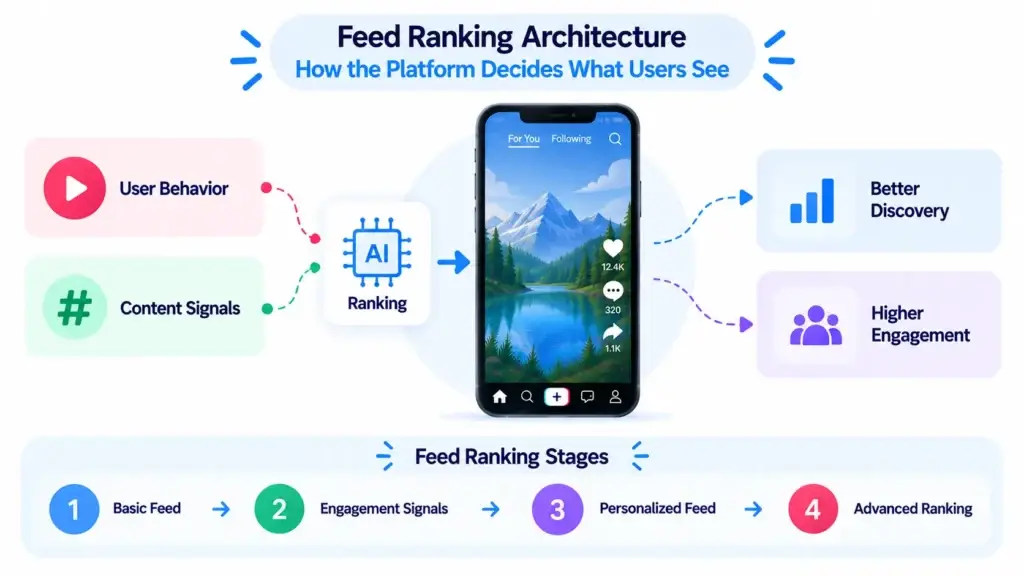
Feed ranking is one of the most important systems in a short-form video platform. It controls discovery, engagement, creator visibility, session length, and retention.
A basic feed may show recent uploads or popular videos. A more useful feed learns from behavior and ranks videos based on multiple signals.
Common feed ranking signals include:
- Watch time
- Video completion rate
- Replays
- Skip speed
- Likes
- Comments
- Shares
- Saves
- Follows after viewing
- Creator relationship
- Hashtag interest
- Audio or sound interaction
- Content category
- Language preference
- Location relevance where applicable
- Report and negative feedback signals
The feed should not only reward the most popular videos. It should also test newer content with relevant audiences, identify rising engagement, and avoid showing users too much repetitive content.
How Feed Ranking Can Work in Stages
Early-stage products do not always need advanced machine learning from day one. A staged architecture can work better.
| Stage | Feed Logic | Best For |
|---|---|---|
| Stage 1 | Recent uploads, categories, hashtags, manual trending, basic engagement score | First product release and niche validation |
| Stage 2 | Watch time, completion rate, shares, saves, creator follows, negative signals | Growing creator and viewer activity |
| Stage 3 | Personalized recommendations, creator affinity, content clustering, behavioral ranking | Larger platforms with enough user behavior data |
| Stage 4 | Advanced recommendation models, A/B testing, real-time ranking, deeper personalization | Mature platforms with high content volume |
This staged approach helps founders avoid overspending before the platform has enough data.
Video Upload and Processing Pipeline
Video architecture begins when the creator uploads content.
The platform needs to accept the file, validate it, process it, store it, and prepare it for playback across devices and connection speeds.
A typical upload pipeline includes:
- Creator records or uploads a video.
- The app sends the file to the backend or upload service.
- The system validates file type, size, duration, and basic rules.
- The video enters a processing queue.
- The system compresses and transcodes the video.
- Multiple playback versions are generated.
- A thumbnail or preview frame is created.
- Metadata is attached, such as caption, hashtags, sound, creator ID, category, and privacy setting.
- The processed video is stored in cloud storage.
- CDN delivery prepares the video for fast playback.
- The content becomes eligible for feed ranking and search.
This pipeline should be asynchronous. Creators should not have to wait with a frozen screen while processing happens. Background jobs should handle heavy media tasks while the app shows upload progress, draft status, or publishing status.
For more detail on this layer, founders can read Miracuves’ guide to features that help short-form video content become more shareable.
Video Delivery Architecture: CDN, Adaptive Playback, and Preloading
Short-form video users expect instant playback. If every swipe causes buffering, the product loses momentum quickly.
A strong video delivery architecture includes:
- Cloud media storage
- CDN distribution
- Video compression
- Transcoding into multiple quality levels
- Adaptive playback
- Feed preloading
- Thumbnail caching
- API caching
- Popular content caching
- Error handling
- Playback monitoring
CDN delivery helps serve videos from locations closer to users. Adaptive playback helps adjust video quality based on network conditions. Preloading helps prepare the next video before the user swipes.
This layer matters because the short-form format depends on speed. Users consume multiple videos quickly, so even small delays can reduce engagement.
A more detailed technical companion can be found in Miracuves’ guide on video streaming infrastructure for short video apps.
Creator Tools Architecture: Helping Users Publish More Often
Creators are the supply side of the platform. If creators do not publish regularly, the feed becomes weak.
Creator tools should be built as a dedicated product layer, not as a small upload form.
Important creator modules include:
- Camera access
- Gallery upload
- Video trimming
- Filters
- Text overlays
- Stickers
- Captions
- Hashtag suggestions
- Drafts
- Sound selection
- Thumbnail selection
- Privacy controls
- Scheduled publishing where relevant
- Creator profile
- Performance analytics
- Audience insights
- Monetization dashboard where enabled
For a deeper product-level view, explore Miracuves’ complete short-form video feature breakdown, covering creator tools, viewer flows, engagement modules, admin control, and backend features.
Why Creator Analytics Should Be Part of the Architecture
Creator analytics should not be added only as a later reporting screen. The platform needs to track the right events from the beginning.
Useful creator analytics may include:
- Views
- Watch time
- Completion rate
- Replays
- Likes
- Comments
- Shares
- Saves
- Follower growth
- Top videos
- Best posting times
- Audience geography
- Audience interests
- Revenue summary where monetization is active
Creators use this feedback to understand what works. Platform operators use it to identify rising creators, strong categories, and content formats that deserve promotion.
Viewer Experience Architecture: Smooth, Fast, and Personalized
The viewer-side architecture should support speed and relevance.
Core viewer features include:
- Registration and login
- Interest selection
- Personalized feed
- Search
- Categories
- Hashtags
- Sound pages
- Creator profiles
- Likes
- Comments
- Saves
- Shares
- Follows
- Notifications
- Report option
- Watch history
- Content preferences
The viewer experience should feel simple, but the backend logic is not simple. Every tap, swipe, follow, save, skip, and share can become a signal for personalization and analytics.
The stronger the event-tracking layer, the better the platform can understand user behavior.
Live Streaming Architecture: Real-Time Engagement Without Platform Instability
Live streaming can turn a short-form video product into a more interactive creator platform. It allows creators to host sessions, answer questions, sell products, receive gifts, or engage communities in real time.
But live streaming is more complex than recorded video.
A live streaming layer may need:
- Live broadcast setup
- Stream health monitoring
- Real-time chat
- Chat moderation
- Viewer count
- Live notifications
- Host controls
- Co-hosting where relevant
- Virtual gifting
- Wallet or coin logic where enabled
- Paid live access where enabled
- Replay storage
- Abuse reporting
- Admin interruption or takedown controls
Founders should add live streaming when the platform has a clear creator or monetization use case. Adding it too early can increase infrastructure complexity before there is enough creator demand.
Moderation and Safety Architecture for User-Generated Video
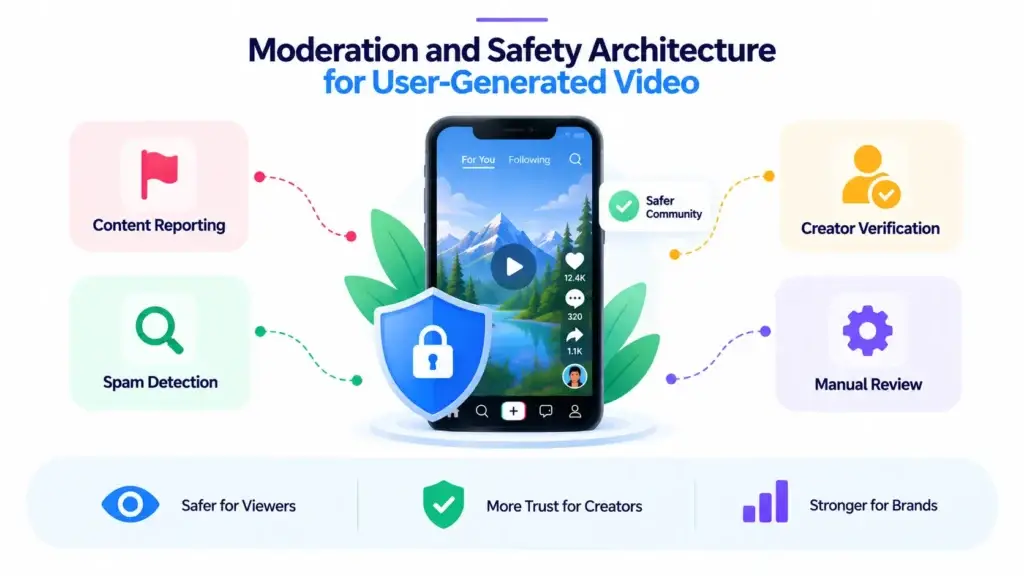
User-generated content platforms need trust controls from the beginning.
A short-form video platform should include moderation workflows for videos, comments, profiles, live chats, hashtags, sounds, and reports.
Important moderation features include:
- Content reporting
- Abuse reporting
- Spam detection
- Comment moderation
- Keyword filters
- Manual review queues
- Admin takedown controls
- Creator verification
- Age-gating where relevant
- Copyright reporting workflows
- Community guideline enforcement
- Activity logs
- Role-based admin access
Moderation protects the viewer experience, creator trust, advertiser confidence, and platform reputation. It also helps the platform operator respond faster when harmful, spammy, or low-quality content appears.
Security and moderation should be treated as foundation layers, not marketing add-ons.
Admin Dashboard Architecture: The Control Room of the Platform
The admin dashboard is where the platform operator manages the business.
A strong admin layer should support:
- User management
- Creator management
- Video management
- Report review
- Content takedown
- Category management
- Hashtag control
- Sound library control
- Banner and promotion control
- Notification management
- Monetization settings
- Payment and payout review
- Campaign management
- Analytics dashboard
- Role-based access control
- Audit logs
Without admin control, every small operational change requires developer support. That slows the team down and creates unnecessary dependency.
For founders, the admin dashboard is not just a backend screen. It is the operating system for managing growth.
Background Processing Architecture: Why Queues Matter
Short-form video apps perform many tasks that should not block the user experience.
Examples include:
- Video transcoding
- Thumbnail creation
- Notification delivery
- Moderation scans
- Analytics processing
- Feed updates
- Search indexing
- Payout calculations
- Email or SMS triggers
- Report escalation
- Live session summaries
These tasks should run through queues and background workers. This keeps the main app responsive while heavy jobs happen separately.
Monetization Architecture: Building Revenue Without Breaking Experience
Monetization should be planned early, even if all revenue features are not activated at launch.
A short-form video platform can support revenue through:
- Advertising
- Promoted content
- Virtual gifts
- Coins or wallet
- Subscriptions
- Paid live sessions
- Creator commissions
- Brand campaigns
- Affiliate commerce
- Premium content
- Platform commission on transactions
Once creator activity grows, monetization becomes a key decision. This creator video platform monetization guide explains revenue options like ads, subscriptions, gifts, creator commissions, and brand campaigns.
The architecture should keep monetization flexible. A founder may start with ads, then add gifts, subscriptions, or creator campaigns later. If the system is too rigid, adding new revenue streams becomes expensive.
Development Cost and Build Path Considerations
Architecture directly affects development cost.
A simple first version with video upload, feed, profiles, likes, comments, sharing, basic moderation, and admin control is very different from a full-scale product with advanced recommendations, live streaming, wallet systems, automated moderation, creator payouts, and campaign dashboards.
Major cost drivers include:
- Number of platforms: Android, iOS, web, or all three
- Feed ranking complexity
- Video processing requirements
- CDN and cloud infrastructure
- Creator tool depth
- Live streaming scope
- Monetization modules
- Payment and payout workflows
- Admin dashboard complexity
- Analytics depth
- Security and moderation controls
- Custom branding and UI changes
- Third-party integrations
If budget planning is part of your decision, this short-form video platform pricing guide explains how features, customization, integrations, and launch scope affect development cost.
Founder Decision Signals: What Architecture Should You Prioritize?
Feed Quality
If your platform depends on engagement, invest early in event tracking, ranking logic, category signals, hashtags, and content discovery.
Video Performance
If users will swipe through videos quickly, prioritize transcoding, CDN delivery, adaptive playback, caching, and preload logic.
Creator Supply
If creators are central to your model, prioritize upload flow, editing tools, drafts, analytics, profile control, and monetization readiness.
Launch Speed
If you need faster market validation, use a launch-ready foundation and customize around your audience instead of rebuilding every common module from zero.
Ready-Made vs Custom Architecture: What Founders Should Consider
A fully custom build gives maximum flexibility, but it can also require more time, planning, testing, and engineering resources. A ready-made foundation helps founders start with prebuilt modules and customize the product around their audience, brand, and business model.
The right decision depends on scope.
| Build Path | Best For | Founder Consideration |
|---|---|---|
| Ready-made foundation | Faster validation, standard short-video workflows, branded launch, known feature set | Faster path to market when core modules already match the business need |
| Custom development | Unique workflows, unusual architecture, complex integrations, enterprise-grade requirements | More control, but usually requires more time, budget, and planning |
| Hybrid approach | Founders who want speed now and deeper customization later | Useful when the first version should launch quickly while future roadmap remains flexible |
If you are comparing launch approaches, this guide on a ready-made short-form video platform for startups can help you decide between faster deployment and a longer custom build.
Common Architecture Mistakes Founders Should Avoid
1. Building the feed before defining ranking signals
A swipe feed without event tracking cannot improve properly. Watch time, skips, shares, saves, follows, and content categories should be tracked from the beginning.
2. Treating video delivery as basic file storage
Short-form video needs processing, compression, multiple quality versions, CDN delivery, adaptive playback, caching, and monitoring. Simple storage is not enough.
3. Adding live streaming without moderation planning
Live sessions need real-time chat control, abuse reporting, stream monitoring, and admin intervention options. Without these, live content can become risky quickly.
4. Ignoring creator analytics
Creators need feedback to improve. If the platform does not show performance data, creators have fewer reasons to keep publishing consistently.
5. Making the admin dashboard too weak
Admins need control over users, creators, content, reports, categories, monetization, payouts, campaigns, and analytics. Weak admin control slows operations as the platform grows.
How Miracuves Helps Founders Launch Architecture-Ready Video Platforms
Miracuves helps founders build short-form video products with ready-made and white-label foundations that can be customized around branding, creator tools, feed experience, video delivery, monetization, moderation, and admin control.
Instead of starting every backend module from zero, founders can begin with a source-code-owned platform foundation and adapt it to their audience, market, and revenue model. This approach is useful when the goal is faster validation without ignoring scalability, creator experience, or operational control.
For founders who want speed, Miracuves can support 6-day solution delivery where the ready-made scope fits the business requirement. Advanced customizations, integrations, infrastructure changes, and unique workflows can be planned based on the final roadmap.
If you are evaluating a faster launch path, explore Miracuves’ ready-made short-video platform foundation. Founders comparing build partners can also review this short-form video development company guide before choosing the right team for launch, customization, and support.
Final Thoughts: Architecture Decides Whether a Video Platform Can Grow
A short-form video platform succeeds when the visible experience and backend architecture work together.
The feed should feel relevant. Videos should load quickly. Creators should publish easily. Live sessions should run smoothly. Moderation should protect trust. Admins should control operations. Analytics should guide product decisions. Monetization should be flexible enough to grow with the platform.
Founders do not need to build every advanced system on day one. But they do need a clear architecture roadmap so the platform can support creators, viewers, brands, admins, and future growth without a full rebuild.
Miracuves helps founders move faster with ready-made, white-label, source-code-owned app foundations built for customization, admin control, video infrastructure, creator workflows, and scalable growth.
You can also explore Miracuves’ broader video content platform solutions if you are planning a creator, streaming, or short-form entertainment product.
FAQs
What is short-form video platform architecture?
Short-form video platform architecture is the technical structure behind the app. It includes user apps, creator tools, video upload, processing, cloud storage, CDN delivery, feed ranking, live streaming, moderation, analytics, monetization, and admin control.
What is the most important backend feature in a short-form video platform?
Video delivery and feed ranking are both critical. Video delivery keeps playback smooth, while feed ranking decides whether users see relevant content. A strong product needs both.
Does a short-form video platform need AI recommendations from the beginning?
Not always. A new platform can start with category-based feeds, hashtags, trending signals, and engagement scoring. More advanced recommendation systems become useful once the platform has enough content and user behavior data.
Why is CDN important for video platforms?
A CDN helps deliver videos from servers closer to users. This can reduce buffering, improve playback speed, and support smoother scrolling across different locations and network conditions.
What creator tools should be included in the first version?
A strong first version should include video upload, recording, trimming, captions, hashtags, drafts, profile control, basic analytics, comments, sharing, and notifications. Advanced creator monetization can be added later.
When should founders add live streaming?
Live streaming should be added when there is a clear use case, such as creator Q&A, fan interaction, live shopping, paid sessions, events, or virtual gifting. It should not be added without moderation and infrastructure planning.
Why is admin control important in short-form video architecture?
Admin control helps platform owners manage users, creators, content, reports, moderation, monetization, payouts, campaigns, categories, notifications, and analytics. Without it, daily operations become difficult as the platform grows.
Can Miracuves help launch a video platform quickly?
Yes. Miracuves helps founders launch ready-made and white-label short-form video platforms with source-code ownership, admin dashboards, creator workflows, scalable backend planning, and monetization-ready modules. Where the ready-made scope fits, 6-day solution delivery can support faster market entry.
Miracuves is an independent software development company. We are not affiliated with, connected to, sponsored by, or endorsed by any company or product named in this article.
Terms such as “X Clone” are used descriptively. It is how the software industry refers to building a platform with functionality comparable to a known service, and how clients search for it.
The entire design and codebase of our products is built by our own team. Our products contain no code, design, graphics, or content originating from any third-party website or applications.
All third-party names and marks referenced in this article are the property of their respective owners, referenced solely to identify the services discussed.