Key Takeaways
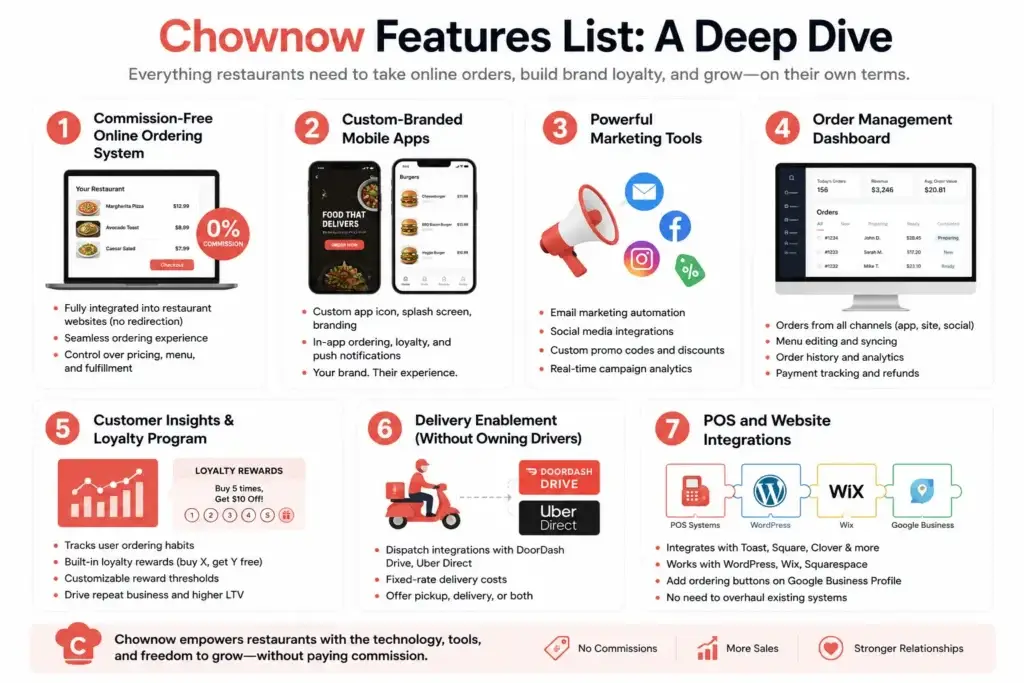
- A direct restaurant ordering platform should combine digital menus, online ordering, payments, pickup and delivery options, customer accounts, loyalty features, restaurant operations, and admin controls.
- Customer-facing features should make menu discovery, item customization, checkout, payment, order tracking, reordering, and support simple across web and mobile ordering channels.
- Restaurant tools should help teams manage menus, availability, incoming orders, preparation, POS integrations, promotions, customer data, refunds, reporting, and multi-location operations.
Customer & Restaurant Feature Signals
- Customer features can include menu search, categories, modifiers, carts, promo codes, saved addresses, scheduled orders, multiple payment methods, order history, ratings, and real-time status updates.
- Restaurant dashboards can support menu editing, pricing, item availability, order acceptance, preparation times, operating hours, pickup and delivery settings, promotions, refunds, and staff permissions.
- POS synchronization, kitchen routing, payment gateway integrations, notifications, loyalty programs, customer profiles, and delivery integrations can connect ordering with daily restaurant operations.
Operations & Growth Insights
- Restaurants should be able to monitor order volume, average order value, repeat customers, popular menu items, payment success, cancellations, fulfillment time, loyalty participation, and location-level performance.
- Features such as branded ordering pages, mobile apps, email and SMS campaigns, loyalty rewards, subscriptions, referral programs, and personalized offers can support direct customer retention.
- Miracuves develops customizable direct restaurant ordering platforms with menu management, online ordering, POS integrations, payments, loyalty, customer engagement, analytics, delivery workflows, and admin controls.
A direct restaurant ordering platform has to do considerably more than display a digital menu and send an order to the kitchen.
For customers, the experience should make finding food, customizing an order, paying, choosing pickup or delivery, and ordering again feel effortless. For restaurant teams, the same platform has to control menus, availability, incoming orders, operating hours, promotions, customer relationships, payments, and day-to-day exceptions without creating more work during service.
That difference matters because restaurant software can appear complete on a feature checklist while still becoming difficult to use during a busy dinner period. A feature is valuable only when it helps the right person complete the right task with less friction.
For founders and restaurant businesses evaluating direct ordering technology, the stronger question therefore is not simply, “How many features does this platform have?” It is, “Does the platform support the complete journey from customer discovery to restaurant fulfilment and repeat ordering?”
This guide examines the features that matter across that journey and explains which capabilities should be treated as foundational, which become important as operations grow, and what businesses should evaluate before choosing a platform.
What Makes Direct Restaurant Ordering Different?

A direct ordering platform creates a digital ordering channel between a restaurant and its customers. Instead of treating the restaurant as simply another listing inside a broad marketplace, the ordering experience can operate around the restaurant’s own brand, menu, customer relationship and fulfilment process.
That changes what the software needs to accomplish.
The platform is no longer responsible only for generating an order. It becomes part of the restaurant’s operating infrastructure. Menu changes need to reach customers quickly. An unavailable dish needs to disappear before another customer purchases it. Pickup orders need realistic preparation times. Payments need to reconcile with actual orders. Promotions need clear rules. Customer information needs to remain useful for service and retention.
Most importantly, the customer-facing experience and restaurant-facing workflow cannot be designed independently. A customer promise such as “ready in 25 minutes” becomes an operational commitment for the restaurant. A menu modifier selected by the customer must arrive clearly at the preparation stage. An item marked unavailable by staff should immediately affect what the next customer can order.
The strongest restaurant ordering systems therefore create one connected order lifecycle rather than a collection of isolated features.
Customer Features Should Remove Friction From the Ordering Journey
Customers rarely think about restaurant technology in terms of modules. They care about whether they can find what they want, understand what they are buying, place the order quickly and know what happens next.
That makes convenience the central design principle for the customer side. The strongest platforms connect menu discovery, item customization, checkout, payments, fulfilment, notifications, and restaurant-side controls into one continuous ordering journey. Businesses evaluating how these capabilities come together can examine the restaurant ordering platform features required across customer, restaurant, and administrative workflows.
Fast Menu Discovery and Clear Navigation
A digital menu should be easier to navigate than a printed menu, not simply a longer version of one displayed on a smaller screen.
Customers should be able to browse logical categories, search for dishes, understand pricing and see relevant information without opening several screens. Large menus particularly benefit from search and category navigation because scrolling through dozens of items creates unnecessary friction.
Useful menu capabilities can include:
- Dish and category search
- Clear food categories and subcategories
- Item images and descriptions
- Prices and available variations
- Dietary and allergen information where appropriate
- Availability indicators
- Featured dishes and offers
- Recommended add-ons or complementary items
Restaurants should also consider how menu design affects ordering decisions. A well-structured menu can make combinations, upgrades and extras easier to understand without turning the experience into an aggressive upsell funnel.
Item Customization and Special Requests
Restaurant orders frequently contain more information than a product name and quantity.
Customers may need to select a size, remove an ingredient, choose toppings, select a side, specify spice level or add preparation notes. The ordering system should translate those choices into structured information that staff can understand immediately.
Modifiers should therefore be designed around the restaurant’s actual menu logic. Required selections need to be clearly distinguished from optional extras, incompatible combinations should be prevented where possible, and pricing changes should be visible before the customer reaches checkout.
Free-text special requests can still be useful, but they should complement structured modifiers rather than replace them. Otherwise, restaurants can end up receiving important preparation instructions in inconsistent formats during busy periods.
Guest Checkout and Low-Friction Account Creation
Mandatory account creation can add unnecessary resistance between appetite and purchase.
A direct ordering platform should consider guest checkout for customers who want to place an order quickly while still offering accounts for people who want saved addresses, payment preferences, order history, loyalty benefits and faster repeat purchases.
The objective is not to force registration. It is to make returning easier once the customer has already chosen to order directly.
Flexible Delivery, Pickup and Scheduled Ordering
Not every restaurant needs the same fulfilment model, which means the ordering system should reflect how the business actually serves customers.
A restaurant may support home delivery, customer pickup, scheduled orders or a combination of these options. Each fulfilment method creates different operational requirements. Delivery needs service-area validation and address handling. Pickup requires accurate preparation estimates. Scheduled ordering requires capacity controls so too many customers cannot choose the same slot.
Customers should understand their available options before they reach the end of checkout. Discovering after building a cart that an address is outside the delivery area is an avoidable conversion failure.
Transparent Checkout and Payment Options
Checkout should summarize exactly what the customer is buying and what they will pay.
The cart should preserve item customizations, quantities, taxes, discounts, delivery charges and any other applicable fees. Customers should be able to review these details before confirming the transaction rather than discovering changes after payment.
Payment architecture should also fit the target market and restaurant operation. Depending on the business model, this may involve card payments, digital wallets, cash-based options or region-specific payment integrations.
Security belongs underneath this entire process. Secure payment gateway integration, encrypted data transfer and appropriate access controls should be treated as product foundations rather than promotional extras.
Accurate Order Status and Notifications
Once payment is complete, uncertainty becomes one of the biggest sources of customer frustration.
Useful status updates can show when an order has been accepted, when preparation begins, when it is ready for collection or when it moves into delivery. Notifications can then communicate meaningful changes without forcing customers to repeatedly reopen the ordering interface.
The important word is meaningful. A decorative progress indicator that advances independently of restaurant activity can create more frustration than no tracking at all. Customer-facing statuses should reflect genuine operational events wherever possible.
Repeat-Order Features Matter More Than They First Appear
A first order proves that the customer was willing to try the restaurant’s direct channel. Repeat ordering proves that the experience was convenient enough to become a habit.
That makes retention functionality an important part of restaurant ordering platform design.
Saved Orders and Easy Reordering
Returning customers should not need to reconstruct a familiar order from the beginning every time.
Order history and reorder functionality can dramatically shorten the path to checkout, particularly when previous item options and modifiers are preserved correctly. If a customer previously ordered a particular meal with a specific size and set of extras, a useful reorder function should understand that configuration.
The platform should still validate the old order against the current menu. An unavailable dish, changed modifier or updated price needs to be surfaced before checkout rather than silently producing an incorrect order.
Loyalty, Rewards and Promotional Tools
Direct ordering gives restaurants an opportunity to create incentives around their own customer relationships.
Depending on the restaurant’s strategy, this can include loyalty points, cashback, coupon codes, referral rewards, targeted offers or incentives for repeat orders. The objective should be to encourage profitable retention rather than simply discount every transaction.
Retention features also need to make sense within the wider direct restaurant ordering business model. Loyalty programs, promotional tools, delivery options, subscriptions, and other monetization mechanisms work better when they support how the platform plans to acquire customers, generate recurring value, and strengthen the restaurant’s direct ordering channel.
Promotional rules also need operational control. Restaurants should be able to define eligibility, dates, order thresholds and usage conditions so campaigns do not become manual exceptions that staff have to resolve.
Customer Profiles and Preferences
Customer profiles become more useful when they reduce effort rather than merely collect information.
Saved addresses, favourite items, order history, preferred fulfilment method and loyalty status can make future orders faster. For restaurants, aggregated customer behaviour can also help identify repeat buyers and understand purchasing patterns.
This is one of the strategic advantages of building a direct ordering relationship: the restaurant can develop its own understanding of customer behaviour instead of treating every transaction as an isolated sale.
Restaurant Features Should Be Designed for Real Service Conditions
Restaurant operators interact with ordering technology under very different conditions from customers.
Some configuration work happens calmly before service. Other decisions happen during a rush, when staff need to respond in seconds. A strong platform should recognize that distinction instead of forcing every restaurant task through the same dashboard.
Menu Management Needs Both Control and Speed
Restaurant owners and managers need detailed menu control. They may need to create categories, change prices, edit descriptions, manage variations, configure add-ons, upload images and determine which items appear at particular locations.
During service, however, staff usually need a much smaller set of actions.
If an ingredient runs out, the immediate requirement is to mark an item unavailable. If the kitchen falls behind, staff may need to increase preparation time or temporarily pause new orders. These actions should be quick and reversible without exposing sensitive settings such as pricing or account configuration.
This is why role design matters as much as the menu-management feature itself.
Real-Time Order Management
Incoming orders need a clear operational queue.
Restaurant staff should be able to identify new orders, review item details and modifiers, accept or reject when appropriate, update preparation status and move completed orders into pickup or delivery workflows.
During busy periods, interface design becomes critical. Important information should not be buried behind several screens, alerts need to be noticeable, and staff should be able to distinguish current orders from scheduled ones.
The order-management system should also protect against common operational problems such as duplicate processing, missed orders or status changes that are not synchronized with the customer side.
Preparation-Time and Capacity Controls
Restaurants do not operate at the same capacity throughout the day.
A kitchen that can prepare an order in 15 minutes during the afternoon may need 35 minutes during the dinner rush. Static preparation estimates can therefore create customer promises the restaurant cannot consistently meet.
Useful ordering software should give restaurant teams practical ways to adjust preparation times, temporarily pause ordering or control scheduled-order capacity. These features connect digital demand with physical kitchen capacity.
That connection is essential because software cannot create additional cooking capacity simply by accepting more orders.
Opening Hours, Closures and Service Availability
Restaurants need straightforward control over when customers can place orders and which fulfilment methods are available.
Normal operating hours are only the beginning. Public holidays, temporary closures, special events, kitchen delays and location-specific schedules all create exceptions.
The system should make those exceptions manageable without forcing restaurant staff to contact technical support for routine operational changes.
Restaurant Dashboard and Performance Visibility
Owners need a different view from frontline staff.
Rather than watching individual orders throughout the day, an owner may want to understand sales, order volume, average order value, repeat customers, popular items, refunds and performance across locations.
The dashboard should turn operational data into questions an owner can actually answer: Are direct orders growing? Which dishes drive revenue? When does demand peak? Which offers generate repeat purchases? Are cancellations increasing?
More data does not automatically create better decisions. The useful dashboard is the one that surfaces information connected to actions the restaurant can take.
Customer Data and Relationship Tools Strengthen the Direct Model
A direct ordering strategy becomes significantly more valuable when restaurants can build ongoing relationships with the people placing orders.
That does not mean collecting as much data as possible. It means capturing appropriate information through normal transactions and making it useful for service, retention and analysis while respecting applicable privacy requirements.
Restaurant teams may benefit from visibility into customer order history, repeat-order behaviour, loyalty participation and campaign response. This can support better segmentation and more relevant communication.
For example, a restaurant might distinguish a first-time customer from someone who orders every Friday. Those customers do not necessarily need the same retention message.
This customer visibility can also strengthen a restaurant’s retention and acquisition strategy. A thoughtful direct restaurant ordering marketing strategy can use customer segments, repeat-order behaviour, loyalty incentives, promotional campaigns, and owned communication channels to encourage customers to return without relying exclusively on one-time discounts.
The broader principle is important: customer information should create a better restaurant-customer relationship, not simply another database.
Multi-Location Restaurants Need a Different Control Layer
A platform that works perfectly for one restaurant can become difficult to manage when the same business adds several locations.
Multi-location operations require a balance between central control and local flexibility.
A restaurant group may want a master menu, shared branding and common promotion rules while allowing individual outlets to change local availability, opening hours or certain prices. Orders also need to reach the correct location based on the customer’s selection, address or service area.
Useful multi-location capabilities can include:
- Central menu management with controlled outlet overrides
- Location-specific availability and operating hours
- Individual outlet order queues
- Service-area configuration
- Location-level reporting
- Central performance reporting
- Outlet-specific promotions where required
- Role-based access for location managers
Without these controls, restaurant groups often compensate by sharing credentials or maintaining information manually across multiple systems. That may work at two locations but becomes increasingly fragile as the business expands.
Role-Based Access Protects Restaurant Operations
Not everyone using the restaurant side should have access to everything.
An owner may need pricing, reports, payout information and account configuration. A manager may need operating hours, refunds and performance data. Counter staff may need order processing, temporary item availability and preparation controls.
Giving every employee owner-level access increases operational risk. Making permissions too restrictive creates the opposite problem: staff cannot perform routine tasks without escalating them.
Role-based access should therefore mirror actual jobs.
Useful controls include permission-based dashboards, activity logs and records of sensitive actions such as refunds or important configuration changes. These controls create accountability while keeping everyday workflows practical.
Delivery and Pickup Features Need to Match the Business Model
A restaurant offering pickup has different requirements from one managing its own delivery fleet, and both differ from a business using an external logistics provider.
Pickup workflows primarily need preparation timing, ready-for-collection notifications and clear handover status.
Restaurant-managed delivery adds service areas, delivery fees, driver assignment, location information, delivery status and potentially live tracking. Businesses integrating outside delivery services may instead need reliable handoff between ordering and logistics systems.
Founders should therefore avoid adding complex delivery functionality simply because it appears impressive on a feature sheet. Fulfilment architecture should follow the actual operating model.
Integrations Can Determine Whether the Platform Simplifies or Duplicates Work
An ordering system rarely exists completely on its own.
Restaurants may already use point-of-sale software, accounting systems, payment services, printers, marketing tools, analytics platforms or external delivery services. If the ordering platform cannot exchange the required information with these systems, staff may end up manually copying data between them.
That can turn a supposedly efficient digital ordering channel into another administrative task.
When evaluating integrations, businesses should ask what information needs to move, how frequently it needs to synchronize, what happens when an integration fails and which system remains the source of truth.
These dependencies should be mapped at the architecture stage rather than treated as separate add-ons after launch. A well-planned restaurant ordering app architecture should account for menu synchronization, order routing, payment processing, database logic, third-party APIs, restaurant operations, and the way information moves between customer-facing and administrative systems.
Not every restaurant needs every integration on day one. But the platform architecture should make future integration requirements possible without rebuilding the ordering experience around them.
What Should the Platform Operator Be Able to Control?
If the direct ordering technology supports multiple restaurants or restaurant locations, the operator also needs a control layer above individual restaurant accounts.
This is where restaurant-level settings and platform-wide governance need to remain clearly separated.
Depending on the operating model, the administration layer may need to support restaurant onboarding, account management, configuration, order oversight, payment visibility, promotions, user support, reports and permission controls.
The operator should also be able to investigate problems without interfering unnecessarily with restaurant operations. Activity records, transaction histories and clear order timelines make support far more effective than relying on screenshots and staff recollection.
Which Features Are Essential and Which Can Wait?
Not every capability needs equal priority at launch.
The foundation should protect the core transaction: a customer can understand the menu, configure an order, pay, choose fulfilment and receive reliable status information while the restaurant can receive, prepare and complete that order without ambiguity.
Once that loop works reliably, additional capabilities can strengthen retention, efficiency and scale.
| Priority | Capability Area | Why It Matters |
|---|---|---|
| Foundation | Menu browsing and search | Helps customers find what they want quickly |
| Foundation | Item modifiers and add-ons | Transfers accurate preparation choices to the restaurant |
| Foundation | Cart and checkout | Converts intent into a complete order |
| Foundation | Payments | Supports reliable transaction processing |
| Foundation | Restaurant order queue | Gives staff a clear workflow for incoming orders |
| Foundation | Availability controls | Prevents orders for unavailable items |
| Foundation | Pickup/delivery configuration | Connects ordering to fulfilment |
| Foundation | Order notifications | Reduces uncertainty for customers and staff |
| Growth | Reorder and order history | Reduces friction for repeat customers |
| Growth | Loyalty and promotions | Supports retention strategies |
| Growth | Customer insights | Helps restaurants understand repeat behaviour |
| Growth | Reporting and analytics | Supports better operational decisions |
| Scale | Multi-location controls | Enables central management with local flexibility |
| Scale | Role-based permissions | Protects sensitive operations as teams grow |
| Scale | Integrations | Reduces duplicated work across restaurant systems |
| Scale | Advanced operational controls | Supports more complex fulfilment and administration |
The right sequence depends on the business. A single-location takeaway restaurant and a platform onboarding dozens of restaurant partners should not have identical priorities.
Feature prioritization should eventually translate into a technical implementation plan. When building a food ordering platform, customer interfaces, restaurant dashboards, backend services, payments, APIs, order-management logic, and fulfilment workflows need to be planned as connected components rather than developed as isolated modules.
Features That Look Impressive but Should Not Distract From the Core Workflow

Restaurant technology can easily become feature-heavy.
Advanced recommendations, conversational ordering, elaborate personalization and other emerging capabilities may eventually create value, but they should not compensate for weaknesses in fundamental restaurant operations.
A sophisticated recommendation engine does not help if customers can order an unavailable item. Advanced analytics do not solve an order queue staff cannot operate during dinner service. Attractive mobile screens cannot compensate for unreliable payment reconciliation.
The practical hierarchy is straightforward: first make ordering reliable, then make operations efficient, then improve retention, and only then add sophistication that supports a measurable business requirement. This prioritization also influences the choice between ready-made and custom restaurant ordering development, because businesses built around established ordering workflows may not need to engineer every foundational module from the beginning.
That approach also prevents founders from paying for complexity before they know whether customers or restaurant teams actually need it.
How to Evaluate a Restaurant Ordering Platform Before Choosing One
Feature comparison should move beyond a checklist.
A useful evaluation follows realistic workflows from beginning to end. Place an order containing modifiers. Change an item to unavailable and check how quickly the customer side responds. Schedule an order. Process a refund. Pause ordering during a simulated kitchen backlog. Check how the transaction appears in reporting. Test what a location manager can see compared with an owner.
The purpose is to expose how the platform behaves when operations become inconvenient.
Businesses should pay particular attention to:
- How quickly customers can complete a repeat order
- Whether menu changes synchronize reliably
- How restaurant staff manage peak-period orders
- Whether fulfilment options match the operating model
- How permissions separate owner, manager and staff responsibilities
- Whether reporting can be traced back to actual orders
- How multi-location controls work if expansion is planned
- Which integrations are included and which require additional scope
- How customer information can support retention
- What happens when payments, connectivity or fulfilment do not follow the happy path
This type of investigation provides far more useful information than comparing which vendor has the longest feature list.
Founder Decision Signals
Customer Experience
If customers cannot browse, customize, pay and reorder quickly, adding more restaurant-side modules will not fix conversion friction.
Restaurant Operations
If staff need several steps to pause orders, change availability or process incoming orders, test the platform under peak-service conditions before committing.
Growth
If multi-location expansion is planned, evaluate outlet controls, permissions, reporting and menu inheritance before the second or third location creates operational complexity.
Ownership
If the ordering channel is expected to become long-term business infrastructure, understand branding, source-code access, integrations and customization options before choosing the foundation.
Common Feature-Planning Mistakes Restaurants and Founders Should Avoid
One of the most common mistakes is prioritizing visible customer features while treating restaurant operations as an afterthought. The ordering interface may look excellent during a demonstration, but the platform will ultimately succeed or fail during real service conditions. The restaurant order queue, availability controls, preparation-time management and exception handling deserve just as much attention as the customer interface.
Another mistake is giving every restaurant user the same control. Owners, managers and frontline staff have different responsibilities. Permissions should follow those responsibilities so routine actions remain fast without unnecessarily exposing pricing, financial or configuration settings.
Businesses also underestimate repeat ordering. A direct ordering channel becomes more valuable when customers return without needing another acquisition campaign. Saved preferences, order history, loyalty and convenient reorder flows should therefore be considered part of the business model rather than cosmetic extras.
Finally, founders can overbuild too early. A long list of advanced features may increase scope without improving the first-order experience or restaurant workflow. Building around actual operational requirements usually creates a stronger product foundation than trying to launch every possible capability simultaneously.
Where a Ready-Made Restaurant Ordering Foundation Can Help
Once the required workflows are clear, the next decision is whether to assemble the platform from the ground up or start from an existing restaurant-ordering foundation and customize it.
Building from zero can make sense when the business model requires unusual workflows, deep proprietary integrations or architecture that differs substantially from established restaurant ordering patterns. It also means that common modules such as menu management, ordering, checkout, restaurant controls and administration need to be designed, developed and tested as part of the project.
Those decisions also determine the eventual restaurant ordering platform development cost. Feature scope, customer and restaurant interfaces, payment integrations, third-party APIs, delivery workflows, administrative controls, branding, and custom operational requirements can all influence the resources required to move from product requirements to deployment.
A ready-made foundation takes a different approach. Standard ordering workflows already exist, allowing more of the implementation effort to focus on branding, configuration, integrations and business-specific requirements.
The implementation partner still matters because restaurant ordering software combines customer experience with operational workflows, integrations, payments, administration, and future scalability. Businesses evaluating a restaurant ordering app development company should therefore look beyond interface design and consider source-code ownership, customization flexibility, integration capabilities, deployment support, and control over the product after launch.
Miracuves provides a ready-made direct restaurant ordering solution for businesses that have moved beyond feature research and want to evaluate a deployable product foundation. Eligible ready-made scopes can be white-labelled and delivered within a 6-day launch window, while final requirements depend on the selected customization and integration scope.
The important distinction is that this article helps define what the platform should enable. The solution page is where businesses can investigate what Miracuves provides, how the product is delivered, and whether that foundation matches their launch requirements.
Final Thoughts: Build Around the Order Journey, Not the Feature Count
The strongest direct restaurant ordering platform is not necessarily the one with the largest number of features. It is the one that connects customer convenience with restaurant control.
Customers need to find food quickly, customize it accurately, pay confidently and understand what happens after checkout. Restaurants need to manage menus, availability, preparation, fulfilment and customer relationships without adding unnecessary operational friction. Growing businesses then need permissions, reporting, multi-location controls and integrations that prevent complexity from increasing faster than order volume.
That is the feature strategy founders should take into product evaluation.
Start with the complete order journey. Identify who performs each action. Test the system under realistic restaurant conditions. Separate foundational requirements from later enhancements. Then evaluate whether the underlying platform gives the business enough control to evolve as customer expectations and restaurant operations change.
For teams that already understand those requirements and are ready to investigate implementation, Miracuves‘ restaurant ordering platform provides the next commercial step without turning this educational guide into a duplicate product page.
FAQs
What features should a direct restaurant ordering platform include?
A direct restaurant ordering platform should cover the complete transaction rather than only the customer interface. Core capabilities generally include digital menu management, search, item customization, cart and checkout, payments, pickup or delivery configuration, restaurant order management, availability controls, status notifications and administration. Retention and scaling capabilities can then include reorder, loyalty, customer insights, reporting, multi-location controls, role-based access and integrations.
What features are most important for restaurant customers?
Customers primarily need a fast and predictable ordering experience. Clear menus, useful search, structured item customization, transparent pricing, simple checkout, flexible fulfilment, secure payment options and accurate order updates remove the biggest sources of friction. For repeat customers, saved preferences, order history and convenient reordering become particularly valuable.
What features do restaurant staff need in an online ordering system?
Restaurant staff need fast operational controls rather than access to every administrative setting. Incoming order management, item availability, preparation status, preparation-time adjustments, pickup or delivery handoff and temporary order pausing are especially important during service. The interface should make frequent actions quick while protecting sensitive settings through role-based permissions.
Why is menu management important for direct restaurant ordering?
The online menu determines what customers believe the restaurant can currently sell. Restaurant teams therefore need reliable control over items, prices, categories, variations, add-ons and availability. When menu information is outdated or difficult to change, customers can place orders the restaurant cannot fulfil, leading to cancellations, refunds and poor experiences.
Should restaurant ordering software include loyalty features?
Loyalty functionality can be valuable when the business wants to increase repeat ordering through its direct channel. Points, rewards, referrals, targeted promotions and convenient reordering can encourage customers to return, but they should support a clear retention strategy rather than exist only because competitors offer similar features.
What should multi-location restaurants look for in an ordering platform?
Multi-location restaurants should evaluate centralized menu control, outlet-specific availability, operating hours, service areas, location-level order management, reporting and role-based access. The system should provide central oversight without forcing every outlet to operate identically when local conditions require flexibility.
How should restaurants evaluate online ordering platform features?
Restaurants should test realistic workflows instead of relying solely on a feature checklist. Place and modify an order, mark an item unavailable, change preparation time, process a refund, test a scheduled order, inspect reporting and verify what different staff roles can access. This reveals whether the features actually work together during normal restaurant operations.
Can a ready-made restaurant ordering platform be launched quickly?
A ready-made foundation can reduce implementation time because common ordering, restaurant-management and administration workflows do not need to be built from zero. Miracuves offers eligible ready-made restaurant ordering scopes with a 6-day launch window. Custom integrations, specialized workflows and other requirements should be confirmed separately because they can affect the final implementation scope.
Miracuves is an independent software development company. We are not affiliated with, connected to, sponsored by, or endorsed by any company or product named in this article.
Terms such as “X Clone” are used descriptively. It is how the software industry refers to building a platform with functionality comparable to a known service, and how clients search for it.
The entire design and codebase of our products is built by our own team. Our products contain no code, design, graphics, or content originating from any third-party website or applications.
All third-party names and marks referenced in this article are the property of their respective owners, referenced solely to identify the services discussed.