Key Takeaways
- Gifting, delivery slots and standing orders are one structural change to the order model: the order is no longer for the person who paid, at the moment they paid.
- The recipient is data on the order rather than an account, which means an address you were told, a scoped link instead of a login, and a strict list of what they may see.
- The price, the buyer’s address and any payment detail must never reach the recipient, and the leak almost always comes from a packing slip, a tracking page or a review request rather than from the gift feature itself.
- A chosen delivery slot has to reserve vendor production and rider capacity inside the same transaction as the order, because validating it the day before oversells every peak weekend.
- A standing order is a rule that generates orders, so price changes, discontinued products, vendor closures and expired cards each need a defined behaviour, and failing silently is the one that quietly removes a paying customer.
Order Model Decisions
- Put recipient, scheduled time and repeat rule on the order before you build the first gift screen.
- Write a permission map of every order field against buyer, recipient, vendor and support.
- Reserve the delivery slot at checkout against both vendor production and rider capacity.
- Define a behaviour for each standing order failure: price change, discontinued product, closure, expired card, moved recipient.
- Give subscribers skip, pause and resume from inside the reminder message, not behind a login.
Real Insights
- Most gifting defects are privacy defects, and they surface on pages nobody remembered were shared with the recipient.
- A delivery slot is a promise about capacity that does not exist yet, so it behaves like inventory rather than like a preference.
- Standing orders churn through silence more than through cancellation, which makes the skip button a revenue feature.
- The combinations customers reach for first, a gift with a slot or a standing order to someone else, are exactly where bolted-on features contradict each other.
- Miracuves builds this marketplace on an order model that already separates payer, recipient and time, with eligible ready-made scopes deployed in 6 days of build time.
A founder forwarded me an email on a Tuesday. A customer had ordered a birthday box for her sister in another city, and her sister received the order confirmation four days early. It carried the item name, the delivery window and the total paid.
The same week, another customer asked why she had been charged three times while the maker she subscribed to was closed for August. The platform had taken the money on schedule and pushed three orders into a dashboard nobody was reading.
Those look like two unrelated bugs. They are the same bug. Both come from an order model that assumes the person who paid is the person who receives, at the moment they paid. Once that stops holding, every default in the system is wrong.
Gifting, delivery slots and standing orders on a marketplace like Goldbelly all resolve to a single order model.
Three Food Marketplace Features That Run on One Order Model
A marketplace like Goldbelly presents these as three products and stores them as one.
Gifting, delivery slots and standing orders usually arrive as three tickets in three different quarters. Gifting comes from marketing before the holidays. Slots come from an operations complaint about clustered demand. Standing orders come from a founder who wants retention.
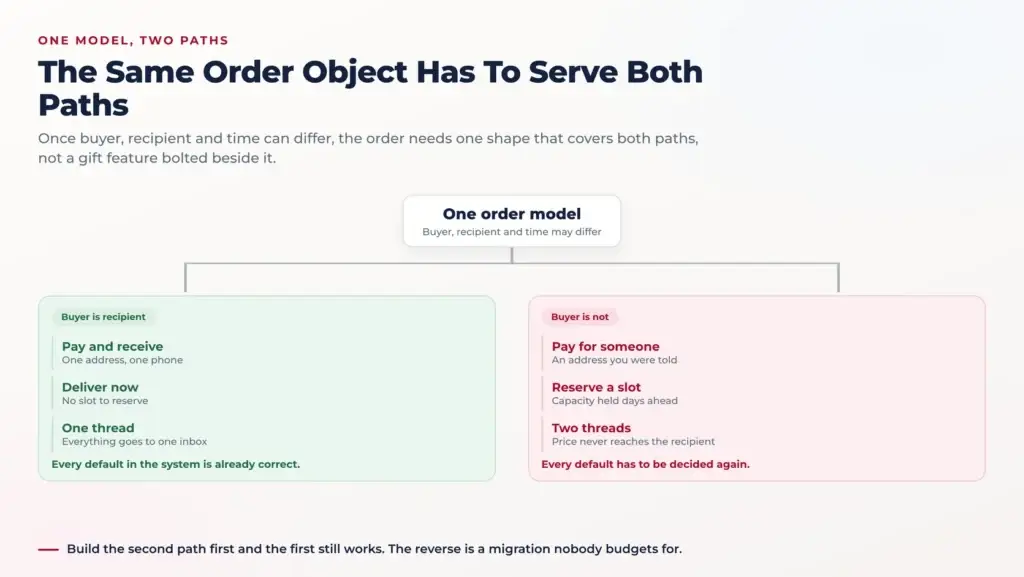
Image Source: AI-generated visual by Miracuves
By the time all three exist, they disagree. The gift flow knows about a recipient but not about slots. The standing order knows about neither, and generates a gift with a slot chosen eleven weeks ago for a product discontinued in March.
The Assumption Every Order Model Starts With
A default order has one identity doing four jobs. The buyer is the payer, the recipient, the notification target and the support contact. The address and phone are theirs, and the time of fulfilment is not a stored value at all but the absence of one.
What Breaks the Moment Buyer and Recipient Differ
Split the identity and you split all four jobs. Payment, refunds and disputes stay with the buyer forever. Delivery and the doorstep conversation belong to the recipient. Support can be either, and has to know which before it says anything.
Then split the time. A slot or a standing order means the order exists long before it can be fulfilled. Stock, price, vendor hours and rider capacity can all change in between, so the order has to be revalidated and something has to decide what happens when revalidation fails.
That is why this belongs in the order model rather than three feature flags. The speciality food marketplace build carries recipient, scheduled time and repeat rule as fields on the order, so a gift with a slot inside a standing order is one object.
What a Food Marketplace Gift Order Holds
Most teams model gifting as a checkbox and a text field. Tick “this is a gift”, type a message, done. That covers the day of purchase and nothing after it. The recipient is a stranger to your system, and strangers need more structure.
The Recipient Is Not an Account
They have no login, no saved address, no order history. They may already be a customer under a different email than the buyer typed, so matching by email and attaching to that account either duplicates a person or hands a stranger’s gift to the wrong one.
Model the recipient as data on the order. Name, address, phone, optional email, and a flag for how much of the order they may see. If they later create an account with the same details, link it after verification, never automatically at checkout.
An Address You Were Told, Not One You Verified
A normal buyer knows their own address and will correct it if delivery fails. A gift buyer is typing one from memory or from a message thread, often missing a flat number, sometimes a workplace where nobody will be on a Saturday.
Because you deliver inside drawn zones rather than handing a parcel to a carrier, the address has to resolve against a zone at checkout, not at dispatch. An unserviceable address found on the morning of a birthday is a refund and a bad story. The features page covers how zones and per-vendor fulfilment fit together.
The Message and the Presentation Are Product Data
A gift message is not a note to your support team. It is something a maker physically produces, written on a card or printed on a slip.
So it needs a length limit that fits the card, a character set the printer can handle, and a moderation pass. It is free text read by a third party you did not sell to.
Presentation behaves the same way. Wrapping, a ribbon, a box instead of a bag: each is a per-vendor capability with a cost and a preparation time, not a global checkbox. A maker in a small kitchen may offer a card and nothing else.
Who a Food Marketplace Tells What, and When
Notification is where gifting breaks most often, and it breaks by omission. A normal platform has one notification target on the order. A gift has two, and sending both the same message is how surprises get spoiled and prices get leaked.
The Buyer’s Thread
The buyer gets everything financial and everything about the promise being kept. They also get the messages nobody thinks to build: the maker cannot make it, the recipient rescheduled, nobody was home. The buyer is the one who will apologize, so they need to know first.
The Recipient’s Thread
The recipient gets logistics only, and only if the buyer allows contact. Something is arriving Saturday between two and four, from your friend Anna, here is a link to change the time. No item list unless the buyer revealed it, no total, no payment detail, and no order number leading to a page that shows one.
Let the buyer decide when the recipient is first contacted. Some want them warned so they are home. Some want silence until the rider knocks. That is a stored choice on the order with a sensible default, not a global policy.
What the Vendor Is Shown
The maker needs the recipient name for the card, the address, the slot and the message. They do not need the buyer’s address. Anything printed and put in the box is a document the recipient will read, so the packing slip template is a privacy surface.
What Must Never Reach a Food Marketplace Gift Recipient
State this as a rule and enforce it in one place. The recipient must never see the amount paid, the buyer’s address, or any payment detail including the last four digits of a card. This is the most common gifting defect, and it almost never comes from the feature built deliberately.
The Four Places the Price Leaks
The packing slip, because it came from the invoice template. The tracking page, because it shows an order summary and the summary has a total. The review request, which lands in the recipient’s inbox carrying a line item and a price. And the support call, where an agent reads the order aloud.
The fix is not four fixes. It is one server-side view of the order, scoped by who is asking, that every surface reads from. If the recipient view has no price field, no template can print a price by accident. That is the discipline The Out-of-Stock Trap: Why Cheap Delivery Scripts Ruin Restaurant Relationships describes for stock state.
The Return Path Is a Leak Too
Refunds go to the buyer, always. A recipient reporting a damaged box must never be offered a refund, because the money was never theirs and naming the amount is itself the leak. Offer a replacement or a redelivery, and route the credit decision to the buyer quietly.
A Recipient With No Login Still Has To Make Decisions
The recipient needs to do something roughly one time in five. They are away that weekend, the building has no doorbell, or they want it left with a neighbour. If the only route to any of that is creating an account, most will do nothing and the delivery will fail.
One Scoped Link, One Order
Give them a signed link tied to that single order, expiring shortly after delivery, granting a short list of actions and a view with no financial fields on it. No password, no account, no access to anything else the buyer has ordered.
What they may do is worth deciding explicitly: move the slot inside a window the vendor allows, add an instruction, nominate a neighbour, or decline. Changing the address outright is a step too far, because a gift redirected to a new address is a fraud vector.
Nobody Was Home
Perishable food and an absent recipient is a timer, not a ticket. Because fulfilment is a rider inside a zone rather than a carrier with a depot, the decision gets made at the door in minutes. Define it once: how long the rider waits, whether leaving it is permitted, whether a neighbour counts.
Call the recipient first, because they may be thirty seconds away. Tell the buyer second, and tell them what actually happened. A silent failure on a gift is worse than a failed delivery, because the buyer learns about it from the person they were trying to please.
A Delivery Slot Is a Promise Made Days Before Anyone Can Keep It
When a buyer picks Saturday between two and four, you have committed capacity you do not yet have. The riders who will work that afternoon are not scheduled. The maker has not started baking. Nothing about Saturday is known on Wednesday except what you held in reserve.
Reserve at Checkout, Do Not Check Later
The common shortcut is to store the requested slot as a preference and validate it the day before. By Friday, Saturday afternoon is oversold, and somebody is emailing forty people to ask whether the morning would do.
A slot has to decrement something at checkout. Not a soft count checked afterwards, a reservation taken inside the same transaction as the order and released if payment fails. It is inventory logic applied to time rather than goods.
Two Capacities, Not One
Two independent limits can bind. The vendor can produce so many units that day, constrained by oven space, staff and lead time. You can make so many drops in that window inside that zone, constrained by riders. A slot is available only when both have room.
Which makes the slot picker a query rather than a static grid. It asks the vendor’s production calendar and your delivery capacity for that zone, then shows the intersection. A maker who bakes Thursdays and Sundays should never be bookable for a Tuesday.
When the Promise Cannot Be Kept
Sometimes it breaks anyway. A maker is ill, a zone floods, a van will not start. Offer the nearest alternative, offer cancellation with a full refund, and on a gift tell the buyer first so they control the apology. The capacity reasoning sits close to the load work in Sub-2 Second Tracking: Load-Testing GPS Delivery Updates on Flutter and Laravel.
Standing Orders Are Not Saved Carts
The naive weekly order is a stored cart and a cron job. It works perfectly for about six weeks, which is long enough for everyone to believe the feature is finished. Then the world changes underneath it and it keeps running as if nothing had.
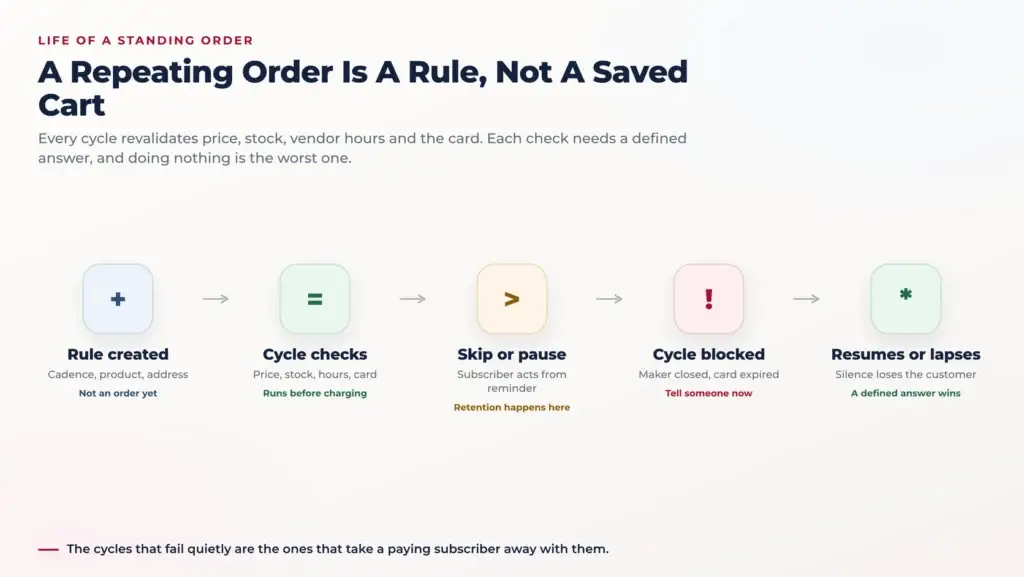
Image Source: AI-generated visual by Miracuves
A repeating order is a rule that generates orders, and every generation is a fresh negotiation with current reality. Price, availability, vendor hours, payment method and address are live values at generation time, not values captured at signup.
Five Things That Change Between Cycles
The price moves, and charging the old one loses the maker money while charging the new one silently starts chargebacks. The product is discontinued. The maker closes for a holiday. The card expires. The recipient moves house, and on a gift rule the person who knows that is not the person paying.
Standing Order Failure Modes and Defined Behaviour
| What changed | The silent default | The defined behaviour |
|---|---|---|
| Price increased | Charges the new amount without warning | Notify before the cycle, honour the old price once, let the subscriber confirm or leave |
| Product discontinued | Fails, or generates an empty basket | Pause the rule, tell the subscriber, offer the maker’s nearest substitute with an explicit opt in |
| Maker closed for a holiday | Charges and creates orders nobody will make | Closure dates suppress generation, the subscriber is told, the cycle resumes on its own |
| Card expired | Retries forever, then the rule dies unnoticed | Warn ahead of expiry, retry on a defined schedule, keep the rule recoverable for a fixed window |
| Recipient moved | Delivers to an address nobody lives at | Reconfirm the address on a cadence, and on a gift rule ask the buyer, never the recipient |
Fail Silently Is the Worst Available Answer
Every row has a version where the system does nothing and says nothing. That version looks cheapest and costs the most, because a standing order that stops without telling anyone takes a paying customer with it. The lines that depend on this retention sit on the business model page.
Pause, Skip and Edit Keep a Standing Order Alive
Subscribers rarely cancel because they stopped wanting the product. They cancel because they are away for two weeks and cancelling is the only control you gave them. Every standing order needs an exit that is not the exit.
The Skip Button Is a Retention Feature
Skip one cycle, pause until a date, and resume are three different actions and subscribers use all three. Put them in the reminder message rather than behind a login, because the moment someone decides they do not want next week’s box is the moment they are reading it.
Send that reminder with a real window to act, long enough that the vendor has not started production. It is also what prevents the disputed charge, because a charge someone expected is not a charge they contest.
Edit Forward, Never Backward
A subscriber changing quantity, slot or address is editing the rule, not the orders already generated from it. Existing orders keep their terms, including the price they were created with. If editing the rule rewrites a pending order the vendor has started, you have changed a production instruction after the work began.
Keep the rule and its generated orders as separate objects with a clear boundary. It is the same discipline that makes a commission rate snapshotted onto an order behave correctly, and it is why the order history stays readable a year later.
Where the Three Collide
Each feature is tolerable alone. The reason to build them on one spine is that customers combine them immediately, and the combinations are where bolted-on versions come apart. Work at least one through before writing any code.
A Gift With a Slot
The buyer picks Saturday afternoon. The recipient, using their scoped link, moves it to Sunday morning. Does the new slot have vendor and rider capacity? Does the buyer get told? And if Sunday is a premium window, who pays, given that the recipient must never see a price?
The workable answer: the recipient may only move to slots that are genuinely available and cost the same or less, the difference is never charged to anyone, and the buyer is told as a fact rather than asked to approve. That is only expressible if all three live on the same order.
A Standing Order Addressed to Someone Else
Someone sends their father a box every month. The father moves in the spring and tells nobody in your system. The buyer will not notice until a delivery fails at what is now a stranger’s front door. A recurring gift rule needs periodic address reconfirmation aimed at the buyer, and a failed delivery should pause the rule.
A Gift Whose Maker Has Sold Out
The maker bakes in batches and this week’s batch is gone. On a normal order you say so and refund. On a gift the date is the whole point, so the useful move is to reach the buyer early with options: a different product from the same maker, the same product a week later, or a refund.
What the Vendor Sees, and What They Must Confirm
Scheduled and gift orders change the vendor’s job, not just their order list. A maker running a small kitchen plans production from what is committed, and an order for eleven days from now is a commitment they need in a calendar rather than in a feed that scrolls.
A Scheduled Order Is a Production Plan
Give the vendor a forward view: what is committed for each future day, by product, with standing orders shown as expected rather than confirmed. That view is what lets a maker buy ingredients correctly, and it is the most useful thing a marketplace can hand a small producer.
It also changes what closing looks like. A vendor declaring a holiday needs the platform to stop selling slots inside those dates, suppress standing order generation, and surface the affected subscribers. Hours and closures are vendor-controlled fields with consequences weeks out, which the food delivery solution overview covers.
Confirmation Is Not Acceptance
An order taken today for next Saturday should not count as accepted simply because it was placed. There are two moments: the vendor agreeing the date is feasible, and the vendor starting the work. Between them a lot can be renegotiated cheaply. After the second, almost nothing can.
Model those as distinct states and the awkward cases answer themselves. A cancellation before production is a full refund and a released slot. After it, it is a conversation, and the platform should know which without anyone asking the maker.
Founder Decision Signals
Speed
Putting recipient, schedule and repeat rule on the order from day one costs days. Retrofitting them across checkout, notifications, vendor tools and support costs a quarter.
Cost
The expensive part is not the gift checkbox. It is every surface that prints an order, each of which has to learn who may read which field.
Scalability
Slot reservations must decrement capacity inside the order transaction. A soft count validated the day before oversells the first time demand clusters.
Market Fit
Gifting brings buyers who would never have found you, and standing orders keep the ones who did. Both are supply commitments before they are features.
Cancelling Something That Does Not Exist Yet
A customer cancelling an order for next Thursday is cancelling a plan, not a product. Nothing has been made, and nobody has lost anything except a reserved slot that can go to someone else. Most platforms make the rules harsher, because they were written for immediate orders.
The Cut-off Is the Real Boundary
Each vendor has a point where a future order becomes work: ingredients ordered, dough started, a batch committed. Before it, cancellation is free and should be self-service. After it, the maker has real cost. Let each vendor set that as a lead time rather than imposing one platform-wide number.
Publish the cut-off at checkout, in the confirmation and in the reminder. A refund rule nobody was told about is a dispute waiting to happen, and disputes on marketplace orders cost more than the amount involved.
Who Is Allowed to Cancel a Gift
Only the buyer, because only the buyer paid. A recipient can decline, which is a different act: it releases the slot, notifies the buyer, and leaves the refund decision where the money is. Building recipient cancellation as buyer cancellation lets a stranger with a link void a transaction they had no part in.
Fulfilment Is Local, and Gifting Has To Respect That
Worth saying plainly, because it shapes every decision above. This build delivers inside zones you draw, carried by riders you run, by vendors delivering with their own staff, or by collection in person, chosen per vendor. It does not hand perishable goods to a carrier for multi-day transit.
National shipping is a different business, with cold-chain packaging and a logistics function behind it. Pretending otherwise at checkout is how you promise a buyer in one city a birthday delivery in another. The honest version is more useful: a gift can go anywhere inside the zones you cover.
That constraint makes gifting better. Local delivery means a named window, a rider who can call, and a recipient reachable in minutes. For what a ready-made scope covers, the facts page states it plainly, and the white label build starts from the same order model.
What Bolting These On Later Actually Costs
Founders usually accept the argument and defer it anyway, because gifting looks seasonal and slots look like an operations nicety. The cost of deferring is not the cost of building it later. It is the cost of building it against a system that has already assumed the opposite everywhere.
The Migration Nobody Budgets For
Adding a recipient means visiting every query that assumed the order belongs to its buyer. Reports, exports, vendor dashboards, the support tool, the review pipeline, the marketing list. Each needs a decision about which party it means, and each wrong answer is a privacy incident.
Adding scheduling later is worse, because it changes the meaning of existing states. Pending in an immediate system means the kitchen has not looked yet. In a scheduled system it means one of four things, and a year of history no longer maps. Teams describe it much as the owners in Migrating from SaaS to Owned Infrastructure: A Peak-Hour Performance Comparison describe their own move.
Three Notification Systems That Disagree
The most visible cost is the one the customer sees. Bolted-on features each grow their own messaging and the sets are never reconciled. The gift flow suppresses the confirmation, the standing order sends a reminder that knows nothing about gifts, and the slot change email is generic because it predates both.
Which is how the email at the top of this article gets sent. Nobody built a feature that spoils surprises. One system did not know what another had decided. Whether to solve that inside a configurable build or as custom work is what The 36-Month TCO Comparison: SaaS Delivery Builders vs. Owned White-Label Engines takes apart, and it is the first thing worth asking a development partner.
Modelling the recipient as a user account
Matching a recipient to an existing account by email attaches gifts to the wrong person and creates duplicates. The recipient is data on the order until they choose otherwise.
Validating the slot the day before
Storing the chosen window as a preference rather than a reservation oversells every peak weekend. Decrement capacity in the same transaction that takes the order.
Reusing the invoice template for the packing slip
This is how the price reaches the recipient. Build one server-side order view per audience and let every printed surface read from it.
Treating a standing order as a stored cart
Prices move, products are discontinued, makers close and cards expire. Every cycle is a fresh validation with a defined answer for each failure.
Offering cancel but not pause or skip
Subscribers going away for a fortnight will take the only control you gave them. A skip reachable from the reminder saves the relationship.
Letting a failed gift delivery stay silent
The buyer must hear it from you before they hear it from the person they were trying to please. Tell the buyer first, then solve it.
Write the Permission Map Before the Screens
One page listing every field on an order against buyer, recipient, vendor and support, each marked readable or not, is an hour of work that removes most of the defects in this article. It is also the document your support team will use.
Do the same with the failure table above. Five rows, five decisions, written down before anyone opens an editor. Teams that skip this do not avoid the decisions. They make them one at a time in production, at the moment a customer is already unhappy.
Both documents are what turn this from architecture into configuration. Starting from an order model that already separates payer, recipient and time means zones, cut-offs, slot lengths and closure dates are settings rather than migrations. The wider solutions catalogue starts from that position.
Final Thoughts: One Spine, Three Behaviours
Goldbelly did not build three features. It built one order model that carries all three.
Gifting, slots and standing orders are not three adjacent features. They are one structural change stated three ways: the order is no longer for the person who paid, at the moment they paid. Build that once and all three behave. Build them separately and you get three systems that contradict each other.
The work is smaller than it sounds when it is done first. A recipient block on the order, a scheduled time that reserves capacity, a repeat rule that generates rather than replays, and a permission map every surface reads from.
All four are cheaper now than after a year of orders written against the opposite assumption. The scoping questions sit on the scoping and cost page, and the delivery-side engineering in our food delivery app development service.
If gifting is anywhere on your roadmap, it is worth an hour before the build starts rather than a quarter after it. Bring your vendor lead times, the zones you intend to cover, and the combinations you expect customers to try. You can book a working session and leave with the permission map drawn.
FAQs
How do gifting features work in a speciality food marketplace?
They must not. The recipient should never see the amount paid, the buyer’s address, or any payment detail including the last four digits of a card. The leak rarely comes from the gift feature itself. It comes from a packing slip generated off the invoice template, a tracking page showing an order summary, or a review request sent to the recipient’s inbox carrying a line item and a price.
How does a food marketplace recipient change a delivery slot?
Give them a signed link tied to that single order, expiring shortly after delivery, with a short list of permitted actions and a view that carries no financial fields. They can move the slot inside a window the vendor allows, add a delivery instruction, nominate a neighbour or decline. Changing the address outright is usually excluded, because a gift redirected to a new address is a fraud vector.
What happens to a food marketplace standing order over a holiday?
Vendor closure dates should suppress generation for those dates rather than charging and creating orders nobody will make. Tell the subscriber which dates are affected, and resume the cycle automatically afterwards. Closures and hours are vendor-controlled fields with consequences several weeks out, so they also have to stop slots being sold inside those dates in the first place.
Should a food marketplace reserve a delivery slot at checkout?
Reserved at checkout. Storing the requested window as a preference and validating it the day before oversells reliably the first time demand clusters. The slot should decrement capacity inside the same transaction that takes the order, released if payment fails. Two independent limits apply: what the vendor can produce that day, and how many drops your riders can make in that window inside that zone.
Who is allowed to cancel a gift order, the buyer or the recipient?
Only the buyer, because only the buyer paid. A recipient can decline a delivery, which is a different act: it releases the slot, notifies the buyer, and leaves the refund decision where the money is. Building recipient cancellation as though it were buyer cancellation creates a path where someone holding a link can void a transaction they had no part in.
What happens when a price changes between standing order cycles?
Charging the old price quietly loses the maker money and charging the new one silently starts chargebacks, so neither is a default. Notify the subscriber before the cycle, honour the previous price for one cycle, and let them confirm or leave. The same discipline applies to the orders already generated from the rule: they keep the terms they were created with.
Can a gift be sent to any address?
Only to an address inside the delivery zones you cover. This build delivers locally through zones and riders, through vendors delivering with their own staff, or through collection in person. It does not hand perishable goods to a carrier for multi-day transit, which is a different business. The practical consequence is that the address has to resolve against a zone at checkout rather than at dispatch.
What does a vendor need to see for a scheduled or gift order?
A forward view rather than a feed: what is committed for each future day by product, with standing orders shown as expected rather than confirmed. That is what lets a maker buy ingredients correctly. For a gift they also need the recipient name for the card, the delivery address, the slot and the message text, and nothing about the buyer beyond what fulfilment requires.
Miracuves is an independent software development company. We are not affiliated with, connected to, sponsored by, or endorsed by any company or product named in this article.
Terms such as “X Clone” are used descriptively. It is how the software industry refers to building a platform with functionality comparable to a known service, and how clients search for it.
The entire design and codebase of our products is built by our own team. Our products contain no code, design, graphics, or content originating from any third-party website or applications.
All third-party names and marks referenced in this article are the property of their respective owners, referenced solely to identify the services discussed.