A video streaming platform may look simple from the user’s side. A viewer opens the app, chooses a profile, browses a catalog, taps a title, and starts watching. But behind that smooth experience is a connected system of profiles, access rules, playback logic, metadata, recommendations, payments, device checks, and admin controls.
For founders, this matters because streaming success is not only about uploading videos. A platform must know who is watching, what they are allowed to watch, how the video should play on their device, and what content should appear next.
That is why modern OTT products need more than a clean homepage and a video player. They need a strong operating layer that connects user identity, content access, playback reliability, and discovery. Without that foundation, viewers may face wrong recommendations, failed playback, restricted content errors, poor search results, or subscription confusion.
Miracuves helps founders build ready-made and white-label video streaming app solutions with branded design, admin control, source-code ownership, and launch-ready workflows. For a founder, the value is not just faster development. It is starting with a product foundation where the major viewing, access, and content-management layers are already planned.
Key Takeaways
- Video streaming platform management depends on four connected layers: profiles, access rights, playback, and discovery.
- User profiles help personalize watch history, recommendations, maturity settings, language preferences, and continue-watching flows.
- Entitlements decide whether a viewer can access a title based on subscription, rental, region, device, plan, or account status.
- Playback management converts an approved access request into a stable watch session across mobile, web, TV, and other devices.
- Content discovery depends on metadata, search, categories, curated rails, recommendations, and user behavior signals.
- Miracuves helps founders move faster with ready-made and white-label app solutions designed for branded streaming businesses.
Prefer to start from the platform itself? See our white label video streaming platform.
Why Streaming Platforms Need More Than a Video Player
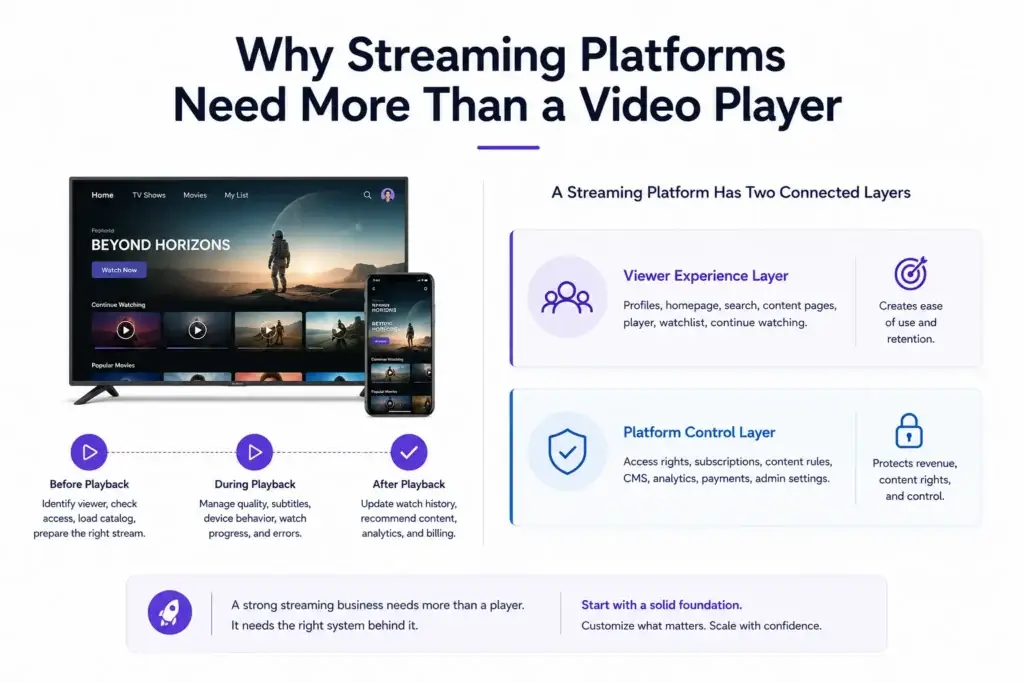
The video player is only the visible part of a streaming business. The real product is the system that decides what happens before, during, and after playback.
Before playback, the platform must identify the viewer, check the profile, load the right catalog, verify access rights, and prepare the correct stream. During playback, it must manage quality, subtitles, device behavior, watch progress, pause/resume, and error recovery. After playback, it must update watch history, continue-watching rows, recommendations, analytics, and sometimes billing or revenue-sharing data.
A founder should think of a streaming platform as two connected layers:
| Layer | What It Manages | Why It Matters |
|---|---|---|
| Viewer experience layer | Profiles, homepage, search, content pages, player, watchlist, continue watching | Creates ease of use and retention |
| Platform control layer | Access rights, subscriptions, content rules, CMS, analytics, payments, admin settings | Protects revenue, content rights, and operational control |
If the viewer experience looks good but the platform control layer is weak, the business will struggle as it grows. Users may get access to the wrong content, paid viewers may face restrictions, admins may struggle to update titles, and playback issues may be hard to trace.
This is where a ready-made streaming foundation can help. Instead of building every layer from zero, founders can begin with a structured system and customize the branding, content strategy, user flows, monetization, and operational rules around their business.
How User Profiles Shape the Viewing Experience
A user profile is not just a name and avatar. In a streaming platform, the profile acts as a personalization container. It separates viewing behavior inside the same account.
For example, one household account may include different profiles for adults, children, regional-language viewers, or different content preferences. Each profile may have its own watch history, watchlist, continue-watching row, maturity setting, language preference, subtitle preference, and recommendation pattern.
This matters because streaming engagement depends heavily on relevance. If every viewer inside one account shares the same recommendations, the homepage becomes noisy. A children’s profile may show unsuitable recommendations. A sports-focused viewer may see drama content. A regional-language viewer may not find the right content quickly.
A strong profile system usually manages:
- Profile name and avatar
- Watch history
- Continue-watching progress
- Watchlist or saved titles
- Preferred language and subtitles
- Maturity or parental controls
- Device-level session history
- Personalized recommendation signals
- Notification preferences where relevant
For founders, profile logic improves the perceived intelligence of the platform. The same content library feels more valuable when each viewer sees a homepage shaped around their behavior.
Account-Level Control vs Profile-Level Personalization
One common mistake is mixing account logic and profile logic.
The account usually controls billing, login, subscription status, payment method, devices, and security. The profile controls viewing behavior and personalization.
| Function | Account-Level | Profile-Level |
| Login and authentication | Yes | No |
| Billing and subscription | Yes | No |
| Device limit | Yes | Sometimes |
| Watch history | Sometimes | Yes |
| Recommendations | No | Yes |
| Maturity settings | Sometimes | Yes |
| Continue watching | No | Yes |
| Saved titles | Sometimes | Yes |
This separation helps the platform avoid confusion. A parent may manage the account and payment, while each viewer gets a separate content experience.
How Entitlements Decide What a Viewer Can Access
Entitlements are the platform’s access rules. They decide whether a viewer has the right to watch a specific title at a specific moment.
In simple terms, entitlement logic answers questions like:
- Is this user subscribed?
- Does this plan include this title?
- Has the user rented or purchased this content?
- Is this title available in the viewer’s region?
- Is this content restricted by age rating?
- Is the user watching from an allowed device?
- Has the subscription expired?
- Has the content license window ended?
- Is the user allowed to download this title for offline viewing?
This is where many streaming businesses become complex. A title may be available for one country but not another. A live event may be available only during a specific time window. A premium title may require an add-on plan. A child profile may be blocked from mature content even if the account has an active subscription.
For a founder, entitlement management protects revenue and content rights. If access rules are weak, users may face two types of problems: paying users may be wrongly blocked, or unpaid users may access premium content.
Both situations damage the business.
Entitlement Rules and Business Value
| Entitlement Rule | Business Value | Founder Impact |
|---|---|---|
| Subscription plan access | Controls what each paid plan includes | Helps create basic, premium, family, or niche plans |
| Rental or pay-per-view access | Supports one-time monetization | Useful for events, premium films, classes, or exclusive releases |
| Regional availability | Supports licensing and market-specific catalogs | Helps avoid showing unavailable content to the wrong audience |
| Device limits | Protects account sharing rules | Gives founders more control over subscription abuse |
| Age and maturity controls | Improves safety and trust | Important for family-focused platforms |
| Content window rules | Controls start and end dates for availability | Useful for licensed content, sports, events, and limited releases |
How Playback Management Turns Access Into a Watchable Session
Once the platform confirms that a viewer can access a title, playback management begins.
Playback is not just “press play.” The platform must create a valid session, understand the viewer’s device, choose the right stream format, load subtitles or audio tracks, manage video quality, handle pause/resume, and update progress.
A typical playback journey may include:
- Viewer taps the play button.
- Platform checks account and profile status.
- Entitlement service confirms access.
- Playback service creates a session.
- The app receives the right stream information.
- The player loads video segments based on device and network conditions.
- The platform tracks watch progress and quality signals.
- Continue-watching data updates after viewing.
Modern playback often involves manifests, adaptive bitrate streaming, CDN delivery, DRM/license handling, and device-specific player behavior. Architecture references also show that playback reliability depends on more than the player itself, because manifests, network conditions, device capability, encryption, and platform access logic all influence the viewing session.
For founders, this means playback problems are not always “video player problems.” A failed session may come from an expired access rule, a missing stream file, a DRM/license issue, a device incompatibility, a CDN problem, or poor metadata mapping.
What a Playback System Should Track
A strong streaming platform should track playback events clearly. Without playback analytics, the team cannot understand whether users are leaving because of content quality, app experience, buffering, login issues, or failed access checks.
Important playback signals include:
- Play request
- Playback start
- Startup delay
- Pause and resume
- Buffering events
- Video quality changes
- Subtitle usage
- Audio language selection
- Completion rate
- Drop-off point
- Playback error code
- Device type
- Network condition where available
This information helps founders make better decisions. If users drop off after 20 seconds, the issue may be content relevance. If users drop before playback starts, the issue may be loading, access rules, or device performance. If buffering is high on certain regions, CDN or encoding strategy may need attention.
How Content Discovery Helps Users Find the Right Title Faster
Content discovery is the system that helps viewers decide what to watch.
A large content library is not useful if users cannot find the right title quickly. Discovery includes homepage rails, search, categories, filters, genres, trending sections, personalized recommendations, watchlists, continue watching, new releases, editorial collections, and related-title suggestions.
A strong discovery layer depends on metadata. Metadata is the structured information attached to each title, such as:
- Title name
- Description
- Genre
- Language
- Cast or creator
- Release year
- Rating
- Content type
- Duration
- Tags
- Thumbnail
- Trailer
- Region availability
- Plan availability
- Related content
- Search keywords
Poor metadata weakens discovery. Even if the content is good, the platform may not know where to place it, which users should see it, or how it should appear in search.
Discovery Is Not Only Recommendation
Many founders think content discovery means AI recommendations. Recommendations are useful, but discovery is broader.
| Discovery Method | What It Does | Best Use Case |
| Search | Helps users find known titles | Large catalogs and returning viewers |
| Categories | Groups titles by theme or genre | New users exploring the library |
| Curated rails | Lets admins promote selected titles | New releases, campaigns, editor picks |
| Continue watching | Brings users back to unfinished content | Retention and habit-building |
| Watchlist | Lets users save content for later | Reduces decision fatigue |
| Personalized recommendations | Suggests titles based on behavior | Higher engagement over time |
| Trending section | Shows popular content | Social proof and quick decisions |
For a new streaming business, curated rails and strong metadata may matter before advanced personalization. Once the platform has enough viewing behavior, recommendations can become more useful.
How Profiles, Access Rules, Playback, and Discovery Work Together
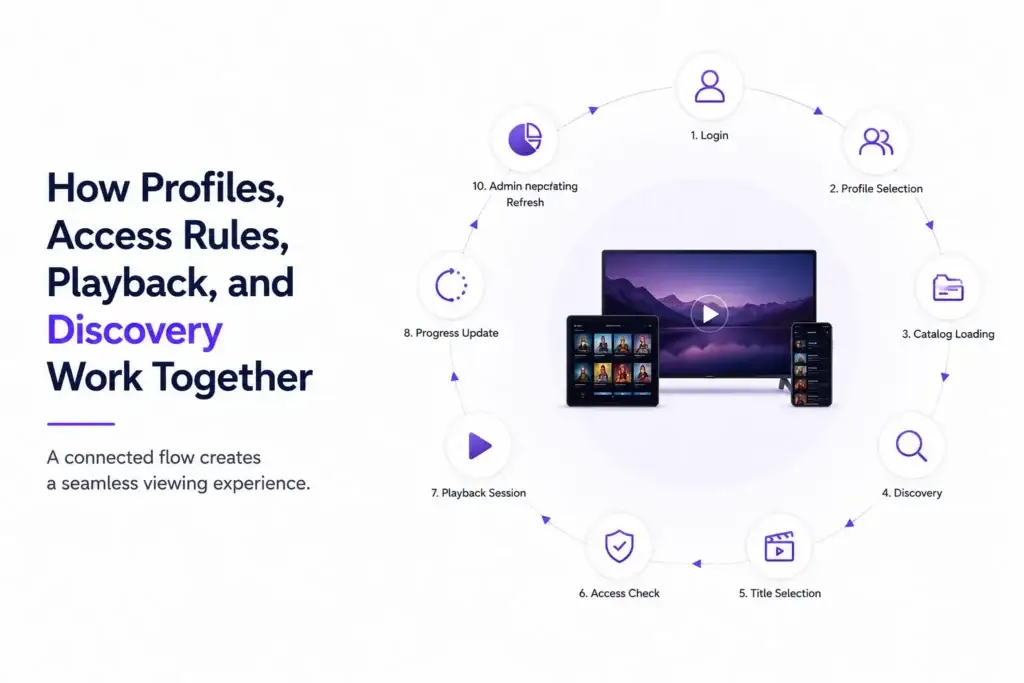
The strongest streaming platforms treat profiles, access rules, playback, and discovery as connected systems.
Here is a simplified viewing journey:
- Login: The viewer signs in to the account.
- Profile selection: The viewer chooses a profile.
- Catalog loading: The platform loads titles allowed for that region, profile, and account type.
- Discovery: The homepage shows relevant rails, continue watching, saved titles, and recommendations.
- Title selection: The viewer opens a title page.
- Access check: The platform checks subscription, rental, region, maturity level, and device rules.
- Playback session: The player starts the correct stream.
- Progress update: The platform records watch time and resume point.
- Recommendation refresh: Viewing behavior updates future discovery.
- Admin reporting: The operator sees engagement, content performance, and playback health.
When these layers work together, the experience feels simple. When they are disconnected, users feel the friction immediately.
For example, a title may appear on the homepage but fail during playback because access rules were not checked during discovery. A profile may show content that is blocked later by maturity settings. A user may rent a title, but the player may fail because the playback service did not receive the updated access status.
These small failures create support tickets, refunds, bad reviews, and lower retention.
Founder Decision Signals Before Building a Streaming Product
Before building a video streaming platform, founders should evaluate whether they have clarity across four areas: speed, cost, scalability, and market fit.
Speed
If your content, audience, and monetization model are already clear, building every profile, access, playback, and discovery module from zero may delay validation. A ready-made foundation can help you launch faster.
Cost
Streaming products can become expensive when teams underestimate video delivery, subscription logic, admin controls, device testing, and playback stability. Clear scope helps control avoidable development waste.
Scalability
A platform should be planned for content growth, user growth, device diversity, CDN needs, catalog expansion, and monetization changes. Scalability is not only server capacity; it is operational flexibility.
Market Fit
If you are testing a niche audience, regional content library, creator-led catalog, or premium video model, the first launch should prove demand without unnecessary overbuilding.
Common Mistakes That Break Streaming Platform Growth
Streaming products often fail because founders focus only on the app screens and underestimate backend coordination.
Mistakes Founders Should Avoid
Building the player before planning access rules
If entitlement logic is weak, users may see titles they cannot watch or access content they have not paid for. Access rules should be planned before playback workflows are finalized.
Treating profiles as basic user fields
Profiles influence recommendations, watch history, maturity controls, language preferences, and continue-watching data. Weak profile design can reduce personalization and retention.
Ignoring metadata quality
Discovery depends on clean metadata. If titles are poorly tagged, search results, categories, recommendations, and editorial rails become weaker.
Testing playback only on ideal networks
Viewers use different devices, bandwidth levels, operating systems, and screen sizes. Playback should be tested across realistic conditions before launch.
Launching without admin control
Founders need control over plans, content availability, featured rows, user access, reports, payments, and support issues. Without admin control, every small operational change becomes a development dependency.
What Founders Should Prioritize in the First Market Version
Not every streaming platform needs advanced personalization, complex bundles, live events, offline downloads, multiple revenue models, and deep AI recommendations on day one.
A smarter first launch should focus on the modules that directly support the business model.
| Priority Area | Why It Matters First |
| Account and profile setup | Creates the base for personalization and access control |
| Subscription or access model | Defines how the platform earns revenue |
| Content management system | Lets admins upload, organize, publish, and update titles |
| Playback reliability | Protects the core user experience |
| Search and category discovery | Helps users find content before advanced recommendations exist |
| Admin dashboard | Gives the business control after launch |
| Analytics | Helps founders understand viewing behavior and content performance |
| Security and access controls | Protects users, payments, and premium content |
The first version should be stable, monetization-ready, and easy to operate. Advanced features can be added once the founder understands user behavior.
How Miracuves Helps Founders Launch a Streaming Platform Faster
Building a streaming product from scratch requires planning across UI, backend, payment flows, profile logic, content management, access rules, playback, hosting, device compatibility, and admin operations.
Miracuves helps founders reduce this complexity with ready-made and white-label app solutions that can be customized around the brand, content library, monetization model, and target audience.
For founders who want to move faster, a launch-ready foundation can include the core workflows needed for a streaming business: user onboarding, profile management, content browsing, subscriptions, admin control, and playback-focused app experiences. The advantage is not just speed. It is avoiding the early-stage mistake of building disconnected modules that later become hard to scale.
If you want to explore a branded OTT streaming app solution, you can review the target solution page here: video streaming app solution. For a deeper feature breakdown, use this supporting page: video streaming app features.
Final Thoughts: The Strongest Streaming Platforms Are Built Around Control
A successful video streaming platform is not just a library of videos. It is a connected system that understands viewers, protects access, delivers playback reliably, and helps users discover the right content faster.
Profiles shape personalization. Entitlements protect revenue and content rights. Playback management creates the actual viewing experience. Discovery turns a content library into an engaging product.
For founders, the real decision is not whether the app should have these modules. The real decision is how quickly and reliably those modules can work together. A ready-made foundation from Miracuves can help reduce development risk, support faster validation, and give founders more control over the streaming business they want to build.
FAQs
What is video streaming platform management?
Video streaming platform management is the process of controlling users, profiles, content, access rights, playback sessions, subscriptions, metadata, recommendations, analytics, and admin operations inside a streaming app.
Why are user profiles important in streaming apps?
User profiles help separate viewing behavior inside the same account. Each profile can have its own watch history, recommendations, saved titles, maturity settings, and continue-watching progress.
What are entitlements in a video streaming platform?
Entitlements are access rules that decide whether a viewer can watch a specific title. These rules may depend on subscription status, rental purchase, region, device, content rating, account status, or content availability window.
How does playback management work?
Playback management starts after access is approved. The system creates a playback session, checks device conditions, loads the correct stream, manages quality, handles subtitles, tracks progress, and records playback events.
Why does content discovery matter for OTT platforms?
Content discovery helps users find what to watch. It includes search, categories, homepage rails, recommendations, watchlists, continue watching, trending titles, and curated collections.
Can a streaming platform launch without advanced recommendations?
Yes. A streaming platform can start with strong metadata, search, categories, curated rails, and continue-watching features. Advanced recommendations become more useful when the platform has enough viewing behavior.
Miracuves is an independent software development company. We are not affiliated with, connected to, sponsored by, or endorsed by any company or product named in this article.
Terms such as “X Clone” are used descriptively. It is how the software industry refers to building a platform with functionality comparable to a known service, and how clients search for it.
The entire design and codebase of our products is built by our own team. Our products contain no code, design, graphics, or content originating from any third-party website or applications.
All third-party names and marks referenced in this article are the property of their respective owners, referenced solely to identify the services discussed.