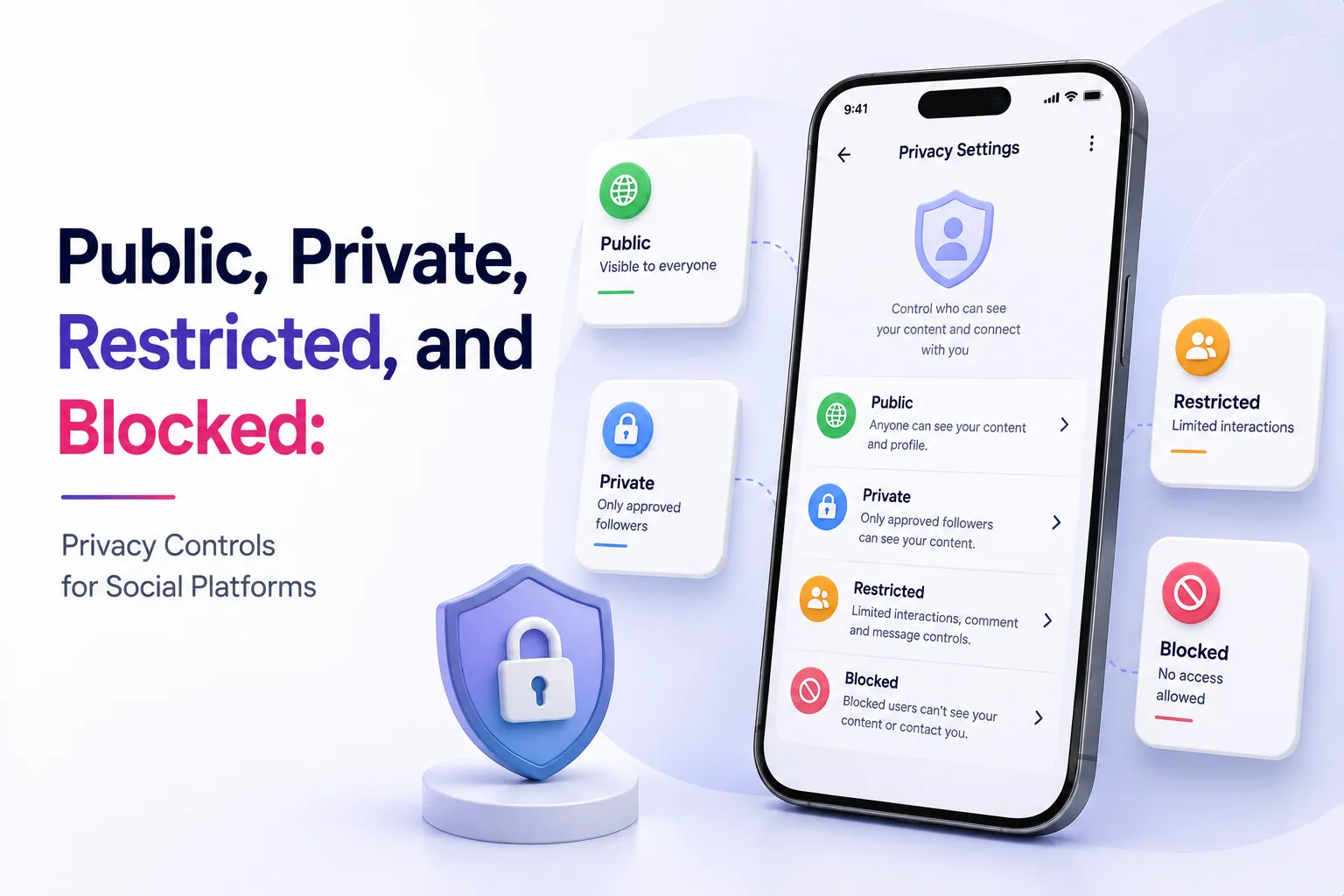
Most founders think privacy controls for social platforms are just settings inside a profile menu.
In reality, privacy is one of the most important trust layers inside a social app. It decides who can see a profile, who can view posts, who can send messages, who can comment, who can follow, and who should be completely removed from another user’s experience.
For a visual social platform or social networking product, this matters because every interaction depends on relationships. A user may be public to everyone, private to approved followers, restricted for specific accounts, blocked from certain users, visible in search but hidden from content, or allowed to view posts but not comment. These rules may sound small, but they decide whether the platform feels safe, predictable, and scalable.
That is why founders should treat relationship-based visibility rules as part of the product foundation, not as a late-stage feature.
A platform can have beautiful feeds, stories, reels, profiles, and messaging, but if users cannot control who interacts with them, trust starts breaking early. The stronger approach is to plan privacy logic before launch, connect it to the social graph, and make sure every content surface follows the same access rule.
For founders planning a privacy-first visual social platform, Miracuves helps create white-label, source-code-owned app foundations where user relationships, content controls, moderation workflows, and admin visibility can be aligned with the business model from the beginning.
Key Takeaways
- Relationship-based visibility rules decide how users, followers, restricted accounts, and blocked accounts interact across a social app.
- Privacy controls should apply consistently across profiles, posts, stories, comments, messaging, search, notifications, and media storage.
- Public, private, restricted, and blocked states should not be treated as UI labels only. They need backend logic that prevents accidental content exposure.
- Strong privacy workflows improve user trust, reduce abuse, support moderation, and make the app easier to scale.
- Miracuves helps founders move from idea to launch faster with ready-made and white-label app solutions built around admin control, source-code ownership, and safer user experiences.
Why Relationship-Based Visibility Matters in Social Apps
A social app is not just a content feed. It is a network of relationships.
Every time a user opens a profile, watches a story, sends a message, comments on a post, or searches for another user, the platform must answer one question:
Is this viewer allowed to access this content or interaction?
That answer depends on the relationship between two accounts.
For example, a public user may allow anyone to view posts. A private user may allow only approved followers. A restricted account may be allowed to stay connected but have limited comment or message visibility. A blocked account should not be able to view content, message, tag, or interact in normal discovery flows.
When this logic is not planned properly, privacy becomes inconsistent. A user may be blocked from a profile but still see old comments. A private post may be hidden in the feed but visible through a media URL. A restricted account may be silenced in comments but still able to trigger notifications. These inconsistencies create user distrust and operational risk.
For founders, this is not just a technical problem. It is a retention problem.
Users stay on platforms where they feel in control. They leave platforms where safety feels unpredictable.
Public, Private, Restricted, and Blocked: What Each State Should Mean
Relationship controls should be simple for users, but precise in the backend. The platform must define what each state means across every surface.
Core Relationship States and Their Business Value
| Relationship State | What It Controls | Founder Impact |
|---|---|---|
| Public | Profile and content can be discovered by a wider audience depending on platform rules. | Supports reach, creator growth, public discovery, influencer activity, and open engagement. |
| Private | Content visibility depends on approved follow relationships. | Builds trust for personal users, niche communities, private creators, and controlled audiences. |
| Restricted | Limits how a specific account interacts without fully removing the relationship. | Reduces confrontation, helps users manage harassment, and supports softer safety controls. |
| Blocked | Prevents visibility, interaction, messaging, tagging, and discovery between accounts. | Protects user safety, reduces abuse, and gives users a clear boundary-setting tool. |
The mistake many founders make is treating these states as independent features. They are not independent. They are connected permissions inside the social graph.
A blocked user should not be allowed to bypass the rule through search, old links, shared posts, comments, tagged content, group messages, or cached notifications. A private account should not expose media through public storage links. A restricted user should not trigger the same visibility and notification behavior as a normal follower.
The stronger product decision is to define one visibility framework and apply it everywhere.
The Social Graph Is the Real Privacy Engine
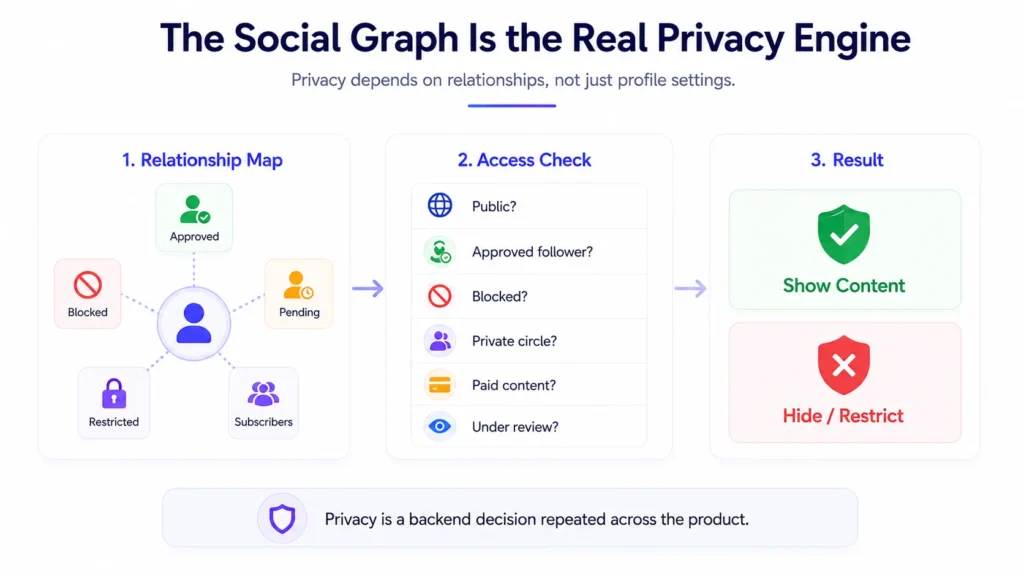
A social graph is the relationship map between users. It stores who follows whom, who has requested access, who has approved access, who is restricted, who is blocked, and what interaction rules apply between accounts.
In a basic app, the social graph only supports following and unfollowing.
In a serious platform, the social graph must support:
- follow requests,
- approved followers,
- pending followers,
- muted accounts,
- restricted accounts,
- blocked accounts,
- close-circle visibility,
- creator subscriber access,
- group or community membership,
- admin overrides for safety investigations.
This is where privacy becomes more than a profile toggle.
If the backend only checks whether a profile is public or private, the platform will eventually fail edge cases. A modern social app needs relationship-aware access checks that ask:
- Is the profile public?
- Is the viewer an approved follower?
- Has either user blocked the other?
- Is the viewer restricted?
- Is the content limited to a private circle?
- Is this media attached to paid or gated content?
- Is the content under moderation review?
- Is the viewer trying to access it through feed, search, direct link, message, or notification?
Founders do not need to personally write this logic, but they should understand why it matters. Privacy is not only a front-end setting. It is a backend decision repeated across the product.
Why Privacy Controls Should Apply Across Every Content Surface
A social platform usually has many content surfaces
- user profiles,
- posts,
- short videos,
- stories,
- comments,
- likes,
- saves,
- direct messages,
- tags and mentions,
- search results,
- notifications,
- media URLs,
- creator pages,
- shopping or product tags,
- live sessions.
If privacy controls apply only to the profile page, users are not truly protected.
For example, a user may make their account private. The feed respects the setting, but old notifications still reveal post previews. Or a blocked user cannot open the profile, but can still see comments on shared content. Or a restricted account cannot comment publicly, but can still send unwanted messages.
These gaps happen when every feature implements privacy separately.
The better approach is a central visibility rule. Every content surface should ask the same permission question before showing anything to the viewer. This makes privacy easier to maintain and reduces the risk of inconsistent behavior as the app grows.
This is especially important when a platform expands from simple posting into commerce, creator subscriptions, live video, private communities, or paid content. The more monetization layers the app adds, the more important access control becomes.
How Follow Requests Shape Private Account Workflows
Private accounts are one of the most important trust controls in social apps. But a private account is not just a lock icon.
It needs a full workflow:
- A user switches their account from public to private.
- New followers must send a request.
- The account owner can approve or decline the request.
- Approved followers gain access to allowed content.
- Declined users remain outside the private content boundary.
- Removed followers lose access immediately.
- Blocked users bypass the request system entirely and remain blocked.
This workflow should also consider existing followers. When a public user switches to private, the product must decide whether current followers remain approved or whether the user gets a review tool to remove unwanted followers.
For founders, the business decision is simple: private-account workflows should reduce user anxiety. If users feel that switching privacy modes is confusing or incomplete, they may stop posting altogether.
A clear follow-request system gives users confidence to share more. That confidence directly affects content creation, engagement, and retention.
Restricted Access: The Middle Layer Between Normal and Blocked
Blocking is a hard boundary. Restriction is a softer control.
A restricted user may still follow the account, but their comments, messages, or interaction visibility may be limited. This matters because users do not always want to block someone publicly or escalate conflict. They may want to reduce unwanted interaction quietly.
A restricted access model can help with:
- reducing harassment,
- limiting spam comments,
- controlling message interruptions,
- hiding comments until approved,
- reducing confrontational blocking,
- protecting creators from low-quality engagement,
- giving users more nuanced control.
For founders, restriction is useful because it improves safety without forcing every uncomfortable interaction into a block-or-ignore decision.
However, restriction must be carefully designed. Users should understand what restriction does, what it does not do, and whether the restricted user is notified. Ambiguous privacy behavior creates confusion and support tickets.
The admin panel should also help operators understand abuse patterns without exposing private user activity unnecessarily. That means restricted-account logic should connect to moderation queues, reporting workflows, and activity logs where appropriate.
Blocked Relationships Must Be Enforced Everywhere
A block should be one of the strongest user safety tools in the platform.
When one user blocks another, the platform should usually prevent:
- profile viewing,
- content viewing,
- direct messaging,
- commenting,
- tagging,
- mentioning,
- follow requests,
- search discovery,
- live interaction,
- group re-entry abuse where relevant,
- notification triggers from the blocked account.
The biggest mistake is making block logic visible only at the interface level. If the client hides a button but the backend still allows access, users can be exposed through direct links, API requests, cached content, or shared surfaces.
This is why block relationships should be part of backend access checks.
For founders, block enforcement is about trust. Users need to believe that when they block someone, the platform respects that boundary consistently. If the boundary fails once, the user may lose confidence in the entire app.
Founder Decision Signals
Speed
If privacy rules are defined before launch, the team avoids rebuilding access logic later across posts, profiles, stories, messages, and media files.
Cost
Retrofitting privacy after launch is more expensive because every content surface must be reviewed, patched, tested, and monitored for edge cases.
Scalability
A central visibility model makes it easier to add new formats such as short videos, paid content, live sessions, creator tiers, or private communities.
Market Fit
Users share more when they feel in control. Strong privacy controls support retention, creator confidence, and safer community growth.
The Business Value of Better Content Visibility Controls
Privacy controls are often viewed as defensive features. That is only half true.
They also create business value.
When users trust the platform, they are more likely to:
- complete profiles,
- upload personal content,
- follow creators,
- join private communities,
- save payment details where commerce exists,
- subscribe to gated content,
- report abuse instead of leaving silently,
- invite friends into the platform.
For creator-led or commerce-enabled platforms, privacy has direct commercial impact. A creator may want public discovery for some posts, private access for subscribers, restricted comments for safety, and blocked-user controls for boundaries. A buyer may want product activity hidden. A private community may need member-only posts. A premium content model may need paid access controls.
These are not separate business models. They all depend on one foundation: reliable content visibility rules.
That is why privacy should be part of monetization planning, not just safety planning.
What Founders Should Decide Before Development Begins
Before building or customizing a social app, founders should document privacy rules clearly. This avoids confusion between product, design, development, QA, and support teams.
Important questions include:
- Can users choose between public and private accounts?
- What happens to existing followers when an account becomes private?
- Can users remove followers without blocking them?
- What does restriction limit: comments, messages, notifications, or visibility?
- Does blocking remove both users from search results?
- Can blocked users see old comments or tagged content?
- Are private media files protected at the storage level?
- Can admins review reports without violating user privacy?
- Do creator subscriptions create separate visibility rules?
- Do shopping, live, or community features need special access checks?
These answers should be written before launch. If the team decides them while coding, privacy becomes inconsistent.
A strong product brief should define the privacy model as clearly as the feed, profile, and messaging experience.
Privacy Logic and Admin Control Should Work Together
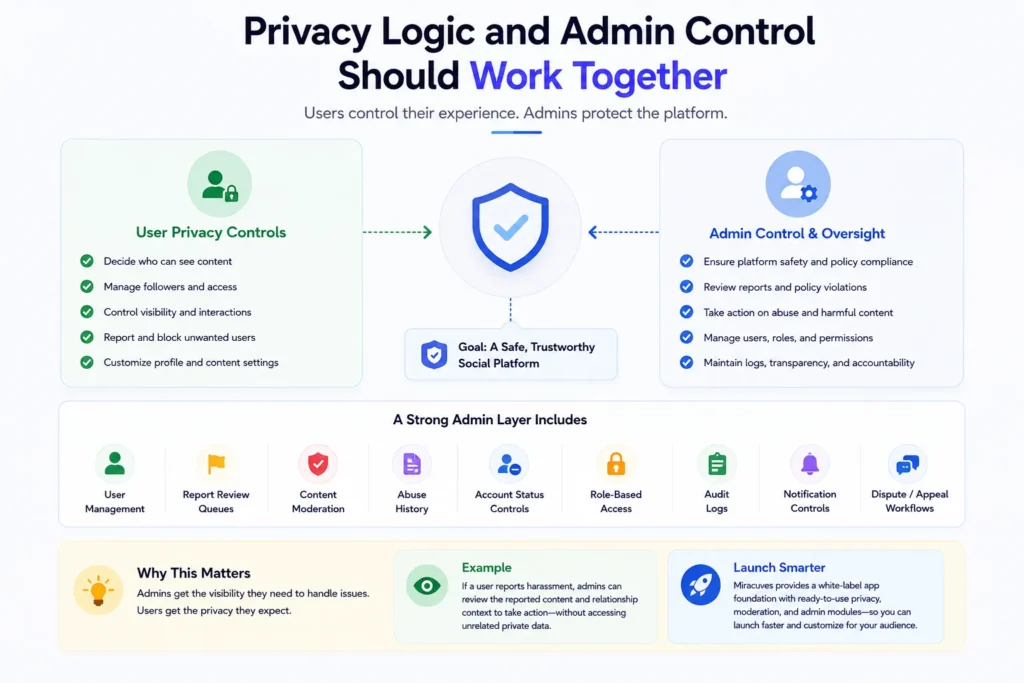
User privacy controls and admin control are not opposites. They should support each other.
Users need control over their own experience. Operators need visibility into platform abuse, policy violations, reports, and safety risks. The challenge is giving admins enough operational control without exposing unnecessary private data.
A strong admin layer may include:
- user management,
- report review queues,
- content moderation,
- abuse history,
- account status controls,
- role-based access control,
- audit logs,
- notification controls,
- dispute or appeal workflows.
For example, if a user reports harassment, the admin should be able to review the relevant reported content, understand the relationship context, and take action. But the admin should not need unrestricted access to every private interaction by default.
This is why role-based dashboards and audit logs matter. They help platform operators manage trust and safety responsibly.
Miracuves’ white-label approach is useful here because founders can start with a launch-ready app foundation and customize privacy, moderation, and admin workflows around the target audience rather than building every module from zero.
Mistakes Founders Should Avoid
Treating privacy as a settings screen only
A settings page is only the visible layer. The real protection comes from backend rules that control access across posts, profiles, media, search, messages, and notifications.
Building separate visibility logic for every feature
If every module handles privacy differently, rules drift over time. A central visibility model makes the platform easier to maintain and safer to scale.
Ignoring blocked-user edge cases
Blocking should not fail through old links, shared comments, media URLs, group interactions, or cached previews. Every surface needs to respect the same boundary.
Adding monetization before access control is mature
Paid content, creator subscriptions, and private communities all depend on accurate access rules. Weak privacy logic can create both user trust problems and revenue leakage.
How a Ready-Made Social App Foundation Helps Founders Move Faster
Building relationship-based privacy from scratch takes time because it touches almost every part of the product.
The team must design the social graph, write access rules, test edge cases, protect media storage, connect reports to moderation, and ensure the app behaves consistently across web and mobile. If the platform also includes creator monetization, shopping, live content, or paid communities, access rules become even more important.
A ready-made app foundation can reduce this complexity because core app flows, admin control, user panels, and content workflows already exist. The founder can focus on business-specific customization instead of rebuilding the foundation.
For founders evaluating a privacy-first visual social platform, Miracuves provides a white-label, source-code-owned solution that can be branded, configured, and extended around your audience, monetization model, and operational rules.
You can explore the launch-ready visual social platform here:
Miracuves visual social commerce platform
Related reading: How Group and Community Controls Help a Messaging Platform Scale Beyond One-to-One Chat and Messaging Platform Privacy Strategy.
Final Thoughts: Privacy Is a Product Foundation, Not a Feature Toggle
A social app grows when users feel safe enough to participate.
That safety comes from clear controls, predictable boundaries, and consistent visibility rules. Public, private, restricted, and blocked relationships may look simple on the surface, but they shape everything underneath the product: content access, messaging, search, comments, media storage, moderation, and monetization.
For founders, the main lesson is this: do not add privacy after the app is already built. Plan it early, connect it to the social graph, and make sure every feature respects the same rule.
A platform that gets privacy right earns user confidence faster. A platform that treats privacy as a patch creates avoidable trust problems later.
Miracuves helps founders build launch-ready, white-label social app foundations with source-code ownership, admin control, and customizable workflows so privacy, monetization, and community growth can be planned from the start.
FAQs
What are relationship-based visibility rules in a social app?
Relationship-based visibility rules decide what one user can see or do based on their relationship with another user. These rules can include public access, approved followers, pending follow requests, restricted users, blocked users, private content, and gated creator access.
Why should privacy controls be planned before launching a social app?
Privacy controls affect almost every feature, including profiles, posts, stories, comments, messages, search, notifications, and media storage. Planning them early reduces rework, prevents inconsistent behavior, and helps users trust the platform from the beginning.
What is the difference between restricted and blocked access?
Restricted access is usually a softer control that limits how a specific user can interact without fully cutting off the relationship. Blocking is a stronger boundary that should prevent viewing, messaging, tagging, following, and other interactions between accounts.
How do private profile settings work in social apps?
Private profile settings usually require new followers to send a request. The account owner can approve or decline the request, and only approved followers can view private content based on the app’s rules.
Why is backend privacy enforcement important?
Backend enforcement prevents users from bypassing privacy rules through direct links, APIs, cached content, media URLs, or alternate app surfaces. If privacy exists only in the interface, sensitive content can still leak through technical gaps.
Can privacy controls support monetization?
Yes. Paid creator content, private communities, subscriber-only posts, gated live sessions, and premium media all depend on reliable access rules. Strong visibility logic helps protect both user trust and revenue access.
What should founders ask before choosing a social app solution?
Founders should ask how the solution handles private accounts, follow requests, restricted users, blocked users, media access, moderation reports, admin permissions, audit logs, and future monetization access rules.
Miracuves is an independent software development company. We are not affiliated with, connected to, sponsored by, or endorsed by any company or product named in this article.
Terms such as “X Clone” are used descriptively. It is how the software industry refers to building a platform with functionality comparable to a known service, and how clients search for it.
The entire design and codebase of our products is built by our own team. Our products contain no code, design, graphics, or content originating from any third-party website or applications.
All third-party names and marks referenced in this article are the property of their respective owners, referenced solely to identify the services discussed.