Key Takeaways
- A text-first social app is built around short posts, conversation feeds, replies, reposts, follows, communities, and fast user interaction.
- Core features include personalized feeds, threaded replies, mentions, hashtags, search, notifications, content discovery, moderation, and user profiles.
- Strong user engagement depends on relevant content, low-friction posting, active conversations, community discovery, and a feed that continuously surfaces useful discussions.
Feed & Conversation Signals
- Feed ranking can use follows, interests, recency, engagement, trending topics, and recommendation signals to decide which posts users see first.
- Replies, quote posts, mentions, reposts, likes, and notifications turn individual posts into ongoing conversation threads and social interactions.
- Search, hashtags, trending discussions, suggested accounts, and topic-based discovery help users find new conversations beyond the people they already follow.
Community Engagement Insights
- Communities become stronger when users can easily discover relevant people, join discussions, follow topics, and receive timely responses to their posts.
- Moderation tools, reporting, blocking, spam prevention, privacy controls, and content guidelines help maintain conversation quality as the platform grows.
- Miracuves develops customizable text-first social platforms with feeds, replies, communities, discovery, moderation, notifications, analytics, user management, and admin controls.
Text-first social apps look simple from the outside. A user writes a short post, others reply, the feed updates, and conversations start moving across communities. But behind that simple experience sits a careful product system built around identity, feed logic, replies, recommendations, moderation, notifications, and community behavior.
For founders, this matters because a text-first platform is not only a posting tool. It is a conversation engine. The product has to make users feel that posting is easy, replies are worth reading, and returning to the app gives them something new each time.
This guide explains how text-first social apps work from a product and business perspective. You will understand the main user flows, the feed system, reply mechanics, community layers, engagement loops, monetization options, and founder decisions that shape whether the platform can grow beyond its first audience.
What Is a Text-First Social App?
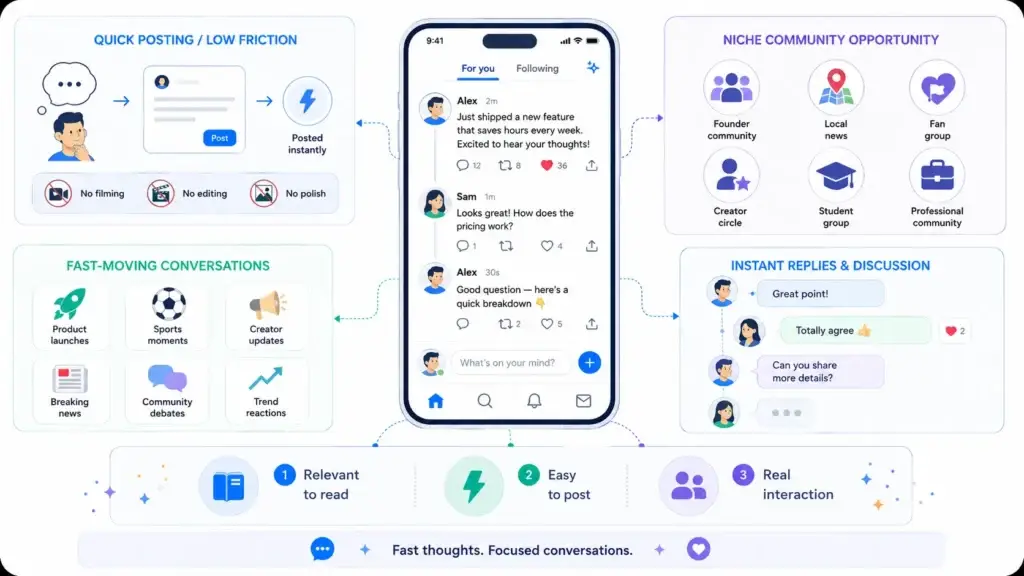
A text-first social app is a social platform where short written updates drive the main user experience. Users post thoughts, opinions, announcements, questions, links, images, polls, or short media updates, while other users respond through replies, reposts, likes, saves, mentions, or private messages.
Unlike visual-first platforms, where photos or videos dominate the experience, text-first apps are built around conversation speed. The value comes from what people are saying, how quickly others respond, and how easily users can follow discussions around people, topics, or communities.
These platforms are commonly used for:
- Public conversations
- Creator updates
- News and commentary
- Brand communities
- Niche interest groups
- Professional discussions
- Fandoms and regional communities
- Founder-led audience building
The product may feel lightweight, but it depends on strong backend logic. A real-time feed, reply system, notification engine, content moderation layer, and admin control panel all work together to keep the experience active and manageable.
Readers exploring similar platform models can also browse Miracuves’ social networking app resources, where related guides cover real-time feeds, social business models, public conversation platforms, and community-led app ideas.
Why Text-First Social Apps Became Popular
Text-first apps became popular because they reduce the friction of sharing. A user does not need to create a polished video, edit a photo, or prepare long-form content. They can post a thought quickly and receive responses almost instantly.
This format works especially well when users want to follow fast-moving conversations. Product launches, sports moments, creator updates, breaking discussions, community debates, and trend reactions all fit naturally into a text-first format.
For founders, the opportunity is not only in copying a popular app pattern. The stronger opportunity is building a focused conversation space for a specific audience. A niche founder community, local news network, fan group, creator circle, student community, or professional discussion platform can often create stronger early retention than a broad general-purpose network.
A text-first social product succeeds when users feel three things:
- There is always something relevant to read.
- Posting feels low-effort and safe.
- Replies create real interaction, not just passive scrolling.
How Text-First Social Apps Work
A text-first social app usually works through six connected layers: onboarding, posting, feed discovery, engagement, notifications, and moderation.
The user signs up, creates a profile, follows people or topics, and lands on a feed. From there, they can create a post, reply to others, repost content, search for conversations, join communities, receive notifications, and manage privacy controls.
The platform operator manages the backend through an admin dashboard. This dashboard usually handles users, posts, reports, moderation queues, analytics, content rules, monetization settings, and platform-level controls.
The basic flow looks like this:
| Layer | What Happens | Why It Matters |
|---|---|---|
| Onboarding | Users create profiles and choose interests | Helps personalize the first feed experience |
| Posting | Users publish short updates, media, polls, or links | Creates the core content supply |
| Feed Discovery | The system shows followed and recommended content | Drives retention and session depth |
| Replies | Users respond to posts and create discussion chains | Turns content into conversation |
| Notifications | Users receive alerts for replies, mentions, follows, and messages | Pulls users back into the app |
| Moderation | Admins and systems manage abuse, spam, and policy violations | Protects trust and platform quality |
The strength of the platform depends on how smoothly these layers work together. If users can post easily but the feed feels empty, they leave. If the feed is active but replies are low-quality, trust drops. If engagement grows but moderation is weak, the platform becomes difficult to manage.
The Feed Is the Core Product Experience
The feed is where most users decide whether the app is worth returning to. It decides which posts appear first, how fresh the content feels, and whether users discover new voices beyond the accounts they already follow.
Most text-first social platforms use more than one feed type. A simple platform may start with a following feed and a discovery feed. A more advanced platform may add topic feeds, trending feeds, community feeds, saved feeds, or custom user-created feeds.
A following feed usually shows posts from accounts the user follows. This gives users control and predictability.
A discovery feed shows recommended posts based on engagement, interests, topics, follows, recency, and behavior. This helps new content travel beyond an author’s direct audience.
A trending feed highlights active topics, hashtags, or fast-growing discussions. This creates urgency and helps users understand what the community is talking about right now.
A community feed focuses on posts inside a specific group, niche, or membership space. This is useful for founders building targeted platforms around creators, professionals, fandoms, education, sports, or local markets.
How Feed Ranking Usually Works
Feed ranking is the logic that decides which content deserves visibility. In early-stage apps, this can be simple. Posts may appear in reverse chronological order, with the newest content first. But as the platform grows, founders usually need more advanced ranking logic.
A practical feed ranking system may consider:
- Recency of the post
- Engagement from replies, likes, reposts, and saves
- Relationship between the viewer and author
- Topics followed by the user
- Muted or blocked accounts
- Language and region preferences
- Reported or restricted content
- Creator quality signals
- Community relevance
The founder decision is important here. A purely chronological feed gives users control but may feel less engaging when the user follows many accounts. A recommendation-led feed improves discovery but needs stronger safety controls because it can amplify low-quality or controversial content.
A balanced product often gives users both: one feed for followed accounts and another feed for recommended discovery.
Replies Turn Posts Into Conversations
Replies are what separate a conversation platform from a simple broadcasting tool. A post may start the discussion, but replies create depth, disagreement, clarification, community memory, and repeat engagement.
A strong reply system usually includes:
- Direct replies to posts
- Nested conversation chains
- Reply visibility controls
- Mention support
- Quote-style sharing
- Reply notifications
- Report and block options
- Author controls for who can respond
For founders, reply design is a trust decision. Open replies can increase engagement, but they can also invite spam or abuse. Restricted replies can improve safety, but they may reduce conversation volume. The right model depends on the audience, industry, region, and moderation capacity.
For example, a creator-led platform may allow public replies but give creators stronger controls. A professional community may prefer verified profiles and limited reply permissions. A youth-focused community may need stricter safety settings, reporting, and content review workflows.
Communities Give Users a Reason to Stay
Broad social apps are difficult to grow because users already have many places to post. Niche communities give users a clearer reason to join and return.
A community layer organizes conversations around shared interests, identities, goals, or use cases. This can include creators, local groups, alumni networks, sports fans, product communities, professional associations, regional language groups, or private member spaces.
Community features may include:
- Topic-based groups
- Group posting rules
- Community moderators
- Member roles
- Private or public visibility
- Community-specific feeds
- Join approvals
- Group analytics
- Pinned posts
- Announcements
For founders, communities reduce cold-start risk. A new social app does not need to attract everyone. It needs to attract the right first audience and give them a reason to create content consistently.
This is why founders should also study niche creator platform growth, because focused communities often create stronger loyalty, clearer discovery, better creator relationships, and more practical monetization paths than broad social platforms.
User Engagement Loops in Text-First Social Apps
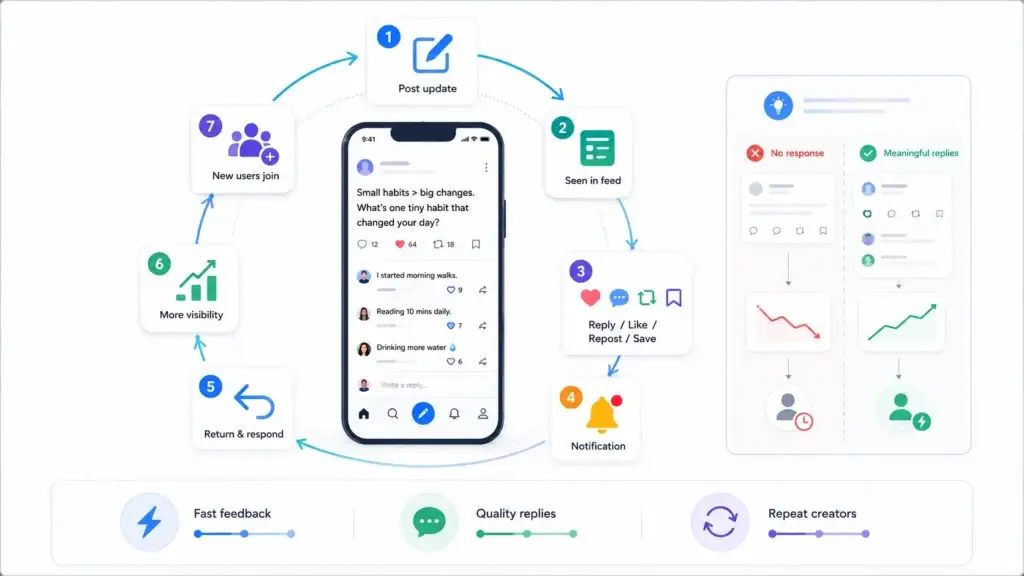
Engagement does not happen by accident. It is designed through repeated loops that encourage users to post, respond, return, and invite others.
The most common engagement loop looks like this:
- A user posts an update.
- Followers or recommended users see it in the feed.
- Some users reply, like, repost, or save it.
- The author receives notifications.
- The author returns to respond.
- The conversation gains more visibility.
- New users join the discussion.
This loop works when the product rewards participation quickly. If a user posts and nothing happens, they may not return. If they receive meaningful replies, they are more likely to keep posting.
Founders should track engagement quality, not only engagement volume. A platform with many low-quality comments can become noisy. A smaller platform with strong replies and repeat creators can become more valuable over time.
After the core engagement loop is defined, founders should think through a growth strategy for a new conversation-led social app, including creator seeding, community activation, referral loops, and retention signals.
Important Features Every Text-First Social App Needs
A scalable text-first social app needs more than posting and liking. The feature set should support users, creators, communities, advertisers, and platform operators.
| Feature Area | Core Features | Business Value |
| User Identity | Profiles, handles, bios, avatars, verification options | Helps users build trust and recognition |
| Publishing | Text posts, media, links, polls, drafts, scheduled posts | Gives creators flexible ways to share |
| Engagement | Replies, likes, reposts, quotes, saves, mentions | Keeps conversations active |
| Discovery | Feeds, search, topics, hashtags, recommendations | Helps users find relevant content |
| Messaging | Direct messages, message requests, group chats | Supports private relationship building |
| Moderation | Reports, blocks, mutes, keyword filters, review queues | Protects community quality |
| Admin Control | User management, content review, analytics, roles | Gives operators control over the platform |
| Monetization | Ads, subscriptions, creator tools, boosts, premium access | Builds revenue options |
| Analytics | Post performance, user growth, engagement reports | Helps founders make product decisions |
The right feature priority depends on the launch model. A founder testing a small community may not need every advanced feature on day one. But the foundation should be flexible enough to add monetization, moderation, and scaling layers later.
Founders who want to go deeper into profiles, feeds, replies, messaging, moderation, analytics, and admin controls can review the feature set for a modern conversation-first platform before finalizing their product scope.
Moderation and Safety Are Not Optional
Text-first platforms can grow quickly because posting is easy. That same speed can also create spam, harassment, impersonation, misinformation, and low-quality content if the platform does not have proper controls.
A strong moderation system should include both user-facing and admin-facing tools.
Users should be able to report content, block accounts, mute keywords, control replies, and manage who can contact them.
Admins should be able to review reports, remove content, restrict accounts, manage appeals, detect suspicious activity, review ads, and monitor platform health.
This matters because trust directly affects retention. Users will not keep posting if they feel unsafe or if the feed becomes filled with spam. Advertisers and creators will also hesitate to invest in a platform that lacks clear rules and enforcement.
For deeper safety planning, founders can review how content moderation systems combine reporting tools, review queues, human oversight, policy control, and scalable platform governance.
Monetization Models for Text-First Social Apps
Text-first platforms can monetize in different ways depending on the audience and business model. The goal is not to add every revenue stream at launch. The goal is to choose monetization that fits user behavior.
Common monetization models include:
| Revenue Model | How It Works | Best For |
| Advertising | Brands pay to promote posts, accounts, or campaigns | Public communities with strong attention volume |
| Verification Subscription | Users or creators pay for account badges or premium identity features | Creator and professional networks |
| Premium Communities | Users pay to access private groups or member-only discussions | Niche communities and expert-led groups |
| Creator Subscriptions | Followers pay creators for exclusive updates or access | Creator economy platforms |
| Post Boosting | Users pay to increase visibility of selected posts | Marketplaces, creators, and business accounts |
| Sponsored Topics | Brands sponsor trending topics or community discussions | Media, sports, events, and regional platforms |
| Data and Insights | Aggregated analytics help brands understand audience behavior | B2B or professional communities |
For founders, monetization should come after trust. If the app pushes ads too early, users may feel interrupted. If monetization is tied to creator value, community quality, or business visibility, it feels more natural.
Once the engagement model is clear, founders should map the business model options for a text-first social platform so revenue does not interrupt the user experience too early.
Founder Decision Signals
Audience Focus
Start with a clear community instead of trying to attract everyone. Niche audiences usually create stronger early conversations.
Feed Strategy
Decide whether the platform should prioritize chronological control, algorithmic discovery, topic feeds, or community-based feeds.
Trust Layer
Plan reporting, blocking, moderation queues, and admin review workflows before public growth begins.
Monetization Fit
Choose a revenue model that supports user value instead of interrupting the conversation experience too early.
What Founders Should Decide Before Building
Before building a text-first social app, founders should answer a few practical questions.
Who is the first audience?
A broad social network is harder to validate than a focused community. A founder should define the first 500 to 5,000 target users clearly. For example, a platform for startup founders, local journalists, creators, sports fans, or alumni groups has a clearer early adoption path than a general public posting app.
What type of conversations should the platform encourage?
Some platforms are built for fast public updates. Others are built for thoughtful discussions, creator updates, professional networking, or private communities. The posting limits, reply controls, moderation rules, and feed ranking should match the type of conversation the founder wants.
How will users discover relevant content?
Discovery can happen through follows, topics, hashtags, communities, search, recommendations, or trending sections. A platform with weak discovery will feel empty even if people are posting.
How will the platform handle abuse?
Reporting, blocking, admin review, automated filters, and account restrictions should be planned early. Moderation becomes harder once growth starts.
Where will revenue come from?
Advertising, subscriptions, creator tools, boosted posts, and premium communities all require different product decisions. A founder should not add monetization only after launch without thinking about how it fits the user experience.
Once the audience, feed logic, moderation rules, and monetization path are clear, founders can compare broader social media app development services to understand how a platform can move from product planning to launch execution.
If the product needs custom workflows, stronger moderation rules, or a more complex launch roadmap, founders may also compare what to expect from a social conversation app development partner before selecting a build path.
Common Mistakes Founders Should Avoid
Building a broad platform with no niche
A general-purpose social platform needs major distribution. A focused community gives early users a clearer reason to join and participate.
Treating moderation as a later feature
Once spam, abuse, or low-quality content spreads, trust becomes harder to recover. Safety workflows should be part of the product foundation.
Launching with a weak first feed
The first session decides whether users return. Seed content, onboarding interests, suggested accounts, and topic discovery should be planned before launch.
Adding monetization before value is clear
Ads and paid features work better when users already see value in the platform. Monetization should support the community experience, not interrupt it.
Ready-Made vs Custom Development for Text-First Social Platforms
Founders usually have two development paths: build everything from scratch or start with a ready-made foundation and customize it.
A custom build gives full flexibility but requires more planning, development time, testing, and iteration before launch. This can be useful when the product has highly unique workflows or a complex long-term roadmap.
A ready-made foundation can help founders move faster because common modules are already structured. These may include user profiles, posting, feeds, replies, messaging, moderation, admin control, and monetization-ready workflows. The founder can then focus on branding, niche positioning, launch strategy, content seeding, and community growth.
For readers who want to understand how faster delivery works without treating speed as a shortcut, Miracuves explains its rapid app development process and how ready-made foundations, branding, QA, deployment preparation, and source-code handover fit together.
Founders comparing build paths should also review the development cost factors for a social conversation app, especially when deciding between a custom build, a ready-made foundation, or a hybrid approach.
| Build Path | Best For | Main Advantage | Main Risk |
| Custom Development | Highly unique platforms with uncommon workflows | Maximum flexibility | Longer timeline and higher execution risk |
| Ready-Made Foundation | Founders who want faster validation with proven social app modules | Faster launch and reduced setup complexity | Needs smart customization to avoid looking generic |
| Hybrid Approach | Founders who want a faster base with custom business logic | Balanced speed and flexibility | Requires clear scope control |
Miracuves helps founders turn proven app patterns into branded, source-code-owned platforms with admin control, custom workflows, and faster deployment. For founders who want to move from research to execution, a ready-made text-first social network solution can reduce the need to build every module from zero.
Final Thoughts
Text-first social apps work because they make conversations feel simple, fast, and natural. Users can share thoughts quickly, receive replies, follow relevant people, discover active discussions, and return when the feed feels alive with fresh conversations.
For founders, the real opportunity is not to build another generic social network. It is to create a focused conversation space with a clear audience, useful discovery, healthy engagement, strong moderation, and a monetization model that fits the community instead of interrupting it.
That is where Miracuves can support founders who want to move from idea to execution faster. With a ready-made, white-label app foundation, Miracuves helps businesses build conversation-led platforms with branded design, admin control, source-code ownership, and launch-ready workflows.
The strongest platforms are not designed only for posting. They are designed for trust, repeat participation, community growth, and long-term platform control.
FAQs
What is a text-first social app?
A text-first social app is a platform where short written posts, replies, feeds, and public conversations form the core user experience. It may also support images, videos, polls, links, private messages, and community spaces.
How does a text-first social feed work?
A text-first social feed shows users posts from followed accounts, recommended accounts, topics, communities, or trending discussions. The feed may be chronological, algorithmic, community-based, or a mix of different discovery models.
Why are replies important in microblogging platforms?
Replies create conversation depth. They turn a single post into an ongoing discussion, increase notifications, encourage return visits, and help users build relationships around shared interests.
What features should a text-first community platform include?
A strong platform should include profiles, posts, replies, reposts, likes, saves, search, topics, notifications, messaging, moderation tools, admin controls, analytics, and monetization options.
How can founders monetize a text-first social app?
Founders can monetize through ads, premium communities, verification subscriptions, creator subscriptions, sponsored topics, post boosting, business accounts, or creator monetization tools.
Why is moderation important for social conversation platforms?
Moderation protects the user experience by reducing spam, abuse, impersonation, harmful content, and low-quality interactions. Strong moderation helps users, creators, and advertisers trust the platform.
Is a niche social platform easier to launch than a broad social app?
Yes. A niche platform usually has a clearer audience, stronger community purpose, and better early engagement potential. Broad platforms require much stronger distribution and brand awareness from day one.
Should founders build from scratch or use a ready-made foundation?
A custom build is useful for highly unique workflows. A ready-made foundation is useful when founders want to launch faster with core modules already structured, then customize branding, features, monetization, and community rules.
Miracuves is an independent software development company. We are not affiliated with, connected to, sponsored by, or endorsed by any company or product named in this article.
Terms such as “X Clone” are used descriptively. It is how the software industry refers to building a platform with functionality comparable to a known service, and how clients search for it.
The entire design and codebase of our products is built by our own team. Our products contain no code, design, graphics, or content originating from any third-party website or applications.
All third-party names and marks referenced in this article are the property of their respective owners, referenced solely to identify the services discussed.