Key Takeaways
- A real-time microblogging platform requires connected client, API, data, real-time communication, and operational layers.
- Posts should publish quickly while mentions, hashtags, feed distribution, notifications, and search indexing run through background processes.
- A hybrid feed architecture can combine database queries, caching, and selective distribution to support early growth and future scale.
- Direct messaging requires dedicated permissions, storage, delivery, and privacy controls separate from public posts.
- Moderation, security, monitoring, and traffic-spike planning should be part of the platform architecture from the beginning.
Platform Architecture Signals
- Design data models around feed, profile, search, notification, messaging, and moderation requirements.
- Use cursor pagination, database indexes, caching, background workers, CDNs, and real-time events to protect response times.
- Maintain consistent APIs across web, mobile, and admin interfaces for accounts, posts, feeds, media, search, notifications, and messaging.
- Implement rate limits, notification preferences, block and mute rules, role-based permissions, and administrative audit logs.
- Monitor API latency, database queries, queue backlogs, failed jobs, active connections, cache performance, and media-upload failures.
Real Insights
- A polished interface cannot compensate for slow feed APIs, overloaded databases, or blocked processing queues.
- Viral activity can increase pressure on feeds, interactions, notifications, media delivery, search, authentication, and moderation simultaneously.
- Feature flags, staged releases, monitoring, and rollback plans reduce the risk of ranking, notification, and messaging updates.
- Start with accounts, profiles, posts, and a basic feed before expanding into discovery, messaging, moderation, analytics, and monetization.
- Miracuves develops white-label, source-code-owned microblogging platforms with posts, feeds, notifications, messaging, moderation, admin controls, and six-day delivery where the ready-made scope applies.
A microblogging platform looks simple from the outside. A user writes a short post, taps publish, and the content appears in a feed. Someone replies, likes, reposts, receives a notification, opens a direct message, and expects every interaction to feel instant.
But behind that simple experience is a complex real-time architecture.
The hardest part is not creating a post form. The real challenge is building a system that can support fast feeds, high write volume, instant notifications, threaded conversations, private messaging, moderation workflows, and sudden traffic spikes without breaking the user experience.
This guide explains how real-time microblogging platform architecture works from a founder and product-build perspective. It is designed for teams planning a social conversation app, niche community platform, creator-led discussion network, or public posting product where speed, scalability, and operational control matter.
Why Real-Time Architecture Matters in a Microblogging Platform
In a traditional content website, most users consume pages that change slowly. In a microblogging platform, the product is alive every second. Posts appear, replies stack into threads, notifications trigger instantly, hashtags trend, profiles update, and direct messages move between users in real time.
That means every feature touches performance.
A slow feed makes the platform feel empty. Delayed notifications reduce engagement. Poorly designed messaging creates trust issues. Weak moderation tools make the platform harder to operate. Missing rate limits can expose the system to spam, scraping, or traffic abuse.
For founders, architecture is not only a technical decision. It affects:
- how fast users can post and interact;
- how long people stay in the feed;
- how quickly the platform can recover from traffic spikes;
- how much infrastructure costs increase as activity grows;
- how safely admins can manage users, content, reports, and abuse.
This is why a launch-ready microblogging product should be planned around system behavior, not only visible screens.
The Core Architecture Layers Behind a Microblogging Platform
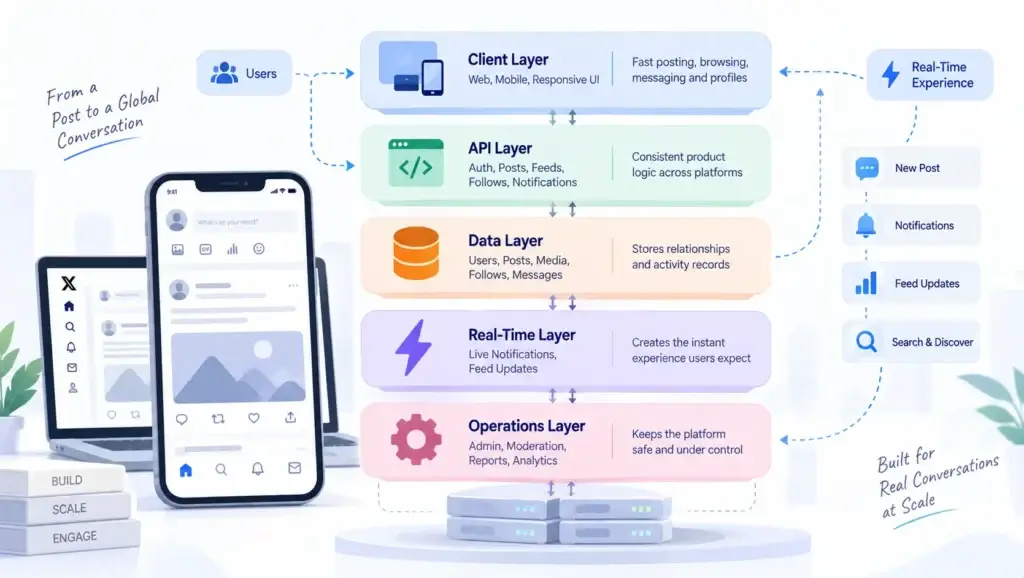
A scalable microblogging app usually needs five major layers working together.
| Architecture Layer | What It Handles | Why It Matters |
|---|---|---|
| Client layer | Web app, mobile app, responsive UI | Gives users fast posting, browsing, messaging, and profile experiences |
| API layer | Authentication, posts, feeds, follows, notifications, messaging | Keeps product logic consistent across web and mobile clients |
| Data layer | Users, posts, media, follows, blocks, likes, reposts, messages | Stores relationships and activity records safely |
| Real-time layer | Live notifications, feed updates, typing indicators, read receipts | Creates the “instant” experience users expect |
| Operations layer | Admin dashboard, moderation, reports, logs, analytics | Gives the platform operator control after launch |
A common early mistake is treating these as separate features. In reality, they are connected. A new post may update the author profile, appear in follower feeds, trigger mention notifications, update hashtags, enter moderation review, and become searchable. If all of that happens inside one slow request, the app will struggle under load.
A stronger architecture separates the user-facing action from background work. The post is saved quickly, and supporting tasks are processed through events, queues, caches, and workers.
Read More: Why Startups Choose a Ready-Made Real-Time Microblogging Platform Over Custom Development
Post System Design: What Happens After a User Publishes?
The post system is the foundation of a microblogging platform. It controls text, media, replies, quote posts, reposts, hashtags, mentions, visibility, and deletion rules.
A clean post architecture should answer several questions:
- Is this a root post, reply, quote, or repost?
- Who can view it?
- Does it include images, videos, GIFs, polls, audio, or links?
- Does it mention another user?
- Should it trigger a notification?
- Should it enter moderation review?
- Should it be indexed for search?
- Should it update the feed immediately or through a queue?
A simplified post lifecycle looks like this:
- User submits a post from web or mobile.
- API validates authentication, content length, media rules, and visibility.
- Post record is saved in the database.
- Media references are attached after upload validation.
- Background events process mentions, hashtags, notifications, search indexing, and feed distribution.
- The client receives a fast success response.
- Feed and notification services update connected users where needed.
The business value of this structure is speed. Users should not wait while the platform performs every secondary action. The publish action should feel instant, while heavier tasks run in the background.
Feed Architecture: Pull Model, Push Model, or Hybrid?
The feed is the most sensitive part of a microblogging platform because it directly affects engagement. Users expect the timeline to load quickly, refresh smoothly, and show relevant content without repeating or missing posts.
There are three common feed architecture models.
| Feed Model | How It Works | Best For | Risk |
|---|---|---|---|
| Pull model | Feed is generated when the user opens it | Smaller platforms, early-stage products, simpler follower graphs | Slow queries as content and users grow |
| Push model | New posts are pre-written into follower timelines | High-read systems where feed speed matters | Expensive for accounts with many followers |
| Hybrid model | Pull for some users, push/cache for others | Growing platforms with mixed activity patterns | Requires smarter feed rules and monitoring |
For most founder-led microblogging platforms, a hybrid model is practical. You can generate feeds dynamically for smaller accounts, cache common feed pages, and treat high-volume accounts differently.
A simple version might use:
- database indexes for recent posts;
- Redis or memory cache for first-page feeds;
- cursor-based pagination instead of offset pagination;
- background workers to fan out posts from high-priority accounts;
- ranking rules for “Following,” “For You,” or community-specific feeds;
- cache invalidation when users follow, mute, block, or post.
The goal is not to overbuild from day one. The goal is to avoid a feed design that collapses the moment user activity increases.
Database Design for Posts, Follows, Threads, and Interactions
Database design decides how fast your platform can answer common questions:
- Who does this user follow?
- Which posts belong in this feed?
- How many replies does this post have?
- Has this user liked or reposted this content?
- Which posts mention this user?
- Which hashtags are rising?
- What should be hidden because of blocks, mutes, or reports?
A practical data model may include tables or collections for:
| Data Entity | Purpose |
|---|---|
| Users | Profiles, handles, verification state, settings |
| Posts | Text, media references, visibility, parent post, quote reference |
| Follows | Follower and following relationships |
| Interactions | Likes, reposts, bookmarks, shares |
| Threads | Parent-child conversation structure |
| Hashtags | Topic discovery and trend grouping |
| Mentions | User tagging and notification triggers |
| Blocks and mutes | Feed safety and user control |
| Notifications | Activity alerts and read states |
| Messages | Private conversations and message history |
| Reports | Content and user moderation workflows |
| Audit logs | Admin action tracking |
The most important principle is query-first modeling. Design the data around what the feed, profile, search, moderation, and notification screens need to retrieve quickly.
For example, a post detail page needs the root post, author details, reply count, viewer interaction state, and reply thread. A moderation dashboard needs reported content, report reasons, user history, and admin actions. These are different read patterns, and the architecture should support both without forcing expensive queries everywhere.
Real-Time Notifications: Keep the Product Fast Without Blocking Actions
Notifications are easy to underestimate. A user likes a post, follows someone, replies to a thread, sends a message, or mentions another account. Each of these actions can generate an alert.
If notifications are processed inside the same request as the original user action, the app becomes slower as engagement increases.
A stronger notification architecture uses events:
- User performs an action.
- API records the action.
- Event is published, such as
post.liked,user.followed, orreply.created. - Notification worker checks rules.
- Notification is saved.
- Real-time service pushes the alert to connected users.
- Mobile push service handles offline users.
This approach allows the product to remain responsive while still giving users timely updates.
Good notification architecture should support:
- in-app notifications;
- push notifications;
- unread counts;
- notification grouping;
- mention alerts;
- reply alerts;
- follow alerts;
- message alerts;
- mute and preference settings;
- anti-spam throttling;
- admin-level notification monitoring.
For founders, this matters because notifications directly influence retention. But uncontrolled notifications can also annoy users. The architecture should give the platform operator enough control to tune notification frequency, categories, and user preferences.
Messaging Architecture: Why Direct Messages Need Their Own System
Direct messaging should not be treated as a small extension of the post system. Public posts and private messages have different expectations.
Posts are public, discoverable, shareable, and often cacheable. Messages are private, permission-sensitive, and expected to update instantly inside a conversation.
A microblogging messaging layer usually needs:
- conversation records;
- participants;
- message records;
- read receipts;
- typing indicators;
- message reactions;
- media attachment handling;
- blocked-user rules;
- abuse reporting;
- deletion or hide logic;
- real-time socket events;
- offline push notification support.
A clean messaging event flow looks like this:
- User sends a direct message.
- API validates sender, recipient, block status, and conversation access.
- Message is saved.
- Real-time service emits the message to active participants.
- Notification service alerts offline users.
- Read receipt updates when the recipient opens the conversation.
- Audit and abuse workflows remain available for moderation where policy allows.
The founder decision here is important. If private messaging is central to your community, it deserves first-class architecture. If it is a secondary feature, you can launch with simpler messaging and improve presence, reactions, and group messaging later.
API Design: One Contract for Web, Mobile, and Admin
A real-time microblogging platform usually has multiple clients: web app, mobile app, admin dashboard, and sometimes third-party integrations. If each client gets custom backend logic, the platform becomes difficult to maintain.
An API-first structure keeps the product cleaner.
Core endpoint groups may include:
| API Group | Example Responsibilities |
|---|---|
| Auth API | Login, signup, sessions, password reset, token refresh |
| User API | Profile, settings, follow, block, mute |
| Post API | Create, edit, delete, reply, quote, repost |
| Feed API | Following feed, discovery feed, bookmarks, lists |
| Notification API | Fetch alerts, mark as read, update preferences |
| Messaging API | Conversations, messages, receipts, typing events |
| Search API | Users, posts, hashtags, topics |
| Media API | Uploads, thumbnails, validation, CDN references |
| Admin API | Reports, bans, content actions, audit logs |
| Monetization API | Ads, subscriptions, creator earnings, invoices where relevant |
A consistent API contract protects the platform from future drift. When web, mobile, and admin panels follow the same rules, every new feature becomes easier to test, document, and extend.
This is also where a source-code-owned app foundation becomes valuable. The platform operator is not locked into a closed system and can extend APIs, workflows, and integrations as the business model matures.
Traffic Spike Planning: What Happens When a Post Goes Viral?

Traffic spikes are normal in microblogging. One post gets shared, a creator brings followers, a campaign goes live, or a news event drives sudden activity. The platform must handle unpredictable surges in reads, writes, notifications, and media requests.
The highest-risk areas during spikes are:
- home feed loading;
- post detail pages;
- likes and reposts;
- notification generation;
- media delivery;
- search queries;
- login/session endpoints;
- admin moderation queues.
A practical traffic spike plan includes:
1. Cache the Most Repeated Reads
Feeds, post detail pages, profile summaries, hashtag pages, and public counts should use caching where possible. The first page of a feed is often the most requested page, so caching it even briefly can reduce database pressure.
2. Use Queues for Heavy Work
Notifications, feed fanout, search indexing, media processing, emails, and analytics events should not block the user’s immediate request. Queue workers allow the platform to absorb bursts of activity more safely.
3. Apply Rate Limits
Rate limits protect posting, login, follow, messaging, search, and API access from abuse. They should be configurable because the right threshold depends on the product, user behavior, and growth stage.
4. Monitor the Right Metrics
A founder does not need every engineering dashboard on day one, but the team should track:
- API response time;
- feed load time;
- database query latency;
- queue backlog;
- failed jobs;
- socket connection count;
- error rate;
- cache hit ratio;
- CPU and memory usage;
- media upload failures.
5. Prepare Rollback-Safe Releases
Social platforms are always changing. New ranking rules, notification logic, or messaging features can create unexpected load. Feature flags, staged rollouts, and rollback plans help protect user experience during updates.
Admin and Moderation Architecture: The Control Layer Founders Often Forget
A microblogging platform is not only a user app. It is an operating system for public conversation. That means the admin layer is critical.
The operator should be able to manage:
- users;
- reported posts;
- blocked or suspended accounts;
- hashtags;
- content visibility;
- ads or promoted content;
- verification requests;
- API access;
- platform settings;
- audit logs;
- abuse patterns;
- support issues.
The moderation workflow should not be an afterthought. When users can post in real time, harmful content, spam, impersonation, or policy violations can also spread quickly. The admin dashboard needs clear queues, filters, permissions, and action history.
This is where technical architecture and business risk meet. Without admin control, every operational issue becomes a developer task. With a structured operator console, the business can manage daily platform health without depending on engineering for every decision.
Security Considerations for Real-Time Microblogging Apps
Security in a microblogging platform must cover both public content and private interactions.
Important layers include:
- secure authentication;
- role-based access control;
- encrypted data transfer;
- rate limiting;
- input validation;
- API token handling;
- admin permissions;
- audit logs;
- abuse reporting;
- content moderation;
- secure media uploads;
- spam detection;
- private message access checks;
- block and mute enforcement;
- suspicious activity monitoring.
The architecture should also separate normal user permissions from admin permissions. A member should not be able to access moderation endpoints. A moderator should only access the actions allowed by their role. Every sensitive admin action should be logged.
For founders, security is not just a technical checkbox. It affects user trust, advertiser confidence, platform reputation, and the ability to scale safely.
Ready-Made Foundation vs Building Every Layer From Zero
Building a real-time microblogging platform from scratch gives your team full control over architecture, product logic, and feature decisions. However, that control also comes with a heavier responsibility. Every core system must be planned, built, tested, secured, and optimized before the platform is ready for real users.
A microblogging product is not just a posting interface. It needs authentication, user profiles, feed generation, post creation, replies, reposts, notifications, messaging, moderation, admin controls, APIs, caching, deployment workflows, and traffic spike handling. When all of these layers are built from zero, the launch timeline can become longer than expected, especially if the team has to solve performance and scalability issues along the way.
A ready-made foundation can shorten that path when the goal is faster market validation. Instead of spending the early budget on rebuilding standard social networking mechanics, founders can focus on what actually differentiates the platform: audience positioning, community rules, creator experience, monetization strategy, content safety, and long-term product growth.
| Build Area | Building From Zero | Using a Ready-Made Foundation | Founder Impact |
|---|---|---|---|
| Core Features | Every module, including posts, profiles, feeds, reactions, and messaging, must be designed and developed from scratch. | Core app flows are already available and can be customized for the brand and audience. | Reduces time spent on standard mechanics and shifts focus toward differentiation. |
| Feed Logic | The team must build feed queries, ranking logic, caching, pagination, and performance rules independently. | A working feed structure gives the team a faster starting point for customization and scaling. | Helps avoid early architecture mistakes that can slow user experience later. |
| Notifications & Messaging | Real-time alerts, direct messages, read states, and delivery logic require separate planning and testing. | Basic communication workflows can be available earlier, then extended based on user needs. | Improves launch readiness for engagement-focused communities. |
| Admin Control | Moderation tools, user controls, reports, and platform settings must be built as separate backend workflows. | Admin dashboards and control layers can help operators manage users, content, and platform activity from launch. | Reduces dependency on developers for everyday operational decisions. |
| Launch Timeline | Development can take longer because each layer must be scoped, built, tested, and optimized. | A ready-made solution can support faster deployment when the core product foundation is already built. | Helps founders validate demand sooner instead of waiting for every system to be built from zero. |
For teams that want a faster route, Miracuves offers a launch-ready microblogging platform that can be branded, deployed, and extended around your community model. The stronger decision is not whether to copy another platform. It is whether your team should spend its early budget rebuilding infrastructure from zero or investing in the features, positioning, and user experience that make your community different.
Founder Decision Signals Before You Build
Speed
If your audience is already waiting, a ready-made foundation may help you launch faster than building every feed, messaging, and notification workflow from scratch.
Cost
The expensive part is not only development. It is the engineering time spent fixing architecture mistakes after users arrive.
Scalability
Feeds, notifications, and traffic spikes should be planned early, even if your first release starts with a smaller community.
Market Fit
Your platform wins by serving a specific audience better, not by recreating every feature from a large public network on day one.
Common Architecture Mistakes to Avoid
Building the feed as one heavy database query
This works for a prototype but becomes fragile as follows, posts, likes, and blocks increase. Use indexes, caching, cursor pagination, and eventually a hybrid feed model.
Processing notifications inside user actions
A like, reply, follow, or mention should not become slow because the system is generating notifications synchronously. Use background events and queues.
Treating messaging as public posts with privacy flags
Private messages need separate access rules, conversation state, delivery events, and reporting workflows.
Ignoring moderation until after launch
Real-time posting creates real-time operational risk. Build report queues, admin roles, content actions, and audit logs before growth makes moderation urgent.
Scaling only the frontend
A fast frontend cannot save a slow feed API, overloaded database, or blocked job queue. Performance must be handled across the full stack.
Practical Build Roadmap for a Real-Time Microblogging Platform
A founder-friendly roadmap should avoid overbuilding while protecting future scalability.
| Phase | Build Focus | Founder Goal |
|---|---|---|
| Phase 1 | Authentication, profiles, posts, follows, basic feed | Validate the core conversation loop |
| Phase 2 | Replies, reposts, bookmarks, hashtags, mentions | Increase engagement and content discovery |
| Phase 3 | Notifications, direct messaging, moderation dashboard | Improve retention and operational control |
| Phase 4 | Feed ranking, caching, queue workers, analytics | Prepare for higher activity and traffic spikes |
| Phase 5 | Ads, subscriptions, API access, creator tools | Turn platform activity into monetization paths |
This phased approach keeps the first release focused while leaving room for growth. The key is to avoid shortcuts that make the platform difficult to scale later.
How Miracuves Helps Founders Move From Idea to Launch Faster
Miracuves helps founders build ready-made and white-label app solutions with source code, admin control, branded design, and faster deployment. For a microblogging product, this matters because the foundational modules — posts, feeds, user profiles, notifications, messaging, and admin workflows — are often the slowest parts to build correctly.
Instead of spending the early build phase recreating every standard social networking layer, founders can use a launch-ready foundation and focus more on the parts that make the platform different. This can include the community niche, user experience, monetization strategy, creator tools, moderation rules, and long-term growth plan.
Miracuves can support founders with:
- Ready-made app foundation for faster market entry
- White-label branding to match the business identity
- Source-code ownership for long-term flexibility
- Admin dashboard to manage users, content, reports, and platform activity
- Core microblogging modules such as posts, feeds, profiles, notifications, and messaging
- Customization support for niche communities, creator workflows, monetization models, and moderation policies
- Faster deployment through Miracuves’ 6-day solution delivery where relevant
This approach helps founders reduce the time spent on basic infrastructure and move faster toward market validation. The goal is not just to launch another social platform. The goal is to create a controlled, scalable, and brand-ready microblogging experience that can be shaped around a specific audience and business model.
For founders who want to test demand faster, Miracuves’ 6-day solution delivery can help move the project from planning to branded deployment while still allowing room for business-specific customization.
Final Thoughts: Architecture Is the Difference Between a Feed and a Platform
A microblogging app is not successful because users can publish short posts. It becomes useful when the full system works together: feeds stay fast, posts trigger the right events, notifications arrive without slowing actions, messages feel instant, and admins can manage the platform safely.
For founders, the real question is not just “Can we build this?” It is “Can we build this in a way that survives real users, real traffic, and real operations?”
A strong architecture gives your product that foundation. A ready-made solution can help you reach that foundation faster when speed, control, and launch clarity matter.
FAQs
What is real-time microblogging platform architecture?
Real-time microblogging platform architecture is the technical structure behind a social posting app where users can publish posts, view feeds, receive notifications, send messages, and interact instantly. It usually includes APIs, databases, caching, queues, WebSocket or real-time services, media handling, moderation tools, and admin controls.
What is the hardest part of building a microblogging platform?
The feed is usually the hardest part because it is read-heavy, personalized, and constantly changing. As users follow more accounts and interact with more content, the platform needs indexing, caching, pagination, ranking logic, and sometimes feed fanout workers to stay fast.
Should a microblogging app use a pull feed or push feed?
Early-stage platforms can often start with a pull model, where the feed is generated when users open it. As traffic grows, a hybrid model becomes more practical because it combines cached feeds, dynamic queries, and selective fanout for high-activity accounts.
Why are queues important in social media architecture?
Queues help process heavy background tasks such as notifications, feed updates, media processing, search indexing, emails, and analytics. Without queues, user actions like posting or liking can become slow as the platform grows.
How should direct messaging be designed in a microblogging app?
Direct messaging should have its own conversation model, participant permissions, message records, read receipts, typing indicators, abuse reporting, and real-time delivery layer. It should not be treated as a simple variation of public posts.
How can a microblogging platform handle traffic spikes?
Traffic spikes can be handled with feed caching, queue workers, rate limiting, database indexes, CDN-backed media delivery, observability, feature flags, and rollback-safe deployment. The goal is to protect the most-used actions: feed loading, posting, liking, notifications, and messaging.
Is it better to build from scratch or use a ready-made foundation?
Building from scratch gives maximum control but requires more time, budget, and engineering effort. A ready-made foundation can help founders launch faster when the standard platform modules are already available and the real differentiation is community, positioning, monetization, and custom workflows.
Can Miracuves help launch a real-time microblogging platform?
Yes. Miracuves helps founders launch white-label, source-code-owned social app solutions with branded design, admin control, and faster deployment. Founders can use the ready-made foundation to validate the market faster while customizing the experience for their audience.
Miracuves is an independent software development company. We are not affiliated with, connected to, sponsored by, or endorsed by any company or product named in this article.
Terms such as “X Clone” are used descriptively. It is how the software industry refers to building a platform with functionality comparable to a known service, and how clients search for it.
The entire design and codebase of our products is built by our own team. Our products contain no code, design, graphics, or content originating from any third-party website or applications.
All third-party names and marks referenced in this article are the property of their respective owners, referenced solely to identify the services discussed.