Key Takeaways
- Food delivery marketplace features should connect customer ordering, restaurant operations, rider management, payments, dispatch, live tracking, promotions, payouts, and admin control.
- Each user role needs a dedicated workflow while sharing accurate information about menus, availability, order status, delivery progress, payments, commissions, and support issues.
- A well-structured feature set should simplify ordering for customers while helping restaurants, riders, and operators manage fulfillment efficiently from checkout through final delivery.
Customer & Restaurant Feature Signals
- Customer features can include restaurant discovery, search, filters, menus, carts, coupons, checkout, multiple payment methods, order tracking, ratings, refunds, notifications, and order history.
- Restaurant dashboards can support onboarding, menu and pricing management, item availability, incoming orders, preparation times, promotions, operating hours, cancellations, commissions, and earnings reports.
- Real-time order status, inventory updates, preparation progress, customer requests, payment confirmation, and rider arrival information help restaurants coordinate fulfillment more accurately.
Rider & Admin Control Insights
- Rider features can include availability controls, order assignment, pickup details, navigation, live GPS tracking, delivery verification, earnings, incentives, ratings, and payout management.
- Admin controls should cover customer, restaurant, and rider management, delivery zones, commissions, fees, promotions, refunds, disputes, payouts, fraud monitoring, analytics, and marketplace performance.
- Miracuves develops customizable food delivery marketplaces with customer ordering, restaurant dashboards, rider management, dispatch, live tracking, payments, commissions, payouts, analytics, and admin controls.
A food delivery marketplace is not just an ordering app. It is a connected operating system where customers place orders, restaurants manage fulfilment, riders complete deliveries, and platform owners control everything from one dashboard.
For founders, this distinction matters. A basic food ordering app can accept orders, but a serious delivery marketplace needs workflow depth. It must handle menu availability, delivery zones, rider allocation, payouts, refunds, commissions, ratings, notifications, and reporting without creating daily operational chaos.
That is why food delivery marketplace features should be planned around four core roles:
- Customers who want fast ordering and transparent tracking
- Restaurants that need menu, order, and payout control
- Riders who need clear delivery tasks and navigation
- Admin teams that need visibility, rules, and business control
This guide breaks down the essential features every scalable food delivery marketplace should include, how each module supports business operations, and what founders should consider before launching. For a more product-focused breakdown, you can also explore Miracuves’ detailed guide to food delivery platform feature modules across customer, restaurant, rider, and admin workflows.
Why Food Delivery Marketplace Features Matter More Than a Simple Ordering Flow
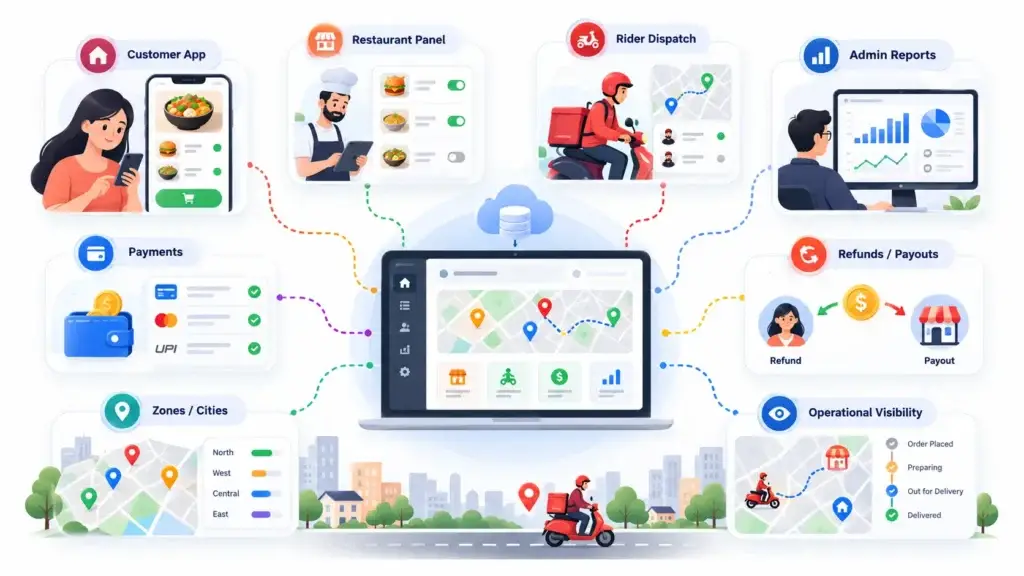
Many founders start by thinking about the customer app first. That is understandable because the customer experience is visible. Users open the app, browse restaurants, add dishes to cart, pay, and track delivery.
But the real business challenge sits behind the screen.
A marketplace has to coordinate multiple sides at once. Restaurants must know what to prepare. Riders must know where to go. Admins must know whether orders, payments, commissions, refunds, and payouts are moving correctly. If one layer breaks, the customer experience suffers.
For example, a customer may see a smooth checkout screen, but if the restaurant panel does not update item availability, customers may order unavailable dishes. If rider allocation is weak, orders may sit ready while no one picks them up. If admin reporting is poor, the platform owner may not know which restaurants are profitable, which zones are failing, or which delivery fees need adjustment.
A scalable marketplace is built around operational visibility, not just app design.
Core Customer Ordering Features for a Better Food Delivery Experience
Customer ordering features decide whether users place the first order and whether they come back. The goal is to reduce friction while giving customers enough control to feel confident.
Simple Signup and Guest Browsing
A strong food delivery marketplace should allow users to explore before forcing account creation. Guest browsing helps customers check restaurants, cuisines, offers, and delivery availability before signing up.
Useful customer onboarding features include:
- Email, phone, and social login
- OTP verification
- Guest browsing
- Saved addresses
- Location-based restaurant discovery
- Profile and order history
The founder benefit is simple: fewer signup barriers can increase discovery, especially for first-time users who are still deciding whether the marketplace has enough restaurant options in their area.
Location-Based Restaurant Discovery
Food delivery is hyperlocal. The app should only show restaurants that can actually serve the customer’s address. This avoids failed orders, refund requests, and customer frustration.
Important discovery features include:
- Auto-detected location
- Manual address entry
- Serviceable zone mapping
- Cuisine filters
- Search by dish, restaurant, or category
- Restaurant ratings and delivery time display
For marketplace operators, location-based discovery also improves operational control. It allows the platform to manage delivery areas, assign restaurants to zones, and set different delivery charges for different locations.
Menu Browsing, Add-Ons, and Smart Cart Flow
Menu management is where customer experience and restaurant operations meet. A good marketplace should support real-world food ordering behaviour, not just static item listings.
Customers often want to change size, add toppings, remove ingredients, select spice levels, add sides, or choose combos. The app should make these choices easy without confusing the checkout flow.
Essential menu and cart features include:
- Item images and descriptions
- Variant selection
- Add-ons and modifiers
- Combo offers
- Special instructions
- Tax and packaging fee visibility
- Coupon application
- Cart review before payment
A strong cart flow increases order accuracy and helps restaurants avoid manual clarification calls.
Multiple Payment Options
Payment flexibility is important because users in different markets prefer different methods. Some customers want cards or wallets. Others still prefer cash, especially in local delivery markets.
Useful payment features include:
- Card payments
- Wallet payments
- Cash on delivery
- Split payment logic where relevant
- Coupon and promo code support
- Refund handling
- Invoice or order receipt generation
The platform owner should also be able to control which payment methods are active in each market. A single payment rule does not always work across cities, customer segments, or restaurant types.
Real-Time Order Tracking
Tracking is one of the biggest trust builders in food delivery. Customers do not simply want to know that an order was placed. They want to know what is happening now.
A strong tracking flow should show:
- Order accepted
- Food being prepared
- Rider assigned
- Pickup completed
- Rider location
- Estimated arrival
- Delivery confirmation
This reduces support tickets because customers can see progress without contacting the platform.
Ratings, Reviews, and Reorder Flow
Ratings and reviews help customers decide where to order. Reorder features help repeat customers move faster.
Important retention features include:
- Restaurant ratings
- Dish-level feedback
- Rider rating
- Order issue reporting
- Favourite restaurants
- Repeat previous order
- Push notifications for offers
- Loyalty points or wallet credits
For founders, retention features are not decorative. They reduce dependency on paid acquisition by encouraging customers to return. Once the core ordering and retention workflows are in place, a strong growth strategy for a food delivery marketplace can help improve acquisition, repeat orders, and customer lifetime value.
Restaurant Operations Features That Keep Orders Moving
Restaurant-side features are often underestimated. But restaurants are the supply engine of a food delivery marketplace. If restaurant workflows are slow, confusing, or incomplete, order fulfilment becomes inconsistent.
Restaurant Onboarding and Approval
A marketplace needs a structured restaurant onboarding flow. This helps the platform collect necessary business details, review applications, and maintain quality control.
Useful onboarding features include:
- Restaurant registration form
- Business profile
- Cuisine categories
- Operating hours
- Document upload where needed
- Admin approval workflow
- Commission or subscription plan assignment
This gives platform owners better control over who joins the marketplace and how each restaurant is configured.
Menu and Availability Management
Restaurants should be able to update menus without depending on the admin team for every small change. This is especially important for kitchens with changing stock, seasonal items, lunch menus, or daily specials.
Important restaurant menu features include:
- Add, edit, and remove items
- Upload dish images
- Set prices, variants, and add-ons
- Mark items unavailable
- Set preparation time
- Manage categories
- Bulk menu updates where relevant
For platform owners, restaurant self-management reduces operational workload and keeps listings more accurate.
Order Acceptance and Preparation Flow
Restaurants need a clear workflow from order received to order ready. The panel should help staff avoid missed orders, delayed confirmations, and preparation confusion.
Useful order management features include:
- New order alerts
- Accept or reject order
- Estimated preparation time
- Order status updates
- Item-level order details
- Customer instructions
- Ready-for-pickup status
- Cancellation reason capture
A clean restaurant order flow improves fulfilment speed and gives the customer app more accurate updates.
Store Offers, Discounts, and Promotions
Restaurants often need promotional tools to attract orders during slow hours, launch new dishes, or compete within a local area.
Useful promotion features include:
- Restaurant-level coupons
- Item discounts
- Free delivery campaigns
- First-order offers
- Time-limited deals
- Featured restaurant placement
- Loyalty campaigns
The admin should control whether restaurants can create offers independently or require approval before promotions go live.
Restaurant Payout and Earnings Dashboard
Restaurants need clarity on earnings. If payout records are confusing, support requests increase and trust declines.
A strong restaurant earnings module should include:
- Order-wise earnings
- Commission deduction
- Tax and fee breakdown
- Refund adjustments
- Payout status
- Settlement history
- Downloadable reports
This helps restaurants understand exactly what they earned and what the platform deducted.
Rider Management Features for Faster Delivery Operations
Delivery is where the customer promise becomes visible. Even if the app design is polished and the restaurant prepares quickly, weak rider management can damage the entire experience.
Rider Registration and Verification
Before riders start accepting orders, the platform should collect essential details and allow admin review.
Useful rider onboarding features include:
- Rider profile
- Phone verification
- Vehicle details
- Document upload
- Service area assignment
- Availability status
- Admin approval
For founders, verification supports marketplace trust and helps create accountability in delivery operations.
Order Assignment and Dispatch
Dispatch logic is one of the most important features in a delivery marketplace. It decides how quickly orders move from restaurant to customer.
Common dispatch features include:
- Manual rider assignment
- Auto-assignment based on location
- Reassignment option
- Rider availability tracking
- Delivery zone matching
- Pickup and drop-off details
- Order priority handling
In early-stage marketplaces, manual dispatch may be enough. As order volume grows, smart assignment becomes more important because the admin team cannot manually manage every delivery.
Rider App With Navigation and Status Updates
A rider app should be simple, fast, and focused. Riders need to know where to pick up, where to deliver, and how to update status without confusion.
Important rider app features include:
- New delivery request
- Accept or reject delivery
- Pickup location
- Drop-off location
- In-app navigation support
- Customer contact option
- Delivery status updates
- Proof of delivery
- Cash collection record where relevant
The rider experience should not be overloaded with unnecessary screens. Speed and clarity matter more than visual complexity.
Delivery Earnings and Payout Visibility
Riders also need earnings transparency. If riders do not understand how they are paid, the platform may face disputes or poor retention.
Useful rider earning features include:
- Per-delivery earnings
- Incentives
- Tips where relevant
- Cash collected
- Payout history
- Pending amount
- Delivery performance summary
A strong payout system helps the marketplace maintain rider trust as volume grows.
Admin Control Features That Help Founders Run the Marketplace
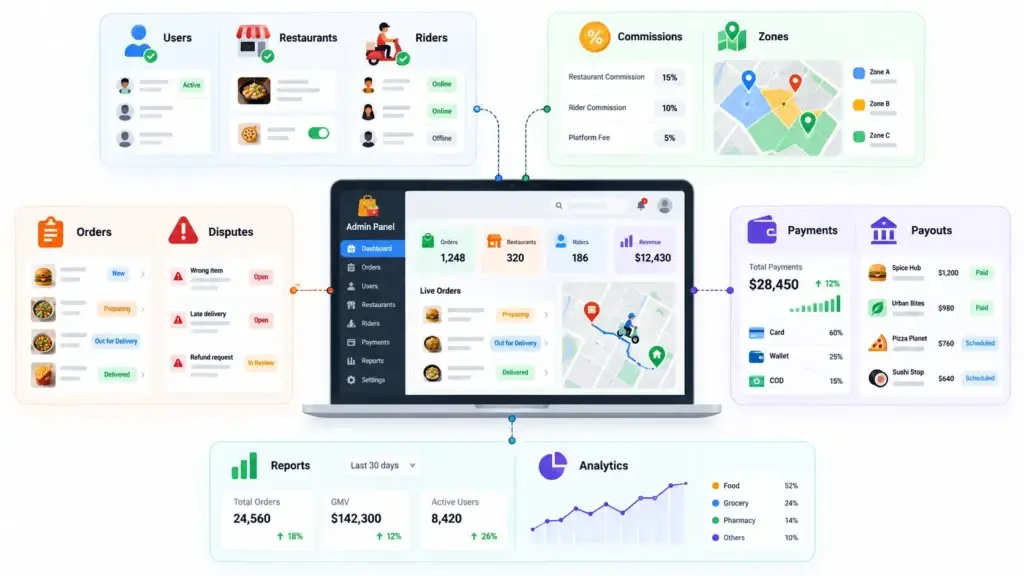
The admin dashboard is the control centre of the food delivery marketplace. It is where the platform owner manages users, restaurants, riders, orders, payments, commissions, disputes, content, and reporting.
Without a strong admin panel, every operational change requires manual work or developer dependency.
User, Restaurant, and Rider Management
The admin should have full visibility into all marketplace participants.
Important admin management features include:
- Customer management
- Restaurant approval and suspension
- Rider approval and suspension
- Profile edits
- Document review
- Support notes
- Activity tracking
- Role-based staff access
This helps the platform owner manage trust, quality, and operational risk.
Commission, Delivery Fee, and Zone Control
A food delivery marketplace needs flexible pricing rules. Different restaurants, categories, or cities may require different commission rates and delivery charges.
Important control features include:
- Restaurant-wise commission
- Category-wise commission
- Delivery zone setup
- Distance-based delivery fees
- Minimum order rules
- Surge or peak-hour logic where relevant
- Packaging or service fee controls
- Tax configuration
These settings help founders test revenue models without rebuilding the platform every time pricing changes.
Order Monitoring and Dispute Handling
The admin should be able to see what is happening across the order lifecycle.
Useful order control features include:
- Live order dashboard
- Order status tracking
- Restaurant delay visibility
- Rider delay visibility
- Cancellation management
- Refund approval
- Complaint tracking
- Delivery proof review
This is especially important when the marketplace scales beyond one neighbourhood. The founder needs operational visibility, not just order volume.
Payment, Wallet, and Payout Control
Marketplace money flow is more complex than a simple online store. Funds may involve customers, restaurants, riders, platform commissions, refunds, discounts, taxes, and wallet credits.
Important payment control features include:
- Payment gateway management
- Wallet balance tracking
- Restaurant settlements
- Rider payouts
- Refund processing
- Commission reports
- Cash collection tracking
- Failed payment logs
A clear financial control layer helps avoid confusion as order volume increases.
Reports and Analytics
Analytics help founders understand where the business is working and where it is leaking money.
Useful reporting features include:
- Total orders
- Gross order value
- Revenue by restaurant
- Revenue by zone
- Average delivery time
- Cancelled orders
- Refund trends
- Rider performance
- Customer repeat rate
- Popular cuisines and items
A founder should not have to guess which city, restaurant, or offer is performing. The dashboard should make those decisions easier.
Food Delivery Marketplace Feature Table
Core Food Delivery Marketplace Features and Business Value
| Feature Area | Important Features | Business Value |
|---|---|---|
| Customer Ordering | Restaurant discovery, menu browsing, cart, coupons, payments, live tracking | Improves conversion, trust, and repeat orders |
| Restaurant Operations | Menu control, order acceptance, availability, offers, payout reports | Helps restaurants fulfil orders accurately and manage sales |
| Rider Management | Rider onboarding, assignment, navigation, delivery updates, earnings | Improves delivery speed, accountability, and rider retention |
| Admin Dashboard | User control, zones, commission, payments, refunds, analytics | Gives platform owners control over growth, revenue, and operations |
| Monetization | Commissions, subscriptions, delivery fees, ads, promotions | Creates multiple revenue paths for the marketplace |
| Security and Trust | Role-based access, verification, secure payments, audit logs | Protects users, restaurants, riders, and platform data |
Founder Decision Signals Before Choosing Food Delivery Marketplace Features
Speed
If you want to validate a local delivery market quickly, choose a platform foundation where ordering, dispatch, payments, restaurant tools, and admin control are already connected.
Operations
If restaurants, riders, and customers need separate workflows, avoid a basic ordering app. You need a marketplace system with role-specific dashboards.
Scalability
If you plan to expand into multiple zones or cities, delivery area control, rider allocation, and payout reporting should be available from the beginning.
Revenue Control
If monetization matters from day one, make sure the admin can manage commissions, delivery fees, subscriptions, promotions, refunds, and settlements.
Monetization Features Every Food Delivery Marketplace Should Consider
A food delivery marketplace should not depend on one revenue stream. Different markets require different monetization strategies, especially when restaurant margins, customer willingness to pay, and delivery costs vary.
Common monetization features include:
- Commission on every order
- Restaurant subscription plans
- Delivery fees
- Small order fees
- Featured restaurant placements
- Sponsored listings
- Customer membership plans
- Wallet-based loyalty
- Promotional campaign fees
The best monetization setup depends on your market. For example, a premium city market may support delivery fees and membership plans. A restaurant-first local marketplace may work better with lower commissions and paid promotion tools. A franchise or cloud kitchen model may rely more on direct sales, repeat orders, and location-based offers. If your business is focused on kitchen-led fulfilment, this ghost kitchen delivery strategy can help connect restaurant operations, order control, and delivery efficiency.
For a deeper breakdown of commissions, delivery fees, restaurant plans, and promotional revenue, review this guide to the food delivery marketplace revenue model.
This is why admin flexibility matters. Founders should be able to adjust commission, delivery charges, and promotional rules without changing the code every time.
Security and Trust Features for Food Delivery Platforms
Trust is essential in a marketplace where customers pay online, restaurants depend on settlements, and riders handle deliveries.
Important trust and security features include:
- Secure payment gateway integration
- Role-based access control
- Customer, restaurant, and rider verification
- Order history records
- Refund and dispute workflows
- Admin activity logs
- Delivery proof
- Data privacy controls
- Fraud monitoring signals
- Cash collection limits for riders
For a more detailed look at verification, payment safety, dispute handling, and marketplace trust, explore this guide on food delivery app security workflows.
Security should not be treated as a final add-on. It should be part of the platform foundation because payment disputes, account misuse, false delivery claims, and refund abuse can appear once order volume grows.
Common Mistakes Founders Make When Planning Marketplace Features
Building only the customer app first
A marketplace needs restaurant, rider, and admin workflows from the beginning. A beautiful customer app will still fail if restaurants cannot manage orders or riders cannot complete deliveries smoothly.
Ignoring payout and settlement logic
Commission, refunds, cash collection, restaurant payouts, and rider earnings must be clear. Weak financial workflows create disputes and manual work.
Using fixed delivery rules for every market
Different zones may need different delivery fees, minimum order values, rider rules, and restaurant availability. A scalable marketplace needs flexible admin controls.
Treating analytics as optional
Without reports, founders cannot see which restaurants perform well, where deliveries are delayed, or which offers actually improve repeat orders.
Ready-Made vs Custom Food Delivery Marketplace Features
Founders usually face two routes: build everything from scratch or start with a ready-made platform foundation.
A custom build gives full control, but it can take longer because every module must be planned, designed, developed, tested, and connected. This includes customer ordering, restaurant operations, rider workflows, admin reporting, payment logic, notifications, and deployment.
A ready-made food delivery marketplace can be faster because the core workflows already exist. The founder can focus on branding, market positioning, restaurant onboarding, pricing strategy, and local launch operations.
| Build Route | Best For | Main Advantage | Main Watchout |
|---|---|---|---|
| Fully custom development | Unique operating models with unusual workflows | Deep flexibility | Longer planning, development, and testing cycle |
| Ready-made marketplace platform | Founders who want faster market entry | Faster launch with core modules already built | Must confirm customization scope before launch |
| Hybrid approach | Businesses that need speed plus selected custom features | Faster foundation with tailored workflows | Requires clear feature prioritization |
If you are budgeting for customer apps, restaurant dashboards, rider workflows, payment integrations, admin controls, and launch support, this guide on what affects food delivery platform development cost can help you plan the scope more clearly.
Miracuves supports founders with a ready-made food delivery platform that can be branded, configured, and launched faster. For businesses that want to move from idea to market without building every module from zero, this approach can reduce development complexity while keeping the platform commercially useful.
How Miracuves Helps Founders Launch Faster
Miracuves helps founders build food delivery marketplace platforms with customer ordering, restaurant operations, rider management, payment workflows, admin control, and monetization features. When choosing a food delivery app development partner, founders should look beyond app screens and evaluate ordering logic, restaurant tools, rider workflows, payment handling, and admin control.
Instead of starting from a blank development scope, founders can begin with a launch-ready foundation and customize it around their market. This is useful for local delivery startups, restaurant groups, cloud kitchens, grocery operators, and multi-location businesses that want control over branding, operations, and revenue.
Where relevant, Miracuves can support a 6-day solution delivery approach for ready-made food delivery platforms, depending on final scope, branding requirements, integrations, and deployment needs.
For founders comparing build options, the key question is not only “What features do we need?” It is “Which features must be ready on launch day so the marketplace can actually operate?”
Explore Miracuves’ ready-made food delivery platform built for ordering, dispatch, and admin control to see how these modules connect inside a working marketplace.
Related reading: marketplace gifting, slots and standing orders.
Final Thoughts
Food delivery marketplace features should be planned around real operations, not only app screens. Customers need smooth ordering. Restaurants need menu and order control. Riders need fast dispatch and delivery clarity. Admins need visibility over payments, commissions, disputes, zones, and growth.
Founders can also review current food delivery app development trends before deciding which features should be included at launch and which can be added after validation.
The strongest platforms are not the ones with the longest feature lists. They are the ones where every feature supports a business workflow.
For founders, the practical path is to define which modules are essential for launch, which controls are needed for daily operations, and which features can be added after market validation. Miracuves helps founders move faster by starting with a ready-made food delivery marketplace foundation that can be branded, configured, and prepared for launch with the right operational control layer.
FAQs
What are the most important food delivery marketplace features?
The most important features include customer ordering, restaurant menu management, rider assignment, live tracking, secure payments, admin dashboard, commission control, refunds, ratings, and reporting. These features work together to support the full order lifecycle.
Why does a food delivery marketplace need separate restaurant and rider apps?
Restaurants and riders have different workflows. Restaurants need to manage menus, accept orders, update preparation status, and track payouts. Riders need delivery tasks, navigation, pickup details, customer location, and earnings visibility. Separate apps keep each role focused.
What should founders look for in a food delivery admin dashboard?
Founders should look for user management, restaurant approval, rider control, live order monitoring, commission settings, delivery zones, payment tracking, refund handling, reports, and role-based access. The admin dashboard should reduce manual dependency.
How do delivery zones help a food delivery platform?
Delivery zones help the platform control which restaurants serve which locations, how delivery fees are calculated, and which riders operate in each area. This is important for managing expansion, delivery time, and operational cost.
Which monetization features should a food delivery marketplace include?
Common monetization features include order commissions, restaurant subscriptions, delivery fees, featured listings, sponsored placements, customer memberships, and promotional campaigns. The right mix depends on the market and restaurant economics.
Is a ready-made food delivery platform better than custom development?
A ready-made platform is useful when founders want faster launch and core marketplace workflows already connected. Custom development is better for highly unique operating models. Many founders choose a ready-made foundation first, then customize based on market feedback.
How does rider management affect customer experience?
Rider management affects delivery speed, tracking accuracy, order handoff, and customer trust. If rider assignment or status updates are weak, customers may face delays even when restaurants prepare orders on time.
Can Miracuves help launch a food delivery marketplace quickly?
Yes. Miracuves provides ready-made and white-label food delivery marketplace solutions with customer, restaurant, rider, and admin workflows. Depending on final scope and configuration, Miracuves can support faster launch timelines, including 6-day delivery for ready-made solutions where applicable.
Miracuves is an independent software development company. We are not affiliated with, connected to, sponsored by, or endorsed by any company or product named in this article.
Terms such as “X Clone” are used descriptively. It is how the software industry refers to building a platform with functionality comparable to a known service, and how clients search for it.
The entire design and codebase of our products is built by our own team. Our products contain no code, design, graphics, or content originating from any third-party website or applications.
All third-party names and marks referenced in this article are the property of their respective owners, referenced solely to identify the services discussed.