
















v2026 - Production Ready

Binance Clone App - White-Label Centralized Crypto Exchange

Crypto Exchange Script with P2P Escrow, Staking Pools, Token Launchpad and Admin Console

A launch-ready centralized crypto exchange with the whole trading shelf under one roof: spot and futures markets, P2P with escrow, staking pools, and a token launchpad, all behind one account, one wallet and one admin console.

Three surfaces from one codebase: a trader website, Flutter apps for Android and iOS, and an admin panel for chains, pairs, fees, KYC review, withdrawals and profit reports, delivered white-label with the complete source code.

Launch in 6 Days with

  • 60 Days Platform Guidance
  • Complete Source Code
  • Complete Rebranding
  • Complete White-Labeling
  • App Publishing Support
  • 6 Months Bug Fixes + 12 Months Updates
MXCrypto console · ExchangeLive
Orders matched1,284
Pending withdrawals7
Pairs live48

Exchange activity

  • Spot order matchedSpot
  • Futures position openedFutures
  • Deposit confirmed on chainWallets
  • Withdrawal waiting for approvalWithdrawals
  • P2P trade released from escrowP2P
  • Stake started in a poolStaking
  • KYC application approvedKYC
  • Launchpad contribution receivedLaunchpad
  • Spot order matchedSpot
  • Futures position openedFutures
  • Deposit confirmed on chainWallets
  • Withdrawal waiting for approvalWithdrawals
  • P2P trade released from escrowP2P
  • Stake started in a poolStaking
  • KYC application approvedKYC
  • Launchpad contribution receivedLaunchpad
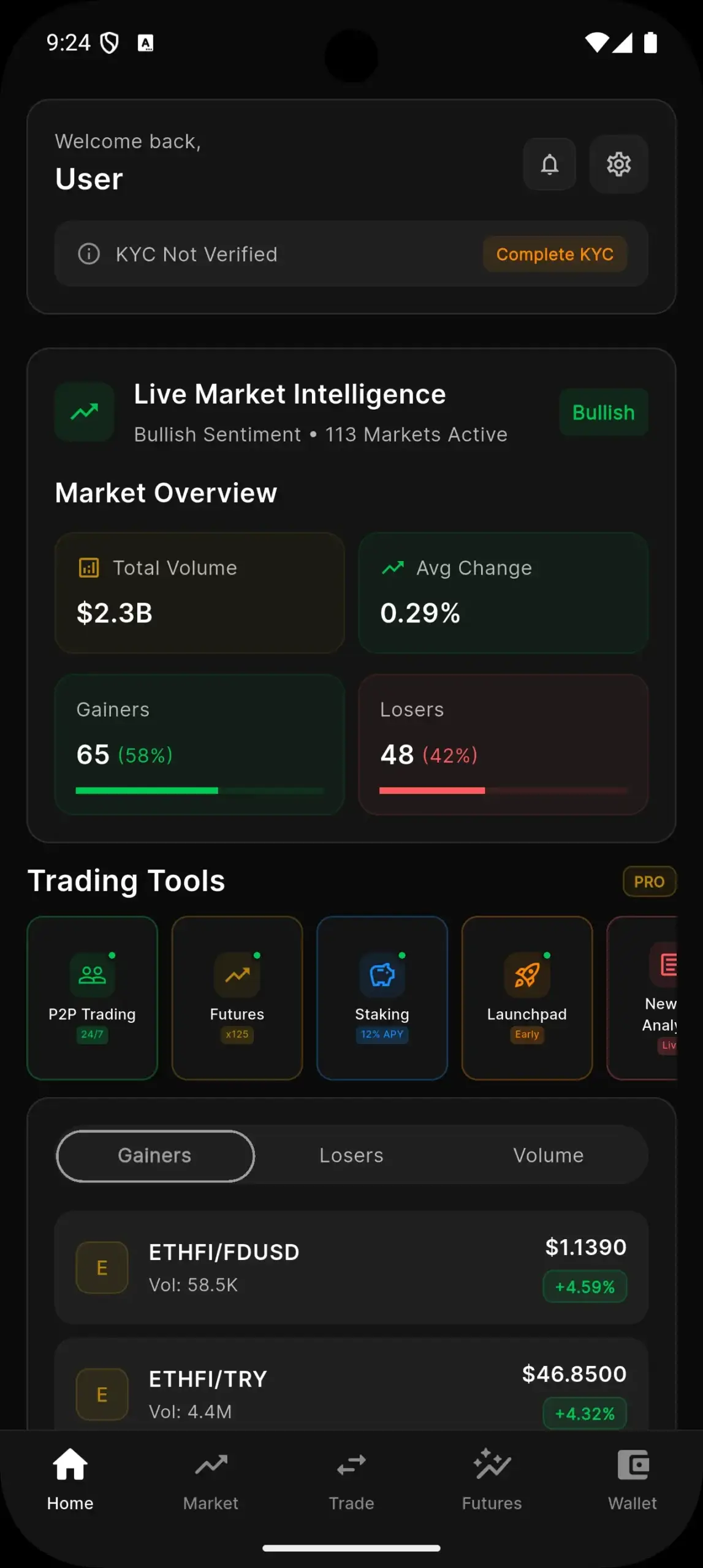
Binance Clone app home screen with KYC status, market overview, gainers and losers and a row of trading tools.
Spot, futures, P2P and stakingone order flow

Platform at a Glance

6
Days to Go Live

our build time, store review is separate

3
Surfaces

trader site, mobile apps, admin panel

5
App Tabs

Home, Market, Trade, Futures and Wallet

15
Chains Listed

twelve built in and three extended, shown in the admin

Every Market Product Behind One Login

Spot, futures, P2P, staking and the launchpad share one account and one wallet, so a trader moves between products without registering again.

KYC and Custody the Operator Controls

Users pass the KYC levels you configure, deposits land in generated wallets per chain, and withdrawals can be approved by hand or automatically.

Ready to open your own crypto exchange?Talk to Product Expert

Chosen by 6,000+ clients across the globe

Miracuves is listed by Expertise.com as a managed IT service provider.Miracuves is an official member of the Forbes Business Council.Miracuves is a verified agency on DesignRush, listed among top design agencies in India.Miracuves is reviewed on Trustpilot as a software development company.Miracuves is listed by The Manifest among top managed software development companies.Miracuves is listed by DesignRush as a top software development company.Miracuves is recognized by GoodFirms as a top software development company.Miracuves is ranked among the top 1000 companies globally by Clutch.Miracuves is a top managed service provider in the United States on Clutch.

01See it live

Live in Action

Binance Clone Demo - Trader App, Web Platform & Admin Panel

Try the Miracuves Binance Clone hands-on. One shared login opens the trader app and the web platform, and the admin login is shared on a guided call. Scan the markets, open a deposit address, look at the staking pools and check how KYC is prompted.
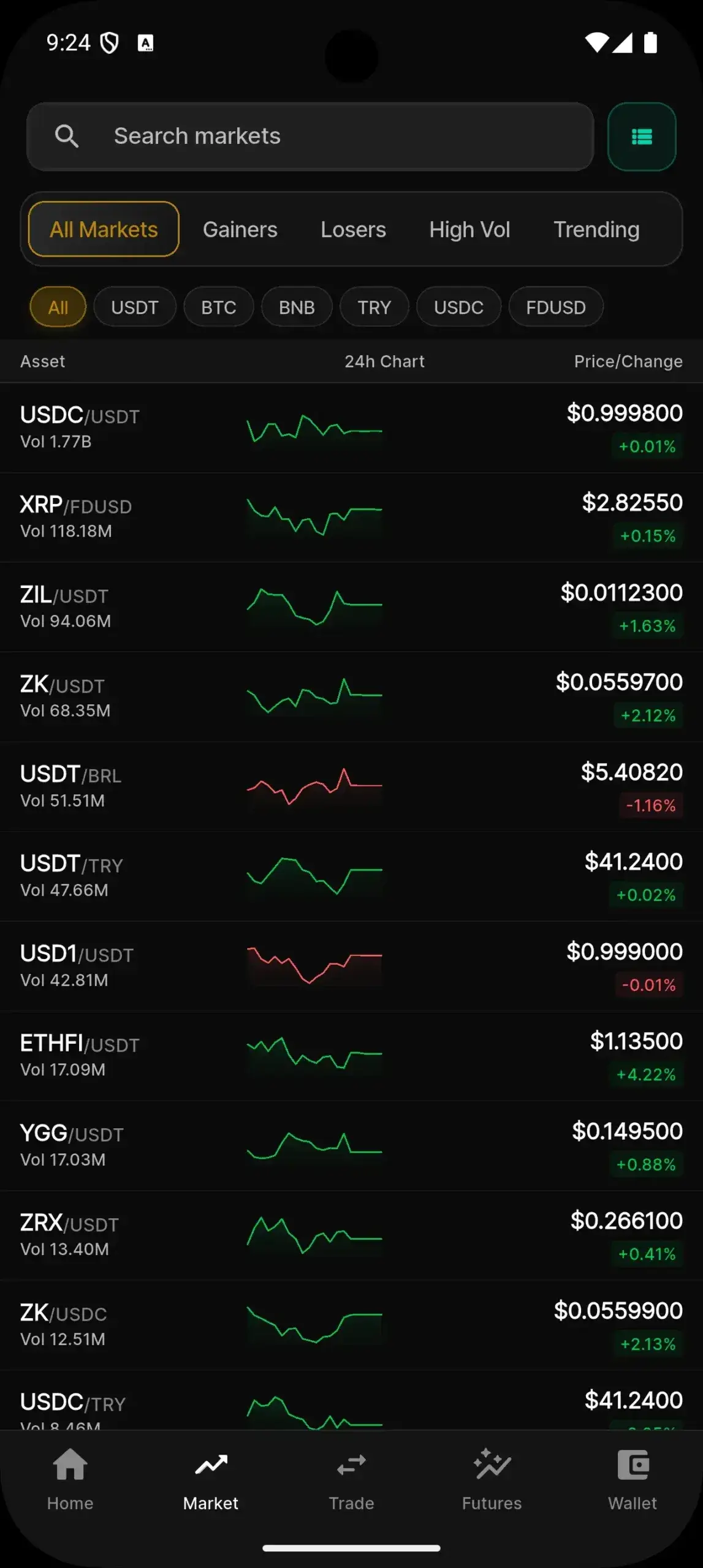
Binance Clone app home screen with KYC status, market overview, gainers and losers and a row of trading tools.Binance Clone app markets list with search, gainers, losers and quote-asset filters, price and 24-hour change per pair.
Live demo
TRADER APP

Binance Clone - Trader App

The exchange on a phone: Home with market overview and KYC status, a searchable markets list, a deposit address with a QR code, staking pools and the account profile.

  1. 1Open the app portal and pick your phone
  2. 2Sign in with the demo login below
  3. 3Explore: Home, Market, Wallet, Staking
Try:user@demo.com | User_321
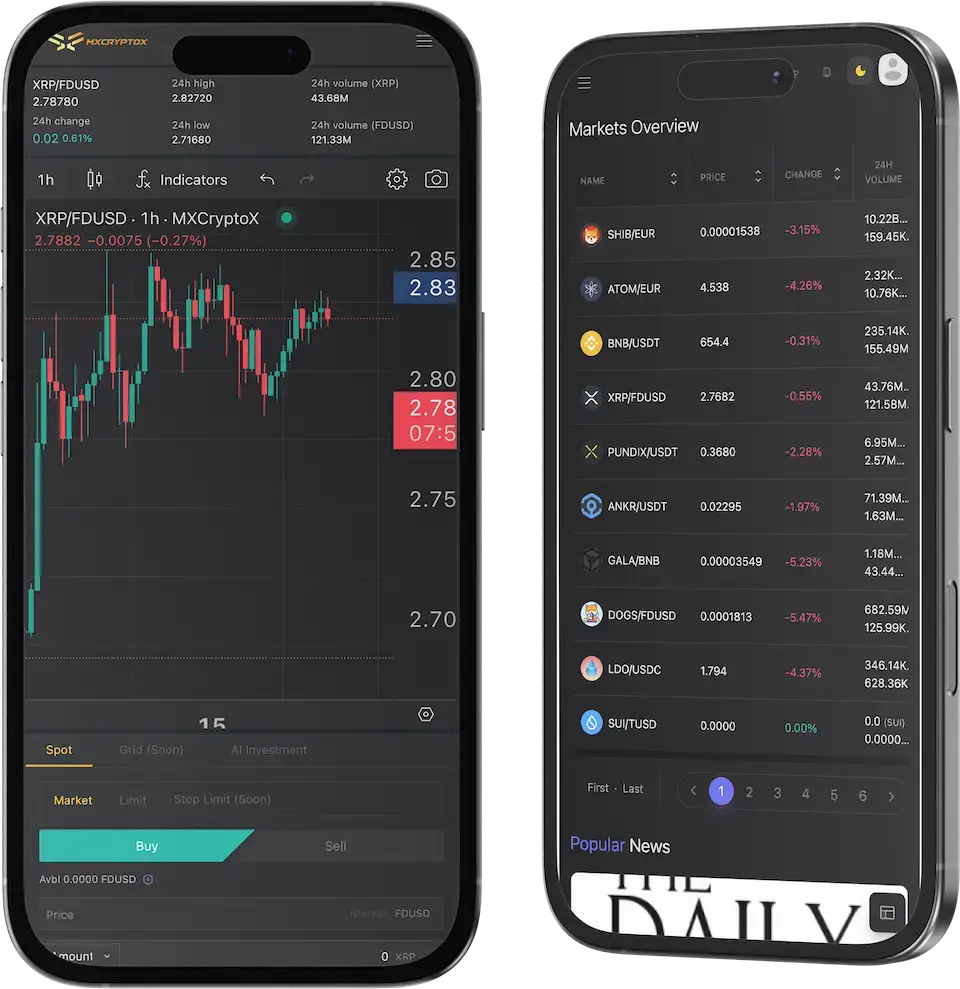
mxcrypto.mimeld.comBinance Clone on two phones: a trading chart with a buy and sell panel and the markets overview on mobile web.
Live demo
WEB PLATFORM

Binance Clone - Web Platform

The same exchange in a browser: a markets overview with price, 24-hour change and volume per pair, then the trading, wallet and account pages.

  1. 1Open the demo site in a browser tab
  2. 2Sign in with the demo login below
  3. 3Explore: Markets, Trade, Wallet, Account
Try:user@demo.com | User_321
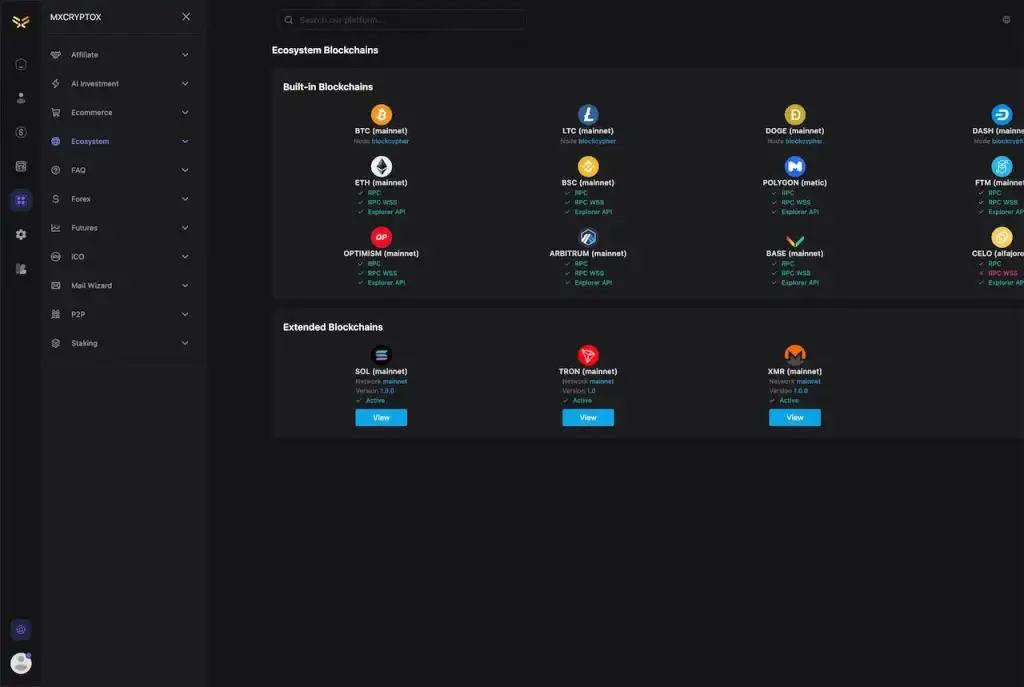
mxcrypto.mimeld.comBinance Clone admin ecosystem page listing built-in and extended blockchains beside the Affiliate, Futures, ICO, P2P and Staking menus.
Live demo
ADMIN PANEL

Admin Panel - Chains, Assets, Pairs & KYC

The operator console. Its menus include Ecosystem, Futures, Forex, ICO, P2P, Staking and Affiliate, with the chain manager listing built-in and extended blockchains.

  1. 1Open the admin panel on the demo host
  2. 2Ask the team for the admin login
  3. 3Explore: Ecosystem, Futures, P2P, Staking
Admin login:shared on a guided call
Binance Clone app deposit address screen with a QR code, the network and a countdown for the deposit session.Binance Clone app staking screen with total value locked, average APR and Overview, My Stakes and All Pools tabs.
Live demo
GUIDED TOUR

Launchpad & Futures Walkthrough

Some surfaces are best shown with an engineer beside you: futures and the token launchpad, set up around your own listing plan instead of the public demo data.

  1. 1Pick a 30-minute slot
  2. 2Tell us your markets and token plan
  3. 3We open the matching surfaces together
Demo access:available on request
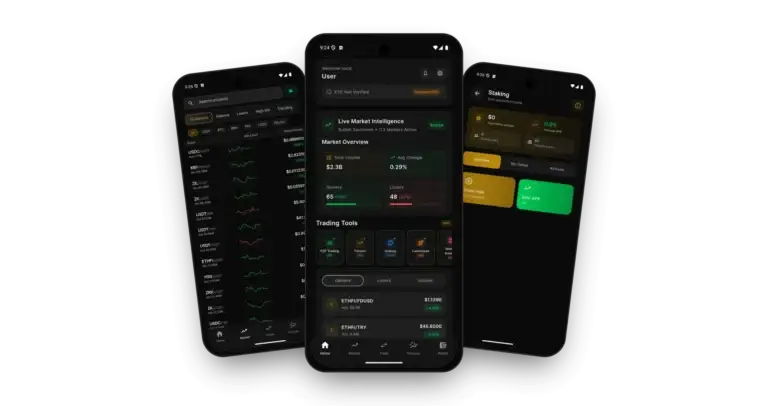
Binance Clone on three phones: the exchange app home with market overview and trading tools, the live markets list with 24-hour charts and the staking pools overview

See It With Us

Binance Clone Walkthrough: Markets, Wallets, Staking & Admin Panel

The quickest way to judge an exchange is to watch an engineer drive it. In 30 minutes we open the trader app, the web platform and the admin panel and tie each screen to your own plan: your first pairs, your fee schedule, your KYC levels and your launch date.

Schedule a live walkthrough call.

Every Screen Mapped

Binance Clone App Flows - Mobile App, Admin Chain Manager & Device Views

From sign-in to a staking pool: the real screens of the trader app, the admin ecosystem page and the exchange on phone-sized screens, in the order a trader meets them.
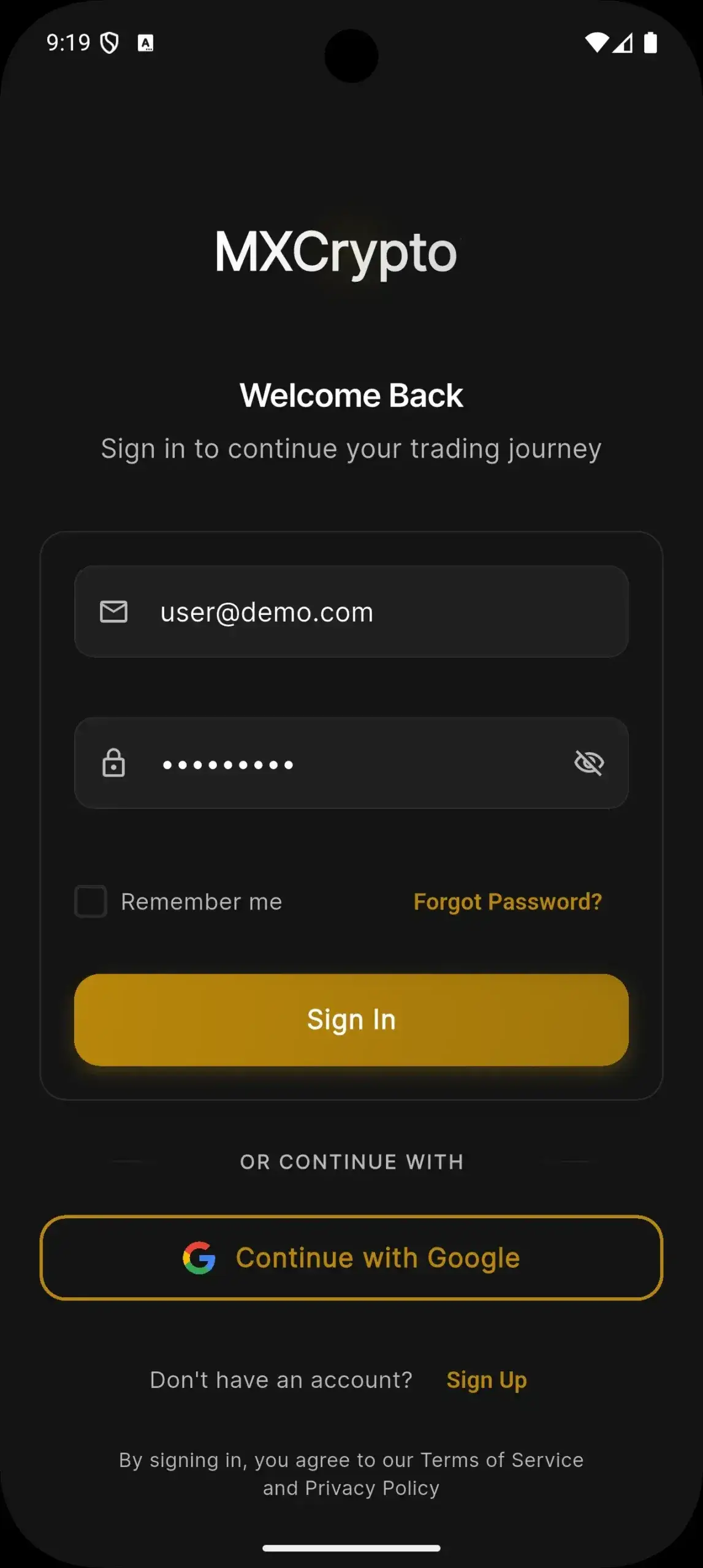
Binance Clone app sign-in screen with email, password, remember me, forgot password and Continue with Google.
Binance Clone app home screen with KYC status, market overview, gainers and losers and a row of trading tools.
Binance Clone app markets list with search, gainers, losers and quote-asset filters, price and 24-hour change per pair.
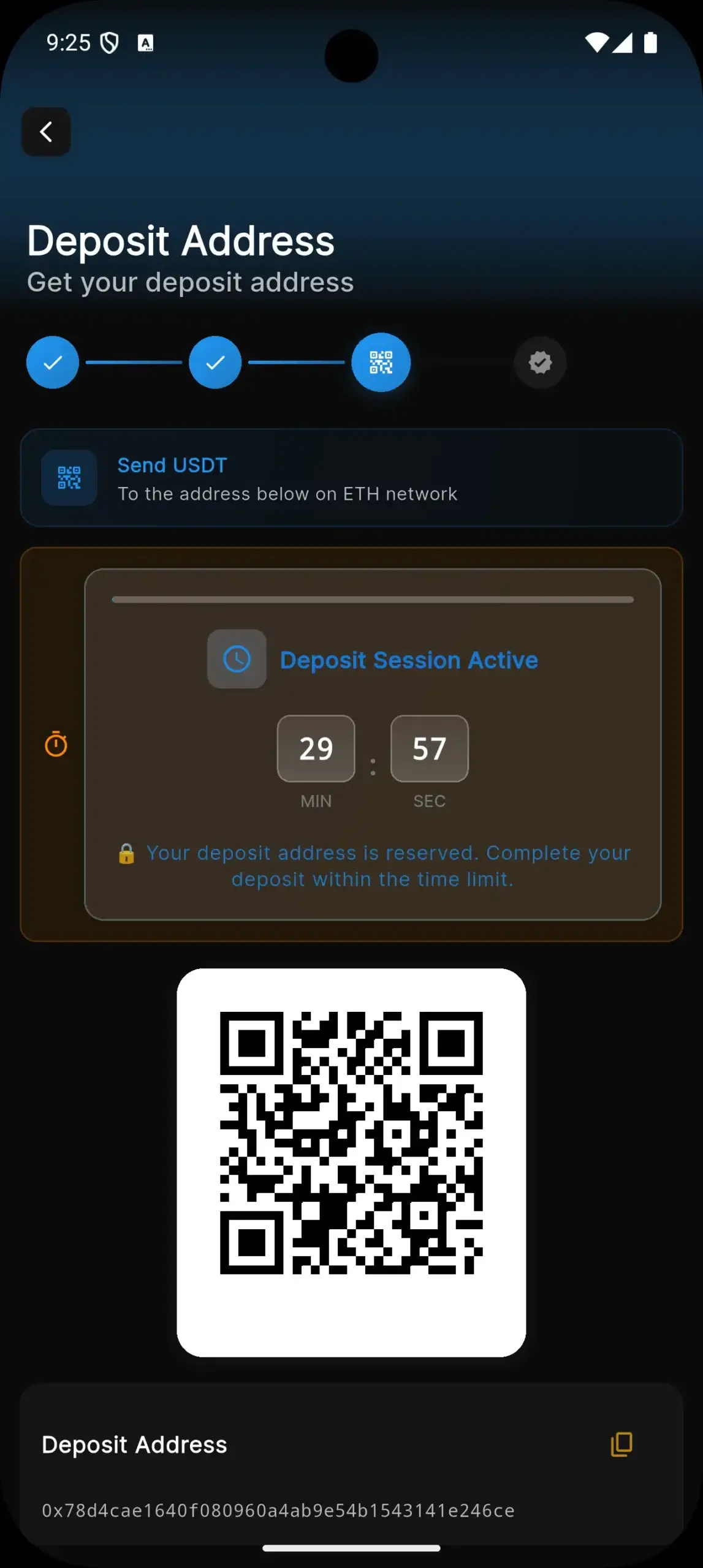
Binance Clone app deposit address screen with a QR code, the network and a countdown for the deposit session.
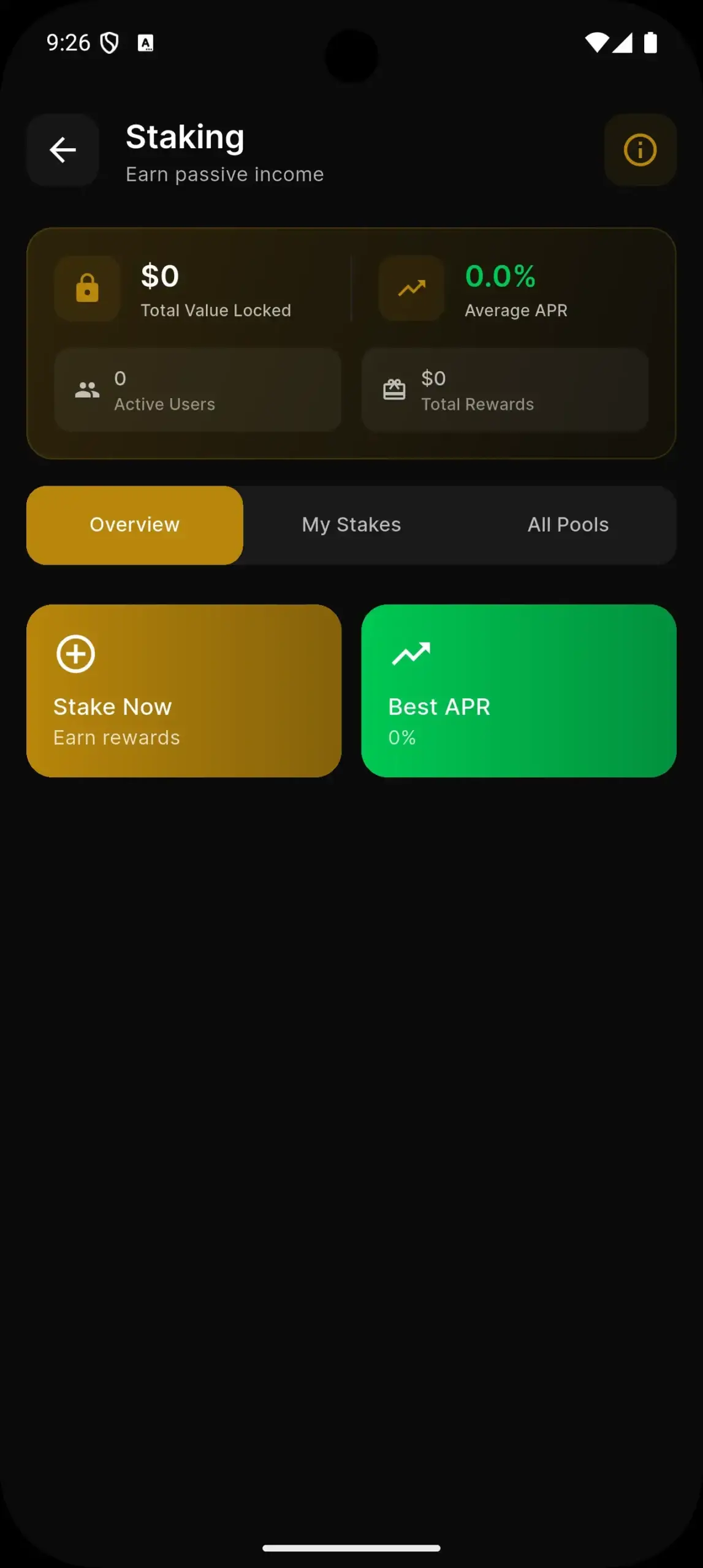
Binance Clone app staking screen with total value locked, average APR and Overview, My Stakes and All Pools tabs.
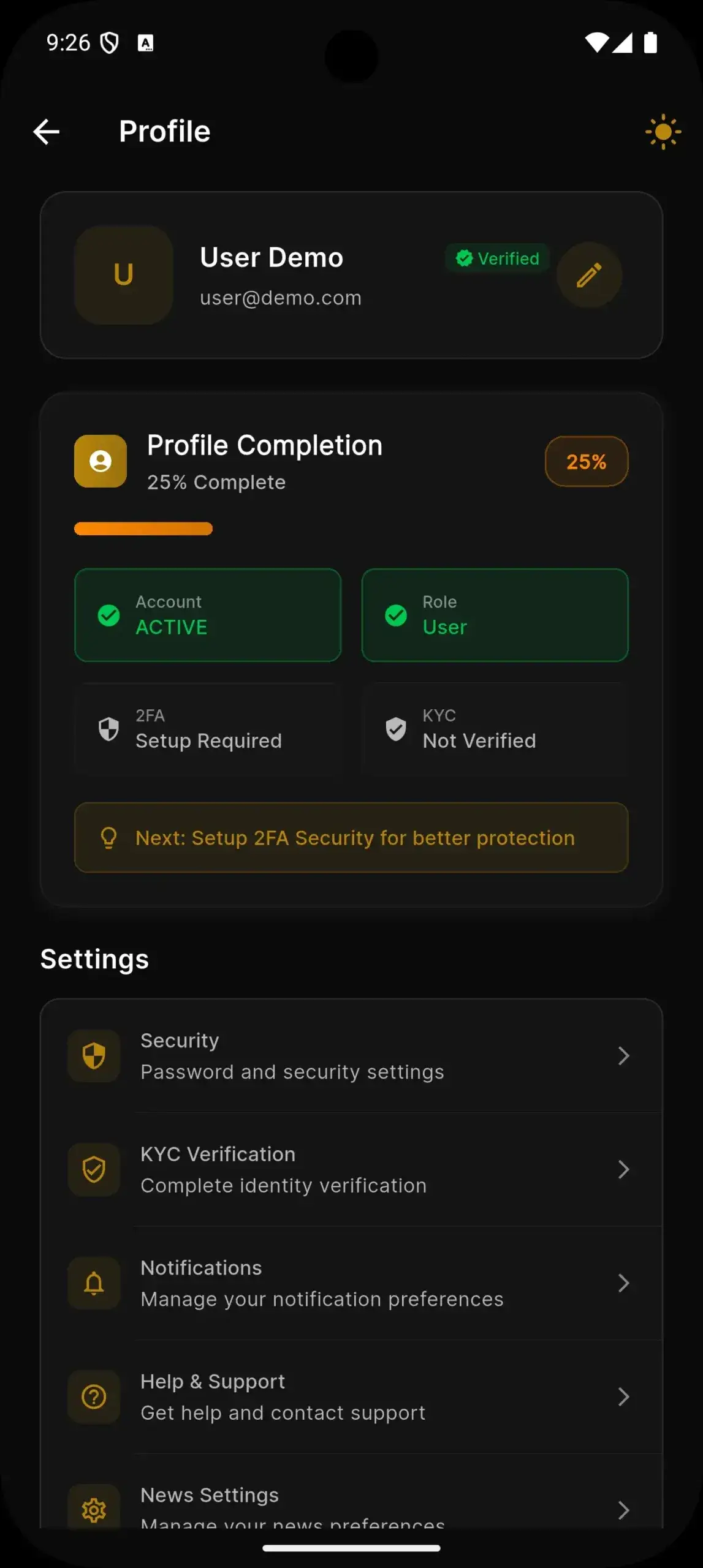
Binance Clone app profile screen with completion progress, security settings, KYC verification and notifications.
6 screens · scroll →
Binance Clone admin ecosystem page listing built-in and extended blockchains beside the Affiliate, Futures, ICO, P2P and Staking menus.
1 screen
Binance Clone on two phones: a trading chart with a buy and sell panel and the markets overview on mobile web.
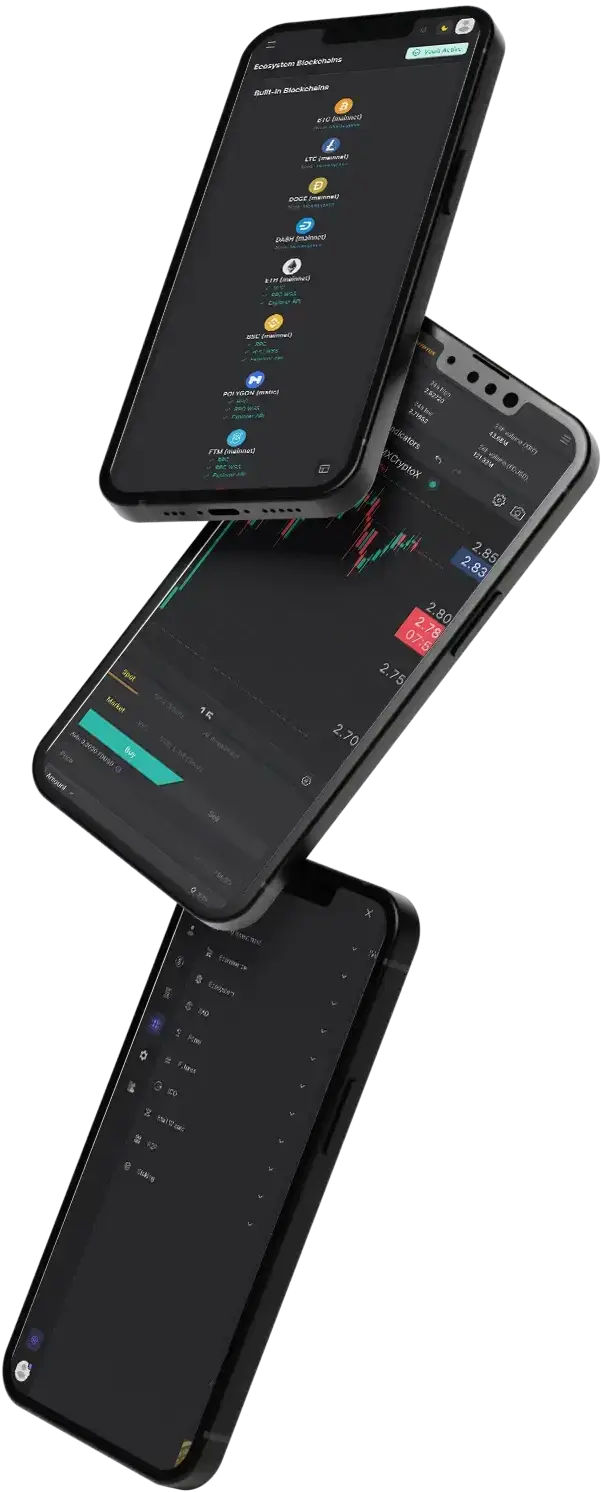
Binance Clone app screens on tilted phones: the chain list, a trading chart and the main menu.
2 screens · scroll →

Follow a trader from sign-in through the Home screen and the markets list to a funded wallet and a staking pool, and follow an operator through the admin ecosystem page where chains are listed and activated.

Explore Our Solutions

02Proof

Client Voices

Binance Clone Client Reviews - Exchange Founders in Their Own Words

What clients say about building on Miracuves bases. The first two come from teams that opened exchanges on this one; the other six come from other industries and are shown exactly as their authors gave them.

AAnton BarbaroFounder & CEO, Annurax Exchange
“We had a licence sitting idle and every quote we pulled came back six figures on a nine-month timeline. Miracuves had a matching engine, settlement and the trading surface already built, so we spent our time on branding, the on-ramp and our reward token instead of on order books. The platform was running inside a month, and we have had no settlement incidents since.”
CChadi El BoustaniManaging Partner, Florida Growth Ventures LLC
“We needed a centralized exchange with KYC, wallets, and mobile apps before our token launch — every US quote came back at six figures and 9 months. Miracuves had a battle-tested exchange base that already covered matching, settlement and the trading UI. We reused that and layered our own branding, a custom USD on-ramp, and the ORCA reward token. Staging was up in 6 weeks, live users by week 14. Building from scratch would have burned 8–10 engineering months and roughly $400k in salaries alone. Six months in, we've processed three figures of millions in volume with zero settlement incidents.”
DDr. Vivek RungtaFounder & Chief Dermatologist, Dermacian
“Every HMS I tried was built for general physicians, with no lesion mapping, no before/after tracking, and no procedure-based billing. Their MXHealth base gave us the patient app, doctor app, EMR and video consult out of the box. Front-desk time on scheduling and follow-ups is down ~70%, and we went fully digital in 9 months, where a fully custom job would have been 18.”
AAndre GittensCEO, Ride Corporation
“Turo is the obvious reference, but the Caribbean specifics, from different insurance norms to different payment rails, meant we needed a real partner, not just a clone. Miracuves’s MXCar base covered the listing, the trip flow, and the host payouts. We launched in 6 working days and are live in three islands.”
MMarsha WilliamsFounder, Bmore On Demands LLC
“The team was running it on a dispatcher and a Google Sheet, and we needed a real platform quickly, because we were about to onboard a major retail client. Miracuves’s Delivery Genie base gave us the rider app, the dispatch console, and live tracking. We launched in 6 weeks and cleared 4x the previous order volume in the first month.”
TTiffany DandreaOperations Director, Best Cabo Yacht Rentals
“We were running it on phone calls and a paper calendar, and we were losing bookings to bigger OTAs. Miracuves’s GetmyBoat Clone base gave us the calendar, the booking flow, and the payment engine. Online bookings are up roughly 70% in the first six months, and the ops team finally has a live view of the fleet.”
DDr. Carlos A. PalermoCo-founder & CEO, Doctta Health
“Building a compliant telehealth stack from scratch in three markets would have been a year-plus effort. Miracuves’s MXHealth base covered the patient and doctor apps, video consult, e-prescription and the pharmacy integrations. We launched in our first market in 9 weeks and rolled out to two more in the following six months.”
BBrian LatailleVP Logistics Technology, IBC Tanks Canada
“We were juggling spreadsheets, a third-party GPS provider, and a phone. We needed a single operations console. Miracuves’s MXLogistics base covered the trip lifecycle, the driver app, and the customer tracking page. We’ve cut operations admin time by about 40%.”
Read More Client TestimonialsOperators and founders in their own words

Proof in Production

Binance Clone Case Study - Annurax Exchange Trading Venue

How a licensed team stood up a centralized crypto exchange on the Miracuves Binance Clone base. Summarized from the published case study, which describes what was delivered in 2024.

Case Study
Centralized Crypto Exchange

Annurax Exchange held a license and needed a trading venue. Miracuves built on the Binance Clone base, spent the effort on the parts that were the client's own, and transferred the source code at handover.

Annurax ExchangeClient
2024Delivered
Centralized crypto exchangeIndustry
6 daysBuild time
20 of 25Blocks reused
4Applications shipped
Binance Clone admin ecosystem page listing built-in and extended blockchains beside the Affiliate, Futures, ICO, P2P and Staking menus.
Challenges
  • A license already held, but every quote for the trading platform ran to six figures and nine months
  • Matching, settlement and the trading screens are slow and risky to write from nothing
  • Listed markets, the token and the KYC policy were commercial calls only the client could make
Goal
  • Open the exchange without writing the engine, the ledger and the trading surface again
  • Spend the effort on branding, the on-ramp and the reward token
  • Hold the source code, schema and deployment configuration outright
Solution by Miracuves
  • Spot, futures and forex, P2P with escrow and the binary and practice surfaces the published case study lists, each with its own permissions
  • Five client decisions implemented: listed markets, the token, KYC and AML policy, fee schedule, brand and theming
  • Deployment to the client's own hosting, with apps submitted from the client's developer accounts
  • Source, schema, deployment configuration and architecture notes handed over
  • Build window of 6 working days on the ready-made base

“We had a licence sitting idle and every quote we pulled came back six figures on a nine-month timeline. Miracuves had a matching engine, settlement and the trading surface already built, so we spent our time on branding, the on-ramp and our reward token instead of on order books. The platform was running inside a month, and we have had no settlement incidents since.”Anton Barbaro · Founder & CEO, Annurax Exchange

Read the full case studySee the 20 reused blocks, the 5 built for the client and the six-day timeline.

03The product

The Basics

What the Binance Clone App Does for Traders and Operators

A Binance Clone is a ready-made centralized crypto exchange. Traders sign up, pass KYC, send coins to per-chain deposit addresses and then trade spot and futures markets, stake, deal peer to peer or join token launches, while the operator sets pairs, fees and withdrawal rules in an admin panel.

Binance Clone on three phones: the exchange app home with market overview and trading tools, the live markets list with 24-hour charts and the staking pools overview

Breadth, Not Just a Chart

Spot, futures, P2P, staking and a launchpad share one account and one wallet, so the exchange can add a product at a time without a second sign-up.

Not a Locked Box

You get the unencrypted source for the web platform, the apps and the admin panel, so your own engineers can change screens and rules with no per-seat fee.

Plain About What Is Extra

Trading bots, liquidity pools, an NFT marketplace and social trading are add-ons, each quoted on its own. This page never counts them as base features.

Web, Android & iOS

What Is a Binance Clone Script?

The hard part of an exchange sits under the trading screen: an order book and matching logic that agree with a ledger, wallets that confirm deposits on several chains, and admin controls over who may withdraw what. Those parts arrive built, and you can test them in the demo before you decide.

Binance Clone admin ecosystem page listing built-in and extended blockchains beside the Affiliate, Futures, ICO, P2P and Staking menus.
  1. 01Spot and futures markets with live charts
  2. 02Multi-chain deposit addresses and wallets
  3. 03KYC levels, P2P trades and staking pools
  4. 04Launchpad rounds for your own token
  5. 05Admin panel for pairs, fees and profit reports

You receive three surfaces: the trader website, Flutter apps for Android and iOS, and an admin panel, with the complete source code for each.

Everything Included

Binance Clone Features - Spot, Futures, Wallets, KYC, P2P, Staking, Launchpad & Admin

Everything below can be seen in the app screens, the admin panel, the release log or the published case study. Anything that needs an extra module is named as an add-on further down the page.

Feature 01 / 12

Spot Trading & Live Markets

Traders open a pair, read the chart and the order book and place an order. The markets list shows price, 24-hour change and volume for every pair.

  • Markets list with price, 24h change and volume
  • Gainers, losers, high-volume and trending tabs
  • Quote-asset filters such as USDT, BTC, BNB and USDC
  • Candlestick chart with indicators beside a buy and sell panel
  • Market and limit orders on the Spot tab
  • Price-time priority matching with a live order book and tickers
Feature 02 / 12

Futures Trading

A Futures tab sits in the app navigation, backed by leverage settings and by exposure limits on the admin side.

  • Futures tab in the app navigation
  • Leverage settings
  • Exposure caps and liquidation rules for leveraged positions
  • Risk alerts and position limits in the admin
  • Futures and Forex menus in the admin panel
Feature 03 / 12

Chains, Wallets & Deposits

Each user gets deposit addresses per chain, shown with a QR code and a time-limited deposit session, while the operator manages master and custodial wallets.

  • Deposit screen with a QR code and a countdown timer
  • Network named on the screen, such as ETH
  • Twelve built-in chains including Bitcoin, Ethereum, BSC and Polygon
  • Solana, Tron and Monero as extended chains
  • Master wallets and user wallets generated per chain
  • Custodial wallet search and transactions in the admin
Feature 04 / 12

KYC & Account Security

The Home screen shows KYC status with a Complete KYC prompt, the admin reviews applications by level, and the profile screen carries a two-factor setup prompt.

  • KYC status and a prompt on the Home screen
  • KYC applications with levels and templates in the admin
  • Rejection modal and handling of document errors
  • Two-factor authentication setup on the profile screen
  • Email sign-in and Continue with Google
  • User activity logs and access control
Feature 05 / 12

P2P Trading & Escrow

Traders deal directly with each other through offers and trades, with funds held in escrow until release and disputes handled by the operator.

  • P2P menu with offers and trades
  • Escrow hold, release and dispute handling
  • Payment Methods at the top of the user P2P menu
  • Offer card shows the remaining balance in the trade currency
  • P2P profit tracked in the admin
Feature 06 / 12

Staking Pools

The Staking screen shows total value locked, average APR and active users, with Overview, My Stakes and All Pools tabs.

  • Overview, My Stakes and All Pools tabs
  • Total value locked and average APR tiles
  • Stake Now and Best APR shortcuts
  • Rewards and active-stake counters
  • Staking menu in the admin panel
  • Rewards history inside the wallet dashboard
Feature 07 / 12

Token Launchpad & Listings

A Launchpad shortcut sits among the trading tools, and the admin has an ICO menu, so a token round can run on your own venue.

  • Launchpad shortcut in the Trading Tools row
  • ICO menu in the admin panel
  • Token deployment and import with clearer error handling
  • ICO contributions counted in the profit reports
  • Add, edit or delist coins and tokens from asset management
  • Listed markets are configuration, not a rebuild
Feature 08 / 12

Home Screen & Market Intelligence

The Home screen opens with a welcome line and KYC status, then a market overview of total volume and average change, gainers and losers, and a row of trading tools.

  • Welcome header with KYC status
  • Total volume and average change tiles
  • Gainers and losers counters with percentages
  • Trading Tools row: P2P, Futures, Staking and Launchpad
  • Live Market Intelligence banner with market sentiment
Feature 09 / 12

Fees, Rewards & Affiliates

Fee settings sit in the admin: maker and taker per pair, transfer percentages and chain fees on withdrawals, plus affiliate programs that reward referrals.

  • Maker and taker fee settings per pair
  • Percentage transfer fee setting
  • Wallet withdraw chain fee setting
  • Spot wallet withdraw percentage fee
  • Affiliate program with unilevel and binary trees
  • Wallet generation for affiliate reward claims
Feature 10 / 12

Mobile Trading Apps

Flutter apps for Android and iOS carry five bottom tabs and a dark theme, with a Home screen of live market intelligence and shortcuts to the trading tools.

  • Android and iOS apps written in Flutter
  • Home, Market, Trade, Futures and Wallet tabs
  • Search field and quote-asset filters on the Market tab
  • Profile with security settings, notifications and help
  • Dark theme across the app
Feature 11 / 12

Admin: Users, Assets & Pairs

One console covers users, coins and tokens, trading pairs with their fees, risk limits and the chain manager.

  • Users with KYC status and access control
  • Add, edit or delist coins and tokens
  • Trading pair setup with fees
  • Leverage, exposure and position limits
  • Ecosystem page for built-in and extended chains
  • Export user details to Excel
Feature 12 / 12

Withdrawals, Profit & Reports

Withdrawals can be approved by hand or automatically, and the admin profit pages total what the exchange earns from each product line.

  • Withdrawal approval by hand or automatically in settings
  • Processing status until a withdrawal is finalized
  • Fee refund when a spot withdrawal is rejected
  • Profit management and profit analysis pages
  • Profit across withdrawals, transfers, P2P trades and ICO contributions
  • Email notices for withdrawal confirmations and failures
  • Fiat currency rates through an exchange-rate API

Before you buy, note this: The exchange arrives rebranded to your identity and deployed in 6 days of our build time. You bring hosting and a domain, a verified developer account for the stores, your branding and business details, keys for the KYC and market-data providers you choose, and the license or registration your market requires. Store review sits with Apple and Google and falls outside those 6 days.

Talk to Our Team

Operate It Day to Day

Binance Clone Admin Panel - Chains, Users, Pairs, Withdrawals & Profit Reports

One console covers the exchange operator's day: which chains are live, who is verified, which pairs trade at what fee, which withdrawals wait for approval and what the venue earned.

Binance Clone admin ecosystem page listing built-in and extended blockchains beside the Affiliate, Futures, ICO, P2P and Staking menus.
Binance Clone on two phones: a trading chart with a buy and sell panel and the markets overview on mobile web.

Admin Panel Sections

  • 01

    Ecosystem & Chains

    A chain manager lists built-in and extended blockchains with their RPC and explorer endpoints, and has a page to activate, install and update more.

  • 02

    Users & KYC

    Review users and their KYC applications by level, follow activity logs, set access control and export user details to Excel.

  • 03

    Assets & Trading Pairs

    Add, edit or delist coins and tokens, create or remove trading pairs and set the fees that apply to each of them.

  • 04

    Futures, Forex & Risk

    Futures and Forex menus sit beside risk controls: alerts, leverage settings and position limits for the products you switch on.

  • 05

    Withdrawals & Wallets

    Approve withdrawals by hand or automatically, follow the Processing status, and search custodial wallets by blockchain.

  • 06

    Profit Management & Analysis

    Finance pages total what the exchange earns from withdrawals, transfers, P2P trades and ICO contributions.

  • 07

    P2P, ICO & Staking Menus

    Dedicated menus to oversee peer trades, token sale rounds and staking pools, each in its own section of the console.

  • 08

    Affiliates & Mail Wizard

    Run the affiliate program with unilevel and binary trees, and use the Mail Wizard menu for messages to your users.

Money Movement

The finance side of the console, from a deposit confirmation to a processed withdrawal.

  • Percentage transfer fee and wallet chain fee settings
  • Fixed chain fee so the target wallet receives the full amount
  • Fee refund when a spot withdrawal is rejected
  • Fee entries removed when an admin removes a transaction

Settings & Tools

The controls behind pricing data and the daily routine.

  • Exchange provider markets and currencies importer
  • Multiple fiat currency rates through an exchange-rate API
  • Regular or priority mining fee rate
  • HEIC and HEIF uploads converted to JPG

Need the console to do more? Extra chains or exchange providers, more KYC levels, a custom approval step for withdrawals or different profit reports are scoped on their own. Tell us what your finance and compliance teams need and we will quote it in writing.

Talk to Our Team

04Package and price

The Full Package

Package Contents: Source Code, Apps & Deployment for Your Binance Clone

You receive a working exchange rather than a kit of parts: the trader site, the apps, the admin panel, the matching and ledger core, the source code and the schema behind them. Ownership passes to you completely: nothing is charged per seat or per trade, and no license is needed to keep it running.

01

Full Source Code

The complete source for the web platform and the mobile apps, with no encryption, so your team can change it to suit your business.

  • Web platform source, unencrypted
  • Flutter source for the Android and iOS apps
  • Yours to modify, extend and redeploy
  • Delivered into your own repository
02

Schema & Migrations

The database structure behind users, orders, wallets, KYC, pairs and fees, delivered so it can be rebuilt from empty.

  • Database schema with migrations
  • MySQL data tier
  • Users, wallets, orders and KYC records
  • Pairs, fees and ledger entries
03

Matching & Ledger Core

The engine that matches orders and the ledger that records every fill, with the streams that publish the book and tickers.

  • Price-time priority matching engine
  • Append-only double-entry settlement ledger
  • Order book and ticker streams
  • Event bus with retries
04

Trader Website

The responsive public platform with markets, trading screens, wallet and account pages, built to carry your brand.

  • Markets overview with price, change and volume
  • Trading, wallet and staking pages
  • P2P menu and launchpad entry points
  • Responsive on phone-sized screens
05

Trader Apps

Two Flutter apps, one for Android and one for iOS, covering Home, Market, Trade, Futures and Wallet, with a dark theme throughout.

  • Android and iOS from one Flutter codebase
  • Home, Market, Trade, Futures and Wallet tabs
  • Deposit address with QR code, staking pools
  • Publishing from your own developer accounts
Binance Clone app markets list with search, gainers, losers and quote-asset filters, price and 24-hour change per pair.
Binance Clone admin ecosystem page listing built-in and extended blockchains beside the Affiliate, Futures, ICO, P2P and Staking menus.
06

Admin Panel

The operator console with the chain manager, users and KYC, assets and pairs, risk limits, withdrawals, profit reports and the P2P, ICO and staking menus.

  • Ecosystem chain manager and wallet search
  • Users, KYC review and access control
  • Assets, pairs, fees and risk limits
  • Withdrawals, profit management and analysis
07

Access & Security Layer

Separate roles for trader and admin, an API gateway in front of the services and the protections the platform ships with.

  • Separate roles with their own permissions
  • API gateway with authentication and rate limits
  • Two-factor setup prompt on the profile screen
  • Credentials kept out of the repository
08

Handover & Support

Branding and deployment done for you, a handover pack, and the three support periods that run side by side from launch.

  • Rebranding with your logo, icons and colors
  • Deployment to your hosting
  • Deployment configuration and architecture notes
  • 60 days guidance, 6 months bug fixes, 12 months updates

Want to see it before deciding? Log in to the demo as a trader, or ask for a guided tour. We can walk you through the markets list, a deposit address, a staking pool and the admin ecosystem page, each set against your own exchange plan.

Talk to Our Team

Transparent Pricing

How Much Does It Cost to Build a Crypto Exchange Like Binance?

The launch-ready white-label Binance Clone is a fixed price of $5,199. Work beyond the base, such as add-ons, extra chains or exchange providers, or custom flows, is scoped and quoted separately in writing. Licenses, liquidity and KYC providers are your own costs and are not part of it.

Most Popular

Professional

Ready-Made Launch Package
$5,199/-paid once
Ships in 6 days

Chosen by: Teams holding a license, regional exchanges, brokers and fintechs adding a crypto venue

The exchange arrives as the demo shows it, rebranded to your logo, icons and colors, and deployed on your own hosting.

Get Started

Enterprise

Custom Builds for Larger Scope
Customquote
Go-live: based on final scope

Chosen by: Exchange groups, multi-region operators, institutional desks

Need products or integrations the base does not have? We build to your requirements and agree the scope and price before work starts.

Request a Quote

05Who it is for

Know Your Buyer

Who Is This Binance Clone App For?

It suits teams that already know where they will operate, hold or can obtain the license that market asks for, and want a full trading venue under their own name rather than a listing on someone else’s.

Audience 01 / 06Licensed Crypto Startups

Teams that already hold a registration or license and need a trading venue quickly, with the matching engine, ledger and trading screens already working.

Audience 02 / 06Regional Exchanges

Operators serving one country or region who want local languages, local listings and their own fee schedule under one brand.

Audience 03 / 06Brokers & Fintechs Adding Crypto

Existing financial businesses that want a spot and futures venue beside their current products, with KYC review and an admin they control.

Audience 04 / 06Token Projects With Their Own Venue

Projects that want to list their own token, run a launchpad round and keep the order flow on a platform they own.

Audience 05 / 06Trading Communities & Educators

Communities that want practice accounts, staking and later add-ons such as social trading around a brand their members already trust.

Audience 06 / 06Teams Replatforming an Exchange

Operators outgrowing a rented or inherited stack who want to hold the source, the schema and the deployment themselves.

If your edge is a market, a community or a token rather than an order book, starting from a working exchange puts your effort where it counts, with the source code to prove the platform is yours.

Talk to Our Team

Where It Fits

Binance Clone Use Cases - Regional Exchange, Derivatives, P2P, Launchpad & Staking

Different operators lean on different parts of the same product. A regional exchange puts spot pairs and fees first, a derivatives desk puts risk controls first, and a token project puts the launchpad first. You set the emphasis in configuration.

SpotRegionalSpot-First Regional Exchange

Open with a handful of liquid pairs in your local market, set your own maker and taker fees and add products one at a time as volume grows.

01
Binance Clone app markets list with search, gainers, losers and quote-asset filters, price and 24-hour change per pair.
FuturesLeverageDerivatives Add-On

Give active traders futures and leverage beside spot, with exposure caps, position limits and risk alerts that you configure in the admin.

02
Binance Clone admin ecosystem page listing built-in and extended blockchains beside the Affiliate, Futures, ICO, P2P and Staking menus.
P2PEscrowP2P Marketplace Inside an Exchange

Let users trade with each other through offers, payment methods and escrow, while the admin tracks the profit from every peer trade.

03
Binance Clone app home screen with KYC status, market overview, gainers and losers and a row of trading tools.
LaunchpadListingToken Launch Venue

Run a token round on your own platform, list the token afterwards and keep contributions, listings and trading in one console.

04
Binance Clone app profile screen with completion progress, security settings, KYC verification and notifications.
StakingRetailStaking-Led Retail Platform

Lead with staking pools, total value locked and an APR users can see, then bring them into spot trading from the same wallet.

05
Binance Clone app staking screen with total value locked, average APR and Overview, My Stakes and All Pools tabs.
AffiliateReferralReferral-Led Community Exchange

Grow through the affiliate program: referral rewards, unilevel and binary reward trees and affiliate wallets, with KYC levels that fit your community.

06
Binance Clone app deposit address screen with a QR code, the network and a countdown for the deposit session.

One product, six ways to use it. All six cases share the trader site, the apps and the admin panel. What differs is which pairs you list, which products you switch on, which KYC levels you require and how it is branded, so there is a single codebase to look after.

Talk to Our Team

Industries

Industries We Serve

The Binance Clone suits any business that wants to run its own trading venue. Crypto exchanges list spot and futures pairs. Regional operators serve one country in its own language. Brokerages and fintech apps add a crypto desk. Neobanks and payment companies bring digital assets to existing customers. Token projects run a launchpad and a listing. P2P marketplaces connect buyers and sellers with escrow. Trading communities add practice accounts and staking. Web3 start-ups build a branded venue on a base that already works.

  1. 01Crypto Exchanges
  2. 02Regional Exchanges
  3. 03Brokerages
  4. 04Fintech Apps
  5. 05Neobanks
  6. 06Token Projects
  7. 07Launchpads
  8. 08P2P Marketplaces
  9. 09Trading Communities
  10. 10Web3 Start-Ups
  11. 11Staking Services
  12. 12Payment Companies

Miracuves’ Binance Clone is a centralized exchange platform you can adapt to many trading business models, with the engine, wallets and admin console carrying your name from the first screen.

06Under the hood

End to End

How the Binance Clone Works - Sign In, Browse, Deposit, Stake & Manage the Account

To a trader an exchange is a few taps. Underneath it is a strict chain of account checks, matching, settlement and wallet movement. Below is the journey from sign-in to a funded wallet, followed by the architecture that carries it.

Trader Journey - From Sign-In to a Funded Wallet

  1. Binance Clone app sign-in screen with email, password, remember me, forgot password and Continue with Google.
    1Sign In or Create an Account

    A trader opens the app on the sign-in screen, enters email and password or continues with Google, and lands on the exchange.

    • Email and password sign-in
    • Continue with Google
    • Sign-up and forgot-password links
  2. Binance Clone app home screen with KYC status, market overview, gainers and losers and a row of trading tools.
    2Read the Home Screen

    Home greets the user with KYC status and a Complete KYC prompt, a market overview and a row of trading tools.

    • KYC status with a Complete KYC prompt
    • Total volume, average change, gainers and losers
    • Trading Tools: P2P, Futures, Staking, Launchpad
  3. Binance Clone app markets list with search, gainers, losers and quote-asset filters, price and 24-hour change per pair.
    3Browse the Markets

    The Market tab lists pairs with price and 24-hour change, filtered by gainers, losers, volume or quote asset.

    • Search markets by pair
    • Gainers, Losers, High Vol and Trending
    • USDT, BTC, BNB and USDC filters
  4. Binance Clone app deposit address screen with a QR code, the network and a countdown for the deposit session.
    4Fund the Wallet

    A deposit screen shows the address for the chosen network with a QR code and a countdown for the deposit session.

    • Network named on the screen
    • QR code and copyable address
    • Time-limited deposit session
  5. Binance Clone app staking screen with total value locked, average APR and Overview, My Stakes and All Pools tabs.
    5Stake or Trade

    Staking pools show value locked and APR, and the trade tabs open spot and futures for traders who want to act on a market.

    • Overview, My Stakes and All Pools
    • Stake Now and Best APR shortcuts
    • Spot and Futures tabs
  6. Binance Clone app profile screen with completion progress, security settings, KYC verification and notifications.
    6Manage the Account

    Profile holds completion progress, role and verification, then security settings, KYC, notifications and help.

    • Profile completion and account status
    • Two-factor setup and KYC verification
    • Notifications, help and support
Visual Flow DiagramSign inHomeMarketsDepositStakeAccount

How It's Built

Binance Clone Platform Architecture & Order Flow

Talk to Our Team
  1. Part 01

    Separate Surfaces, Separate Permissions

    Trader, operator and admin surfaces are separate applications, each with its own permissions, so a trader never reaches the operator console.

  2. Part 02

    Matching Engine & Order Book

    Orders meet in a price-time priority book, and the book and tickers stream out to the screens in real time.

  3. Part 03

    Settlement Ledger

    Every fill posts to an append-only double-entry ledger, so a balance can always be re-derived from the entries behind it.

  4. Part 04

    Wallets & Chain Listeners

    Chain listeners confirm deposits, withdrawals pass an approval step, and hot and cold storage stay separate.

  5. Part 05

    Risk & Liquidation

    Exposure caps and leverage controls guard leveraged positions, with limits that the operator sets in the admin.

  6. Part 06

    Events & Background Work

    Notifications, verification jobs and retries run through an event bus, away from the path an order takes.

Under the Hood

Binance Clone Tech Stack - React, Node.js, MySQL, Flutter & Multi-Chain Wallets

An exchange needs a fast web tier, a database that keeps balances consistent, mobile apps that feel native and listeners for several blockchains. Here is what the platform is built with, stated as listed on the product pages and in the release log.

WEB & ADMIN

Web Platform

React · Node.js · Tailwind CSS · PNPM
  • Trader website and admin panel
  • ReactJS and NodeJS as listed on the product sheet
  • Tailwind CSS interface with a dark theme
  • Responsive on phone-sized screens
DATABASE

Data Tier

MySQL
  • MySQL as the data tier
  • Append-only double-entry settlement ledger
  • Schema and migrations delivered with the source
  • Rebuildable from empty
MOBILE

Trader Apps

Flutter · Android · iOS
  • Flutter full-component apps with current dependencies
  • One codebase for Android and iOS
  • Home, Market, Trade, Futures and Wallet tabs
  • Published from your own developer accounts
REALTIME

Order Book & Streams

REST · WebSocket · Event Bus
  • REST and WebSocket APIs for market data
  • Order book and ticker streams
  • Event bus with fan-out and retries
  • Queue worker that verifies pending deposits
CHAINS

Chains & Wallets

Bitcoin · Ethereum · BSC · Polygon · Solana · Tron
  • Twelve built-in chains listed in the admin
  • Solana and Tron as extended chains
  • Master and user wallet generation per chain
  • Deposit listeners and a withdrawal queue
PROVIDERS

Market & Rate Data

Exchange APIs · Open Exchange Rates · Currency API
  • Exchange provider connectors, including XT in the release log
  • Provider markets and currencies importer
  • Fiat rates through Open Exchange Rates and a currency API
  • Your own provider accounts and keys
Tech buyer notes:

The web and admin side is listed as ReactJS and NodeJS with Tailwind CSS and PNPM, on MySQL, and the apps are Flutter. KYC, market-data and fiat-rate providers need your own accounts and keys, which you supply at deployment. Every technology named here is mainstream and easy to hire for.

Talk to Our Team

Build to Scale

Built to Scale - Separate Parts, Gateway Limits & Room to Grow

The exchange is built as separate parts around shared building blocks, so adding pairs, users and chains is a matter of capacity and configuration rather than a rewrite. This page makes no throughput claim: peak load depends on your hosting and your traffic, and we size it with you.

Separate Applications, Separate Release Paths. Trader, operator and admin surfaces each carry their own permissions, so a change to one does not have to ship with the others.

One Book, One Ledger. The matching engine and the settlement ledger agree on every fill, which gives the venue a single answer to the question of what a balance is.

Documents Stored Apart From the App. Identity documents sit in object storage in your own bucket and region, which keeps the application tier light as the user base grows.

Events Off the Hot Path. Notifications, retries and verification jobs fan out through an event bus, so they do not slow the path an order takes.

01

Separate Applications

Trader, operator and admin surfaces are separate applications with their own permissions and release paths, so each can change without touching the others.

02
MatchLedgerStream

One Book, One Ledger

A price-time priority matching engine feeds an append-only double-entry ledger, so each fill leaves a record that balances can be rebuilt from.

  • Price-time priority matching
  • Append-only double-entry entries
  • Order book and ticker streams
  • Spot and futures books
03

Rate-Limited Gateway

Requests pass an API gateway that handles authentication and rate limits before they reach the trading logic.

  • Authentication at the gateway
  • Rate limits on public traffic
  • Separate logins per role
  • Two-factor setup for accounts
04
AuthLimitsRoles

Documents Stored Apart

Identity documents are kept in object storage in your own bucket and region instead of in the application tier.

  • Your bucket, your region
  • Documents served separately
  • KYC review in the admin
  • Document errors flagged to applicants
05

Events With Retries

Notifications, verification jobs and withdrawal processing run through an event bus with fan-out and retries.

  • Fan-out to several consumers
  • Retries on failed jobs
  • Pending-deposit verification worker
  • Withdrawal queue and Processing status
06

Documented Hand-Over

Source, schema, deployment configuration and architecture notes are handed over so another team can run the platform unaided.

Room to Change and Grow. Every exchange ends up needing something particular to its market or its token. With the complete source code and a conventional stack, adding a pair type, a rule or an integration is ordinary development work that your team or ours can carry out.

If you are launching an exchange: Begin with the pairs and users you can bring in and grow on the one deployment you already have. As volume rises, capacity is a hosting and configuration decision, and anything beyond the base is scoped and quoted on its own.

Talk to Our Team

07Security and trust

Built to Be Checked

Binance Clone Security - Role Separation, Custody Controls & Honest Limits

An exchange holds identities, balances and withdrawal rights, so the controls that matter most are who can see what, how coins move out and what still has to be done before launch. This section says what the platform does and what remains your work.

  1. 01 · Roles
    Role Separation

    Each surface sees only what its role permits, enforced on the server rather than hidden in the interface, so a trader cannot open the operator console.

    • Listing Review: Pairs and tokens are added by the operator in the admin, so what the exchange lists is a decision with a name on it, not an automatic feed.
    • Dispute Handling: P2P escrow holds can go to a dispute, and the people who decide those disputes are your own staff, using the trade record behind each case.
  2. 02 · Audit
    Audit Trail

    The base keeps a record of who changed what and when, so a dispute over an order or a withdrawal can be answered with a record instead of a recollection.

    • KYC Gates: Higher limits and withdrawals can sit behind the KYC levels you configure, and the admin reviews applications, rejections and document errors.
  3. 03 · Transport
    Transport & Storage

    Traffic runs over TLS, credentials are stored hashed, and sensitive values at rest are encrypted rather than merely obscured.

    • Two-Factor Setup: The profile screen prompts users to set up two-factor authentication. Making it mandatory for withdrawals is a policy you decide.
  4. 04 · Secrets
    Secrets Handling

    Keys live in environment configuration on your own infrastructure, never inside the repository that is handed over.

    • Named Launch Tasks: Penetration testing, key rotation, a restore drill, a custody review and a token or contract review are listed as pre-launch work, not assumed to be done.
  5. 05 · Custody
    Custody & Withdrawal Controls

    Hot and cold storage are kept separate, and every withdrawal passes an approval step before coins leave the platform.

    • Withdrawal Approval: Approval can be manual or automatic. Which one you run, and the limits around it, are settings you choose before launch.
  6. 06 · Backups
    Backups & Restore

    A backup and restore drill is planned before launch, because an untested backup is a guess and an exchange cannot afford guesses.

The platform is not certified under any security framework, and Miracuves holds no ISO 27001 or SOC 2 certificate: the base is built to the controls those frameworks expect, and the evidence trail is there for anyone who audits it. Penetration testing, key rotation, a restore drill and a review of your wallet setup are launch tasks we plan with you.

Discuss Security Before Launch

Regulatory Clarification

Binance Clone Operator Readiness - Software Scope, Licensing and Your Compliance Programme

A Binance Clone is software, not a license. Miracuves builds and hands over the platform layer: the matching engine and ledger, wallets on several chains, KYC review tools, withdrawal approval, fee settings and an admin console. Operating an exchange that lists assets, holds user funds and moves coins on behalf of customers is a regulated activity almost everywhere. That authority sits with your own registered or licensed entity, and with the banking, custody and KYC partners you choose. We build to their APIs; we do not replace them and we do not act as one.

Ready here means built with the controls, not certified, not licensed and not legal advice.

The base is built with role separation, an audit trail, hashed credentials and KYC and withdrawal gates, so a review of your own program starts from working tooling instead of a blank page. Miracuves holds no ISO 27001, SOC 2 or PCI-DSS certificate on your behalf and shows no badge without the certificate behind it. Registration, a license or an audit is granted to the operating entity, against its own policies, hosting and records.

What the Software Delivers

Spot and futures markets, an order book and ledger, deposit addresses and wallets per chain, KYC levels with review and rejection handling, withdrawal approval, fee and risk settings, profit reports and an audit trail. Delivered as source code you own.

What Only a License Delivers

The right to list assets for the public, to hold customer funds and coins, and to report to a regulator. That comes from a registration or license held by your own entity and from partners who hold their own. Software cannot substitute for it, and neither can Miracuves.

Policies and Providers Stay Yours

The KYC and AML policy, the sanctions and Travel Rule tooling you connect, the identity provider, the banking or fiat partner, the liquidity you bring and the wording of your terms are yours to choose and to answer for. We can connect the provider you pick, but we do not apply on your behalf.

Jurisdiction Decides the Route

The EU asks for authorization as a crypto-asset service provider under MiCA. In the US a business registers with FinCEN and obtains state money transmitter licenses, or a BitLicense in New York. The UK requires FCA registration, and India requires registration with FIU-IND. Confirm your route with specialist counsel; Miracuves does not provide legal, licensing or investment advice.

08Grow the platform

Included coreMXCrypto
  • Spot, futures & P2P markets
  • Wallets & multi-chain deposits
  • KYC, staking & launchpad
  • Admin panel & profit reports

Adding a module

  1. 1
    Pick what you need

    Bots, pools, NFTs or social trading, now or after launch.

  2. 2
    Price agreed first

    Each module gets its own written scope and quote before any work begins.

  3. 3
    Handed over as code

    The module is added to the source you already hold.

Ask About Custom Modules

Go Further

Binance Clone Add-Ons - Trading Bots, Liquidity Pools, NFT Marketplace & Social Trading

As delivered, the exchange works end to end and can be shown in the demo. The four modules below are optional extras, and each is priced separately because the scope depends on your venue.

  • Trading

    Auto Trading Bots

    Let users automate their strategies with technical indicators, risk-management settings and algorithmic rules, so they can keep trading while they are away from the screen.

    Trading · Bots
  • Trading

    Liquidity Pool

    Let users supply liquidity to chosen trading pairs and earn a share of the trading fees, giving investors a second reason to hold assets on your venue.

    Liquidity · Pools
  • Ecosystem

    NFT Marketplace

    A marketplace where users buy, sell and trade unique digital assets, so artists and collectors can sit inside the same ecosystem as traders.

    NFT · Marketplace
  • Ecosystem

    Social Trading

    Let users follow experienced traders, learn from them and choose to copy their trades automatically, which builds a community around the venue.

    Social · Trading

The Crypto & Fintech Suite

Building a Crypto or Fintech Product? We Have the Neighbors Covered.

The Binance Clone is one platform in a wider crypto and fintech suite. If your plan reaches past a centralized exchange, these four connect naturally.
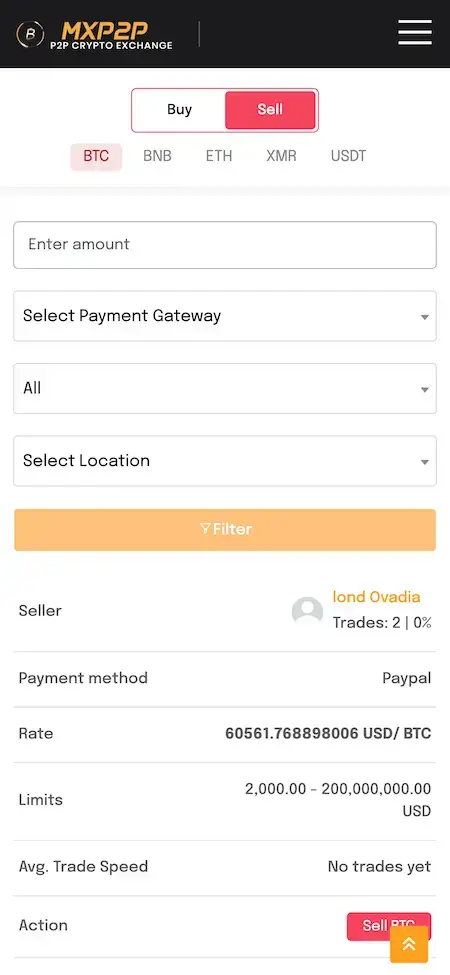
P2P Exchange Script mobile page with Buy and Sell tabs, coin filters and a seller offer.01
Pick it if: You want a peer-to-peer venue without an order bookP2P Exchange Script

A peer-to-peer crypto marketplace with Buy and Sell offers, coin filters, payment gateways and trade requests between users.

Explore Solution
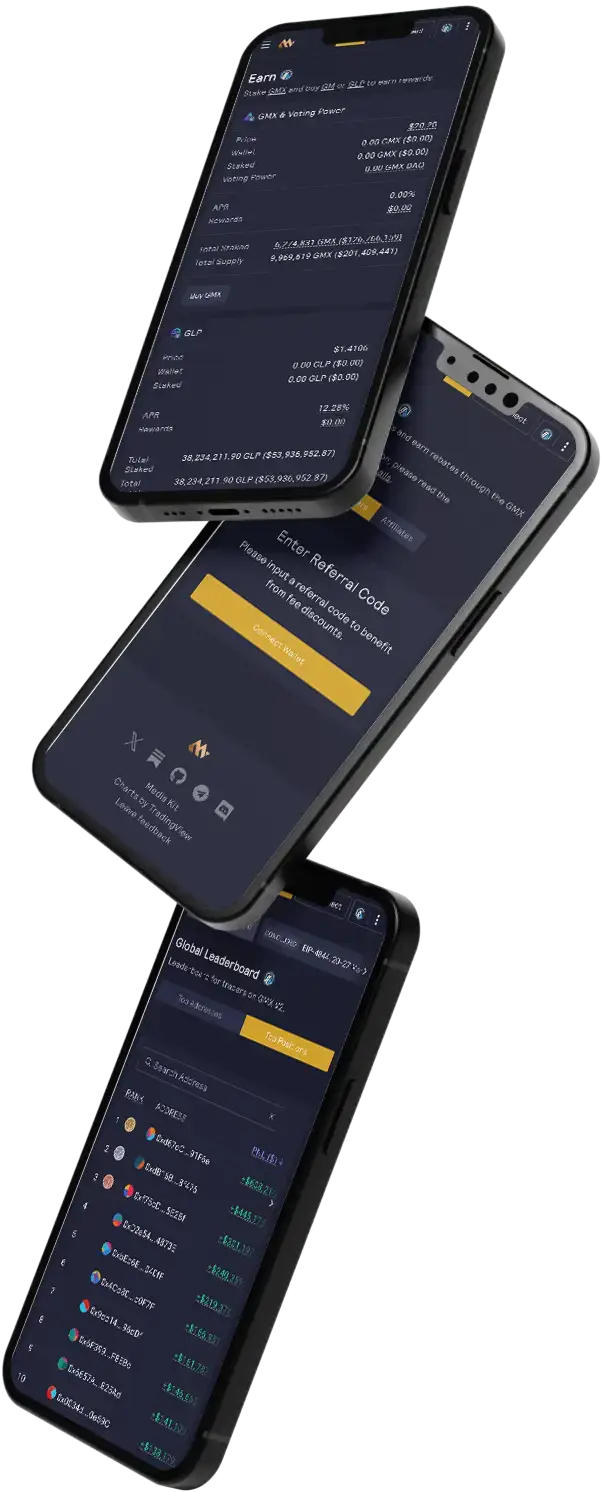
GMX Clone app screens on tilted phones: earn, referral and the leaderboard.02
Pick it if: You prefer on-chain perpetuals to a custodial bookGMX Clone

An on-chain perpetuals trading platform with earn, referral and leaderboard screens, built for wallet-based trading.

Explore Solution
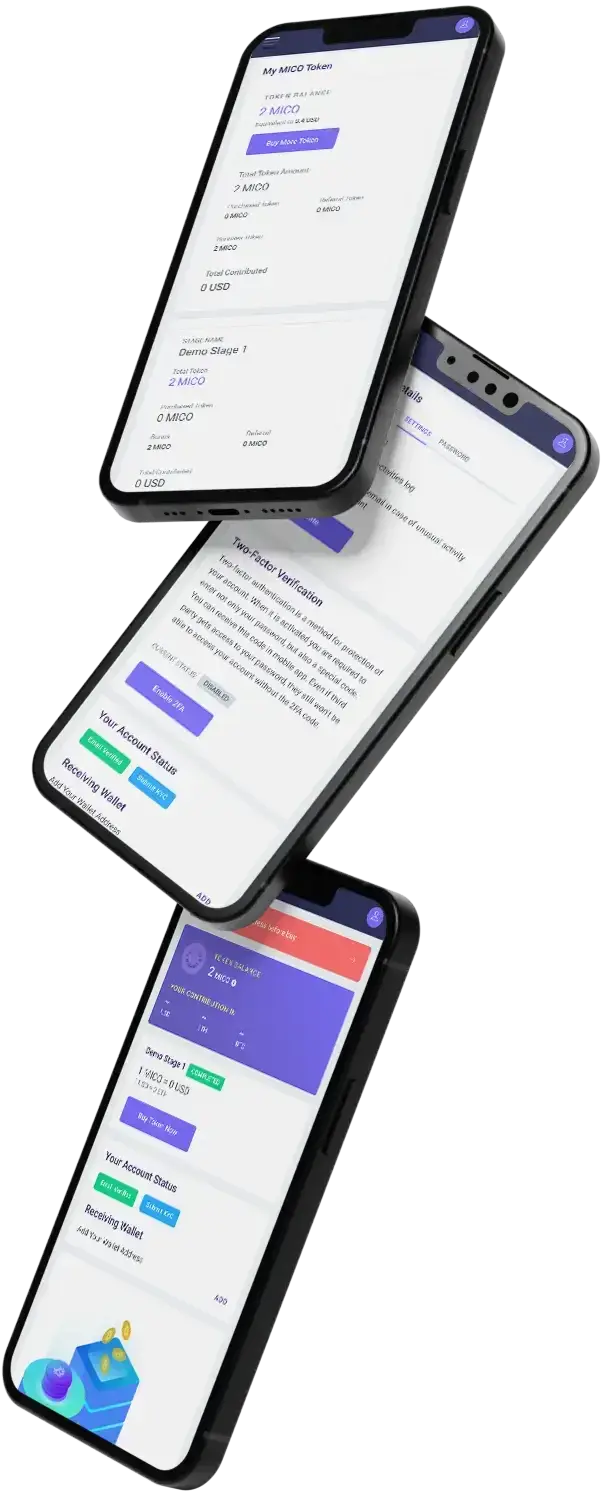
ICO Launchpad app screens on tilted phones: token stages and account balance.03
Pick it if: Your main product is the token sale itselfICO Launchpad

A token sale platform with staged rounds, account balances, transaction history and an activity log for contributors.

Explore Solution
Revolut Clone digital banking platform across customer app, web and admin.04
Pick it if: You want fiat accounts beside your exchangeRevolut Clone

A digital banking platform with accounts, cards and money transfers for customers, and an admin console for operators.

Explore Solution
CatalogAll 90+ solutions

09The business case

How Operators Earn

Binance Clone Revenue Models - Trading Fees, Futures, Withdrawals, Staking & Launches

An exchange earns on every product it lists, and the platform keeps each line apart so that changing one fee leaves the others as they were.

Spot fees usually carry the early volume; derivatives, staking and token launches widen the mix as the venue matures.

  1. 01

    Spot Trading Fees

    A maker or taker percentage on each matched order. Fees are set per pair in the admin panel, so a new listing can start cheap and a busy pair can be tiered.

  2. 02

    Futures Fees

    Leveraged products earn on position size, and the risk limits in the admin keep exposure inside what you decide to carry.

  3. 03

    Withdrawal & Transfer Fees

    The admin carries a percentage transfer fee, a wallet chain fee and a spot withdrawal percentage, so network cost and your margin are separate lines.

  4. 04

    Staking Commission

    Staking pools show total value locked and APR; whether you keep a share of the rewards a pool pays is a pricing choice that sits with you.

  5. 05

    P2P Trade Fees

    Admin profit tracking already counts earnings from P2P trades, so a fee on each escrowed deal is one more line to switch on.

  6. 06

    Launchpad & Listing Fees

    ICO contributions feed the same profit reports, and listing a coin or token is an admin action you can charge for.

What published exchanges charge on four lines this platform can run: spot fees, derivatives fees, a staking commission and withdrawal fees, each figure traced to a fee page, a documentation page or an annual report.
Revenue streamHow it is chargedTake rateTypical take rateWhat sets the ceiling
Spot Trading FeesA percentage of each matched order, split into maker and taker rates and tiered by trading volume.Kraken lists 0.40% maker and 0.80% taker at entry. Binance lists 0.100% / 0.100% for its base level, 0.075% with BNB.Volume tiers pull the rate down fast: Kraken's top published tier is 0.0% maker and 0.05% taker. Gemini's filing implies about 0.18% of volume in exchange revenue (our arithmetic).
Futures FeesA percentage of position size or order value when a leveraged position opens or closes.Hyperliquid lists 0.045% taker and 0.015% maker at its base tier. GMX charges 0.04% or 0.06% of position size.What rival venues charge for perpetuals and how much leverage you allow. Coinbase reported institutional transaction revenue up 39% to $479.7m in 2025, driven by derivatives.
Staking CommissionA share of the rewards a pool pays out, taken before payout, rather than a fee for joining.Kraken lists a 20% commission on flexible staking with an on-chain unbonding period and on Rewards program assets.What stakers will accept against raw on-chain yield. Coinbase reported $677.4m of blockchain rewards revenue in 2025, 4% lower than 2024.
Withdrawal & Transfer FeesA fixed chain fee, a percentage of the amount, or both, set as admin withdrawal and transfer fees.No common rate. Kraken says its deposit and withdrawal fees depend on the method and the currency used.The network cost of each coin and what rivals charge for the same asset. The platform can apply a fixed chain fee so the destination wallet receives the full amount.

How to read this. The spot and staking figures come from the Kraken fee schedule and the Binance fee page, the derivatives figures from the Hyperliquid and GMX documentation, and the revenue lines from the Coinbase and Gemini annual reports on Form 10-K. Fee pages are published price lists and the filings are audited company reports; the 0.18% is our arithmetic on Gemini's reported figures. Treat all of it as modeling input, not a quote and not a forecast of what your venue will earn, and set your own schedule in the admin panel.

Want a fee schedule built around your own exchange?Design My Revenue Model

Market Benchmarks

Crypto Exchange Market Benchmarks - Independent 2025-2026 Data

The revenue models above are ours. The figures below are not. They come from the Coinbase annual report on Form 10-K, the Gemini annual report on Form 10-K, the Bank for International Settlements and Kraken's published fee schedule, reproduced as published. They show how listed exchanges earn from trading and what published fees look like, so you can test your own business case against sources you can check.

Coinbase 10-K01

59% of Coinbase Net Revenue Came From Trading

Coinbase's annual report on Form 10-K shows total transaction revenue of $4.06 billion in 2025, up 2 percent and equal to 59 percent of net revenue of $6.88 billion, against 63 percent in 2024. Consumer transaction revenue fell 3 percent to $3.32 billion: a lower average blended fee rate, as volume moved to users paying lower fees, outweighed a 7 percent rise in consumer Trading Volume.

Gemini 10-K02

$52.7bn Trading Volume, $93m Exchange Revenue

Gemini's annual report on Form 10-K reports 2025 Trading Volume of $52.7 billion, up from $38.6 billion, of which institutional was $46.0 billion and retail $6.7 billion. Exchange revenue across crypto assets totaled $93 million, about 0.18 percent of volume (our arithmetic on reported figures). Total revenue was $179.6 million against an operating loss of $345.7 million.

BIS03

$320bn Stablecoin Market, Used Mainly to Trade

The Bank for International Settlements reports in its Annual Economic Report 2026 that stablecoin market capitalisation was around $320 billion at end-May 2026, and that the main use of stablecoins so far has been crypto trading. It estimates annual stablecoin transaction volume at $28 trillion in 2025, and calls current use modest next to bank deposits.

Kraken04

Kraken Spot Fees: 0.40% Maker, 0.80% Taker

Kraken publishes a tiered maker-taker spot schedule. The entry tier, from $0 of 30-day volume, charges 0.40 percent maker and 0.80 percent taker. Fees fall with volume, assets on platform or futures volume, and the top Pro 5 tier at $500M+ of 30-day spot volume charges 0.0 percent maker and 0.05 percent taker. It shows how steeply an exchange discounts for scale.

Where each figure comes from.

Coinbase Global, Inc., Annual Report on Form 10-K for the year ended 31 December 2025, signed 12 February 2026 - sec.gov

Gemini Space Station, Inc., Annual Report on Form 10-K for the year ended 31 December 2025, filed 31 March 2026 - sec.gov

Bank for International Settlements, Annual Economic Report 2026, Chapter III: Anchoring trust in money: innovation beyond stablecoins, 23 June 2026 - bis.org

Kraken (Payward, Inc.), Fee schedule, accessed October 2026 - kraken.com

All figures are the publishers’ own filings, estimates and published fees, reproduced as published. The Gemini 0.18 percent is our arithmetic on reported figures (exchange revenue divided by Trading Volume). They describe the market and published price lists, not the performance of any platform Miracuves builds, and nothing here is investment advice or a revenue projection for your business.

Market Timing

Why Build a Crypto Exchange in 2026?

Retail interest in crypto trading comes in waves, and most traders still sit on a handful of large venues. A branded exchange gives a regional operator, a broker or a token project a place to serve its own audience and keep the fees that venue earns.

01

Traders Want One Venue for Many Products

A trader who can move from spot to futures, a staking pool or a token round without a second account has fewer reasons to leave. One login and one wallet are the whole pitch.

02

Local Markets Still Want Local Venues

Fiat routes, languages and listings differ by country. A venue built around one region's coins, rules and payment habits is something a global platform rarely tailors.

03

Token Projects Need a Place to Launch

A project with its own token often wants a launchpad round and a listing on a venue it can talk to. Owning that venue turns a service fee into your own revenue line.

04

You Keep the Order Flow and the Data

With the ledger, user records and fee settings in your own database, what the venue learns about its traders stays with the business that earned it.

05

The Hard Middle Already Exists

Matching, settlement, wallets on several chains and an admin panel are most of an exchange. Writing them again is slow and risky, and here they are already built and demonstrable.

06

Rules Differ, So Plan the Route Early

Regimes for crypto businesses are written market by market. Deciding which one applies to you before you build keeps the technical work and the license application moving together.

Platform by the Numbers

15

Chains Listed in the Admin

3

Surfaces, One Codebase

5

App Tabs

6

Days of Build Time

Most of the effort in an exchange is the unglamorous middle: order matching, a trustworthy ledger, wallet and withdrawal handling, and the admin console that reconciles it. Here it is already built.

The Commercial Case

Marketability, Revenue Potential & Business Prospects

An exchange earns when traders trust it enough to fund it and keep trading. Everything that follows is about making those two decisions easier, and about owning the venue, its order flow and its fee schedule once they have been made. None of it is investment advice.

  1. 01

    Fees on Every Matched Order

    Revenue follows trading activity rather than headcount, so the same console that runs ten pairs can run a hundred.

  2. 02

    Several Lines, One Console

    Spot fees, derivatives, withdrawal fees, staking commission, P2P and launches are separate settings, so one can be switched on without redesigning the rest.

  3. 03

    Owned Traders and Order Flow

    User records, KYC outcomes and trading history sit in your database, so the value the venue builds up stays with you.

  4. 04

    Exit Optionality

    You hold the complete source code and the schema, so a later change of host, team or direction needs no one's permission.

Main Revenue Levers
  • Spot Trading Fees
  • Futures Fees
  • Withdrawal & Transfer Fees
  • Staking Commission
  • P2P Trade Fees
  • Launchpad & Listing Fees
Long-Term Value

Defensibility comes from liquidity, trust and the audience you serve rather than from features.

  1. 01Verified, funded traders do not casually move
  2. 02A regional or token community is hard for a global platform to copy
  3. 03That accumulation starts at launch and stays in your database
  4. 04Careful listing and honest compliance are the second moat
Example Revenue Scenarios

These three cases differ only in how many traders are active, and each names the lever that leads at that size. They are examples for planning conversations, not predictions of what any exchange will earn.

Small Regional Venue1,000Active Traders

Spot trading fees carry early revenue.

A focused exchange with a few liquid pairs, where the maker and taker fees on each matched order cover running costs. Illustrative size, not a forecast.

Growing Regional Exchange25,000Active Traders

Spot fees plus withdrawal fees and staking.

A regional exchange where wallets are busy, so withdrawal fees and a staking commission start to matter beside trading fees. Illustrative size, not a forecast.

Multi-Product Venue250,000Active Traders

Several products, with futures and launches active.

A venue with derivatives, P2P and token rounds running together, where the profit reports show which line to push next. Illustrative size, not a forecast.

10Why Miracuves

Why Miracuves

Miracuves Compared With Other Binance Clone Developers

There are several ways to get an exchange: an open-source script you assemble yourself, a freelancer, an agency, or a ready-made base from a team that has delivered it before.

Why Founders Choose Miracuves

  • 01

    Breadth Out of the Box

    Spot, futures, P2P with escrow, staking and a launchpad ship in one base, where a generic script often stops at a spot screen.

  • 02

    A Real Ledger Underneath

    Fills post to an append-only double-entry ledger beside a price-time priority engine, which is what lets balances be checked.

  • 03

    Compliance Tooling, Honest Claims

    KYC levels, review and rejection handling and withdrawal approval exist; the license, the policy and the providers are named as yours.

  • 04

    Full Source Code Ownership

    The whole codebase arrives unencrypted, with the schema and deployment notes, so nobody can reprice it or change the terms later.

  • 05

    A Base That Has Shipped Before

    The same base carried Annurax Exchange in 2024, with 20 of 25 building blocks reused as they were, and the published case study shows the ledger of what was built.

  • 06

    Plain Readiness Language

    This page says what is a base feature, what is an add-on and what you supply yourself, including licenses, KYC providers and store accounts.

How the Binance Clone Stacks Up Against Scripts and Agencies, Row by Row

CriteriaMiracuvesMiracuves Binance CloneGeneric Exchange ScriptCustom Dev Agency
Time to Launch6 days of our build timeWeeks of setup and debuggingScoped per project, usually months
Source-Code OwnershipComplete, unencryptedOpen license terms, no exclusive rightsUsually yes
Trading DepthSpot, futures, P2P, staking and launchpadOften spot onlyWhatever the budget allows
Wallets & ChainsMulti-chain deposit addresses and master walletsVaries by scriptCustom integration
Admin & ReportsPairs, KYC, withdrawals and profit reportsThin or absentBuilt to order, extra cost
KYC & Compliance ToolingKYC levels and review; policy and license stay yoursManual setupBuilt to order
Security PostureRole separation, audit trail, no certificate claimedCommunity patches onlyVaries widely
Cost vs Speed vs QualityFixed price, fast, tested baseLow price, high effortExpensive and slow
Ongoing Support & Updates60 days guidance, 6 months bug fixes, 12 months updatesCommunity support onlySet by the contract

Few routes to an exchange survive their first real week of trading unchanged. This is where they part ways.

Talk to Our Team

Changelog

Release Log for the Binance Clone - Versions & Updates

Release notes for the platform, newest first. The notes carry no dates, and lines that name only internal tooling are left out.

VersionChangesWhat changed
V5.5.68 updates, 4 fixesAdded or updated
Rebuilt the application on a modular architecture for easier scaling
Redesigned interface with dark mode, accessibility improvements and responsive layouts
Interface languages: English, Spanish, Hindi and Arabic
Analytics dashboards with advanced reporting
Sign-in with Google
Chat and notification center
CSV and JSON import and export
Setup wizard with inline validation
Fixed
Duplicate entries in reporting modules
Layout inconsistencies on mobile and desktop
Deployment script error on Ubuntu
Memory leak in background jobs
V4.6.06 updatesAdded or updated
Token deployment and import, with clearer error handling
Prevention of self-crossing orders
Cancellation of partially filled orders with correct refunds, and canceled orders kept in the system
Custodial wallet search by blockchain and longer transaction pagination
Wallet generator for affiliate reward claims
Deposit handlers for the supported chains and a worker that verifies pending deposits
V4.4.99 updates, 4 fixesAdded or updated
New About Us page
Admin finance pages for profit management and profit analysis
Payment Methods moved to the top of the P2P menu
Responsive wallet-type selection on deposit, withdrawal and transfer pages
Admin profit calculated on withdrawals, transfers, P2P trades and ICO contributions
Percentage transfer fee, wallet withdraw chain fee and spot wallet withdraw percentage fee settings
User details export to Excel
HEIC and HEIF images converted to JPG on upload
Clearer network selection, dark-mode lists and a dark KYC rejection modal
Fixed
Ecosystem token structure missing in integrated add-ons
KYC applicants unable to view applications with document errors
KYC cancel button still sending applications, the max-level calculation and an extra level added on rejection
P2P trades of every user visible to admins on the user side
V4.4.83 fixesFixed
Access-token refresh using the refresh token
Unilevel and binary nodes not registering in the affiliate system, and the main node missing when a user had no referrals
Duplicate node requests on the multi-level network page
V4.4.63 updatesAdded or updated
User ID shown in the name column of user management
Full Tron support: service handler, master and user wallet generation, balance lookup, address activation check, deposits, withdrawals, transaction parsing, fee estimator and the TRX native token
Tron installable and activatable from the extended blockchains manager
V4.4.55 updates, 3 fixesAdded or updated
Full Solana support: master and user wallets, balances, the native SOL token, deposits, transfers, withdrawals and a withdrawal queue
Email templates for ecosystem withdrawal confirmations and failures
A Processing status for withdrawals until they are finalized
XT exchange provider support: order book, orders, trades, tickers, charts, deposits, withdrawals and a markets and currencies importer
Extended blockchains card and a page to activate, install and update blockchains
Fixed
Auto-approval of withdrawals
Deposit expiration settings
Network settings not reading all data in some cases
V4.4.39 updates, 3 fixesAdded or updated
BTC fee calculator
Spending check for transaction outputs and better error handling on swaps
Internal withdrawals treated as zero-fee transfers
Fee refund when a spot withdrawal is rejected or fails
Automated withdrawal approval setting
Multiple fiat currency rates through an exchange-rate API
Regular or priority mining fee rate
Back button on the provider markets page returns to the selected provider
P2P offer card shows the remaining wallet balance in the trade currency
Fixed
Internal transfers replacing the target wallet chain address
Custodial fund transfers within the ecosystem
Google Analytics not capturing client visits

Let's build together

Let's take your exchange idea and make it a working platform.

Book a free consultation and leave with a clear timeline and honest answers to your questions. We would rather earn your trust than close a fast sale.

  • First reply in under 2 hrs
  • Free consultation
  • No lock-in contracts
  • Full source code ownership

11Learn more

Blog & Resources

Binance Clone App: Newest Guides & Insights

Stay up to date with guides on how exchanges are built, how their revenue lines work and what to weigh before you choose a base.
The product4 questions

01What exactly do we mean by a Binance Clone Script?

A Binance Clone Script is ready-made software for a centralized crypto exchange. The Miracuves Binance Clone covers spot and futures markets, P2P with escrow, staking pools, a token launchpad, multi-chain wallets, KYC review and an admin panel, and it ships as a trader website, Flutter apps and the complete source code, rebranded to you.

02Can users trade multiple cryptocurrencies on the Binance Clone App?

Yes. The markets list shows many pairs with price, 24-hour change and volume, filtered by quote assets such as USDT, BTC, BNB and USDC, and the admin lists twelve built-in chains plus Solana, Tron and Monero as extended ones. Which pairs and coins your exchange lists is your decision, made in the admin panel.

03Can I add my own tokens or blockchains?

Your own token can be listed through asset management and launched through the launchpad. Chains are managed on the admin ecosystem page, where built-in and extended blockchains are activated, and the release log shows Solana and Tron arriving as extended chains. A chain that is not in the list is custom work that we scope and quote on its own.

04Does the app offer staking and rewards?

Yes. The Staking screen shows total value locked, average APR and active users, with Overview, My Stakes and All Pools tabs, and the admin panel has a Staking menu. Rewards, any commission you keep and the pools you open are choices you make before launch.

Trading, KYC & security3 questions

05Is the Binance Clone legal to operate?

The software is a white-label product, and it is lawful to build and to sell. Running an exchange is a different matter: most markets ask for a registration or license, KYC and AML controls and sometimes local rules on specific products. The license belongs to your own entity, and Miracuves does not give legal advice, so check your route with specialist counsel.

06How secure is the solution?

The base separates roles on the server, keeps an audit trail, hashes credentials, uses TLS and keeps keys out of the repository, with KYC levels and withdrawal approval on top. It holds no security certificate, and Miracuves does not claim ISO 27001 or SOC 2. Penetration testing, key rotation and a restore drill are launch tasks that we plan with you.

07Is the app secure for users' funds and data?

Funds are protected by the controls you configure: separate hot and cold storage, a withdrawal approval step, KYC gates and a two-factor setup prompt on the profile screen. Identity documents live in object storage in your own bucket and region. No platform can promise that funds are safe, so a custody review and testing before launch are part of the plan.

Admin, money & payments5 questions

08What controls do I get in the Admin Panel?

The admin panel covers the chain manager, users and KYC applications, assets, trading pairs, risk limits, withdrawal approval, wallets, and the Futures, Forex, ICO, P2P, Staking and Affiliate menus. Finance pages show profit management and analysis across withdrawals, transfers, P2P trades and ICO contributions.

09Can I customize fees and trading pairs?

Yes. You create or remove pairs, set maker and taker fees, and configure a percentage transfer fee, a wallet withdraw chain fee and a spot wallet withdraw percentage. A fixed chain fee can be applied so the destination wallet receives the full amount while the sender pays the fees.

10Who handles hosting, uptime and capacity?

You do, on hosting you choose, and we deploy the platform there. Miracuves does not run managed hosting and gives no uptime guarantee, because uptime depends on your servers. We help you size capacity before launch, and the 60 days of guidance and 6 months of priority bug fixes cover the platform itself.

11What is the realistic path to first revenue?

Most exchanges start with spot trading fees, because a fee schedule is the one revenue line that needs no extra product: the first matched order earns it. Withdrawal fees follow as wallets fill, and staking commission, P2P fees and launchpad rounds come once there are enough users to want them. Other lines sometimes named for this kind of venue, such as sponsored listings or API access, depend on your own commercial arrangements and are agreed rather than built in.

12How defensible is a crypto exchange?

Defensibility comes from liquidity, trust and the audience you serve rather than from features. Traders who have verified accounts, funded wallets and a trading history do not casually move, and a market built around one region or one token community is hard for a global platform to copy. The platform helps by letting that accumulation start at launch and by keeping it in your own database. Careful listing decisions and honest compliance are the second moat, because a venue people trust is slow to replace.

Launch & Miracuves4 questions

13How fast can I launch my Binance-like exchange with Miracuves?

Ready-made delivery takes 6 days of Miracuves build time, covering rebranding, deployment to your hosting and handover of the source. Store review by Apple and Google is separate and sits outside those 6 days, and so do your license, your KYC provider onboarding and your own listing preparation.

14Will the complete source code be mine?

Yes. You receive the complete source code for the web platform, the admin panel and the Flutter apps with no encryption, plus the database schema, deployment configuration and architecture notes, so your team can change anything without our permission.

15What do I need to supply before launch?

Hosting and a domain, a verified developer account the apps are published from, your branding and business details, the keys for the KYC and market-data providers you choose, and the license or registration your market asks for. We do not apply to providers or regulators on your behalf.

16What makes Miracuves the right team to build a Binance clone?

Because the matching engine, ledger, wallets and admin panel arrive working, on a base that already carried Annurax Exchange in 2024 with 20 of 25 building blocks reused. Miracuves has been building software since 2010, with 9,000+ projects delivered for 6,000+ clients and 90+ ready-made solutions. The Binance Clone is a fixed $5,199, goes live in 6 working days, and comes with 60 days of guidance, 6 months of priority bug fixes and 12 months of product updates, with a first response in under 2 hours Monday to Saturday, 10:00-19:00 IST.

Disclaimer

Miracuves is an independent software development company. We are not affiliated with, connected to, sponsored by, or endorsed by Binance.

Read our full Legal Notice & Disclaimer →
Why this name

“Binance Clone” is used descriptively. It is how the software industry refers to building a platform with functionality similar to Binance, and how clients search for it.

Who built this

The entire design and codebase is built by our own team. The product contains no code, design, graphics, or content originating from the Binance website or applications.

Trademarks

Binance and all other third-party names and marks are the property of their respective owners, referenced here solely to describe the category of software offered.