Buildium Clone App - White-Label Property Management Software
Property Management Clone Script with Tenant, Owner and Admin Roles and Rent Payments
A launch-ready property management app for landlords and managers. Tenants see the next rent due and pay it from their phone, raise maintenance requests and open their lease, while owners follow occupancy and revenue and administrators keep the property, unit and tenant records.
Role-based sign-in for tenant, owner and admin, delivered white-label with the complete source code, a web portal with a vendor panel and Flutter apps for Android and iOS.
Launch in 6 Days with
- 60 Days Platform Guidance
- Complete Source Code
- Complete Rebranding
- Complete White-Labeling
- App Publishing Support
- 6 Months Bug Fixes + 12 Months Updates
Portfolio activity
- Rent payment receivedPayments
- Maintenance request submittedRepairs
- New tenant addedTenants
- Lease renewal coming upLeases
- Work order closedWork orders
- Owner report openedOwners
- Payment history viewedTenant app
- Property record updatedProperties
- Rent payment receivedPayments
- Maintenance request submittedRepairs
- New tenant addedTenants
- Lease renewal coming upLeases
- Work order closedWork orders
- Owner report openedOwners
- Payment history viewedTenant app
- Property record updatedProperties

Platform at a Glance
our build time, store review is separate
tenant, owner and admin sign-in
real screens from the tenant, owner and admin flows
delivered complete, with no encryption
From Lease to Rent in One App
A tenant sees the next payment due and pays it, opens their lease and documents and raises a maintenance request, while the admin follows properties, tenants, work orders and revenue.
Records for Every Role
Properties carry units and occupancy, tenants carry a status and contact details, and owners get reports on income and expenses and on property performance.
01See it live
Live in Action
Buildium Clone Demo - Tenant, Owner & Admin Sides of the Property App
Try the Miracuves Buildium Clone hands-on. The demo app opens on one sign-in screen with a one-tap button for each role, so you can step into the tenant, owner or admin side without creating an account. The web portal and vendor panel are shown on a guided call.
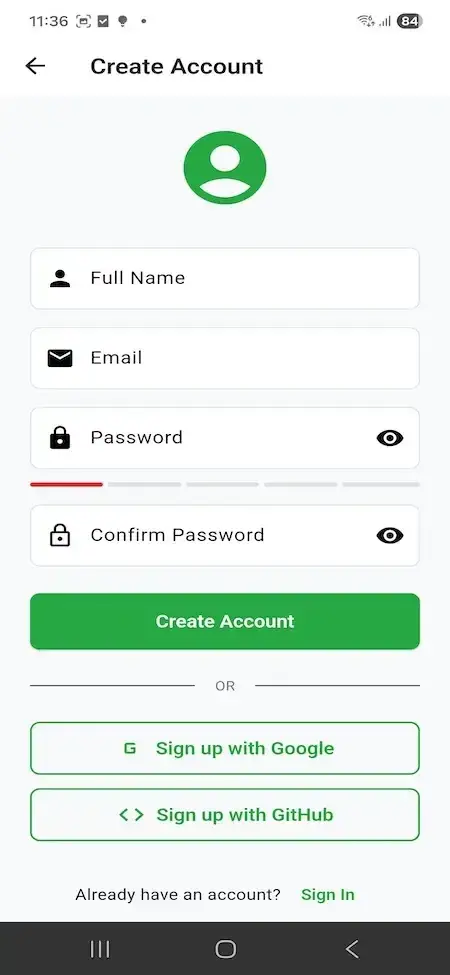

Buildium Clone - Tenant Portal
The renter side of the demo: see the next rent payment and its due date, press Pay Now, and reach a maintenance request, payment history, the lease record and documents from one home screen.
- 1Open the app portal and install the demo
- 2On the sign-in screen tap Explore as Tenant
- 3Explore: Next payment, Maintenance, Payment history, Lease
alice.tenant@email.com
Buildium Clone - Landlord & Owner Portal
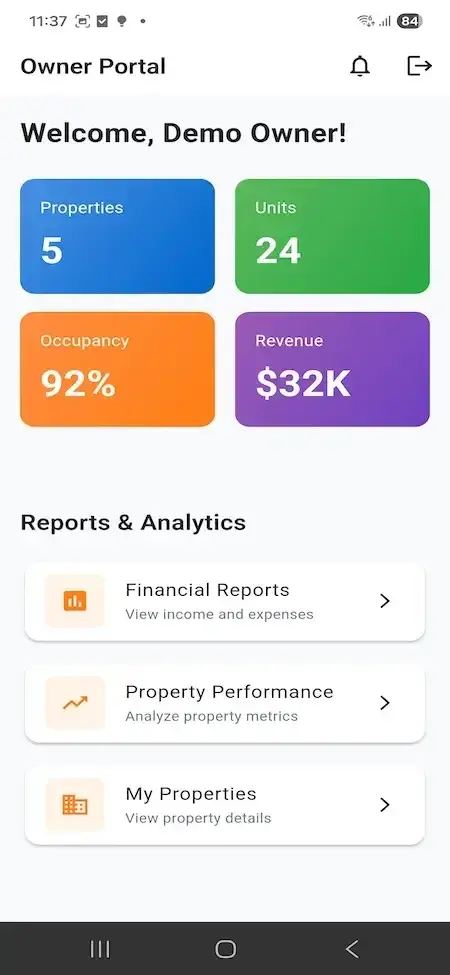
The landlord side: properties, units, occupancy and revenue as four tiles, with shortcuts to financial reports on income and expenses, property performance and the properties you own.
- 1Open the app portal and install the demo
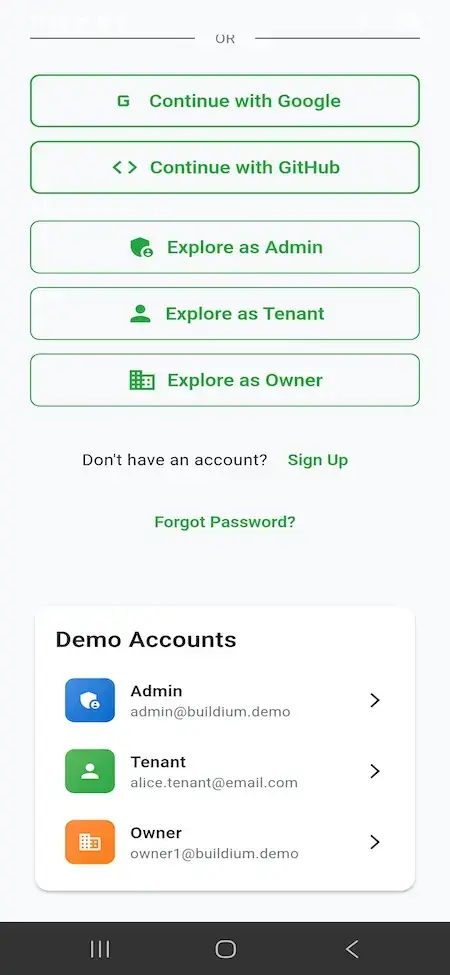
- 2On the sign-in screen tap Explore as Owner
- 3Explore: Financial reports, Property performance
owner1@buildium.demo
Buildium Clone - Admin Dashboard
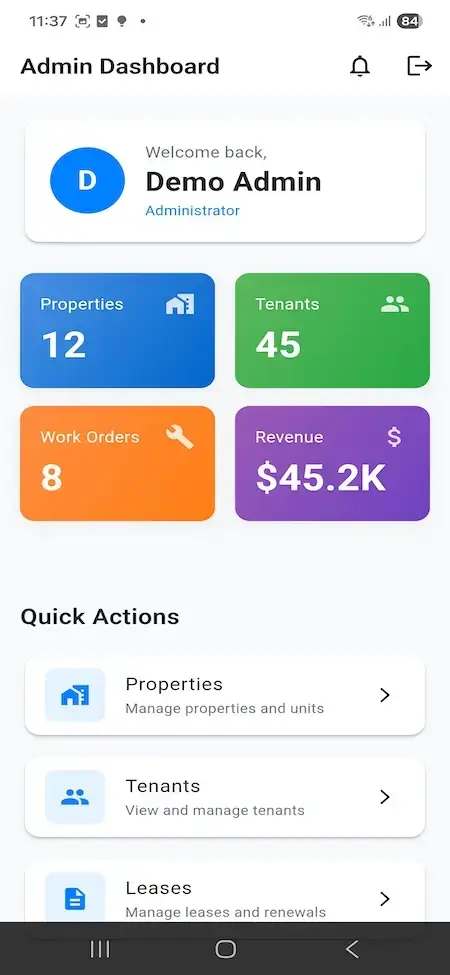
The operator side: counts of properties, tenants, work orders and revenue, plus quick actions into property and unit records, tenant records and lease renewals.
- 1Open the app portal and install the demo
- 2On the sign-in screen tap Explore as Admin
- 3Explore: Properties, Tenants, Leases
admin@buildium.demo
Web Portal & Vendor Panel
The package lists a web portal, a vendor panel and an admin web panel next to the apps. Their public demo is offline at the moment, so we open them for you on a call.
- 1Book a guided call
- 2We open the web panels on screen
- 3Explore: Properties, Tenants, Payments
available on request

See It With Us
Buildium Clone Walkthrough: Tenant Portal, Owner Portal, Admin Dashboard & Property Records
No recorded walkthrough is published for this product, so a live call is the quickest way to see it. In 30 minutes we open the tenant, owner and admin sides of the demo app and tie each one to your own portfolio: your unit types, your rent calendar, your maintenance routine and your launch date.
Schedule a live walkthrough call.Every Screen Mapped
Buildium Clone App Flows - Tenant, Owner & Admin Screens
Nine real screens from the demo app, grouped by who uses them: the tenant, the owner and the administrator. None of them is a mock-up.


Follow a tenant from sign-in to the next payment due and a maintenance request, an owner from the portfolio tiles to a financial report, and an administrator from the dashboard through the property list and a property record.
02Proof
Client Voices
What Miracuves Clients Say About Building on a Ready-Made Base
Real words from Miracuves clients. One of these comes from a property operator; the others come from other industries and are shown exactly as their authors gave them.
“We were running a few dozen properties off a static site, email and a phone. Calendar, booking flow and the property manager came off the shelf. They added a channel manager for our OTAs, a guest portal and a multilingual interface. The operations team no longer lives in the inbox.”
“Every HMS I tried was built for general physicians, with no lesion mapping, no before/after tracking, and no procedure-based billing. Their MXHealth base gave us the patient app, doctor app, EMR and video consult out of the box. Front-desk time on scheduling and follow-ups is down ~70%, and we went fully digital in 9 months, where a fully custom job would have been 18.”
“Turo is the obvious reference, but the Caribbean specifics, from different insurance norms to different payment rails, meant we needed a real partner, not just a clone. Miracuves’s MXCar base covered the listing, the trip flow, and the host payouts. We launched in 6 working days and are live in three islands.”
“The team was running it on a dispatcher and a Google Sheet, and we needed a real platform quickly, because we were about to onboard a major retail client. Miracuves’s Delivery Genie base gave us the rider app, the dispatch console, and live tracking. We launched in 6 weeks and cleared 4x the previous order volume in the first month.”
“We were running it on phone calls and a paper calendar, and we were losing bookings to bigger OTAs. Miracuves’s GetmyBoat Clone base gave us the calendar, the booking flow, and the payment engine. Online bookings are up roughly 70% in the first six months, and the ops team finally has a live view of the fleet.”
“Building a compliant telehealth stack from scratch in three markets would have been a year-plus effort. Miracuves’s MXHealth base covered the patient and doctor apps, video consult, e-prescription and the pharmacy integrations. We launched in our first market in 9 weeks and rolled out to two more in the following six months.”
“We were juggling spreadsheets, a third-party GPS provider, and a phone. We needed a single operations console. Miracuves’s MXLogistics base covered the trip lifecycle, the driver app, and the customer tracking page. We’ve cut operations admin time by about 40%.”
Proof in Production
Buildium Clone Case Study - What Is Published and What Is Not
Miracuves has not published a named client deployment of the Buildium Clone, so this section does not borrow one. It lists what you can check yourself and what we will not do.
A case study needs a client who agreed to be named and a published page to link to. Neither exists for this product today, so this section says so instead of borrowing a logo.

- Sign in as a tenant, an owner or an admin from the demo app
- Open a property record with units, occupancy, address and a Financials tab
- Follow a tenant from the next payment due to the payment history
- Ask for the web portal and vendor panel on a guided call
- Name a client that has not agreed to be named
- Quote results from a deployment that is not published
- Present the demo figures as a customer outcome
- Rebrand the apps and panels with your logo, icons and colors
- Deploy to hosting you provide
- Publish the apps from your own developer accounts
- Hand over the complete source code
- Build window of 6 working days on the ready-made base
Want proof before you buy? Ask on a guided call what we can show for this product today and what we cannot.
03The product
The Basics
What the Buildium Clone App Does for Landlords and Tenants
The Buildium Clone is a ready-made property management app. Landlords and managers keep property, unit, tenant and lease records in one place, tenants pay rent and raise maintenance requests from their phones, and an admin dashboard follows properties, tenants, work orders and revenue.


More Than a Tenant Portal
The value sits in the records: properties with units, tenants with a status, leases and renewals, documents, a work orders count and a revenue figure, so the app earns its keep after the first login.
Not a Locked Box
You get the complete source code with no encryption, so your team can change screens and rules as the portfolio grows. Nothing is charged per unit or per tenant for running it.
Plain About What Is Extra
Tenant applications, screening, e-signature, autopay with late fees and accounting sync are not in the demo. They are scoped as add-ons and never counted as base features.
Mobile apps & panels
What Is a Buildium Clone Script?
The hard part of property software is not the tenant screen. It is the records behind it: which unit sits in which property, who holds which lease, what is due and what has been paid, and which repair is waiting. Those records and the three role-based entry points ship working.

- 01Properties and units with address, type and occupancy
- 02Tenant records with contact details and a status
- 03Rent due, Pay Now and payment history on the tenant side
- 04A maintenance request shortcut and a work orders count
- 05Separate tenant, owner and admin sign-in
The package lists a tenant app, a landlord app, a web portal with a vendor panel and an admin panel. The mobile apps are Flutter, and the complete source code comes with all of it.
Everything Included
Buildium Clone Features - Sign-In, Properties, Tenants, Rent, Leases, Maintenance & Admin
Every item below is visible in the demo screens or in the release log. Whatever depends on an extra module is called out as an add-on later in the page.
Role-Based Sign-In
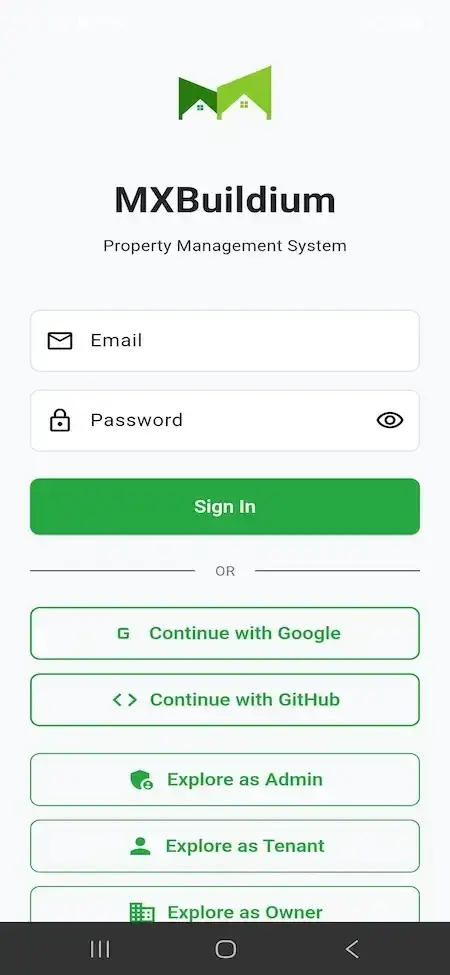
Sign in with email, continue with Google or GitHub, create an account, or step straight into the tenant, owner or admin side from the demo sign-in screen.
- Email and password sign-in
- Continue with Google or GitHub
- Create Account with a password strength bar
- Explore as Admin, Tenant or Owner buttons
- Forgot Password link on the sign-in screen
Property Records
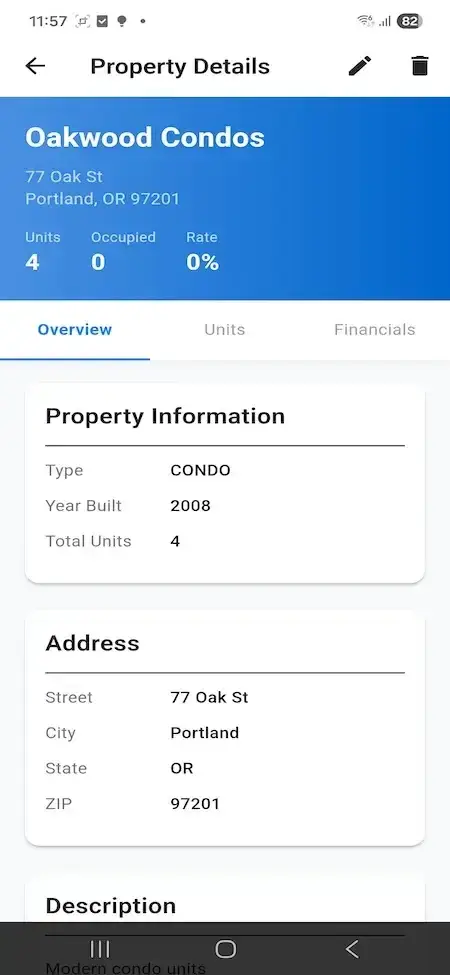
Each property keeps its name, address, type, year built, total units and a description, with Overview, Units and Financials tabs on the details screen.
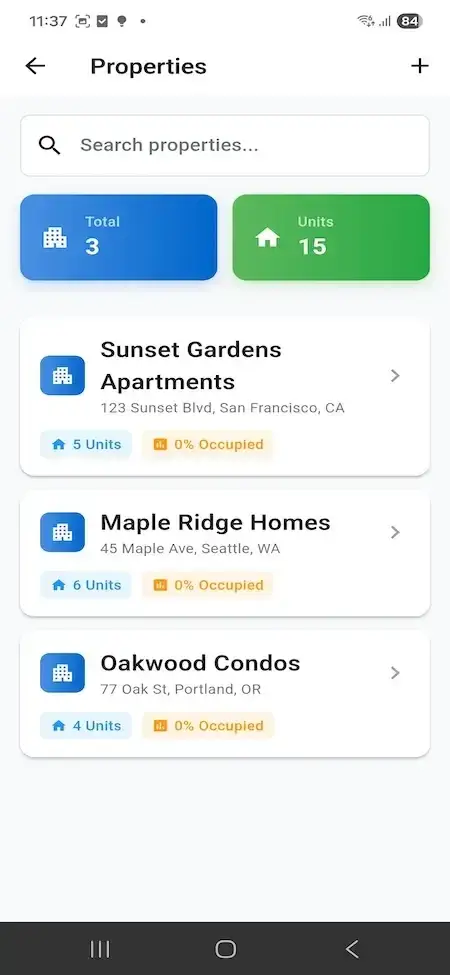
- Searchable property list with a total count
- Street, city, state and ZIP for every property
- Type, year built and total units on the information card
- Units, occupied and rate at the top of each record
- Edit and delete controls on the details screen
- Add button on the properties list
Units & Occupancy
Every property shows how many units it holds and what share is occupied, and the dashboards roll those figures up into unit and occupancy totals.
- Units count on every property card
- Occupied share shown as a percentage
- Total properties and total units tiles
- Occupancy tile on the owner portal
- Units tab on each property record
Tenant Records
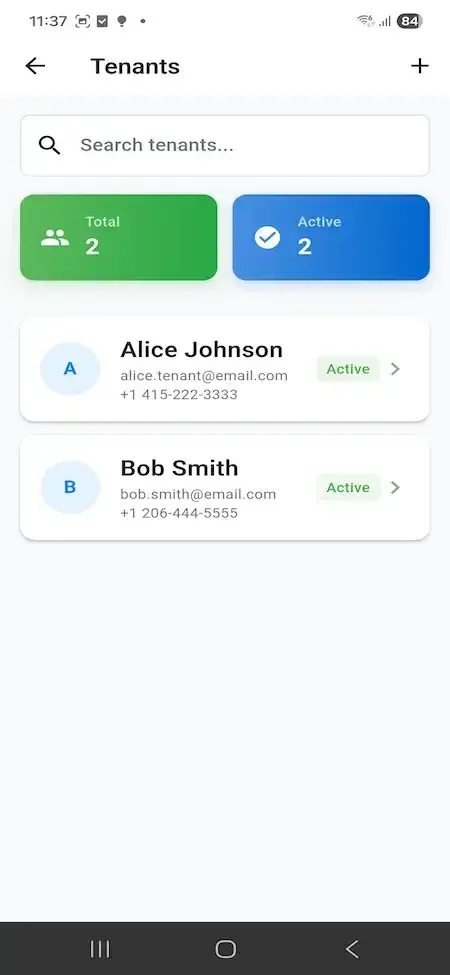
A searchable tenant list with total and active counts and a card for each tenant with name, email, phone and a status label.
- Search box on the tenants list
- Total and active tenant counts
- Name, email and phone on each card
- Active status label per tenant
- Add button on the tenants list
Rent Due & Pay Now
The tenant home screen leads with the next payment due: the amount, the due date and a Pay Now button, with payment history one tap away.
- Next Payment Due card on the tenant portal
- Amount and due date shown together
- Pay Now button on the card
- Payment History quick action
- Notification bell in the app header
Lease Records
Admins get a Leases shortcut for leases and renewals, and tenants open My Lease to see their lease details, with a Documents shortcut beside it.
- Leases quick action on the admin dashboard
- Manage leases and renewals
- My Lease on the tenant home
- View lease details from the tenant app
- Documents shortcut for the tenant
Maintenance Requests
Tenants submit a new maintenance request from a quick action, and the admin dashboard keeps a Work Orders tile beside rent and occupancy.
- Maintenance Request quick action for tenants
- Submit a new request from the tenant home
- Work Orders tile on the admin dashboard
- Notifications bell for updates
- Ticket-related issues resolved in release 1.4
Owner Portal
Owners see properties, units, occupancy and revenue at a glance and open financial reports and property performance from shortcuts.
- Properties, units, occupancy and revenue tiles
- Financial Reports: income and expenses
- Property Performance: property metrics
- My Properties shortcut
- Own entry through Explore as Owner
Admin Dashboard
The admin home counts properties, tenants, work orders and revenue, and offers quick actions into properties, tenants and leases.
- Four headline tiles in one view
- Properties: manage properties and units
- Tenants: view and manage tenants
- Leases: manage leases and renewals
- Welcome card for the signed-in administrator
Notifications
A notification bell sits in the header of the tenant, owner and admin portals, next to the sign-out control, and its list card was refined in release 1.3.
- Bell icon in every portal header
- Notification list card redesigned in release 1.3
- Sign-out control beside the bell
- Account management improved in release 1.1
Branding & White-Label
The apps and web arrive rebranded with your logo, icons and color scheme, deployed for you and ready to publish from your own accounts.
- Complete rebranding of the web and the apps
- Your logo, icons and color scheme
- Deployment to your hosting
- Complete white-labeling
- App publishing support from your developer accounts
Source Code & Updates
The complete source code ships without encryption, and the platform keeps getting tested updates under three support periods that run side by side.
- Complete source code, no encryption
- Flutter source for the mobile apps
- 60 days of dedicated platform guidance
- 6 months of priority bug resolution
- 12 months of continuous product updates
Before you buy, note this: The platform arrives rebranded to your identity and deployed for you. You bring hosting and a domain, a verified developer account for each store, your branding and business details, an onboarded payment gateway with KYC complete, and any third-party keys. Apple and Google review apps on their own timetable, outside our 6-day build time.
Operate It Day to Day
Buildium Clone Admin Dashboard - Properties, Tenants, Work Orders & Revenue
One dashboard covers the manager's day: how many properties and tenants there are, how many work orders are on the board, what revenue looks like and which leases need attention.


Admin Dashboard Sections
- 01
Headline Tiles
Properties, tenants, work orders and revenue are the four tiles at the top of the dashboard, under a welcome card for the signed-in administrator.
- 02
Properties & Units
A searchable list of properties with a total, the units and occupancy on each card, an add button, and a details screen with edit and delete controls.
- 03
Tenants
A searchable tenant list with total and active counts, contact details on every card and an add button for the next tenant.
- 04
Leases & Renewals
A Leases quick action opens the place where leases and renewals are managed, beside the properties and tenants shortcuts.
- 05
Work Orders
The Work Orders tile keeps maintenance visible next to rent and occupancy, so a repair backlog is not hidden from the office.
- 06
Revenue
Revenue is a headline figure on the admin dashboard and on the owner portal, with financial reports a tap away for owners.
- 07
Notifications
A bell in the header collects updates for the signed-in role, and the notification list card was refined in release 1.3.
- 08
Sign-In & Roles
Administrators, owners and tenants each have an entry point of their own, so every person lands on the screens meant for them.
Money on Screen
Where rent and revenue show up, from the tenant side to the owner side.
- Revenue tile on the admin dashboard
- Pay Now and payment history for tenants
- Financial Reports: income and expenses
- Property Performance for owners
Records & Access
Who signs in where, and the records behind each screen.
- Separate tenant, owner and admin sign-in
- Property, unit and tenant records
- Lease and document shortcuts
- Notification bell and sign-out in every header
Need the dashboard to do more? Extra reports, another approval step, accounting sync or a different rent calendar are scoped on their own. Tell us what your team needs and we will quote it in writing.
04Package and price
The Full Package
Package Contents: Source Code, Apps & Deployment for Your Buildium Clone
You receive a working property platform rather than a kit of parts: the tenant and landlord apps, the web portal and vendor panel, the admin panel and the source code behind them. Ownership passes to you completely: no per-unit fee and no license to keep it running.
$ git clone your-platform Full Source Code
The complete source for the web platform and the mobile apps, with no encryption, so your team can change it to suit your business.
- Web platform source, unencrypted
- Flutter source for the Android and iOS apps
- Yours to modify, extend and redeploy
- Delivered into your own repository
Records & Data
The data behind properties, units, tenants, leases and payments, delivered with the source so your team can read and extend it.
- MySQL and MongoDB data tiers as listed in the stack
- Property and unit records
- Tenant and lease records
- Payment and work-order records
Notifications
The notification bell in every portal header and the list card behind it, which was refined in release 1.3.
- Bell icon in the tenant, owner and admin portals
- Notification list card
- Next Payment Due card on the tenant home
- Maintenance request shortcut for tenants
Web Portal & Vendor Panel
The package lists a web portal and a vendor panel next to the apps. Their public demo is offline, so we open them for you on a call.
- Web portal
- Vendor panel
- Rebranded with your logo and colors
- Deployed to your hosting
Tenant & Landlord Apps
Two Flutter apps, one for tenants and one for landlords, with the role-based sign-in that leads to the tenant, owner or admin home.
- Tenant app: rent, maintenance, lease, documents
- Landlord app: properties, units, reports
- Android and iOS builds
- Publishing from your own developer accounts

Admin Panel
The operator dashboard with the four headline tiles and quick actions into properties, tenants and leases.
- Properties, tenants, work orders, revenue
- Properties and units management
- Tenants and leases shortcuts
- Notification bell and sign-out

Access & Security Layer
Separate sign-in for each role, with Google and GitHub options and a forgot-password path, and payment through the gateway you connect.
- Role-based sign-in
- Google and GitHub sign-in options
- Password strength bar on sign-up
- Card details are handled by your gateway
Handover & Support
Branding and deployment done for you, publishing support from your own developer accounts, and three support periods that run side by side from launch.
- Rebranding with your logo, icons and colors
- Deployment to your hosting
- App publishing support
- 60 days guidance, 6 months bug fixes, 12 months updates
Want to see it before deciding? Open the demo app as a tenant, an owner or an admin, or ask for a guided tour. We can walk you through a property record, the tenant list, the next-payment card and the owner reports against your own portfolio.
Transparent Pricing
How Much Does It Cost to Build a Property Management App Like Buildium?
The launch-ready white-label Buildium Clone is a fixed price of $5,199. Work beyond the base, such as add-ons, extra integrations or custom flows, is scoped and quoted separately in writing.
Professional
Ready-Made Launch PackageChosen by: Landlord-tech startups, property management firms, regional rental operators
The platform arrives as the demo shows it, rebranded to your logo, icons and colors, and deployed on your own hosting.
Get StartedEnterprise
Custom Builds for Larger ScopeChosen by: Property groups, franchise networks, multi-region operators
Need workflows the base does not have, such as screening or e-signature? We build to your requirements and agree the scope and price before work starts.
Request a Quote05Who it is for
Know Your Buyer
Who Is This Buildium Clone App For?
It suits anyone who runs rented buildings and wants tenants, owners and staff on one platform under their own name, instead of renting a seat on someone else’s product.
Owners of a few buildings who want rent due dates, tenant records and maintenance requests in one app, rather than a spreadsheet and a group chat.
Companies that look after buildings for other owners and want a branded tenant app, an owner portal with reports and an admin view of properties, tenants and work orders.
Agencies that sell and let property and want to offer ongoing management, with leases and payment history behind the brand they already built.
Founders building a landlord software brand who need a working multi-role product to put in front of customers, with the source code to evolve it.
Operators with many units and many tenants under one roof who need occupancy per property and a status on every tenant at a glance.
Teams serving one city or country who want their own payment gateway, branding and unit types, with the build carried out in 6 days.
If rent, leases and repairs run your business, a platform with your name on it keeps the tenant relationship, the payment history and the records in your hands, with the source code to prove it.
Talk to Our TeamWhere It Fits
Buildium Clone Use Cases - Landlords, Property Managers, Co-Living & Proptech
Different operators lean on different screens. A landlord starts with the tenant list and the rent that is due, a management firm starts with the owner portal, and a proptech founder starts with the whole stack. You set the emphasis in configuration.
Swipe · 6
Give a landlord one place for units, tenants, leases and the rent that is due, so each month starts from a screen instead of a spreadsheet.

Look after buildings for several owners with a branded tenant app, an owner portal for reports and an admin view of properties, tenants and work orders.

Let tenants raise a request from their phone and give the office a work orders count beside occupancy and revenue.

Give property owners a sign-in of their own where properties, units, occupancy and revenue sit beside financial reports and property performance.

Track many units and many tenants in one system, with occupancy on each property card and an active status on every tenant.

Launch your own landlord software brand with the source code in hand, selling plans to landlords while the base handles the records.

One product, six ways to use it. All six cases share the apps and the admin side. What changes is whose portfolio you load, which payment gateway you connect and how it is branded, so a single codebase serves every one of them.
Talk to Our TeamIndustries
Industries We Serve
The Buildium Clone suits any business that looks after rented space and the people who pay for it. Residential landlords track rent and repairs. Management firms report to owners. Agencies add management beside lettings. Co-living and student housing run many units under one roof. Condo associations and commercial landlords keep property records and tenant contacts together. Serviced apartment and build-to-rent operators lean on occupancy. Proptech founders resell the whole platform under their own brand.
one codebaseMXBuildium
- 01RlResidential Landlords
- 02PmProperty Managers
- 03ReReal Estate Agencies
- 04ClCo-Living
- 05ShStudent Housing
- 06CaCondo Associations
- 07CpCommercial Property
- 08SaServiced Apartments
- 09BtBuild-to-Rent
- 10FsFacility Services
- 11PsProptech Startups
- 12HdHousing Developers
Miracuves’ Buildium Clone is a landlord and property manager platform you can adapt to any rental model, carrying your name from the first sign-in screen onward.
06Under the hood
End to End
How the Buildium Clone Works - From Sign-Up to Rent Paid and Repairs Requested
To a tenant, rent and repairs are a few taps. Behind them sits a chain of property, tenant, lease, payment and request records. Below is that chain from sign-up to a paid month, followed by the building blocks that carry it.
Landlord and Tenant Journey - From Sign-Up to a Paid Month
Swipe · 6
- 1Sign Up & Choose a Role
A user creates an account or signs in with email, Google or GitHub, and the demo lets you step straight into the tenant, owner or admin side.
- Create Account with a confirm-password field
- Continue with Google or GitHub
- Explore as Admin, Tenant or Owner
- 2Add Properties & Units
Admins keep a searchable list of properties, each with its units and occupancy, and add a new one from the plus button.
- Search properties
- Units and occupancy on every card
- Add button on the list
- 3Add Tenants
The tenants list shows total and active tenants with contact details on each card, and a plus button to add another.
- Search tenants
- Total and active counts
- Name, email and phone on each card
- 4Keep the Property Record
Each property opens into a details screen with units, occupied and rate, an information card, an address and Overview, Units and Financials tabs.
- Type, year built and total units
- Street, city, state and ZIP
- Edit and delete controls
- 5Collect Rent & Handle Requests
The tenant home leads with the next payment due and a Pay Now button, with quick actions for a maintenance request, payment history, the lease and documents.
- Next payment due and its due date
- Maintenance request in a few taps
- Payment history and My Lease
- 6Watch the Whole Portfolio
The admin dashboard rolls properties, tenants, work orders and revenue into four tiles, with quick actions into properties, tenants and leases.
- Four headline tiles
- Properties, tenants and leases shortcuts
- Notification bell in the header
How It's Built
Buildium Clone Platform Architecture & Rent Workflow
- 01Step 01
Role-Based Entry Points
Tenant, owner and admin each land on a home screen built for their role, so a tenant works from rent and repairs and an administrator from the portfolio tiles.
- 02Step 02
Property and Unit Records
A property carries its units and its occupancy, and the owner and admin dashboards show totals drawn from the same kind of record.
- 03Step 03
Lease Records
Leases and renewals have an entry on the admin side, and a tenant opens their own lease from My Lease, so both ends read from one lease record.
- 04Step 04
Rent Due and Payment
A next-payment card with an amount and a due date leads to Pay Now, and the payment history sits one tap away from the same home screen.
- 05Step 05
Maintenance Intake
Tenants submit a request from a quick action, and the admin dashboard counts work orders, so intake and follow-up share one place.
- 06Step 06
Notifications
A bell in each portal header gathers updates, backed by the notification list card that release 1.3 refined.
Under the Hood
Buildium Clone Tech Stack - Laravel, Vue.js, MySQL, MongoDB & Flutter
A property platform needs a dependable web tier, a database that keeps tenant and payment records consistent and mobile apps that feel native. Here is what this one is built with, stated as listed on the product pages.
Web Platform
PHP · Laravel · Vue.js- Web portal, vendor panel and admin panel
- Laravel framework on the server
- Vue.js interface
- Rebranded with your identity
Data Tier
MySQL · MongoDB- The stack list names MySQL and MongoDB for storage
- Property, unit and tenant records
- Lease and payment records
- Hosted on your own infrastructure
Tenant & Landlord Apps
Flutter · Android · iOS- Flutter full-component apps with current dependencies
- Tenant app and landlord app
- Role entry for tenant, owner and admin
- Published from your own developer accounts
Accounts & Roles
Email · Google · GitHub- Email and password sign-in
- Continue with Google
- Continue with GitHub
- Forgot Password and Create Account screens
Third-Party Services
Google Maps · Twilio · Firebase- Google Maps listed among the integrations
- Twilio listed among the integrations
- Firebase listed among the integrations
- Payment gateway and translation APIs
Source & Updates
Source · Packages · Releases- Complete source with no encryption
- Packages updated in release 1.1
- Unused code removed in release 1.4
- Three support periods from launch
The web and admin side is listed as PHP with the Laravel framework and Vue.js, on MySQL and MongoDB. The mobile apps are Flutter. Third-party services such as Google Maps, Twilio, Firebase, payment gateways and translation need your own accounts and keys, which you supply at deployment. Everything named here is mainstream and easy to hire for.
Build to Scale
Built to Grow - Role Separation, Data Tiers & Room for More Units
The platform keeps tenants, owners and administrators on separate entry points around one set of records, so adding units, tenants and properties is a matter of capacity and configuration, not a redesign.
Three Roles, Three Home Screens. Tenant, owner and admin each start from their own screen, so growth in one group does not crowd the others.
Records That Search. Property and tenant lists carry search boxes and totals, which keeps a long list usable as the portfolio grows.
Two Data Tiers Listed. MySQL and MongoDB are both named in the stack, so core records and other data can live in the store that suits them.
Upkeep Already Shown. The release log records package updates, unused code removed and fixes, which is the maintenance a growing platform needs.
Separate Role Entry Points
Tenants, owners and admins each have their own home screen, so adding more of one group does not change what the others see.
Two Data Tiers
The web platform lists MySQL and MongoDB, so structured records and other data can sit in the store that suits them.
- MySQL for core records
- MongoDB listed alongside
- Property, unit and tenant data
- Your own database hosting
One Flutter Code Base
The tenant and landlord apps are Flutter, so Android and iOS builds come from one code base.
- Android and iOS from one code base
- Current dependencies at delivery
- Packages updated in release 1.1
- Published from your accounts
Lists That Grow
Properties, units, tenants and leases are separate records with search on the lists, so a bigger portfolio means more rows rather than a new design.
- Search on properties
- Search on tenants
- Unit counts per property
- Total and active counts
Maintained Code
Unused code was removed in release 1.4 and packages were brought up to date in release 1.1, the kind of upkeep a growing platform needs.
- Release 1.1: packages updated
- Release 1.3: fixes and refinements
- Release 1.4: unused code removed
- 12 months of product updates
Hand-Over You Can Run
The complete source code goes to your team with the rebranded build, so scaling work does not depend on us.
Room to Change and Grow. Every portfolio ends up needing something particular to its city or its owners. With the complete source code and a conventional stack, adding a screen, a rule or an integration is ordinary development work that your team or ours can carry out.
If you are launching a platform: Begin with the buildings and tenants you already have and grow on the one deployment you hold. As the portfolio rises, capacity is a hosting and configuration decision, and anything beyond the base is scoped and quoted on its own.
07Security and trust
Security You Can Inspect
Buildium Clone Security - Role Separation, Sign-In, Gateway Payments & Honest Limits
A property platform holds names, contact details, leases and payment references, so the controls that matter most are who can see what, how people sign in and what happens before launch. This section says what the platform shows and what remains your work.
- 01 · RolesRole Separation
Tenant, owner and admin sign in to their own home screens, so each role works from the screens built for it rather than from one shared view.
- Tenant Data Care: Tenant records hold names, emails and phone numbers, so who may view them, how long you keep them and what your privacy policy says are decisions for you as the operator.
- 02 · Sign-inSign-In Options
Email and password, Google and GitHub sit on the sign-in screen, with a forgot-password link and a confirm-password step when an account is created.
- Screening Not in the Base: Tenant screening, background checks and credit checks are not in the demo. If you add them, a screening provider and the rules for your region come with them.
- E-Signature Not in the Base: Digital lease signing is not in the demo either. It is scoped as an add-on with an e-signature provider you choose.
- 03 · PasswordsPassword Handling
Sign-up shows a password strength bar and asks for the password twice. Hashed storage and secret rotation are launch tasks we confirm with you.
- 04 · RecordsRecords on Your Hosting
Property, tenant, lease and payment records live in databases on hosting you provide, so you decide where the data sits and who can reach the server.
- Backup Restore Test: Scheduled backups are part of deployment planning, and a restore is tried before launch because an untested backup is only a guess.
- 05 · PaymentsPayments Through Your Gateway
Rent is paid through the gateway account you connect. Card details are the gateway's job, and the property records keep the status and the history.
- Payment Reconciliation: Compare the payment history on screen with your gateway statements each month: the platform shows status, and your gateway holds the ledger.
- 06 · HandoverHandover & Access
Source code and build files are handed to you at delivery, and access to hosting, store accounts and the gateway stays in accounts that you own.
- Named Launch Tasks: Penetration testing, key rotation, a restore drill and a review of your own gateway settings are listed as pre-launch work, not assumed to be done.
The platform is not certified under any security framework, and Miracuves does not claim ISO 27001: the base is built to the controls those frameworks expect, and the evidence is there for anyone who audits it. Penetration testing, secret rotation and a restore test are launch tasks we plan with you.
Discuss Security Before LaunchOperator Readiness
What the Buildium Clone Provides and What Stays With the Landlord or Manager
A property platform sits between a landlord, a tenant and a payment. Miracuves builds the records, the sign-in and the screens; deciding who may rent, what a lease says, how deposits and fees are handled and what the law requires where you operate stays with you as the operator.
On this page, ready describes software you can see working in the demo. It is not a statement that the platform or Miracuves has been licensed, certified or approved by anyone, and nothing here is legal advice.
Built Into the Software
Role-based sign-in, property and unit records, tenant records with a status, a next-payment card with Pay Now and payment history, a maintenance request shortcut, lease and document shortcuts, owner financial reports and an admin dashboard with work orders and revenue.
Left to the Operator
Your lease terms, your privacy policy and terms of service, which tenants and owners you accept, how long you keep tenant data, how late fees and deposits are handled, and how disputes and repairs are settled beyond the screens you configure.
Screening & Fair Treatment
Screening, background and credit checks are not in the demo. If you add them, consent, provider rules and equal-treatment duties come with them, and the way you apply them to applicants is your responsibility, not the software's.
Where You Operate
Rules on deposits, late fees, notice periods, rent payments and landlord-tenant relations differ by country and often by state or city. Check them for each market you serve with qualified local advisers before you open the platform to tenants.
08Grow the platform
- Tenant, owner & admin sign-in
- Properties, units & tenants
- Rent due & payment history
- Maintenance requests & work orders
Adding a module
- 1Pick what you need
Screening, e-signature, autopay or accounting, now or after launch.
- 2Price agreed first
Each module gets its own written scope and quote before any work begins.
- 3Handed over as code
The module is added to the source you already hold.
Go Further
Buildium Clone Add-Ons - Screening, E-Signature, Autopay & Accounting Sync
As delivered, the platform does what the demo shows. The four modules below are the natural next steps for a landlord workflow. None of them is part of the base, and each is priced on its own because the scope depends on your region and your providers.
Drag to explore · hover to pause
- 01Tenant intake
Tenant Screening & Applications
Rental applications plus background and credit checks through a screening provider you contract, with the result returned to the tenant record. Not in the demo today; scoped on request.
Screening · Applications - 02Tenant intake
E-Signature for Leases
Send a lease for signature through an e-signature provider you choose and keep the signed copy against the tenant record. Not in the demo today; scoped on request.
E-Sign · Leases
- 03Operations
Autopay & Late-Fee Rules
Recurring rent on a schedule and late-fee rules you define, built on top of the Pay Now flow the demo shows. Scoped on request.
Autopay · Late Fees - 04Operations
Accounting Sync
Export or sync income and expense data to your accounting package, beyond the financial reports the owner portal shows. Scoped on request.
Accounting · Sync
The Property Suite
Running Rentals or a Property Product? These Neighbors Connect Naturally.
The Buildium Clone covers the landlord and tenant side of property. If your plan reaches into listings, stays or investment, these four sit right next to it.
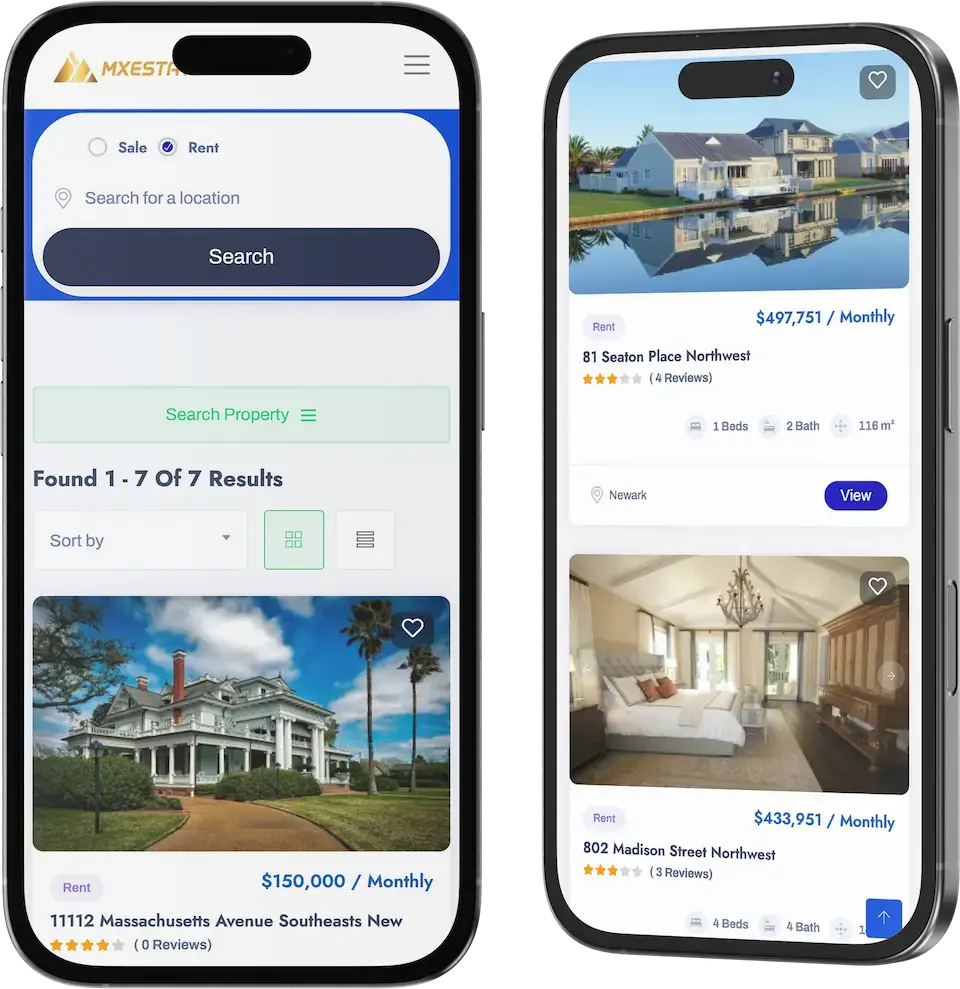
01A property portal where visitors search listings for rent or sale and agents manage what they list, with an admin side for the operator.
Explore Solution
02A furnished-housing product with listings, an availability calendar, bookings and a tenant dashboard for flexible stays.
Explore Solution
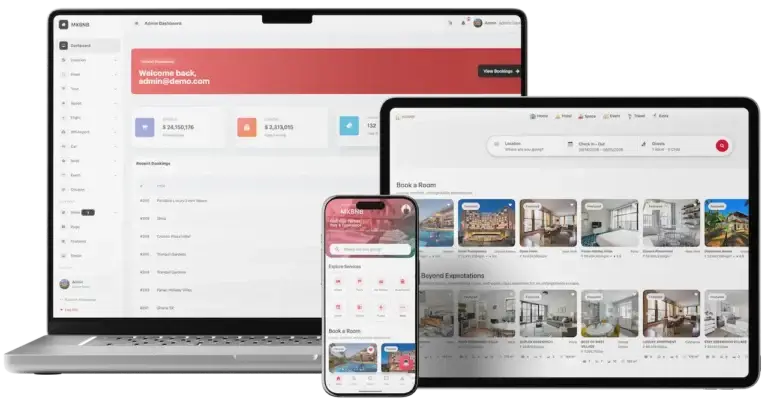
03A short-stay marketplace for hosts and guests, with a host console and an operator admin panel.
Explore Solution
04A fractional property platform where investors buy a share of a building and receive their portion of its rent.
Explore Solution09The business case
How Operators Earn
Buildium Clone Revenue Models - Subscriptions, Rent Payment Fees, Add-On Modules & Licensing
A property platform earns in several places, and the product keeps each line apart so that changing one leaves the others as they were.
Two lines usually matter most: the plan landlords pay and the fee on the rent that flows through the app.
- 01
Subscription Plans
Landlords and management firms pay a monthly or annual plan, flat or per unit, so revenue follows the size of the portfolio each customer runs on your platform.
- 02
Rent Payment Fees
A fee on each rent payment a tenant makes by bank transfer. The tenant home already leads with the next payment due and a Pay Now button, so the fee sits on a screen that every tenant opens.
- 03
Card Payment Fees
Card costs can be recovered through a convenience fee rather than absorbed by the landlord, which keeps small portfolios from paying for a tenant's choice of card.
- 04
Paid Add-On Modules
Screening, e-signature, autopay and accounting sync are scoped modules, and each can carry its own monthly or per-unit price once it is built for your market.
- 05
Payments & Tenant Services
Payments, tenant screening and renters insurance sold through the platform earn per use. None of them is in the demo today, so each depends on an add-on and a provider you contract.
- 06
White-Label Licensing
Because you hold the source code, the same deployment can be licensed to another management company as its own branded platform, on terms you agree with them.
| Revenue stream | How it is charged | Take rateTypical take rate | What sets the ceiling |
|---|---|---|---|
| Subscription Plans | A monthly plan price, either a flat amount or a rate per unit under management. | AppFolio lists $1.49, $3.20 and $5.00 per unit per month. Buildium lists flat plans of $62, $192 and $400 per month. | Portfolio size. AppFolio applies a 50-unit minimum to its lowest plan and Buildium sends portfolios over 5,000 units to a call. Plans sold inside your app also pay Apple 15% to 30%. |
| Rent Payment Fees | A fixed amount per rent payment collected by bank transfer, plus a separate amount for money sent out. | Buildium lists $2.35, $1.35 or $0.60 per incoming payment by plan, and $0.99 per outgoing payment. | What a landlord accepts per payment. Buildium waives the Premium incoming fee for 12 months, so a free period is something to price against. |
| Card Payment Fees | A percentage of each card payment, passed to the tenant or taken from the landlord. | Buildium lists 2.99% per card transaction on all plans. Stripe publishes 2.9% + 30 cents for US cards. | Your gateway contract and your card mix. A fee below the gateway's own rate would not cover processing, so Stripe's published rate is the practical floor. |
| Paid Add-On Modules | A monthly or per-unit price for an extra module such as showings or inspections. | Buildium lists Showings Coordinator from $41 per month and charges $0.40 per unit for inspections after three years on Growth. | Whether the module saves a manager real hours. Buildium tiers the showings price by unit count, so the price climbs with the portfolio. |
| Payments & Tenant Services | Fees on electronic payments, screening and insurance products sold to a portfolio. | AppFolio reports $721.5 million of Value Added Services revenue in 2025, about 76% of its $950.8 million total, mostly from electronic payments. | Payment volume that actually flows through the platform. The 10-K gives no per-transaction price, so read the share as evidence of scale, not as a rate. |
How to read this. The Buildium plan, rent-payment, card and module prices come from its own pricing page, the AppFolio plan prices from its pricing page and its revenue split from the annual report on Form 10-K, and the card example from a Stripe support page. Store commissions are on Apple's developer program page and in the Google Play fee table, which changed on 30 June 2026 for the US, UK and EEA. All of it is other businesses' published pricing, so use it as a modeling input: this table is not a quote and not a forecast of what any platform will earn, and your own figures belong in your gateway and plan settings.
Market Benchmarks
Property Management Software Market Benchmarks - Independent 2025-2026 Data
The revenue models above are ours. The figures below are not. They come from AppFolio's annual report on Form 10-K and the Bureau of Labor Statistics, reproduced as published. Together they show how a listed property management platform earns its revenue and how fast US shelter costs are rising, so you can test a business case against numbers you can check.
9.4m Units Under Management at AppFolio
AppFolio reports in its 2025 annual report on Form 10-K that property management units under management grew 8 percent year over year to 9.4 million at 31 December 2025, served across 22,096 property management customers, up from 20,784. Revenue grew 20 percent to $950.8 million, a scale benchmark for a listed property management platform.
$721.5m of AppFolio Revenue Is Value Added
AppFolio's 10-K reports Value Added Services revenue of $721.5 million in 2025, up 19 percent, against $211.5 million from Subscription Services, up 17 percent. Value Added Services were about 76 percent of the $950.8 million total, and AppFolio says a significant majority of them comes from its electronic payment services.
Shelter Costs Up 3.2% in the Year to September
The US Bureau of Labor Statistics Consumer Price Index release of 14 October 2026 reports that the shelter index increased 3.2 percent over the last year and rose 0.4 percent in September after rising 0.3 percent in August. The index for rent increased 0.2 percent in September, context for the rents a property manager collects.
AppFolio, Inc., Annual report on Form 10-K for the fiscal year ended December 31, 2025, filed 5 February 2026 - sec.gov
US Bureau of Labor Statistics, Consumer Price Index - September 2026, 14 October 2026 - bls.gov
All figures are the publishers’ own reported results and statistics, reproduced as published. The 76 percent Value Added Services share is our arithmetic on reported figures ($721.5 million divided by $950.8 million). They describe the market, not the performance of any platform Miracuves builds, and nothing here is a revenue projection for your business.
Market Timing
Why Build a Property Management Platform in 2026?
Rental management is local and repetitive: the same rent calendar, the same repairs, the same owner questions every month. A platform under your own brand turns that routine into records you own and keeps the tenant, the payment history and the owner relationship on your side of the table.
01Tenants Expect to Pay From a Phone
A next-payment card with a Pay Now button meets tenants where they already are, and a payment history on the same screen settles questions about what was paid.
02Spreadsheets Stop Scaling
Past a handful of units, who lives where, who owes what and which repair is waiting outgrow a spreadsheet. A property record with units and occupancy keeps them in one place.
03Owners Want to See Numbers
Owners who hire a manager ask about income, expenses and performance. An owner portal with financial reports and property performance answers before they ask.
04Maintenance Is Where Tenants Judge You
A request tenants can submit in a few taps, and a work orders count the office can see, turn repairs into a tracked routine instead of a phone call.
05Your Brand, Not a Seat on Another Platform
When the app carries your name, the tenant relationship, the payment history and the owner reports stay with you.
06Buy Versus Build Is Quick to Settle
Roles, property records, tenant records, rent due and an admin dashboard are most of a management product. After 6 days of our build time, a white-label copy is running on your own hosting.
Platform by the Numbers
Roles, One Codebase
Real Demo Screens
Features Listed
Days of Build Time
Most of the work in a property product is the plain middle: unit and tenant records, rent due dates, repair requests and an admin dashboard that ties them together. Here it is already built.
The Commercial Case
Marketability, Revenue Potential & Business Prospects
A property platform earns when landlords trust it enough to run their portfolio on it and tenants use it enough to pay through it. Everything that follows is about making those two habits easier to form, and about owning the relationship once they exist.
- 01
Revenue That Follows the Portfolio
Plans, payment fees and add-on modules all grow with the number of units you serve, so revenue rises with the portfolio rather than with headcount.
- 02
Several Lines, One Platform
Subscriptions, rent payment fees, card fees and extra modules are separate levers, so you can switch one on without redesigning the rest.
- 03
Tenants and Owners You Own
Tenant records, payment history and owner reports sit in your database, so the value of the platform builds up with you and not with a third party.
- 04
Exit Optionality
You hold the complete source code, so a future change of host, team or direction needs no one's permission.
- Subscription Plans
- Rent Payment Fees
- Card Payment Fees
- Paid Add-On Modules
- Payments & Tenant Services
- White-Label Licensing
Defensibility comes from records and routine rather than features.
- 01Landlords with buildings and tenants loaded do not casually move
- 02Tenants with a payment history and a lease have a reason to stay
- 03That accumulation starts at launch and stays in your database
- 04Reliable support for rent and repairs is the second moat
These three cases differ only in how many units are managed, and each names the lever that leads at that size. They are examples for planning conversations, not predictions of what any platform will earn.
Rent payment fees and a simple plan carry early revenue.
A landlord or small firm running a couple of dozen units, where a monthly plan and the fee on rent collected cover the running costs. Illustrative size, not a forecast.
Plans plus paid modules and card fees.
A firm running a few hundred units for several owners, where plans, payment fees and a paid module such as screening or accounting sync all begin to matter. Illustrative size, not a forecast.
Several lines active, with licensing on top.
An operator spanning many buildings and owners, where subscriptions, payment fees, modules and white-label licensing add up and the admin reports guide where to focus. Illustrative size, not a forecast.
10Why Miracuves
Why Miracuves
How Miracuves Compares With the Other Routes to a Buildium-Style Platform
There are several routes to a property management platform: a generic rental script, a freelancer, an agency, or a ready-made base from a team that has built it before.
Why Founders Choose Miracuves
- 01
Three Roles Built In
Tenant, owner and admin each get their own entry and home screen. Generic rental scripts often stop at a listing page and a single login.
- 02
Rent Due and Pay Now on Screen
The tenant home leads with the next payment due and a Pay Now button, with payment history beside it, so the rent story is visible from the first login.
- 03
Records for the Whole Portfolio
Properties, units, tenants and leases come as linked records with search, instead of four projects to join later.
- 04
Full Source Code Ownership
The whole codebase arrives unencrypted, so nobody can reprice it or change the terms after you launch.
- 05
Maintenance Intake Included
A maintenance request shortcut for tenants and a work orders tile for admins are part of the base, where many scripts leave repairs to a phone call.
- 06
Plain Readiness Language
This page says what is a base feature, what is an add-on and what you supply yourself, including gateway accounts, hosting and store developer accounts.
How the Buildium Clone Compares With Rental Scripts and Agencies, Row by Row
| Criteria | MiracuvesMiracuves Buildium Clone | Generic Rental Script | Custom Dev Agency |
|---|---|---|---|
| Time to Launch | 6 days of our build time | Unknown or DIY | Scoped per project, usually months |
| Source-Code Ownership | Complete, unencrypted | Often limited or locked | Usually yes |
| Property-Management Depth | Properties, units, tenants, rent, maintenance, leases | Plain listing pages | Whatever the budget allows |
| Tenant App | Pay Now, payment history, lease, documents, requests | Rarely included | Built to order |
| Owner & Admin Side | Owner reports and an admin dashboard | Thin or absent | Built to order, extra cost |
| Screening & E-Signature | Scoped add-ons, not in the base | Varies by script | Custom integration |
| Security & Compliance | Role sign-in, gateway-held card data, honest limits | Minimal | Varies widely |
| Cost vs Speed vs Quality | Fixed price, fast, tested base | Low price, high risk | Expensive and slow |
| Ongoing Support & Updates | 60 days guidance, 6 months bug fixes, 12 months updates | Rarely offered | Set by the contract |
Few routes to a landlord platform survive the first busy rent cycle unchanged. This is where they part ways.
Talk to Our TeamChangelog
Buildium Clone Release Log - What Changed in Each Version
Release notes for the platform, newest first. The notes carry no dates, so the table lists versions only.
| Version | Changes | What changed |
|---|---|---|
| V 1.4 | 1 update, 1 fix | Added or updated Unused code stripped out of the project for better performance Fixed Ticket-related problems resolved |
| V 1.3 | 1 update, 1 fix | Added or updated Refined notification list card design for better user experience Fixed Fixed tenant profile settings issue |
| V 1.2 | 1 update | Added or updated Improved brand card design for a more polished look |
| V 1.1 | 2 updates, 1 fix | Added or updated Every package moved to its newest version Account management improved, which also helps performance Fixed Problems with the category issue list resolved |
Let's build together
Let's turn your rental portfolio plan into a platform with your name on it.
Book a free consultation and leave with a clear timeline and honest answers to your questions. We would rather earn your trust than close a fast sale.
- First reply under 2 hours
- Free consultation
- No lock-in contracts
- Full source code ownership
11Learn more
Blog & Resources
Buildium Clone App: Newest Guides & Insights
Stay up to date with guides on what property management software includes, how to build one and how its revenue model works.


The product4 questions
01What exactly is a Buildium Clone solution?
A Buildium clone is a ready-made property management app. The Miracuves Buildium Clone gives landlords and managers property, unit, tenant and lease records, lets tenants see the next rent due, pay it and raise a maintenance request from their phones, and gives owners and administrators dashboards for occupancy, work orders and revenue. It ships as a tenant app, a landlord app, a web portal with a vendor panel and an admin panel, white-labeled to your brand.
02What does the demo app show?
The demo is one Flutter app with three entry points on its sign-in screen: Explore as Tenant, Explore as Owner and Explore as Admin. The tenant side shows the next payment due with a Pay Now button and shortcuts to a maintenance request, payment history, the lease and documents. The owner side shows properties, units, occupancy and revenue with shortcuts to financial reports and property performance. The admin side shows properties, tenants, work orders and revenue with shortcuts to properties, tenants and leases. The web portal and vendor panel are shown on a guided call.
03Can I launch a property management app like Buildium legally?
Software for managing rentals is generally lawful to build and sell. The Miracuves Buildium Clone follows ordinary property-management patterns, uses no code, design or content from Buildium, and uses the name descriptively. What the law asks of you as a landlord or manager, such as rules on deposits, late fees, notices and tenant screening, depends on where you operate. Miracuves gives no legal advice, so have a local lawyer check those points for your market.
04Which landlord workflow steps are in the base, and which are add-ons?
The base covers what the demo shows: role-based sign-in, property and unit records, tenant records, rent due with Pay Now and payment history, a maintenance request shortcut, lease and document shortcuts, owner financial reports and an admin dashboard. Tenant applications, screening and background checks, e-signature for leases, autopay with late-fee rules and accounting sync are not in the demo. They are scoped as add-ons, and each is quoted in writing before any work starts.
Tenants & landlords6 questions
05Can tenants manage their accounts and view payment history?
Yes. The tenant app has a Payment History quick action beside the next payment due card, a My Lease shortcut and a Documents shortcut, and tenants can create their own account with email, Google or GitHub. Account management was improved in release 1.1.
06Is the app mobile-friendly and available on both iOS and Android?
Yes. The tenant and landlord apps are built in Flutter, so Android and iOS builds come from one code base, and Miracuves supports publishing them from your own developer accounts. Apple and Google review each app on their own timetable, which sits outside our 6-day build time.
07How secure is the app for tenants’ data?
The demo shows role-based sign-in, a password strength bar with a confirmation field, and Google and GitHub options. Tenant records stay in databases on hosting you provide, and card details are handled by the payment gateway you connect. The platform is not certified under any security framework. Penetration testing, secret rotation and a restore test are launch tasks we plan with you.
08Can property managers list multiple properties on the platform?
Yes. The properties list holds as many properties as you add, each with its own address, type, year built, total units, description and Overview, Units and Financials tabs. The list has a search box and an add button.
09Does the landlord app allow for tenant screening?
Not in the demo. The landlord side shows properties, units, occupancy, revenue and reports, and the tenant list shows contact details and an active status, but no screening or credit-check flow appears in any demo screen. Screening and applications are available as a scoped add-on with a screening provider you contract, priced separately.
10How can property managers track rent payments and expenses?
On the tenant side, the next payment due and the payment history show what is owed and what was paid. On the owner side, Financial Reports opens income and expenses and Property Performance opens property metrics, and the admin dashboard carries a revenue tile. Deeper tracking, such as overdue lists or accounting sync, is scoped as custom work.
Admin, money & payments6 questions
11What level of control does the admin panel provide?
The admin dashboard shows properties, tenants, work orders and revenue as four tiles, with quick actions into properties and units, tenants and lease renewals. Property records can be added, edited and deleted, and the tenant list can be searched. The web admin panel is shown on a guided call.
12Can I manage roles and permissions for different users?
The demo separates three roles: tenant, owner and admin, each with its own sign-in entry and home screen. Finer permissions, such as a technician or vendor role with limited screens, are scoped as custom work.
13Does the admin panel include reporting and analytics tools?
The demo shows headline tiles on the admin dashboard and, on the owner side, Financial Reports for income and expenses and Property Performance for property metrics. A larger reporting suite with custom reports is scoped separately.
14How do tenants pay rent in the app?
The tenant home shows the next payment due with its amount and due date, and a Pay Now button. Payments go through the gateway account you connect, so you need a gateway with KYC completed before launch. Recurring autopay and late-fee rules are an add-on, not part of the demo.
15How does revenue actually start coming in?
Most property platforms start with the subscription, because it needs nothing beyond the base: the first landlord who signs up pays a plan. Fees on rent payments come next, once tenants actually pay through the app and you have agreed the gateway terms. Paid modules such as screening, e-signature or accounting sync, and licensing the white-label deployment to another management company, depend on your own commercial arrangements and are agreed rather than built in.
16How defensible is a property management platform?
Defensibility comes from records and routine rather than features. Landlords who have loaded their buildings, units and tenants do not casually move, and tenants who have a payment history and a lease in the app have a reason to keep using it. The platform helps by letting that accumulation start at launch and by keeping it in your database. Reliable support for rent and repairs is the second moat, because a platform people depend on every month is hard to replace.
Launch & Miracuves5 questions
17How much does the Buildium Clone cost?
The launch-ready white-label Buildium Clone is a fixed price of $5,199, with the complete source code. Add-ons, extra integrations and custom flows are scoped and quoted separately in writing. Hosting, a domain, store developer accounts and a payment gateway are yours to supply.
18How long does it take to launch?
The ready-made build takes 6 working days on our side: rebranding, deployment to your hosting and publishing support from your developer accounts. Store review by Apple and Google, gateway onboarding and your own content are outside that time.
19What support is included?
Launch starts three overlapping periods: 60 days of dedicated platform guidance, 6 months of priority bug resolution and 12 months of continuous product updates, all at no extra cost. We answer first in under 2 hours, Monday to Saturday, 10:00 to 19:00 IST.
20What do I need to provide?
You bring hosting and a domain, a verified developer account for each store, your branding and business details, a payment gateway that is onboarded with KYC complete, and any third-party keys such as Google Maps, Twilio or Firebase. Miracuves does not write your lease templates, privacy policy or terms of service.
21Why is Miracuves the right team for a Buildium clone?
Because the role-based sign-in, the property and tenant records and the rent and maintenance screens arrive working, with the complete source code and a fixed price of $5,199. Miracuves has 9,000+ projects delivered since 2010 and 6,000+ clients served, and this page says plainly which features are in the base and which are add-ons.
Go deeper on this platform
A sector overview, explainer articles, the service behind it and companion products.
Real estate app development
See the service→GuideWhite-Label Buildium App Security: Risks, Compliance & Safety in 2026
Read the guide→Business model
How a property management platform is structured and where its revenue comes from.
Read the guide→Related platformBlueground Clone
A furnished-housing product with an availability calendar, bookings and a tenant dashboard.
See the platform→Real estate and PropTech
See the industry→GuideRevenue model
The income streams and fee structure of a property management platform, broken down.
Read the guide→Talk to an expert →Features and pricing
What a ready-made property management script includes, how its features are grouped and what it costs.
Read the guide→Related platformZillow Clone
A property portal where visitors search listings for rent or sale and agents manage what they list.
See the platform→Disclaimer
Miracuves is an independent software development company. We are not affiliated with, connected to, sponsored by, or endorsed by Buildium.
Read our full Legal Notice & Disclaimer →“Buildium Clone” is used descriptively. It is how the software industry refers to building a platform with functionality similar to Buildium, and how clients search for it.
The entire design and codebase is built by our own team. The product contains no code, design, graphics, or content originating from the Buildium website or applications.
Buildium and all other third-party names and marks are the property of their respective owners, referenced here solely to describe the category of software offered.