

















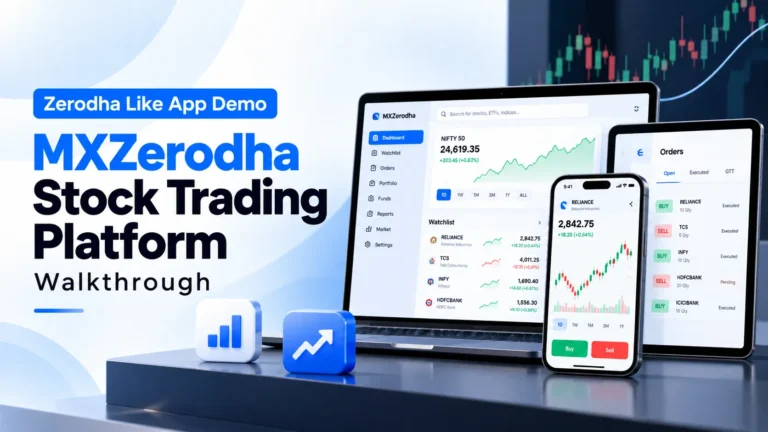
Watch this Zerodha Like App Demo to explore how MXZerodha connects market discovery, trading workflows, portfolios, investor tools, mobile access and administrative operations within one stock trading platform.
What Does This Zerodha Like App Demo Show?
This Zerodha Like App Demo provides a practical walkthrough of MXZerodha, a stock trading platform designed around trader workflows, investment management, market information, portfolio visibility and administrative operations.
Rather than looking at trading features separately, the demo helps founders understand how different parts of a modern trading platform connect. Traders can access markets, review holdings and positions and manage trading activity, while investors and platform administrators operate through dedicated interfaces.
The MXZerodha Demo Video is useful for fintech founders, brokerages and investment businesses evaluating a stock trading application before moving into customization, integrations and deployment planning.
MXZerodha Demo Video: Key Platform Areas to Explore
While watching the walkthrough, focus on how the following parts of the platform connect across trader, investor and administrator journeys.
Trading Terminal
Review how traders access market information, order workflows, positions and holdings.
Market Data
Explore market views, watchlists, charting and price information used during trading.
Portfolio Tracking
See how holdings, positions and portfolio information can be organized in one interface.
Investor Portal
Review the investment-focused experience for users managing longer-term portfolio activity.
Mobile Trading
Understand how trading and portfolio access extends to the Android application.
Admin Operations
Explore the operational layer used to manage users, KYC, brokers, risk and platform activity.
Inside the MXZerodha Stock Trading Platform
MXZerodha demonstrates how a Zerodha Like App Demo can combine trader-facing functionality with investor tools and administrative operations without making this video page another Zerodha Clone commercial page.
1. Trader Dashboard and Market Access
The trader-facing interface brings market information and trading activity into one working environment.
- Watchlists: Monitor selected securities and market movements.
- Market Views: Review trading information before placing orders.
- Positions: Track active market positions.
- Holdings: Review securities held within the portfolio.
2. Order and Trading Workflows
A trading application needs a structured workflow connecting market selection, order entry, validation and portfolio updates.
- Order Entry: Initiate buy and sell activity through the trading interface.
- Order Types: Support common market and conditional order workflows.
- Order Tracking: Review submitted and completed trading activity.
- GTT Workflows: Configure longer-lived trigger-based trading instructions.
3. Portfolio and Investor Experience
The platform also includes investment-focused workflows beyond immediate order placement.
- Portfolio View: Review investments from a unified interface.
- Holdings: Track owned securities and portfolio composition.
- Investment Activity: Review longer-term investment information.
- Investor Portal: Provide a dedicated interface for investment-focused users.
4. Admin and Platform Operations
Trading software also requires an operational layer for managing the platform behind the trader-facing experience.
- User Management: Oversee trader and investor accounts.
- KYC Operations: Manage identity and onboarding workflows.
- Broker Management: Maintain connected brokerage relationships.
- Risk and Finance Controls: Monitor important operational activity.
How the Stock Trading App Workflow Connects
MXZerodha connects market discovery, trading, portfolio management, investor access and administrative operations within one trading ecosystem.
| Platform Area | Primary User | Purpose |
|---|---|---|
| Market Discovery | Traders | Review securities, watchlists, market information and trading opportunities. |
| Order Management | Traders | Place, review and manage trading orders through structured execution workflows. |
| Positions & Holdings | Traders & Investors | Monitor active positions, owned securities and overall portfolio activity. |
| Investor Portal | Investors | Provide an investment-focused interface for portfolio and long-term asset management. |
| Mobile Trading | Traders & Investors | Extend trading, portfolio and account access to a mobile application. |
| KYC & User Management | Platform Admin | Oversee onboarding, identity workflows and user account operations. |
| Platform Administration | Platform Admin | Manage broker connections, risk controls, finance and operational settings. |
Why Watch a Zerodha Like App Demo Before Choosing a Trading Platform?
A feature list can show whether a trading platform includes orders, watchlists or portfolio tracking, but it does not always show how those workflows connect in practice.
A Zerodha Like App Demo gives founders and fintech teams a clearer view of the trader experience, investor workflows, mobile access and administrative operations before moving into deeper technical or commercial evaluation.
The demo can help answer two important questions:
- Does the trading workflow fit the intended user and business model?
- Can the platform foundation support the required broker, market and operational workflows?
Where Miracuves Fits Into the MXZerodha Demo
MXZerodha demonstrates the working product experience behind a modern stock trading and investment platform.
Miracuves provides the broader white-label trading foundation that can be adapted around a fintech brand, brokerage model, broker integrations, trading workflows and operational requirements.
If you want to review the complete commercial solution rather than only watch the product workflow, explore the Miracuves Zerodha-style trading platform for detailed information about the full product, customization and deployment.
Frequently Asked Questions
What is shown in the MXZerodha demo video?
The MXZerodha demo provides a walkthrough of a stock trading platform covering trader workflows, market information, portfolios, investor access, mobile functionality and administrative operations.
Is MXZerodha a Zerodha-like app demo?
Yes. MXZerodha demonstrates a stock trading platform with workflows associated with modern online trading applications, including market access, orders, positions, holdings and portfolio management.
Does the demo include trader and investor interfaces?
Yes. The MXZerodha demo environment provides dedicated access for traders and investors, along with an administrative interface.
Is there a mobile trading app demo?
Yes. The MXZerodha demo environment includes an Android application alongside the web-based trading and administrative interfaces.
Where can I review the full Miracuves trading platform?
The Miracuves trading solution pages provide broader details about trading features, broker connectivity, customization, platform ownership and deployment options.
Explore the Stock Trading Platform
Use the MXZerodha demo to understand the trader and investor experience, then explore the Miracuves solution when you are ready to evaluate customization, broker integrations and platform deployment.