



















Key Takeaways
- Autonomous AI agents can reduce repetitive work across multiple SaaS applications by interpreting goals, accessing connected tools and completing multi-step business workflows.
- Unlike traditional SaaS automation, AI agents can make context-based decisions, process unstructured information and adapt their next actions within defined operational boundaries.
- Founders can explore AI agent opportunities in customer support, lead qualification, reporting, internal operations and routine data management without replacing every existing SaaS tool.
- Successful AI agent adoption requires reliable integrations, human oversight, data security, measurable performance and clear limits on autonomous decision-making.
How AI Agents Transform Traditional SaaS Workflows
- Traditional SaaS workflows often require employees to move between dashboards, update records manually and coordinate tasks across separate business applications.
- AI agents can connect with approved APIs, databases and business software to retrieve information, perform authorized actions and coordinate related tasks from a single workflow.
- Agent-based automation can support activities such as organizing customer inquiries, updating CRM records, preparing operational reports and routing requests to the appropriate teams.
- Rather than eliminating every SaaS subscription, AI agents may reduce manual coordination while existing platforms continue providing essential data storage, transaction processing and system controls.
AI Agent Implementation and Business Growth Considerations
- Founders should begin with repetitive, well-defined workflows where task frequency, processing time, error rates and automation benefits can be measured.
- AI agent architecture should include secure tool access, permission controls, workflow logging, error handling and human approval for sensitive or irreversible actions.
- Before expanding deployment, businesses should evaluate task completion accuracy, operating costs, integration reliability, exception handling and the quality of AI-generated decisions.
- A practical adoption strategy combines limited pilot projects, continuous monitoring, employee feedback and gradual workflow expansion to improve efficiency without compromising operational reliability.
The modern founder rarely struggles with a shortage of software. The bigger challenge is that running a business often requires too many applications, too many dashboards, and too much manual coordination between them. A customer inquiry enters one system, an employee updates another, a task is assigned elsewhere, and a separate reporting tool eventually shows what happened.
Each application might work perfectly on its own, yet the overall process remains inefficient because people must connect the steps.
Autonomous AI agents are beginning to change this operating model. Instead of requiring employees to navigate several SaaS tools to complete a business process, an AI agent can interpret a goal, retrieve information, interact with authorized systems, and execute a sequence of actions within predefined boundaries.
For founders, the opportunity is not necessarily to eliminate every software subscription. It is to rethink why each application exists, what work it performs, and whether that work still requires a dedicated interface.
Understanding how AI agents are replacing repetitive SaaS tools helps business owners identify unnecessary software complexity, reduce manual coordination, and create more responsive operations without sacrificing control.
Why Founders Are Rethinking Their Growing SaaS Stack
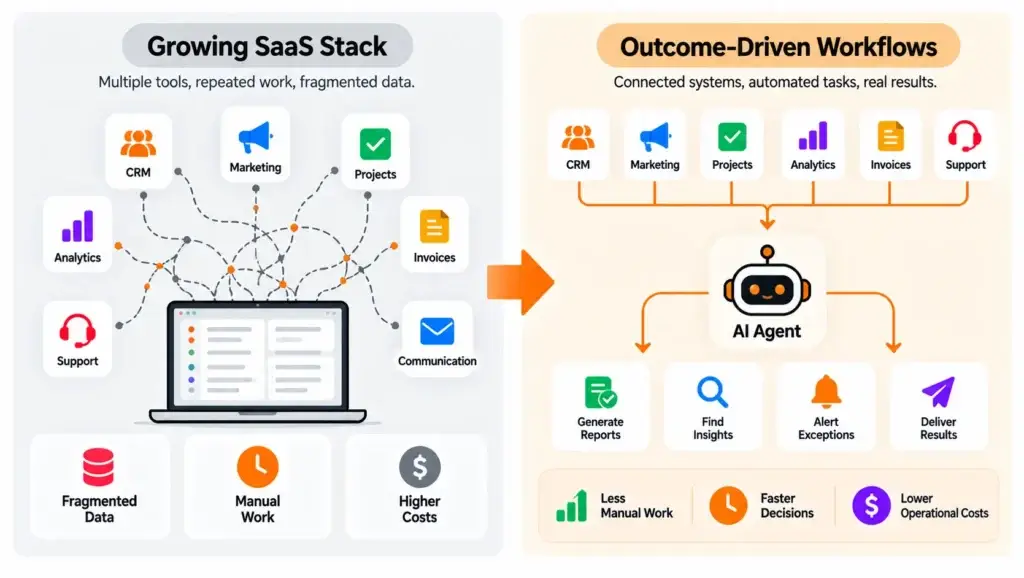
SaaS platforms made sophisticated business capabilities accessible without requiring companies to develop every system themselves. A small team can manage customer relationships, marketing campaigns, invoices, projects, analytics, and support tickets through separate cloud applications.
However, as a business expands, those applications can create operational friction. Customer information becomes fragmented, employees repeat updates across systems, and managers spend time reconciling reports instead of acting on the information they contain.
This creates a form of software complexity that is not always visible in the monthly subscription bill.
A founder might pay for a reporting application, a workflow connector, a task management platform, and a customer communication tool. The combined expense includes not only software fees but also the time employees spend moving information between them.
The challenge becomes more noticeable when a relatively simple business outcome requires several manual steps. Preparing a weekly sales summary, for example, might require extracting CRM data, organizing a spreadsheet, checking invoice records, preparing an explanation, and sharing the final report.
The real business requirement is a reliable sales summary. The applications are simply the mechanisms used to produce it.
From Software Features to Completed Business Outcomes
Traditional SaaS purchasing decisions often focus on functionality. A founder chooses an application because it provides dashboards, forms, notifications, reports, or integrations.
Autonomous workflows encourage a different question: what business outcome should the system deliver?
A founder does not necessarily need another reporting interface if an authorized workflow can retrieve accurate numbers, detect exceptions, prepare a summary, and deliver it to the appropriate manager.
This represents a shift from software organized around individual user actions toward operations organized around completed tasks.
The distinction matters because eliminating unnecessary manual steps can create value even when the underlying SaaS applications remain in place.
What Autonomous AI Agents Actually Do Inside Business Workflows
An autonomous AI agent is a software system that can pursue a defined objective by interpreting context, selecting from permitted actions, interacting with tools or data sources, and evaluating intermediate results.
Unlike a conventional automation that follows an entirely fixed sequence, an AI agent can handle certain variations in the information it encounters. It may need to decide which record to retrieve, whether additional context is required, or when a situation should be escalated to a person.
Consider a customer asking why an order has not arrived. A conventional automated response might return a tracking link. A controlled AI agent could retrieve the order, check the latest delivery event, compare it with the estimated arrival window, identify an approved response, and prepare a customer update.
If the situation requires compensation or a financial adjustment, the system can stop and request approval.
The important capability is not simply generating natural-language responses. It is coordinating actions using relevant business information.
How an AI Agent Completes a Multi-Step Task
A typical agent-assisted workflow follows a practical sequence:
- Receive a business objective. A request, scheduled event, or system alert establishes what needs to happen.
- Gather relevant context. The agent retrieves authorized records from connected systems.
- Select permitted actions. It determines which available tools can help complete the task.
- Execute and verify. The system performs actions and checks whether they produced the expected results.
- Escalate exceptions. Uncertain, sensitive, or unauthorized actions are referred to a human.
- Record the outcome. The workflow maintains a traceable record of completed actions and unresolved issues.
Not every agent uses all these steps, and autonomy should not be unlimited. A well-designed business workflow defines exactly what the agent can do, which information it may access, and when it must stop.
These capabilities become especially valuable when an agent needs to work with customer records, operational data, and application-specific business rules rather than responding to isolated prompts. For founders exploring integrating intelligent workflows into existing applications, understanding how agents access authorized information, interact with APIs, and follow predefined execution boundaries is essential before introducing more complex automation.
Which Repetitive SaaS Workflows Can AI Agents Replace?
The most promising opportunities are often found in the gaps between existing applications.
When an employee repeatedly collects information from one platform, interprets it, and updates another, a controlled agent may be able to handle part or all of that process.
However, the suitability of a workflow depends on its complexity, required accuracy, available integrations, and consequences of an incorrect action.
| Business workflow | Traditional SaaS-dependent process | Potential AI agent responsibility | Replacement potential |
|---|---|---|---|
| Weekly business reporting | Exporting data and assembling reports manually | Retrieve, reconcile, and summarize approved data | High for manual preparation |
| Lead qualification | Reviewing forms and updating sales records | Classify inquiries, enrich records, and suggest routing | High with appropriate controls |
| Customer support triage | Switching between ticketing, order, and knowledge systems | Gather context and prepare responses or route tickets | High for routine cases |
| Project administration | Copying updates across collaboration tools | Summarize progress and create approved follow-up tasks | Moderate to high |
| Invoice follow-ups | Checking payment status and sending reminders | Detect overdue items and draft approved communications | Moderate |
| Content operations | Moving drafts between documents and publishing systems | Coordinate review, formatting, and scheduling | Moderate |
| Financial reconciliation | Comparing transactions and investigating mismatches | Flag exceptions and prepare supporting evidence | Assistive rather than fully autonomous |
These classifications are practical editorial assessments, not measured performance guarantees. Actual suitability depends on the organization’s systems and risk requirements.
1. Reporting and Business Intelligence Workflows
Founders frequently use multiple tools to understand revenue, customer activity, campaign performance, and operational progress. The difficulty is often not accessing data but combining it into a consistent business picture.
An AI agent can help retrieve reports from authorized sources, organize information into a standard format, flag unusual patterns, and prepare a summary for review.
For example, an online marketplace founder might request a weekly explanation of declining completed orders. The agent could compare available order data, cancellation reasons, seller activity, and support categories before producing a structured analysis.
The underlying databases and analytics platforms remain necessary. What becomes replaceable is the repetitive manual preparation surrounding them.
A key requirement is that the agent should distinguish verified numbers from interpretations. Any conclusion that cannot be supported by the available data should be identified as uncertain rather than presented as fact.
2. Sales Administration and Lead Follow-Ups
Sales teams often spend considerable time reviewing inquiry forms, updating customer records, checking prior interactions, and preparing follow-up messages.
An autonomous workflow can assist by categorizing incoming inquiries, detecting missing information, preparing personalized drafts, and assigning qualified opportunities according to business rules.
Consider a B2B founder receiving inquiries through a website, email, and campaign landing pages. Instead of manually consolidating every request, an agent could gather available context, identify duplicates, assign an initial category, and prepare a review queue.
This reduces administrative friction without requiring the company to abandon its customer relationship management platform.
For outbound communication, founders should keep consent requirements, communication policies, and human approval controls in place. Automating messages without those safeguards can create more problems than it solves.
3. Customer Support Coordination
Customer support is particularly suitable for selective automation because many inquiries involve gathering information already stored in business systems.
An AI agent can check account details, identify relevant policies, summarize previous conversations, and suggest the next permitted action.
For example, an online retailer might receive a complaint involving an incomplete delivery. The agent could retrieve the order record, compare the delivered items against the purchase details, identify the relevant support policy, and prepare a response.
Straightforward cases may be completed automatically if the business has approved that action. Complex disputes, high-value refunds, or unclear records should move to a human specialist.
For businesses automating customer interactions, response accuracy matters as much as execution speed. Using verified business knowledge in AI customer support helps teams understand how retrieval-based responses, policy validation, and human escalation can reduce the risk of incorrect customer communications while allowing AI agents to handle routine support activities.
The opportunity is to reduce repetitive investigation while maintaining accountability for sensitive decisions.
4. Internal Project and Operations Management
Growing businesses often maintain information across project boards, shared documents, messaging systems, and internal databases.
A significant amount of operational time can disappear into preparing progress summaries, updating task statuses, and reminding employees about pending actions.
An agent can review authorized project information, detect missed deadlines, organize unresolved issues, and prepare a team update. It may also create follow-up tasks where permissions and business rules allow.
However, project priorities and resource allocation involve judgment. An agent can provide relevant context, but founders should retain responsibility for strategic trade-offs and sensitive personnel decisions.
5. Finance Administration and Exception Detection
Certain finance-related workflows contain repetitive administrative steps, including invoice classification, payment reminders, transaction matching, and document organization.
These activities can benefit from intelligent assistance, especially when business records contain inconsistent descriptions or require contextual interpretation.
An agent might identify a potential invoice mismatch and prepare the supporting records for an accountant. This is different from granting the agent authority to change a ledger, authorize transfers, or approve payments independently.
Accounting systems, transaction controls, and audit trails should remain authoritative.
For finance operations, the most useful automation often reduces investigation time while leaving final decisions and irreversible actions under appropriate human control.
Are AI Agents Replacing SaaS Platforms or Just Their Interfaces?
This distinction determines whether a business can genuinely remove a subscription.
An application typically delivers several kinds of value. Some features help employees interact with information, while others store critical records, enforce permissions, execute transactions, or support regulated operations.
AI agents may replace manual interaction layers without replacing the infrastructure beneath them.
A founder who automates reporting may no longer need a separate report-assembly tool, but still needs the database containing accurate source information.
Similarly, an agent that organizes customer follow-ups does not automatically eliminate the requirement for reliable customer records, access controls, and communication history.
For businesses that already depend on established CRM platforms, financial systems, and operational databases, connecting AI capabilities with existing business systems may be more practical than replacing those applications entirely. This approach allows intelligent workflows to retrieve information, coordinate permitted actions, and reduce manual handoffs while preserving the underlying software infrastructure that supports data accuracy, security, and day-to-day continuity.
Three Possible Outcomes of SaaS Consolidation
| Outcome | What changes | Practical example |
|---|---|---|
| Replace a narrow task tool | A dedicated application becomes unnecessary | An agent prepares a recurring summary previously assembled through a separate reporting utility |
| Consolidate overlapping workflows | Multiple manual coordination steps become one controlled process | Lead intake, classification, and follow-up preparation run through a shared workflow |
| Retain and enhance a core platform | Existing software remains the authoritative system | An agent interacts with CRM records rather than replacing the CRM database |
The sensible objective is not the smallest possible number of applications. It is the least complex technology environment that can deliver dependable business outcomes.
When Traditional SaaS Remains the Better Choice
Many established SaaS systems provide capabilities that are difficult to reproduce safely through autonomous execution alone.
These include financial ledgers, structured customer records, security permissions, regulatory reporting, payroll calculations, and specialized industry workflows.
They may also deliver predictable results at lower operating cost than model-driven execution.
When a task always follows the same rules and does not require interpretation, conventional automation can be simpler, faster, and easier to verify.
Another consideration is whether a business should continue relying on hosted software or take greater control of its own technology foundation. The distinction between hosted tools and source-code-owned AI platforms becomes relevant when founders need deeper customization, independent infrastructure control, or proprietary workflow logic. Ownership may provide greater flexibility, but it also introduces ongoing maintenance and operational responsibilities that should be considered before replacing established SaaS systems.
Founders should therefore avoid assuming that adding AI necessarily improves every existing process.
The Founder’s SaaS Replacement Scorecard: What Should You Automate First?
The most reliable starting point is a workflow audit, not an immediate decision to cancel subscriptions.
Instead of evaluating software by product name, examine the specific activity employees perform through each tool.
For every candidate workflow, consider five factors: how frequently it occurs, how much human effort it requires, how predictable its inputs are, whether the necessary data is accessible, and what happens when an action goes wrong.
A Practical Workflow Suitability Matrix
| Evaluation factor | Strong candidate | Weak candidate |
|---|---|---|
| Frequency | Repeated daily or weekly | Infrequent and exceptional |
| Manual effort | Significant copying, checking, or summarizing | Minimal existing effort |
| Data availability | Relevant records accessible through approved interfaces | Missing, inconsistent, or inaccessible records |
| Error impact | Easy to correct before customer or financial harm | High financial, legal, safety, or reputational consequences |
| Success measurement | Clear outcome and measurable acceptance criteria | Subjective or poorly defined outcome |
A founder can classify each workflow into one of four decisions:
Keep: The existing software performs a necessary function reliably and economically.
Automate: The software remains useful, but an agent can reduce the manual effort required to operate it.
Consolidate: Several overlapping coordination tasks can be combined into one governed workflow.
Retire: A narrow application is no longer needed because its useful function has been replaced and validated elsewhere.
Retirement should come last, after the replacement workflow has demonstrated dependable execution and the business has confirmed that no critical records or dependencies will be lost.
How AI Agents Could Reduce SaaS Expenses Without Creating New Costs
Reducing the number of subscriptions is an attractive possibility, but it is not the same as reducing total operating expenses.
AI agents introduce their own costs, including model usage, integrations, infrastructure, workflow monitoring, exception handling, testing, and ongoing maintenance.
A founder who eliminates a small reporting subscription but introduces an expensive, unreliable autonomous workflow may end up spending more.
The financial case should therefore consider both visible and hidden costs.
Compare Total Workflow Costs, Not Only Subscription Fees
A useful evaluation begins with two calculations:
Current annual workflow cost = SaaS subscriptions attributable to the workflow + manual labor + integration maintenance + error correction.
Proposed annual workflow cost = AI execution + infrastructure + integration maintenance + monitoring + human review + expected error correction + allocated implementation expense.
These calculations should use the same workflow volume and comparable quality standards.
For example, suppose a team manually prepares a report every morning. The existing cost includes employee time, relevant software charges, and any effort required to correct mistakes.
An automated alternative may reduce preparation time, but someone might still need to validate the report, investigate missing data, and monitor API failures.
A trustworthy business case accounts for those responsibilities rather than assuming automation eliminates them.
Why the Cost Per Completed Task Matters
Founders should measure what it costs to produce one accepted business outcome, not merely one model request.
An AI agent may need several model calls, data lookups, retries, and validation steps to complete a single task. If the workflow fails, additional human effort may be required.
That means a low cost per API request does not necessarily translate into a low cost per successfully completed workflow.
The relevant metric is:
\[ \text{Cost per accepted task} = \frac{\text{Total workflow operating cost}}{\text{Accepted completed tasks}} \]
This offers a more practical way to compare manual, traditional automation, and AI-assisted processes.
If agent execution becomes less expensive while maintaining the required quality and safety, automation may offer a meaningful operational advantage.
A Practical Example: Consolidating Customer Onboarding Workflows
Imagine a subscription-based business that uses separate tools for customer inquiries, account records, onboarding messages, internal task tracking, and progress reporting.
After a new customer registers, employees manually confirm the account, review the customer’s chosen plan, create internal tasks, send onboarding instructions, and update the account status.
Every application serves a purpose, but the process requires repeated human coordination.
An AI-assisted approach could reorganize these activities around a single onboarding objective.
Before: Multiple Manual Handoffs
The support team reviews the registration, operations checks the account information, a coordinator creates tasks, and another employee prepares the welcome communication.
If a record is incomplete, the process may stop until someone discovers the issue.
The business may have difficulty identifying where onboarding delays occur because the work is spread across separate applications.
After: One Governed Workflow
An agent receives an onboarding event and checks the required account fields using authorized access.
If the information is complete, it creates approved onboarding tasks, prepares the relevant communication, and records the workflow’s progress.
If the information is missing or contradictory, the agent routes the case to the appropriate employee instead of guessing.
Managers can review completed tasks, unresolved exceptions, and workflow performance from a consistent operational view.
The business still retains its core customer database and necessary communication infrastructure. What changes is the manual effort connecting them.
This is a hypothetical operating scenario, not a claim about a particular customer deployment.
What the Founder Actually Gains
The potential benefit is more than subscription reduction. A well-controlled onboarding workflow can reduce repetitive administration, make handoffs more visible, and help the team identify exceptions sooner.
It may also improve consistency because the process follows defined requirements instead of relying on employees remembering every step.
However, those benefits must be validated through real operating data. A demonstration that works with a handful of clean records does not establish production reliability.
Why Human Oversight Still Matters in Autonomous Operations
The term autonomous can create the impression that an AI agent should operate without supervision. In real businesses, reliable autonomy requires carefully defined limits.
Agents may encounter outdated information, ambiguous instructions, unavailable APIs, or unexpected customer situations. They can also misinterpret data and select an action that technically succeeds but produces the wrong business outcome.
When agents can modify records or communicate externally, mistakes may have consequences beyond an inaccurate answer.
Founders should therefore treat governance as part of the operating model rather than an optional feature.
Give Agents Only the Access They Need
An agent responsible for preparing sales reports may need permission to read approved sales records. It does not automatically need permission to change prices, delete contacts, or issue refunds.
Limited access reduces the damage that an incorrect action or compromised workflow could cause.
Credentials should be managed securely, and access should be reviewed as the workflow changes.
Introduce Approval Gates for Sensitive Actions
A reporting agent may be allowed to generate and distribute an internal summary automatically.
An agent proposing to issue customer compensation, transfer money, change billing information, or modify an important account should normally require additional authorization.
Approval requirements should reflect the financial, legal, privacy, and operational impact of the action.
Maintain Action Logs and Exception Records
Businesses need to understand what their agents did and why an outcome occurred.
Useful workflow records include the initiating request, accessed systems, tools invoked, resulting changes, errors, approvals, and final status.
Sensitive information should not be copied indiscriminately into logs. Retention and access policies should match the organization’s privacy and security requirements.
As business processes become more complex, a single agent may not be responsible for every stage of execution. Organizations may need separate agents for information retrieval, task planning, verification, and exception handling, coordinated through shared operational rules. Understanding how specialized AI agents coordinate across business workflows helps founders recognize why orchestration, monitoring, and clear responsibility boundaries become increasingly important when automation extends across multiple SaaS applications.
How Founders Can Validate Their First Autonomous Workflow
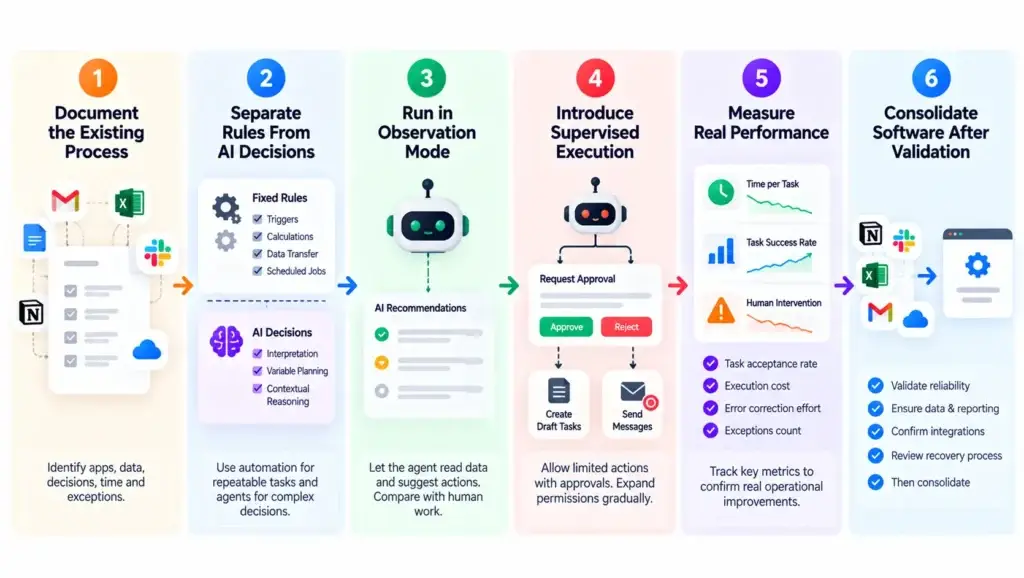
The smartest adoption strategy is usually narrow and measurable. Founders should begin with a workflow that produces a recognizable business outcome and carries manageable operational risk.
Step 1: Document the Existing Process
Identify every application involved, the information employees use, the decisions they make, and the time required to complete the task.
Include exceptions rather than documenting only the ideal path. A workflow that depends on missing customer records, inconsistent document formats, or unusual approvals needs those situations represented from the beginning.
Without an accurate baseline, improvements will be difficult to measure.
Step 2: Separate Fixed Rules From Contextual Decisions
Not every part of the workflow needs artificial intelligence.
Simple triggers, scheduled jobs, fixed calculations, and predictable data transfers may be better handled by traditional automation.
Reserve agent capabilities for steps that genuinely require interpretation, variable planning, or contextual reasoning.
Combining straightforward automation with selective agent execution can reduce unnecessary complexity.
A practical automation strategy should distinguish tasks that require contextual reasoning from those that follow predictable rules. Routine notifications, scheduled updates, and structured data transfers can often be handled through conventional business process automation, while autonomous agents are better reserved for situations involving interpretation, changing inputs, or multi-step decisions. Combining both approaches can help founders avoid unnecessary AI execution costs while maintaining dependable operational workflows.
Step 3: Run the Agent in Observation Mode
Before giving an agent permission to change records, allow it to read permitted information and propose actions.
Compare its recommendations with the work employees actually perform. Review incorrect classifications, missing data, unusual cases, and unnecessary tool calls.
For founders experimenting with new operational processes, AI-powered application builders can also help create early internal dashboards, workflow interfaces, and testing environments. These tools can make it easier to visualize how tasks move between systems before introducing autonomous execution into live business operations, although generated workflows still require appropriate review and security testing.
This helps reveal whether the workflow is suitable for automation without exposing the business to premature execution risk.
Step 4: Introduce Supervised Execution
Once the agent produces dependable recommendations, permit narrowly scoped actions with appropriate approvals.
A founder might initially allow an agent to create internal draft tasks but not send customer messages or modify payment records.
The business can expand permissions gradually as testing demonstrates that the controls remain effective.
Step 5: Measure Real Operational Performance
Useful metrics include task acceptance rate, time per completed workflow, human intervention rate, error correction effort, execution cost, and the number of exceptions requiring manual review.
These measurements reveal whether automation improves operations rather than merely making the workflow appear more sophisticated.
Step 6: Consolidate Software Only After Validation
Software subscriptions should be reviewed after the replacement workflow has demonstrated acceptable reliability and the company has confirmed that its records, integrations, reporting obligations, and recovery procedures remain intact.
Cancelling a tool before validating the replacement can introduce avoidable disruption.
The sequence should be: validate the workflow, establish operational controls, prove the economics, and then consider consolidation.
When Does It Make Sense to Move Beyond Existing SaaS Automation?
Some businesses can achieve sufficient automation through the capabilities already included in their SaaS subscriptions. Others have processes involving multiple systems, contextual decisions, and industry-specific rules that basic workflow connectors cannot manage effectively.
The distinction matters because founders should not invest in additional AI capabilities when a simpler approach already solves the problem.
A more specialized approach may be justified when a workflow spans disconnected applications, requires flexible decision-making, or needs a controlled execution layer that existing products cannot provide.
For example, a marketplace operator may need to combine order records, customer complaints, merchant policies, delivery information, and internal approvals into one operational process.
At that point, the business is evaluating more than a software subscription. It is evaluating how its operational logic should function across the company.
For founders whose operations have outgrown basic SaaS automation, the next step is to evaluate how controlled AI-powered workflows can handle multi-step tasks across existing business systems. Miracuves helps businesses explore autonomous execution with appropriate integrations, approval mechanisms, and operational controls, making it possible to reduce repetitive coordination without abandoning the applications and records their teams already depend on.
Miracuves also offers a 6-working-day delivery pathway for eligible ready-made, white-label platforms. Custom autonomous workflows have different delivery requirements depending on integrations, permissions, testing, and business complexity.
The appropriate decision depends on the actual workflow, not on a promise that every AI project can be completed within the same timeline.
Mistakes Founders Should Avoid When Replacing SaaS Workflows
Automating a Broken Process Without Redesigning It
AI cannot reliably compensate for inconsistent business rules or missing source information.
If employees repeatedly correct inaccurate customer data, adding an autonomous agent may accelerate the same underlying errors.
Process quality should be addressed before increasing execution speed.
Treating Every Repetitive Task as an AI Problem
A scheduled notification or straightforward data transfer may not need an AI agent.
Introducing model-driven decision-making into a deterministic workflow can increase cost, latency, and monitoring requirements without improving the result.
Use AI where contextual intelligence provides a genuine advantage.
Removing Software Before Identifying Dependencies
A seemingly unnecessary application may still store important records, enforce permissions, or support other integrations.
Removing it without understanding those dependencies can interrupt business operations.
A complete software audit should identify both visible user features and less obvious infrastructure responsibilities.
Giving Agents Broad System Permissions
Unrestricted access increases the consequences of errors and potential misuse.
Agents should receive limited permissions, use approved interfaces, and require human authorization for sensitive actions.
Measuring Success Only Through Subscription Savings
Lower subscription costs are not useful if the replacement generates frequent errors, requires constant supervision, or creates unpredictable operating expenses.
A founder should measure completed outcomes, reliability, employee effort, and total workflow cost together.
What the Future of SaaS Looks Like in an Agent-Driven Business
The growing role of autonomous AI suggests that business software will increasingly be evaluated by its ability to support outcomes, not simply the number of features accessible through its interface.
Some applications will remain essential because they maintain authoritative records, enforce policy, or operate specialized infrastructure. Others may evolve into services that agents access through APIs rather than dashboards employees use directly.
Narrow tools built primarily around repetitive manual coordination face a different challenge. If a governed agent can complete the same work using existing business data, maintaining another separate application may become difficult to justify.
This does not mean founders should abandon SaaS entirely. The more productive approach is to distinguish between systems that provide durable business value and interfaces that exist mainly because people previously had to perform tasks manually.
Future-ready businesses will likely combine dependable software infrastructure, conventional automation, and agent-driven execution in ways appropriate to each workflow.
That combination can create more adaptable operations without depending on unlimited autonomy.
Final Thoughts: Replace Repetitive Work Before Replacing Software
Autonomous AI agents are changing how founders think about SaaS because they shift attention from individual applications toward completed business outcomes.
The opportunity is not to eliminate software for the sake of reducing subscription counts. It is to remove unnecessary coordination, improve workflow consistency, and give employees more time for decisions that require human judgment.
For modern founders, the most useful starting point is a single question: which recurring business process consumes significant effort without creating meaningful differentiation?
Identify that process, understand its dependencies, test a controlled alternative, and measure the result. Only then decide whether an existing tool should be retained, automated, consolidated, or retired.
FAQs
Can AI agents replace traditional SaaS tools?
AI agents can replace certain repetitive tasks performed through traditional SaaS tools, including data entry, report generation, customer support coordination, and workflow management. However, they do not eliminate the need for every SaaS platform. Businesses still require reliable databases, secure payment systems, and core operational software. The greatest opportunity lies in automating manual activities and reducing unnecessary software complexity.
How are autonomous AI agents different from SaaS automation tools?
Traditional SaaS automation tools generally follow predefined rules and triggers, while autonomous AI agents can interpret information, make context-based decisions, and execute multiple actions across connected systems. For example, an AI agent can review a customer inquiry, retrieve account information, and prepare an appropriate response. This flexibility makes agents useful for workflows that require more than simple rule-based automation.
Which SaaS tasks can AI agents automate most effectively?
AI agents are particularly useful for repetitive business activities such as lead qualification, customer support triage, document processing, sales reporting, project updates, and administrative follow-ups. The most suitable tasks have clear objectives, accessible data, measurable outcomes, and manageable operational risks. Founders should prioritize workflows that consume significant employee time but require limited strategic judgment.
Can AI agents help startups reduce SaaS subscription costs?
AI agents can potentially reduce SaaS subscription expenses by consolidating repetitive workflows and eliminating redundant applications. However, founders should also consider AI model usage, infrastructure, system integration, maintenance, and human supervision costs. The most effective approach is to compare the total operating cost of existing tools with the cost of completing the same workflows through AI-powered automation.
Will autonomous AI agents completely replace SaaS platforms in the future?
Autonomous AI agents are more likely to transform how businesses use SaaS platforms than replace them entirely. Applications responsible for maintaining financial records, customer information, permissions, and critical business operations will remain valuable. However, standalone tools that primarily support repetitive manual coordination may face increasing pressure as agents become capable of handling those activities across multiple systems.
What are the biggest risks of replacing SaaS workflows with AI agents?
The main risks include inaccurate decisions, unauthorized data access, unexpected execution costs, integration failures, and insufficient human oversight. AI agents may also encounter incomplete information or situations outside their permitted responsibilities. Businesses can manage these risks through role-based permissions, approval checkpoints, audit logs, workflow testing, and clear escalation procedures before expanding autonomous execution.
How can founders identify which SaaS workflows should be automated first?
Founders should begin by identifying repetitive processes that require frequent manual intervention across multiple applications. Each workflow should be evaluated based on task frequency, employee effort, data availability, error consequences, and measurable outcomes. Reporting, lead classification, and customer inquiry routing are potential starting points. A supervised pilot can help validate whether automation delivers meaningful improvements before retiring existing software.
Miracuves is an independent software development company. We are not affiliated with, connected to, sponsored by, or endorsed by any company or product named in this article.
Terms such as “X Clone” are used descriptively. It is how the software industry refers to building a platform with functionality comparable to a known service, and how clients search for it.
The entire design and codebase of our products is built by our own team. Our products contain no code, design, graphics, or content originating from any third-party website or applications.
All third-party names and marks referenced in this article are the property of their respective owners, referenced solely to identify the services discussed.